Redragon K671
4.3Editor score
Hot-swappable linear red switches
Eleven programmable backlight modes
Full-key anti-ghosting support
Explore the best Loud Mechanical Keyboard options, comparing switch sound, build quality, customization, layouts, features, and compatibility for users.
A loud mechanical keyboard can transform a gaming setup with crisp clicks, springy feedback, and the unmistakable cadence of every keypress. The best models balance that audible personality with durable construction, useful controls, comfortable layouts, and enough customization to suit both competitive play and productive work.
This guide compares ten loud mechanical keyboards across switch type, sound character, anti-ghosting behavior, lighting, programmability, connectivity, ergonomics, and platform support. It covers wired and wireless designs, compact and full-size layouts, hot-swappable models, and boards aimed at different levels of customization.
Each recommendation highlights the keyboard's most useful qualities and any meaningful compromises. The selection reveals which models suit gamers, typists, and desktop enthusiasts seeking a bold sound profile. Prices and availability can change, so readers should verify current product details before purchasing.
4.3Editor score
4.6Editor score

4.6Editor score
The table below compares all ten keyboards by their most important loud-typing traits, including switch style, layout, lighting, programmability, and connectivity.



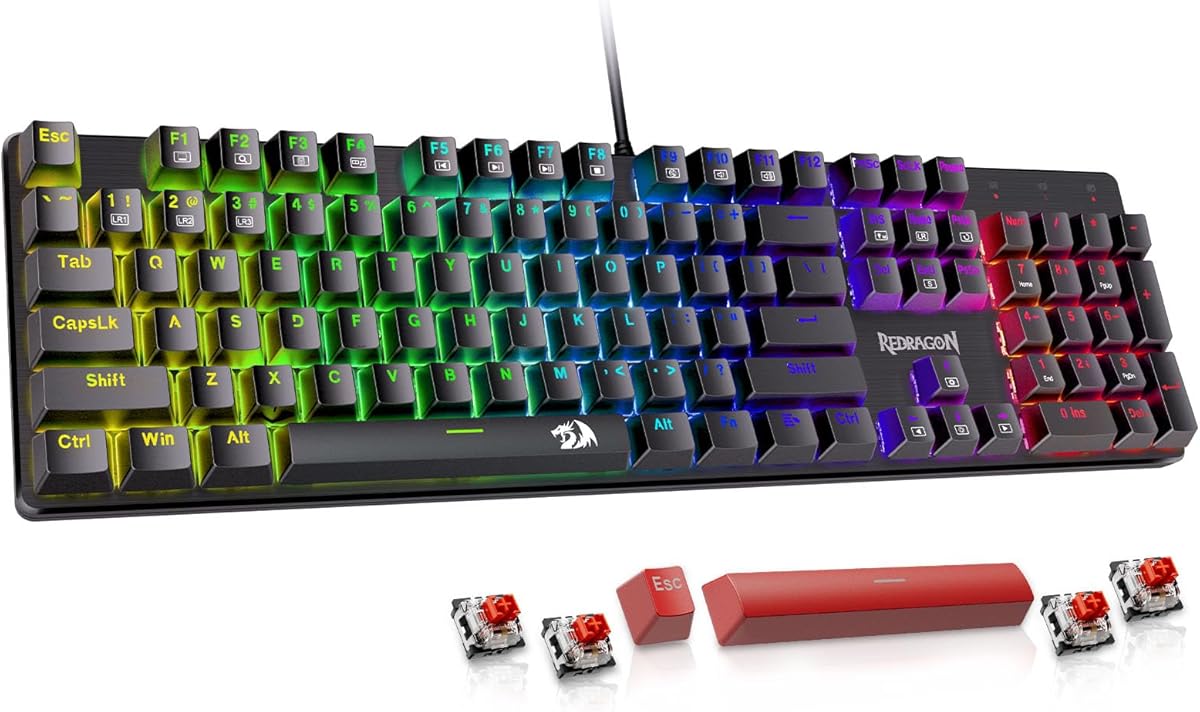
The Redragon K671 earns a place as an affordable mechanical option for buyers who want a colorful gaming keyboard with several customization features. Its 4.3 rating reflects a capable package built around hot-swappable linear red switches, eleven backlight modes, full-key anti-ghosting, and double-shot PBT keycaps. Although red switches are not traditionally associated with the sharp click sought by many loud-keyboard enthusiasts, their light actuation force and smooth travel create clear, energetic feedback that can still be heard across a room.
We may earn a commission when you buy through this link, at no additional cost to you.
The strongest feature is the hot-swappable socket system, which lets users replace compatible 3-pin or 5-pin switches without soldering. Redragon includes four spare red switches and two replacement keycaps, making the board approachable for first-time switch experimentation. Eleven lighting modes, five brightness levels, and adjustable light speed add considerable visual personality, while the macro editor can remap keys, combine functions, and assign shortcuts. The double-shot PBT keycaps also help preserve legends and offer a more durable surface than inexpensive printed caps.
There are important compromises for shoppers specifically chasing an audible click. The stock red switches feel smooth rather than sharply tactile, and the stated lighting limitation means the main backlight color cannot be freely changed through the software. Some users may also prefer a keyboard with a more sophisticated case or sound-damping construction. Nevertheless, the anti-ghosting implementation, dedicated multimedia shortcuts, and switch flexibility make the K671 unusually well equipped at this budget level.
This is a strong recommendation for gamers and beginners who want loud mechanical feel, RGB-style illumination, and easy switch changes without paying for a premium board. It is less suited to someone who insists on a pronounced click or expects the muted sound of heavily dampened switches. Even with those limits, the combination of hot-swapping, macro support, durable keycaps, and vivid lighting makes it a practical entry point into customized mechanical keyboards.
Hot-swappable sockets make the K671 approachable for users who want to experiment with different switch characteristics. The included puller tools, spare switches, and replacement keycaps reduce the practical barrier to changing the feel and appearance of the board.
Eleven programmable lighting modes, five brightness levels, adjustable speed, and macro editing create a strong customization package. The restriction on changing the primary backlight color is worth considering, but the range of preset effects still gives the keyboard a dramatic gaming presence.
We may earn a commission when you buy through this link, at no additional cost to you.
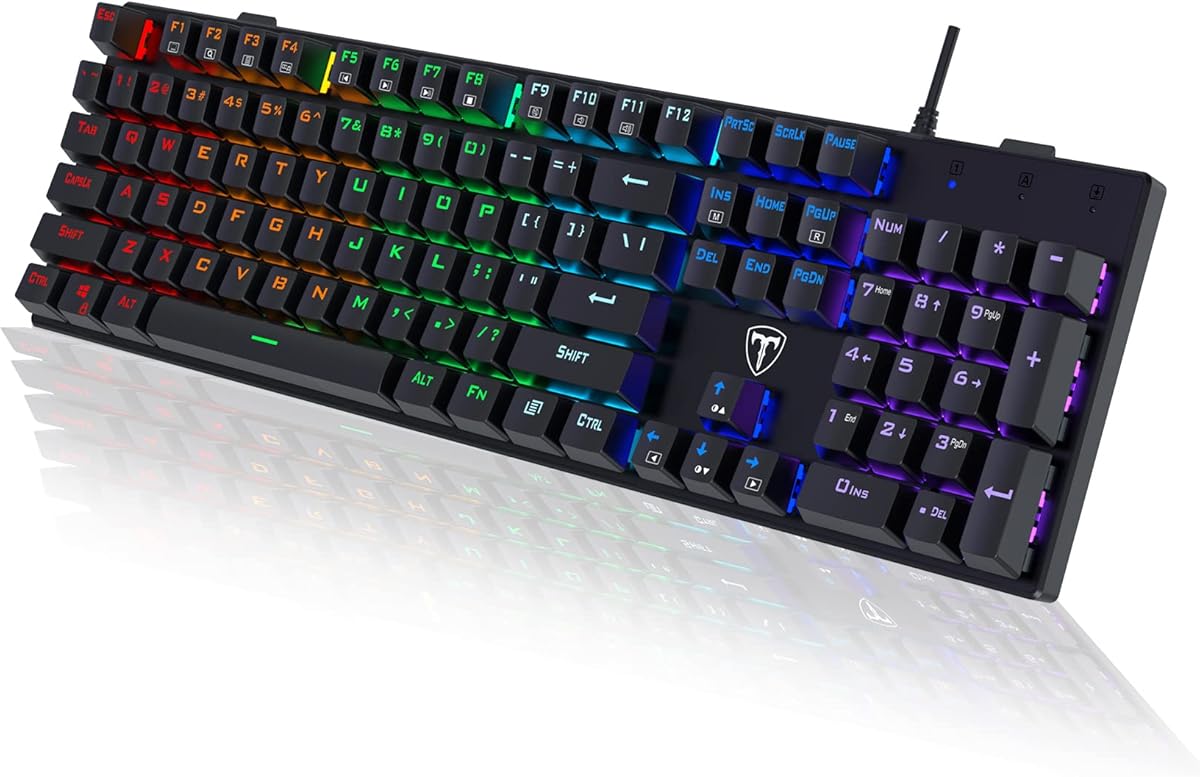
The RisoPhy Mechanical Gaming Keyboard is built around the kind of full-size, clicky design that immediately appeals to loud-typing enthusiasts. Its 4.5 rating reflects a well-rounded package with blue mechanical switches, a 104-key layout, nine backlight modes, 100% anti-ghosting, and a slim wired form. The blue switches provide an audible click, noticeable tactile bump, and deeper travel, making them a familiar choice for people who prefer their keystrokes to announce themselves.
We may earn a commission when you buy through this link, at no additional cost to you.
This model emphasizes practical everyday functionality. The double-injection ABS keycaps promote clear illumination, while a Win Lock function helps prevent accidental operating-system shortcuts during games. Twelve multimedia combinations provide quick access to media, volume, calculator, and email functions. Four hydrophobic drainage holes allow water to flow away, adding a useful layer of spill protection for a keyboard likely to sit beside drinks and busy work areas.
Comfort is addressed through a stair-up keycap design, foldable rear kickstands, and four nonslip pads underneath the case. These features can help maintain a natural wrist position during long sessions. The main trade-offs are the use of ABS rather than PBT keycaps, the absence of dedicated onboard macro keys, and the absence of a hot-swappable switch system. The stated compatibility range is broad, including multiple Windows versions, Mac OS, and Xbox-oriented use.
The RisoPhy is best suited to users who want a straightforward full-size mechanical keyboard with a pronounced click, visible lighting, spill precautions, and a number pad. It may not be the right choice for heavy switch customization, but it delivers the familiar qualities of a blue-switch gaming board without requiring complicated setup. For a traditional loud mechanical design, it remains an appealing and versatile option.
The blue mechanical switches supply the sharp, clicky response at the center of this keyboard's appeal. Their deeper travel and clear tactile bump make them suitable for typists who enjoy feedback as well as gamers who want audible confirmation of rapid inputs.
The 104-key arrangement preserves dedicated function and navigation keys while adding a useful number pad. Multimedia shortcuts, a Win Lock function, drainage holes, and adjustable kickstands make this board practical for regular work as well as gaming.
We may earn a commission when you buy through this link, at no additional cost to you.
The SteelSeries Apex 5 stands apart with a 4.6 rating and a blend of premium construction, clicky feedback, and desktop-focused features. Its hybrid blue mechanical switches combine a tactile bump and audible click with a smooth membrane mechanism, producing a distinctive sound without the harsher profile of some traditional mechanical switches. The keyboard's aircraft-grade aluminum alloy frame and magnetic wrist rest give it a substantial, polished feel.
We may earn a commission when you buy through this link, at no additional cost to you.
The standout feature is the OLED smart display. Users can customize it with GIFs, game information, Discord messages, and other content, making the keyboard more interactive than a conventional input device. Dynamic per-key RGB illumination adds reactive effects and color schemes for every key. The premium magnetic wrist rest provides substantial palm support, while the stated dimensions confirm that this is a full desktop footprint rather than a compact travel keyboard.
The main limitation is the fixed hybrid switch design. Unlike hot-swappable models in this list, users cannot readily exchange the stock switches for another sound or feel. It also occupies more desk space than a tenkeyless or 98-key layout. Because the hybrid mechanism softens the experience slightly compared with a pure blue mechanical switch, listeners who want the sharpest possible click may prefer a traditional mechanical board. Even so, the combination of OLED flexibility, per-key lighting, and premium materials justifies its position as the high-end choice.
This keyboard is ideal for a gamer or desktop enthusiast who wants one impressive centerpiece rather than a basic input tool. It works particularly well when the display can show useful game information or communication messages. Buyers who prioritize audible mechanical tactility, rich visual effects, and a refined physical build should give the Apex 5 serious consideration.
The smart display is more than a decorative status panel. It can present game information, Discord messages, GIFs, and other customizable content, giving the keyboard a useful second layer of interaction while keeping those details visible during play.
The aircraft-grade aluminum alloy frame supplies rigidity and a refined appearance, while the magnetic wrist rest adds broad palm support. Together they create a more substantial desktop experience than many plastic-bodied alternatives.
We may earn a commission when you buy through this link, at no additional cost to you.
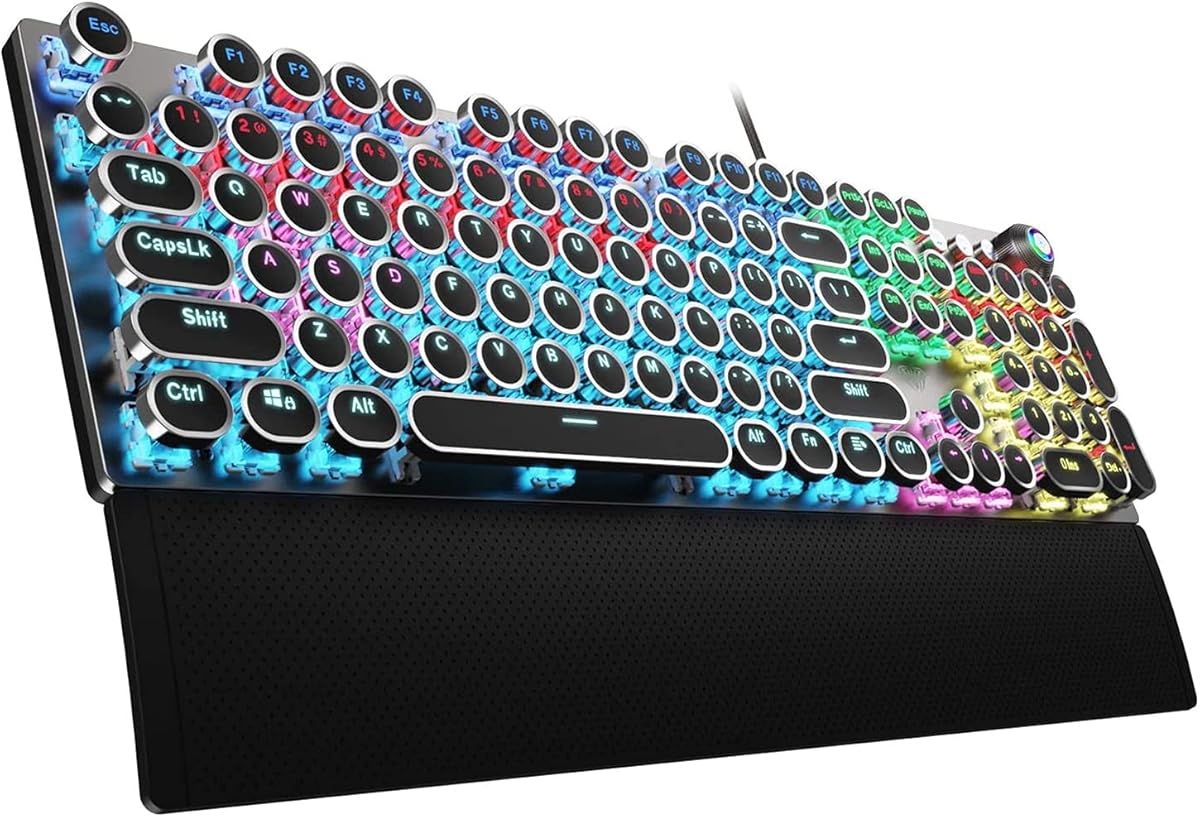
The RK Royal Kludge S108 combines a 4.6 rating with a distinctive typewriter-inspired design and traditional blue switches. It is a 108-key full-size keyboard for users who want a highly visible number pad, bold click feedback, and vintage styling rather than the anonymous appearance of a typical gaming board. The round keycaps and stepped profile create a memorable visual identity while retaining the depth and tactility associated with mechanical typing.
We may earn a commission when you buy through this link, at no additional cost to you.
Its blue switches deliver a clear tactile bump and audible click, satisfying the core expectations of loud-keyboard enthusiasts. Full anti-ghosting helps maintain accurate registration during rapid typing and multi-key gaming commands. The aluminum alloy panel provides a sturdy matte surface, and the detachable ABS wrist rest offers palm support for extended sessions. Yellow backlighting shines through and around the keycaps, producing a warmer visual effect than conventional white illumination.
Software support allows users to remap keys, create macros, and customize lighting effects. That functionality is a meaningful advantage over simpler plug-and-play boards, although the software itself is limited to Windows. The switches cannot be hot-swapped, so the loud click and tactile feel are essentially fixed unless the entire switch assembly is replaced through more involved means. The round keycaps are changeable, and the board supports two keycap styles according to the supplied information.
The S108 is a compelling match for gamers and typists who enjoy retro industrial design and want a keyboard to look noticeably different on their desk. It also suits users who value a metal panel, wrist rest, and traditional number pad. Those seeking easy switch experimentation or a software experience that works equally well on Mac may prefer a more modular alternative, but the S108 delivers an engaging combination of appearance, feedback, and practical controls.
Round retro keycaps, a stepped layout, and a matte aluminum panel create an aesthetic closer to a vintage writing machine than a conventional gaming keyboard. The alternate keycap set provides a quick way to change the visual style without replacing the board.
Blue mechanical switches supply an audible click and tactile bump, while full anti-ghosting protects input accuracy. Windows software adds key remapping, macros, and lighting control, giving this traditional design several modern conveniences.
We may earn a commission when you buy through this link, at no additional cost to you.
The Redragon K668 is a 4.5-rated full-size keyboard that emphasizes hot-swapping, vivid RGB lighting, and useful shortcut features. Its stock red linear switches produce a relatively discreet sound rather than a pronounced click, but the compatible socket system allows users to introduce a louder switch later. That makes it a flexible option for people who want to begin with smooth gaming keys and experiment over time.
We may earn a commission when you buy through this link, at no additional cost to you.
Four extra hotkeys default to functions such as mute, calculator, screen lock, and desktop access, while the standard 104 keys support accurate rapid multi-key combinations. The lighting system includes up to 19 preset modes, adjustable brightness, flow speed, and a music-synchronized mode. Two sets of mixed-color keycaps allow the board's appearance to change without requiring a separate purchase, adding visual variety beyond the RGB effects.
Redragon's software supports hotkey reassignment, custom lighting, and macro programming. Two-stage feet can adjust the typing angle, although the keyboard does not include the detachable palm rest offered by some competing models. The fixed red switches are the main drawback for buyers whose definition of loud depends on a sharp click. As the board is hot-swappable, this is not a permanent limitation for owners willing to install compatible 3-pin or 5-pin switches.
The K668 is best for gamers who want rich RGB effects, a full number pad, and straightforward switch experimentation. It also works well for users who value programmable hotkeys without needing a complicated onboard control system. Although it is not the loudest board as supplied, its hot-swap design gives it long-term flexibility that many similarly equipped keyboards cannot match.
The upgraded hot-swap sockets accept almost any 3-pin or 5-pin mechanical switch. Owners can replace the stock linear reds with a louder or more tactile alternative without soldering, making the keyboard a flexible foundation for experimentation.
Nineteen lighting presets, brightness and speed controls, music synchronization, four programmable hotkeys, and two keycap sets make the K668 visually and functionally versatile. The two-stage feet also let users select a more comfortable angle.
We may earn a commission when you buy through this link, at no additional cost to you.
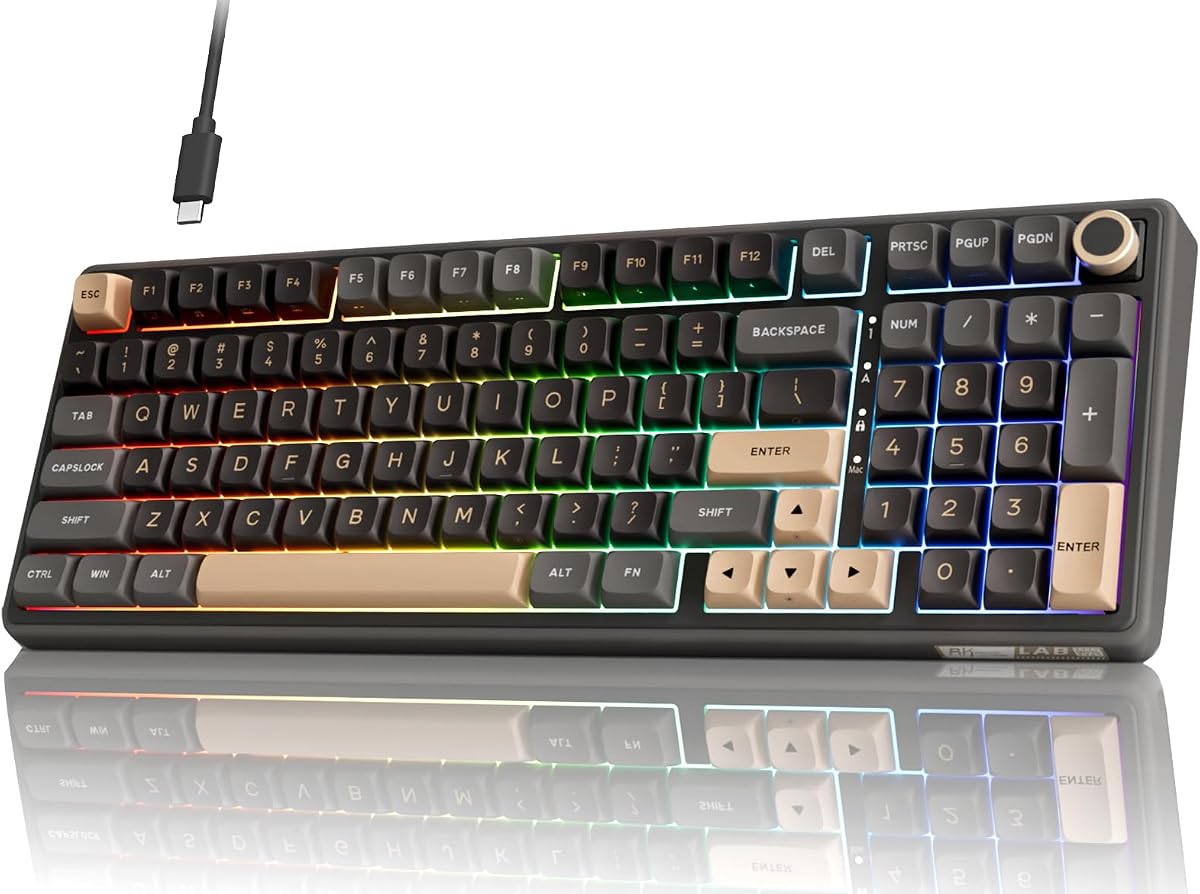
The RK Royal Kludge R98 Pro takes a different approach to loud mechanical keyboards, prioritizing a smooth, creamy sound rather than an explicit click. It carries a 4.5 rating and combines a compact 98-key layout with a gasket mount, five layers of sound-absorbing foam, pre-lubed linear cream switches, and double-shot PBT keycaps. The result is a refined board for listeners who consider a rich, clean sound more satisfying than sharp mechanical clicking.
We may earn a commission when you buy through this link, at no additional cost to you.
Its 98-key layout preserves the number pad, arrow keys, and most essential functions while reducing desktop space compared with a conventional full-size board. The detachable CNC aluminum volume knob provides quick, precise volume control, and four indicator lights show Num Lock, Caps Lock, Win Lock, and Mac Mode status. More than 20 RGB modes cover full-color, monochrome, and dynamic effects, while the online driver supports key definitions, macros, and lighting customization.
This board is designed to deliver a creamy tonal character through its pre-lubed switches, gasket structure, and layered foam. That construction may still produce a more audible mechanical sound than membrane keyboards, but it lacks the sharp tactile bump and click of blue switches. The MDA profile is designed to wrap the fingers more closely, and PBT keycaps offer a matte texture and greater resistance to fading over time.
The R98 Pro is best for users who want meaningful mechanical feedback, a polished look, and a clean sound without a traditional click. It is particularly attractive for shared workspaces or late-night use, where the broad noise profile of a blue-switch board could become disruptive. Those who specifically want maximum audible impact may need to install louder switches, but the hot-swappable design makes that possible.
The 98-key design retains a number pad, arrow keys, and most expected functions in a smaller footprint. It is a practical compromise for gamers and office users who want the utility of a full-size board without occupying the maximum amount of desk area.
Five layers of sound-absorbing foam work with the gasket mount to reduce harsh internal resonance around the switch and positioning plate. Pre-lubed cream switches, MDA-profile keycaps, and a detachable aluminum knob complete a board designed around smooth, composed operation.
We may earn a commission when you buy through this link, at no additional cost to you.
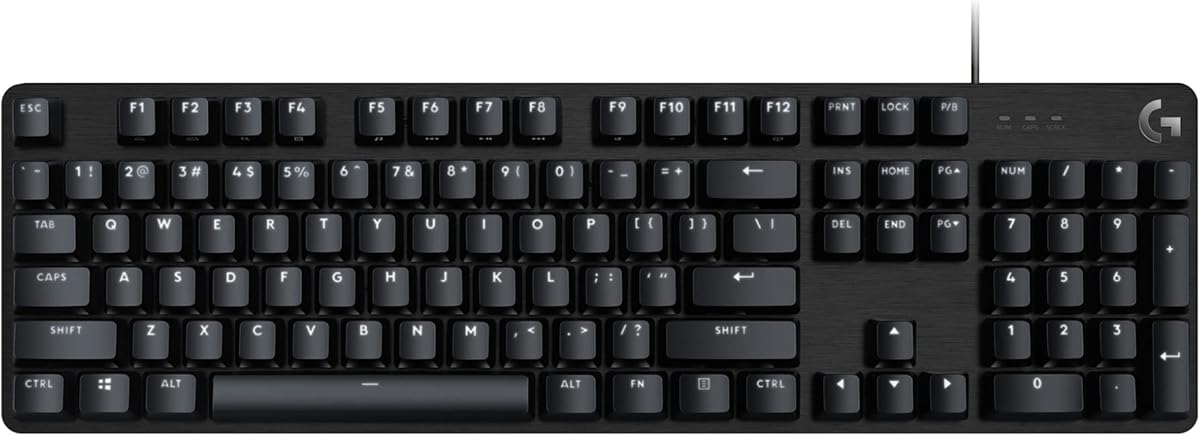
The Logitech G413 SE is a 4.5-rated full-size mechanical gaming keyboard that delivers a more restrained and polished experience. Its tactile mechanical switches provide clear feedback without relying on an exaggerated blue-switch click, while the white LED lighting and brushed aluminum-magnesium top case create a clean, professional appearance. It is a strong option for gamers who want audible mechanical response but prefer a less visually aggressive setup.
We may earn a commission when you buy through this link, at no additional cost to you.
The PBT keycaps are designed to resist heat and wear, making them well suited to prolonged use. The brushed metal case provides rigidity and minimizes flex, while six-key rollover anti-ghosting supports accurate simultaneous inputs. Twelve FN-layer controls provide access to volume, playback, track skipping, mute, lighting, and Windows Lock functions. The result is a practical control layout that keeps frequently used settings within reach without adding dedicated macro keys.
The board lacks per-key RGB, an OLED display, onboard macros, and hot-swappable sockets. Its lighting is limited to white, so buyers seeking dramatic colors or reactive effects may prefer another model. The fixed tactile switches also prevent experimentation with a sharper click. These are meaningful limitations, but they help explain the design's focused, durable approach and make it a straightforward choice for users who prioritize feel and build quality over extensive visual effects.
The G413 SE is best for gamers and everyday computer users who want a full-size mechanical board with reliable construction and restrained styling. It also fits professional desks where a colorful RGB keyboard would feel out of place. Those seeking deeper customization can look elsewhere, but buyers who value durable keycaps, a rigid frame, and dependable anti-ghosting will find a well-balanced option here.
A rigid brushed aluminum-magnesium case and heat-resistant PBT keycaps address two common mechanical-keyboard concerns: structural flex and worn legends. The construction is aimed at regular use rather than temporary visual appeal.
The tactile mechanical switches create clear feedback with a more restrained profile than a sharp blue click. White LED illumination and six-key rollover preserve a clean appearance while maintaining dependable input during ordinary gaming and productivity.
We may earn a commission when you buy through this link, at no additional cost to you.
The AULA F2088 is a 4.4-rated full-size mechanical keyboard built around retro typewriter styling and traditional blue switches. Its blue switches offer a quick, springy return, crisp click, and pronounced tactile feedback, all of which make it a direct fit for buyers seeking unmistakable sound. Double-shot injection-molded round keycaps strengthen the vintage appearance and support durable, clearly illuminated legends.
We may earn a commission when you buy through this link, at no additional cost to you.
A dedicated knob provides convenient control over media functions and lighting. The board supports 19 lighting effects, adjustable brightness and speed, and three customized lighting choices. Users can switch between media and lighting modes by holding the knob for three seconds. Dedicated multimedia buttons provide additional direct access to playback, volume, and backlight functions, making the retro styling more practical than its appearance might initially suggest.
The aluminum alloy top panel has a matte texture intended to resist scratches, and the magnetic ABS wrist rest offers firm support during long typing or gaming sessions. Anti-ghosting technology and independently controlled switches support accurate simultaneous inputs. The keyboard connects through USB and works with PC, Mac, laptop, tablet, and desktop systems across several listed operating systems. No driver or software is required for basic use.
The F2088 is best for gamers and writers who enjoy round keycaps, a retro visual identity, and an unmistakable click. It is less suitable for users who want hot-swappable switches or prefer conventional keycap shapes and spacing. It may also demand some adjustment because the round caps can feel different from the sculpted surfaces used by standard gaming boards. Despite those considerations, its sound, controls, and broad compatibility make it a memorable option.
Round double-shot keycaps and a stepped floating layout create the typewriter impression, while the control knob, multimedia buttons, and 19 lighting effects introduce modern functionality. The wrist rest and metal panel help the design remain comfortable and sturdy.
Blue mechanical switches provide a crisp sound, stronger spring action, and tactile feedback on every press. Anti-ghosting supports rapid multi-key commands, while plug-and-play USB connectivity keeps setup straightforward across a wide range of devices.
We may earn a commission when you buy through this link, at no additional cost to you.
The AULA F99 is a 4.5-rated wireless mechanical keyboard for users who want broad device support and customization without staying tied to a desk. It supports Bluetooth 5.0, a 2.4 GHz wireless connection, and USB-C wired mode, with the ability to connect to five devices and switch among them using FN combinations. Its 99-key layout retains a number area while keeping the footprint relatively compact.
We may earn a commission when you buy through this link, at no additional cost to you.
The hot-swappable PCB accepts 3-pin and 5-pin switches, and the package includes a keycap puller and switch puller. Pre-lubed linear switches create a smooth feel and relatively composed sound, while 16 RGB effects, macro recording, custom key functions, color selection, and music-rhythm lighting add broad personalization. The 8000mAh rechargeable battery supports the wireless focus, and double-shot PBT keycaps help preserve their legends.
A gasket structure, extended integrated silicone pad, PCB single-key slotting, and five layers of filling material are intended to improve resilience and reduce cavity noise. N-key rollover helps the keyboard respond accurately when several keys are pressed together. The main caveat is that the stock linear switches do not provide the pronounced click that defines many traditional loud mechanical keyboards. The wireless controls and device switching also require a little more setup than a simple wired board.
The F99 is an excellent choice for mobile workers, students, and gamers who move between a desktop, laptop, tablet, or console. It offers more freedom than a purely wired keyboard while preserving hot-swapping and layered acoustic construction. Buyers who specifically want an audible click can replace the stock switches, making the board a flexible platform for experimenting with a louder sound.
Bluetooth 5.0, 2.4 GHz wireless, and USB-C wired modes allow the F99 to serve several devices. Simultaneous connection to as many as five devices and FN-based switching make it convenient for users who alternate between work, study, and gaming systems.
Hot-swappable 3-pin and 5-pin sockets, included puller tools, PBT keycaps, and programmable RGB effects create a highly adjustable board. The 8000mAh rechargeable battery and compact 99-key arrangement complement its wireless-oriented design.
We may earn a commission when you buy through this link, at no additional cost to you.
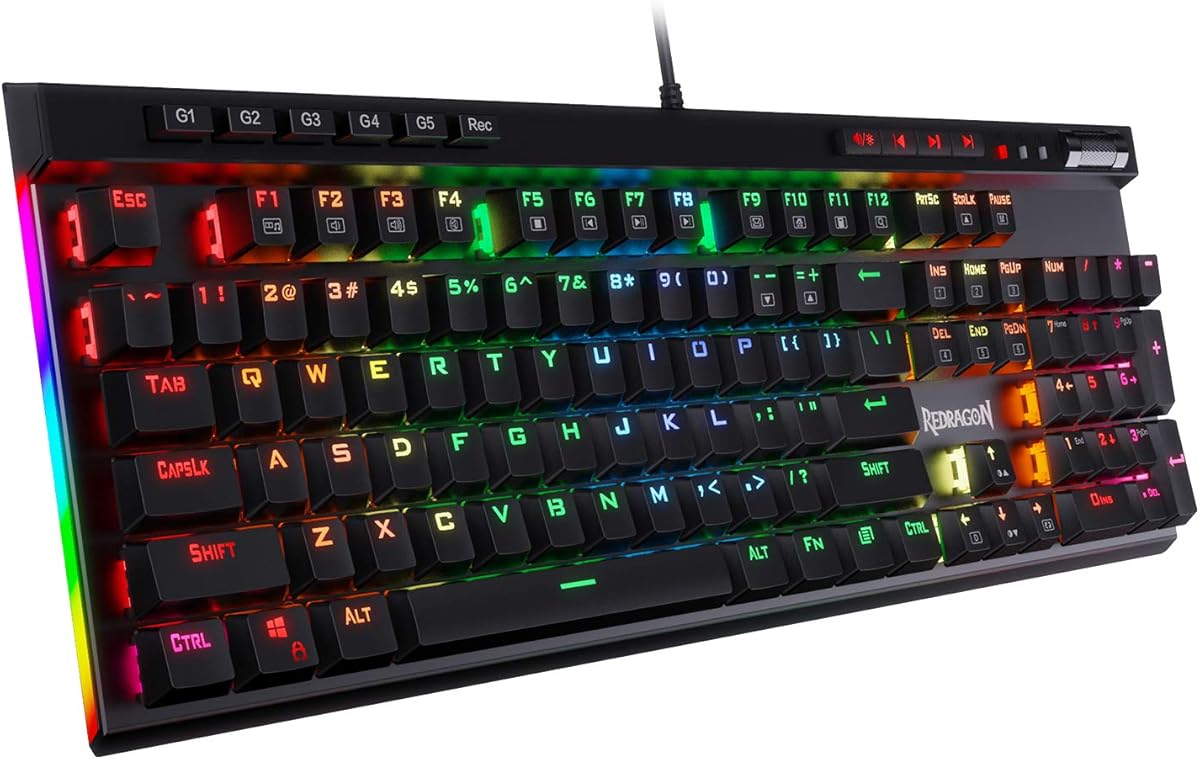
The Redragon K580 is a 4.6-rated full-size RGB mechanical keyboard that balances a genuinely loud blue-switch experience with convenient onboard controls. Five dedicated G1 through G5 macro keys allow users to record complex combinations or shortcuts directly on the keyboard, while dedicated media controls provide play, pause, and track functions. It is a particularly attractive option for gamers who want useful macros without navigating a software interface during play.
We may earn a commission when you buy through this link, at no additional cost to you.
The hot-swappable sockets accept nearly any mechanical switch, allowing the included blue switches to be replaced with another compatible type without soldering. The stock switches already deliver the tactile bump and audible click sought by many enthusiasts. Full anti-ghosting supports accurate input across 104 keys during rapid combinations, and the stated 50-million-keystroke rating indicates a design intended for regular gaming use. Double-shot keycaps are designed to resist fading.
Basic operation requires no software, which is valuable for quick setup or when users simply want the macro and media keys to work immediately. Companion software is available for more advanced RGB effects and deeper macro profiles. That optional approach keeps the keyboard approachable without preventing detailed configuration. The main layout limitation is its full-size footprint, which includes a number pad and dedicated macro area rather than maximizing desk space.
The K580 is best for competitive and high-activity gamers who want a pronounced click, rapid macro access, and the option to change switches later. It also suits creators who can assign frequently used editing or productivity commands to the G keys. Compared with a board that relies entirely on software, its physical shortcuts are more immediate. For gamers wanting both customization and fast access, this is one of the strongest choices in the guide.
Five dedicated G keys can store combinations directly on the board, making them faster to access than software-only macros. Companion software remains available for advanced profiles, but everyday users can configure core actions without leaving the keyboard.
Stock blue switches provide a clear tactile bump and audible click, while the hot-swap sockets allow compatible alternatives to be installed later. Full anti-ghosting and a stated 50-million-keystroke rating support sustained gaming use.
We may earn a commission when you buy through this link, at no additional cost to you.
Choosing a loud mechanical keyboard means balancing audible feedback with switch feel, layout, construction, controls, and the amount of customization you actually need.
The switch is the primary source of both sound and tactile feedback. Blue mechanical switches are the clearest option for a sharp, clicky sound, with a distinct bump that confirms each keystroke. Red linear switches are smoother and usually produce less noise as supplied, while tactile brown switches occupy the middle ground with a noticeable bump but less overt clicking. Hybrid blue switches, as used in the SteelSeries Apex 5, combine mechanical tactile behavior with a membrane layer for a distinct but somewhat moderated sound.
Sound and feel are related but not identical. A clicky board may feel energetic and bumpy, while a linear board can sound surprisingly substantial because of its case, keycaps, and internal damping. Tactile switches provide a noticeable mid-press event that can help users maintain rhythm without a loud secondary click. The Redragon K580 and RisoPhy models use blue switches for pronounced feedback, while the Logitech G413 SE offers a more restrained tactile mechanical feel.
Hot-swappable keyboards use sockets that allow switches to be removed and replaced without soldering. This makes it easier to test different colors, click levels, and tactile profiles, and it can extend the practical life of a board. Models including the Redragon K671, K668, K580, AULA F99, and RK Royal Kludge R98 Pro support this approach. Fixed-switch designs may feel simpler and can offer certain specialized switch constructions, but changing their sound generally requires more involved work.
Full-size boards provide a number pad, function row, arrow keys, and dedicated navigation controls. They are convenient for spreadsheets, shortcuts, and games that benefit from a complete number pad. The RisoPhy 104-key, Redragon K668 108-key, and SteelSeries Apex 5 options favor this approach. The AULA F99 and RK Royal Kludge R98 Pro use 99-key and 98-key layouts to preserve most functions while reclaiming some space. Compact boards can improve mouse movement but may remove familiar keys or require layers for navigation.
A keyboard's internal design affects both loudness and tonal quality. Metal panels add rigidity, while gasket mounts and multiple foam or silicone layers can absorb harsh resonance and produce a deeper, more controlled sound. The R98 Pro specifically uses five layers of sound-absorbing foam and a gasket mount. By contrast, the Apex 5 uses a premium aluminum alloy frame and magnetic wrist rest. Users seeking maximum noise should expect more resonance from open, stiff constructions, while fans of a fuller sound may prefer substantial dampening.
Useful customization includes RGB control, macro assignment, key remapping, media controls, and onboard shortcut keys. Some boards provide five physical macro keys, such as the Redragon K580, while others rely entirely on downloadable software. The Redragon K668 supports hotkey reassignment, custom effects, and macros, while the RK Royal Kludge S108 offers remapping, macros, and lighting through Windows software. Compatibility matters: some drivers work only on Windows, while others support Windows and Mac systems.
Lighting ranges from simple single-color white to multizone effects, reactive RGB, and programmable displays. The Logitech G413 SE uses restrained white LED lighting, whereas the Redragon K671, K668, and AULA F99 offer more animated visual modes. The SteelSeries Apex 5 goes further with per-key RGB and an OLED display capable of showing game information, Discord messages, GIFs, and other content. These displays and effects improve the visual experience but do not change the core acoustic character of the switches.
Wired keyboards provide a consistent connection and usually serve as the simplest option for a stationary gaming computer. Wireless models add portability and desk flexibility but require charging and configuration. The AULA F99 supports Bluetooth 5.0, 2.4 GHz wireless, and USB-C wired modes, with up to five devices connected simultaneously. For wired choices, confirm that the operating system is listed and whether any advanced software works only on Windows. Platform support is especially important for users combining a desktop, laptop, tablet, and console.
Begin by placing the keyboard on a stable surface and choosing the feet or wrist-rest angle that keeps the wrists neutral. Connect the cable or establish the preferred wireless connection, then update the manufacturer's software before assigning macros or lighting effects. Test the switch feel and ensure that every key registers before beginning a long session.
For a keyboard with hot-swappable sockets, power it down and disconnect it before changing switches. Use the supplied puller to remove a keycap, gently straighten the switch legs, and align the replacement with the socket before pressing it in. Confirm that compatible 3-pin or 5-pin pins are being used, and avoid forcing components that do not fit. Users should also check that any replacement switch is suitable for the plate and intended position.
Mechanical keyboards benefit from regular, gentle cleaning. Use a soft brush or microfiber cloth to remove dust, and clean keycaps with suitable nonabrasive materials according to their construction. Avoid spilling liquids directly onto the keyboard, unplug it before cleaning, and never pull a keycap by the switch stem. Compressed air can help remove debris between switches, while periodic inspection of cables, connectors, and feet can prevent avoidable damage.
Blue mechanical switches are generally the loudest mainstream option because their click mechanism creates a sharp sound with every keypress. The exact volume also depends on the switch stem, keyboard case, keycaps, mounting system, and any internal foam. A rigid metal construction often emphasizes sound, while a gasket-mounted keyboard with damping layers usually produces a deeper and more controlled acoustic profile.
Clicky blue switches can be disruptive in shared offices because their sound is frequent and easy to hear across a room. Users who want mechanical feedback with less disturbance should consider tactile or linear switches and a dampened construction. The RK Royal Kludge R98 Pro, for example, combines pre-lubed linear switches with gasket mounting and multiple foam layers for a smoother, quieter stock experience.
Hot-swappable sockets let users replace compatible mechanical switches without soldering. This makes it easier to change the switch color, click level, tactile feel, and sound profile. It also simplifies experimentation for beginners because a failed or unsuitable switch can be replaced without removing the entire keyboard assembly.
Most mechanical keyboards provide standard typing, media shortcuts, and their stated lighting effects without additional software. Software is generally needed for advanced macro profiles, custom RGB effects, key remapping, or device-specific settings. Some options also offer onboard shortcuts, such as the Redragon K580's five macro keys, which can be recorded directly without opening the companion program.
A full-size model is preferable if you rely on a number pad, dedicated navigation keys, or separate function row. A 98- or 99-key layout provides a useful compromise by preserving a number pad and arrow cluster while reducing desk width. Tenkeyless designs maximize mouse space but require more layer use or remapping for people accustomed to full navigation clusters.
Yes, the easiest change is installing quieter switches such as silent linear or silent tactile models in a hot-swappable keyboard. You can also add compatible switch foam, use softer keycaps, or apply sound-damping materials inside the case. Fixed-switch boards are more difficult to quiet because replacing the switch assembly is less convenient.
Anti-ghosting means the keyboard can register multiple keys at the same time without incorrectly suppressing inputs. This matters during games involving combinations such as movement, crouching, and abilities pressed together. The listed models vary from six-key rollover to broader key support, so frequent complex inputs should be checked against the manufacturer's specifications.
A louder keyboard is not inherently more accurate or faster. Blue switches provide clear audible feedback that some players find reassuring, but switch choice should also consider tactility, actuation, durability, and comfort. Competitive players may prioritize fast reset behavior and multi-key registration, while casual users may prioritize the simple enjoyment of a pronounced click.
The strongest overall choices depend on what loud means to the buyer. The Redragon K580 leads for users who want immediate onboard macros, a sharp blue-switch click, and hot-swappable flexibility. The SteelSeries Apex 5 takes the premium route with its OLED display, per-key RGB, aluminum construction, and magnetic wrist rest, while the Redragon K671 offers the most approachable entry point with backlighting and switch customization.
Prioritize the switch first, because it defines the tactile experience and much of the sound. Then consider layout, desk space, software compatibility, wrist comfort, and whether you value physical shortcuts or elaborate RGB. A blue-switch board provides the clearest traditional click, a tactile board offers balanced feedback, and a linear board can produce a rich sound while feeling especially smooth.
Finally, verify the current specifications, availability, and price for the exact model before buying. Mechanical keyboard features vary between versions, and prices can change frequently. Checking the listed operating-system support, connector type, lighting controls, and included accessories ensures that the chosen loud mechanical keyboard fits the intended setup.