
RasTech Raspberry Pi 5 8GB Kit
4.6Editor score
Complete 8GB Raspberry Pi 5
Active cooler included
64GB card and readers
Dual 4K display cables
This Raspberry Pi 5 accessories guide compares displays, cooling kits, cases, power supplies, cameras, and starter bundles for every project.
Raspberry Pi 5 accessories can transform a compact single-board computer into a practical learning platform, desktop system, media hub, camera project, or network appliance. The most useful additions solve clear needs: adequate cooling, reliable power, convenient storage, accessible displays, protective enclosures, and expansion hardware.
This guide compares ten accessory options spanning beginner kits, powered bundles, enclosures, active coolers, touchscreens, NVMe HATs, and camera modules. Selection is based on the supplied compatibility information, included components, feature coverage, practical limitations, and customer ratings, with the Raspberry Pi board itself included only in one bundle.
Each review explains what the product adds, which projects it suits, and where it falls short. The rankings also show whether a Raspberry Pi 5 is included, whether extra hardware must be purchased separately, and which accessories work best together. Prices and availability can change, so confirm current details before buying.
4.6Editor score

4.6Editor score

4.4Editor score
The comparison covers education kits, complete Raspberry Pi 5 bundles, cooling and case combinations, touchscreen displays, NVMe expansion, camera hardware, and a dedicated active fan. Together, they show the clearest ways to expand functionality while noting board inclusion, display size, cooling, and expansion requirements.




The Freenove Ultimate Starter Kit is the broadest learning-oriented accessory package in this roundup, earning a 4.6 customer rating. It includes 223 electronic components and 128 projects that progress from basic exercises to more complex builds. Although the title mentions Raspberry Pi 5, the board itself is not included, so buyers need a compatible computer and a suitable way to store the kit.
We may earn a commission when you buy through this link, at no additional cost to you.
Its strongest feature is the combination of components and instruction. The bundle supports Python, C, Java, Scratch, and Processing, with graphical interfaces available through Scratch and Processing. The downloadable English tutorial totals 962 pages and includes schematics, wiring diagrams, complete code, and explanations for each project. This structure makes it possible to learn from a single reference rather than assembling a collection of unrelated sensors and modules.
There are some practical trade-offs. The tutorial is not supplied as a paper manual; the product information directs users to a link on the box and notes that browsers can translate the English material into other languages. The board is also excluded, and the 223-piece inventory means beginners may need help identifying which components matter for a particular project. Compatibility is broad, covering Raspberry Pi 5, 500, 400, 4B, 3B+, 3B, 3A+, 2B, 1B+, 1A+, Zero 2 W, Zero W, and Zero models.
This is the most complete choice for students, teachers, families, and self-learners who want a structured introduction to physical computing. It is less suitable for someone whose sole goal is to improve cooling or add a display, because those needs are served more directly by focused accessories. Even so, the combination of parts, code, and progressively structured projects makes it the strongest overall educational package here.
The 128-project sequence offers a practical route from basic circuits to more involved builds. Each exercise is supported by wiring information and complete code, which reduces the gap between reading a concept and applying it to hardware.
Five code sets let learners move between text-based languages and graphical tools. That variety is useful for comparing approaches to the same sensor, actuator, and automation tasks.
We may earn a commission when you buy through this link, at no additional cost to you.
The Hosyond 7 Inch Touchscreen provides a roomy, directly connected display for Raspberry Pi 5 projects, and it carries a 4.4 customer rating. Its 800-by-480 IPS panel offers wide viewing angles, clear imagery, and capacitive touch response. The screen is intended for dashboards, control panels, status displays, and interactive installations where a larger touch target is more useful than maximum display resolution.
We may earn a commission when you buy through this link, at no additional cost to you.
Installation is one of the main attractions. The display connects to the Raspberry Pi's MIPI DSI interface without additional connections, and the product information describes a plug-and-play approach with no configuration required for new or unchanged systems. It supports Raspbian, Ubuntu, Kali, and Windows 10 IoT, with two-point zoom behavior in the older Raspbian version and single-touch operation in the listed alternative systems.
The important limitation is that this is not a general-purpose HDMI monitor. It has no HDMI port and is not compatible with other devices. Older Raspbian versions provide two-point touch-related page zoom, while the other listed operating systems support single touch. Buyers who need richer multitouch interaction, higher resolution, or flexible mounting options should verify their requirements before purchase.
The display is a good match for Raspberry Pi 5 owners building a dedicated control console or portable dashboard, particularly when a compact seven-inch panel is preferred. It suits users comfortable operating through Raspberry Pi operating systems and connecting to the board through MIPI DSI. For a smaller installation, the five-inch Hosyond option provides a more space-conscious alternative with similar core functionality.
Connecting through the native MIPI DSI interface avoids the extra cables and conversion hardware often associated with display additions. The stated driver-free operation simplifies initial setup on supported Raspberry Pi systems.
A seven-inch capacitive screen gives control panels and dashboards a practical target size. Wide IPS viewing angles also help when the unit is viewed from different positions.
We may earn a commission when you buy through this link, at no additional cost to you.
The RasTech Core Accessories Kit combines three of the most basic Raspberry Pi 5 needs: a suitable power supply, active cooling, and a protective enclosure. It has a 4.3 customer rating and is designed for Raspberry Pi 5 boards with 2GB, 4GB, 8GB, or 16GB memory. The Raspberry Pi 5 itself is not included, which keeps this package focused on accessories rather than serving as a complete computer bundle.
We may earn a commission when you buy through this link, at no additional cost to you.
The included 27-watt GaN USB-C adapter provides 5.1V at 5A for Raspberry Pi 5 operation. It also offers 9V at 3A, 12V at 2.25A, and 15V at 1.8A outputs, adding flexibility for compatible devices. The active cooler combines an aluminum heatsink with a PWM fan, thermal pads, and software-compatible speed regulation. Together, the cooling system and ventilated case are designed to help keep typical workloads below the board's thermal throttling point.
The ABS case is lightweight and uses a removable top for access to GPIO and camera connectors. Cutouts provide access to the USB-C power connection, micro HDMI ports, USB ports, Ethernet jack, card slot, and power button. Slots and mesh features encourage airflow and hot-air dispersal. One minor usability consideration is that a removable top may be less convenient during frequent wiring, but it makes internal access straightforward.
This kit is a sensible choice for a new Raspberry Pi 5 owner who already has a board and wants the core thermal and power accessories together. It is less appropriate for an electronics beginner seeking sensors, displays, or programming exercises, since those are outside its scope. For everyday desktop, kiosk, automation, or learning projects, however, it provides a coordinated and practical foundation.
A Pi 5-specific power supply and active cooler are packaged together, reducing the need to research separate parts. The thermal design is especially relevant for sustained processing, media, or development workloads.
The case keeps common connectors reachable while using mesh and slots for airflow. Its removable top also simplifies access to GPIO and camera connections when wiring changes.
We may earn a commission when you buy through this link, at no additional cost to you.
The RasTech Raspberry Pi 5 8GB Kit is the only complete Raspberry Pi 5 bundle in this guide, earning a 4.6 customer rating. It supplies an 8GB board along with active cooling, a matching case, a 27-watt 5.1V 5A USB-C power supply, a 64GB card, two card readers, two 4K micro HDMI cables, a screwdriver, and instructions. For a buyer starting without any hardware, it removes much of the initial assembly work.
We may earn a commission when you buy through this link, at no additional cost to you.
The included board uses a 64-bit quad-core Arm Cortex-A76 processor operating at 2.4GHz and an 800MHz VideoCore VII GPU with OpenGL ES 3.1 and Vulkan 1.2 support. Dual 4Kp60 display outputs, HDR support, and dedicated dual four-channel MIPI DSI/CSI connectivity make it well suited to multimedia, graphics-intensive tasks, and multi-display arrangements. The 8GB memory configuration is particularly useful when running more demanding software or multiple services.
The active cooler and case are specifically designed to work together, and the case gives access to power, display, USB, Ethernet, card, button, and MIPI connectors. Storage needs are addressed with the 64GB card, while the two readers make it easier to transfer files between devices. The bundle does not include a touchscreen, camera, peripherals, or an M.2 NVMe drive, so additional hardware may still be needed for specialized projects.
This is the strongest premium choice for a new user who wants a complete, coordinated 8GB Raspberry Pi 5 system rather than assembling one from separate components. It is less suitable for owners who already have a Pi 5 or who need a sensor-focused education kit. The key advantage is convenience: the essential board, storage, cooling, enclosure, power, and display cables are selected together in one package.
The 8GB board, storage, cooling, enclosure, power supply, and display cables cover the core requirements of a new Pi 5 setup. This reduces compatibility guesswork and makes the package especially approachable for first-time owners.
Dual 4Kp60 outputs, an 800MHz VideoCore VII GPU, and 8GB of memory create a capable foundation for displays, graphics applications, and multitasking. The appropriate operating system and software still need to be installed and configured.
We may earn a commission when you buy through this link, at no additional cost to you.
The RasTech Case and Cooler is a narrowly focused answer for Raspberry Pi 5 owners who need thermal management and physical protection but already have suitable power. It carries a 4.5 customer rating and supports Pi 5 boards with 4GB, 8GB, or 16GB memory. The bundle includes one ABS case, one active cooler, and one screwdriver; the Pi 5 board is not included.
We may earn a commission when you buy through this link, at no additional cost to you.
The cooler uses an aluminum heatsink and PWM fan to regulate temperatures under compatible software control. That approach is useful for sustained workloads because it gives the operating system a way to vary fan speed instead of relying only on passive cooling. The case is made from heat-resistant ABS and is intended to shield the board from dust and scratches while preserving access to its connectors.
Port access covers the USB-C power jack, micro HDMI outputs, USB ports, Ethernet jack, card slot, power button, and four-lane MIPI DSI/CSI connectors. A user considering this set should account for its smaller component list and verify the physical layout of a planned expansion board before installation. There is no integrated storage, display, camera, or power supply in this package.
This set is a good choice for an existing Pi 5 system that runs regular workloads and needs a straightforward cooler-case combination. It is not the best purchase for a complete new build because a dedicated USB-C supply and storage are still required. The value lies in a simple, coordinated thermal solution with convenient installation hardware.
The PWM fan can respond to the operating system rather than running at one fixed speed. This provides a more flexible thermal approach than a passive heatsink alone.
The ABS enclosure adds physical protection without hiding frequently used connectors. A removable-style layout is also helpful for projects involving GPIO or camera wiring.
We may earn a commission when you buy through this link, at no additional cost to you.
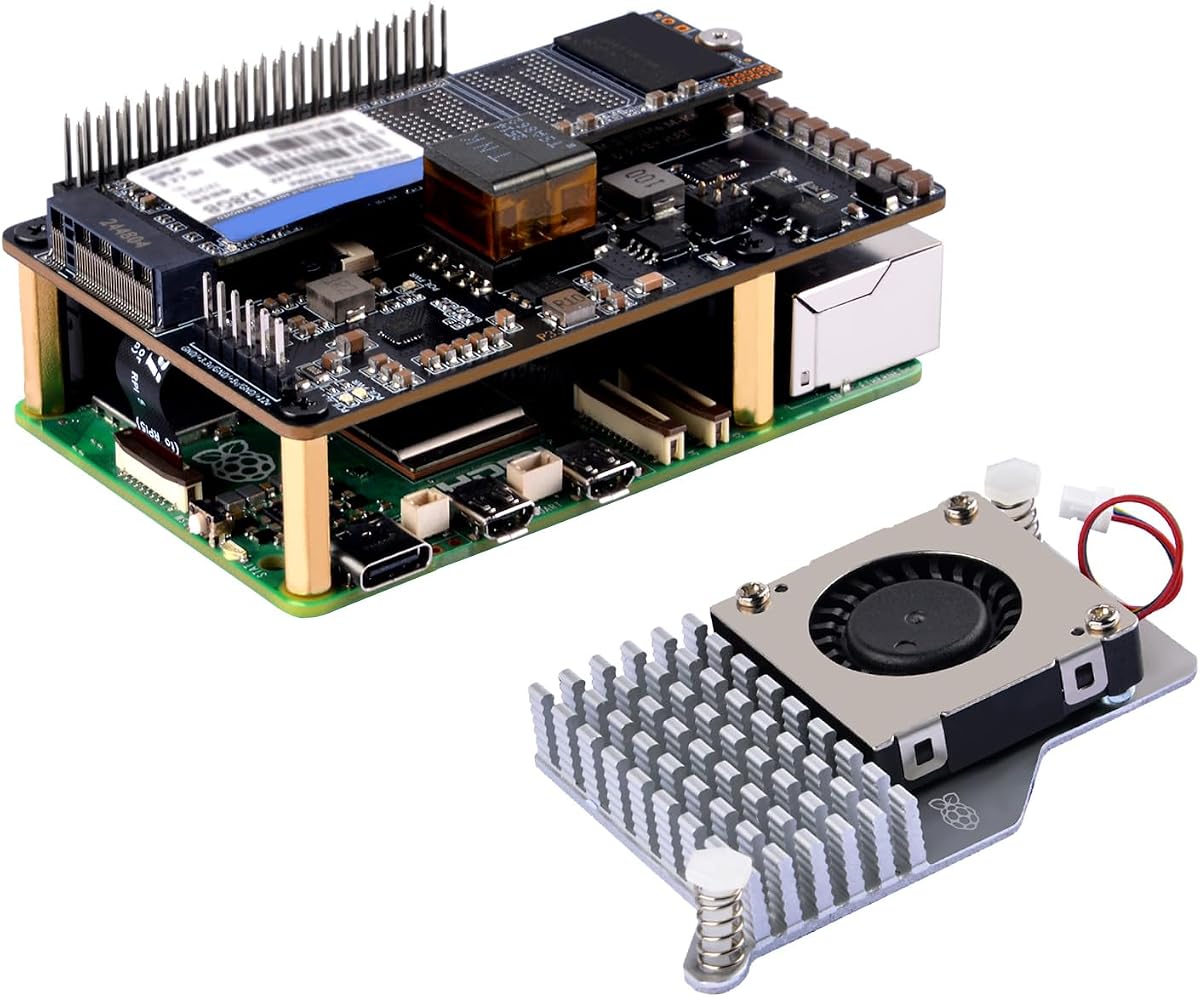
The GeeekPi P33 combines fast M.2 NVMe storage expansion with Power over Ethernet for the Raspberry Pi 5, earning a 4.2 customer rating. It is aimed at projects that need more responsive storage or a tidy network deployment with a single Ethernet cable. The package also includes an active cooler, combining two important Pi 5 requirements in a specialized platform.
We may earn a commission when you buy through this link, at no additional cost to you.
The HAT uses the Raspberry Pi 5's PCIe interface for M.2 NVMe communication and supports SSDs in 2230, 2242, 2260, and 2280 formats. PoE+ follows the 802.3at protocol and supports input power up to 25.5 watts. The HAT also provides a 5.1V, 4.5A output for the Pi 5 and attached peripherals. For installations using PoE+, the USB-C power supply must not be connected at the same time.
The most important planning point is power-source discipline. A PoE+ switch or injector must provide compatible Ethernet power, and the installer should understand that the board is being powered through the network rather than USB-C. The included active cooler uses an aluminum heatsink and PWM fan to maintain reasonable board temperatures, which is particularly helpful when storage and network tasks are active.
This is the most specialized option here, and it is best for users building a network-attached storage project, a compact server, or another deployment where Ethernet power and NVMe performance are priorities. It is less convenient for desktop experimentation because the PoE+ arrangement introduces additional network hardware and setup. Confirm cable standards, SSD fit, cooling clearance, and power configuration before installation.
Connecting an NVMe drive through PCIe makes it possible to use much faster storage than conventional microSD media for compatible workloads. Operating system support and configuration remain essential for reliable performance.
PoE+ can carry both network data and power over Ethernet. This simplifies remote or tidy installations, but the setup requires compatible 802.3at infrastructure and careful avoidance of simultaneous USB-C power.
We may earn a commission when you buy through this link, at no additional cost to you.
The Arducam OV5647 Camera Module is a straightforward way to add image and video capture to a Raspberry Pi 5, and it has a 4.4 customer rating. It uses a five-megapixel Omnivision OV5647 sensor with a fixed-focus lens and an integral infrared filter. The module supports Raspberry Pi 5, 4, 3, 3B+, and other A and B series models, making it useful for cameras built on multiple generations of the platform.
We may earn a commission when you buy through this link, at no additional cost to you.
Still images can reach 2592 by 1944 pixels, while maximum video resolution is 1080p. These specifications suit beginner vision projects, monitoring demonstrations, simple machine-learning experiments, and educational demonstrations where the goal is to capture and process images rather than produce professional cinema output. The camera connects through the Raspberry Pi camera interface and requires compatible software or a relevant vision library.
The fixed-focus lens is the main compromise for some users. It is appropriate when the subject remains at a consistent distance, but projects involving frequent refocusing may need a different lens arrangement. The product information also points to separate software autofocus options and optional enclosures, tripods, and cases under other ASINs. Most importantly, the camera is not compatible with Raspberry Pi Zero models, despite some broad listings referring to the Pi family.
This module is a good fit for students and experimenters who want a simple camera without a complex enclosure or premium imaging package. It is less appropriate for a compact Zero-based project or for a professional video system that requires advanced optics. The combination of broad mainstream Pi compatibility and familiar image and video resolutions makes it a versatile educational starting point.
A five-megapixel sensor can produce detailed still images for learning and experimentation. The 1080p video ceiling is adequate for many software-based vision demonstrations.
Support for Raspberry Pi 5 and several earlier A and B series models lets learners reuse the camera across different systems. Excluding Pi Zero compatibility narrows that advantage for very compact builds.
We may earn a commission when you buy through this link, at no additional cost to you.
The ElectroCookie Aluminum Mini Tower Case combines a distinctive desktop-style enclosure with active cooling, giving it a 4.4 customer rating. Its silver aluminum body turns the Raspberry Pi 5 into something that can sit on a desk, wall, or workshop shelf with a more finished appearance than a standard board-level setup. The Raspberry Pi board and power supply are not listed as included components.
We may earn a commission when you buy through this link, at no additional cost to you.
The large heat-dissipation structure and RGB-lit PWM fan form the central feature. According to the product information, the fan adjusts its speed automatically based on CPU temperature. The lighting is not programmable, and behavior can differ when the CPU is cool or when no operating system or bootable drive is available for fan control. In some states, the fan may not spin, while in others it may run continuously.
Port access is a deliberate strength. GPIO pins, the SD card slot, USB, Ethernet, power, and micro HDMI ports remain available, and the soft-touch power button provides a convenient control. The case also has an arrangement for an optional compatible M.2 HAT NVMe SSD shield, listed separately under several regional ASINs. This creates a path to fast storage, but that expansion must be purchased independently and installed carefully.
The case is not compatible with Raspberry Pi 4 because the USB and Ethernet port positions differ. That restriction makes model identification important. It is a good choice for a Pi 5 owner who wants an attractive, actively cooled desktop or kiosk enclosure without buying a larger multi-part cooling bundle. It is less suitable for compact installations where the mini tower shape would be inconvenient.
The aluminum mini tower design gives a bare Raspberry Pi 5 a more finished appearance. It works particularly well for permanent desk setups, displays, and visible development projects.
A large cooling structure and temperature-responsive PWM fan help manage board heat. The ambient RGB lighting adds visual appeal but does not offer programmable lighting controls.
We may earn a commission when you buy through this link, at no additional cost to you.
The Hosyond 5 Inch Touchscreen offers a compact way to turn a Raspberry Pi 5 into a self-contained control interface. It carries a 4.4 customer rating and uses a 5-inch, 800-by-480 IPS capacitive panel. The smaller format is particularly useful for embedded dashboards, appliance controls, portable projects, and installations where every millimeter of space matters.
We may earn a commission when you buy through this link, at no additional cost to you.
The display connects directly through the Raspberry Pi's MIPI DSI interface and does not require driver installation. It supports Raspbian, Ubuntu, Kali, and Windows 10 IoT. Raspbian provides two-point page zoom in the older version, while Ubuntu, Kali, and Windows 10 IoT offer single touch. PWM backlight brightness adjustment provides another useful control for matching the display to the environment.
Compatibility is intentionally limited. The product has no HDMI connection and is not intended for other device types. The native 800-by-480 resolution is adequate for menus, sensors, status pages, and simple applications, but it is not the right specification for a high-resolution desktop replacement. Users should also plan their enclosure, mounting, and power arrangement, as these are not universal features of the stated package.
This screen is best for compact, purpose-built interfaces where a touchscreen panel is more convenient than a standard monitor. It offers the same direct-connect and driver-free approach as the larger seven-inch Hosyond display, but in a smaller format. For new Raspberry Pi 5 projects, the main trade-off is choosing between more usable screen space and a smaller physical footprint.
The five-inch format makes touch input practical for small embedded projects. A compact dashboard can fit into a control panel without the depth and mounting demands of a larger display.
Direct MIPI DSI attachment and driver-free operation reduce initial configuration. Documentation is included, while supported operating systems and single-touch behavior should still be checked before project development.
We may earn a commission when you buy through this link, at no additional cost to you.
The Raspberry Pi Active Fan is the smallest, most specialized thermal accessory in this guide. It has a 4.8 customer rating, the highest among the ten products, and focuses on a single job: helping a Raspberry Pi 5 manage heat. It is a practical choice for users who need active cooling without committing to a full case or a larger multi-component bundle.
We may earn a commission when you buy through this link, at no additional cost to you.
The assembly combines a single-piece anodized aluminum heatsink with a temperature-controlled blower fan. The fan mounts to the heatsink using three screws, while spring-loaded push pins attach the cooler to the Raspberry Pi 5. Pre-applied thermal pads are already positioned for heat transfer, simplifying assembly and reducing the need to apply interface material separately.
Because it does not include a case, the cooler leaves the rest of the board exposed. That is useful for a temporary development setup, breadboard work, or a build with a custom enclosure, but it provides less physical protection than a case-based alternative. Users should also account for airflow around the blower and avoid routing wires where they could interfere with the fan. The product listing also uses broader development-kit language, so buyers should verify the Raspberry Pi 5 mounting details against the final hardware.
This fan is best for a Pi 5 owner who has an existing enclosure strategy or wants a straightforward cooling upgrade without replacing the entire case setup. It is less appropriate when a finished appearance, dust protection, or integrated port access is the priority. Its strong rating, simple mounting system, and dedicated thermal design make it a focused and potentially long-lasting addition.
The three-screw fan mount and spring-loaded board pins create a straightforward installation path. An existing Pi 5 can gain active cooling without buying a full enclosure.
Pre-applied thermal pads simplify contact between the cooler and board. Correct placement and even mounting are important for consistent heat transfer and reliable operation.
We may earn a commission when you buy through this link, at no additional cost to you.
The right Raspberry Pi 5 accessory depends on the project, the hardware already owned, and the operating conditions. Start with the most immediate limitation rather than adding features indiscriminately, then confirm connector, power, physical, and software compatibility.
A useful purchase begins with a clear project objective. Learning kits suit students who need sensors, wiring examples, and code. Touchscreens suit dashboards and control panels, camera modules suit visual recognition and monitoring, and NVMe hardware suits storage-heavy network systems. A case may be more valuable than a display for a project intended to run continuously in a workshop or mounted installation.
Choose the accessory that removes the largest obstacle between the current setup and the intended result. Adding specialized hardware before the core power, cooling, and storage needs are stable can create compatibility work later.
Compatibility statements need to be read carefully. The Freenove kit explicitly supports Raspberry Pi 5, both Hosyond displays list it among supported models, and the Arducam camera includes it. The ElectroCookie case is specifically designed for Pi 5 and will not fit a Raspberry Pi 4 because the USB and Ethernet positions differ. The Arducam camera also excludes Raspberry Pi Zero models.
Before buying, compare the accessory's supported model list with the exact board variant. Check connector type, board dimensions, mounting locations, and any required operating system. A keyword appearing in a listing is not enough when physical layouts or interfaces differ.
Only the RasTech 8GB Complete Kit includes the Raspberry Pi 5 board. The Freenove starter kit, both RasTech accessory kits, the P33 HAT bundle, the camera, the displays, the aluminum case, and the standalone fan require the buyer to supply compatible hardware. The RasTech listings explicitly state that the board is not included, while the Freenove title also makes that limitation clear.
Make a simple inventory before ordering. Separate complete bundles from add-on accessories so the final total includes the board, a suitable USB-C power supply, cooling, and storage when those components are not already available.
Raspberry Pi 5 performance can be affected by thermal throttling during sustained demanding tasks. Active cooling options in this guide use PWM fans, aluminum heatsinks, and thermal pads to move heat away from the board. Dedicated cooling is especially sensible for sustained computing, media work, development, or installations where peak cooling cannot be achieved with passive measures alone.
Consider fan behavior, mounting stability, airflow, and case compatibility together. A fan mounted in open air may cool effectively but offer little physical protection, while a case-based solution may need to maintain sufficient clearance around the cooler and connectors.
Power demands vary with the board, display, storage, cameras, and other peripherals. The RasTech kits include a 27-watt GaN supply rated at 5.1V and 5A for the Pi 5, with additional output voltages. The P33 PoE+ HAT offers a different approach, taking power through Ethernet using the 802.3at protocol and delivering up to 25.5 watts.
Follow the accessory instructions and avoid connecting incompatible power sources in parallel. In particular, the P33 listing instructs users not to connect a USB-C power supply while the PoE+ HAT is providing power. Adequate power is as important as cooling for stable operation.
Both Hosyond displays use the Raspberry Pi's MIPI DSI interface rather than HDMI. Their 800-by-480 resolution is suitable for status screens and embedded interfaces, but buyers should not expect the flexibility of a general desktop monitor. The seven-inch model offers more working space, while the five-inch model is easier to fit into compact control projects.
Check operating system support, touch behavior, and brightness controls. Raspbian's older version provides two-point page zoom, whereas the listed Ubuntu, Kali, and Windows 10 IoT environments use single touch. Neither display supports HDMI or other device types.
Storage needs can influence the accessory choice. The RasTech Complete Kit includes a 64GB card and two readers, offering a straightforward starting point. The P33 HAT supports M.2 NVMe SSDs in four lengths and uses the Pi 5's PCIe interface for substantially different performance characteristics. The ElectroCookie tower case can accommodate a separately purchased compatible M.2 shield for similar expansion goals.
Account for operating system support, filesystem preparation, and physical clearance. Fast storage does not automatically guarantee fast applications, and a case may only support one specific shield design. Check all component dimensions before settling on an expansion path.
An enclosure should protect the board while preserving the airflow, connectors, controls, and expansion access required by the project. The RasTech ABS cases emphasize ventilation and access to GPIO, camera, USB, Ethernet, display, card, and power connections. The ElectroCookie aluminum tower offers a finished appearance, integrated cooling, RGB lighting, and a soft-touch power button.
Do not select an enclosure solely by appearance. Confirm the board revision, active cooler dimensions, storage location, display plan, and every required connector. For prototypes, a standalone cooler may be more practical; for permanent installations, a case with controlled airflow is usually more appropriate.
Begin by inventorying the Raspberry Pi 5 and every accessory you intend to connect. Read the included instructions, identify each cable and connector, and confirm the board is powered off before attaching a display, camera, HAT, cooler, or enclosure. Create the required operating system and storage media before moving to a final installation so that basic startup problems can be separated from physical assembly issues.
Install cooling before applying sustained workloads, then verify that the fan is detected and operating at an appropriate speed. Attach the active cooler evenly, leave the spring pins and screws secure, and check the thermal pads for proper contact. Inside a case, make sure no cable blocks the fan and that vents remain unobstructed. Use the appropriate USB-C supply or PoE+ arrangement specified by the chosen product, but never combine incompatible power paths.
For ongoing care, keep the board away from dust, conductive debris, moisture, and direct heat. Periodically inspect fan movement, cable routing, connector fit, and storage health. Back up important files from the microSD card or NVMe drive, handle the camera ribbon cable by its connector, and avoid moving an assembled system while a display or storage device is under active use. Clean enclosures with a dry, soft material rather than allowing liquid to enter ports.
Only the RasTech Raspberry Pi 5 8GB Complete Kit includes a Raspberry Pi 5 board. The Freenove starter kit and the other accessory-focused products require a separately purchased compatible board. The RasTech 8GB package also includes cooling, a case, a 64GB card, card readers, a USB-C power supply, and two micro HDMI cables.
No. Both Hosyond displays connect directly to the Raspberry Pi's MIPI DSI interface and do not include HDMI compatibility. They are intended for supported Raspberry Pi models, including Pi 5, and are not general-purpose screens for unrelated devices.
A complete kit includes the central computer, while an accessory bundle adds supporting hardware to a board you already own. The RasTech 8GB package is complete, while the RasTech Core Accessories Kit includes power, cooling, and a case but no board. The Freenove product supplies electronics and tutorials rather than the Raspberry Pi itself.
The P33 is designed around the Raspberry Pi 5's PCIe interface for NVMe storage and includes a PoE+ power option through Ethernet. Using PoE+ requires compatible 802.3at network infrastructure. The product instructions specify that the USB-C power supply should not be connected when the PoE+ HAT is supplying power.
The Freenove Ultimate Starter Kit is the most comprehensive option for learning because it combines 223 components with 128 structured projects and code in Python, C, Java, Scratch, and Processing. It does not include the Raspberry Pi board, so the total setup must account for that separate purchase.
Active cooling is strongly worth considering for sustained workloads, enclosed installations, media use, or development involving repeated processor load. The roundup includes a dedicated active fan, two case-and-cooler bundles, a HAT bundle with cooling, and a tower case with a temperature-responsive fan.
No. The supplied compatibility information lists the camera for Raspberry Pi 5, 4, 3, 3B+, and other A and B series models, while explicitly excluding Pi Zero. Its fixed-focus lens and maximum 1080p video output also make it better suited to educational and experimental projects than specialized professional imaging.
Choose the five-inch display for compact embedded controls, portable builds, or projects with limited mounting space. The seven-inch model offers a larger interaction and information area for dashboards. Both use an 800-by-480 IPS capacitive panel, direct MIPI DSI connections, and driver-free setup, so size is the main practical distinction.
The Freenove Ultimate Starter Kit is the strongest all-around choice for learning because it combines a large component inventory with structured tutorials and multiple programming environments. The RasTech 8GB Complete Kit is the most convenient premium purchase for someone starting with no hardware, while the ElectroCookie Aluminum Mini Tower Case provides an attractive, actively cooled desktop-style enclosure.
Prioritize the limitation that matters most to your project. Choose active cooling for sustained workloads, a touchscreen for a touch-based interface, a camera for visual capture, an NVMe HAT for high-speed storage, and a starter kit for hands-on electronics. Before ordering, verify the exact board model, included components, power requirements, connector type, and operating system support.
Finally, check current prices, availability, and the latest product details before purchasing. Accessory bundles can change as Raspberry Pi hardware and third-party designs evolve, and a product that fits one configuration may not fit another. Choosing a well-supported package that matches your actual project will provide the most useful long-term result.

