
SUPERFECT OLED Portable Monitor
4.3Editor score
14-inch 3K OLED panel
120Hz refresh rate
120% DCI-P3 coverage
An OLED portable monitor combines a slim, self-emissive display with the flexibility of a second screen, but the strongest options vary considerably in size, resolution, touch support, refresh rate, and connectivity. The best model for travel may not be the best choice for gaming or color-sensitive creative work.
We compared all ten products using the information provided about each display, focusing on panel type, screen dimensions, resolution, motion specifications, color coverage, brightness, ports, portability features, and intended use. The list includes genuinely portable OLED models alongside related desktop and smart displays that help clarify the market.
Each review identifies the product’s most useful qualities and practical compromises so buyers can match a screen to their devices and routines. Ratings and specifications can change over time, while prices and promotional offers fluctuate frequently, so readers should confirm current details before purchasing.
Every product in this guide received a rating based on verified customer feedback. That information can be especially useful when deciding between displays with different strengths, such as a large desktop OLED versus a compact model designed for laptop users.
4.3Editor score

4.3Editor score

4.3Editor score
As an Amazon Associate we earn from qualifying purchases.
The table below compares panel type, screen size, resolution, motion performance, and major features to make the differences among these ten displays easier to understand.




The ASUS ZenScreen MQ16FC is a 15.6-inch OLED portable monitor with a 1920×1200 resolution and a customer rating of 3.5. Its defining features include a spacious 16:10 format, OLED contrast, a 95% DCI-P3 color gamut, a 1ms response time, and an 89% screen-to-body ratio, making it aimed at users who want a genuinely useful second workspace rather than a tiny supplemental screen.
We may earn a commission when you buy through this link, at no additional cost to you.
Power management is one of the strongest aspects of this ZenScreen. It can be powered by a compatible laptop or use USB-C power pass-through to charge the connected laptop, reducing cable clutter. Two full-function USB-C ports and a mini-HDMI port broaden device compatibility, while the included two USB-C cables, Mini-HDMI cable, adapter, sleeve, cloth, and tripod socket kit create a more complete travel package than many competitors offer.
The automatic rotation function is especially relevant for a portable display because it can switch between landscape and portrait orientations through DisplayWidget Center. ASUS also highlights TV Rheinland-certified flicker-free and low-blue-light technologies, a 1ms response time, and a three-year warranty with advance replacement and burn-in coverage. The 3.5 rating is the most important caution: it suggests that some customers may have encountered issues not captured by the otherwise attractive feature set.
This monitor is best suited to students, office workers, and creative professionals who need a large 16:10 canvas but still value a relatively conventional portable form. Its resolution may seem modest beside premium 3K or 4K choices, and buyers should verify refresh-rate, touch, and device-compatibility details. Even so, the combination of OLED quality, power pass-through, rotation, and accessories makes it a strong productivity-focused travel option.
The 1920×1200 resolution gives laptop users more vertical room than a conventional 16:9 screen. That extra height can reduce scrolling in documents, spreadsheets, browser windows, and creative applications.
USB-C power pass-through lets the display share charging duties with the attached laptop. Automatic rotation adds further portability by adapting the layout to the way the screen is physically positioned.
We may earn a commission when you buy through this link, at no additional cost to you.
This 13.3-inch OLED portable monitor combines a 1920×1080 panel, 500-nit brightness, HDR support, and a 10-point touchscreen with a 4.3 customer rating. The result is a compelling all-around choice for people who want more than visual quality: direct on-screen interaction can be useful for presentations, creative work, media consumption, and tablet-style workflows.
We may earn a commission when you buy through this link, at no additional cost to you.
The OLED panel is specified with 100% DCI-P3 coverage and a 100000:1 contrast ratio, producing deep blacks and saturated color. Touch supports tapping, swiping, scrolling, zooming, and dragging on compatible Windows, macOS, and Android systems. Its slim profile is designed to fit inside a backpack or laptop bag, and the included protective cover helps guard the panel during storage and transport.
The important limitation is that touch functionality depends on the source device and connection type. Not every USB-C laptop or tablet can drive the touchscreen, so users should verify operating-system and display-output support. The 1080p resolution is also less detailed than the 3K SUPERFECT model or the 4K desktop alternatives, although it remains sharp for a compact secondary screen and may be easier to drive from a laptop.
Overall, this is a strong pick for mobile professionals, students, and travelers who value touch input and a balanced mix of portability, color, and brightness. It works well with compatible laptops, Macs, PCs, and Android devices for extended or mirrored viewing. Buyers who only need a conventional non-touch second display may find more resolution or performance in the premium SUPERFECT, but this model provides the most tactile experience in the roundup.
A ten-point interface is more useful than a single-finger panel for scrolling, zooming, drawing, and presenting. Compatibility must be confirmed with the intended host because connection mode and operating system can affect touch support.
The 500-nit panel and full DCI-P3 coverage make the display useful for vivid media and creative review. Its compact dimensions and included cover support use across offices, classrooms, hotels, and commutes.
We may earn a commission when you buy through this link, at no additional cost to you.
The SUPERFECT OLED Portable Monitor is the most advanced portable option in this guide, combining a 14-inch 2880×1800 OLED panel, 120Hz refresh rate, 0.1ms response time, and a 4.3 customer rating. Its high resolution, wide color gamut, and fast motion make it suitable for gamers, photographers, editors, and power users who refuse to settle for a basic travel display.
We may earn a commission when you buy through this link, at no additional cost to you.
The panel reaches 500 nits and covers 120% of DCI-P3, using 8-bit color with frame-rate conversion to represent 1.07 billion colors. Its stated 5,000,000:1 contrast ratio and independently illuminated pixels deliver true blacks and strong perceived depth. The hardware is equally travel-conscious, with a metal construction, a 0.12-inch thinnest point, 1.29-pound weight, a 0.05-inch bezel, a 90-degree adjustable stand, and dual VESA mounting holes.
There are two operational caveats. The product information advises connecting the power adapter before use, which may be inconvenient for users who expect a fully cable-free setup. Also, the maximum 2880×1800 mode is associated with the stated 120Hz USB-C connection, while HDMI runs that resolution at 100Hz. These distinctions matter for buyers deciding how to connect a gaming laptop or desktop.
Despite those limitations, this is the strongest premium portable OLED for someone who values both resolution and speed. The specification combination is unusually ambitious for a 14-inch travel display, and the physical design suggests it can handle both mobile and semi-permanent use. It is a particularly compelling recommendation for a competitive gamer or creative professional who can travel with a small power supply and understands the connection-mode differences.
The 2880×1800 panel provides substantially more working detail than a 1080p portable display. A 120Hz refresh rate and 0.1ms response time make the same screen suitable for fast gaming, smooth previews, and real-time editing.
At 1.29 pounds, the full-metal display balances portability with a more premium construction. The built-in adjustable stand and VESA holes also make it practical for a desk-based setup when travel is not the priority.
We may earn a commission when you buy through this link, at no additional cost to you.
The MNN 15.6-inch Portable Monitor is an IPS alternative to the OLED models included here, and it combines a 1920×1080 resolution with a 60Hz refresh rate and a 4.3 customer rating. Although it does not offer true-black OLED contrast, it offers a large screen and practical connectivity at a notably accessible price point.
We may earn a commission when you buy through this link, at no additional cost to you.
Two full-feature USB-C ports allow a single compatible cable to carry both display signal and power. The host must support Thunderbolt 3.0 or USB 3.1 Type-C DisplayPort Alternate Mode, an important compatibility consideration for older laptops and some phones. The display supports copy, extended, second-screen, and portrait modes, and its glossy IPS panel is specified with 178-degree viewing angles.
This monitor is not the right choice for buyers whose defining requirement is an OLED panel or high-end gaming performance. Its 60Hz refresh rate and FHD resolution are adequate for documents, browsing, presentations, video, and console or casual PC gaming, but they do not compete with 3K portable OLED panels or 240Hz desktop gaming monitors. The HDR mode should also be understood as an image feature rather than a guarantee of high-end HDR performance.
Even with that distinction, MNN delivers a compelling package for students, travelers, remote workers, and occasional gamers. The scratch-resistant smart cover provides protection and doubles as a stand, while the large 15.6-inch panel makes it useful for work in confined spaces. It is the budget selection for shoppers who prioritize screen area, simple USB-C operation, and versatility over OLED-specific image quality.
A full-feature USB-C connection can carry video and power over a single cable when the source supports DisplayPort Alternate Mode. That simplifies setup and reduces the number of adapters required while traveling.
The included smart cover protects the display during transport and provides a practical support surface in landscape or portrait orientation. This makes the package more practical than a bare screen with a minimal stand.
We may earn a commission when you buy through this link, at no additional cost to you.
The ASUS ROG XG27AQDMGR is a 26.5-inch desktop OLED gaming monitor with a 2560×1440 resolution, 240Hz refresh rate, 0.03ms response time, and a 4.6 customer rating. Although it is not portable, it provides a useful reference for buyers seeking the speed and rich color associated with a high-end OLED gaming setup.
We may earn a commission when you buy through this link, at no additional cost to you.
Its glossy TrueBlack WOLED panel is specified with 99% DCI-P3 coverage, true 10-bit color, a Delta E below 2, and VESA DisplayHDR 400 compliance. The stated pixel-level contrast produces very deep blacks, while 240Hz refresh and the rapid gray-to-gray response help maintain clarity in fast action. DisplayWidget Center provides mouse-based access to settings and OLED Care Pro.
A key feature is the Neo Proximity Sensor, which detects when the user is away and switches the display to black to reduce burn-in risk. That measure does not eliminate image-retention concerns, but it shows how seriously ASUS addresses the maintenance challenges associated with OLED gaming. The product also includes a three-year warranty with advance replacement and burn-in coverage.
This monitor is best for a fixed gaming desk and an enthusiast who prioritizes immediate motion response over portability. A glossy panel can reflect room lights, so placement matters, and buyers should be comfortable with a permanently installed display rather than a mobile companion. For competitive gamers, creators, and desktop users, however, the combination of QHD resolution, 240Hz motion, 10-bit color, and proactive OLED care is highly compelling.
A 240Hz refresh rate and 0.03ms response time are designed to reduce ghosting and keep fast movement clear. QHD resolution also provides more usable detail than a typical Full HD gaming display.
The proximity sensor can darken the panel when nobody is viewing it. Combined with ASUS OLED Care Pro and a three-year burn-in warranty, it provides a more proactive approach to long-term ownership.
We may earn a commission when you buy through this link, at no additional cost to you.
Samsung’s 27-inch Odyssey OLED G6 is a QHD QD-OLED gaming monitor rated 4.7, making it the highest customer rating among the ten products in the guide. Its 240Hz refresh rate and 0.03ms response time position it for fast competitive and high-fidelity gaming, while the 27-inch panel offers a generous desktop footprint.
We may earn a commission when you buy through this link, at no additional cost to you.
QD-OLED technology supports high brightness and a wide range of colors, and Samsung highlights Pantone validation across more than 2,100 colors and over 110 skin-tone shades. HDR10 adds brighter highlights and nuanced shadows, while Glare Free Technology is intended to preserve clarity under external lighting. AMD FreeSync Premium is included for compatible systems, helping reduce choppiness, lag, and tearing.
Samsung’s OLED Safeguard technology uses thermal modulation to help prevent burn-in, one of the principal concerns when choosing an OLED gaming display. As with other OLED panels, however, long-term image retention depends on usage patterns, brightness settings, and maintenance. The monitor does not offer the same travel utility as a lightweight USB-C screen because it requires a permanent desk setup and power connection.
The height-adjustable stand pivots, tilts, and swivels, making it easy to align the large display with a desk or secondary equipment. This is an excellent recommendation for a gaming-focused desktop where color, motion, and an adjustable viewing position matter more than portability. It is less relevant to shoppers searching for a travel monitor, but within the broader OLED market it offers a particularly strong balance of validated color, high speed, and customer satisfaction.
Pantone validation indicates attention to accurate color reproduction, including skin tones. The QD-OLED panel and HDR10 support further improve the visual range available in supported content.
Height adjustment, pivot, tilt, and swivel let users optimize the viewing angle. Ergonomic positioning is especially valuable on a large 27-inch display that must coexist with a keyboard, mouse, and other desk equipment.
We may earn a commission when you buy through this link, at no additional cost to you.
The LG UltraGear 27GX704A-B is a glossy 27-inch QHD OLED gaming monitor with a 4.5 customer rating, 240Hz refresh rate, and 0.03ms response time. Its major differentiator is brightness: the display is specified at 275 nits standard brightness and up to 1300 nits at peak, which should give HDR highlights greater impact than many conventional OLED panels.
We may earn a commission when you buy through this link, at no additional cost to you.
VESA DisplayHDR True Black 400 compliance, a stated 1.5-million-to-one contrast ratio, and up to 98.5% DCI-P3 coverage support rich imagery. LG adds three UL certifications covering anti-glare, flicker-free operation, and low blue light. Although the panel itself is glossy, these certifications and the screen’s brightness specification make it suitable for users seeking strong visual impact during extended gaming sessions.
Connectivity is particularly thorough for a modern gaming desk. Dual HDMI 2.1, DisplayPort 1.4, USB 3.2 upstream, and two USB 3.2 downstream ports support consoles, PCs, peripherals, and accessories. The monitor is NVIDIA G-SYNC Compatible and supports AMD FreeSync Premium Pro, giving it broad variable-refresh-rate options across different hardware ecosystems.
LG’s OLED Care system includes automatic pixel-refresh cycles during standby or shutdown, while the On-Screen Control interface exposes brightness and protection settings. The stand supports height, tilt, swivel, and pivot adjustment, and a headphone jack is included. This is the ideal pick for a high-end gaming setup that values brightness, connectivity, and broad synchronization support, although it is not the correct choice for a genuinely mobile workflow.
A peak brightness of up to 1300 nits gives supported HDR content more visible highlight impact. The high contrast ratio retains deep blacks, while the broad color gamut supports vivid game worlds.
Dual HDMI 2.1 and DisplayPort 1.4 serve modern displays and consoles, while USB 3.2 adds a direct path for compatible peripherals. This makes the monitor easier to integrate into a permanent gaming command center.
We may earn a commission when you buy through this link, at no additional cost to you.
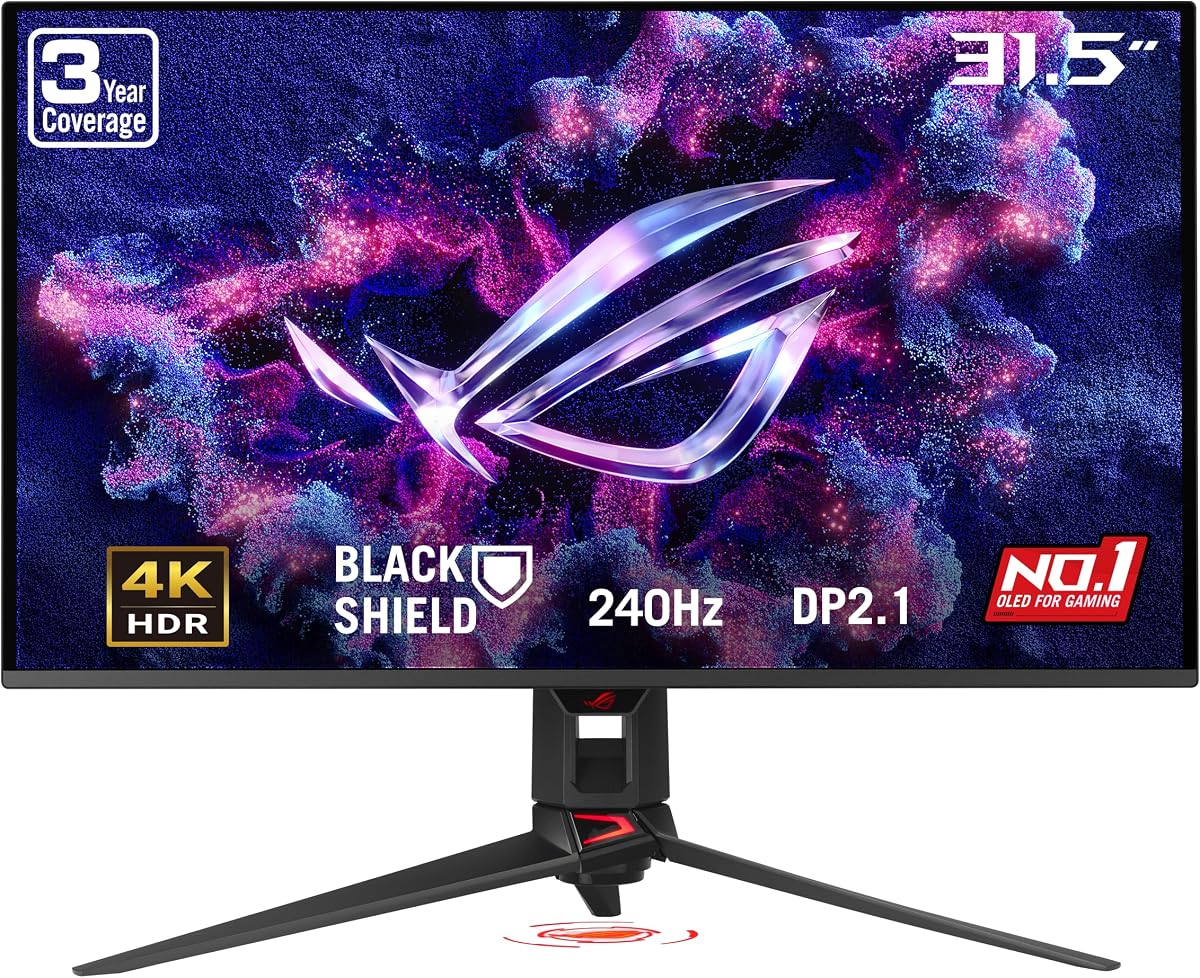
The ASUS ROG PG32UCDM3 is a 32-inch 4K QD-OLED gaming monitor featuring a 240Hz refresh rate, 0.03ms response time, and a 4.0 customer rating. It represents the high end of desktop OLED performance, combining extremely fine detail with rapid motion in a large format intended for immersive gaming and professional use.
We may earn a commission when you buy through this link, at no additional cost to you.
The 3840×2160 panel offers four times the pixel count of Full HD, giving games, documents, and creative applications noticeably greater clarity. VESA DisplayHDR 500 True Black compliance, 99.5% DCI-P3 coverage, true 10-bit color, and Delta E below 2 support accurate, high-range visuals. BlackShield Film Technology is specified to improve scratch resistance by 2.5 times and enhance perceived black levels by up to 40% compared with earlier QD-OLED panels.
Its connectivity is designed for current and future hardware. DisplayPort 2.1 UHBR20 provides full 80Gbps bandwidth, HDMI 2.1 supports modern consoles and graphics cards, and USB-C Power Delivery can deliver 90 watts. G-SYNC Compatible variable refresh rate is included, while DisplayWidget Center simplifies firmware updates and lets users import, export, or copy settings.
The Neo Proximity Sensor can switch the panel to black when the user leaves, helping reduce burn-in risk. ASUS also provides a three-year warranty with advance replacement and burn-in coverage, an important reassurance for an expensive OLED display. This monitor is a specialist recommendation for enthusiasts who want 4K detail, 240Hz motion, and premium connectivity on a permanent desk; portable use is plainly not one of its strengths.
The combination provides sharp interface text and detailed game imagery while retaining the low latency of a competitive display. It is particularly suitable for powerful gaming PCs and productivity applications that benefit from dense pixel detail.
DisplayPort 2.1 UHBR20, HDMI 2.1, and 90-watt USB-C create a flexible and forward-looking connection package. The proximity sensor and burn-in warranty help address the maintenance concerns that accompany large OLED ownership.
We may earn a commission when you buy through this link, at no additional cost to you.
Acer’s Predator X27U W1 is a 26.5-inch QHD QD-OLED gaming monitor with a 4.5 customer rating, a 240Hz refresh rate, and a 0.03ms response time. Its compact size relative to many 27-inch models, narrow ZeroFrame design, and focus on competitive motion make it appealing to gamers who want a large but visually immersive display.
We may earn a commission when you buy through this link, at no additional cost to you.
The WQHD quantum-dot OLED panel offers true 10-bit color, a 99% DCI-P3 gamut, Delta E below 2, and HDR10 support. These specifications target vivid scenes and accurate color reproduction, while an image-retention refresh function is included to help keep images from sticking. The result is a display suited to both fast action and visually rich games.
AMD FreeSync Premium synchronizes the monitor’s frames with compatible graphics-card output to reduce tearing and stuttering. The 240Hz refresh rate and 0.03ms gray-to-gray response leave little room for visible motion blur or ghosting. As its name suggests, however, the synchronization feature is centered on the AMD platform, and buyers using a different graphics ecosystem should investigate compatibility carefully.
This is a desktop gaming monitor rather than a travel display, but it is a strong choice for competitive players who value speed and minimal distractions. The 26.5-inch diagonal offers a broad field of view while remaining less cumbersome than larger formats. It is best recommended to gamers with compatible hardware who want 240Hz performance, accurate color, and a near-borderless design at a fixed workstation.
The combination of 240Hz and a 0.03ms response time prioritizes quick visual updates. It gives competitive games a clear advantage over standard 60Hz and 144Hz displays when paired with a capable graphics card.
The ZeroFrame design reduces the visual interruption between the panel and the surrounding bezel. At 26.5 inches, the screen offers substantial immersion without the footprint of a 32-inch model.
We may earn a commission when you buy through this link, at no additional cost to you.
The LG StanbyME 2 Max is a 32-inch 4K smart portable touchscreen TV with a 4.4 customer rating. Unlike conventional portable computer monitors, it is designed primarily for mobile entertainment: the screen detaches from its stand, includes a rechargeable battery, and can be moved between the kitchen, bedroom, and patio.
We may earn a commission when you buy through this link, at no additional cost to you.
The detached screen weighs 12.3 pounds, or 5.6 kilograms, and the built-in battery is rated for up to 4.5 hours. That makes the display portable within the home but much less convenient for airline or backpack travel. Its interactive touchscreen supports drawing, educational content, games, and apps, while HDMI and two USB-C ports with DisplayPort Alternate Mode provide wired connections for consoles and compatible laptops.
Picture quality comes from a 3840×2160 panel with Dolby Vision, HDR10, Filmmaker Mode, and an Alpha 8 AI Processor 4K Gen3. A 60Hz refresh rate is suitable for everyday viewing but does not target competitive gaming. Wi-Fi 6 and Bluetooth 5.3 support streaming and wireless accessories, while webOS provides access to popular applications and more than 400 LG Channels.
This display is ideal for households seeking a movable television and interactive screen rather than a compact productivity monitor. It can function as a cordless entertainment display, a smart display with apps, or a connected touchscreen for compatible devices. Buyers should prioritize its room-to-room convenience, broad smart-platform features, and large size, while recognizing that it is neither lightweight enough for ordinary travel nor optimized as a laptop workspace.
The detachable design and built-in battery allow cordless viewing in several rooms. Its weight makes moving it a two-person consideration, but the benefit is greater flexibility than a permanently mounted television.
webOS gives the display its own streaming interface, while Wi-Fi 6, Bluetooth 5.3, and touch controls add interactive functions. It can therefore operate as a standalone entertainment system instead of merely mirroring another device.
We may earn a commission when you buy through this link, at no additional cost to you.
The most suitable OLED portable monitor depends on whether your priority is genuine mobility, touch interaction, high-resolution creative work, competitive gaming, or cordless home entertainment. Use the following factors to narrow the field before comparing connection requirements and long-term ownership considerations.
Short summary: choose a genuinely mobile model for bags and daily commuting, and treat desktop OLEDs as fixed-display alternatives.
Short summary: prioritize the highest resolution your source device can actually output without sacrificing the intended use case.
Short summary: competitive players need 120Hz or more, while productivity users can prioritize resolution, touch, and portability instead.
Short summary: broad gamut and high peak brightness improve HDR, while true 10-bit color and low Delta E are more relevant to professional editing.
Short summary: confirm device, operating system, touch, video, and power support before choosing a USB-C-first portable display.
Short summary: choose touch for direct interaction and rotation for vertical workflows, but verify software and host-device support.
Short summary: battery life enables cordless home viewing, while travel monitors still need reliable adapter or host-device power.
Short summary: choose a model with active panel care and meaningful burn-in coverage, especially for long sessions or static desktop work.
Begin by confirming that the host device supports the intended resolution, refresh rate, touch input, and power-delivery mode. Connect the display with the specified cable or a compatible adapter, then select the matching display mode in the operating system. For the SUPERFECT, connect the power adapter before use and remember that its stated 120Hz maximum resolution is available through Type-C rather than HDMI.
Choose the correct orientation before finalizing the layout. Use the ASUS ZenScreen’s DisplayWidget Center for automatic rotation, or set portrait mode manually for a 13.3-inch OLED and MNN display. Adjust brightness and room lighting to suit the content, taking advantage of deeper OLED blacks in controlled environments and using the available brightness range when viewing HDR material in brighter spaces.
To care for an OLED panel, clean it with a soft microfiber cloth and avoid abrasive, ammonia-based, or overly wet cleaning products. Do not press on the screen or leave objects resting against the panel. Manage static content with the manufacturer’s pixel-refresh features, use screen savers where appropriate, and avoid leaving bright menus or dashboards displayed for prolonged periods. A protective sleeve or cover adds an extra layer of protection during transport.
No. The ASUS ZenScreen MQ16FC, 13.3-inch OLED Touchscreen, and SUPERFECT are portable OLED models, while the MNN uses an IPS panel. The remaining products are desktop OLED gaming monitors or a smart portable television. The comparison deliberately separates genuine portable computer displays from related OLED products for shoppers researching the wider category.
No. Touch operation depends on the source device, operating system, and connection method. Windows, macOS, and Android systems are listed as compatible, but buyers should confirm that their particular device supports the required video and touch functions before purchasing.
The product information specifies that 2880×1800 runs at 100Hz over HDMI, while the Type-C connection maintains the full 120Hz mode. The power adapter should also be connected before use. This distinction is important for gamers who want both maximum resolution and maximum refresh rate simultaneously.
OLED pixels produce their own light, enabling true blacks and very high contrast, while a conventional IPS LCD uses a backlight behind the panel. IPS can still deliver accurate color and wide viewing angles, as the MNN does, but it cannot reproduce the same native black level. The best choice depends on whether OLED contrast matters more than cost, brightness uniformity, or other practical considerations.
Not in the same practical sense as the compact models in the guide. The ASUS ROG, Samsung Odyssey, LG UltraGear, and Acer Predator displays are designed for permanent desks and require external power. The LG StanbyME 2 Max is more mobile, with a detachable screen and built-in battery, but its 12.3-pound weight makes it intended for moving around a home rather than carrying in a travel bag.
Use the manufacturer’s OLED-care or pixel-refresh features, avoid leaving static bright interfaces on-screen for long periods, and adjust brightness according to the surrounding light. Several products also include automated refresh cycles or a proximity sensor that darkens the display when nobody is present. A three-year burn-in warranty on the ASUS ROG models offers additional protection.
Usually not. A 60Hz portable monitor is sufficient for web browsing, office applications, documents, and video calls, and the MNN provides that rate in a lightweight 15.6-inch design. Faster 120Hz or 240Hz panels matter most for competitive gaming, high-motion content, and some interactive creative workflows.
Verify that your computer has a USB-C port with DisplayPort Alternate Mode, or determine which HDMI or DisplayPort adapter is required. Also check maximum output resolution, refresh rate, touch compatibility, and whether the display can power the host while receiving a video signal. The MNN specifically lists Thunderbolt 3.0 or USB 3.1 Type-C with DP Alternate Mode as its requirement.
The SUPERFECT stands out as the premium portable choice because it combines a 14-inch 3K OLED panel with 120Hz motion, broad DCI-P3 coverage, and a slim metal design. The 13.3-inch OLED Touchscreen is the most interactive and balanced model, while the MNN is the practical budget option for anyone who prioritizes a large second screen and one-cable USB-C use over native OLED contrast.
Choose according to the feature that affects your daily work: portability, touch, resolution, motion, color accuracy, or battery-powered entertainment. Confirm source-device compatibility before buying, check whether the advertised resolution works at the desired refresh rate, and consider OLED-care features if you expect long sessions or static content. The desktop gaming alternatives deliver much faster motion but require a fixed workspace and mains power.
Customer ratings, firmware behavior, promotional bundles, and prices can change over time, so verify the current listing before placing an order. Comparing the display with the specific devices and applications you use will produce a more satisfying result than selecting solely by panel type or headline specification.