
Titan 11061 Mini Magnetic Parts Tray
4.8Editor score
Compact 4.25-inch stainless dish
Scratch-preventing rubber base
Works vertically and upside down
Magnetic parts trays bring order to the small screws, standoffs, motherboard fasteners, connectors, and other metal pieces involved in a PC build. A dependable tray keeps hardware visible, reduces search time, and helps prevent tiny components from disappearing beneath cables or motherboard trays during installation.
The products in this guide are compared by tray count, dimensions, construction, magnetic attachment, capacity, portability, and suitability for separating different groups of hardware. The list includes rigid stainless steel trays, flexible silicone bowls, collapsible models, and color-coded sets designed for garages, workshops, and home builders.
Each review explains the practical strengths and limitations of one set and identifies the builders most likely to benefit from it. Product ratings reflect the available customer feedback, while configurations and availability can change. Always check the current listing, measurements, included accessories, and seller details before ordering.
4.8Editor score
4.7Editor score

4.5Editor score
As an Amazon Associate we earn from qualifying purchases.
This side-by-side comparison highlights tray count, construction, dimensions, magnetic attachment, and the organizational features most relevant to assembling and servicing a personal computer.




The OEMTOOLS 26052 set offers four collapsible magnetic trays designed to keep small fasteners grouped during assembly, repair, or inspection. Its 4.4 rating reflects generally favorable feedback, while the combination of flexible construction, color coding, and expandable depth makes it especially useful for builders working with motherboard hardware, case screws, brackets, and other compact components.
We may earn a commission when you buy through this link, at no additional cost to you.
Each tray expands to a two-inch depth and is stated to hold up to two pounds. That depth is valuable because screws, washers, standoffs, and similar hardware tend to scatter when placed on a flat magnetic surface. Color coding also turns the set into more than a storage aid: a builder can assign one color to motherboard fasteners, another to case hardware, and others to storage-drive screws or cooling components.
The trade-off is flexibility. Silicone-style trays can conform to irregular surfaces and are less likely to scratch delicate finishes, but they do not offer the rigid support of stainless steel. The four-piece count is also more modest than the larger sets in this guide. For a single PC build, however, four well-used trays can be sufficient when each one represents a carefully chosen hardware category.
This is a strong choice for home builders who want portable, color-coded storage without occupying much drawer or toolbox space. Choose it when the PC is being built on a temporary desk, inside a cramped entertainment cabinet, or in a portable work area. It is also useful for anyone who prefers flexible trays that can be folded around a group of components rather than fixed steel dishes.
Assigning one color to each hardware family makes it easier to confirm that every screw, washer, and standoff has been reinstalled. The separate colors also help when several projects or components are open at the same time.
The flexible trays expand when you need a deeper holding area and collapse for storage or transport. That makes the set convenient for builders who work in temporary spaces and want organized trays that can be tucked away between build stages.
We may earn a commission when you buy through this link, at no additional cost to you.
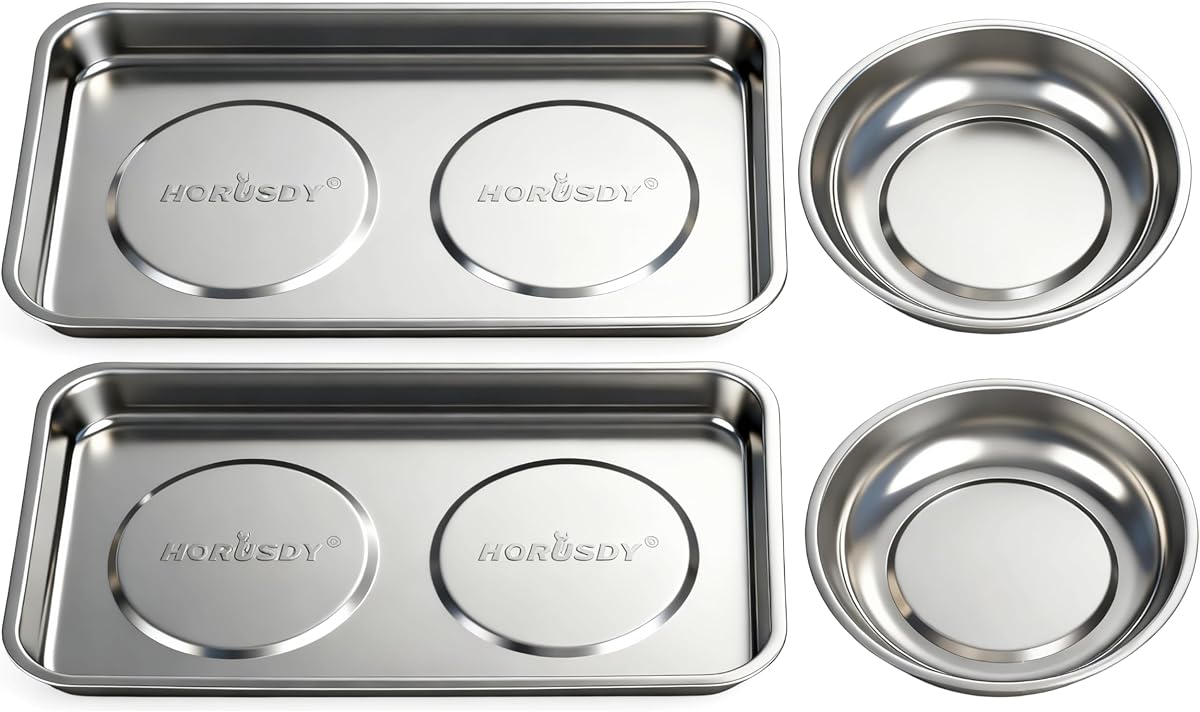
The HORUSDY four-piece set combines rigid stainless steel construction with a useful mix of tray shapes and sizes. Its 4.7 rating is among the strongest in this collection, and the broad 9.5-by-5.5-inch square tray offers enough room for larger groups of fasteners while the round dishes suit smaller components such as screws, nuts, washers, and clips.
We may earn a commission when you buy through this link, at no additional cost to you.
The strong magnets allow the trays to be placed horizontally, vertically, sideways, or upside down on compatible metal surfaces. During a PC build, this flexibility is more useful than it may initially appear. A tray can sit beside the motherboard, remain attached to the side of a metal chassis or tool chest, or keep a group of parts visible while the builder reaches for a screwdriver. The rubber-covered magnetic base helps reduce scratching and direct metal-to-metal contact.
Stainless steel provides a firmer feel than flexible silicone and resists deformation when parts are pushed together with a screwdriver tip. The tradeoff is that these trays do not collapse, so the set claims more permanent space than a folding option. Color coding is also absent, which means builders must rely on placement, labels, or their own system to distinguish hardware groups.
This set is an excellent general-purpose choice for assembling a tower PC, installing a graphics card, mounting storage, or servicing a metal computer case. It is especially attractive to builders who want strong magnetic attachment, easy-to-clean surfaces, and a balanced selection of tray dimensions without carrying a larger eight- or twelve-piece kit.
Round trays naturally contain compact fasteners, while the larger square tray can handle broader groups of screws, brackets, and small parts. Having both shapes available reduces the need to move hardware between mismatched containers.
Because the trays can attach in several orientations, they can remain close to the active work area. Builders working inside a metal chassis can keep sorted hardware visible without leaving it on the floor or a distant work mat.
We may earn a commission when you buy through this link, at no additional cost to you.
The GRENPRO 4-Pack is a well-balanced collection of stainless steel trays for builders who want organized hardware without carrying an oversized set. The set has a 4.7 rating and includes a 3.03-inch round tray, a 5.91-inch round tray, a small square tray, and a large shallow tray, giving users several useful ways to separate parts.
We may earn a commission when you buy through this link, at no additional cost to you.
Strong magnetic bases keep metal components secure while also allowing each tray to attach to toolboxes, cabinets, and other metal surfaces. The treated bases are designed to resist slipping and scratching, which is a meaningful advantage when trays are moved around a busy workbench. Because the trays hold their shape, they also provide a consistent surface for handling screws, nuts, bolts, and washers.
As with most fixed stainless sets, this option occupies more space than a collapsible silicone kit. It also does not offer distinct colors for immediate visual identification. Those shortcomings are modest for builders who want durable dishes and can use physical placement to organize the contents. Its four-piece format is less expansive than the eight-piece alternatives, but it covers small, medium, square, and shallow-storage needs.
The GRENPRO set suits users who regularly service computers, appliances, or mechanical equipment and want one tray system to handle multiple repair categories. For a PC builder, it is a practical choice when parts must remain attached to a steel desk, cabinet, or tool chest while the work area itself is being rearranged.
The set mixes two round sizes with a small square tray and a large shallow tray. That variety makes it easy to reserve the deeper round dishes for loose fasteners and use the square formats for longer or grouped components.
A treated, non-slip base helps a tray remain stable and reduces contact with the supporting surface. This is particularly useful on painted metal cases, steel cabinets, and workshop benches where loose hardware is already difficult to control.
We may earn a commission when you buy through this link, at no additional cost to you.
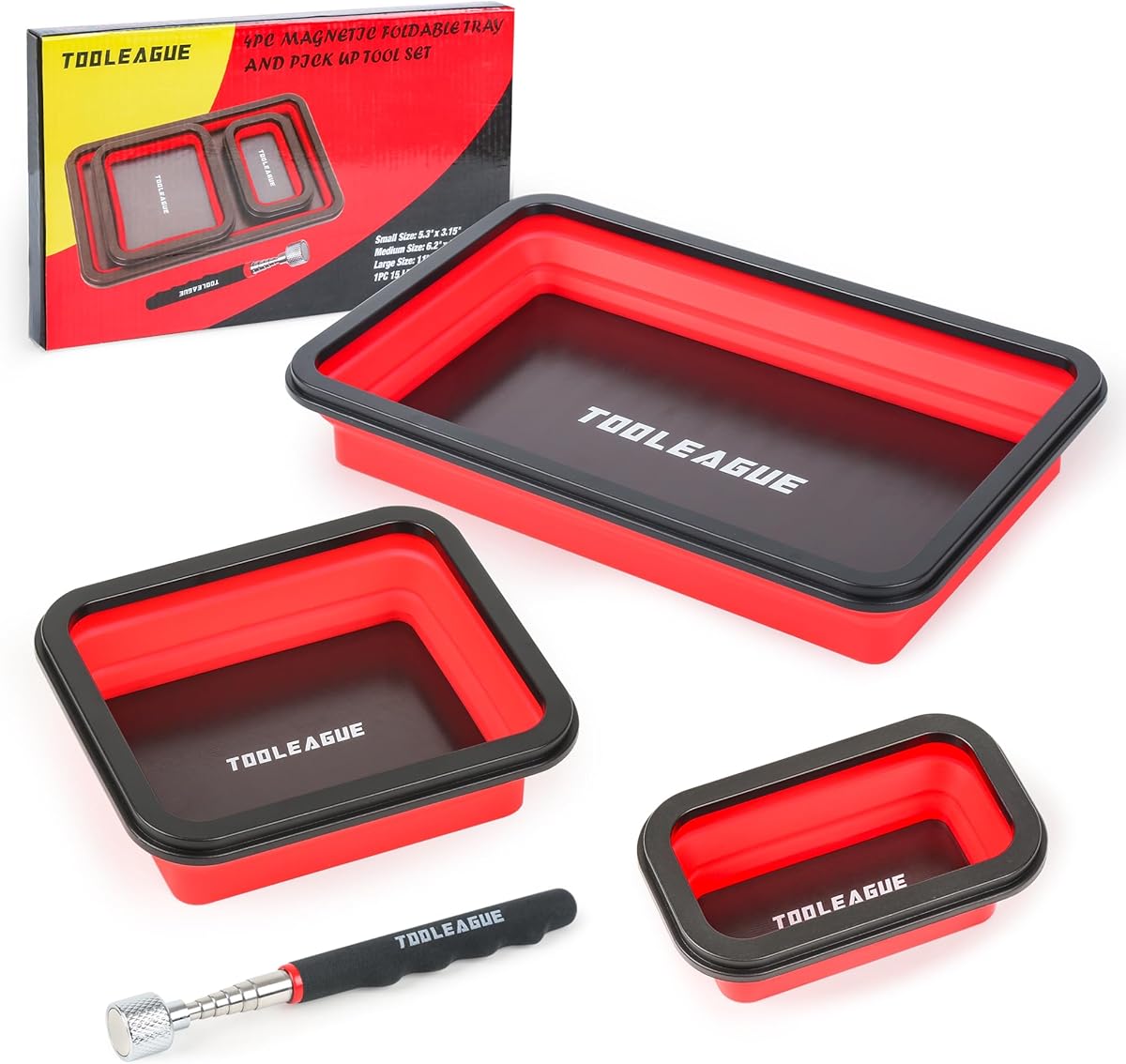
The 3-Piece Collapsible Magnetic Parts Tray Set stands out because it combines three graduated silicone trays with an adjustable magnetic pickup pen. Its 4.5 rating indicates positive customer feedback, while the pickup tool adds a practical way to recover small metal components from narrow spaces inside a computer case or around a crowded workbench.
We may earn a commission when you buy through this link, at no additional cost to you.
The trays measure 5.31 by 3.15 inches, 6.14 by 5.2 inches, and 11.02 by 7.09 inches. Each expands to approximately 1.97 inches deep and compresses to about 0.78 inch, creating a useful range from small hardware bins to a broad tray for case screws or mounting hardware. High-grade silicone is flexible, durable, and easy to clean with soap and water.
The pickup pen can be extended, retracted, and adjusted to reach small parts, giving the set functionality beyond basic magnetic storage. Its limitations are the relatively small three-tray count and the lack of the rigidity found in steel. The broad largest tray can compensate for the lower count, but buyers with several simultaneous projects may prefer a larger set.
This option is best for mobile builders, students, and anyone assembling a PC in a confined temporary workspace. It is particularly attractive when recovering dropped screws matters, since the included pen can help retrieve hardware that would otherwise disappear into dark gaps or beneath dense cable bundles.
The included magnetic pickup pen is useful for screws and other small metal pieces lodged near fans, cable channels, or case seams. Its adjustable length allows the tip to reach into confined areas without requiring a full-sized tool.
Small fasteners, medium mounting hardware, and a wider assortment of case components can each receive a dedicated area. The size progression also lets the trays nest or stack more efficiently when a build is paused.
We may earn a commission when you buy through this link, at no additional cost to you.
The 12-Piece Collapsible Magnetic Parts Tray Set is the most extensive organization package in this guide. It includes twelve silicone trays distributed across red, blue, yellow, and green colors and three size categories. The 4.5 rating reflects positive feedback, and its strongest attraction is the ability to assign a distinct color and size to many separate groups of PC hardware.
We may earn a commission when you buy through this link, at no additional cost to you.
Large trays measure 9.65 by 1.97 inches, medium trays measure 4.92 by 1.97 inches, and small trays measure 3.94 by 1.77 inches. The adhesive magnetic bases allow placement on metal surfaces, while the flexible silicone construction is heat resistant, easy to wash with soap and water, and compatible with brake cleaner when more substantial cleaning is required.
The main disadvantage is obvious: twelve pieces create the largest storage and transport footprint here. Flexible silicone also provides less rigidity than stainless steel, and the numerous colors are most useful when the builder actually creates a consistent labeling system. Some users may prefer two or four trays that remain permanently on the bench instead of maintaining a larger collection.
This set is ideal for advanced builders, modders, system integrators, or anyone handling multiple computer projects at once. It is particularly valuable for PC restoration work involving many generations of case screws, brackets, drive hardware, and expansion-card fasteners. The color range makes it easier to isolate those groups and avoid installing the wrong component.
A larger PC build can produce many small categories of hardware. Twelve dedicated trays reduce the temptation to mix case screws, motherboard standoffs, storage fasteners, and cooling hardware together, making final reassembly faster and more confident.
Four colors make it possible to organize by function, project stage, or component family. Labeling the underside of each tray with the corresponding PC section further improves the system without changing the compact design.
We may earn a commission when you buy through this link, at no additional cost to you.
The Titan 11061 Mini Magnetic Parts Tray delivers a focused solution in a single 4.25-inch stainless steel dish. It carries a 4.8 rating, the highest numeric rating among the products supplied, and its compact design makes it especially practical for screws, hardware, fasteners, and other small pieces that need to remain visible during a PC assembly.
We may earn a commission when you buy through this link, at no additional cost to you.
The rubber-covered magnetic base serves two purposes. It helps prevent scratching while the tray rests on a metal surface, and it allows the dish to attach to ferrous metal. Because it works upside down, a builder can secure it beneath a metal shelf, cabinet panel, or chassis edge while keeping the contents available from below.
As a single mini tray, it cannot offer the separation capacity of a multi-piece kit. That limitation becomes apparent when several hardware categories are open simultaneously or when larger brackets and connectors need somewhere to rest. On the other hand, the simplicity may be preferable for a quick repair, a single upgrade, or a builder who wants one dependable dish without excess equipment.
This is the best choice for basic organization at a compact scale. It works especially well for a dedicated screws and fasteners group during a tower build, or as a small magnetic landing area placed inside a metal case. Buyers who anticipate a major build with many component groups may want to add additional trays, but the Titan remains a versatile building block.
The 4.25-inch diameter takes up little bench or shelf space while still providing a practical area for PC fasteners. It can sit close to the active work zone without competing with tools, manuals, or anti-static mats.
The ability to work upside down makes the tray more versatile than a conventional dish. Builders can keep a group of screws visible beneath a compatible metal surface or attach it vertically to a cabinet.
We may earn a commission when you buy through this link, at no additional cost to you.
The 4-Pack Stainless Steel Black Magnetic Trays set offers a clean, practical way to organize PC hardware across several sizes. Its 4.5 rating suggests generally positive feedback, and the configuration includes a 3-inch round tray, a 6-inch round tray, a square tool tray, and a large shallow tray for separating fasteners, clips, washers, and larger groups of small components.
We may earn a commission when you buy through this link, at no additional cost to you.
The magnetic base attaches firmly to toolboxes, cabinets, workbenches, lifts, and other compatible metal surfaces. Builders can position the trays vertically or upside down to reach hardware in confined spaces. Stainless steel contributes durability and a smooth surface that can be wiped down after dusty computer work or repeated maintenance sessions.
A covered base helps reduce direct metal-to-metal contact, slips, and scratches. The lack of distinct colors, however, makes visual grouping less immediate than in the multicolor kits. These trays also remain rigid and cannot collapse, so a builder maintaining several active work areas may need additional storage for the unused pieces.
The set is well suited to garage-based computer repairs, general electronics servicing, and clean home workshops. Its four-tray format feels more manageable than an eight- or twelve-piece collection while still providing enough separation for a typical upgrade, new system assembly, or recurring diagnostic work.
The wipe-clean stainless surfaces and protected base suit workshops where trays are handled frequently. Multiple sizes make it easier to keep tiny screws separate from longer brackets, clips, or grouped connectors during diagnostics.
A tray that remains fixed to a metal cabinet or toolbox can stay within reach throughout a repair. This reduces the chance that a tiny screw will be swept away or buried beneath other PC components.
We may earn a commission when you buy through this link, at no additional cost to you.
The GENHAKON eight-piece magnetic tray collection provides more separation capacity than most four-piece kits without reaching the size of the twelve-piece option. Its 4.6 rating is solid, and the red rectangular trays form a visually uniform system for builders who prefer a consistent workshop appearance over individually color-coded hardware groups.
We may earn a commission when you buy through this link, at no additional cost to you.
The set includes two 11.4-by-10.6-inch trays, three 6-by-2.5-inch trays, and three 3.6-by-2.5-inch trays. Powerful magnets keep metal parts secure and allow the trays to attach to compatible work surfaces. Their solid stainless steel construction is intended to withstand repeated use, while the black soft-rubber base helps prevent sliding, marks, and direct contact with the supporting surface.
Uniform red coloring has both aesthetic and organizational consequences. It produces a tidy, professional-looking collection, but it does not communicate category differences as quickly as the four-color silicone set. Eight trays also demand more storage space, although having several small and medium options can help prevent overfilling a single large tray.
This collection is a good fit for system builders, mechanics, and DIY users handling mixed hardware from computers, appliances, or vehicles. It is particularly useful when a build contains several motherboard screws, expansion-card brackets, case fasteners, and cooling accessories that would otherwise share a single dish.
Large trays can support broader groups of case hardware, medium trays can handle component fasteners, and small trays keep individual screw groups together. The dimensional range makes it easier to match each group with an appropriately sized container.
The soft-rubber underside helps a loaded tray remain steady and reduces the chance of marking a work surface. It is a useful detail for builders who keep multiple trays attached to metal cabinets and benches.
We may earn a commission when you buy through this link, at no additional cost to you.
The DURATECH 3-Pack stands out through its double-sided magnetic base and three distinct colors. With a 4.6 rating, it offers a strong balance of holding power, portability, and visual organization. Each tray is approximately 4.5 by 4.5 by 0.75 inches when collapsed and expands to a four-and-a-half-inch capacity when opened.
We may earn a commission when you buy through this link, at no additional cost to you.
The double-sided base is designed to attach securely to compatible metal surfaces while also holding metal components inside the bowl. Blue, purple, and green provide immediate category distinctions, allowing a builder to separate motherboard hardware, case screws, and cooling or expansion components without adding labels.
High-grade silicone gives the trays flexibility and makes them easy to clean with soap and water. The limitations are the three-piece count and the relatively modest dimensions of each tray. Compared with a rigid multi-tray set, the flexible construction provides less support for large parts and offers fewer dedicated holding areas, although folding compensates for some of the lost storage volume.
This set is a good match for compact work areas, portable repair kits, and builders who value fast color recognition. It is especially helpful when only three hardware groups are active at once and the ability to fold the trays flat between stages matters more than having a dozen separate compartments.
The dual magnetic construction supports both functions of the product: securing the tray to a metal surface and helping keep metal parts in place. That versatility allows the bowls to be mounted vertically or sideways during a repair.
Each tray folds down to only 0.75 inch, making the set easier to place in a drawer, tool pouch, or carry kit. Three bright colors add immediate visual organization without requiring adhesive labels.
We may earn a commission when you buy through this link, at no additional cost to you.
The Rechabite eight-piece set uses eight uniform rectangular trays, each measuring 3.7 by 2.5 inches. Its 4.5 rating reflects generally favorable feedback, while the repeated shape creates a simple system in which screws, sockets, bolts, pins, and other small hardware can be separated into eight consistent compartments.
We may earn a commission when you buy through this link, at no additional cost to you.
Heavy-gauge polished 430 stainless steel provides a rigid, durable surface, and the bottom includes a PVC covering intended to protect the supporting area. Strong magnets keep the metal contents secure and permit horizontal, vertical, sideways, or upside-down positioning on suitable metal surfaces. That makes the trays useful around a steel case, tool cabinet, or workshop bench.
Uniform dimensions simplify stacking and labeling, but they also limit flexibility. Larger PC components, such as long brackets or cable-management pieces, may not fit comfortably, and the lack of color coding means the builder must create a separate visual system. The eight identical trays also offer less shape variety than mixed-format collections.
This set is best for builders who want a consistent row of small compartments for numerous groups of fine hardware. It is especially effective for PC repairs involving many tiny screws and pins, where maintaining eight clearly labeled categories reduces the risk of leaving a fastener behind during reassembly.
Identical trays make it easy to establish a repeatable labeling system. Each compartment can hold one motherboard zone, case section, expansion-card group, or other defined hardware category.
The polished stainless steel offers a firm, easy-to-clean surface for fine fasteners. Unlike flexible silicone bowls, the rigid tray remains stable when a screwdriver is used to guide or collect screws inside it.
We may earn a commission when you buy through this link, at no additional cost to you.
The most useful tray depends on your workspace, the number of hardware groups involved, and whether portability, fast sorting, or maximum durability matters most. Consider these factors before choosing a set.
Match the count to the complexity of the build, not merely the number of parts.
Choose dimensions that fit both the hardware and the available work area.
Prioritize secure retention together with a surface-protecting base.
Choose steel for rigidity and silicone for flexibility and compact storage.
Confirm that the set fits the workspace and the intended storage location.
Use colors or labels to reduce confusion during final reassembly.
Confirm that included tools and varied sizes solve a real organizational need.
Favor easy cleaning and store magnetic trays away from sensitive electronics.
Before beginning a build, divide the hardware into logical groups. Small trays can hold motherboard screws and corresponding standoffs, medium trays can hold expansion-card brackets, and larger trays can hold case fasteners or cooling hardware. If the trays are colored, assign a category to each color and remain consistent throughout the project. Keeping similar screws and their associated parts together reduces the chance of a mismatch during reassembly.
Place each tray on a flat, clean surface or attach it to a compatible metal panel, cabinet, or chassis. Keep trays away from fans, intakes, and other locations where a small screw could fall into moving parts. Use a magnetic pickup pen when retrieving fasteners from confined areas, and place retrieved hardware directly into its assigned tray. When moving the computer or working underneath it, remove loose metal items from the work area first.
After use, brush away dust and wipe the trays with a clean cloth. Stainless steel surfaces can be wiped with a suitable cleaner, while silicone trays should be washed with soap and water according to their instructions and allowed to dry fully before storage. Keep magnetic trays separated from hard drives, removable media, cards, and other magnetically sensitive devices. For long-term storage, nest or stack the trays carefully and avoid placing heavy objects on flexible silicone bowls.
Magnetic trays are generally useful for organizing loose metal screws and other hardware during a build. Keep strong magnetic trays away from hard drives, memory modules, graphics cards, and other magnetically sensitive electronic components. Use the trays to hold fasteners rather than resting active storage or electronic parts directly against them.
No. The magnetic effect will not retain plastic cable ties, rubber grommets, fabric, or most non-ferrous materials. Those parts should be placed in conventional containers or bins, while magnetic trays are reserved for screws, standoffs, steel washers, drive hardware, and other metal components.
Stainless steel trays are rigid, durable, and easy to wipe clean, making them suitable for a permanent bench organization system. Silicone trays are flexible, portable, and often collapsible, which can be advantageous in temporary workspaces. The better option depends on whether you prioritize stable organization or easy storage and transport.
A mixed set is usually most effective because PC builds produce different scales of hardware. Small dishes suit fine screws and standoffs, while medium and large trays handle case fasteners, brackets, and grouped components. If space is limited, one medium tray plus a small dish can still provide a functional two-category system.
You can attach one to a compatible ferrous-metal section, provided it does not obstruct fans, airflow, radiators, drives, cables, or expansion cards. Check for clearance before placing a tray inside a case, and remove loose metal parts before the system is powered. A tray mounted outside the chassis is often easier to access during assembly.
Assign each hardware group a dedicated tray and avoid placing loose screws on the case floor or directly on a cable bundle. Keep the tray within reach of the active installation area, and use a magnetic pickup pen for screws that fall into gaps. Before reassembly, compare each populated tray with the component list for that section of the PC.
Color coding is helpful when several categories of hardware are open at once because it enables faster visual separation. Plain trays can be equally effective if the builder applies consistent labels to their undersides. The more important point is to create a simple labeling system and keep it consistent from the start of the build.
Stainless steel trays can usually be wiped with a clean cloth and an appropriate cleaner, while silicone trays are generally washable with soap and water. Dry flexible trays completely before stacking them, and never immerse an electrical component in a tray. Follow the product-specific care instructions if they differ from these general recommendations.
The HORUSDY four-piece stainless set is the most versatile all-around choice because it combines rigid construction, mixed shapes, protected bases, and flexible magnetic positioning. The Titan 11061 mini tray is the straightforward budget option for a compact workspace, while the twelve-piece collapsible multicolor set provides the strongest organization for complex builds and multiple active projects.
Prioritize the number of hardware groups you need to separate, the dimensions of your smallest and largest parts, and the amount of available storage space. Rigid stainless steel suits a permanent workbench, flexible silicone favors portability, and color coding or labels can prevent costly confusion during reassembly. Whichever format you choose, assign each tray a clear purpose and keep it away from fans and sensitive electronics.
Ratings, configurations, and product availability can change, so check the current listing before purchasing. Review the dimensions, included pieces, material, magnetic-base protection, and current customer feedback to confirm that the set still matches your PC-building needs.