
TP-Link Archer BE230
4.2Editor score
Entry-level Wi-Fi 7
Multi-gig Ethernet connectivity
EasyMesh whole-home expansion
Our Low Latency WiFi Routers guide compares ten models for wireless speed, wired connectivity, range, gaming features, and dependable everyday performance.
Low latency matters whenever delay interrupts a fast connection. The right router can reduce lag, smooth crowded connections, and keep games, calls, and streaming responsive. This guide covers ten current Wi-Fi 6, Wi-Fi 6E, and Wi-Fi 7 routers designed to deliver strong real-time performance across demanding homes.
We compared the products using their stated standards, maximum wireless rates, ports, processing resources, coverage claims, multi-device features, gaming tools, security options, and management interfaces. The list includes budget models, tri-band and quad-band systems, VPN-focused routers, and premium options with unusually fast wired connections.
Each review explains the router's most useful strengths, limitations, and ideal owner, helping you distinguish headline speed from the features that improve daily responsiveness. Product configurations and promotions can change, so confirm the current specifications, compatibility, and price before making a final purchase.
4.2Editor score

4.6Editor score
4.3Editor score
The comparison below highlights each router's wireless generation, aggregate speed, multi-gig networking, and best-supported use case to make side-by-side selection easier.

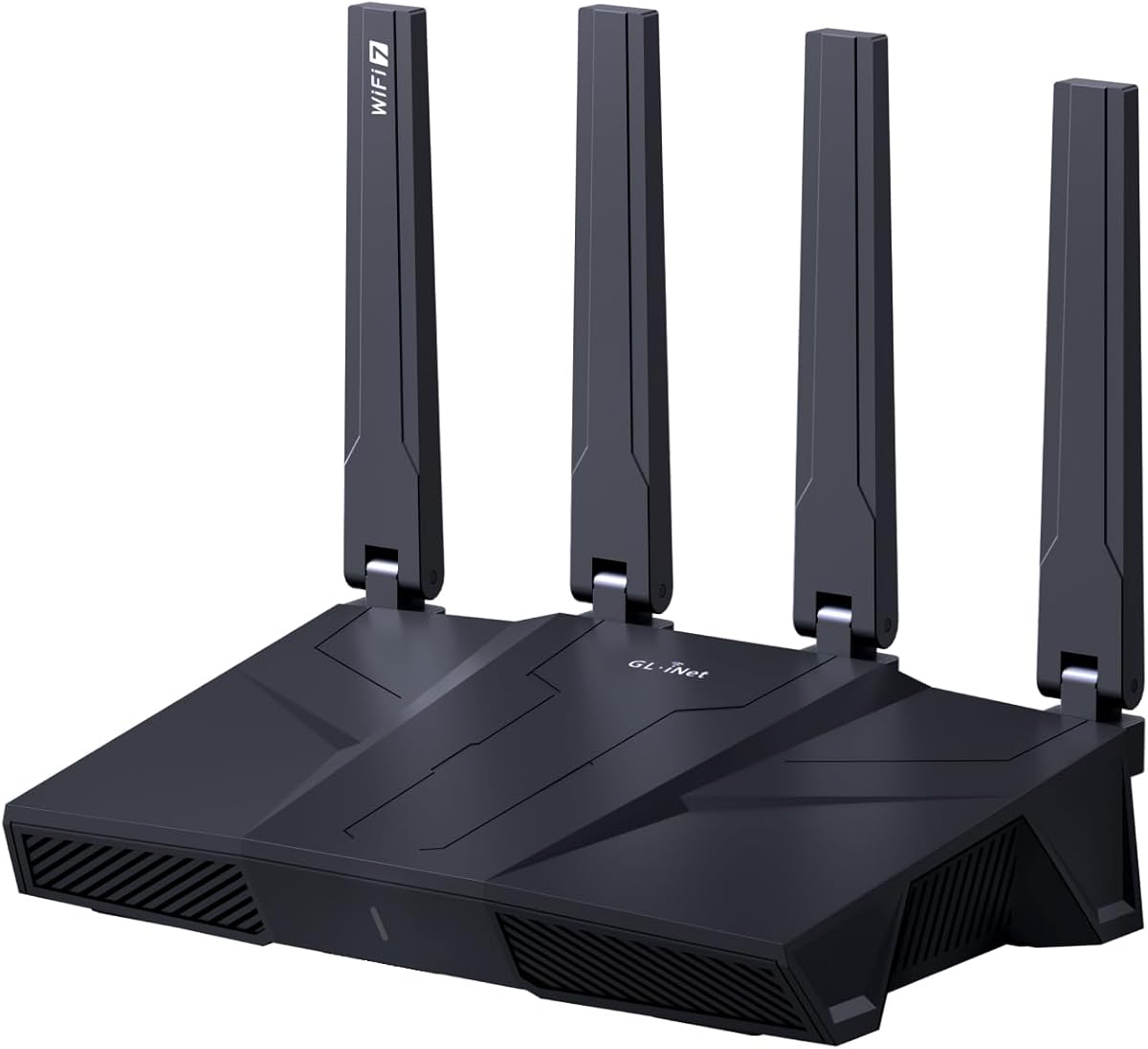



The GL.iNet GL-MT6000 Flint 2 is the strongest all-around recommendation in this guide, combining an emphasized gaming platform, Wi-Fi 6 performance, and two 2.5G ports. Its 4.6 rating is the highest among the listed products. The eight-stream radio, aggregate speed of up to 6 Gbps, and 1GB of DDR4 memory give it useful headroom for gaming, work, and busy connected homes.
We may earn a commission when you buy through this link, at no additional cost to you.
Its most compelling feature is the balance between responsive networking and practical wired speed. GL.iNet lists WireGuard performance of up to 900 Mbps and OpenVPN performance of up to 880 Mbps, although actual results depend on the internet plan, VPN provider, server location, and local conditions. The 2.5G ports can remove the common gigabit bottleneck for a gaming desktop, game streaming setup, or network storage device, while Wi-Fi 6 handles compatible phones, laptops, consoles, and smart-home equipment.
The Flint 2 also supports AdGuard Home for DNS-based ad and tracker filtering, accommodates more than 100 devices, and offers a web administration panel for direct control. Its 1GB RAM and 8GB eMMC give it more resources than many affordable routers, which can be valuable for people interested in additional plugins. The principal trade-off is age: it uses Wi-Fi 6 rather than the newer Wi-Fi 7 standard, and it has fewer high-speed Ethernet ports than several premium alternatives.
This is the router to choose when gaming responsiveness, VPN speed, and flexible wired connections matter more than owning the newest wireless generation. It suits households that want a capable dedicated gaming router without moving into the most expensive category. Update the firmware during initial setup, connect it by Ethernet for administration if needed, and give the new configuration time to optimize. For most buyers seeking the most balanced low-latency experience, the Flint 2 is the recommendation to beat.
Eight-stream Wi-Fi 6, 1GB of DDR4 memory, and an 8GB eMMC allow the Flint 2 to handle numerous simultaneous activities without relying on a lightweight platform. Those resources are particularly helpful when gaming, streaming, downloading, and running local network services overlap.
Two 2.5G ports add useful wired headroom, while the stated WireGuard and OpenVPN rates make this model appealing to people who need a protected connection without accepting a severely limited router-based VPN.
We may earn a commission when you buy through this link, at no additional cost to you.
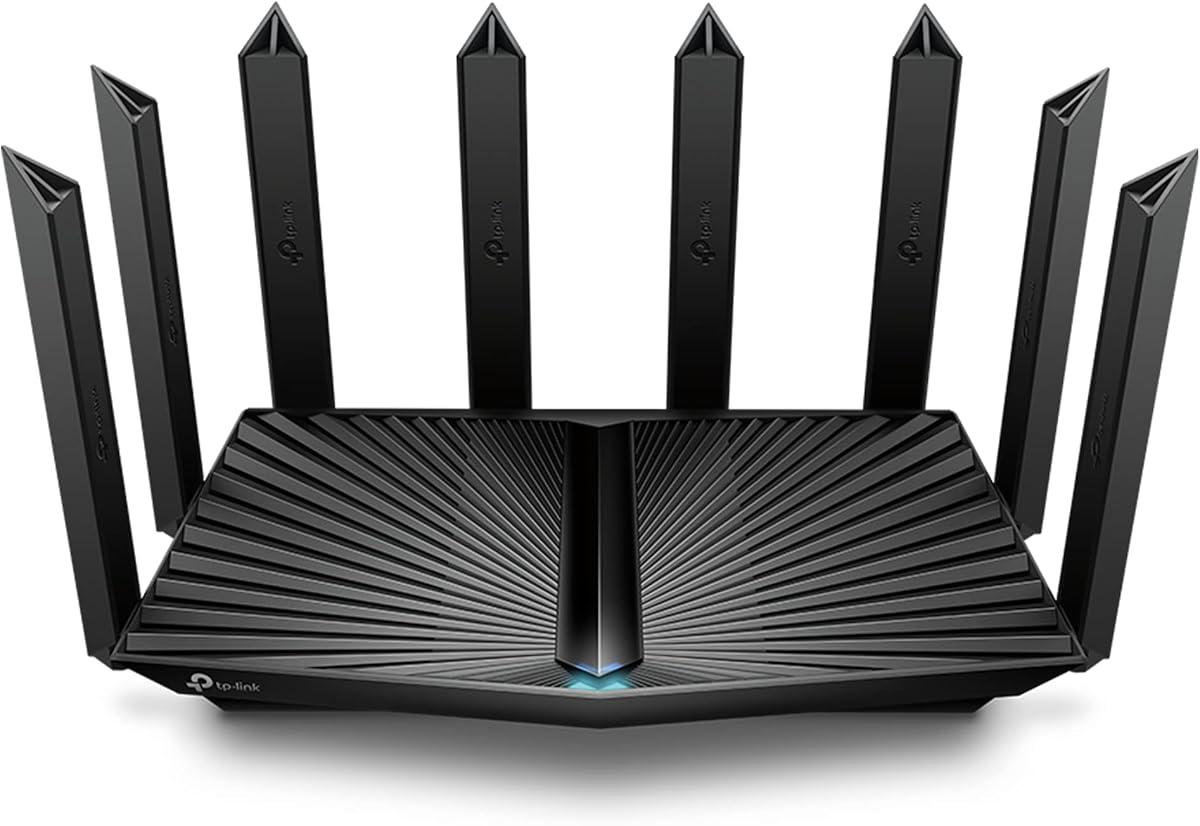
The TP-Link Archer AXE75 combines tri-band Wi-Fi 6E with a dedicated 6 GHz spectrum, making it a practical choice for users who want newer wireless capabilities without moving to Wi-Fi 7. Its stated aggregate rate is up to 5,400 Mbps, divided among 2.4, 5, and 6 GHz bands. The 4.3 rating reflects a broadly capable router with a notable 6 GHz option for compatible modern devices.
We may earn a commission when you buy through this link, at no additional cost to you.
The 6 GHz band is its main advantage for low-latency use. Compatible devices can receive a cleaner, higher-capacity path that may be less congested than the traditional 2.4 and 5 GHz bands. True tri-band operation and OFDMA allow simultaneous transmission to more clients, which is useful when several people are gaming, joining video calls, and watching high-resolution video at the same time.
TP-Link pairs the radios with a 1 GHz dual-core processor, 512MB of memory, and a housing designed for heat dissipation. The router also supports EasyMesh expansion, OpenVPN, PPTP, and L2TP in server or client configurations, while HomeShield includes basic parental controls, a security scan, IoT device identification, Quality of Service, and recurring reports.
The important limitation is wired speed. The AXE75 does not offer the 2.5G networking found in the Flint 2, Archer BE230, and several Wi-Fi 7 models, so it is less attractive for owners of multi-gig internet plans or ultra-fast network storage. It remains a compelling pick for a busy home that prioritizes wireless separation and affordable tri-band Wi-Fi 6E. Choose it when a dedicated high-bandwidth wireless lane matters more than multi-gig Ethernet.
The 6 GHz radio can give compatible Wi-Fi 6E clients access to wider channels and additional capacity. In a crowded home, that separation can be more meaningful than a slightly higher maximum speed on an already congested 5 GHz network.
EasyMesh compatibility lets you add compatible routers, extenders, or wireless powerline adapters. This makes the AXE75 a practical starting point when coverage needs will expand as the household changes.
We may earn a commission when you buy through this link, at no additional cost to you.
The GL.iNet GL-BE9300 Flint 3 is the most convincing Wi-Fi 7 option for buyers who need more than one multi-gig Ethernet port. It combines tri-band Wi-Fi 7, up to 9 Gbps aggregate wireless speed, and five 2.5G ports. The 4.3 rating is supported by a specification set oriented toward high-speed homes, network storage, and demanding connected environments.
We may earn a commission when you buy through this link, at no additional cost to you.
Five 2.5G ports distinguish it from routers that provide one or two high-speed sockets. A home can connect a desktop, game console, television, storage system, and access point without falling back to 1G networking. On the wireless side, Multi-Link Operation, enhanced OFDMA, 4K-QAM, and preamble puncturing are intended to lower delay and increase reliability in crowded environments.
The Flint 3 also offers WireGuard and OpenVPN rates of up to 680 Mbps, AdGuard Home support, a claimed capacity for more than 100 devices, and 1GB of DDR4 memory with 8GB of eMMC. Its listed coverage reaches up to 2,000 square feet, though walls, placement, client hardware, and interference affect real results. Bark integration provides website filtering, safe search, and usage limits for families.
Its trade-offs are cost and client readiness. New Wi-Fi 7 features do not create faster links on older devices, and a household with mostly Wi-Fi 6 equipment may receive less benefit than the specifications suggest. Even so, the port selection makes the Flint 3 particularly useful for owners of a multi-gig internet plan or fast local storage. It is a strong recommendation for current Wi-Fi 7 users and a forward-looking option for mixed-device homes.
Unlike most routers limited to one or two 2.5G connections, the Flint 3 gives you a practical pool of high-speed wired ports. This is especially helpful for local traffic, where the router itself need not limit fast storage or modern client hardware.
Multi-Link Operation and enhanced OFDMA target exactly the crowded conditions in which older dual-band systems can struggle. The benefits are most visible when several modern clients compete for airtime.
We may earn a commission when you buy through this link, at no additional cost to you.
The NETGEAR Nighthawk R7000 is a balanced tri-band Wi-Fi 7 router for households that want modern wireless performance, multi-gig internet support, and a familiar app-based setup. It offers up to 9.3 Gbps across the 2.4, 5, and 6 GHz bands, with a 2.5G WAN port, two 2.5G LAN ports, and two 1G LAN ports. Its 4.3 rating reflects a well-rounded feature set.
We may earn a commission when you buy through this link, at no additional cost to you.
The added 6 GHz band gives newer devices access to a dedicated high-speed lane. Nighthawk describes this as helping demanding clients avoid contention with other traffic, while Multi-Link Operation and the wider wireless capacity can improve responsiveness in busy networks. The router is rated for up to 100 devices and up to 2,500 square feet, making it suitable for active homes with streaming, calls, gaming, and smart-home products.
Management is handled through the Nighthawk app for iOS and Android, which supports guided setup, Wi-Fi management, speed tests, device pausing, and guest networks. Security features are enabled out of the box, automatic firmware updates are provided, and Advanced Router Protection is included. NETGEAR Armor is offered through a free trial, but continued use requires a separate subscription.
The main drawback is that coverage figures are laboratory-style maximums; walls, floors, nearby networks, and router placement can reduce actual range. Larger or multi-story homes may still need Orbi mesh equipment. The port arrangement is less generous than the Flint 3, but it is highly practical for a normal connected household. Choose the R7000 when you want a polished app, Wi-Fi 7, multi-gig readiness, and enough capacity for many clients.
Connecting a compatible modem or gateway to the 2.5G WAN port allows the router to take advantage of multi-gig service. The two additional 2.5G LAN ports are useful for demanding devices, while 1G ports cover standard equipment.
The Nighthawk app puts network controls, guest access, speed tests, and device management in one place. Automatic firmware updates also reduce the need for manual maintenance.
We may earn a commission when you buy through this link, at no additional cost to you.
The NETGEAR Nighthawk RS90 brings dual-band Wi-Fi 7 to smaller and medium-sized homes without relying on a tri-band configuration. It provides up to 3.6 Gbps across 2.4 and 5 GHz, supports up to 50 devices, and includes a 2.5G WAN port for faster internet plans. Its 4.3 rating makes it a credible step up from basic dual-band routers.
We may earn a commission when you buy through this link, at no additional cost to you.
Wi-Fi 7 features such as MU-MIMO and OFDMA allow multiple devices to transmit and receive more efficiently. The 320 MHz channels available within the 5 GHz spectrum can provide additional capacity on compatible clients, while the 2.5G WAN port avoids limiting multi-gig service at the network edge. Four 1G LAN ports provide ample connections for ordinary computers, consoles, televisions, and storage devices.
The Nighthawk app provides guided installation, remote Wi-Fi management, speed tests, device pausing, and guest networking. Like the larger tri-band Nighthawk model, the RS90 includes security features enabled by default, Advanced Router Protection, and automatic firmware updates. NETGEAR Armor includes a trial period, with a subscription required afterward.
The limitation is predictable: without a 6 GHz radio, the RS90 cannot offer the clean dedicated lane of a tri-band Wi-Fi 7 router, and it has fewer than two 2.5G LAN ports. It is also not the option for very large homes because its stated coverage reaches up to 2,000 square feet. Within those boundaries, it offers a clear route to Wi-Fi 7 and multi-gig internet at a restrained level.
You do not need four radios to benefit from Wi-Fi 7 efficiency. The RS90 focuses on the core improvements in concurrency, channel width, and multi-gig access without adding a 6 GHz band.
The stated 50-device capacity suits couples, families, and active apartments. Larger offices or heavily connected homes may prefer a higher-capacity model or a mesh network.
We may earn a commission when you buy through this link, at no additional cost to you.
The TP-Link Archer BE230 is the budget-focused pick because it combines entry-level Wi-Fi 7 with two multi-gig Ethernet ports, a capable processor, and extensive management features. It reaches up to 2,882 Mbps on 5 GHz and 688 Mbps on 2.4 GHz. The 4.2 rating reflects a capable package for homes that want current wireless technology without a premium-tier design.
We may earn a commission when you buy through this link, at no additional cost to you.
Multi-Link Operation, Multi-RUs, and 4K-QAM provide the core Wi-Fi 7 improvements, improving reliability and data capacity depending on the client and network conditions. A next-generation 2 GHz quad-core processor is intended to handle throughput with low latency during heavy transfers, while beamforming and four internal antennas focus signals toward difficult areas. The stated capacity covers up to 2,000 square feet and up to 60 devices.
Its networking is unusually well considered for a budget-oriented model. One 2.5G port handles either WAN or LAN, another provides a dedicated 2.5G LAN connection, and three 1G LAN ports complete the set. TP-Link OneMesh can expand coverage with compatible systems, Tether provides mobile management and firmware updates, and voice-assistant compatibility makes basic control convenient.
As a dual-band router, the BE230 does not support 6 GHz, so users cannot benefit from a dedicated Wi-Fi 7 high band. Walls and distance also affect performance, and the modest 4.2 rating may reflect a market crowded with more ambitious models. Those caveats are reasonable for a budget recommendation. It is best for apartments, medium homes, gamers seeking future-facing features, and anyone who values a 2.5G port at an attainable price.
Multi-Link Operation, Multi-RUs, 4K-QAM, and beamforming make the BE230 more than a simple speed upgrade. They are useful foundations for responsive traffic in a modern mixed-device home.
A flexible 2.5G WAN/LAN port and a dedicated 2.5G LAN port provide a useful combination for a gaming PC, television, or fast storage system. The remaining ports cover standard wired devices.
We may earn a commission when you buy through this link, at no additional cost to you.
The GL.iNet Flint 3e is a Wi-Fi 7 router tailored to people who want a protected connection, a modern gaming platform, and broad home coverage. It offers up to 6.5 Gbps aggregate wireless speed, 1GB of DDR4 memory, and a claimed range of up to 2,500 square feet. Its 4.2 rating complements the larger Flint 3 while maintaining a somewhat different emphasis.
We may earn a commission when you buy through this link, at no additional cost to you.
The standout specification is router-based VPN performance. GL.iNet lists WireGuard and OpenVPN speeds of up to 1,100 Mbps, making this one of the most compelling models in the guide for people who route traffic through a VPN server. Multi-Link Operation, enhanced OFDMA, 4K-QAM, preamble puncturing, and Multi-RUs support lower-latency operation and better performance in crowded wireless environments.
For household management, the router supports more than 100 devices, AdGuard Home for tracking and ad filtering, and Bark integration for website filtering, safe search, and usage limits. It is designed for both home and workplace use, with a web administration panel that can be accessed by connecting the BE6500 to a computer by Ethernet.
Actual VPN throughput depends on the ISP, server location, provider, and surrounding network, as GL.iNet explicitly notes. Wi-Fi 7 gains similarly require compatible devices, and the listed coverage remains sensitive to walls and placement. The Flint 3e is a compelling choice for privacy-conscious users and gamers who prioritize VPN throughput and flexible household controls. It is less essential for users who only need a basic modern Wi-Fi system.
The stated 1,100 Mbps WireGuard and OpenVPN rates are unusually high for a home router. They are most useful when a nearby VPN server, fast internet service, and compatible clients can take full advantage of the hardware.
Bark support gives parents a direct way to manage websites, safe search, and time limits. AdGuard Home provides an additional layer of DNS-level filtering and tracker blocking.
We may earn a commission when you buy through this link, at no additional cost to you.
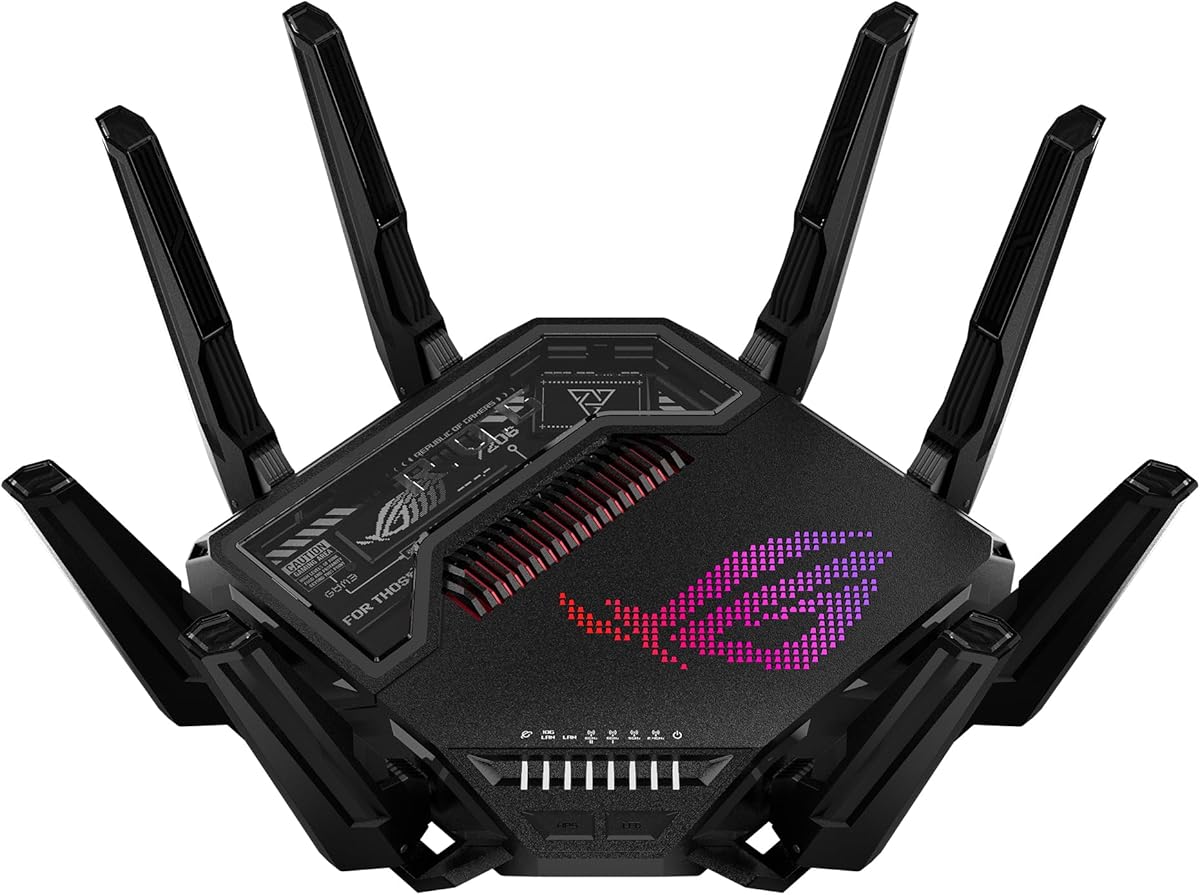
The ASUS ROG Rapture GT-BE98 Pro is the premium choice for a demanding home or enthusiast gaming setup. It combines quad-band Wi-Fi 7, a claimed aggregate speed of up to 30 Gbps, dual 10G ports, and four 2.5G ports. Its 4.3 rating understates how much capacity this model offers, although only owners with suitably fast clients and services can fully exploit it.
We may earn a commission when you buy through this link, at no additional cost to you.
The router supports 320 MHz channels in the 6 GHz band and 4096-QAM, increasing available network capacity. Multi-Link Operation links multiple bands simultaneously to improve connection stability and data-transfer efficiency. External dual-feeding antennas are designed to increase signal strength and coverage, while the abundance of high-speed Ethernet ports allows local devices to communicate without falling back to 1G.
Its most relevant gaming feature is triple-level game acceleration, which is intended to optimize PC gaming traffic from the client side through the router and onward to the game server. For users who want more than general QoS, that focused gaming path can be a meaningful advantage. Mesh support also offers a route to scale coverage in larger homes, provided the rest of the network is appropriately designed.
The obvious trade-off is cost, which places the GT-BE98 Pro far above ordinary dual-band and tri-band models. Its extraordinary headline rate is an aggregate laboratory figure, not a guaranteed individual-client speed. Walls, client limitations, radio congestion, and internet service speed all matter. The recommendation is straightforward: choose this model when you have multiple high-end clients, multi-gig or 10G service, serious local traffic, and a budget that supports premium networking hardware.
Dual 10G and quad 2.5G ports create exceptional wired flexibility for servers, workstations, high-end game systems, and fast storage. The design avoids forcing advanced equipment through a single-gigabit bottleneck.
Triple-level game acceleration targets the complete path from a gaming PC to the game server. That makes the GT-BE98 Pro more relevant to committed gamers than to households simply seeking basic whole-home coverage.
We may earn a commission when you buy through this link, at no additional cost to you.
The TP-Link Archer AX80 is a dual-band Wi-Fi 6 router that combines a strong 4.4 rating with a 2.5G port and broad antenna coverage. It provides up to 4,804 Mbps on 5 GHz and 1,148 Mbps on 2.4 GHz. Although it is not Wi-Fi 7, its mature feature set and high throughput can still deliver responsive performance for compatible devices.
We may earn a commission when you buy through this link, at no additional cost to you.
Eight external high-gain antennas work with beamforming to extend coverage, while MU-MIMO and OFDMA improve simultaneous communication and data-stream efficiency. Those features are valuable in a household where phones, laptops, consoles, televisions, and smart devices are all active at once. The 2.5G multi-gig port prevents a modern fiber or cable connection from being limited to 1 Gbps.
TP-Link HomeShield offers basic network security, IoT identification, parental controls, Quality of Service, and weekly or monthly reports. The router can operate as a VPN client, allowing selected home devices to reach remote VPN servers without installing individual VPN software. OneMesh compatibility creates a unified whole-home network when paired with a supported range extender.
The AX80's age is visible in its wireless standard. It lacks a 6 GHz band, meaning users cannot exploit the clean dedicated spectrum available on Wi-Fi 6E and Wi-Fi 7 systems. Its eight external antennas also create a larger physical footprint than a compact modern router. Still, the combination of strong 5 GHz throughput, multi-gig wired access, and a 4.4 rating makes this a solid option for users whose current devices are primarily Wi-Fi 6.
The 4,804 Mbps 5 GHz capacity provides a strong path for modern laptops, consoles, and televisions. Beamforming focuses the external antennas toward clients rather than scattering energy indiscriminately.
The 2.5G port allows a fast fiber connection, local storage device, or capable computer to operate above gigabit limits. It is a simple but meaningful upgrade path.
We may earn a commission when you buy through this link, at no additional cost to you.
The ASUS ROG Rapture GT-AXE11000 is a large tri-band Wi-Fi 6E gaming router offering up to 11,000 Mbps aggregate speed. Its 4.1 rating is the lowest among the listed products, but the underlying platform remains capable, especially for owners with 6 GHz-compatible devices and demanding local networks. Eight external antennas and a cooling-focused design underline its enthusiast positioning.
We may earn a commission when you buy through this link, at no additional cost to you.
The 6 GHz spectrum provides wider channels and additional capacity, which can reduce interference and lower latency for compatible clients. A quad-core processor and optimized antenna arrangement support the workload, while a 2.5G LAN/WAN port gives priority to traffic flowing through that connection. This is valuable for a gaming desktop or other high-bandwidth device that would otherwise be constrained by gigabit Ethernet.
Triple-level game acceleration is designed to optimize gaming traffic from the device to the game server. That focus makes the GT-AXE11000 more than a conventional high-speed router. It suits owners of powerful gaming PCs who value a dedicated network path and can take advantage of the 6 GHz band without replacing their other client devices immediately.
The main disadvantages are the router's physical size and its older Wi-Fi 6E foundation compared with newer Wi-Fi 7 choices. The eight external antennas make placement more involved, and the stated 11,000 Mbps figure is an aggregate maximum rather than a single-client guarantee. The lower rating also warrants attention when considering equally capable alternatives. Nevertheless, the GT-AXE11000 remains a powerful choice for a dedicated gaming room with compatible hardware and multi-gig service.
The 6 GHz band gives compatible devices wider channels and more room for low-latency traffic. In a home with modern gaming hardware, that additional spectrum can be more valuable than a small improvement in processor speed.
Triple-level acceleration and prioritized 2.5G traffic provide a focused path for demanding clients. These features are most relevant when the router is placed near the main gaming system.
We may earn a commission when you buy through this link, at no additional cost to you.
Choosing well means balancing wireless generation, real-time traffic management, wired speed, range, and device compatibility rather than looking only at the largest advertised rate.
Wi-Fi 6 remains a capable standard for many households, while Wi-Fi 6E adds the 6 GHz band and Wi-Fi 7 introduces features such as Multi-Link Operation, 4K-QAM, and Multi-RUs. Newer standards matter only to the extent that your phones, laptops, televisions, consoles, and other clients support them. A Wi-Fi 7 router can still improve an older network through better processing and multi-device scheduling, but it cannot make an unsupported client receive a Wi-Fi 7 link. For a large collection of current devices, Wi-Fi 7 offers more potential. For a mixed household, a strong Wi-Fi 6 or 6E model may deliver more practical value.
Maximum throughput and latency are related but different measurements. A high aggregate speed does not guarantee a stable real-time experience. Look for MU-MIMO, OFDMA, Multi-Link Operation, beamforming, quality-of-service controls, dedicated gaming features, and a capable processor. These technologies help the router allocate airtime fairly and respond quickly when traffic becomes uneven. Wired connections remain even more predictable for a gaming desktop, so a multi-gig port can be more valuable than another wireless band if the main computer supports Ethernet.
Modern fiber and cable services can exceed 1 Gbps, but a router with only gigabit ports may restrict the connection. A 2.5G WAN port is the common sweet spot because it supports multi-gig service and high-speed local transfers without demanding a costly 10G upgrade. Models with two or more 2.5G ports are especially useful for gaming PCs, network storage, media servers, and access points. Check the port configuration carefully because some multi-gig ports are shared, configurable, or limited in their WAN and LAN roles.
Coverage claims are useful only as general guidance. Walls, floors, building materials, router position, nearby networks, and client capabilities affect real results. A larger home or multi-story property may need a mesh system rather than a single high-speed router. Conversely, a compact apartment can be well served by a dual-band model. Think about where the router will sit, whether Ethernet can be run to access points, and whether the product supports the mesh standard used by compatible accessories in your home. Strong peak speed cannot compensate for a dead zone in the room where you actually play.
Low latency becomes difficult when a router must handle many active clients. Look for stated device counts, sufficient memory, multi-user scheduling features, and a processor designed for high throughput. A gaming-focused home with several consoles, phones, televisions, work devices, cameras, and smart-home products benefits from tri-band or quad-band radios, OFDMA, MU-MIMO, and Multi-Link Operation. Larger device targets do not guarantee good results for every environment, but they provide a better indication than a simple two-radio design intended for light use.
Some buyers want a router that handles a VPN directly, while others prefer app-based parental controls, automatic updates, or a browser interface. GL.iNet models emphasize VPN speed and AdGuard Home, TP-Link offers HomeShield and Tether, and NETGEAR centers management around the Nighthawk app. Security subscriptions differ: NETGEAR Armor includes a trial and then requires a subscription, whereas other features are available without one. Decide which tools you will actually use and review account requirements before purchase. A simple, well-supported interface can be more valuable than a long list of advanced options.
Gaming features range from general Quality of Service to automatic game-server recognition and multi-stage traffic acceleration. ASUS ROG models explicitly emphasize game acceleration, while several GL.iNet and TP-Link routers provide scheduling, VPN support, or policy controls that can be adapted for gaming. These tools are helpful when streaming, downloading, and uploading compete with a live game. Keep expectations realistic, however: no router can remove latency imposed by a distant server, congested internet service, poor Wi-Fi conditions, or an overloaded device.
Begin with the correct placement. Put the router near the center of the home or gaming area, on an open surface with ventilation. Avoid cabinets, enclosed shelving, television backs, and locations beside large metal or microwave appliances. If the internet enters through a separate modem or gateway, connect its Ethernet output to the router's WAN or Internet port. Review the manual to confirm whether your provider requires bridge mode, and connect a computer by Ethernet during initial setup when the manufacturer recommends it.
Update the firmware as soon as the router is configured, then install the current security and wireless updates. Create separate administrator and Wi-Fi credentials, change default network names, and use a strong passphrase. Configure guest access for visitors, parental controls for children, and a VPN only if you understand its effects on local traffic and device compatibility. For gaming, place the wired client near the router, use Ethernet where possible, and test from the actual play location rather than only beside the access point.
Check performance periodically with a modern speed test and the router's built-in diagnostics. Compare results on 2.4, 5, and 6 GHz where applicable, and watch for channel congestion, excessive reboots, or disabled hardware acceleration. Keep the router ventilated, remove accumulated dust, and avoid placing anything that blocks its antennas. If Wi-Fi performance is satisfactory but a specific room remains weak, add a correctly compatible mesh node or wired access point rather than repeatedly changing unrelated settings.
No. A higher rating describes theoretical capacity, while latency depends on signal conditions, network congestion, the internet route, server response time, device performance, and router scheduling. Look for MU-MIMO, OFDMA, Multi-Link Operation, good processing, and quality-of-service tools alongside the headline rate. A wired connection can often provide the most predictable result for a gaming computer.
Wi-Fi 7 can improve responsiveness, reliability, and efficiency in crowded networks, especially when modern clients use its wider channels and Multi-Link Operation features. The benefit is smaller when your main gaming device is limited to Wi-Fi 6 or when the router is placed far from the client. A well-positioned Wi-Fi 6 router can still deliver an excellent experience, so client compatibility and wired options matter as much as the generation.
Ethernet is usually the best choice for consistent low latency because it avoids radio contention, interference, and signal degradation. Use Wi-Fi when cabling is impractical and position the router in a clear, nearby location. If your internet plan exceeds 1 Gbps, confirm that the PC, network interface, cables, and router port all support the required speed.
One is often enough for a multi-gig internet connection, while two or more make sense when you also have fast storage, a television, an access point, or a gaming PC. The Flint 3 offers five 2.5G ports, and the Archer AX80 and BE230 provide useful multi-gig options at more modest levels. Count the wired devices that truly benefit from speeds above 1 Gbps before choosing.
A capable router can reduce local congestion, improve traffic prioritization, and prevent weak Wi-Fi from becoming the bottleneck. It cannot control latency to distant game servers, overloaded internet service, packet loss on an upstream network, or delays created by the game itself. Testing on Ethernet and at different times can help reveal whether remaining lag comes from the local network or the service path.
It depends on the building and where reliable coverage is needed. A single powerful router can work well in an open home, but thick walls, multiple floors, and long corridors often create dead zones. Mesh nodes or wired access points can extend coverage smoothly. The main router should still be placed carefully, and expansion products must support a compatible mesh standard for seamless roaming.
It is important if you routinely connect devices through a VPN or use encrypted remote access. The GL.iNet Flint 2, Flint 3, and Flint 3e list strong WireGuard and OpenVPN throughput, but results depend on the VPN provider, server location, internet plan, and processing overhead. Users who do not need a router-hosted VPN may gain more from spending their budget on better radio coverage or additional multi-gig ports.
Install the initial update as soon as setup is complete, then enable automatic updates if the router supports them. Security and stability patches can matter because routers are exposed to the internet and manage traffic for every connected device. Check the manufacturer's support page periodically as well, especially before installing major new features or changing security settings.
The GL.iNet Flint 2 is the strongest overall choice because it balances gaming performance, capable Wi-Fi 6, two 2.5G ports, fast VPN processing, and generous memory. The TP-Link Archer BE230 is the budget pick for affordable Wi-Fi 7 and multi-gig access, while the ASUS ROG GT-BE98 Pro leads the premium group with extraordinary bandwidth and dedicated gaming acceleration.
Prioritize the connection path that matters most. Use Ethernet for a gaming desktop when possible, choose at least one 2.5G port for multi-gig service or fast local storage, and place the router where the signal is not obstructed. If most clients are older, a mature Wi-Fi 6 or 6E router may deliver better value, while a busy modern household benefits from tri-band Wi-Fi 7 or mesh expansion.
Finally, check the current specifications, firmware, compatibility, subscription terms, and price before ordering. Router configurations and promotions can change, and the best option is the one whose coverage, ports, and management tools fit your home and the devices you actually use.