
Ophayapen 3-in-1 Smart Writing-Smart Pen, Digital Notebook, Writing Board
3.9Editor score
Works with standard paper
Real-time phone synchronization
OCR text conversion
Searchable notes and audio
Handwriting to text tablets combine the natural feel of writing with the convenience of searchable digital notes. The strongest choices deliver responsive pen input, dependable handwriting recognition, useful organization, and a display that remains comfortable for long work sessions. They suit students, professionals, researchers, and anyone who thinks more naturally with a pen.
The products in this guide were compared using their published specifications, stated features, supplied accessories, display technology, portability, and documented handwriting conversion capabilities. The list covers e-ink paper tablets, Android-based digital notebooks, and smart pens that digitize ordinary paper, giving readers several distinct approaches to consider.
Each review explains what makes the product stand out, where its trade-offs appear, and which users are most likely to benefit. Rankings reflect the information available for this guide rather than personal testing, while software updates, bundles, and retail prices can change over time and may influence the final choice.
3.9Editor score

4.3Editor score

4.1Editor score
As an Amazon Associate we earn from qualifying purchases.
This side-by-side comparison highlights the main differences in display design, portability, handwriting conversion, included accessories, and suitable use cases across all ten products.

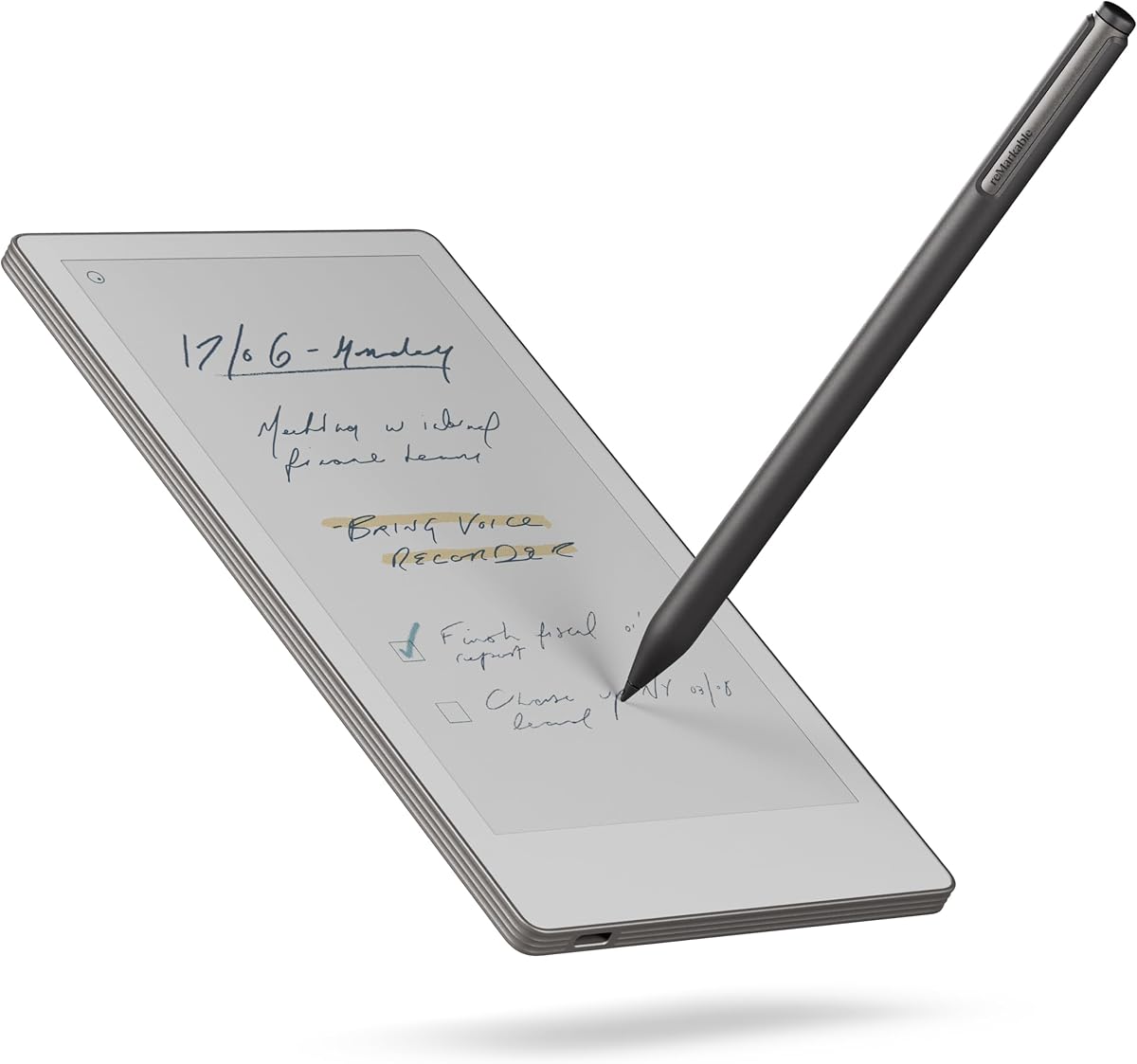


The reMarkable Paper Pure Bundle is the strongest all-around choice in this guide, earning a 4.3 rating from the supplied product information. Its central advantage is the combination of a low-latency 10.3-inch e-ink screen and a natural, uncluttered writing environment. The third-generation display is described as whiter and higher in contrast, while digital ink appears in 21 ms. Those specifications matter because a tablet that feels immediate makes handwritten note-taking more satisfying and keeps attention on the page rather than the technology.
We may earn a commission when you buy through this link, at no additional cost to you.
Its handwriting-to-text functions go beyond the basic promise of transcription. Users can convert handwritten notes into editable text, organize documents with folders and tags, and search handwritten content when connected to reMarkable's Connect service. Workflow integrations extend to Google Drive, Dropbox, Microsoft Word, email, Slack, and Miro. The included Marker Plus and Ocean Blue Sleeve Folio make this a ready-to-use package, while the pen's built-in eraser adds practical value for revisions without requiring a separate tool.
There are clear boundaries. The Paper Pure is monochrome, so it is better suited to text, equations, line work, and black-and-white document review than detailed color illustration. Some expanded functions, particularly handwritten search and broader cloud benefits, depend on a Connect subscription. Its focus also means it does not offer the freedom of a general-purpose Android tablet. For users who want a calm writing device rather than an endlessly interactive screen, these are reasonable compromises rather than fundamental drawbacks.
Choose this bundle if you want a dedicated tablet for handwritten notes, PDF markup, meetings, reading, and later text conversion without the noise of a conventional tablet. It is particularly suitable for focused professionals, students, and readers who value paper-like presentation, quick ink response, and dependable organization. As the top overall pick, it balances capability, portability, and a coherent software experience more successfully than the alternatives in the list.
The 21 ms ink response and clean interface create a convincing paper-like rhythm. Templates, simple navigation, and the Marker Plus let a new user begin writing without first mastering a complex operating system.
Handwriting conversion, folders, tags, document imports, and email sharing make captured notes easier to revisit. Connected services add search and app-based workflows when users need more advanced organization.
We may earn a commission when you buy through this link, at no additional cost to you.
The reMarkable Paper Pro Bundle is the premium choice here, carrying a 4.1 rating and offering the most expansive reMarkable canvas in the group. Its 11.8-inch Canvas Color display supports writing, sketching, and reading in color while preserving a deliberately paper-like appearance. For professionals who annotate reports, mark up reference material, or read long documents, the larger format offers a balance between screen space and focused interaction that smaller devices cannot match.
We may earn a commission when you buy through this link, at no additional cost to you.
The included Marker Plus is designed specifically around the color display, with the stated aim of realistic friction, precise control, responsiveness, and comfortable extended use. The Black Leather Book Folio adds protection and gives the set a more complete presentation. Meanwhile, folders and tags provide dependable organization, and handwriting can be converted to typed text for reuse in editable workflows. An adjustable reading light expands the device's value for evening reading, while the low-glare surface is intended to remain comfortable outdoors and in bright rooms.
The principal trade-off is size. A full-size 11.8-inch paper tablet is less convenient for commuting than the 7.3-inch Paper Pro Move or the 8.2-inch AiPaper Mini. It also remains a focused writing device rather than a conventional Android tablet, so users who expect unrestricted app installation may find the ecosystem limiting. The premium designation ultimately makes sense for people who regularly work with large documents, handwritten diagrams, or color-annotated material.
This bundle is best for consultants, researchers, designers, students handling textbooks, and readers who want a substantial digital notebook. It is a particularly strong fit for anyone who prefers color ink on a subdued screen over the saturated appearance of an LCD. If your priority is a large, polished, paper-oriented canvas with a protective folio and advanced stylus, the Paper Pro Bundle is the most complete premium option in this roundup.
The 11.8-inch display provides room for side-by-side notes, larger handwriting, detailed sketches, and extensive PDF markup. It is especially useful when reducing the need to zoom and pan through dense pages.
Canvas Color combines color capability with a low-glare, reflective approach. The adjustable reading light adds comfort in dim spaces without requiring the bright, illuminated look of many conventional tablets.
We may earn a commission when you buy through this link, at no additional cost to you.
The reMarkable Paper Pro Move is built for people who want to capture ideas away from a desk. Its 4.3-inch-class portability is represented by a 7.3-inch color display, while the included Marker Plus, six spare tips, and USB-C cable provide the core essentials. The product is described as smaller than a paperback, making it realistic to carry consistently rather than leaving a larger tablet behind because of its bulk.
We may earn a commission when you buy through this link, at no additional cost to you.
Its strength is creating a focused meeting environment. The display is said to look, feel, and sound like paper, and the device avoids the wall of notifications associated with laptops and phones. Notes can be converted to typed text, shared, and synchronized through reMarkable's mobile and desktop applications. Connect subscribers can search their handwritten notes, while folders and tags remain available for broader organization. This combination suits interviews, lectures, travel planning, and quick idea capture.
The smaller canvas is the central compromise. Users who write extensively, work with dense PDFs, or draw detailed diagrams may find 7.3 inches restrictive. The 3.8 rating also suggests that the compact experience is not universally compelling, even though the feature set is capable. Handwritten search depends on a subscription, and the device does not offer the larger Paper Pro's adjustable reading light or roomier working area.
Buy the Paper Pro Move if mobility is your highest priority and your notes tend to be concise. It is a strong meeting companion for commuters, students, consultants, and creative professionals who value a paper-like interface more than screen size. It is less appropriate for long-form document review, but within its portable niche, it offers one of the most convincing reasons to put a phone away during a conversation.
The small format slips into a bag or jacket pocket more easily than a full-size tablet. That portability makes spontaneous note-taking and short meeting summaries more likely to happen consistently.
A limited, paper-oriented interface keeps the device close to an analog notebook. Synchronization and text conversion are available without turning the tablet into a conventional multitasking screen.
We may earn a commission when you buy through this link, at no additional cost to you.
The Ophayapen 3-in-1 Smart Writing Set is the most approachable option for anyone who does not want to replace paper with another screen. It uses a smart pen, reusable notebook, and writing board to capture handwritten content digitally while preserving the familiar act of writing on paper. With a 3.9 rating, it stands out for accessibility, broad file support, real-time synchronization, and an unusually useful combination of OCR and audio recording.
We may earn a commission when you buy through this link, at no additional cost to you.
The Ophaya Pro+ app is designed for iOS and Android phones and synchronizes notes and drawings as they are created. Users can convert handwriting into digital text, share it as a Word document, and search notes using keywords, tags, and timestamps. Supported output includes PDF, Word, PNG, GIF, and MP4 files. The pen can record audio while writing, allowing playback to be linked to the relevant handwritten section, which is valuable for lectures, interviews, and client conversations.
Offline storage addresses a genuine concern with connected note devices. Users can continue writing and saving content without a phone connection, then upload the stored material after reconnecting. The trade-off is that this is not a standalone tablet: the phone and app are central to synchronization, and OCR quality can depend on handwriting consistency, page alignment, and the conversion process. The separate paper, pen, board, and accessories also require more organization than an integrated device.
This set is an excellent fit for students, field workers, sales representatives, and anyone accustomed to taking notes on ordinary paper. It is especially attractive when the main goal is searchable text and synchronized records rather than color ink, multimedia apps, or a large annotation canvas. It offers a practical path into handwriting-to-text technology without asking users to abandon the paper workflow they already know.
The smart pen captures the user's existing handwriting on standard paper. This lowers the learning barrier because there is no screen interface, latency target, or unfamiliar note-taking platform to master.
Recording audio while writing and linking playback to the corresponding note can preserve explanations that words alone do not capture. This makes the set particularly useful for training sessions and research interviews.
We may earn a commission when you buy through this link, at no additional cost to you.
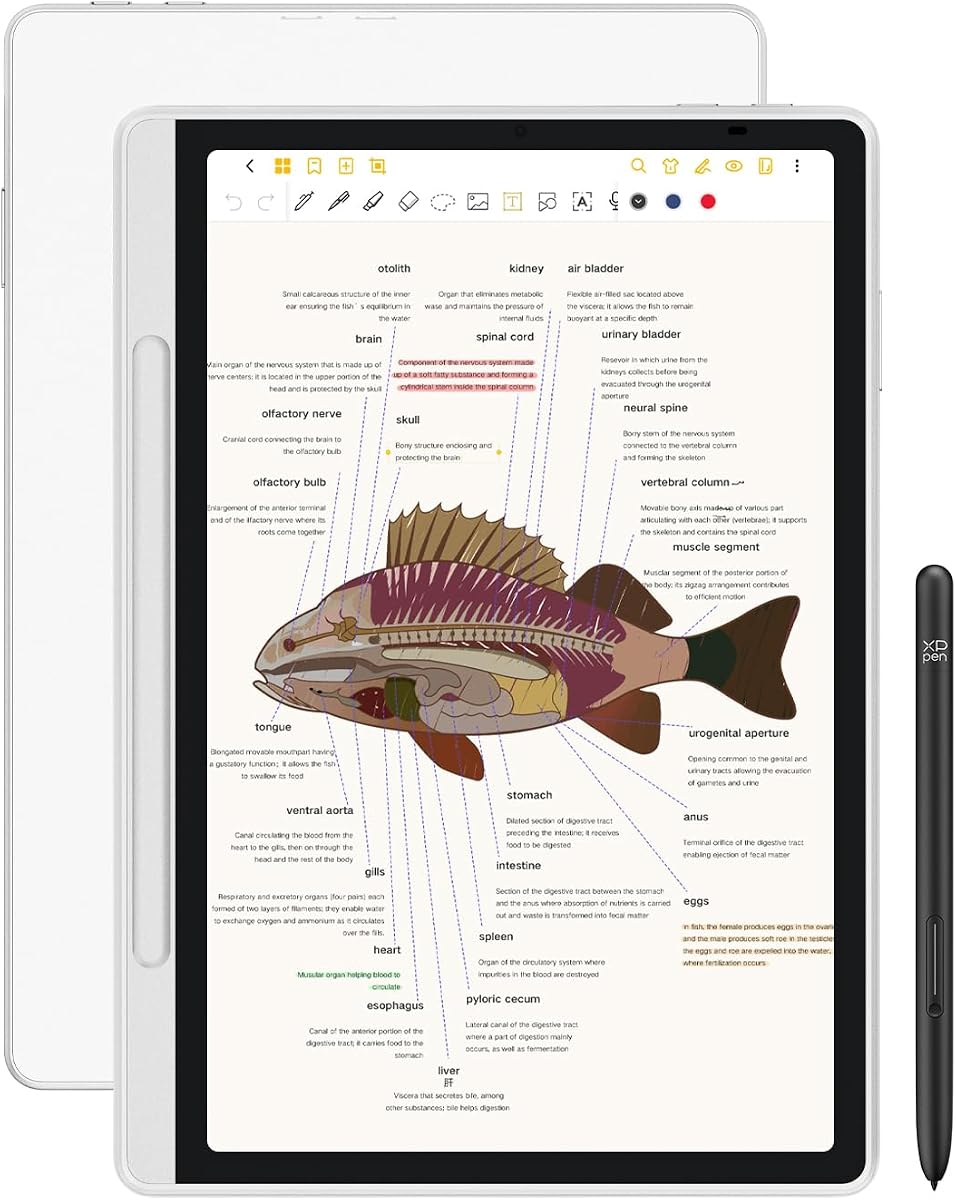
The XPPen 3-in-1 Color Notebook is the most versatile Android-based option in the guide, with a 4.2 rating. Unlike dedicated e-ink devices, it runs Android 14 and supports Google Play, allowing it to function as both a writing tablet and a more conventional computing device. Its 10.95-inch AG nano-etched LCD offers three color modes—monochrome, light color, and nature color—so users can shift between reading and creative work without changing hardware.
We may earn a commission when you buy through this link, at no additional cost to you.
The X3 Pro Pencil 2 is battery-free and provides 16,384 levels of pressure sensitivity, enabling varied stroke width and color depth. The native XPPen Notes app supports handwriting conversion, audio recording, PDF editing, multiple brushes, an AI assistant, automatic saving, and cloud uploads. After upgrading the system to 1PAE, MyScript Notes can convert handwriting and shapes into typed text and precise forms with recognition across 66 languages, while MyScript Math supports handwritten equations, variables, plotted functions, and edits by scratching out content.
This flexibility brings compromises. The etched-glass LCD looks and behaves differently from e-ink, and its narrower viewing angle means users should view it mostly from the front. At 495 grams and 7 millimeters thick, it is also larger and heavier than most dedicated paper tablets. The 90Hz display and Android ecosystem add responsiveness but can encourage multitasking, while the product guidance recommends avoiding multiple programs at once for the best experience.
The XPPen is a strong recommendation for users who want handwriting recognition alongside a flexible Android platform. It suits students, remote workers, meeting participants, and creators who value MyScript tools, app access, color, and high internal storage. Choose it over a minimalist e-ink tablet when software flexibility is more important than a distraction-free environment or sunlight-oriented reflective display.
Switching among monochrome, light color, and nature color modes lets users adapt to different documents and environments. The etched surface is designed to reduce reflections and provide a more paper-like visual texture.
MyScript Notes handles handwriting and shape recognition across 66 languages, while MyScript Math turns handwritten equations into editable structures. These features give the tablet a stronger role in technical study and active problem solving.
We may earn a commission when you buy through this link, at no additional cost to you.
The Penstar eNote 2 combines a high-resolution e-ink display with a comparatively broad feature set, earning a 4.3 rating. Its 10.3-inch screen operates at 2480 by 1860 resolution with 300 pixels per inch, and the product description emphasizes reduced haze and refraction. The stated result is cleaner black text, brighter white areas, and a reading experience that remains clear in sunlight while preserving the calm appearance of paper.
We may earn a commission when you buy through this link, at no additional cost to you.
The included stylus offers 8,192 pressure levels without requiring a charge, along with nine customizable buttons. Users can write over books and PDFs, split the display into two screens for reading and note-taking, and convert both handwriting and speech into text. The AI-oriented functions also include note summaries, while folders and tags support organization. An Android 14 system, 4GB of memory, 128GB of storage, a microphone, and four speakers expand the device beyond a simple paper replacement.
Its broad capabilities introduce some uncertainty. The product supports more than 35 file formats and third-party applications, but the range does not make it identical to a full tablet. AI features may require setup or connectivity, and the overall ecosystem is less established than that of the best-known alternatives. The e-ink display also remains monochrome, which limits visual planning and color annotation. Buyers who want the printed-page look should accept those limitations in exchange for sunlight readability.
The Penstar eNote 2 is a compelling choice for readers and note-takers who want more than basic transcription. It suits students comparing a textbook with notes, professionals recording and summarizing spoken content, and users who work with many document formats. It ranks highly for its display, included stylus, and feature density, making it a flexible option between a conventional e-ink reader and a full Android tablet.
The 300-ppi e-ink panel provides enough resolution for dense pages, notes, and marked-up documents. Its reflective design avoids the illuminated, glossy appearance associated with conventional LCD tablets.
Split-screen support places reference material and note-taking areas together. This is particularly helpful for textbooks, reports, recipes, and other documents that require frequent annotation.
We may earn a commission when you buy through this link, at no additional cost to you.
The reMarkable Paper Pure with Marker delivers the core reMarkable experience without the folio bundle offered by the first-ranked product. It retains the 10.3-inch third-generation e-ink display, 21 ms ink response, improved contrast, and handwriting conversion. With a 3.8 rating, its appeal lies in a clean writing environment, quick pen response, and a relatively uncluttered route from handwritten thought to organized digital document.
We may earn a commission when you buy through this link, at no additional cost to you.
The included Marker supports note-taking, document markup, and sketching, while numerous templates help users start quickly. Handwritten notes can be edited and converted to text, and folders and tags make important material easier to retrieve. Articles, documents, and PDFs can be transferred from Google Drive, Dropbox, Microsoft Word, and other sources through reMarkable's apps and plugins. Completed notes can then be shared by email, keeping the workflow reasonably direct.
The minimalist approach has limits. Monochrome is appropriate for serious writing but not for color diagrams or visual material that needs differentiation. More advanced capabilities, including searching handwritten notes, editing in reMarkable's apps, and integrations such as Slack and Miro, are tied to Connect in the supplied information. Buyers should therefore distinguish between the tablet's basic conversion tools and the additional features available through a subscription.
Choose this model if you want a dedicated paper tablet and do not need a folio or the larger Paper Pro's color screen. It is well suited to reading, journaling, meeting notes, and black-and-white PDF markup, especially for users who want fewer distractions. The Marker version provides a simpler entry into the reMarkable platform, although the folio bundle may be more convenient for anyone who plans to carry the device regularly.
The interface centers on notebooks, documents, templates, and pen input rather than general applications. That design can make meetings, journaling, and document review feel more deliberate and less fragmented.
Apps and plugins bring web articles, PDFs, documents, and cloud files onto the tablet. Email sharing then provides a straightforward route for distributing finished handwritten work.
We may earn a commission when you buy through this link, at no additional cost to you.
The reMarkable Paper Pro with Marker Plus is the standard large-format version of the color paper tablet, rated 4.2 in the supplied information. Its 11.8-inch Canvas Color display supports handwritten notes, sketches, and color reading, while the Marker Plus is tuned to provide realistic friction and precise control. It gives users more canvas than the Paper Pure without including the premium leather folio bundled with the second-ranked model.
We may earn a commission when you buy through this link, at no additional cost to you.
Documents can be sorted through folders and tags, written on directly, and converted from handwriting to typed text. The reflective, low-glare screen is designed for reading in bright conditions, and the adjustable light supports work after dark. The result is a versatile device for extended reading, detailed annotation, and project planning, especially for people who prefer the subdued appearance of paper over a glowing LCD.
Like the other reMarkable models, it remains intentionally limited as a general-purpose tablet. It is not designed around unrestricted Android app installation, and some advanced services are connected to reMarkable's subscription ecosystem. The large display also means more weight and bulk than the 7.3-inch Paper Pro Move. Color should not be confused with full multimedia flexibility; the screen adds richer visual output while the core focus stays on writing and documents.
This Paper Pro configuration is best for users who value screen area and Marker Plus performance but do not need the additional folio. It is a natural choice for students working with large textbooks, architects reviewing plans, researchers annotating sources, and creative professionals producing visual notes. Compared with smaller models, it reduces zooming and provides a more comfortable canvas for handwriting, diagrams, and detailed markup.
A large display reduces the need to compress handwriting or constantly zoom. It gives PDF annotations, sketches, and meeting notes a more open, paper-like working area.
The low-glare panel reflects ambient light for daytime reading, while the adjustable reading light adds visibility in darker settings. This flexibility supports use well beyond a typical office desk.
We may earn a commission when you buy through this link, at no additional cost to you.
The VIWOODS AiPaper Mini is a compact reading and writing tablet with a 4.0 rating. At 8.2 inches and 230 grams, it is designed to move easily between a bag, daily planner, ebook reader, and digital notebook. Its 292-ppi e-ink display supports reading of ebooks, articles, PDFs, and study materials, while 20 adjustable warm-light levels make it more comfortable in dim environments.
We may earn a commission when you buy through this link, at no additional cost to you.
The included W2 Stylus Pro pen supports note-taking, PDF annotation, sketches, lists, and meeting notes. Storage totals 128GB, and the product is equipped to synchronize or transfer files through OneDrive, Google Drive, Dropbox, WLAN, Bluetooth, USB, or ViTransfer. The bundle also contains a protective folio, five replacement nibs, and a USB-C charging cable, making it convenient for immediate use and travel.
The compact format naturally limits annotation space and may require more scrolling on dense pages. The supplied information also acknowledges the normal refresh latency of e-ink, so users should expect a brief transition when changing pages or altering the display. The product description focuses heavily on reading, storage, and synchronization, with less detail about the exact handwriting-conversion process than the top reMarkable and XPPen entries provide.
The AiPaper Mini is a good match for commuters, students, and readers who want a lightweight writing surface without carrying a full-size tablet. Its warm-light controls, color e-ink, and 128GB capacity also make it useful as a compact digital library. Choose it when portability, storage, and reading comfort matter more than a large markup canvas or a broad general-purpose application ecosystem.
The 8.2-inch format and 230-gram weight are easy to manage for commuting and travel. A single device can hold reading material, planning pages, and handwritten notes without the bulk of a larger tablet.
With 128GB of internal space and several transfer options, users can organize documents locally or move them through familiar cloud and connection methods. The folio and spare nibs improve readiness for daily use.
We may earn a commission when you buy through this link, at no additional cost to you.
The Ophaya Smart Pen & Reusable Digital Notebook takes a paper-first approach to handwriting conversion. Rather than placing a display between the user and the page, it captures handwriting while the user writes on ordinary paper and synchronizes the result to the Ophaya Pro+ app. With a 4.0 rating, its main strengths are accessibility, searchable notes, editable text output, audio capture, and offline operation.
We may earn a commission when you buy through this link, at no additional cost to you.
Real-time synchronization supports iOS and Android phones, while OCR converts handwritten content into editable digital text and a Word file. Users can search for words or phrases, apply tags, and share output as Word, PDF, PNG, MP4, or video. Recording audio at the same time as writing adds context, since playback can be associated with the corresponding notes. These features are particularly relevant for classes, meetings, interviews, and collaborative sharing.
The need for a phone and app is a meaningful limitation. This is not a self-contained tablet, so users cannot review a large reference document or sketch on a built-in canvas. OCR accuracy and capture organization may also depend on consistent writing and correct page handling. Nevertheless, offline storage gives the system resilience: users can continue capturing work without a connection and upload it after reconnecting, reducing the risk of losing important material.
Choose the Ophaya Smart Pen Set if you want searchable and editable notes without giving up ordinary paper. It is particularly attractive for students, healthcare workers, field professionals, and meeting-heavy users who want digital records but already prefer writing by hand. It offers a different kind of handwriting-to-text solution from the dedicated tablets, making it most valuable as a focused digitizing tool rather than a general-purpose reading device.
Writing remains on a physical page, so there is no screen to stare at and no tablet to carry. The digital copy is created in the background and made available through the companion app.
OCR turns captured writing into editable text, while search and tags improve retrieval. Multiple export formats let users move the same material into documents, images, or recorded presentations.
We may earn a commission when you buy through this link, at no additional cost to you.
The most useful handwriting-to-text tablet depends on whether you prefer writing on a screen, writing on paper with a smart pen, or managing a full digital notebook. Display quality, pen behavior, recognition, portability, storage, and connected services should be considered together.
Dedicated paper tablets place an e-ink or paper-like display between you and the page, while smart-pen systems capture writing on ordinary paper. A dedicated tablet offers annotation, document reading, and note organization in one device. A smart pen preserves familiar stationery and can be less distracting, but it usually depends on a phone or computer for storage, searching, and sharing. Choose the medium that matches your existing habits rather than assuming one workflow is universally superior.
E-ink screens reflect ambient light, consume relatively little power, and often look natural in bright rooms. They generally show only black, white, and limited color, and page or color changes can involve a slower refresh. Etched LCDs can provide brighter color, smoother animation, and wider viewing angles, but the etched surface may restrict off-axis visibility. Consider sunlight readability, color needs, motion, text density, and eye comfort together rather than treating one display type as automatically superior.
Latency, pressure sensitivity, nib behavior, palm rejection, and surface friction determine whether a tablet feels like writing or operating a touchscreen. Low-latency ink helps prevent visible separation between the stroke and the nib. Pressure levels can improve shading and line variation, but they matter less if the main task is ordinary text. Battery-free pens reduce charging friction, while magnetic attachment and shortcut buttons can make the stylus easier to carry and operate.
Handwriting-to-text performance should be evaluated for the languages, symbols, and layouts you actually use. A conversion feature that works well for simple English prose may handle equations, diagrams, lists, or mixed-language notes less effectively. Searchable handwriting is especially valuable because it turns a large archive of notes into a practical working library. Confirm whether conversion is included, limited, or dependent on a subscription, and check whether recognition can preserve document layout.
Small displays are easier to carry and may be more realistic for daily note-taking. Larger screens reduce zooming, provide room for side-by-side reading and annotation, and better suit technical documents. Weight, thickness, folio design, and battery endurance also influence whether a device will remain in your daily bag. The most capable tablet is not necessarily the most useful one if it is too large to carry or inconvenient to hold during a meeting.
A handwriting tablet should also work as a document reader if you plan to import textbooks, reports, PDFs, recipes, or reference manuals. Compare supported formats, local storage, cloud services, file-transfer methods, and annotation tools. Some devices support split-screen reading and writing, while others focus on notebooks and cloud synchronization. Confirm that important files can be reached offline, particularly for travel, fieldwork, and locations with unreliable connectivity.
Some tablets provide a controlled, distraction-free environment, while Android devices support broader app selection. More features can bring ads, notifications, account requirements, cloud limits, and update considerations. A subscription may unlock handwriting search, infinite cloud storage, editing, or integrations, so the long-term cost and dependency should be understood before purchase. Free core writing and conversion functions can still be worthwhile, but a useful ecosystem should fit your needs without creating ongoing friction.
Some note-taking devices can record audio while you write, linking recorded explanations to specific pages. Built-in microphones, speakers, and cameras can support remote meetings, but they also change the device's size, power demands, and character. If your work depends on interviews, lectures, demonstrations, or collaboration, these additions may be valuable. If your priority is a quiet reading and writing tool, a simpler package may serve you better.
Begin by configuring the display, pen, handwriting language, templates, and synchronization settings before a busy meeting. Write a short test page in the styles you normally use, including lists, headings, equations, or mixed notes. Run the text conversion, check search results, and export a sample document. This setup step reveals differences in recognition quality and helps you decide where line spacing, page size, and pen thickness should be adjusted.
Develop a simple naming and organization system. Give notebooks descriptive names, use folders for major projects, and add tags for recurring subjects such as clients, courses, or research topics. Save important conversions to the cloud and keep a local copy when possible. For smart-pen systems, use the app's offline mode during travel or in areas without a connection, then confirm that queued notes uploaded successfully after reconnecting.
Care for the pen tips, charging contacts, folio, and screen according to the manufacturer's instructions. Avoid pressing hard with a damaged nib, and keep replacement tips available for heavy use. Do not leave the device in extreme heat, direct sunlight for long periods, or moisture. Update the operating system and note applications when those updates improve recognition, security, stability, or file handling, and keep a backup of any notes that cannot be downloaded or recovered.
Accuracy depends on the device, recognition engine, writing style, and document layout. Consistent letter formation, uncrowded spacing, a clear page, and good alignment between the page and capture area usually improve results. Test the converter with representative notes before committing to a workflow, especially when mathematical notation, diagrams, or multiple languages are involved.
A smart pen is better when you prefer ordinary paper, low distraction, and minimal screen interaction. A handwriting tablet is better when you want built-in document reading, direct PDF markup, larger annotations, and a self-contained notebook. Smart pens usually rely on a phone or computer for app-based storage, while tablets can offer more document-focused hardware features.
E-ink displays reflect ambient light rather than emitting a bright backlight, which generally makes them easy to read outdoors. Readability still depends on screen quality, front lighting, contrast, and whether the display is refreshing. Color e-ink may have more limited contrast than monochrome panels, particularly for small text.
Some advanced Android devices support specialized mathematics and shape-recognition tools, while simpler paper tablets may focus on converting words and lines. Diagram handling varies, and complex sketches may require manual correction. If technical notation is central to your work, review the supported symbol types and editing tools before choosing a model.
Not every product requires one for basic writing or conversion, but advanced features may be tied to a subscription. Cloud storage, handwriting search, editing, and integrations can differ by model and service tier. Check which functions work without an account and what changes after a trial or paid plan expires.
A 10.3-inch or 10.95-inch screen offers a practical balance for typed lecture notes, handwritten annotations, and portability. An 11.8-inch display provides more room for diagrams and PDF markup, while smaller models are easier to carry. Consider whether you mostly write bullet points, reproduce entire pages, or annotate existing documents.
Write on a clear, flat surface and keep pages consistently aligned. Use a supported language, avoid writing over earlier strokes unless the app handles that behavior, and leave adequate space between words and lines. Review conversions promptly because small errors are easier to correct before they are filed and reused.
Most can store notes and documents locally, and the dedicated tablets in this guide provide internal storage or cloud synchronization. Offline availability may depend on whether files have already been downloaded. Smart-pen systems also support offline capture, but their content is normally processed and organized through the companion app after reconnection.
The reMarkable Paper Pure Bundle is the strongest overall option because it combines quick ink response, a focused interface, useful handwriting conversion, and a complete pen-and-folio package. The Ophayapen Smart Writing Set is the most budget-conscious route into digitizing ordinary paper, while the reMarkable Paper Pro Bundle stands out for its large color canvas and premium accessories. These picks cover a dedicated tablet, a smart-pen system, and a high-end color paper tablet.
Prioritize the workflow that matches your notes rather than a headline specification alone. Frequent travelers may prefer the compact Paper Pro Move or AiPaper Mini, while technical learners may favor the XPPen with its Android ecosystem and MyScript recognition. Document-heavy readers may appreciate the Penstar's split-screen tools, and people who insist on writing on paper should examine smart-pen systems. Also verify subscription requirements, supported languages, and export formats before purchasing.
Software features and retail prices can change, and bundles may also vary. Review the current listing to confirm the included stylus, cover, accessories, account conditions, and warranty information. With those details checked, the right handwriting-to-text tablet becomes a practical extension of your thinking process rather than merely another electronic display.


