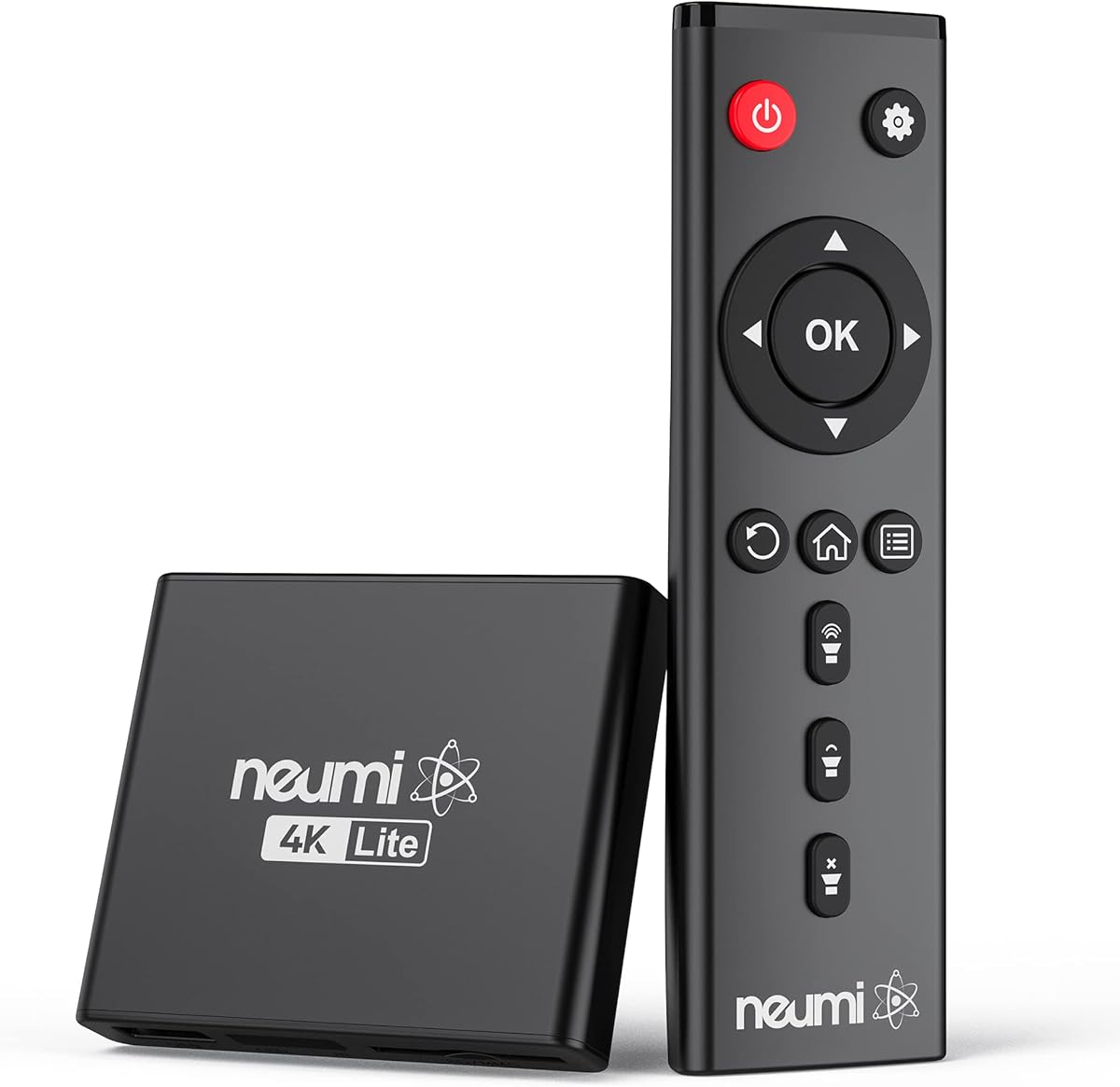
NEUMI Atom 4K Lite
4.3Editor score
4K UHD HDMI playback
Trigger sensor input
Automatic looping and resume
USB and SD compatibility
Explore the best External Hard Drive Media Player options, comparing playback, storage, connectivity, formats, signage features, and compatibility today.
An external hard drive media player turns stored photos, music, presentations, and videos into a simple playback system for any compatible television, monitor, or projector. The right unit should support your media formats, connect through the outputs your display offers, and operate reliably without requiring streaming accounts or complicated network configuration.
We compared ten products using their stated playback resolution, codec support, storage options, connectivity, automation features, and practical use cases. The list covers compact HDMI players, signage-oriented devices with looping controls, units with built-in 2.5-inch drive enclosures, and a portable hard drive intended to serve as local media storage.
Each numbered review explains the strongest reason to consider that model and the compromises buyers should understand. The top selections represent the most balanced choices for different needs, while ratings and product details can change over time. Current pricing, availability, accessories, and retailer policies should always be confirmed before purchasing.
4.3Editor score

4.1Editor score

5.0Editor score
This side-by-side comparison highlights each product's stated resolution, storage support, key connectivity, and intended application. Because these devices use different playback ceilings, automation tools, and enclosure designs, the most suitable choice depends on your display, media files, and signage requirements.


The Micca 4K Ultra-HD Media Player is a versatile local-playback device with a 4.1 rating and a particularly useful combination of file support, storage options, and signage controls. It can play video, music, and photographs from USB drives, USB hard drives, or microSD cards, making it suitable for a television without smart-platform access or for a display that needs dependable unattended playback.
We may earn a commission when you buy through this link, at no additional cost to you.
Its headline capability is 4K ultra-HD video at up to 4096 by 2304 pixels and 30 frames per second over HDMI. The listed formats cover common H.265 and H.264 video, MPEG and VC1 codecs, several popular container types, and separate subtitle formats. The player also includes composite AV output for older televisions or audio-only use, so buyers do not have to limit themselves to newer HDMI displays.
Storage capacity is another major strength. The microSD reader accepts cards up to 1TB, while USB hard drives are supported up to 8TB. FAT, FAT32, exFAT, and NTFS file systems are listed, giving users several practical ways to organize media. Automatic playback, endless repeating, resume capability, and selectable 90, 180, or 270-degree rotation improve its suitability for menu boards, lobby screens, exhibits, and other vertical or continuous-display installations.
The main limitation is that 4K output is specified at 30Hz rather than 60Hz. It also does not contain an internal 2.5-inch SATA enclosure, so playback requires external storage. Those limitations are acceptable for signage, slideshows, and conventional movie playback, but a buyer seeking smoother 4K motion or direct internal-drive integration should consider the 60Hz enclosure models. Overall, this Micca is the most versatile balanced choice in the group.
Choose it when one device must handle home media, recurring signage, rotated portrait content, several file types, and both modern and legacy displays. Its automated playback features go beyond the basics, while broad storage support reduces the need for constant file replacement. For a buyer who wants one flexible media player rather than a narrowly specialized 1080p box, it is a particularly persuasive recommendation.
USB hard drives of up to 8TB and microSD cards of up to 1TB provide considerable room for movies, photos, music, and signage loops. The listed file-system support means that common desktop-formatted drives can be used without relying on a particular brand of storage.
Automatic starting, endless repeat, resume-after-stop, and configurable rotation make the Micca practical for unattended installations. These functions are especially helpful for menu boards, welcome loops, museum displays, and portrait-oriented screens.
We may earn a commission when you buy through this link, at no additional cost to you.
The compact HDMI Media Player is a 1080p-focused alternative with a 4.1 rating. Its small aluminum enclosure and straightforward media interface make it appropriate for offices, travel, secondary televisions, and displays that do not require ultra-HD playback. It can handle video, audio, and images from USB flash drives, SD cards, and hard drives.
We may earn a commission when you buy through this link, at no additional cost to you.
Full HD output at 60Hz is supported through HDMI, with composite AV output available for analog televisions and external speakers. The listed decoding formats include RM, RMVB, AVI, DivX, MKV, MOV, MP4, M4V, VOB, MPG, TS, M2TS, WMV, and several H.264, H.263, VC-1, and MPEG variants. Subtitle playback and looped video are also supported.
Playback controls go beyond simple sequential viewing. The device can play randomly, repeat selected content, zoom, fast-forward, rewind, rotate images, resume from a breakpoint, and jump to a selected time. Files can also be copied or deleted directly from a FAT or FAT32 USB drive, making the unit more manageable than a completely hands-off signage terminal.
Its 1080p ceiling is the central compromise. Some smartphone videos and high-resolution files may require the separate 4K player referenced in the product information. The storage specification also limits hard drives to 8TB, which is generous for most libraries but lower than some larger-capacity alternatives. Users should verify that their chosen files fall within the supported containers and codecs.
This is a sensible pick for a second screen, a compact office system, or a display where 1080p is sufficient. It provides useful navigation and playback flexibility without introducing a larger enclosure or more complex setup. Buyers prioritizing high-resolution video should move up to a 4K model, while those seeking an inexpensive, straightforward local player will find this option easy to consider.
Random playback, repeat, zoom, rotation, time selection, and breakpoint resume give this unit more control than a basic signage player. Those features suit users who regularly browse a mixed collection rather than running one unattended loop.
The palm-sized aluminum design is easy to position near a compact television or carry between locations. HDMI and composite AV outputs provide flexibility for both contemporary and older display equipment.
We may earn a commission when you buy through this link, at no additional cost to you.
The NEUMI Atom 4K Lite earns a 4.3 rating and stands out through a rare combination of compact 4K playback and trigger sensor input. It is designed to present videos, photographs, and music from USB drives, hard drives, and SD cards without a complex interface, making it approachable for both household and commercial displays.
We may earn a commission when you buy through this link, at no additional cost to you.
HDMI output is specified at up to 2160p and 60Hz, with support for current codecs such as H.265 and H.264. Digital surround sound can be sent to a home-theater receiver, while composite AV output covers older televisions and separate stereo systems. The listed media library includes MP4, MKV, AVI, TS, MOV, VOB, and M2TS video alongside common image and music formats.
Storage support extends to USB hard drives of up to 8TB and SD cards of up to 1TB, with FAT32, exFAT, and NTFS file systems listed. Automatic playback, continuous looping, repeat, and resume functions support routine unattended use. Its trigger input adds a more interactive layer: one video can loop while another appears when an optional push button or motion sensor is activated.
That trigger capability is the defining feature for interactive galleries, museum installations, novelty displays, and audience-triggered promotional content. The required push-button or motion sensors are sold separately, however, so the complete setup involves more than the player alone. The Atom also lacks a built-in SATA enclosure and depends on external storage for movie libraries.
Choose the Atom when you want 60Hz 4K output, automated playback, and optional interaction without moving to a larger enclosure-style model. It is particularly compelling for signage that needs to respond to a visitor. For straightforward home use, the automatic loop and resume functions are enough; for interactive installations, the separate sensor accessory unlocks the product's most distinctive capability.
The trigger input allows one file to run continuously while another begins in response to a button or motion event. This makes the Atom more flexible than ordinary loop-only players and well suited to exhibits and guided signage.
Despite its compact size, the player supports 2160p output at 60Hz and H.265 decoding. It also provides digital surround sound for receivers and composite AV for older equipment.
We may earn a commission when you buy through this link, at no additional cost to you.
The ACEMAX 4K HDD Player is a dual-purpose device that combines local media playback with an enclosure for a compatible 2.5-inch SATA hard drive or SSD. Its 3.5 rating is lower than those of many competing players, but the unusual two-in-one design gives it a clear role in installations that want media playback and internal storage in one box.
We may earn a commission when you buy through this link, at no additional cost to you.
Video can be played from an installed 2.5-inch drive, a USB drive, or a microSD card. HDMI supports 4K at 60Hz and H.265 10-bit HEVC playback, while AV output is available for older displays and external audio. The stated maximum data rate is not given, so file compatibility should be checked carefully against the player's requirements before committing to a large mixed-media library.
Automatic startup, continuous repeating, and resume after interruption make it well matched to retail displays, menu boards, exhibitions, offices, and other unattended screens. The aluminum housing is intended to dissipate heat during extended playback, and an included infrared remote provides direct file navigation. That remote requires a clear line of sight, which matters when the unit is hidden behind or beside a display.
Several storage-format notes in the product information deserve attention. A drive may need to be reformatted if it is not recognized, and the supported formats vary by operating system. The hard drive, SSD, USB drive, and microSD card are not included, making the enclosure a capability rather than a complete storage package. The lower rating may also reflect a less mature listing or mixed user experiences.
This model makes sense when reducing cable clutter and keeping media inside a dedicated enclosure is important. It is less attractive for casual users who only need a tiny player for a USB stick. If you can accept the extra setup around drive formatting and the need to purchase storage separately, the combination of 60Hz 4K and unattended playback features is compelling.
Installing a compatible 2.5-inch SATA drive inside the enclosure allows direct playback without a permanently attached external drive. USB and microSD remain available for transfer media, temporary content, or alternative storage.
Automatic start, continuous looping, and resume reduce the need for someone to restart content after power interruptions. The metal housing also addresses heat management during sustained commercial use.
We may earn a commission when you buy through this link, at no additional cost to you.
This 4K media player has a 4.0 rating and differentiates itself through extensive playback and audio options. It can display 4K video at 30Hz, handle common high-resolution containers, and send audio through HDMI, optical, or composite AV connections. That makes it relevant to home theaters where the television or receiver handles picture but the player serves multiple audio routes.
We may earn a commission when you buy through this link, at no additional cost to you.
The supported file list includes MKV, AVI, TS, MP4, M4V, MOV, VOB, M2TS, WMV, and PMP. Maximum individual file sizes are listed as 4GB on FAT32 or 30GB on NTFS. H.265 decoding is included for efficient handling of compatible high-resolution files, while embedded and external subtitles can use SRT, SMI, SUB, or SSA formats.
Two USB ports are provided, and the player reads TF cards, USB flash drives up to 128GB, and USB hard drives up to 8TB. Although both ports are present, only one storage device can be read at a time. A USB mouse or keyboard can also be connected for operation, which is helpful when navigating a large collection or managing menu-driven content.
Music, photographs, video, and even presentation documents are supported. Photos and videos can play in order, while music can be shuffled. Horizontal and vertical screen orientation support gives this model an advantage for portrait signage. For sound, HDMI supports up to 7.1-channel audio, while optical and AV outputs can carry MP3 or WAV files to external speakers.
The central drawback is the 30Hz 4K ceiling, which is less desirable for fast motion than 60Hz alternatives. The second USB port cannot increase simultaneous storage access, and presentation playback is not the primary strength of the product. It is nevertheless a broad and flexible choice for homes that want multiple audio routes, vertical-display support, and extensive media compatibility.
HDMI, optical, and composite AV outputs let users direct playback through a television, surround receiver, or external stereo system. Support for HDMI audio up to 7.1 channels benefits compatible home-theater setups.
The player handles video, music, photographs, subtitles, and presentation documents. Sequential playback for visual media, shuffled music, and vertical-screen support broaden its use beyond a simple movie box.
We may earn a commission when you buy through this link, at no additional cost to you.
The 4K HDMI Digital Player carries a 4.2 rating and emphasizes connection flexibility. Its most immediately useful feature is the range of outputs: HDMI, optical audio, VGA, and composite AV are all listed. That makes it easier to adapt to an unusual display arrangement, a legacy television, or a separate analog speaker system.
We may earn a commission when you buy through this link, at no additional cost to you.
Video output reaches 4K at 30Hz, with a stated resolution ceiling of 3840 by 2160 and a maximum bit rate of 20,000 as listed in the product information. H.265 and H.264 decoding are supported across a broad range of containers, including MP4, MKV, MOV, AVI, TS, ISO, VOB, WEBM, and others. A range of subtitle, photo, and audio formats is also included.
USB storage can hold up to 8TB of hard-drive content, while the SD slot and USB drive support up to 128GB according to the stated specifications. A hub can be connected to add keyboard or mouse input, and the USB port is also described as usable for separate power and firmware upgrades. Advertising, photo, presentation, and media loops are all named use cases.
The HDMI connection supports up to 7.1-channel surround sound, while optical and composite outputs can carry MP3 or WAV audio. The optical connection is particularly useful for users whose receiver lacks convenient HDMI audio handling. Automatic playback is supported for compatible media placed in the first level of the file directory.
This player is less suitable for buyers who require 60Hz 4K or a built-in drive enclosure. It also has a dense list of capabilities, making careful file-format verification worthwhile. Still, the variety of outputs makes it a strong option for advertising installations, office displays, or older equipment that cannot be connected through HDMI alone.
HDMI, VGA, optical, and composite AV provide more ways to connect than a basic player. This flexibility is useful in mixed environments where display and audio equipment may use different interfaces.
Automatic playback, advertising loops, photographs, and presentation files make the player practical for commercial messages and office communication. The stated playback and bit-rate limits should be checked against source files.
We may earn a commission when you buy through this link, at no additional cost to you.
The WD 2TB Elements Portable External Hard Drive has a 4.7 rating, the highest among the listed products. Unlike the other entries, it is not itself a media player. It is a portable storage device designed to hold photos, videos, music, documents, and other files, making it a useful companion for any compatible external hard drive media player.
We may earn a commission when you buy through this link, at no additional cost to you.
Its 2TB capacity offers ample room for a personal film library, a presentation collection, or a rotating signage library. The small, lightweight enclosure is easier to transport than a desktop drive, while plug-and-play expandability makes it straightforward to add storage to a compatible computer or media-player setup.
The connection uses SuperSpeed USB 3.2 Gen 1, listed at 5Gbps. This interface is appropriate for transferring large video files between a computer and the drive. The product information also identifies compatibility with Windows and Mac systems, which helps buyers who want one drive to serve both a computer and a separate playback device.
Its limitation is fundamental: it cannot decode video, produce HDMI output, loop content automatically, or connect directly to a television. Buyers will still need one of the dedicated players in this guide, along with suitable cables and a display. The 2TB capacity may also be less than the 8TB maximum cited for several players, although capacity needs vary according to actual use.
This drive makes most sense for users who already own a compatible player or computer and want reliable local media storage. Its strong rating, portable form, and generous capacity can be especially helpful for travel, classroom libraries, and family media collections. It should be considered a storage component, not a substitute for a complete playback system.
The compact 2TB drive can carry movies, music, photographs, and documents between computers or compatible players. Its portability is valuable when content needs to move between home, office, and event locations.
USB 3.2 Gen 1 provides a listed 5Gbps interface, while plug-and-play operation reduces setup friction. Windows and Mac compatibility broadens its usefulness beyond a single media ecosystem.
We may earn a commission when you buy through this link, at no additional cost to you.
The 4K HDD Enclosure Media Player has a 5.0 rating and offers one of the most complete feature combinations in the guide. It combines a 4K digital player, a 2.5-inch SATA hard-drive enclosure, and Type-C data transfer in a single unit. That makes it a strong candidate for buyers who want local media and a more permanent storage arrangement.
We may earn a commission when you buy through this link, at no additional cost to you.
Video playback reaches 4K at 60Hz with H.265 decoding and a listed maximum data rate of 200Mbps. It works with televisions, monitors, and projectors, and the HDMI output remains compatible with 1080p displays. An AV port adds compatibility with older display devices, which prevents the enclosure-focused design from locking out legacy equipment.
Users can install a 2.5-inch SATA hard drive and play files directly from it. The player also reads USB flash drives, Type-C storage, and SD memory cards, so the internal drive need not be the only content source. FAT32, exFAT, NTFS, and Mac-formatted drives are listed as compatible. A Type-C cable transfers hard-drive data to laptops, making the enclosure useful for maintenance as well as playback.
Automation includes auto-loop playback, resume, repeat, and shuffle for video, images, and audio. Pictures can run as continuous slideshows, while music can play randomly. These functions align well with restaurant menu boards, lobby welcome videos, shopping-mall promotions, home theaters, and office displays that need dependable unattended operation.
The internal hard drive is not included, and the 5.0 rating should be understood as the current listing value rather than a guarantee of universal compatibility. Newer products can accumulate fewer long-term user reviews than established models. Even so, the blend of 60Hz 4K, integrated storage, Type-C transfer, and automation makes this the most premium-feeling model in this group.
A 2.5-inch SATA drive can remain inside the unit while the included Type-C connection transfers its data to a laptop. Users gain direct playback from internal storage without giving up convenient file management.
The combination of 4K at 60Hz, H.265 decoding, auto-loop, repeat, shuffle, and resume covers both high-resolution home viewing and continuous commercial display needs. AV and HDMI outputs cover both modern and legacy screens.
We may earn a commission when you buy through this link, at no additional cost to you.
The Ultra HD 4K HDD Enclosure has a 3.8 rating and combines a 60Hz media player with an internal 2.5-inch SATA drive enclosure. It is a practical option for users who want direct playback from an installed hard drive while retaining access to USB, Type-C, and SD-card media.
We may earn a commission when you buy through this link, at no additional cost to you.
Its playback specifications include 4K at 60Hz, H.265 and HEVC decoding, and a listed maximum data rate of 200Mbps. The player can connect to a television, monitor, or projector and supports FAT32, exFAT, NTFS, and Mac-formatted drives. The included Type-C cable allows an installed hard drive to be connected to a laptop for transfer or modification.
Videos and photographs can be played in sequence, while music supports shuffle. Automatic playback starts content without menu navigation, and resume returns to the previous position. Together, these controls make the player suitable for home theaters, offices, restaurant menu boards, lobby loops, and shopping-mall signage.
The enclosure does not include a 2.5-inch hard drive, so buyers must add compatible storage. The unit itself has no built-in battery, and the remote requires two AA batteries that are also not included. These are minor inconveniences, but they matter for users expecting a completely self-contained package or a portable player that can operate away from mains power.
This product is most appropriate for buyers who appreciate the value of a combined enclosure and player but do not need the newest premium model's broader connectivity claims. Its 60Hz output, file-system flexibility, and automation functions are solid. Confirm display compatibility, media file specifications, and storage requirements before buying, especially if your content uses uncommon codecs or very high bit rates.
Internal SATA storage, USB connections, Type-C media, and SD cards give users several ways to organize a library. Mac-formatted support can be useful for mixed computer environments.
Auto-start and resume reduce the attention required for recurring displays. Shuffle for music and ordered playback for video and photographs make the same unit useful for both entertainment and signage.
We may earn a commission when you buy through this link, at no additional cost to you.
The JLZNLC 4K Media Player has a 3.0 rating, the lowest in this list, but its specifications include a broad set of signage functions. It combines 4K media playback with an internal 2.5-inch SATA hard-drive enclosure, USB and microSD access, automatic playback, resume, and configurable screen rotation.
We may earn a commission when you buy through this link, at no additional cost to you.
The HDMI output supports video up to 4096 by 2304 pixels at 30 frames per second with a stated 200Mbps limit. H.265 and H.264 codecs are supported across MKV, MP4, AVI, MOV, MPG, VOB, M2TS, and TS containers. MP3, WAV, FLAC, and APE audio are listed along with JPG, GIF, BMP, and PNG photographs.
USB hard drives of up to 8TB and microSD cards of up to 1TB are supported, while FAT, FAT32, exFAT, and NTFS file systems cover common storage arrangements. Automatic video playback, continuous looping, resume, and 90, 180, or 270-degree rotation are particularly relevant to restaurant boards, lobby displays, retail promotions, museum exhibits, education spaces, and fitness facilities.
The built-in enclosure can hold a compatible hard drive, although the drive itself is not included. The player also has composite AV output for older televisions and external audio systems. These features make it possible to adapt a display without replacing its existing speaker arrangement, while HDMI carries digital video and audio to modern equipment.
Its 3.0 rating and 30Hz output limit mean it should not be the automatic choice for buyers prioritizing smooth high-resolution motion or a well-established user history. Nevertheless, the combination of internal storage, rotation, looping, and broad formats may justify consideration for static or portrait signage. Users should test their exact files and verify enclosure compatibility before deployment.
Selectable 90, 180, and 270-degree video rotation is more useful than a standard landscape-only player for menu columns and vertical promotional panels. The feature keeps content aligned with the physical orientation of the screen.
A compatible 2.5-inch hard drive can be installed in the integrated enclosure, while USB hard drives and microSD cards provide alternatives. This supports both permanent libraries and replaceable content cards.
We may earn a commission when you buy through this link, at no additional cost to you.
The best external hard drive media player depends on your display, source files, storage plan, and need for automation. Resolution, codec support, connection types, enclosure design, and playback controls matter more than marketing labels alone.
Choose the output that matches your screen and files, not simply the largest advertised number.
Test your exact container, codec, bit rate, and subtitle format before making a final choice.
Use external drives for flexibility; choose an integrated enclosure for a tidy permanent installation.
Prioritize auto-play, looping, resume, and rotation for unattended or vertically mounted displays.
List your display and audio connections first, then choose a player that includes every required output.
Prepare storage with a supported file system before connecting it to the player.
Choose removable storage for rotating content and an internal enclosure for a permanent installation.
Confirm remote range, required batteries, line-of-sight needs, and separately sold trigger accessories.
Begin by identifying the media's codec, container, resolution, and storage format, then confirm compatibility with the player. Copy one short test file to the USB drive, SD card, or installed hard drive before transferring an entire library. Connect the player to the television or monitor with the appropriate HDMI, AV, VGA, or audio cable, power the unit, and select the correct output if it does not detect the display automatically.
For signage use, organize each installation in a clearly named folder and place the files where the player's menu expects them. Set automatic playback, looping, repeat, shuffle, or resume according to the display's purpose. For portrait screens, apply the correct 90, 180, or 270-degree rotation. Test the complete loop, check subtitle visibility, confirm audio routing, and verify that the unit starts content again after a power interruption before leaving it unattended.
Care for the player by keeping its ventilation areas unobstructed and placing it where heat can dissipate. Protect the enclosure from impact, moisture, and excessive dust, especially when a hard drive is installed. Safely eject removable storage before unplugging it, avoid moving a spinning drive while it is reading, and maintain a separate backup of important media. Periodically test playback and inspect cables, ventilation, and storage recognition.
It is a device that reads locally stored video, music, photos, and other files and sends them to a television, monitor, or projector. It differs from a streaming box because its content comes from USB storage, an SD card, or an internal hard drive rather than primarily from internet services. The best unit for you depends on display connections, file formats, storage capacity, and automation needs.
The supplied product information describes local media playback and does not identify streaming apps, Wi-Fi, or online service support. These devices are therefore best treated as offline players. If internet streaming is important, use a separate streaming device or smart television, or verify current manufacturer specifications for any functionality not included in the listed product details.
No. Most dedicated media players can play files from USB flash drives, USB hard drives, or memory cards without an internal bay. An integrated enclosure is useful when you want the storage permanently housed inside the unit, prefer a tidier installation, or need easy file management through Type-C. It also adds cost because a compatible 2.5-inch SATA hard drive or SSD generally has to be purchased separately.
It can produce a sharp 4K image, but the 30Hz refresh rate is lower than the 60Hz supported by some televisions and players. The difference is most noticeable in fast movement, sports, action films, and scrolling signage. For general movies, photos, and static promotional content, 30Hz can be sufficient if it meets your budget and compatibility requirements.
First confirm the player's supported capacity, connection type, partition scheme, and file systems. Common options include FAT32, exFAT, and NTFS, but not every unit supports every option. Format the drive on a computer, copy a short test file, and verify playback before transferring important content. Keep a separate backup because media drives can fail, and never disconnect storage while files are actively being read.
Automatic startup, continuous looping, resume, and dependable storage support are the core requirements. Vertical installations also benefit from configurable rotation, while interactive displays may need a trigger sensor input. The display's resolution and orientation, the desired audio connection, and whether the player can be hidden from view should all be considered before choosing a model.
The problem may involve the output setting, cable, display input, file structure, codec, bit rate, or storage format. Begin by connecting a known-compatible 1080p file and confirm that the television is set to the correct HDMI input. Check the player's supported format list and make sure the media is stored in a compatible folder. If the unit includes both HDMI and AV outputs, verify that the active output matches the connected display.
It depends on the outputs and the installation. A player with one HDMI connection generally requires a separate splitter or distribution system for multiple displays, and both screens must support the selected resolution. Longer runs may also require compatible cables and distribution equipment. For unattended multi-screen signage, choosing the same low-resolution loop for every display can simplify compatibility, while 4K distribution requires more careful planning.
The Micca 4K Ultra-HD Media Player is the most balanced all-purpose selection, offering broad file support, USB and microSD access, automatic looping, resume, and video rotation. The NEUMI Atom 4K Lite stands out as the best value-oriented interactive option because it combines 60Hz 4K with a trigger input, while the 4K HDD Enclosure Media Player offers the premium mix of internal storage, Type-C transfer, and 60Hz playback.
Your priority should determine which of those trade-offs matter most. Choose the Micca for broad signage versatility, the NEUMI for trigger-based interaction, and the enclosure model for integrated storage and smooth 4K output. The other players remain relevant when 1080p output, particular connectors, vertical rotation, optical audio, or a lower-cost enclosure design better matches your setup. Always verify the actual codec, bit rate, file system, and output requirements.
Remember that current prices, ratings, included accessories, and retailer policies can change. Check the live listing and manufacturer details before ordering, especially for hard drives, sensors, remote batteries, cables, and display adapters. A careful compatibility check will do more to prevent playback problems than choosing solely on the largest resolution or the most feature-heavy specification.