
Dell Pro Tower Desktop
4.9Editor score
14th Gen Intel i3
16GB DDR5 memory
512GB PCIe SSD
Dual monitor support
Windows 11 Pro
Our guide compares the best desktop computers for home use across processors, memory, storage, connectivity, display support, and everyday performance.
A home desktop should deliver dependable performance without demanding constant attention. The right machine supports schoolwork, household browsing, creative projects, entertainment, and remote employment while remaining comfortable to live beside. Processor power matters, but memory, storage, display options, connectivity, serviceability, and physical design are equally important when choosing a lasting home computer.
We compared ten tower, small-form-factor, and renewed desktop systems using the supplied specifications and feature details. The list covers general-purpose productivity, family computing, home offices, students, light content work, and multi-monitor setups. Every recommendation is evaluated on the balance of its processor, memory, storage, networking, ports, included accessories, operating system, physical footprint, and stated support options.
The selections show how different specifications affect real home workflows rather than treating one processor or chassis as ideal for everyone. Some systems emphasize compactness and modern connectivity, while others provide more memory, business-oriented security, or easier expansion. Product availability and pricing can change, so verify the current listing and specifications before purchasing.
4.9Editor score

4.6Editor score

4.0Editor score
This side-by-side comparison highlights each desktop's processor, memory, storage, connectivity, and practical strengths, helping home users match a system to their specific daily workload.




The Dell Slim Desktop combines a Core Ultra 5-225 processor, 512GB SSD, and Windows 11 Home in a modern chassis designed for both homes and offices. Its 4.5 rating reflects a well-rounded proposition, particularly for buyers who want a relatively compact system without giving up strong display flexibility or practical serviceability.
We may earn a commission when you buy through this link, at no additional cost to you.
One of its most useful features is monitor flexibility. The stated configuration supports up to four Full HD monitors through DisplayPort 1.4a and daisy chaining, or two 4K displays through HDMI 2.1 and DisplayPort. That makes it useful for a home office combining a laptop-style display with a larger monitor, or for a household that wants information spread across several screens.
The tool-less entry and removable side panel simplify access to internal components, which is a meaningful advantage over a sealed compact PC. A hardware TPM chip and built-in lock slot add security and physical protection, while one year of onsite service provides a useful support benefit if a covered hardware issue cannot be solved remotely.
The main limitation is the 512GB SSD, which can become modest for large photo libraries, extensive game installations, or multiple work projects. The listing also does not state the installed memory capacity. Overall, this is a strong choice for a tidy, modern family or home-office setup where display support and easy access matter more than maximum storage.
The combination of HDMI 2.1, DisplayPort 1.4a, and daisy chaining gives the slim desktop unusual flexibility for a home setup. It can serve a single high-resolution screen or create a larger workspace without requiring several separate systems.
Tool-less entry makes internal access less intimidating and can simplify future maintenance. The slim enclosure also uses recycled materials and refined corners, allowing it to fit more naturally into a living area or office than a full-size tower.
We may earn a commission when you buy through this link, at no additional cost to you.
The Dell Tower Desktop is the most visibly powerful configuration in this guide, pairing an Intel Core Ultra 7-265 processor with 32GB of RAM. It targets demanding home offices and creative users who want additional headroom for many browser tabs, demanding applications, large files, and productivity software running together.
We may earn a commission when you buy through this link, at no additional cost to you.
Its built-in AI capability is highlighted as a way to accelerate everyday tasks and support creative workflows. The practical benefit will vary by application, but the processor tier provides a higher performance ceiling than the Core Ultra 5 and lower-end Core i3 models elsewhere in the list.
The tower supports as many as four Full HD displays using DisplayPort and daisy chaining, or two 4K displays with HDMI 2.1 and DisplayPort. Tool-less entry and a removable side panel improve serviceability, while a hardware TPM and physical lock features support security-conscious households and home offices.
The trade-off is physical size and an unspecified storage configuration. A full tower may be less convenient in a small living space, and buyers who need substantial file capacity should confirm the installed drive. Even so, the combination of 32GB memory, a high-end processor, and multi-monitor support makes this an attractive performance choice.
The stated 32GB allocation gives the system more room for simultaneous applications than the 16GB configurations in the list. It is a meaningful advantage for users who routinely keep communication, conferencing, browsing, document work, and creative software open at the same time.
The removable side panel and tool-less entry support future maintenance and upgrades. This is useful for buyers who expect their home computing needs to grow, although the exact installed memory and storage should be confirmed on the current listing.
We may earn a commission when you buy through this link, at no additional cost to you.
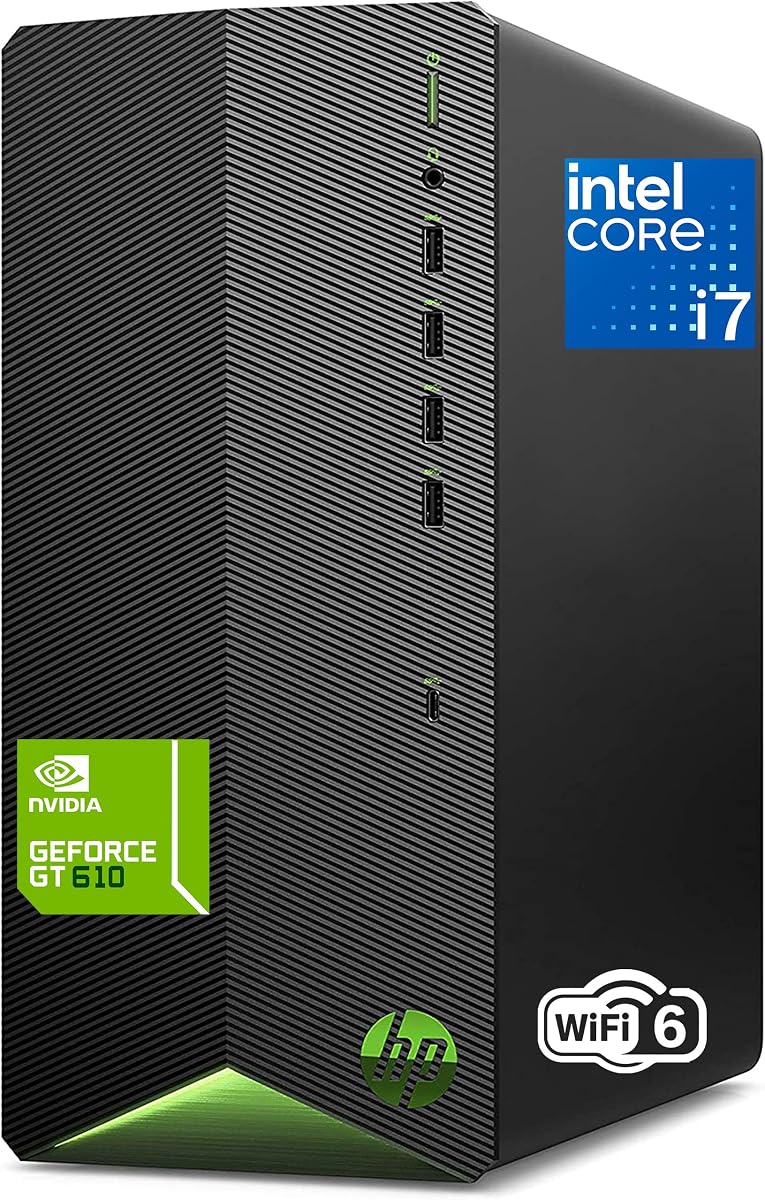
This HP tower is presented as an all-in-one home and student package. It combines an eight-core Intel i7-11700F processor, 16GB DDR4 memory, and a 1TB PCIe SSD, while including a keyboard and mouse for a more immediate setup.
We may earn a commission when you buy through this link, at no additional cost to you.
The 1TB SSD provides considerably more local storage than the 256GB and 512GB alternatives in this guide. That capacity is especially useful for assignments, research files, photographs, video, and installed applications. Wi-Fi 6, Bluetooth, HDMI, and RJ-45 connectivity also make it easier to integrate with a home network, television, printer, and other devices.
Its GeForce GT 610 graphics are intended for casual entertainment and light gaming rather than demanding modern games or intensive graphics work. The i7-11700F is also an older 11th-generation platform, so buyers should not expect the newest processor features found in the Core Ultra and 14th-generation alternatives.
For a student, family, or home employee wanting a storage-rich and largely complete package, this system is particularly practical. The included peripherals and familiar interface reduce setup friction, while the eight-core processor provides enough capability for research, video calls, spreadsheets, and productivity applications.
A 1TB PCIe SSD gives students and families room to organize coursework, documents, media libraries, and applications without immediately relying on external storage. The solid-state format also supports quick startup and file access.
The included keyboard, mouse, Wi-Fi 6, and familiar Windows interface make this a convenient household system. It is easier for several family members to begin using than a barebones desktop requiring additional core peripherals.
We may earn a commission when you buy through this link, at no additional cost to you.
The HP Home Desktop Tower focuses on a compact, practical package for homework, online learning, streaming, photo editing, and casual gaming. Its 4.5 rating indicates a favorable balance, with 16GB of memory, a 256GB PCIe SSD, and a microtower measuring 11.93 inches tall.
We may earn a commission when you buy through this link, at no additional cost to you.
Connectivity is a major strength. The system lists USB Type-C, multiple high-speed USB ports, Ethernet, an included Wi-Fi adapter, a headphone jack, and HDMI, DVI, and VGA outputs. Those legacy and modern video options make it adaptable to older televisions, projectors, and current monitors.
Its main compromise is storage. A 256GB SSD leaves limited room for large media collections or extensive software, and users may quickly need an external drive or a larger internal drive. The dedicated graphics should also be compared with the intended workload, as the listing positions it for video playback, light gaming, and entertainment rather than serious graphics work.
This is a sensible pick for a bedroom, study, or shared family space where a full-size tower would be inconvenient. Windows 11 Pro, included keyboard and mouse, quiet operation, and the compact enclosure add value, while buyers with large files should plan additional storage.
The microtower is easy to position on a desk or near an entertainment center. Its mixture of USB-C, traditional USB connections, Ethernet, and multiple display outputs makes it adaptable to existing home accessories.
Dedicated graphics, HDMI support, and a headphone jack help the system function as a family entertainment and learning computer. The compact design is particularly useful where space is limited or equipment must remain unobtrusive.
We may earn a commission when you buy through this link, at no additional cost to you.
The renewed Dell OptiPlex 3060 stands out for the amount of memory and storage it provides relative to its role as a value-oriented system. It combines a six-core Intel i5-8500 with 32GB of DDR4 RAM and a 1TB SSD, delivering a configuration well suited to browsing, media, and multitasking.
We may earn a commission when you buy through this link, at no additional cost to you.
Built-in Wi-Fi and Bluetooth eliminate the need to rely solely on Ethernet for network access. Its port selection includes four USB 3.0 ports, four USB 2.0 ports, DisplayPort, HDMI, an audio combination jack, separate audio output, RJ-45 Ethernet, and three internal SATA connections.
The processor and Intel HD 630 graphics are dated compared with newer systems in the guide. That means users should be realistic about demanding software, advanced content creation, and modern games. As a renewed product, its physical condition and included components may also differ from a new system.
Despite those qualifications, the combination of 32GB memory and a 1TB SSD is compelling for a home office, school computer, or general-purpose family machine. The stated quality guarantee, free technical support, and Microsoft Authorized Refurbisher status provide additional confidence for buyers comfortable with renewed hardware.
The 32GB memory allocation is unusually useful in a value-oriented desktop. It allows more applications and browser tabs to remain active, making the older processor feel more versatile in routine productivity and media tasks.
The 1TB solid-state drive supplies both quick startup and ample room for documents, photos, videos, and applications. The stated internal SATA connections also provide some scope for additional storage expansion.
We may earn a commission when you buy through this link, at no additional cost to you.
The HP ProDesk 400 G9 is designed for users who value a small chassis, business-oriented features, and abundant memory over high-end processing. Its small form factor measures 11.9 by 10.6 by 3.7 inches, making it considerably shallower than a conventional tower.
We may earn a commission when you buy through this link, at no additional cost to you.
The listed Intel Celeron G6900 has two cores, 4MB of cache, and a 3.4GHz clock. It is intended for smooth daily computing rather than intensive creation or advanced gaming. The larger 32GB memory configuration and 1TB PCIe SSD provide useful capacity for business applications, browsing, documentation, and communication software.
Connectivity is extensive, including USB-C, several USB-A connections, USB 2.0, DisplayPort 1.4, HDMI 1.4, RJ-45, audio connections, Wi-Fi, and a wired keyboard and mouse. The inclusion of TPM 2.0 and HP Wolf Security adds protection appropriate to a home office that may also handle sensitive records.
This system makes the most sense for administrative work, document handling, online learning, and space-conscious offices. Buyers who expect intensive video editing, 3D work, or modern gaming should consider a stronger processor, but the SFF format is otherwise well suited to a tidy home workspace.
The shallow chassis can fit under a desk or sit close to a monitor with minimal visual clutter. Its dimensions make it one of the most practical choices here for a compact home office that still needs a full desktop.
Windows 11 Pro, TPM 2.0, and HP Wolf Security are valuable when a home computer is also used for business records. These features are less visible than processor benchmarks but can matter greatly in a professional workflow.
We may earn a commission when you buy through this link, at no additional cost to you.
The Dell 2026 Edition Tower combines a 14th-generation Intel Core i3-14100 with 32GB of DDR5 memory and a 1TB PCIe NVMe SSD. That balance makes it suitable for a home office that needs modern performance, plenty of active-memory capacity, and fast local storage without moving to a high-end workstation.
We may earn a commission when you buy through this link, at no additional cost to you.
The processor has four cores, eight threads, a stated boost speed of up to 4.7GHz, and 12MB of cache. It is well suited to office automation, communication tools, browsing, document work, and sustained daily operations, though more demanding creative tasks may benefit from additional cores.
Its Intel UHD Graphics 730 supports dual 4K monitors through HDMI 2.1 and DisplayPort 1.4a. The system also includes MediaTek Wi-Fi 6, Bluetooth, USB Type-C, USB-A, Gigabit Ethernet, an SD media reader, and an audio jack, covering most modern home-office accessories.
Windows 11 Pro 64-bit provides security and management capabilities, and the listed 12.76 by 6.06 by 11.53-inch enclosure remains reasonably compact. This Dell is a strong all-round choice for users who prioritize DDR5, 32GB memory, and storage over top-tier processing.
Combining 32GB DDR5 with a 1TB NVMe SSD creates a responsive foundation for multitasking. The memory handles numerous open applications, while the drive supports fast boot times and quick access to larger working files.
Dual 4K support is a major benefit for trading dashboards, spreadsheets, research references, or content previews. Keeping two detailed screens visible can improve productivity without requiring a second computer.
We may earn a commission when you buy through this link, at no additional cost to you.
The HP 2026 Desktop Computer is an approachable tower for students, remote workers, and small businesses. Its Intel Core i5-12500 has six cores and 12 threads, with turbo speeds up to 4.6GHz, while 16GB of DDR4 RAM and a 512GB PCIe SSD cover common productivity needs.
We may earn a commission when you buy through this link, at no additional cost to you.
The system arrives with a wired keyboard and mouse and includes lifetime web-based access to Office 365. That makes it a practical package for writing documents, preparing presentations, collaborating remotely, and managing everyday business tasks. Windows 11 Home provides a familiar interface for general family use.
Its eight total USB ports, HDMI and VGA outputs, Ethernet, and Wi-Fi 6 offer solid peripheral compatibility. Intel UHD Graphics 770 handles everyday visuals, presentations, and multimedia. The older 12th-generation processor and 16GB memory are adequate but leave less headroom for intensive workloads than the 32GB Dell alternatives.
For a home office that values completeness and connectivity, this is a straightforward recommendation. It works especially well for administrators, students, and households seeking a dependable productivity machine without a complex initial accessory purchase.
Lifetime access to Office 365 on the web supports document creation, editing, and sharing through a browser. It provides a useful starting point for new students or workers who want productivity applications without immediately purchasing a full desktop software package.
Eight USB connections make it easier to add storage, printers, headsets, webcams, and other accessories. Wi-Fi 6 and Ethernet provide flexible networking, while HDMI and VGA support a range of displays.
We may earn a commission when you buy through this link, at no additional cost to you.
The Lenovo IdeaCentre Tower Desktop offers the strongest overall balance for a broad range of home users. It pairs a 10-core, 10-thread Intel Core Ultra 5 225 processor with 16GB of DDR5 memory and a 512GB PCIe SSD, earning a 4.6 rating within this guide.
We may earn a commission when you buy through this link, at no additional cost to you.
The processor operates at a stated base frequency of 3.3GHz and can boost to 4.9GHz, with 20MB of Intel Smart Cache and 22MB of L2 cache. These specifications support responsive everyday computing, office tasks, multitasking, and light productivity work. The system can also accommodate more memory and a larger PCIe M.2 SSD according to the supplied details.
Its seven USB ports, RJ-45 Ethernet, Wi-Fi 6E, and Bluetooth 5.1 make it well connected. HDMI and VGA support dual-monitor setups, while a wired Lenovo keyboard and mouse are included. Windows 11 Home 64-bit provides a modern, familiar operating system for daily household use.
Its main limitation is the base 512GB storage, which may be insufficient for extensive media collections. Even so, the modern processor, DDR5 memory, wireless capabilities, and complete accessory package make this an especially versatile recommendation for a main family or home-office computer.
Ten cores give the IdeaCentre more parallel processing capacity than the four- and six-core alternatives here. While the listed configuration includes eight threads, the processor's overall core count remains a useful advantage for multitasking and heavier daily workloads.
Wi-Fi 6E and Bluetooth 5.1 support current wireless accessories, while RJ-45 Ethernet provides a dependable wired option. Seven USB ports and two display outputs create a practical foundation for a flexible home setup.
We may earn a commission when you buy through this link, at no additional cost to you.
The Dell Pro Tower Desktop received the highest listed rating in this roundup at 4.9. Its Intel Core i3-14100, 16GB DDR5 memory, and 512GB PCIe SSD form a modern foundation for business applications, video conferencing, content creation, and routine productivity.
We may earn a commission when you buy through this link, at no additional cost to you.
The processor has four cores, eight threads, a stated boost of up to 4.7GHz, and 12MB of cache. That is enough for office work, communication tools, research, presentations, and multi-application use, although buyers undertaking sustained rendering or advanced creative workloads may want more cores.
Connectivity is a defining strength. The system includes USB-C 3.2 Gen 1, multiple USB 3.2 and USB 2.0 ports, DisplayPort 1.4, HDMI 2.1, a headset jack, media card reader, Gigabit Ethernet, Wi-Fi 6, and Bluetooth. DisplayPort and HDMI support dual monitors, which is valuable for a professional home office.
Windows 11 Pro adds remote desktop capabilities, security features, and business-oriented tools. The compact tower includes a 180W Bronze power supply, Kensington lock slot, and padlock loop. With a 4.9 rating and excellent connection options, it is a particularly polished choice for home-based professionals.
DisplayPort 1.4 and HDMI 2.1 provide flexible support for two monitors. That expands workspace for spreadsheets, analysis, presentations, and communication tools without requiring a separate display or computer.
Windows 11 Pro supports remote access and professional security features, while the Kensington lock slot and padlock loop add physical protection. These details are particularly relevant when the same computer handles employment and personal data.
We may earn a commission when you buy through this link, at no additional cost to you.
The right home desktop balances processing power, memory, storage, connectivity, physical design, and operating-system features around the tasks you actually perform. Use the following factors to narrow the field before making a final comparison.
The processor influences how quickly a computer handles everyday calculations, web browsing, document work, video calls, and application launches. Core Ultra 5 and Core Ultra 7 models provide newer architecture and built-in AI capabilities, while Core i3, i5, and i7 options cover conventional productivity requirements. Processor choice also affects whether the machine feels ready for more demanding software over time.
Choose a processor that comfortably exceeds your normal workload rather than paying for capability you will never use. For basic family use, a current Core i3 or i5 may be sufficient; heavier multitasking and creative work benefit from more cores and memory.
RAM allows active applications and data to remain accessible at the same time. The systems in this guide range from 16GB to 32GB, with 32GB providing more breathing room for large browser workloads, communications, creative applications, and multiple virtual or business programs. DDR5 is also present in several newer configurations.
Prioritize 16GB as a practical minimum for a modern home computer and consider 32GB when the machine will be shared or used professionally. Memory capacity cannot replace faster processing, but it helps prevent sluggish behavior when many applications remain open.
A solid-state drive improves startup time, application loading, and file responsiveness compared with a traditional hard drive. Capacity must also match the type of content being stored. Documents and web browsing need less room, while photographs, videos, large games, and creative projects can quickly fill a smaller drive.
A 512GB SSD is a sensible starting point for many households, while 1TB offers more freedom for media and installed applications. Check whether the listing states the drive size, and consider external or secondary storage if your existing files already require substantial capacity.
A home desktop may serve one monitor, a television, or a multi-screen workspace. HDMI is the most common modern connection, while DisplayPort is especially useful for high-refresh-rate monitors and daisy chaining. Systems with VGA or DVI can connect to older displays, but buyers should confirm resolution and refresh-rate support for their exact screens.
Integrated graphics suit office tasks, browsing, video, and presentations, while dedicated graphics are more appropriate for light gaming and certain creative applications. Match graphics capability to the display and workload rather than assuming every office desktop can handle advanced graphics.
Wi-Fi 6 or Wi-Fi 6E offers modern wireless connectivity, while built-in Ethernet is useful for stable large transfers and fixed workstations. Bluetooth simplifies the addition of keyboards, mice, headphones, and other accessories. The number and type of USB ports matter because printers, external drives, webcams, and charging devices all need accessible connections.
Look for USB-A and USB-C based on the peripherals you already own. A wired keyboard and mouse are included with several systems, which can reduce the initial setup, but verify the package contents and avoid assuming that a USB-C port supports every docking or display function.
Windows 11 Home is designed for personal use and everyday household features, while Windows 11 Pro adds business-oriented security, management, and remote desktop capabilities. Both interfaces can handle general productivity, education, entertainment, and communication. The operating system should align with the environment in which the computer will be used.
A professional or mixed-use home may benefit from Pro, especially for remote access, security features, and advanced device management. Families using the system primarily for schoolwork, browsing, media, and personal productivity will find Home straightforward and familiar.
Tower desktops provide room for expansion and tend to suit long work sessions, while small-form-factor models fit neatly beneath desks or beside televisions. A slim design can be attractive in a living area, but internal clearance and upgrade options may be more limited than in a full tower.
Measure the intended location before buying and leave room for ventilation. Tool-less access and removable side panels make routine maintenance easier, while physical lock slots can be useful in a shared or business workspace.
Onsite service can be particularly valuable for home users because a major hardware issue may otherwise require taking a tower to a repair location. Renewed systems may also include quality guarantees and technical support, although their condition and component history should be understood before purchase.
Check whether a keyboard, mouse, Wi-Fi adapter, or other accessories are included. Complete packages can be more convenient, but they are not automatically superior if the included components do not meet your comfort, resolution, or connectivity preferences.
Begin by placing the chassis on a stable, hard surface with ventilation openings unobstructed. Connect the display, keyboard, mouse, and network, then power on the system and follow the operating-system setup prompts. Create separate user accounts for family members or work and personal activity, and choose a strong password for each account.
Install the applications required for your daily workflow and save active files in organized folders backed up to an external drive or another protected location. Keep system updates current, restart regularly, and leave a little free storage space. Periodically clean dust from vents, use surge protection, and shut the system down cleanly rather than repeatedly forcing it off.
For a multi-monitor arrangement, identify the correct display inputs and configure resolution and scaling in the operating system. If performance declines, check for unnecessary startup programs, confirm that the storage drive has room, and keep memory-intensive browser tabs and applications under control. For renewed equipment, follow the seller's coverage terms and document the initial condition and included accessories.
Yes, 16GB is generally sufficient for web browsing, schoolwork, office applications, video calls, and media playback. It becomes more restrictive when many applications, large browser workloads, or professional software remain open simultaneously. A 32GB configuration offers additional headroom for power users and shared family computers.
A tower is generally better when expansion, cooling room, and straightforward internal access matter most. A compact or slim model is better for limited desk space, entertainment-center placement, and a less noticeable work area. The Dell Slim Desktop and HP ProDesk are particularly relevant options for buyers who prioritize footprint.
It can be enough for documents, browsing, and a modest collection of applications, but it fills quickly with photos, videos, and larger programs. A 512GB or 1TB SSD offers more flexibility. External storage can supplement smaller drives, although keeping active applications on the internal SSD preserves responsiveness.
Not for most office work, school projects, video calls, streaming, or general browsing. Integrated Intel graphics are adequate for those tasks and can support one or multiple displays depending on the model. Dedicated graphics become more important for demanding games, 3D work, video editing, and other graphics-intensive applications.
DDR5 is a newer memory generation that supports improved bandwidth and efficiency compared with DDR4. Its practical value is strongest in newer systems paired with compatible processors. For ordinary home tasks, the total memory capacity often matters more than the generation alone.
Several models explicitly support dual displays, including the Dell Slim Desktop, Dell Tower Desktop, Dell 2026 Edition Tower, Dell Pro Tower, HP Home Desktop Tower, HP ProDesk 400 G9, and Lenovo IdeaCentre. The appropriate cables and supported display settings should be confirmed for the exact monitor configuration.
A renewed desktop can be suitable when it offers the memory, storage, connectivity, and software support needed for the workload. The OptiPlex 3060 in this guide, for example, combines 32GB of memory with a 1TB SSD and stated technical support. Buyers should review the condition, warranty, return terms, and included accessories carefully.
Windows 11 Home is well suited to personal browsing, school, media, and standard productivity tasks. Windows 11 Pro is more appropriate when a home computer also supports paid work, needs remote desktop access, or benefits from additional security and management features. Both are capable general-purpose operating systems.
The Lenovo IdeaCentre Tower Desktop is the most balanced overall recommendation, combining a 10-core Intel Ultra 5 processor, DDR5 memory, Wi-Fi 6E, dual-display support, and included peripherals. The Dell Pro Tower stands out for its high rating, professional security, extensive connectivity, and polished business-oriented design, while the renewed Dell OptiPlex 3060 delivers exceptional memory-and-storage value.
Prioritize the specifications tied to your actual workload. Choose 32GB for heavier multitasking, 1TB storage for large media collections, dedicated graphics for more demanding visual work, and a compact chassis when desk space is limited. Newer platforms, multiple modern video outputs, and business operating systems can also provide longer-term flexibility for a mixed home and office environment.
Before buying, verify the current listing because configurations, included accessories, and prices can change. Check the processor, installed memory, storage capacity, ports, operating system, display support, warranty, and service terms, then select the desktop that offers the most useful balance for your household rather than relying on one specification alone.