
Three-Fan Laptop Cooling Pad
4.3Editor score
Three large cooling fans
Five height levels
Two external USB ports
Integrated phone holder
A computer fan stand can cool a laptop, guide air through a desktop setup, or improve the position of a screen without occupying much desk space. The right model depends on whether you need a powered cooling pad or an adjustable mount for an existing 120mm or 140mm PC fan.
We compared the ten products in this guide by examining fan count, cooling approach, adjustability, construction, device compatibility, portability, and desk utility. The list includes integrated laptop cooling stands, portable risers, and heavy-duty mounts that require a separate PC fan.
Each review highlights the product’s strongest features, practical limitations, and ideal user so you can choose confidently. Product details and availability can change, and current prices should always be checked before making a purchase.
Top 3 Picks for Best Computer Fan Stand
The three leading options serve different needs: the YICOSUN model offers a balanced aluminum design, the three-fan cooling pad provides generous cooling and connectivity, and the rotating laptop stand combines a central fan with flexible screen positioning.
4.3Editor score

4.4Editor score
4.6Editor score
As an Amazon Associate we earn from qualifying purchases.
This side-by-side overview compares integrated laptop cooling pads, adjustable risers, and metal mounts for standard desktop PC fans, highlighting the features that distinguish each design.


The Kootek Laptop Cooling Pad Cooler Stand is a feature-rich all-in-one platform with five integrated blue LED fans, six height settings, and a built-in dual USB hub. Its 4.4 rating reflects a generally favorable balance of cooling performance, useful controls, and broad compatibility with laptops from 12 to 17 inches.
We may earn a commission when you buy through this link, at no additional cost to you.
Its most notable strength is the unusually large fan arrangement. The platform combines a 4.72-inch fan with four smaller 2.76-inch fans, and two switches allow users to select one fan, four fans, or all five. This flexibility makes it useful for quiet work sessions as well as periods of more demanding gaming or media playback. Front stoppers help keep the computer from sliding while the six-position structure supports better screen placement.
The dual USB hub adds practical value to a desk setup, allowing peripherals such as a mouse, keyboard, flash drive, or controller to connect through the pad. One practical caveat is that the included lead is USB-to-USB. Users who want to connect a USB-C peripheral should be prepared to use an appropriate USB-C-to-USB adapter. The many fans, LEDs, and motor assemblies also make this a larger and more substantial cooler than a minimalist riser.
This is a strong choice for users who want maximum built-in cooling without buying a separate PC fan and mounting it. It suits students, office workers, and gamers with compatible laptops, particularly anyone who values a USB hub and multiple cooling levels. Those wanting a smaller travel stand may prefer a foldable model, but for a full desktop cooling station, this one is difficult to overlook.
Using one, four, or all five fans lets buyers match cooling output to the activity. The larger central fan moves substantial air while the smaller units support airflow across the rest of the laptop base.
The built-in dual USB hub reduces desk clutter by giving connected accessories more available ports. It is a meaningful convenience in a home office or gaming setup where USB connections are already in demand.
We may earn a commission when you buy through this link, at no additional cost to you.
The YICOSUN Adjustable Laptop Cooling Stand combines two quiet RGB fans with a foldable aluminum alloy frame, making it one of the most versatile products in this guide. It carries a 4.4 rating and is designed for 10- to 16-inch laptops from brands such as MacBook, Lenovo, ASUS, and Dell.
We may earn a commission when you buy through this link, at no additional cost to you.
Three adjustable fan speeds let users balance airflow with noise depending on the task. The stand raises the display to reduce the need to hunch over a flat laptop, while the aluminum frame keeps the overall structure light enough to move between a home desk, dorm room, or travel setup. Anti-slip silicone pads help maintain contact and limit unwanted movement.
There are some trade-offs. The listed compatibility ends at 16 inches, so buyers with larger gaming laptops should verify their dimensions. The manufacturer also recommends removing the laptop or tablet before changing the height or angle. That instruction is important because repositioning a loaded stand can be less stable than adjusting it first and then placing the device.
Overall, this stand is well suited to people who move between locations or want cooling without a large desktop cooling pad. It also works for DJ setups, study sessions, and general office use. The combination of RGB lighting, aluminum portability, and adjustable fan control gives it broad appeal, although it does not include the multiple USB ports or five-fan capacity found in heavier-duty alternatives.
The folding aluminum construction makes the stand easier to pack than a full-size cooling pad. Two fans and three speeds provide useful cooling while preserving a relatively compact footprint.
Raising the laptop can support a more comfortable viewing position during long work, study, or gaming sessions. The silicone pads add stability without replacing the need to keep the device centered.
We may earn a commission when you buy through this link, at no additional cost to you.
This Laptop Stand for Desk combines an open-frame riser, an active cooling fan, and an adjustable support structure for 14- to 18-inch laptops. Its 4.5 rating places it among the highest-rated products here, and the design is especially interesting for users who want a laptop elevated while maintaining access to the space underneath.
We may earn a commission when you buy through this link, at no additional cost to you.
A major strength is the included screw adjustment tool, which can modify the stand’s load range up to 5kg. That level of adaptability may appeal to owners of larger or heavier gaming laptops. The open frame also promotes airflow and leaves room for accessories, while the phone mount and USB-A and USB-C connections add practical desk functions beyond simple elevation.
The product asks for more deliberate setup than stands adjusted by hand. Users must work with the provided tool to alter the load range, and the unusual frame may take a little longer to understand than a conventional cooling pad. Its listed 14- to 18-inch laptop range is broad, although the adjustable structure should be checked against the dimensions and weight of a particular device.
This stand is a compelling option for creative professionals, gamers, and users building a multi-device workstation. It offers cooling, portability, desk organization, and device support in one distinctive package. It is less suited to someone seeking a simple two-step setup or a very slim travel accessory, but it delivers exceptional flexibility for a premium desktop stand.
The adjustable load range extends up to 5kg, making the stand more accommodating for heavier portable computers. Buyers should still check both their laptop’s size and weight before installation.
The elevated open-frame construction can create room for a keyboard, mouse, documents, or other desk accessories. This makes it more than a cooling device and a potential workstation organizer.
We may earn a commission when you buy through this link, at no additional cost to you.
The Laptop Cooling Pad with 3 Quiet Fans is a broad-purpose cooling station designed for home, school, work, and gaming use. Its three large fans, five height levels, phone holder, and two USB ports create a generous feature set, while its 4.3 rating indicates solid performance across its intended uses.
We may earn a commission when you buy through this link, at no additional cost to you.
Fan control is handled with a simple wheel switch rather than a bank of small buttons, which should make everyday adjustment straightforward. The listed maximum noise is about 40dB, making the pad more appropriate for a shared room during active use than a dedicated silent office. Heat-resistant ABS, stainless steel mesh, and front anti-slip pads support durability and device security.
The external USB ports and internal dual USB hub are especially helpful in a shared household, where several people may need to connect mice, keyboards, or storage devices. As with many combined cooling pads, the included USB-to-USB cable means USB-C peripherals may require an adapter. The phone holder is another thoughtful addition for recipes, video calls, messages, or children watching content beside the computer.
This is a strong recommendation for anyone who wants a visible, multifunctional cooling station that can serve different family members. It supports laptops under 17 inches, but very large gaming systems should be checked for fit. For users who value more than cooling—such as extra connectivity, a phone stand, and adjustable screen height—this model delivers a particularly complete package.
A top-mounted wheel changes cooling output without navigating complicated controls. That accessibility makes the pad convenient for a wide range of users, including students and family members.
The phone holder and multi-port USB hub turn the pad into a compact shared-device station. These extras can reduce clutter around a dining table, study desk, or home office.
We may earn a commission when you buy through this link, at no additional cost to you.
The Computer Fan Stand is a heavy-duty mounting solution for standard 120mm and 140mm square-frame PC fans. It carries a 4.4 rating and is built for users who want to direct external airflow toward a desktop computer, router, 3D printer, or other electronic equipment without placing another fan directly inside the case.
We may earn a commission when you buy through this link, at no additional cost to you.
Its 360-degree vertical rotation is the core feature. Instead of fixing airflow in one direction, the pivot allows the fan to move upward, downward, sideways, or diagonally. A solid steel frame and weighted base help reduce movement when the fan operates at higher speeds, while thumb screws permit installation and repositioning without additional tools.
The fan itself is not included, so buyers need to own a compatible unit or add one separately. The manufacturer also warns that the precision-cut metal edges can be sharp and recommends gloves during installation. Users should therefore inspect the components before assembly and tighten the screws securely, especially if the stand will support a high-speed fan.
This is the right choice for an enthusiast or technician who already uses PC case fans and wants one in a freestanding desktop role. It can target a graphics card, motherboard area, router, or printer without occupying internal expansion slots. It does not offer laptop elevation, and it makes little sense for shoppers who want a complete cooling solution rather than a mount.
Vertical rotation lets users direct air toward specific heat-producing parts. The freestanding design can provide targeted cooling while keeping the computer’s internal slots open.
A heavy metal frame and weighted base are valuable when supporting a fast-spinning fan. These elements help limit vibration and keep the assembly from shifting across the desk.
We may earn a commission when you buy through this link, at no additional cost to you.
The Multi-Purpose Desk Fan Stand Mount is an aluminum black bracket designed specifically for most square-frame 120mm PC fans. It has a 4.3 rating and offers a relatively straightforward way to place a spare case fan on a desk, workbench, or near compact electronic equipment.
We may earn a commission when you buy through this link, at no additional cost to you.
The full aluminum construction should appeal to users who want a clean, durable mount that resists rust. Its 360-degree vertical rotation allows the attached fan to direct air upward, downward, sideways, or at an angle. Thumb screws support tool-free installation and repositioning, and the heavy-duty design is intended to remain stable at higher fan speeds.
Compatibility is the main limitation. This model does not accept 140mm fans, so it is less versatile than several other mounts in the guide. The fan is also excluded from the package. This product is therefore best understood as an accessory for someone who already owns a suitable 120mm fan, rather than a ready-to-use desktop cooling solution.
For a compact workstation, small-form-factor PC, or electronics project, the mount can direct useful airflow without modifying a computer case. It is especially suitable for users who value aluminum construction and a compact profile over the broader size compatibility offered by multi-size brackets. Those planning to use a 140mm fan should select one of the universal alternatives instead.
The aluminum frame provides a refined appearance while resisting rust over time. Its dark finish also blends well with desktop PC components and technical equipment.
Restricting the mount to standard 120mm square-frame fans keeps the design compact. Users should measure their fan before ordering to avoid compatibility surprises.
We may earn a commission when you buy through this link, at no additional cost to you.
The Multi-Purpose Desk Fan Stand Mount is a simple metal accessory compatible with most square-frame 120mm and 140mm PC fans. Its 4.3 rating reflects a practical design that prioritizes straightforward installation, stable support, and easy airflow positioning without unnecessary features.
We may earn a commission when you buy through this link, at no additional cost to you.
Users can rotate the mounted fan through 360 degrees vertically, directing airflow in multiple directions. This is useful for cooling a desktop computer, network equipment, or other electronics that could benefit from an external stream of air. Heavy-duty metal construction helps the stand stay planted when the fan runs at elevated speeds, and the included thumb screws make setup and repositioning tool-free.
Like other mount-only products, it does not include a fan. Buyers must source a compatible 120mm or 140mm unit, and they should match the fan’s mounting pattern and intended airflow direction to the bracket. The product is less accommodating than the most universal mount in the list, which also supports 180mm fans, but that additional size is rarely needed for a standard desk setup.
This mount is a good middle ground for PC users who want a simple stand and commonly own 120mm or 140mm case fans. It avoids the complexity of a larger multi-axis assembly while still offering meaningful directional control. It is particularly appropriate for a repair bench, hobby workspace, or compact desktop where a case fan is already available and needs a freestanding position.
Support for 120mm and 140mm models covers the sizes most often found in desktop PC cases. The broad fit makes it a practical option for users with a mixed collection of standard fans.
Thumb screws allow users to mount, tighten, and redirect a fan without finding a screwdriver. This makes routine setup changes quick and approachable.
We may earn a commission when you buy through this link, at no additional cost to you.
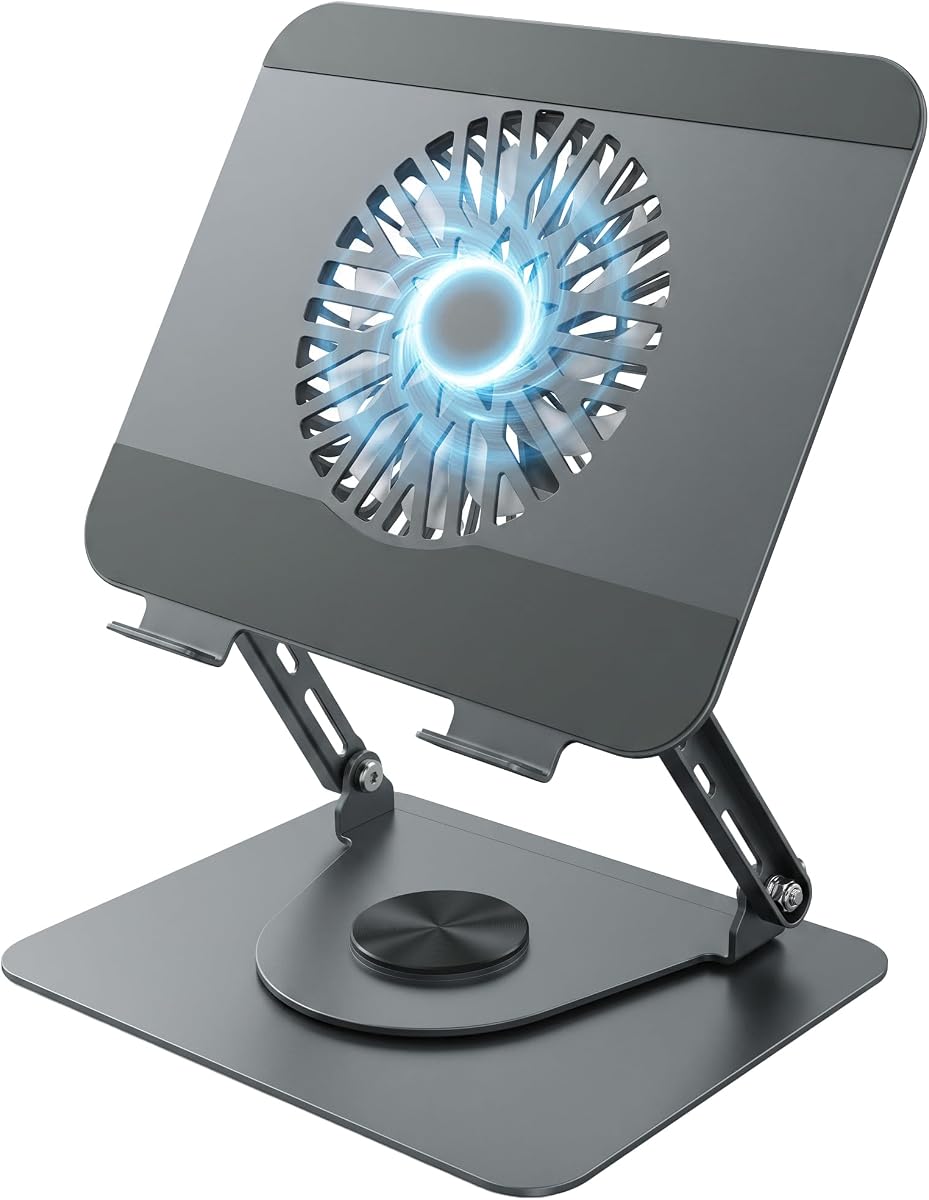
The Laptop Stand with Cooling Fan stands out because it combines active airflow, height and angle adjustment, and a fully rotating base. Its 4.6 rating is the highest among the laptop-focused products in this guide, reflecting a particularly versatile approach to everyday desk use.
We may earn a commission when you buy through this link, at no additional cost to you.
The central fan helps keep air moving beneath the laptop during demanding work or gaming. More distinctive is the 360-degree rotating platform, which lets users turn the screen toward colleagues, clients, or a second person without relocating the entire stand. Adjustable height and angle help place the display closer to eye level, while integrated silicone pads and front rests support the computer during typing and interaction.
Raising the laptop also opens space beneath the platform for an external keyboard, mouse, docking station, or notes. This can produce a cleaner and more ergonomic workstation. The trade-off is that the stand offers fewer explicit cooling controls than a multi-fan pad, and the rotating base should be moved deliberately to avoid twisting a connected cable or displacing the device.
This is an excellent option for office professionals, students, presenters, and collaborative users who reposition their screens frequently. It offers a stronger balance of ergonomic benefits and cooling than a plain riser, while avoiding the footprint of a large multi-fan cooling station. For a rotating display platform with active airflow, it is the most distinctive choice in the guide.
The 360-degree base makes it easy to turn the display toward another person. That convenience is especially valuable in meetings, interviews, classes, and shared workspaces.
The elevated platform creates usable storage space beneath the laptop. An external keyboard and mouse can improve comfort while keeping the desktop visually organized.
We may earn a commission when you buy through this link, at no additional cost to you.
The Aluminum Multi-Purpose Desk Fan Stand Mount is the most mechanically elaborate and broadly compatible fan mount in this guide. It supports 120mm, 140mm, and 180mm PC fans, has a 4.0 rating, and is built for users who want extensive control over the position of a large external fan.
We may earn a commission when you buy through this link, at no additional cost to you.
Three precision damped pivot hinges create 360-degree horizontal rotation and 180-degree vertical tilt. These axes make it possible to point airflow toward a GPU, motherboard, network device, or other component with more precision than a simple vertical swivel. The wide base, anti-slip pads, and cross-shaped hanging holes help improve stability and make the mount suitable for a permanent desktop arrangement.
The CNC-machined aluminum alloy construction, sandblasted texture, and anodized finish create a polished appearance. Most components arrive preassembled, and six included thumbscrews allow adjustments without a full tool kit. This convenience has a trade-off: the more sophisticated hinge system and broader size support make the mount bulkier and more involved than simpler brackets.
This product is best for enthusiasts, builders, and technical users who have several fan sizes and need precise placement. It is less attractive to someone seeking a lightweight travel accessory or a complete laptop cooling solution. Its flexibility and refined construction make it a strong choice for a permanent, carefully organized cooling setup.
Horizontal rotation and vertical tilt provide more aiming options than a standard vertical pivot. This is useful when airflow must reach a component at an unusual angle.
The wide base, anti-slip pads, and substantial aluminum frame prioritize stability. This makes the mount more appropriate as a fixed setup than a frequently packed accessory.
We may earn a commission when you buy through this link, at no additional cost to you.
The YAODHAOD Multi-Purpose Desk Fan Stand Mount is a solid-metal bracket designed to position 120mm and 140mm computer fans above or beside electronic devices. Its 5.0 rating is the highest in the guide, though the relatively limited feature set means its value depends heavily on the user’s need for stable directional airflow.
We may earn a commission when you buy through this link, at no additional cost to you.
A full vertical rotation mechanism lets the fan point air upward, downward, sideways, or diagonally. The thick metal frame is intended to reduce vibration and shaking, and large textured thumb knobs allow the fan to be mounted, locked, and repositioned without screwdrivers, drills, or additional hardware. Pre-drilled holes are designed to fit mainstream square-frame PC fans, including units with RGB lighting.
The primary limitation is that the fan is not included. Shoppers need to obtain a compatible fan and should confirm its mounting hole pattern and airflow direction. Although the product title references laptops, routers, modems, electronics, and hobby devices, the stand itself does not elevate a laptop or include a cooling platform, so it is primarily a freestanding fan accessory.
This mount works well for directing airflow toward a router, modem, laptop underside, 3D printer hot end, or desktop component. It is a good option for users who value sturdy construction and tool-free adjustment over multi-axis hinges or broad 180mm support. For a basic, durable stand with a standard PC fan, it delivers an attractive and focused package.
The thick bracket is designed to resist vibration when paired with a faster-spinning PC fan. A stable frame helps maintain the intended airflow position.
The freestanding format can direct air toward networking equipment, laptops, printers, and small electronics. It is especially handy when a device cannot accept an internal fan.
We may earn a commission when you buy through this link, at no additional cost to you.
The right computer fan stand depends on the device you want to cool, whether the fan is included, and how much control you need over height, angle, and airflow direction.
Integrated cooling pads contain their own powered fans and are immediately ready to use with a compatible laptop. Fan mounts are empty brackets designed for a 120mm, 140mm, or 180mm PC case fan, giving experienced users more control over fan speed and noise. Integrated models are simpler for beginners, while mounts can be better for directing air toward a specific desktop component or choosing a fan with the desired characteristics.
Choose an integrated pad if you want one product and simple USB power. Choose a mount if you already own a suitable fan or need precise desktop airflow.
Laptop stands should be checked against both screen size and weight. Products in this guide support various ranges, from compact 10-inch models to larger 18-inch gaming systems, but dimensions do not always tell the entire story. Portability, port placement, vents, and the shape of the computer all affect fit. Desktop fan mounts should be matched to the exact square-frame size of the fan and its mounting-hole pattern.
Measure the device before ordering. For laptops, verify size and weight; for fan mounts, verify the fan dimensions.
More fans can move more air across a larger surface, but they also consume more power, create more moving parts, and may be heard in a quiet room. Adjustable speed control is valuable because it allows users to increase cooling during demanding tasks and reduce it while working or watching media. A single central fan may be sufficient for a compact laptop, while a multi-fan pad is better suited to larger systems and sustained gaming.
Prioritize adjustable airflow if noise matters. Choose fan count and pad size to match the computer’s workload.
A computer fan stand often serves as an ergonomic riser as well as a cooling device. Multiple height positions and adjustable angles can place the display closer to eye level, reduce neck strain, and make room for an external keyboard. Rotating bases add another form of adjustment by allowing the screen to face different people. Consider the stability of the stand at each position, particularly when a laptop is being typed on rather than merely viewed.
Look for multiple stable positions and easy-to-reach controls. Adjust the empty stand before placing a laptop on it.
Large cooling pads provide more surface area and may include multiple fans, but they take up significant desk space. Foldable aluminum stands are easier to carry and store, while fixed metal mounts are intended for a permanent setup. Consider where the device will be used, how often it must be moved, and whether a larger footprint would interfere with a mouse, keyboard, or docking station.
Prioritize a full-size pad for a fixed workstation and a folding stand for travel or compact desks.
Powered laptop cooling pads normally draw power through USB. Models with built-in hubs can add convenient connectivity for peripherals, reducing the need for a separate adapter. Some products provide external USB-A ports or other connections, but the included cable may still use USB-to-USB rather than USB-C. Users should verify the supplied connection and prepare an adapter if a USB-C peripheral is involved.
Treat a built-in hub as a convenience, not a replacement for a full-featured docking station. Verify connector type before ordering.
Metal stands generally resist heat and provide stable support for fast-spinning fans, while ABS cooling pads can be lighter and easier to store. Weight and non-slip pads matter when a desktop fan is running at high speed or when a laptop is being typed on. Metal edges should be handled carefully during installation, and all thumb screws should be tightened evenly to maintain secure alignment.
Choose metal for permanent equipment and high-speed fans. Check non-slip surfaces and tightening hardware before use.
Start by placing the stand on a level, stable surface and reviewing its instructions. For a laptop cooling pad, connect the supplied USB cable and confirm that the fans are running before positioning the computer. For a fan mount, install a compatible square-frame PC fan, tighten the thumb screws evenly, and rotate the fan only after the locking mechanism is secure.
Center the laptop within the supported size range and make sure it does not overhang the cooling surface or interfere with the hinges. Adjust the height or angle before attaching power to a powered model. Remove the device before making major structural changes, and never place cables where they can be pinched by a moving stand or pulled by a rotating base.
Clean the cooling surface and vents with a soft, dry cloth, and use compressed air sparingly to remove dust from the pad or mounted fan. Keep liquids away from electrical connections, avoid blocking intake and exhaust paths, and check screws periodically. Unplug a powered pad before cleaning, and replace the stand if its frame becomes bent, its grips wear down, or its fasteners no longer hold securely.
A laptop cooling pad is a platform with built-in powered fans and supports designed to hold and cool a laptop. A PC fan stand is generally an empty adjustable mount for a 120mm, 140mm, or 180mm computer case fan. The first offers a ready-to-use laptop solution, while the second provides flexible desktop airflow for computers and other electronics.
Yes, but the method depends on the product. An integrated laptop stand moves air directly beneath the computer, while a desktop fan mount can direct a separate PC fan toward the laptop’s underside or intake vents. A mount generally offers less controlled contact cooling and may produce more noise, so a laptop-specific pad is usually better for regular use.
No. The desktop PC fan mounts in this guide generally do not include a fan and require a separately purchased compatible unit. The laptop cooling stands do contain integrated fans, but they still need a connection to a suitable USB power source. Always verify what is included in the package before ordering.
Choose the mount based on the fan you already own or plan to buy. Most compact case fans are 120mm, while 140mm fans provide a larger frame and 180mm options are less common. Confirm both the overall dimensions and the spacing of the mounting holes, especially for fans with nonstandard mounting patterns.
Begin with the lowest fan speed and increase it only when the computer needs additional airflow. Closing unused applications and allowing ventilation around the laptop can reduce its heat output. Moving the pad slightly away from reflective walls or hard surfaces may also prevent a concentrated airflow effect, but it should always remain stable and connected to power.
They can be, especially when their height adjustment places the display in a comfortable position and their fans provide steady airflow. Ergonomic benefits depend on choosing the correct angle and using an external keyboard when appropriate. A stand cannot prevent every thermal problem, so users should still monitor performance and keep the computer’s vents unobstructed.
It is safer to remove the laptop first. Moving a loaded stand can cause the computer to slip, fall, or pinch a connected cable. Some manufacturers explicitly recommend removing the device before changing the height or angle, particularly on foldable or hinged models.
Confirm that the fan size and mounting-hole pattern match the bracket, then tighten all thumb screws before operating the fan at high speed. Make sure the stand sits on a flat surface, the base cannot slide, and the airflow is directed safely toward the intended component. Hardware components must also be disconnected before installation.
The YICOSUN Adjustable Laptop Cooling Stand is the most balanced top pick for buyers who want active cooling, portability, adjustable height, and attractive RGB lighting in one relatively compact design. The three-fan Laptop Cooling Pad stands out for households that value multiple fans, USB connectivity, a phone holder, and straightforward height control, while the rotating laptop stand delivers the strongest combination of cooling, ergonomics, and screen-sharing flexibility.
The best product ultimately depends on the device and intended setup. Choose a laptop-specific pad for direct cooling and elevated viewing, a rotating stand for collaborative work, or a metal PC fan mount when directing a separate case fan toward a router, graphics card, 3D printer, or other electronic equipment. Fan size, stability, portability, and power requirements deserve more attention than decorative lighting or extra features.
Ratings, product configurations, and current prices can change over time, so buyers should review the latest listing and confirm compatibility before purchasing. Comparing the stand’s dimensions, fan requirements, included accessories, and connection method against the intended device will help prevent returns and produce a more satisfying setup.