
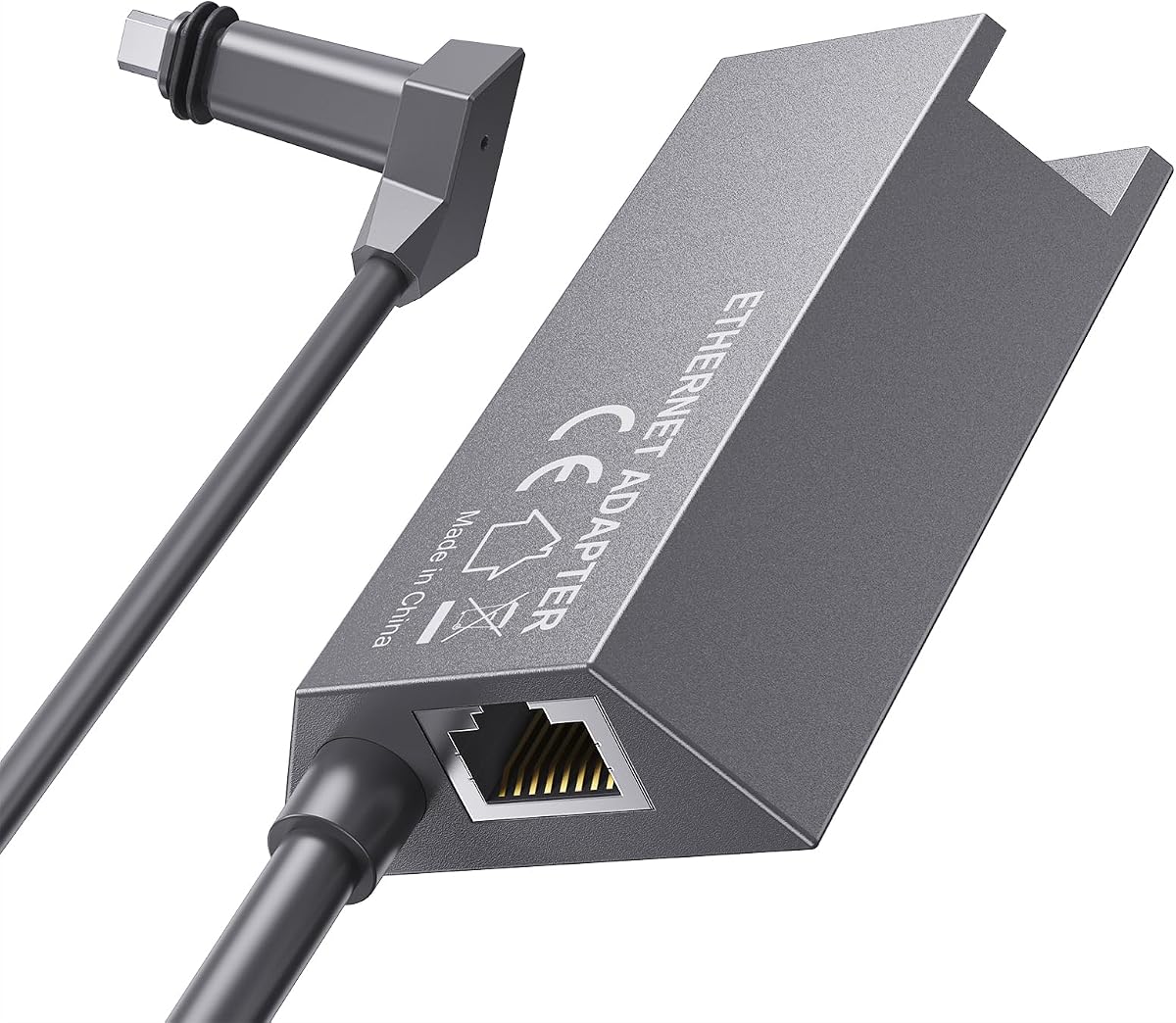
for Starlink Ethernet Adapter Gen 3/Mini, 1000 Mbps 11.8″ Starlink Cable SPX to RJ45
4.8Editor score
Gen 3 and Mini compatibility
IP67 waterproof sealing
Standard T568B RJ45 interface
Starlink Ethernet Adapter guide comparing 10 models for Gen 2, Gen 3, and Mini systems, with details on port counts, wired speed, compatibility, and setup.
A Starlink Ethernet Adapter provides a more dependable route from a compatible Starlink dish and router into a wired network. The right model can reduce wireless interference, add RJ45 connectivity, and give computers, televisions, game consoles, and network equipment a direct connection with a straightforward installation.
This guide compares ten adapters across Starlink generations, port counts, supported Ethernet speeds, included cables, environmental protection, and installation requirements. It includes simple Gen 2 units, multi-port options for newer hardware, and waterproof couplers designed for routing cables through exterior walls or around outdoor installations.
Each review explains the product's strongest benefits, limitations, and ideal user. The three featured picks provide quick recommendations for different priorities, while the complete comparison helps readers verify hardware generation, connector style, and port requirements before ordering.
4.8Editor score

4.6Editor score

4.6Editor score
The table below compares all ten adapters by hardware compatibility, connection capacity, speed, and installation design, making it easier to identify the right model before adding it to a Starlink network.



The Starlink Ethernet Adapter for Rectangular Satellite Internet V2 is a straightforward wired-access solution for owners of the Starlink Actuated Gen 2 system. Its 4.6 rating reflects a well-regarded product that combines a compact design, support for speeds up to 1 Gbps, and an installation process that does not require software drivers. It is especially relevant for users who want to connect one Ethernet-enabled device directly to a compatible Starlink router rather than relying entirely on Wi-Fi.
We may earn a commission when you buy through this link, at no additional cost to you.
The adapter occupies the router connection normally used by the Starlink antenna cable, allowing the original cable to connect through the adapter and continue carrying the satellite signal. A standard RJ45 port then supplies the wired network connection. This design is useful for desktop computers, smart televisions, Ethernet switches, third-party routers, and other devices that benefit from a consistent physical link. Its broad device support makes it less restrictive than a solution designed around a particular category of hardware.
The main limitation is compatibility. It is designed for the rectangular-dish Actuated Gen 2 arrangement and does not work with the latest Standard Kit featuring a kickstand base. The single-port design also means users with several wired devices will need a switch or another approach. These constraints are understandable for a compact direct adapter, but they make careful model verification essential before purchase.
This is the strongest general recommendation for someone with the specified Actuated Gen 2 hardware who needs one dependable Ethernet connection. It avoids unnecessary complexity, provides the advertised Gigabit capability, and works with a broad range of wired endpoints. For owners of newer systems, a Gen 3 or Mini-specific model will be a better fit.
By converting the router's antenna connection into a standard Ethernet interface, the adapter creates a direct path for compatible hardware. It can also feed a third-party router or switch, allowing a broader home network to use the Starlink service.
The plug-and-play design removes the need for drivers or advanced configuration. Users can move the antenna connection to the adapter, restore power, and begin using the RJ45 connection with a compatible wired device.
We may earn a commission when you buy through this link, at no additional cost to you.
The Dual-Port Gen 2 Adapter adds useful capacity to the familiar Starlink Gen 2 connection format. Its two RJ45 ports let users connect a pair of wired endpoints at the same time, such as a computer and game console, a network-attached storage device and television, or a router and another networked device. The 4.1 rating places it among the more highly rated options, although it does not lead the list.
We may earn a commission when you buy through this link, at no additional cost to you.
Gigabit transmission is supported at up to 1 Gbps, which is well suited to streaming, gaming, remote work, and large downloads. Compatibility extends beyond the original router to devices including PCs, Macs, PS5, Xbox, smart TVs, NAS systems, mesh routers, and security systems. The adapter is designed for Gen 2 routers paired with several listed system configurations, giving it more flexibility than a basic single-port accessory.
Its gold-plated contacts, ABS housing, and IP65 rating make it a more purpose-built option than a simple passive coupler. The product also underwent 72-hour industrial stress testing and is described as suitable for continuous operation in multiple environments. That does not guarantee every possible installation, but it provides useful context for buyers who prioritize physical construction as well as convenience.
Choose this adapter when two simultaneous wired connections would genuinely improve your setup. Its strongest use is avoiding an additional standalone switch for a simple two-device arrangement. Buyers should still confirm that their router and Starlink kit fall within the stated compatibility list, since the adapter is not intended for every generation or variant.
The dual-port layout provides immediate value for homes or offices with exactly two wired endpoints. It can simplify cable routing while keeping both connections in one compact adapter.
The stated 72-hour stress testing, gold-plated contacts, and IP65 housing make the adapter a credible option for installations that need more than a basic in-line connector.
We may earn a commission when you buy through this link, at no additional cost to you.
This Starlink Ethernet Adapter for Standard Actuated Gen 2 is a practical option for extending a compatible Starlink installation into an existing home or business network. With a 4.5 rating, it stands out for a clear four-step installation and support for wired speeds up to 1 Gbps. The adapter can provide an RJ45 connection for a computer, network appliance, or another Ethernet-enabled device.
We may earn a commission when you buy through this link, at no additional cost to you.
A particularly useful application is replacing a missing or faulty RJ45 port. It can also connect a Starlink system to a home mesh Wi-Fi setup, allowing the satellite service to be distributed through a broader wireless network. The product data describes this arrangement as a way to improve coverage through areas where Wi-Fi signals may otherwise be weakened by walls.
The claimed performance benefits should be considered alongside the limitations of the Starlink service and local network. A wired adapter can reduce wireless contention and provide a more consistent link, but it cannot independently create additional satellite bandwidth. The device remains limited to the Standard Actuated Kit V2 and offers just one RJ45 port, so larger wired networks still require a switch or similar equipment.
This adapter is a sensible choice for a compatible Actuated Gen 2 owner who wants a direct, uncomplicated connection and values a clearly explained setup. It is particularly well suited to a single desktop computer or a connection into an existing mesh system. Users should confirm the precise kit and router before ordering to avoid compatibility problems.
Connecting the Starlink service to a mesh Wi-Fi system can extend internet access into parts of a property where a router's wireless signal is less effective. The adapter provides the wired handoff between the two systems.
When a target device lacks an Ethernet jack or has a faulty one, this adapter supplies a usable RJ45 interface without requiring users to modify the original Starlink cable.
We may earn a commission when you buy through this link, at no additional cost to you.
The Multi Ports Starlink Standard 4X/Gen 3/Mini Ethernet Adapter with Cable targets newer Starlink equipment that needs more than one wired output. It provides four RJ45 ports, allowing a home office, media area, or gaming setup to connect several devices at once. The product has a 4.2 rating and stands apart from basic single-port adapters through its broader connection capacity.
We may earn a commission when you buy through this link, at no additional cost to you.
The product is designed for the Starlink Standard 4X/Gen 3 and the Starlink Mini portable dish. An included instruction guide is intended to make setup easier, which is useful because the adapter introduces a multi-device element that may be less familiar than a simple in-line coupler. It is presented as a solution for situations where wired connectivity is preferable to Wi-Fi, including video conferencing and online gaming.
Compatibility is the decisive factor. The listing explicitly states that the adapter is not compatible with Starlink Router Mini and is not compatible with Starlink Mini X. The product data also does not provide a specific transfer-rate figure for every port. Buyers should therefore treat the four-port capacity and hardware compatibility as the main reasons to select it rather than relying on unstated technical details.
This is a good fit for a Gen 3 or Mini owner with several wired endpoints and a preference for consolidating connections in one adapter. It is less appropriate for a Router Mini or Mini X installation. Verifying the exact model designation before ordering is essential to ensure the physical connector and supported hardware align with the system.
Four RJ45 ports allow computers, consoles, televisions, and other wired equipment to share a single Starlink-based network arrangement. This can reduce the need for several separate inline connections.
The adapter is specifically aimed at Standard 4X/Gen 3 and Mini portable-dish installations. Its fit and intended applications differ from the Actuated Gen 2 products earlier in this list.
We may earn a commission when you buy through this link, at no additional cost to you.
The Starlink Gen 3/Mini Four-Port Adapter combines a multi-port network box with an included Cat 5e cable. It is made for Starlink Standard Gen 3 and Mini systems and can connect up to four devices at the same time. The 3.9 rating is the lowest among the ten products, so buyers should evaluate the complete feature set rather than treating the rating as a dealbreaker by itself.
We may earn a commission when you buy through this link, at no additional cost to you.
Its four Gigabit ports are backed by a listed maximum speed of 1 Gbps per connection, and the included Cat 5e cable supports fast, stable data transfer. Dual-color LEDs show connection status at a glance, which is convenient during installation and troubleshooting. The product also claims 72-hour full-load testing and is designed for continuous use in demanding network environments.
One concern is that a four-port adapter can encourage users to assume that all four devices will receive the full Starlink service capacity simultaneously. The adapter provides four physical connections, but the available internet throughput still depends on the satellite service, router, and other network equipment. A switch or more advanced network planning may still be necessary in demanding scenarios.
The strongest reason to choose this model is the combination of four ports, a supplied cable, status lights, and Gen 3/Mini fit. It suits users who want a more complete kit rather than just a connector. It is best for owners who understand the shared bandwidth and who value immediate plug-and-play operation.
The included Cat 5e cable removes the need to source a compatible Ethernet lead for the initial connection. Users can begin with a complete package and add their own cables as needed.
Dual-color LED indicators provide a quick way to confirm port activity. This is particularly helpful when several devices are connected and troubleshooting individual links.
We may earn a commission when you buy through this link, at no additional cost to you.
The Rectangle Dish V2 Adapter is another single-port option for the Starlink Standard Actuated Kit V2. It provides a standard Ethernet interface for directly connecting a device to the Starlink router, with a listed maximum speed of 1 Gbps. Its 4.1 rating reflects a generally useful accessory for users who want more wired reliability in rural or edge-of-coverage properties.
We may earn a commission when you buy through this link, at no additional cost to you.
Its installation is straightforward. The user disconnects the router's antenna cable, places the adapter in the antenna port, reconnects the cable to the adapter, and restores power. The product's strongest use cases are adding a port to a device that lacks one, replacing a faulty RJ45 interface, and connecting the Starlink system to an existing mesh Wi-Fi network.
The product data describes the adapter as capable of significantly improving the speed of a Starlink-to-mesh arrangement and extending coverage to areas separated by multiple walls. Those outcomes depend on the entire network, including the mesh equipment and satellite service. It is more accurate to view the adapter as the wired link that enables this arrangement rather than a guarantee of a specific performance increase.
Choose it for a single direct wired endpoint or a mesh-network handoff on the specified Actuated Kit V2. The compact, driver-free approach is appealing, but owners of newer Gen 3 or Mini systems should choose a newer adapter instead.
The adapter can sit between the Starlink system and a mesh router, allowing the satellite connection to be distributed through a multi-router wireless network. That is valuable in larger homes and buildings.
The documented sequence takes the installation from a powered-down router to a restored connection in five steps. No driver installation or cable crimping is required.
We may earn a commission when you buy through this link, at no additional cost to you.
The Waterproof Gen 3/Mini Coupler is built for installations where a Starlink cable must be routed along a roof, down an exterior wall, or through another damp environment. It is designed for the Starlink Gen 3 Standard and Mini dish systems and carries an IP68 waterproof rating. Its 4.4 rating reflects a specialized accessory with a clear practical advantage over an ordinary indoor coupler.
We may earn a commission when you buy through this link, at no additional cost to you.
The male-to-female extender allows any suitable Ethernet cable to be connected without cutting or crimping the original Starlink wiring. Its listed transfer rate reaches 1,200 Mbps, while 24AWG pure copper and full-metal shielding are intended to preserve signal quality and limit interference. The product data also states that it reduces contact resistance, supporting stable long-term connections.
The main operational consideration is cable distance. The manufacturer recommends keeping the Ethernet cable below 175 feet, or 50 meters, to help maintain reliable operation and minimize signal loss or interference. IP68 protection addresses environmental exposure but does not remove the practical limits of long Ethernet runs or poor-quality terminations.
This coupler is the most compelling option in the list for outdoor extension or repair work. It suits a homeowner or installer who wants a protected, tool-free connection between Starlink hardware and a standard Ethernet cable. Users should still use quality cable, secure both ends, and verify that the selected adapter matches their Gen 3 or Mini equipment.
The IP68 housing is intended to protect the connection from moisture, dirt, and outdoor exposure. It is particularly relevant when a cable must pass through a roof penetration or exterior wall.
Because the coupler accepts a standard Ethernet cable, installers can extend or repair a run without cutting and crimping the original Starlink lead. The procedure is faster and reduces installation errors.
We may earn a commission when you buy through this link, at no additional cost to you.
The Starlink Ethernet Adapter Gen 2 for Wired External Network is a compact option for users of the Actuated Gen 2 kit. It converts the compatible router arrangement into a wired connection with support for speeds up to 1 Gbps. Its 4.0 rating reflects a functional accessory with clear benefits, though it does not offer the expanded port count of several newer alternatives.
We may earn a commission when you buy through this link, at no additional cost to you.
The adapter is described as producing a stable connection with less interference than Wi-Fi. It works with Ethernet-enabled equipment and can move with a portable installation, making it useful for a fixed router or a setup that changes locations. Plug-and-play operation means no drivers are required, reducing the setup burden for users who may not be familiar with network hardware.
The compatibility warning is important. The product does not work with the latest Starlink Standard Kit that uses a kickstand base and is only compatible with the Actuated Gen 2. A compact body is convenient, but a single RJ45 port will not satisfy a user who needs multiple simultaneous wired connections without another network device.
This model is a straightforward choice for Actuated Gen 2 users who want one reliable Ethernet link in a compact package. It is especially attractive when the system travels between locations or when a direct connection is preferable for a computer, television, or network appliance. Confirm the hardware version before ordering.
The portable housing takes up little space and has no separate power requirement of its own. That makes it convenient for Starlink installations that are moved between temporary locations.
A wired RJ45 link can reduce contention and interference within a local network. For compatible devices, that can provide a more consistent experience for calls, transfers, and streaming.
We may earn a commission when you buy through this link, at no additional cost to you.
The Gen 3/Mini SPX RJ45 Adapter is the highest-rated product in this comparison, carrying a 4.8 rating. It offers a compact direct connection for Starlink Gen 3 Standard and Mini dishes and routers. With an 11.8-inch cable and a standard T568B RJ45 female port, it is a practical bridge between the proprietary Starlink connector and standard Ethernet equipment.
We may earn a commission when you buy through this link, at no additional cost to you.
Its most appealing characteristic is the combination of a short integrated cable and a sealed connection. The IP67 waterproof sealing ring supports use around the home or in a camping setup, while the plug-and-play format means no drivers, cutting, or crimping are needed. Data rates of up to 1 Gbps over Cat 5e or Cat 6 cabling are suitable for everyday high-speed network activities.
The fixed 11.8-inch cable is the main compromise. It works well when the Starlink hardware and target device are close, but it cannot provide the routing flexibility of a longer patch cable. The product title also identifies it as an indoor-oriented accessory, so buyers needing a long exterior run should consider the IP68 coupler listed separately in this guide.
This is the best value-oriented pick for a compatible Gen 3 or Mini user who wants a small, sealed, tool-free adapter with a strong customer rating. It is particularly suitable for a nearby computer, compact travel setup, or temporary connection. Its narrow use case is balanced by simple installation and broad compatibility with the stated Starlink systems.
The integrated 11.8-inch lead makes this adapter easy to place near a router or portable dish. It avoids a loose collection of short cables and is convenient for temporary or close-range installations.
The IP67 sealing ring and dedicated Starlink connector design protect the junction while eliminating the need to terminate cable manually. Users connect the adapter and standard Ethernet lead without special tools.
We may earn a commission when you buy through this link, at no additional cost to you.
The Four-Port Gen 3/Mini Splitter is the most elaborately engineered adapter in the list. Designed for Starlink Standard Gen 3 and Mini antennas, it includes four independent RJ45 Gigabit Ethernet ports and a 4.6 rating. The result is a network-focused accessory for users who want several stable wired connections rather than a simple one-port conversion.
We may earn a commission when you buy through this link, at no additional cost to you.
Each port supports transmission rates up to 1 Gbps, allowing computers, game devices, televisions, and cameras to connect over wired links. The aviation aluminum alloy shell is designed to improve heat dissipation, while an integrated chip supports plug-and-play operation without complicated settings. Its listed operating-temperature range of -20°C to 60°C further supports use across varied environments.
Power management is another distinguishing feature. The adapter accepts a 9–60V input, allowing it to work with the original Starlink power adapter and compatible third-party power systems. The connecting cable uses a tinned pure-copper core and UL-certified rubber jacket rated for temperatures from -30°C to 105°C. These specifications give it a more industrial orientation than the lighter accessories elsewhere in the guide.
This premium pick is most appropriate for a Gen 3 or Mini installation with several wired endpoints and a need for durable construction. Its four ports can simplify a home office, media center, or surveillance installation. Buyers should still confirm that the Starlink service plan and overall network can support the intended simultaneous traffic, since the splitter creates links but does not add satellite capacity.
The aluminum shell helps dissipate heat, and the cable materials are selected for conductivity and temperature resistance. These details make the adapter well suited to long-running installations with multiple connected devices.
The 9–60V input range offers more flexibility than a solution tied to one narrow supply specification. It can work with the original Starlink adapter and suitable third-party power systems.
We may earn a commission when you buy through this link, at no additional cost to you.
The right choice depends first on the exact Starlink hardware in your possession, followed by the number of wired devices, cable routing conditions, and desired level of installation flexibility.
Compatibility is the most important factor because Starlink connectors and router designs differ across generations and kits. The Actuated Gen 2 adapters in this guide are intended for the rectangular-dish system, while the other four-port and coupler options target Starlink Standard Gen 3 or Mini equipment. Some listings explicitly exclude the Standard Kit with a kickstand base, Router Mini, or Mini X. Review the exact product description and identify whether your dish, router, antenna cable, and power system all belong to the same supported configuration before buying.
A single RJ45 port is sufficient for one direct wired endpoint, such as a desktop computer, smart television, or network appliance. Two-port and four-port adapters are more useful when several devices need wired access without adding a separate switch. The four-port models can simplify cable management, but each connected device still shares the available Starlink service capacity. Consider whether a compact adapter with one port and your own Ethernet switch would offer more flexibility than a permanently sized multi-port option.
Most products in this comparison support up to 1 Gbps, which is more than sufficient for many homes and small offices. The waterproof Gen 3/Mini coupler lists support up to 1,200 Mbps, though the actual connection is limited by the attached cable and every device in the path. Match the adapter to Cat 5e or better cable, avoid unnecessarily long runs, and remember that adapter speed does not independently increase the throughput of the satellite service.
An indoor desktop setup can usually use a simple adapter, while an exterior installation may require an IP67- or IP68-rated coupler. Water resistance is especially relevant when cables travel along roofs, exterior walls, or outdoor equipment enclosures. A short integrated cable works well near a portable dish or router, whereas a standard RJ45 coupler gives users more freedom to select an appropriate cable length. Secure outdoor connections and keep the recommended run within 175 feet.
For a permanent installation, connector quality and housing material deserve more attention than they might for a temporary setup. Options in the list include gold-plated contacts, IP65 ABS housing, IP67 and IP68 sealing, aluminum alloy shells, and copper-centered cables. Stress-testing claims can also provide context, although they do not replace compatibility checks or proper installation. Select a construction level that matches the environment rather than paying for features that will never be used.
An Ethernet adapter can connect one device directly, feed a third-party router, or link into a mesh Wi-Fi system. If your goal is broad wireless coverage, the adapter is only one part of the design. A multi-port adapter may reduce the number of separate connections, while a single-port model can feed a switch or router. Check whether your existing equipment supports Gigabit Ethernet and whether your intended configuration introduces unnecessary bottlenecks or duplicated wireless coverage.
Most compact adapters draw power through the Starlink router and require no separate power supply. The premium four-port splitter adds a broader 9–60V input range and its own power-management capabilities, which can be useful in specialized installations. Compare the adapter's listed input requirements with the supplied Starlink power hardware, particularly when using a third-party supply. Safe electrical compatibility is more important than a small difference in convenience.
Driver-free operation is common across the list, but the complete package still varies. Some options include an Ethernet cable, while others require the user to supply one. Multi-port products may include instructions, and the compact SPX adapter provides a fixed lead. For a first-time installer, the clearest instructions and most complete package can be more valuable than an extra specialized feature. For an experienced user, a separately selected cable of the right length may offer a better result.
Begin by identifying the dish, router, kit, and connector variant. Compare those details with the adapter's compatibility statement, especially if you own a kickstand-base Standard Kit, Router Mini, Mini X, or mixed hardware. Confirm that the Ethernet cable and connected devices support Gigabit Ethernet where required. Before changing connections, disconnect the router's power and allow the installation to be handled without energized equipment.
For a typical Gen 2 inline installation, unplug the router's power, disconnect the antenna cable from the port where it was connected, insert the adapter into that port, and reconnect the antenna cable to the adapter. Restore power and connect an Ethernet cable from the RJ45 port to the target device, switch, or router. Newer Gen 3 and Mini adapters follow their included instructions, which may involve a proprietary connector and a standard T568B RJ45 port. Connect only one appropriate Starlink cable to the dish and router side.
For outdoor routing, use a properly rated waterproof coupler, protect cable entry points, and keep the Ethernet run within the manufacturer's recommended 50-meter limit. Inspect seals for damage, avoid pinching the cable, and do not place a coupler where standing water or direct high-pressure cleaning can collect. Test each link, confirm status lights where present, and check that the network identifies every connected device before beginning long downloads or bandwidth-intensive tasks.
It depends on what you want to connect and which Starlink hardware you own. A standard Starlink router's Ethernet port may be intended for connecting another router or switching equipment rather than serving as a simple direct adapter for a single device. An adapter is useful when you need to create a wired path for a compatible Starlink system, connect an Ethernet-only device, or expand the network into another router or mesh system.
An adapter can improve the consistency of the local connection and reduce Wi-Fi contention, but it does not add satellite service capacity. Actual speed depends on the Starlink subscription, the service conditions, the router, Ethernet cables, and every device sharing the connection. A Gigabit adapter only helps when the rest of the path can support the speed you want.
Only if the adapter includes multiple RJ45 ports. The four-port products in this guide are designed to connect as many as four devices simultaneously, while single-port models require an Ethernet switch to serve additional wired devices. Even with four ports, the total available bandwidth remains shared through the Starlink service.
Products explicitly labeled for Standard Gen 3, Standard 4X/Gen 3, or Mini are the relevant options. The included short SPX adapter and waterproof coupler are single-connection choices, while the multi-port adapters provide four RJ45 ports. Always check exclusions such as Router Mini or Mini X, because a broad Gen 3 label does not necessarily mean every compact Starlink product is supported.
The adapter must be specifically rated for the environment. Options with IP67 or IP68 protection are better suited to exterior cable routing, moisture, and dirt than an indoor adapter without a weather rating. Keep connections secured, inspect seals, and follow the recommended cable-length guidance. Even a waterproof coupler cannot compensate for a damaged cable or improper connector fit.
The products in this guide are described as plug-and-play and do not require driver installation. The basic physical process is to connect the adapter between the appropriate Starlink hardware and Ethernet equipment, then restore power. Owners should still follow the included instructions because connector placement differs among Starlink generations and adapter designs.
Cat 5e is a practical minimum for the listed Gigabit connections, and Cat 6 or better provides additional headroom for installation quality and future upgrades. Use a properly terminated cable, avoid damaged connectors, and keep outdoor runs within the manufacturer's stated limits. Longer or lower-quality cables can contribute to signal loss and instability.
Yes, when the adapter and Starlink hardware are compatible. A single-port adapter can provide the wired handoff to a compatible third-party router or mesh system, allowing Starlink service to be distributed over a broader wireless network. The mesh equipment may also need to be placed in router or access-point mode rather than managing the same network twice.
The leading recommendation is the Starlink Ethernet Adapter for Rectangular Satellite Internet V2 for owners of the Actuated Gen 2 system who want a simple, direct, single-device connection. The highest-rated option is the compact Gen 3/Mini SPX RJ45 adapter, while the feature-rich four-port Gen 3/Mini splitter is the premium choice for multiple wired endpoints and a more robust installation.
Compatibility should always come before features. Confirm the exact Starlink generation, router, dish, and excluded variants, then choose the smallest adapter that meets your needs. Use a single-port model for one endpoint, a four-port model for several devices, and an IP67- or IP68-rated coupler when the connection will be exposed to outdoor conditions.
Current specifications, package contents, ratings, and prices can change, so check the latest product listing before purchasing. Also consider the Ethernet cable length, power arrangement, and overall network design. With those details confirmed, you can choose a Starlink Ethernet Adapter that supports a stable, convenient wired connection without paying for unnecessary features.