
OMTech K40+ 45W
4.5Editor score
45W cutting power
Compact 12 by 8 bed
Automatic 45-degree air assist
Our October 2026 guide compares 10 CO2 Laser Cutters across power, work area, automation, safety, software, productivity, and ideal materials for makers.
CO2 laser cutters use a focused carbon dioxide beam to engrave, score, and cut nonmetallic materials such as wood, acrylic, leather, cardboard, glass, stone, and certain plastics. A useful machine balances laser power, work area, safety systems, airflow, software compatibility, and ease of setup rather than focusing on a single headline specification.
This guide compares 10 CO2 laser cutters using the supplied manufacturer and listing information, including power, cutting depth, engraving speed, bed dimensions, autofocus, air assist, pass-through access, cooling hardware, and safety features. The list covers compact desktop models, mid-sized production machines, and larger enclosed systems intended for demanding workflows.
Each review identifies the strongest use case and the compromises that prospective buyers should consider. The top picks highlight the xTool P3 for automation, an OMTech K40+ for budget-conscious users, and the OMTech Pro 130W for high-output production, while product availability, configurations, and current pricing can change over time.
4.5Editor score

4.5Editor score

The table below compares the ten featured machines by rated power, working area, major automation features, and production-oriented capabilities, making it easier to match a cutter to your materials, space, and workload.




The xTool P3 80W is the most automation-focused machine in this guide, combining an 80W CO2 laser with LiDAR autofocus, dual cameras, an adjustable base, and an enclosed Class 1-rated design. Its 4.5 rating reflects an ambitious feature set, although buyers should evaluate the machine primarily as a complete production system rather than as a basic engraver.
We may earn a commission when you buy through this link, at no additional cost to you.
Its 36 by 18 inch work area is unusually generous for a desktop machine, while the listed maximum speed of 1,200 mm/s favors quick engraving and efficient production. LiDAR ranging and a close-range detail camera help simplify placement, and the supplied 0.0079 inch alignment accuracy figure supports precise setup. Smart Nesting claims 98.7 percent material utilization, while spreadsheet import and variable batch filling target repetitive orders.
Safety is a major strength. The enclosure includes lid interlocks, active detection and suppression, and alerts for accumulated scrap. The camera system, automated base, and nesting tools may reduce manual intervention, although operators still need appropriate materials, ventilation, and careful job preparation. The potential complexity and separately sold conveyor, rotary, infrared, and air-purification accessories may also stretch beyond a simple maker's needs.
Choose the P3 when workflow automation, precision, batch production, and a large enclosed desktop area matter most. It is our top overall pick for buyers who want a CO2 platform capable of evolving into a structured production system. Those who only need occasional small projects may find a simpler machine easier to operate and maintain.
LiDAR autofocus, dual cameras, and the automated base address three common sources of wasted time: determining focal distance, locating the origin, and raising the bed. For batch-oriented shops, that convenience can be more valuable than an increase in nominal laser power.
Smart nesting, variable batch filling, and spreadsheet import make the P3 more than a general-purpose engraver. The optional conveyor feeder and rotary attachment also broaden its range, although buyers should account for those accessories separately when planning an expanded workflow.
We may earn a commission when you buy through this link, at no additional cost to you.
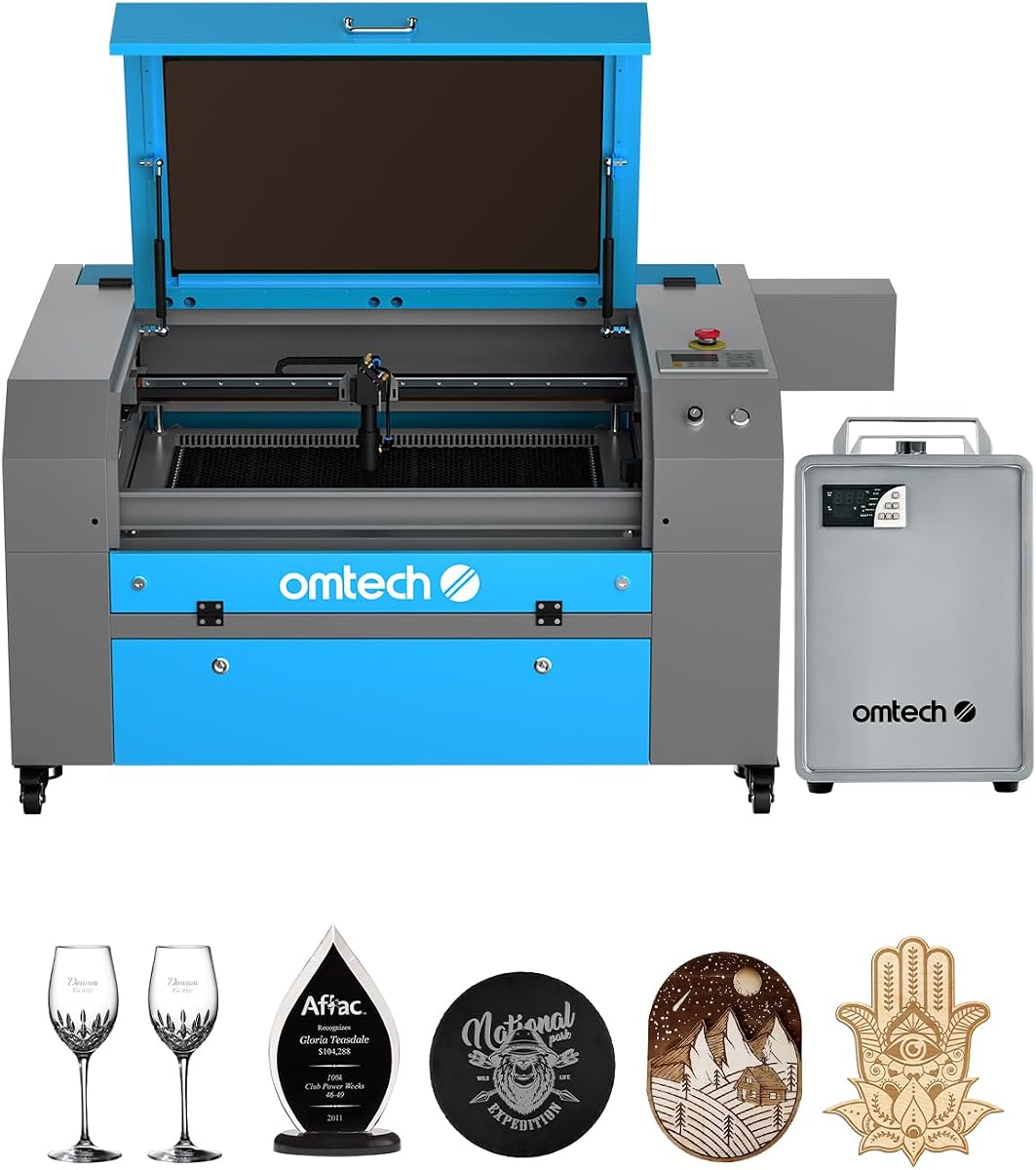
The OMTech K40+ 45W is a compelling entry into serious CO2 cutting, with enough stated power to slice 10 mm acrylic and 8 mm wood. Its 4.4 rating and combination of a compact 12 by 8 inch bed, 300 mm/s engraving, and automatic air assist make it suitable for prototypes, signs, engraving, and small-batch cutting.
We may earn a commission when you buy through this link, at no additional cost to you.
The integrated 45-degree air system is especially useful because it adjusts airflow according to laser power. That helps clear smoke and debris, protect the optics, and reduce wood carbonization. The honeycomb bed accommodates flat and irregular items, while a detachable base and optional rotary axis extend the machine toward cylindrical or elevated products.
Software support for LightBurn and LaserGRBL gives buyers familiar design and motion-control options. Door and water protection, an emergency stop, a flame-retardant panel, and a high-capacity exhaust fan support safer operation. The main limitation is space: a 12 by 8 inch work area is compact compared with the mid-sized and industrial options in this roundup, and the machine does not list the preinstalled autofocus found on larger OMTech models.
The K40+ makes sense for makers, educators, and small businesses that need reliable cutting power without a large footprint. It is also a practical choice for learning the design-to-cut workflow before investing in automated beds or larger systems. Buyers producing oversized panels or running heavy batch schedules should look to the 20 by 28 inch or larger models.
Air assist is not merely a convenience on the K40+. By moving debris away from the cutting area and adapting to power levels, it can support cleaner edges, clearer engravings, and better protection of the lens and mirrors.
The 12 by 8 inch bed keeps the machine suitable for home studios, classrooms, and compact production spaces. The tradeoff is that large sheets must be divided into smaller sections, which can increase preparation time for large signage jobs.
We may earn a commission when you buy through this link, at no additional cost to you.
The VEVOR 100W combines substantial laser output with a large 24 by 35 inch work area, making it a noteworthy option for workshops that need more sheet capacity than a compact desktop machine. Its perfect 5.0 listing rating is encouraging, though ratings should be considered alongside the machine's feature set and support requirements.
We may earn a commission when you buy through this link, at no additional cost to you.
The listing states that the laser can cut materials up to 0.59 inch thick in one pass and engraves at speeds up to 19.7 ips. The honeycomb bed provides an 840 square inch working area, while front and back pass-through doors help accommodate longer components. An intelligent laser head, red-dot pointer, framing function, and linear guide rail support accurate job placement.
Compatibility with LightBurn, CorelDRAW, and AutoCAD is broad, and the machine supports Windows, macOS, and Linux through USB, network, or other transfer options. Its tinted viewing window, automatic power cutoff when the lid opens, emergency stop, and air assist provide important safeguards. The absence of a listed autofocus function means operators may need more manual height and focus calibration than with the xTool P3 or the autofocus-equipped OMTech models.
This cutter is best for users who prioritize power and bed area over maximum stated speed or extensive automation. It should appeal to small manufacturers, schools, and serious hobbyists working with wood, acrylic, cardboard, glass, leather, stone, and other nonmetallic materials. Confirm your preferred materials and operating system before finalizing a purchase.
A 24 by 35 inch area can hold a meaningful portion of a full sheet of material. The pass-through doors also make it easier to feed long pieces through the machine, reducing the need to reposition them inside a limited enclosure.
Support for major design packages and three operating systems makes the VEVOR easier to integrate into mixed creative environments. Users should still confirm that their preferred plug-in, fonts, and output workflow behave as expected with the selected software.
We may earn a commission when you buy through this link, at no additional cost to you.
The OMTech Maker 90W offers a balanced combination of power, bed size, cooling, and throughput for workshops moving beyond hobby-scale work. It can engrave as deep as 0.4 inch into several nonmetallic materials and operates at up to 23.6 ips, while the included water chiller supports more extended engraving sessions.
We may earn a commission when you buy through this link, at no additional cost to you.
Its 20 by 28 inch bed is divided into honeycomb and aluminum blade sections, providing useful options for different material types. Four-way pass-through doors make oversized or lengthy workpieces easier to load, and the Yongli H2 tube is listed for up to 8,000 hours of use under appropriate operating conditions. The built-in air assist helps keep smoke and dust away from optical components.
Safety provisions include a widened flame-retardant viewing window and a cover interlock that shuts off the laser when the window opens. The machine does not list an autofocus system, so operators may need to establish focal distance manually. It also has no visible customer rating in the supplied listing information, making the published specifications and support terms particularly important to evaluate.
The Maker 90W is well suited to small production businesses, educational workshops, and makers handling mixed projects. It makes more sense than a 45W desktop unit when cut depth and speed are recurring requirements, but it lacks some of the camera-driven automation offered by the xTool P3. Choose it for a capable, straightforward production platform with cooling already included.
The bundled water chiller helps maintain consistent operating conditions during extended jobs. Cooling is especially relevant for users who expect continuous engraving or cutting sessions rather than occasional short projects.
Four-way access is useful when the finished part extends beyond the machine's bed. It reduces the awkwardness of feeding long stock through a single opening and improves flexibility when designing signage, panels, or repeated components.
We may earn a commission when you buy through this link, at no additional cost to you.
The OMTech Maker 60W stands out for integrating several usability features that buyers might otherwise need to arrange separately. It combines a 20 by 28 inch bed, preinstalled autofocus, LightBurn software, and a water chiller in a midrange package, earning a strong 4.7 rating.
We may earn a commission when you buy through this link, at no additional cost to you.
Autofocus is the standout practical feature. Operators can place material on the bed, adjust its height, and let the system establish the correct focal distance rather than relying entirely on manual calibration. Four-way pass-through doors support larger pieces, while the mixed honeycomb and aluminum blade beds provide convenient work surfaces for a variety of materials.
The built-in air assist moves smoke and dust away from the lens and reflective mirrors, and the flame-retardant viewing window supports observation of a running job. A water chiller contributes to stable laser performance. Compared with the 90W and 100W alternatives, however, this model offers less raw cutting output, and its supplied details do not quote a maximum engraving speed.
The Maker 60W is an attractive middle ground for small businesses, educators, and dedicated makers who want a capable bed, software, cooling, and autofocus without moving to the largest production configurations. It is especially compelling for users transitioning from a smaller desktop cutter. Those who regularly process thick material or need maximum throughput should compare its output with more powerful alternatives.
Automatic focus helps remove one of the most common sources of uneven results, particularly when switching between material types or bed heights. It also lowers the amount of fine adjustment required between setup and production.
Including LightBurn and a water chiller simplifies initial configuration. The combination is useful for buyers who want control software, cooling, and a capable midsize bed without immediately building a larger production system.
We may earn a commission when you buy through this link, at no additional cost to you.
The OMTech K40+ 45W is the most budget-conscious way in this roundup to acquire a CO2 laser capable of both engraving and meaningful cutting. With a 4.5 rating, it combines 45W output, a listed 300 mm/s engraving speed, and an automatic 45-degree air assist in a compact desktop format.
We may earn a commission when you buy through this link, at no additional cost to you.
The machine is advertised as cutting 10 mm acrylic and 8 mm wood, with power-related improvements intended to increase speed and cutting depth. Its honeycomb bed accepts flat and irregular materials, while a detachable base and optional rotary axis allow taller or cylindrical work. Compatibility with LightBurn and LaserGRBL gives users room to grow from simple designs into more complex vector workflows.
Door and water protection, an emergency stop, a flame-retardant acrylic panel, and a high-capacity exhaust fan address several common operating concerns. Automatic air adjustment is a meaningful feature at this level because it helps remove debris and reduce burning without continuous manual control. The principal drawback is the small 12 by 8 inch workspace, and no automatic focus is listed.
This is our best budget recommendation for makers, educators, and small businesses that need to cut wood, acrylic, leather, and other suitable nonmetallic materials without moving to a large industrial enclosure. It is less suitable for oversized panels or heavy production volumes, but it can provide a strong foundation for learning, prototyping, and small customer orders.
A 45W laser provides more useful cutting headroom than low-wattage engravers while preserving a manageable footprint. It is a sensible middle ground for buyers who need clear acrylic or thicker wood capability but do not require an industrial work area.
The integrated 45-degree air system automatically adjusts to laser power, supporting cleaner cuts and helping protect the lens. This is one of the most practical premium-style conveniences retained in a budget-oriented machine.
We may earn a commission when you buy through this link, at no additional cost to you.
The OMTech Pronto 100W is built for high-throughput work, pairing a 100W laser with a listed speed of 39.4 inches per second and a spacious 40 by 24 inch bed. These specifications position it as a fast production platform for users who process large quantities of wood, acrylic, leather, and other nonmetallic materials.
We may earn a commission when you buy through this link, at no additional cost to you.
Autofocus removes much of the guesswork from setup, while the bed can be adjusted to accommodate different material heights. The mixed honeycomb and aluminum blade surfaces offer different holding options, and two-way pass-through doors simplify the handling of long components. The high-performance tube is listed for up to 12,000 hours of use when operated consistently at lower settings.
Airflow is unusually strong, with a listed 4.4 cfm air pump and 318 cfm fan intended to produce cleaner cuts and reduce material burn. Protection features include water protection, air assist, temperature alarms, cover protection, and an emergency stop. The machine does not have a visible customer rating in the supplied data, so buyers should place greater weight on the service terms, installation requirements, and local support network.
The Pronto 100W makes sense for growing businesses and advanced makers who value speed and capacity more than a compact footprint or minimal acquisition cost. Its bed and two-way access offer a useful balance between panel production and long workpieces, while the autofocus supports consistency across a busy schedule. It is less compelling for occasional small projects where most of its capacity would remain unused.
A listed speed of 39.4 ips can shorten job times when the machine is matched to suitable materials and appropriate settings. The benefit is strongest for repetitive engraving and production cutting rather than one-off intricate pieces.
The listed pump and fan output are intended to clear smoke and debris and reduce burning around the cut. Strong airflow can also help keep optical surfaces cleaner, although the system should always be matched to the extraction requirements of the installation space.
We may earn a commission when you buy through this link, at no additional cost to you.
The OMTech Pronto 130W combines high laser power with one of the largest beds in the guide, offering a 51 by 35 inch work area and a perfect 5.0 listing rating. Its 130W output, 1,000 mm/s listed speed, and two-way pass-through doors target workshops that regularly handle oversized panels or substantial production loads.
We may earn a commission when you buy through this link, at no additional cost to you.
The laser can engrave as deep as 0.4 inch into wood, glass, acrylic, leather, and other suitable nonmetallic materials. A motorized bed and preinstalled autofocus simplify changes in material height and focal distance. Mixed honeycomb and aluminum blade surfaces provide practical support options, while the two-way access permits long stock to pass through the enclosure.
The high-performance tube is listed for up to 12,000 hours when used consistently at lower settings. Water protection, air assist, temperature alarms, cover protection, and an emergency stop form the safety package. The footprint and material-handling demands are substantial, making adequate floor space, extraction, and operator training important considerations before purchase.
The Pronto 130W is best suited to established fabrication shops, educational labs, and production businesses producing large components. It offers greater headroom for demanding cuts than lower-wattage models and substantially more usable bed area than desktop cutters. Buyers should carefully assess their largest recurring material sizes, as the machine's capacity only creates an advantage when the workload can use it.
A 51 by 35 inch area can accommodate panels that would need to be split on smaller machines. For signage, decorative panels, and packaged products, fewer material sections can simplify layout and reduce waste.
The combination of 130W power and a listed 1,000 mm/s speed supports demanding production work. Actual results still depend on the material, thickness, geometry, and the settings selected for each job.
We may earn a commission when you buy through this link, at no additional cost to you.
This OMTech K40+ 45W listing offers the same basic product identity as the other K40+ entries while presenting a different Amazon page and ASIN. Its 45W output, 300 mm/s listed engraving speed, and 12 by 8 inch workspace position it as a compact cutter for educational, prototyping, and small-order work.
We may earn a commission when you buy through this link, at no additional cost to you.
The machine's principal appeal is the combination of meaningful cutting power and a manageable desktop footprint. The honeycomb bed supports flat and irregular materials, and the detachable base and optional rotary axis create paths toward cylindrical or taller products. LightBurn and LaserGRBL compatibility, automatic air adjustment, and a range of safety protections support a versatile workflow.
The small bed remains the dominant constraint. Large sheets must be segmented, and high-volume production may be less efficient than on a machine with a 20 by 28 inch or larger surface. This listing provides less detail than the other K40+ pages and has no visible customer rating, so buyers should confirm the included components, support terms, and final configuration before ordering.
It is a sensible choice for a maker who values power, speed, and compact storage over a large work area. It can also serve as a dedicated engraver for small components while a larger machine handles panel work. For users who regularly cut large stock or manage extensive order volumes, one of the larger VEVOR, OMTech, or xTool systems will scale more effectively.
The 45W tube provides enough capability for useful wood and acrylic cutting while keeping the machine within a desktop-oriented format. This makes it particularly suitable for compact studios where every piece of equipment must earn its footprint.
A detachable base and optional rotary axis can extend the machine beyond flat-sheet projects. These accessories are useful for cylindrical items, but they should be considered separately when planning the final setup.
We may earn a commission when you buy through this link, at no additional cost to you.
The OMTech Pro 130W is the most feature-intensive premium platform in this guide, combining a 130W laser with a 35 by 55 inch work area, a built-in CW-5200 water chiller, and a listed 1,200 mm/s operating speed. It is designed for professional and industrial work involving nonmetallic materials.
We may earn a commission when you buy through this link, at no additional cost to you.
The integrated chiller is a particularly useful feature for a production machine. It is specified to maintain temperatures within 0.5 degrees Fahrenheit and provide 5,186 BTU per hour of cooling, reducing the need for a separate cooling arrangement. Upgraded ball-bearing rails and X- and Y-axis servo motors support rapid, precise movement, while four-way pass-through doors improve access to long stock.
A Ruida 6445G touchscreen and Wi-Fi connectivity provide convenient machine control. The widened tempered glass viewing window and tri-color status lights improve visibility and operational awareness. The large chamber and cooling hardware demand appropriate floor space, electrical capacity, ventilation, and ventilation planning. No visible customer rating is supplied for this listing, so service quality and installation details deserve careful review.
Choose the Pro 130W when throughput, large-format work, integrated cooling, and advanced motion hardware justify a premium production platform. It is especially appropriate for businesses handling repeated large jobs where every setup and material change can affect overall productivity. For occasional projects or a small workshop, a lower-wattage machine will generally provide a more economical and manageable entry point.
A built-in chiller removes the need to source and arrange a separate cooling unit. For continuous production, this can improve convenience and reduce the chance that a busy machine is operated without the temperature control it needs.
The 35 by 55 inch bed and 1,200 mm/s listed speed target productive workflows involving large sheets or repeated parts. The enclosure, motion system, extraction needs, and material-handling procedures should all be evaluated before committing to this configuration.
We may earn a commission when you buy through this link, at no additional cost to you.
Selecting a CO2 laser cutter requires balancing cut capacity, material size, workflow complexity, safety, and the amount of production expected. The most powerful machine is not automatically the most useful one for every workshop.
Laser power determines how quickly and deeply a machine can cut suitable nonmetallic materials. A 45W model is already capable of meaningful wood and acrylic work, while 60W, 90W, 100W, and 130W systems offer additional headroom for thicker stock, faster passes, and demanding production schedules. Power does not guarantee identical results across every material, because composition, color, density, machine condition, focus, airflow, and settings all influence the outcome.
Choose enough power for the thickest material you genuinely expect to process, not merely the largest number advertised in a listing.
The working area determines the largest sheet that can be placed flat inside the machine. Compact 12 by 8 inch beds suit small components and educational projects, while 20 by 28 inch, 24 by 35 inch, and larger areas accommodate panels and mixed production loads. Pass-through doors are especially valuable for long pieces because they allow material to extend beyond the enclosure rather than requiring awkward repositioning.
Compare the bed dimensions with your typical sheet size, then verify whether pass-through access is available on the side you need.
Automatic focus, adjustable beds, cameras, pointers, and framing tools can reduce setup time and improve repeatability. LiDAR ranging and dual cameras provide a more sophisticated approach than manual focal calibration, while even a basic autofocus can make material changes faster. For batch work, origin positioning and job placement are just as important as focus because an incorrectly aligned job wastes an entire pass.
Prioritize automation features that solve problems you encounter frequently rather than selecting solely on the largest feature list.
Air assist directs a controlled stream of air toward the cutting point, moving debris away while helping reduce flame and carbonization. Automatic air adjustment is convenient, and integrated pumps or fans can improve consistency. A water chiller is especially relevant for longer sessions because it helps regulate the laser source's operating temperature. The machine still needs suitable room ventilation or extraction, and a strong internal blower does not replace a safe exhaust plan.
Ensure that the machine's cooling and extraction arrangement can support the length and frequency of your planned jobs.
A productive CO2 workflow depends on reliable vector artwork, layer organization, text handling, and motion control. LightBurn and LaserGRBL are common in the category, while CorelDRAW and AutoCAD support broadens the choice for design-centric users. Check whether the selected software works with your operating system, whether required plug-ins are included, and how designs will be transferred to the machine.
Choose a control environment you can learn comfortably, as software proficiency often affects output quality more than small hardware differences.
Look for lid or cover interlocks, emergency stops, water protection, flame-retardant viewing panels, temperature alarms, and automatic power interruption when an enclosure opens. Enclosed Class 1-rated systems and Class 2 systems have different operating considerations, so buyers should review the stated laser classification and follow the manufacturer's safety instructions. Adequate ventilation, fire preparedness, material knowledge, and restricted access are equally important.
Treat safety features as a complete system rather than judging an enclosure by a single label or interlock.
Nesting, batch filling, rotary attachments, conveyor feeders, and infrared modules can transform a general engraver into a specialized production system. These features are valuable when order volume, part size, or material shape justifies the additional complexity. They also increase the planning and learning required, so smaller users should confirm that a simpler workflow can meet their needs before adding accessories.
Map accessories to a real production bottleneck instead of assuming that every expandable feature will be used regularly.
A CO2 laser is a specialized machine with consumable, alignment, cooling, software, and material variables. Support access, local service options, warranty terms, replacement-part availability, and technical guidance can influence long-term ownership more than a small difference in cutting speed. The K40+ listings emphasize global support and two years of service, while buyers of larger systems should examine installation, training, and response coverage in their region.
Choose a manufacturer and configuration whose support structure is available where the machine will actually operate.
Begin by choosing a compatible nonmetallic material, confirming that it contains no prohibited metal, PVC, vinyl, chlorine-based content, or other unknown composition. Inspect the bed, remove debris, verify the lens is clean, ensure the chiller and air assist are operating, and check that the exhaust system is ready. Test focus and run a small calibration or sample job before sending a full production file.
Import or create a vector design in the supported control software, assign power, speed, passes, and focus settings for the specific material, and confirm the material size and origin. Keep the laser path within the bed, avoid placing hands near the beam, and never leave the machine unattended during operation. For cutting, multiple passes may produce cleaner results than forcing one aggressive pass, particularly on thicker or inconsistently colored stock.
After the job, allow the machine and cooling system to settle as directed, clean the bed and lens according to the manufacturer's instructions, empty the collection tray, and inspect the air assist and exhaust filters. Use approved cleaning methods, avoid touching sensitive optical surfaces, and schedule recurring checks of rails, mirrors, focus, interlocks, emergency stops, cooling lines, and firmware. Keep all consumables and maintenance records organized so recurring problems can be diagnosed early.
CO2 laser cutters are primarily used with suitable nonmetallic materials such as wood, acrylic, leather, cardboard, glass, stone, paper, and certain plastics. Material composition matters more than appearance, so identify the exact type before cutting and never test unknown or PVC-containing material. Some plastics can melt, burn, or release harmful fumes, making proper source material selection essential.
A 45W CO2 laser can handle meaningful engraving and cutting in wood and acrylic, making it a capable beginner machine when paired with a suitable exhaust system. It may be more than necessary for a user who only needs shallow engraving. Conversely, it can be limiting for thick stock, very high volumes, or large production workflows.
Cooling requirements depend on the laser design, power, and duration of use. Machines in this guide either include or bundle a chiller, while the listed K40+ variants do not specify one. A chiller is particularly useful for extended sessions because it helps regulate operating temperature. Buyers should follow the specific machine's cooling requirements rather than assuming a separate unit is always necessary.
OMTech K40+ models support LightBurn and LaserGRBL, the OMTech Maker 60W bundle includes LightBurn, and the VEVOR machine supports LightBurn, CorelDRAW, and AutoCAD. The VEVOR is also listed for Windows, macOS, and Linux. Confirm the exact listing configuration and your preferred design workflow before making a final selection.
No. A larger bed is useful when your projects exceed a smaller machine's capacity or if you want to place several parts at once. It can also add bulk, require more floor space, and increase material-handling demands. A compact bed may be more suitable when your typical parts are small and the machine must fit into a limited studio.
Use the machine only according to its manual, keep the enclosure closed during operation, and maintain suitable ventilation or extraction. Keep flammable materials away from the work area, never leave the machine running unattended, and verify that interlocks and emergency stops function properly. Eye protection, training, and a suitable fire-response plan are important parts of a responsible installation.
Autofocus is generally more convenient and repeatable, especially when materials or bed heights change frequently. The xTool P3 and autofocus-equipped OMTech models include automated focusing, while some other listings do not specify it. Manual focus can still produce excellent results with experience, but it adds setup time and increases the likelihood of inconsistent results between jobs.
Choose a desktop machine when your parts are small, your volume is moderate, and portability or a compact footprint matters. Choose a large-format system when you regularly handle oversized panels, need faster production, or can justify the larger installation and support requirements. The most reliable choice is the smallest machine that consistently handles your typical materials, thickness, and order volume.
The xTool P3 80W is the strongest all-around choice for buyers who value automation, large desktop capacity, dual cameras, and batch-production features. The OMTech K40+ 45W remains the most approachable budget option, and the OMTech Pro 130W stands out as a premium high-output platform with a large bed and integrated cooling.
For most buyers, prioritize the machine that matches real material thickness, largest project size, and expected workload rather than selecting the highest wattage available. A smaller bed with autofocus may be more productive than a larger machine requiring constant manual setup. Also account for extraction, cooling, safety, training, and the learning curve associated with design software and material settings.
Before purchasing, confirm the exact bundle, current specifications, included accessories, support coverage, and return terms on the live product page. Ratings, configurations, availability, and pricing can change, and the same machine name may appear under different ASINs. Recheck those details and choose the configuration that best supports your materials, space, and production goals.