
Creality K1 AI Camera with AI Detection
4.2Editor score
AI failure detection and pause
Automatic time-lapse creation
Live app-based print viewing
Compatible K1 series interface
This guide compares the best time lapse camera for 3D printer options, covering compatibility, monitoring, alerts, imaging, and setup.
A time lapse camera for a 3D printer turns a long, mostly unattended print into a compact record that is easy to review and share. The right camera adds remote monitoring, alerts, night visibility, and useful detection features, but printer compatibility and connection requirements matter more than any single specification.
We compared ten available cameras across four practical groups: purpose-built Creality modules, the FLASHFORGE AD5X accessory kit, and durable outdoor time lapse cameras that can also document printers. The comparison considers supported printers, monitoring methods, time-lapse behavior, image quality, storage, power, mounting, and ease of installation.
Each pick demonstrates a different approach, from automatic cloud-based time lapses to real-time AI warnings and flexible long-duration recording. Ratings and product details reflect the supplied listings, while availability, package contents, firmware behavior, and prices can change, so confirm current specifications before purchasing.
4.2Editor score

4.6Editor score

4.3Editor score
The table below compares the ten cameras by printer fit, monitoring method, time-lapse capabilities, power approach, and physical protection, making it easier to separate dedicated printer accessories from general-purpose long-duration cameras.




The Creality Nebula Camera earns the top position because it combines a versatile printer ecosystem with the monitoring and time-lapse functions sought by most 3D-printing owners. Its 4.4 rating reflects generally favorable customer feedback, while the supplied specification highlights real-time viewing, HD manual focus, automatic progress capture, and spaghetti detection. That combination makes it more than a simple camera mounted above a printer: it is intended to become part of the monitoring workflow.
We may earn a commission when you buy through this link, at no additional cost to you.
Compatibility is the major strength. The listing identifies support for Sonic Pad, Nebula Pad, Ender 3 V3, Ender 3 V3 Plus, Ender 3 KE, CR-10 SE, HALOT-MAGE, and HALOT-MAGE Pro, with additional options when the camera is paired with Sonic Pad and a compatible Klipper-based Ender printer. The USB connection and Creality Cloud setup support a more integrated experience than an independent camera can provide, particularly for owners who want to check a print from a phone or computer.
The spaghetti detection feature is especially relevant to long prints because visible extrusion failure may occur after the operator has stopped watching the chamber. The camera can identify certain print errors and send alerts, potentially reducing wasted filament and allowing an intervention sooner. Its time-lapse function also makes a complete print easy to evaluate rather than requiring the owner to watch every layer in real time. These are meaningful advantages, although alerts still depend on the camera seeing the failure clearly and should not replace reasonable supervision.
This is the strongest choice for a Creality-focused workshop that wants live monitoring, shareable time lapses, and error alerts without building a custom network. Buyers should verify the exact printer, control pad, and firmware combination before ordering, because the extensive compatibility list contains model-specific qualifications. For those with a supported system, it offers the most balanced set of dedicated features in this roundup.
Wi-Fi connectivity through Creality Cloud allows the print chamber to be checked from a phone or computer rather than only from the immediate vicinity. This is particularly useful for long jobs, overnight schedules, and printers located in a separate room.
The camera combines visual progress records with spaghetti detection, linking retrospective time-lapse review to more immediate failure awareness. That pairing is valuable when a print may need to be paused or stopped.
We may earn a commission when you buy through this link, at no additional cost to you.
This Nebula Camera shares the core appeal of the leading model: a straightforward way to watch, record, and review Creality prints through the cloud. Its 4.4 rating places it among the strongest options in the supplied data. The listing emphasizes an easy USB connection, Wi-Fi setup through the Creality Cloud app, real-time monitoring, time-lapse photography, manual focus, and spaghetti detection, giving it a clear role in both troubleshooting and presentation.
We may earn a commission when you buy through this link, at no additional cost to you.
Installation appears designed to be approachable. After connecting the camera to the supported printer or pad and downloading the app, a user can begin monitoring through the local network and cloud services. The manual focus control helps produce sharp images of the build plate, while the time-lapse function condenses a lengthy print into a sequence that is easier to share with colleagues, makers, or followers. Real-time viewing is especially helpful for checking layer adhesion, spool behavior, and the general state of the machine.
Spaghetti detection adds a proactive layer that many conventional webcams do not provide. When the camera recognizes a severe printing error, it can alert the owner, reducing the chance that a failed print continues consuming material. It should still be treated as an aid rather than an infallible guarantee, since lighting, camera placement, model geometry, and the nature of the failure can affect recognition. The value comes from adding another signal to the user's overall monitoring process.
Choose this camera if you own one of the listed Creality printers or pads and want integrated cloud viewing with automatic time-lapse output. It is a particularly good match for users who find complex standalone camera networks inconvenient. Check the current manual and printer model first, and ensure the app and network are configured before beginning a critical print.
The app-based connection makes live viewing accessible without designing a separate streaming system. Users can check progress from another room and return to the printer when the image suggests a problem.
Automatic time-lapse capture documents the full job rather than a collection of inconsistent snapshots. This creates a clearer record of movement, extrusion, and any developing problem.
We may earn a commission when you buy through this link, at no additional cost to you.
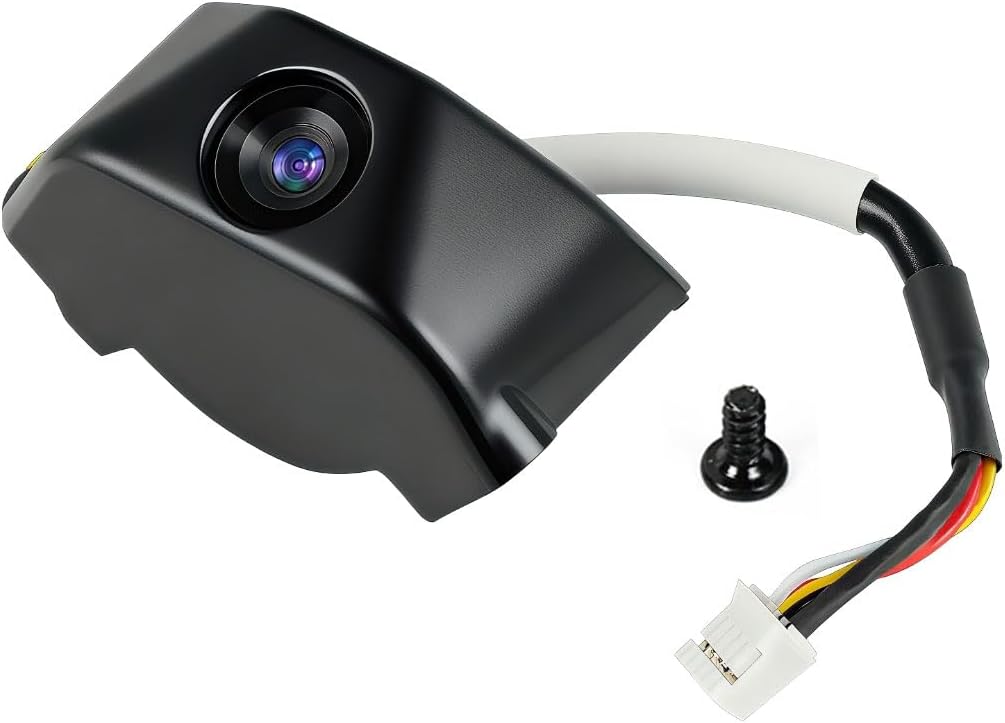
The Creality K1 AI Camera is the most straightforward dedicated choice for owners of a K1, K1 SE, or K1 Max. It has the highest rating in the supplied list at 4.6, and its purpose-built design avoids the complexity of arranging a general-purpose camera around a printer. A reserved camera interface, 1080P capture, phone monitoring, and automatic post-print time-lapse generation make this one of the most complete packages for compatible Creality users.
We may earn a commission when you buy through this link, at no additional cost to you.
The camera's strongest quality is integration. It can be monitored through Creality Cloud or Creality Print, so users can remain within the ecosystem they already use to manage the machine. Live images reveal whether the nozzle is depositing material as expected and whether the model is developing correctly. Because the module connects through a dedicated interface, the setup should be more predictable than a camera requiring separate power, wireless configuration, or third-party viewing software.
Automatic time-lapse generation is particularly useful. Rather than requiring a person to start and stop a recording manually, the camera can log the process and generate a condensed video after the print is complete. That makes the feature well suited to documenting client work, sharing a build, or reviewing the movement of a model. The 1080P resolution provides enough detail to inspect the print while still keeping the camera compact and purpose-built.
Its limitation is clear: it is designed for the K1 family rather than the broader Creality range. Owners of another Creality model should not assume compatibility from the shared brand name. For a K1, K1 SE, or K1 Max owner who wants effortless installation, 1080P monitoring, and automatic time lapses, this is the most balanced and editorially recommended product in the guide.
The reserved interface is the key advantage for compatible owners. A native-style connection reduces signal and configuration friction, keeping the camera focused on the print rather than on network troubleshooting.
Cloud-based time-lapse generation converts a long build into a concise visual record. It reduces repetitive manual recording and creates a ready-to-share summary once the job is complete.
We may earn a commission when you buy through this link, at no additional cost to you.
This Official Nebula Camera stands out for an intelligent approach to time-lapse capture: its embedded system records the model image when each layer finishes. The supplied rating is 4.3, and the feature set emphasizes effortless setup, remote monitoring, automatic video generation, and 24-hour visibility. Those qualities make it a strong candidate for users who want more precise progress records than a generic camera can provide.
We may earn a commission when you buy through this link, at no additional cost to you.
The camera supports viewing through a web browser on the local network or through the user-friendly app. This gives users more than one way to inspect a job and makes the camera practical for different technical preferences. The listing also notes that a user can identify issues and stop prints promptly, reducing the likelihood that a small fault becomes a complete waste of filament. The USB cable and Wi-Fi process keep initial setup relatively direct.
Night visibility is the feature that elevates this model beyond ordinary monitoring. A built-in 940nm infrared fill light illuminates the chamber while the print continues overnight, allowing the camera to retain useful visibility in the dark. It can help reveal filament jams, layer adhesion problems, or alignment issues at times when the printer is otherwise unattended. Because it is designed for the printer environment, the camera is more purpose-specific than a conventional home security camera.
The layer-by-layer recording system is the key reason to prefer this listing over a basic webcam. It should produce a more meaningful progression through the print, while automatic video generation minimizes post-processing. The trade-off is hardware dependence: the camera must work with an eligible Creality system, and owners should review the manual before buying. For supported printers, it is a strong all-day monitoring and time-lapse solution.
The 940nm fill light improves visibility when normal room lighting is absent. This is useful for long or scheduled prints because the user can inspect progress without entering the room or disturbing the machine.
Capturing the image after each completed layer connects the recording to the printer's actual progress. The result is designed to be more coherent than a camera left to record continuously.
We may earn a commission when you buy through this link, at no additional cost to you.
The FLASHFORGE AD5X Camera Kit is designed for a narrow but clearly defined audience: owners of compatible AD5M or AD5M Pro printers who want to retrofit monitoring. Its 4.1 rating is positive, although it sits below the leading dedicated modules. The primary attractions are real-time monitoring and time-lapse video capture in a kit intended to extend the functionality of the printer rather than act as a universal camera.
We may earn a commission when you buy through this link, at no additional cost to you.
A printer-specific accessory can offer a cleaner installation than an improvised web camera placed on top of the enclosure. The camera can observe the build plate without occupying a shelf or relying on a separate support, and the listed compatibility narrows the need for general-purpose mounting hardware. Real-time viewing allows a user to check whether the print is developing normally, while time-lapse capture creates a more engaging record of the build.
The main limitation is that the supplied listing provides very little detail about resolution, viewing software, connection method, storage, alert behavior, or whether time-lapse creation is automatic. Those specifications should be confirmed before purchase. The product title promises real-time monitoring and time-lapse video, but it does not describe the same spaghetti detection, automatic video generation, or detailed night-vision features highlighted by the Nebula models.
The kit is most appropriate for a FLASHFORGE AD5M or AD5M Pro owner who values a model-specific upgrade and straightforward retrofitting. It is less suitable for a mixed-printer workshop, a Creality user, or anyone who needs a particular advanced alert. Check the package contents and current installation instructions to ensure it provides the required cable, connector, viewing interface, and recording behavior.
The accessory is aimed at a specific printer family, reducing the risk of buying a general camera that cannot integrate properly. Its dedicated design should appeal to owners who prefer an original-style machine upgrade.
Real-time viewing helps with active supervision, while time-lapse video produces a condensed record of the finished print. Both functions address common needs without requiring a separate computer setup.
We may earn a commission when you buy through this link, at no additional cost to you.
The Creality Nebula Night Vision Camera is built around a clear proposition: maintain visibility around the printer even when the room is dark. Its 4.4 rating is among the strongest in the group, and the listing specifies 1920 by 1080 resolution, real-time monitoring, automatic night-vision switching, time-lapse filming, and an adjustable manual-focus lens. It is a practical choice for long jobs that continue through the night.
We may earn a commission when you buy through this link, at no additional cost to you.
Automatic night switching removes one obstacle to uninterrupted monitoring. Instead of manually changing settings when the lights go off, the camera adapts to the dark environment. That makes it easier to leave a print alone overnight and still check for a jam, misplaced filament, failed layer, or other visible problem. The 1080P output is also useful when the user needs to inspect fine movement rather than simply confirm that the printer is powered on.
Manual focus gives the user direct control over image sharpness. Because a print bed occupies a fixed and known position, the lens can be adjusted to favor the nozzle, platform, or entire model. The camera angle can also be set manually, which helps eliminate reflections, obstructed views, or an excessive amount of empty chamber. These mechanical controls are less common in basic fixed-focus modules.
The trade-off is that this remains a specialized camera with listed hardware requirements. The listing identifies Sonic Pad, Nebula Pad, Ender 3 V3 KE, Ender 3 V3 Plus, CR-10 SE, and HOLOT-MAGE Pro among compatible systems, but users should confirm their exact model. It also provides less detail about automatic time-lapse compilation than the layer-based Official Nebula listing. For compatible users prioritizing night visibility and 1080P clarity, it is a strong choice.
Automatic night vision is valuable when a print begins in a bright room and continues after the lights are switched off. The camera adjusts without requiring the owner to reopen menus or interrupt the job.
The manually adjustable focus lens helps ensure that the active print area remains sharp. It is a small but meaningful advantage over a fixed camera with uncertain framing.
We may earn a commission when you buy through this link, at no additional cost to you.
This K1 AI Camera adds more active protection than a basic monitoring module. Its supplied rating is 4.2, and its defining feature is the ability to detect printing failures and automatically suspend the job. It also supports real-time viewing, pop-up alerts, automatic time-lapse creation, and 1080P images. For K1 MAX, K1 SE, or K1C owners who want the machine to respond when something goes wrong, it is an appealing option.
We may earn a commission when you buy through this link, at no additional cost to you.
The print-failure response is the most important feature. By identifying a failed build and pausing it, the camera can help preserve filament and prevent a catastrophic error from continuing. This extends monitoring beyond giving a user something to look at. The listing also describes AI LiDAR combined with the camera for foreign-object detection, allowing the system to identify objects on the platform before the hot end reaches them and pause the print to avoid a collision.
Time-lapse generation remains a major convenience. The process can be condensed from hours into a short sequence, and the result can be viewed through Creality Cloud for sharing. Live viewing provides more immediate oversight, while pop-up notifications help ensure that a detected issue is not overlooked. The reserved interface simplifies physical installation for compatible K1 systems.
As with any automated vision system, AI detection should be understood as a supporting layer rather than a guarantee. Lighting, unusual geometries, and certain failure patterns can affect classification, so users should still inspect the chamber when an alert appears. The listed compatibility is also model-specific. Even so, the combination of failure detection, automatic suspension, and time-lapse recording makes this one of the most capable dedicated options for supported K1 printers.
The camera can identify a failure and suspend the job, potentially stopping filament waste before the entire build is lost. This is especially useful during long prints that finish outside normal working hours.
Pop-up notifications complement the live feed, allowing a user to move away from the printer while still receiving information about unusual behavior. The app-based workflow keeps monitoring and review together.
We may earn a commission when you buy through this link, at no additional cost to you.
The Dsoon TL3000 is not a dedicated 3D-printer camera, but it offers a different solution for users who want rugged, long-duration time-lapse recording. Its 4.1 rating is positive, while the feature set includes 4K imaging, an IP66-rated waterproof housing, a claimed battery life of up to 180 days at five-minute capture intervals, and an included 32GB TF card. It can document a printer over a long project, although it will not provide native printer alerts.
We may earn a commission when you buy through this link, at no additional cost to you.
Its weather protection is a defining advantage. The housing and camera are designed for outdoor construction, renovation, plant growth, and environmental documentation, which makes the unit useful in a garage, workshop, greenhouse, or other variable environment. A flip-up IPS display helps frame the shot, while the advanced chip and fill light are intended to maintain image quality in difficult low-light conditions.
The operating model suits long projects. Once connected to power, it cycles through shots until the memory card becomes full. Timed shooting, video time-lapse, and photo time-lapse modes give the user control over the output, while manual macro focus supports both close subjects and distant views. The supplied package includes a suction bracket, circular tube bracket, nail bracket, waterproof housing, memory card, USB cable, and manual.
For a 3D printer, the main trade-off is the lack of direct integration. It will not inherently connect to Creality Cloud, understand layer progress, or suspend a failed print. Instead, it creates an independent visual record based on time intervals. It is best for a maker who values endurance, weather resistance, and included storage over real-time printer diagnostics, and it should be paired with the printer's own controls or monitoring software.
The stated 180-day runtime assumes a five-minute capture interval, so actual duration depends on settings and use. Even so, the long standby design is a major difference from a standard webcam tied to a computer.
The IP66 housing offers an extra layer of protection in environments where ordinary electronics could be vulnerable. That makes the camera practical for long-term documentation around construction and renovation work.
We may earn a commission when you buy through this link, at no additional cost to you.
This 4K outdoor construction time-lapse camera is another general-purpose option, but it combines a strong supplied rating of 4.5 with long-duration recording and physical protection. It is built for construction sites, house building, plant growth, and other projects that evolve over time. For a 3D printer, it can create a durable record of a machine operating in a workshop, although it does not connect directly to printer software.
We may earn a commission when you buy through this link, at no additional cost to you.
Image quality is a central selling point. The camera uses 4K capture, an advanced chip, and fill-light technology, while the IPS display can flip 90 degrees to help adjust the viewing angle. Manual macro focus allows the operator to frame both small subjects and wider scenes. The listed video format is AVI, a useful detail for anyone planning to edit or share the resulting file.
Long-term operation is supported by a battery claim of up to 180 days when using a five-minute interval, along with continuous shooting until the card is full. The unit supports timed, video time-lapse, and photo time-lapse modes. It also comes with a suction bracket, circular tube bracket, nail bracket, waterproof housing, 32GB memory card, USB cable, and manual, making it adaptable to different workshop or outdoor locations.
The weakness for printer use is integration. There are no stated print-failure alerts, automatic pauses, layer-based captures, or direct app monitoring in the supplied information. Users must ensure the memory card is formatted, watch storage capacity, and remember that the camera may become warm during extended operation. It is best for documenting a printer and its environment over a long period rather than controlling or diagnosing an individual print.
The camera can document a workshop, multiple printers, or a larger renovation over time. Its several shooting modes make it useful for both concise time-lapse clips and sequences of individual photographs.
Because the camera continues cycling until the card is full, regular card checks are important. The listing also notes that extended sessions can make the unit slightly warm, which should be considered during unattended use.
We may earn a commission when you buy through this link, at no additional cost to you.
The Dsoon TL3100 offers the most advanced remote-control features among the general-purpose cameras in this guide. Its 4.3 rating is solid, and the supplied data highlights 2.4GHz Wi-Fi app control, 4K UHD capture, live preview, a 110-degree wide-angle lens, IP66 protection, and solar readiness. While it is designed for construction and renovation rather than printers, it can provide flexible around-the-workshop monitoring with fewer physical interactions.
We may earn a commission when you buy through this link, at no additional cost to you.
App control is the major improvement over simpler standalone units. A user can start recording, adjust settings, preview footage, and download files without returning to the camera. Four recording modes—Time Lapse Video, Photo, Scheduled Photo, and standard Video—support different documentation needs. The wide-angle lens can cover a printer bench, several machines, or a work area, while the 2-inch HD screen helps frame the initial shot.
Power and protection make the camera suitable for unattended projects. Its 3000mAh rechargeable battery supports long standby, and an external 6V/1A solar panel can extend runtime in locations without a convenient outlet. The IP66 protective housing provides waterproof and dustproof protection. Clamp, nail, suction-cup, and strap mounts are included, giving the user several ways to position it on a wall, pole, fence, scaffold, or window.
Its limitation is the same one shared by the other general-purpose cameras: it cannot natively understand a failed layer, suspend a print, or generate a layer-specific video. The fill light and infrared sensing help with low light, and manual focus supports close-ups, but printer control remains external. It is most compelling for users who want remote management of a broad scene and are willing to build printer alerts around separate software.
Starting, stopping, previewing, and downloading through the app reduces the need to climb up or reach the mounted camera. This is especially helpful on scaffolds, tall fixtures, or remote project sites.
Four included mounting options suit many environments, while solar compatibility extends the camera's usefulness where wired power is inconvenient. The separate 110-degree view can cover an entire printer station.
We may earn a commission when you buy through this link, at no additional cost to you.
The best choice depends first on printer compatibility, followed by the kind of monitoring, recording, and protection you need. A native camera offers deeper integration, while a standalone time-lapse camera provides broader placement options and longer unattended operation.
Start with the exact printer model, control pad, and firmware. The Creality K1 AI Camera is listed for the K1, K1 SE, and K1 Max family, while the Nebula options support combinations involving Sonic Pad, Nebula Pad, Ender 3 V3 variants, CR-10 SE, and HALOT-MAGE systems. A shared brand does not guarantee that every module, cable, and software version works together. Check the current manual, connector type, and product listing before ordering, especially if your printer was modified or uses an aftermarket control board.
A dedicated module can provide cloud integration, layer-aware recording, automatic time-lapse generation, and printer-specific alerts. It generally requires less setup because the hardware is intended for the supported machine. A standalone camera offers more freedom in angle, enclosure, environment, and recording interval, but it will not inherently stop a failed print or understand layer progress. Choose native integration for active supervision, or standalone recording for documentation, demonstrations, and multi-purpose projects.
Live viewing lets you assess the nozzle, deposited filament, and overall build without walking to the machine. Some modules also provide spaghetti detection, print-failure detection, automatic suspension, foreign-object detection with LiDAR, and pop-up notifications. These tools can reduce waste, but no automated alert is infallible. Lighting, camera alignment, model geometry, and software updates can affect recognition, so maintain a sensible notification and inspection routine even after enabling automatic detection.
The dedicated Creality modules listed here primarily provide 1080P or 1920-by-1080 monitoring, while the general-purpose outdoor cameras advertise 4K capture. Resolution helps reveal fine movement, but low-light performance, fill lighting, exposure control, and lens quality determine whether those pixels remain useful. Night vision is especially valuable for overnight prints. The Nebula Camera with 940nm infrared illumination and the standalone cameras with fill lights or infrared sensing offer more dependable monitoring after dark.
Time-lapse output can be continuous, interval-based, triggered after layers, or generated automatically by cloud software. The Official Nebula Camera records the model image when each layer finishes, while the K1 AI cameras create time-lapse videos through Creality Cloud. Standalone cameras support photo intervals, scheduled photos, video time lapses, and standard video. Consider how you will use the final file: smooth progress videos suit sharing, while timed photographs can be more flexible for editing.
A camera that records for hours or days needs dependable storage and a clear way to retrieve files. The K1 cameras emphasize cloud access and automatic video generation, while the Dsoon units store media on TF cards. The outdoor models include 32GB cards and one supports cards up to 512GB, while the other construction camera lists a maximum of 512GB Class 10 media. Format cards before use, confirm available capacity, and maintain a backup of important print recordings.
A native printer camera usually receives power through the printer or associated pad, while standalone cameras may use a rechargeable battery, a wired connection, or solar assistance. The Dsoon models claim standby periods of up to 180 days at five-minute capture intervals, though real results depend on settings. For an indoor printer, continuous reliable power is usually more important than maximum portability. For outdoor or remote documentation, battery endurance and solar compatibility can be decisive.
The camera should show the active build area without reflections, obstructions, or an extreme viewing angle. Dedicated modules are designed to fit particular printers, while general cameras include suction cups, clamps, straps, and nail or tube brackets. IP66 protection is useful in dusty, damp, or exposed spaces but does not remove the need for sensible placement. Keep lenses clean, avoid direct reflections from bright lamps, and confirm that a mounting point will not interfere with the printer's moving components.
Begin by confirming compatibility, then install the camera according to the printer or accessory manual. For a native Creality module, connect the USB interface to the specified printer or pad, download the appropriate Creality application, and join the camera to the configured Wi-Fi network. A standalone unit should be formatted with its memory card, mounted securely, and pointed at the build plate. Before starting a valuable print, confirm that the live image is sharp, properly framed, and showing the intended print area.
Run a short test print or brief recording before committing to a long job. Check the notification path, verify that time-lapse files appear where expected, and test the pause or stop control where the camera supports it. For AI and spaghetti detection, make sure the camera has a clear view of the nozzle and deposited filament. Keep ordinary room lighting stable if you want consistent exposure, and confirm that the enclosure does not create glare. This test also reveals whether the application needs a cloud account or local network permissions.
During operation, keep the lens and housing free of dust, plastic residue, and fingerprints. Do not move the camera while a time-lapse is running, and avoid changing its focus during a job. Check storage capacity and battery level for long recordings, keeping in mind that the camera may become warm during extended sessions. After the print, save or back up the recording, inspect the printer and camera, and clean the lens with a soft microfiber cloth. Store the unit in a dry place when it is not in use.
A general-purpose time-lapse camera can record a printer, but it will normally act as an independent camera. Native modules offer deeper integration with printer software, layer progress, cloud viewing, and automatic alerts. For a general camera, choose a stable position with a clear view of the build plate and arrange printer notifications through the printer's own software or control system.
The Creality K1 AI Camera is the most direct match for the K1, K1 SE, and K1 Max because it uses a reserved camera interface and supports 1080P live monitoring and automatic cloud time lapses. A second listing adds AI failure detection, automatic print suspension, and foreign-object detection for the K1 MAX, K1 SE, and K1C. Check the exact printer model and current manual before choosing.
Night vision is highly useful if you want to check a print after the room lights are turned off. The Nebula Camera listing with 940nm infrared illumination and the listing with automatic night-vision switching are designed for this environment. Without low-light support, a camera may produce a dark or unusable image even when the printer is operating normally.
A printer camera is designed to integrate with a specific machine or control pad. It may offer app monitoring, layer-based captures, print-failure detection, and automatic suspension. An outdoor time-lapse camera emphasizes weather resistance, battery life, scheduled recording, and flexible mounting. It can document a printer but normally cannot control it or diagnose specific print failures.
Only cameras with compatible printer integration and supported automatic controls can do this. The K1 AI Camera with AI detection is described as detecting print failures and automatically suspending the job. Other cameras primarily provide live images, alerts, or recordings and still require the user to pause or cancel the print manually.
Mount the camera so the nozzle, deposited layers, and much of the build plate are visible. Avoid reflections from the enclosure, keep the lens away from the hot end and moving axes, and use a stable bracket. Manual focus can help sharpen the active area, while consistent lighting and night vision can prevent major changes in image quality throughout the job.
Storage needs depend on the camera's resolution, format, and capture interval. Native Creality cameras can generate time-lapse videos through cloud services, while the general-purpose Dsoon models save to TF cards. The included 32GB card may be sufficient for some projects, but long recordings can fill it quickly. Check the card capacity, format the card before use, and back up important files.
No. Resolution is only one part of a useful monitoring image. Low-light performance, focus, exposure, frame rate, viewing software, and integration with the printer also matter. A well-positioned 1080P camera with reliable night vision may be more useful than a higher-resolution unit with poor lighting or an inconvenient setup.
The Creality K1 AI Camera is the best overall choice for compatible K1 owners because it combines 1080P monitoring, direct installation, and automatic cloud time lapses. The Creality Nebula Camera is the strongest multi-printer option, offering broad compatibility, real-time viewing, and spaghetti detection, while the Nebula listing with 940nm infrared illumination stands out for overnight operation. For K1 users who prioritize automated protection, the AI detection camera adds failure suspension and foreign-object response.
Prioritize compatibility first, then decide whether you need a deeply integrated printer module or an independent recording camera. Native systems suit active monitoring, alerts, and convenient cloud-based time lapses. Rugged standalone cameras suit workshops, renovations, and long-term documentation where weather protection, storage, battery life, mounting flexibility, or Wi-Fi control matter more than direct printer integration.
Before purchasing, verify the exact printer model, pad, firmware, connection method, viewing software, and recording format. Product bundles, compatibility, and features can also change over time. Compare the current listing with the manual, confirm that the camera covers the area you need to inspect, and check current prices and availability before making the final decision.