StarTech HSB100SATBK
4.4Editor score
Single trayless 3.5-inch bay
Front-access 5.25-inch fit
Lockable and shock resistant
Hot swappable drive bays make storage maintenance faster and less disruptive by allowing compatible drives to be removed or replaced without shutting down the entire system. The right enclosure depends on drive size, interface, bay capacity, cooling, security, and whether it will live inside a workstation or beside a computer.
We compared ten internal backplanes, mobile racks, and external direct-attached storage enclosures using the information supplied for each model. The comparison covers SATA and SAS compatibility, supported drive dimensions, cooling systems, connectors, installation methods, capacity, and practical features such as LEDs, locking mechanisms, and tool-free trays.
Each review explains where a particular product is strongest and where buyers should look more closely before purchasing. The list includes several options for enterprise-style internal installation as well as desktop-friendly external enclosures, while noting that specifications, availability, and prices can change over time.
4.4Editor score

5.0Editor score

4.0Editor score
As an Amazon Associate we earn from qualifying purchases.
The table below compares all ten products by form factor, drive support, interface, and maintenance features, making it easier to identify the enclosure that matches a workstation, server, or external storage setup.


The ICY DOCK MB326SP-1B is a six-bay internal enclosure for 2.5-inch SATA or SAS hard drives and SSDs, and it holds the highest rating in this group at 5.0. Its defining strength is the combination of high bay density, tool-less ExpressTray mounting, individual bay indicators, and active cooling in a single 5.25-inch drive-bay space.
We may earn a commission when you buy through this link, at no additional cost to you.
The enclosure supports 5mm, 7mm, and 9.5mm drive heights, allowing it to accept a wider range of 2.5-inch hardware than a cage limited to one thickness. SATA 6Gbps and SAS 3.0 12Gbps support are listed, although the unit operates through a single channel. Its tool-less tray system simplifies maintenance, while optional bottom screw holes provide an extra stability option for installations that tolerate additional assembly.
Cooling is handled by two user-upgradeable 40mm fans with high, low, and off settings. Active Power Technology means the enclosure powers a bay only when a drive is installed, and individual blue LEDs make it easier to identify active or occupied positions. Two 15-pin SATA power connectors supply all six drive positions, which simplifies cable distribution compared with six separate connectors.
This is the strongest general choice for a workstation or server that needs dense, serviceable 2.5-inch storage. It is not appropriate for conventional 3.5-inch hard drives, and buyers must confirm that their motherboard or storage controller supports the enclosure's single-channel configuration. Within that 2.5-inch-focused category, however, its feature set and five-star rating make it especially compelling.
Six individually removable 2.5-inch positions provide strong storage density without requiring several front-access bays. The ExpressTray design keeps maintenance simple while optional screw points add reassurance for vibration-sensitive installations.
Two adjustable 40mm fans help control heat, while Active Power Technology avoids powering unoccupied positions. This combination is particularly useful when bays are not filled continuously.
We may earn a commission when you buy through this link, at no additional cost to you.
The StarTech HSB3SATSASBA converts two 5.25-inch bays into a hot-swappable interface for up to three 3.5-inch SATA or SAS hard drives. Its 4.3 rating reflects a mature enterprise-oriented design that prioritizes secure removal, temperature control, clear status monitoring, and broad drive-generation compatibility.
We may earn a commission when you buy through this link, at no additional cost to you.
Individual ejection levers provide a deliberate method for removing each drive, while the included key-lock design adds a level of physical security for installations where unauthorized access is a concern. The trayless arrangement reduces the number of separate tray components and supports fast replacement. Compatibility extends across SATA I, SATA II, SATA III, SAS I, and SAS II drives, making the unit useful for systems that may contain drives from different eras.
A vented aluminum enclosure supports heat dissipation, and the built-in fan includes speed control for balancing cooling and acoustic output. Power and status LEDs are provided for each bay, helping operators recognize activity or a problem without opening the chassis. The product is backed by two-year coverage and includes lifetime 24/5 multilingual technical assistance according to the supplied information.
The MB326SP-1B offers greater density, but this StarTech model is a more conventional choice for 3.5-inch enterprise storage. It suits administrators who value physical locking, ejection handles, and broad legacy compatibility over maximum bay count. The main limitation is its three-drive capacity, while buyers needing newer SAS generations may need to check controller and backplane requirements carefully.
Individual ejection levers give operators a consistent release mechanism, while the optional key lock helps restrict access in shared or managed environments. This focus on controlled handling is useful in professional racks and workstations.
The vented aluminum shell works with a controllable built-in fan to maintain airflow around three spinning hard drives. Adjusting fan speed allows administrators to balance cooling needs against noise.
We may earn a commission when you buy through this link, at no additional cost to you.
The Rosewill RSV-SATA-Cage-34 is a four-drive internal cage designed to occupy three 5.25-inch CD-ROM or DVD-ROM positions. Its 4.3 rating and focus on converting underused optical-bay space make it a practical option for compatible systems that need more local storage than a single mobile rack can provide.
We may earn a commission when you buy through this link, at no additional cost to you.
The cage supports SATA I, SATA II, SATA III, and SAS 6Gbps drives. It accommodates four 3.5-inch SATA hard drives, four 2.5-inch SATA hard drives, or SAS hard drives, giving buyers some flexibility in drive selection. Hot-swap support is specified for SATA I through SATA III, which is the relevant consideration when planning service without a full system shutdown.
Cooling comes from a single rear-mounted 120mm exhaust fan. This larger fan can move a meaningful volume of air through the cage and is well suited to sustained use with multiple rotating hard drives. The enclosure combines durable steel and ABS materials. Its listed model compatibility includes Rosewill L4000U, L4500U, and R4000U systems, which should be checked before purchase.
This cage is most attractive to owners of a listed compatible system who want four hot-swappable SATA positions. It offers more drive capacity than the three-bay StarTech HSB3SATSASBA and a simpler cooling layout than the RackChoice unit. Its restrictions are meaningful: SAS support is limited to 6Gbps, and hot-swapping is explicitly listed only for SATA drives.
Transforming three 5.25-inch optical-bay spaces into four drive positions makes efficient use of existing chassis real estate. It is a better density choice for compatible systems than a single-bay mobile rack.
A rear 120mm exhaust fan provides a clear cooling route for the installed hard drives. That simple arrangement can be useful in compact internal installations where space for multiple smaller fans is limited.
We may earn a commission when you buy through this link, at no additional cost to you.
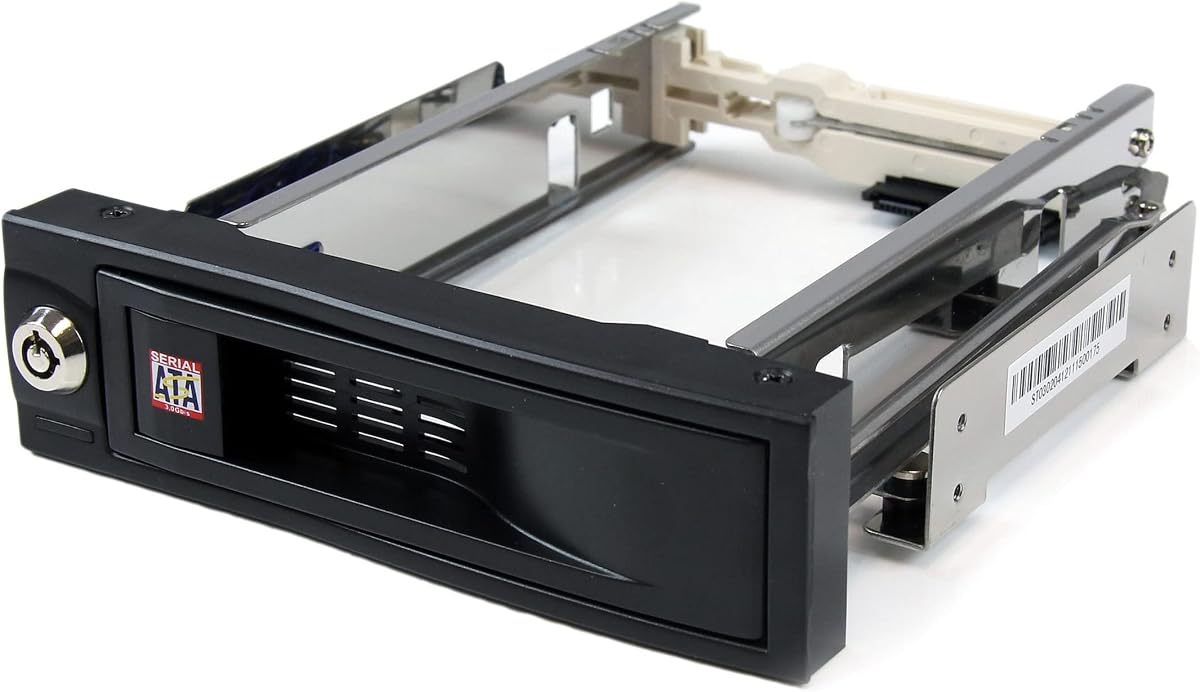
The StarTech HSB100SATBK is a single-bay 3.5-inch SATA mobile rack designed to fit a front-accessible 5.25-inch bay. Its 4.4 rating reflects a straightforward design with a trayless installation, a lockable bay, internal rubber shock absorbers, and a stated insertion rating above 50,000 cycles.
We may earn a commission when you buy through this link, at no additional cost to you.
The defining benefit is simplicity. Instead of mounting a drive in a separate tray or enclosure, the user slides a compatible 3.5-inch SATA drive directly into the mobile rack. That removes several parts from the replacement process and allows the drive to be installed or removed without opening the chassis. It is an effective answer for a single hot-swappable position where maximum capacity is not required.
Shock absorption, solid aluminum construction, and the high insertion rating are designed to support repeated use and drive longevity. The locking feature helps prevent accidental or unauthorized removal. However, this model is limited to one drive and SATA connectivity, so it cannot serve buyers who need multiple bays, SAS compatibility, or external connectivity.
For a workstation, file server, or home system that needs one dependable and serviceable 3.5-inch SATA position, this rack is a budget-conscious choice. Its main limitation is its modest storage capacity, but it solves a narrow problem with fewer parts than many full cages. Buyers should confirm front-bay clearance and that their system provides the required SATA data and power connections.
The trayless design reduces the number of components that must be handled when changing a drive. Users slide the drive into the front-accessible bay and can remove it again without dismantling a separate carrier.
Internal rubber shock absorbers help cushion the drive, while the construction and insertion rating support repeated service cycles. A lock adds physical control over access to the bay.
We may earn a commission when you buy through this link, at no additional cost to you.
The RackChoice 5-Drive Backplane converts three 5.25-inch spaces into a hot-swappable interface for five 2.5-inch or 3.5-inch SATA and SAS drives. Its 3.6 rating is the lowest among the products reviewed, so buyers should pay close attention to what is included and confirm their system can support the required connections.
We may earn a commission when you buy through this link, at no additional cost to you.
The enclosure accepts SAS I and II plus SATA I, II, and III drives, with SATA 3.0 support up to 6Gbps listed. RAID 0, 1, 5, 6, and 10 operation is stated as possible when a RAID card is used. Five SATA cables are included, helping with data connections, but the power supply is not included and the unit calls for two Molex power connections.
An 80mm cooling fan and a full-metal body are intended to improve heat dissipation. The ability to mix 2.5-inch and 3.5-inch devices offers flexibility, especially for a system combining high-capacity hard drives with smaller drives or SSDs. However, the enclosure is described as trayless, and replacement trays are not normally included; the supplied information says a tray must be requested separately when needed.
This backplane is worth considering for a specialized internal build that needs five mixed-size positions and can provide its own suitable power arrangement. The lower rating, excluded power supply, and caveat about replacement trays make it less convenient than similarly sized alternatives. Careful case planning and confirmation of the host controller are especially important.
Mixing drive sizes in one enclosure can simplify system planning when a build needs both high-capacity disks and smaller SATA devices. The five-position layout adds density without requiring five separate front bays.
Five SATA cables are supplied, but the power supply is excluded and replacement trays may need to be requested. Buyers should treat the complete bill of materials as part of the purchase decision.
We may earn a commission when you buy through this link, at no additional cost to you.
The TerraMaster D4-320 is a four-bay external direct-attached storage enclosure with hot-swappable, tool-free drive trays. Its 4.2 rating reflects a well-rounded combination of USB 3.2 Gen 2 connectivity, broad operating system compatibility, flexible drive sizes, and a cooling system designed for sustained external use.
We may earn a commission when you buy through this link, at no additional cost to you.
The enclosure supports 3.5-inch SATA hard drives, 2.5-inch SATA hard drives, and 2.5-inch SATA SSDs. Individual capacities up to 30TB and a stated total capacity of 120TB are listed. It operates as DAS rather than a NAS and has no RAID function, which means it is intended to present attached storage directly to a connected computer rather than manage a network array.
Its USB 3.2 Gen 2 interface is rated for data transfer rates up to 10Gbps, and the product description cites combined read-and-write performance up to 1,016 MB/s with four SATA III hard drives under the stated test conditions. Actual performance depends on the host, drives, and workload. Plug-and-play operation is supported across Mac, Windows, and Linux, while the USB Type-C connection is compatible with several USB and Thunderbolt generations.
Drive management is convenient: each tray is tool-free, hot swapping is supported, and the Push-lock design secures a tray after insertion. An intelligent temperature-controlled fan handles cooling, while sound-absorbing panels and vibration damping are designed to reduce operational noise. This is a strong option for users who want external serviceable storage without configuring a complex internal backplane.
The D4-320 presents attached drives directly through USB and avoids RAID configuration. That makes it approachable for backup, data transfer, and local storage workflows where a network appliance would be unnecessary.
Individual hot-swappable trays and the automatic Push-lock retention mechanism make drive replacement direct. Tool-free handling also reduces the number of small parts users must manage during routine maintenance.
We may earn a commission when you buy through this link, at no additional cost to you.
The CENMATE 6-Bay USB 3.0 is an external direct-attached storage enclosure designed for six 2.5-inch or 3.5-inch SATA hard drives and SSDs. Its 4.3 rating and combination of high external bay count, tool-free replacement, and daisy-chain support make it a versatile option for users who need more capacity than a compact desktop enclosure.
We may earn a commission when you buy through this link, at no additional cost to you.
Each drive position can accommodate a 2.5-inch or 3.5-inch SATA device, with maximum capacity listed at 20TB per drive. USB 3.0 output is provided through USB Type-A and USB Type-C connections, and the enclosure is described as plug-and-play. It supports Windows 7 and above, Mac 9.1 and above, and Linux without the need to install additional drivers.
Hot-swappable tool-free trays simplify drive changes. A USB host port permits daisy-chaining to as many as three devices according to the supplied information, allowing a multi-enclosure storage setup. The aluminum-alloy shell contributes to heat dissipation and structural durability, while two 2.7-inch fans provide active cooling.
This enclosure makes sense for external backup arrays, media libraries, or general local storage where six bays and expansion are priorities. Its chief limitation is the older USB 3.0 interface, which is slower than the USB 3.2 Gen 2 options in this list. The two fans also produce noise in the stated 40-to-50-decibel range, which may be undesirable in a quiet workspace.
Six native drive positions create a substantial storage pool on their own, while the USB host port allows additional enclosures to be daisy-chained. This is useful for users who expect storage needs to grow beyond one desktop unit.
Tool-free hot-swap trays, broad operating system support, and plug-and-play operation simplify routine use. The tradeoff is that USB 3.0 offers less bandwidth than newer 10Gbps-oriented alternatives.
We may earn a commission when you buy through this link, at no additional cost to you.
The CENMATE 6-Bay USB 3.2 Gen 2 enclosure combines six hot-swappable drive positions with a high-speed external interface. Its 4.0 rating reflects a capable premium option for users who want the storage density of a six-bay system and the bandwidth of a 10Gbps USB connection without installing a backplane inside a computer case.
We may earn a commission when you buy through this link, at no additional cost to you.
The enclosure accepts 2.5-inch and 3.5-inch SATA hard drives and SSDs, with maximum capacity stated at 20TB per drive. USB 3.2 Gen 2 output is listed at up to 10Gbps. The supplied performance examples include 500MB/s total read-and-write speed with two hard drives and 510MB/s read-and-write with one SSD, while clearly noting that actual results depend on the drives and computer.
Hot swapping and tool-free tray handling make routine disk changes convenient. The USB Type-C interface supports USB 3.0, 3.1, 3.2, Thunderbolt 3, and Thunderbolt 4 connections, and the enclosure is listed as compatible with Windows 7 and above, Mac 9.1 and above, and Linux. A USB host port also supports daisy-chaining, with expanded capacity of up to 120TB across three devices according to the product information.
This premium CENMATE model is most appropriate for high-capacity external storage where the host and workload can benefit from a faster interface. Two 2.7-inch fans and an aluminum-alloy body help manage heat, although the listed 40-to-50-decibel fan noise may be noticeable. Like the other CENMATE enclosure, it is DAS without RAID or NAS functionality.
The USB 3.2 Gen 2 interface is the main distinction from the 5Gbps CENMATE model. It gives compatible hosts more interface bandwidth for transferring between SSDs and large HDD arrays.
Six individual positions offer a large storage pool in one enclosure, while the host port permits multi-device daisy-chaining. The design suits users who want flexible external capacity without assembling a NAS.
We may earn a commission when you buy through this link, at no additional cost to you.
The SilverStone SST-FS304B-V is a trayless hot-swap cage that fits four 3.5-inch SAS 12G or SATA 6G drives into three 5.25-inch device-bay positions. Its 4.1 rating reflects a specialized internal solution aimed at users who need modern SAS support, compact bay conversion, and clear drive monitoring.
We may earn a commission when you buy through this link, at no additional cost to you.
The cage's support for SAS 12G differentiates it from older SATA and SAS products in this comparison. SAS is generally associated with enterprise and server environments, so buyers should confirm that the motherboard, host adapter, or controller supports the exact generation of SAS devices they intend to install. SATA 6G support offers a familiar alternative for compatible hard drives.
Independent LED indicators show the status of each drive, which is useful in multi-disk configurations where monitoring individual positions matters. A built-in cooling fan supports heat dissipation, and the trayless design is intended to simplify insertion and removal. The enclosure also accommodates a 9.5mm slim optical drive according to the supplied details.
This cage is a strong candidate for an internal workstation or server build that needs four enterprise-style drive positions and newer SAS compatibility. It is less versatile than mixed-size cages because it is limited to 3.5-inch drives, and buyers seeking external placement should consider the USB enclosures instead. Host-controller support is the most important prerequisite.
SAS 12G compatibility positions this cage for more recent enterprise storage hardware. Pairing it with the correct host adapter is essential because the enclosure cannot create SAS controller support by itself.
Independent indicators let an operator check each drive position separately. The built-in fan adds active cooling for sustained operation with multiple rotating disks.
We may earn a commission when you buy through this link, at no additional cost to you.
The Kingwin 5-Bay Mobile Rack installs five hot-swappable 3.5-inch hard drives or SSDs inside three 5.25-inch case-bay positions. Its 4.2 rating reflects a capable internal enclosure for users who want generous drive count, tool-free maintenance, and broad SATA and SAS compatibility in a workstation, gaming rig, or data server.
We may earn a commission when you buy through this link, at no additional cost to you.
The supplied information lists support for SATA I, SATA II, and SATA III as well as SAS I, SAS II, and SAS III, with speeds stated as high as 12Gbps. Interface generations and negotiated link speeds can vary between the enclosure, controller, and installed drives, so buyers should verify their hardware rather than relying on the headline maximum alone.
The trayless design allows drives to be installed or removed without separate screws or tools. An aluminum shell contributes to both heat dissipation and structural durability. The enclosure makes efficient use of three 5.25-inch positions while providing five drive slots, making it a density-focused alternative to the Rosewill and RackChoice cages.
The main limitation is that the rack accepts 3.5-inch devices rather than a mix of 2.5-inch and 3.5-inch media. It is best suited to an internal case with sufficient depth, airflow, power, and controller support. In exchange, buyers receive five hot-swappable positions and a straightforward trayless workflow that is well matched to data management and backup systems.
The enclosure converts three standard case-bay areas into five hot-swappable drive positions. This efficient use of space suits systems where storage count matters but external desktop enclosures are undesirable.
The trayless mounting system removes the need to secure each drive with separate screws. Users can slide drives into serviceable positions while an aluminum housing supports cooling and durability.
We may earn a commission when you buy through this link, at no additional cost to you.
Choosing a hot swappable drive bay requires balancing enclosure type, drive geometry, interface generation, thermal design, and the host system's capabilities. The most important step is to confirm that the enclosure, controller, case, power supply, and operating system will work together before comparing cosmetic or convenience features.
Internal cages and backplanes mount inside a computer case and usually connect through SATA data connectors, SAS expanders, or host adapters. They suit workstation and server owners who want the enclosure to become part of the system chassis. External enclosures connect through USB and are easier to move between computers, but they add a desktop enclosure and depend on the host for performance.
A 2.5-inch-focused cage can fit more bays into a compact front panel and works well with SSDs and 2.5-inch hard drives. A 3.5-inch enclosure usually provides larger capacity per device and suits enterprise hard drives. Some mixed-size products support both, which adds flexibility, but buyers should verify whether every bay accepts every listed size or whether the configuration varies by position.
SATA is common in desktops and many external enclosures, while SAS appears more often in professional storage systems. Compatibility is generational: a unit supporting SATA III may not support SAS, and a cage supporting only older SAS generations may not accept newer 12G devices. The host controller is just as important as the backplane, because the enclosure generally cannot add missing controller functionality.
More bays allow greater storage density and can reduce the need for multiple enclosures, but they also increase heat, power draw, and physical space requirements. External units with USB host ports may support daisy-chaining, while internal cages may need available case space and sufficient power connectors. Consider how much storage is needed now and whether the arrangement can expand later without changing the entire system.
Spinning hard drives and high-performance SSDs can produce heat during sustained transfers. Look for an active fan, ventilation through a metal enclosure, and control over fan speed where possible. External units should also be considered for workspace noise, since a larger number of fans may increase sound. Internal systems can tolerate some fan noise more readily, but airflow still matters for reliability and consistent performance.
External enclosure speed depends on the USB generation, host port, controller, installed drives, and workload. USB 3.2 Gen 2 is specified at up to 10Gbps, while USB 3.0 offers a lower ceiling. Internal SATA and SAS setups depend on the backplane link and host controller. Advertised interface rates are theoretical limits rather than guaranteed real-world transfer speeds for every drive combination.
A product may use removable trays, ejection levers, trayless slides, or locking mechanisms. Tool-free systems are convenient for routine replacement, while locks can improve physical security in shared environments. Also verify whether hot swapping is supported for every listed interface, what happens when a drive is removed, and whether the operating system must be instructed to release the storage device before removal.
Aluminum and steel housings can improve structural strength and heat dissipation, while rubber damping helps reduce vibration transmitted to spinning drives. Independent LEDs are valuable for monitoring occupied and active positions. For managed installations, consider key locks, ejection handles, and a clearly defined method for identifying a failed or removed drive without disrupting the remaining storage.
Before installing a drive, confirm that its size, interface, and capacity are supported by the enclosure and host controller. Power down the system when the manufacturer requires it, discharge power as directed, and attach data and power connections before securing the tray. For external units, connect the enclosure directly to the host rather than through an unpowered hub, and allow adequate clearance around vents and fans.
Before removing a hot-swappable drive, identify it correctly and allow all active transfers to finish. In the operating system, unmount the volume, eject the disk when the platform provides that option, and wait for the activity indicator to stop. Then use the tray, lever, or lock release as intended. A system may expose the enclosure even while an individual drive is removed, but users should follow the enclosure and operating system's guidance for preventing data access or writes to an absent device.
Keep the enclosure cool by leaving its intake and exhaust paths unobstructed, cleaning dust from vents periodically, and monitoring temperatures during large transfers. Replace a failed drive promptly, avoid repeated forced insertions, and keep the correct cable, tray, lock, and mounting hardware available. Users should also maintain separate backups because hot swapping improves maintenance flexibility but does not protect data from logical failures, accidental deletion, or enclosure faults.
A hot swappable drive bay is designed to let a compatible drive be removed or replaced without shutting down the entire computer or storage system. The operating system and controller must support the enclosure and any required eject or unmount process. It is especially useful in servers, workstations, and external arrays where brief maintenance is preferable to a full shutdown.
No. The drive must match the enclosure's supported dimensions, interface, and generation. SATA and SAS are not interchangeable without compatible backplane and host-controller support, and some products provide hot swapping only for SATA even when they can physically accept certain SAS devices.
It depends on the desired configuration. A standalone enclosure can expose attached drives directly to the host, while RAID features require suitable hardware and configuration. The RackChoice model lists RAID 0, 1, 5, 6, and 10 support when a RAID card is used, while the TerraMaster and CENMATE external products are explicitly DAS units without RAID or NAS functions.
It depends on the cage design and the adapter hardware. Some 3.5-inch cages support 2.5-inch drives, while trayless models may hold a 2.5-inch drive directly without a carrier. Buyers should confirm the manufacturer's dimensions, mounting method, and connector alignment rather than assuming every smaller disk will fit safely.
No, although a faster interface can improve throughput when the host, enclosure controller, and installed drives are also capable. Actual speed depends on drive type, drive count, file sizes, workload, host processor, and connection quality. A single SSD may perform differently from a multi-drive HDD array even when both use the same enclosure.
First make sure the replacement data has been mirrored, backed up, or otherwise reconstructed according to the storage system's design. Then identify the failed disk, unmount and eject it through the operating system, wait for activity to stop, and remove it using the tray or locking mechanism. Install the replacement with the correct orientation and confirm that the system recognizes it before deleting or repurposing the old drive.
Some can be used with third-party or software RAID, but the enclosure itself must provide appropriate connectivity and the operating system must provide the RAID layer. The TerraMaster D4-320 and both CENMATE external models in this guide are identified as direct-attached storage without RAID or NAS functionality.
Confirm the required number and dimensions of 5.25-inch case bays, available depth and airflow, power connectors, data-controller support, and operating-system compatibility. Also check whether the enclosure supports the intended SATA or SAS generations and whether any power supply, replacement tray, data cable, or adapter must be purchased separately.
The ICY DOCK MB326SP-1B is the strongest overall choice for dense 2.5-inch internal storage, combining six hot-swappable positions, tool-less trays, active power management, and cooling controls. The StarTech HSB100SATBK is the best budget option when one front-accessible SATA bay is enough, while the premium CENMATE 6-Bay USB 3.2 model offers high-speed external storage with six mixed-size positions.
Before buying, prioritize the requirements that cannot be changed later: drive dimensions, SATA or SAS generation, host-controller support, case space, power connectors, and cooling. Once those are confirmed, tool-free trays, locking, status indicators, expansion, and interface speed can distinguish between otherwise suitable products. Internal cages suit integrated systems, whereas external USB enclosures are easier to deploy and move.
Specifications and prices can change, so check the current product listing and your complete system configuration before ordering. Confirm included accessories as well, because some enclosures exclude power supplies or replacement trays. With the correct hardware match, a hot swappable drive bay can make storage expansion and routine maintenance far more convenient.