
LIAN LI Vector V100 MINI
4.8Editor score
Five 120mm ARGB fans
GPUs up to 415 millimeters
270-degree glass display
Discover the best Matx Case options by comparing airflow, GPU clearance, cooling support, front I/O, aesthetics, and installation features.
A Matx Case may be the ideal home for a compact yet capable gaming or productivity PC, but the best model depends on your motherboard, graphics card, cooler, and available space. Good cases balance airflow, component clearance, cable management, accessibility, and visual appeal without forcing you into a difficult installation.
We compared ten Micro-ATX cases across their rated customer feedback, supported hardware, fan configurations, radiator options, front connectivity, and chassis design. The list covers budget models, wood-accented enclosures, panoramic glass designs, compact cases, and larger Micro-ATX platforms with generous cooling support.
Each recommendation highlights the reason that case earns its place and the compromises worth considering. Features such as pre-installed fans, GPU limits, CPU cooler clearance, and radiator support can vary significantly, while current prices and availability may change, so verify compatibility and listings before purchasing.
4.8Editor score

4.8Editor score

4.8Editor score
This side-by-side comparison highlights each Matx Case's format, hardware clearance, cooling configuration, and defining physical feature, helping you narrow the field before checking the complete reviews.



The Cooler Master Q300L V1 is a budget-oriented Micro-ATX enclosure built around airflow, accessibility, and a transparent viewing panel. Its 4.5 rating reflects a generally favorable balance of practical features and straightforward installation. It supports both Micro-ATX and Mini-ITX motherboards, giving builders some flexibility when choosing components.
We may earn a commission when you buy through this link, at no additional cost to you.
Its most useful strength is the perforated design across the chassis sides, which supports the flow of air into and out of the system. The case can accommodate a 240mm liquid cooler and as many as five fans, while allowing graphics cards up to 360mm and CPU coolers up to 159mm. A modular I/O panel can be positioned at the front, top, or bottom on either side, which is especially helpful when cable routing or desk placement makes one orientation more convenient.
The trade-offs are that the chassis does not include fans, so a complete cooling setup will require additional purchases or compatible components already in hand. Its visual design is functional rather than elaborate, and the broad open-perforation approach can make dust control more involved than a fully filtered design. Nevertheless, the clearances and flexible I/O placement deliver considerable value for a budget build.
This is a sensible recommendation for a first Micro-ATX gaming PC, a small work system, or a builder who values airflow and straightforward access over decorative flourishes. Check your graphics card and cooler measurements first, then plan the fan configuration around the perforated panels. For buyers who want solid compatibility and flexibility without a premium appearance, the Q300L V1 remains a practical choice.
The perforated sides and open thermal layout help move air through the enclosure, while the listed capacity for five fans gives builders room to establish intake and exhaust positions. This makes the Q300L V1 particularly relevant when the system will use a power-hungry graphics card or a sizeable air cooler.
The modular I/O panel can move to several positions and either side of the chassis. That flexibility can prevent blocked front ports, awkward cable runs, and unnecessary bending in the case design.
We may earn a commission when you buy through this link, at no additional cost to you.
The Lian Li A3-mATX combines a compact 26.3-liter footprint with unusually generous hardware support. Its 4.8 rating and distinctive walnut front panel place it among the strongest choices for builders who want a small system without compromising on graphics card or cooling options. It accepts Micro-ATX and ITX motherboards, making it useful for both compact performance builds and space-conscious workstations.
We may earn a commission when you buy through this link, at no additional cost to you.
A major advantage is the support for graphics cards up to 415mm, allowing even unusually long GPUs to fit inside the relatively small enclosure. Steel mesh side and top panels promote airflow, and the chassis can house a 360mm radiator with room for as many as ten 120mm fans. Flexible power-supply installation can be arranged at the front or side and supports ATX, SFX, SFX-L, and LIAN LI EDGE power supplies, giving builders more options for cable management.
The design is not as accommodating in every category. Its four expansion slots are fewer than a standard full-size ATX case can offer, so it may not suit systems needing several add-in cards. The many possible fan and radiator positions also require more careful planning than a simple fixed layout. Even so, the modular wood front panel and minimalist structure compensate for those limitations visually and organizationally.
The A3-mATX is a strong all-around recommendation for a compact gaming PC with a long graphics card. It is particularly attractive when the build should look less industrial than a conventional black steel tower. Confirm PSU form factor, radiator placement, and expansion needs before ordering, but for most single-GPU Micro-ATX systems, this case offers an excellent balance of capacity, cooling, and style.
The 415mm graphics card allowance is a major advantage in a 26.3-liter chassis. It reduces the need to compromise between a compact exterior and a high-end graphics card that is longer than many typical mATX enclosures can accept.
Supporting several power supply formats and front or side positioning gives builders useful room to manage cables. The choice can also help preserve open space around the graphics card and improve the visual cleanliness of the final build.
We may earn a commission when you buy through this link, at no additional cost to you.
The Okinos Cypress 3 Wood is designed for builders who want their Micro-ATX system to blend into a home or office rather than resemble a conventional gaming tower. It carries a 4.6 rating and stands out through genuine walnut decoration on the front, tempered glass on the side, and a more furniture-like overall appearance. Despite that focus on looks, it arrives with four cooling fans already installed.
We may earn a commission when you buy through this link, at no additional cost to you.
Those fans are 120mm H12 models operating at 1000 RPM, using three-pin non-PWM connections without ARGB lighting. A one-to-three splitter is included, and the three-sided mesh intake layout is designed to move air through the enclosure. Component limits include graphics cards up to 285mm with the fan at the rear of the front panel or 320mm with it positioned at the front. CPU air coolers can reach 164mm, and the front I/O includes USB Type-C 3.2 Gen 2 at 10Gbps.
Buyers should note the exact fan specification and the position-dependent GPU limit. The lack of PWM control and ARGB may be a drawback for enthusiasts who want customizable lighting or finer fan-speed control. The wood finish is also a deliberate aesthetic choice rather than a universal preference, and the stated GPU maximum depends on whether the front fan is moved. Six preinstalled standoffs and three spares simplify motherboard fitting.
The Cypress 3 Wood is best for a Micro-ATX build that prioritizes a warm, decorative appearance while still needing substantial airflow and modern front connectivity. It is less suitable if RGB synchronization or long GPUs with a fixed front-fan arrangement are priorities. For fans in the chassis, this is one of the more complete visual packages in the roundup.
The real walnut front treatment gives the case a distinctive look that separates it from mesh-and-glass designs. It is especially appealing for a desk setup where a traditional industrial PC tower might feel visually out of place.
Four preinstalled 120mm fans can provide a useful foundation for airflow without requiring the builder to install every fan from scratch. The included three-pin splitter simplifies the initial wiring, although buyers wanting PWM or RGB will need to account for the non-PWM, non-ARGB design.
We may earn a commission when you buy through this link, at no additional cost to you.
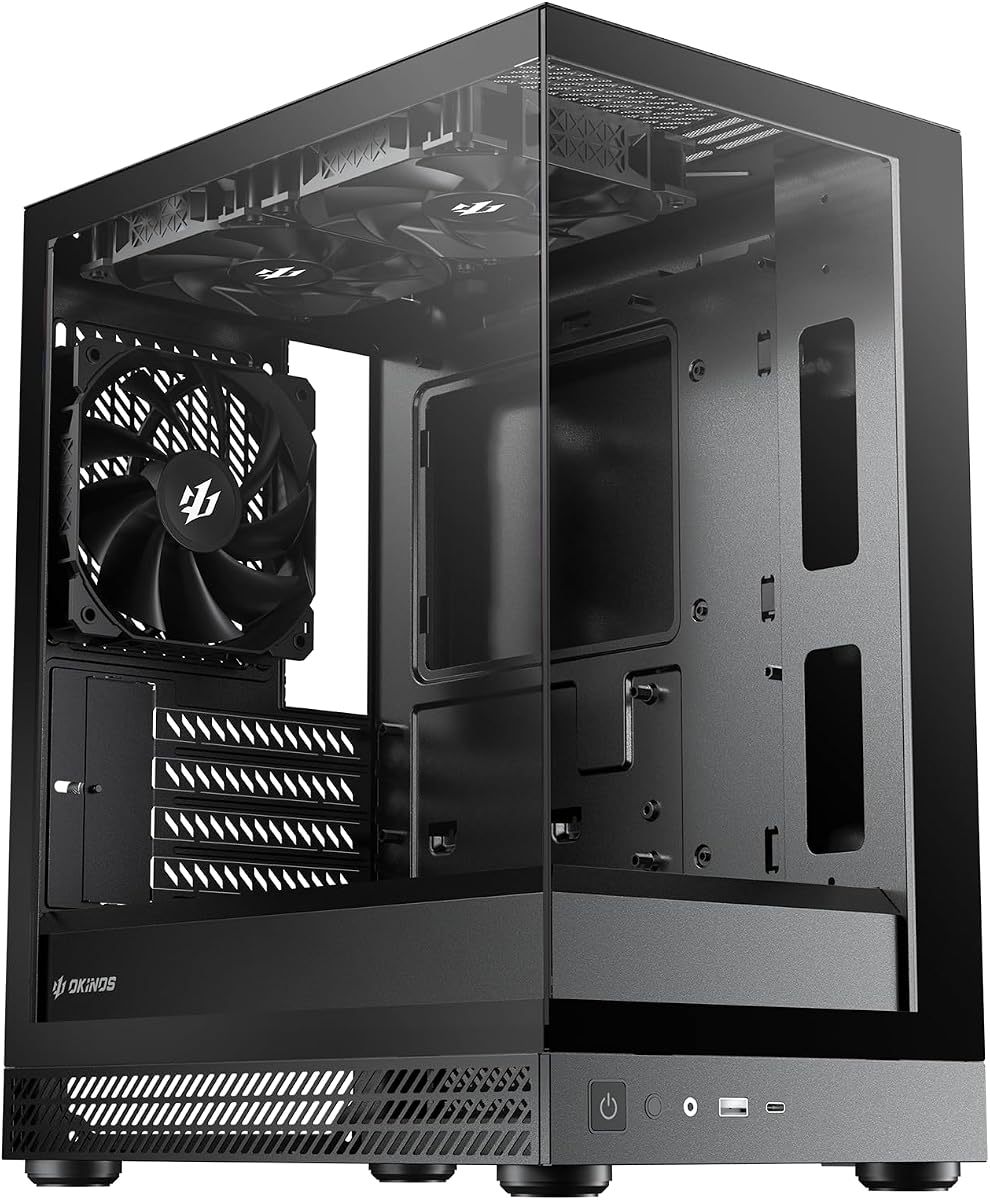
The Okinos Aqua 3 is a display-focused Micro-ATX case with front and side tempered glass, a 270-degree panoramic view, and three preinstalled 120mm ARGB fans. Its 4.7 rating indicates strong customer satisfaction, particularly for buyers who consider the enclosure part of the entertainment setup. The diamond-cut panel angles and clear side create a more dramatic appearance than conventional vented towers.
We may earn a commission when you buy through this link, at no additional cost to you.
Cooling is arranged vertically, with two fans at the top and one at the rear, while a built-in four-port ARGB controller handles the lighting. The case uses 1.2mm steel mesh for finer airflow and dust resistance. Hardware clearance reaches 320mm for graphics cards and 164mm for CPU air coolers. The front I/O adds a Type-C 3.2 Gen 2 port with 10Gbps bandwidth, two USB 3.0 ports, audio connections, a power switch, and ARGB controls.
The primary trade-off is the glass-heavy construction. It looks excellent but demands more care during installation, and the quick-release front panel reduces the need to remove screws without removing the need for caution. A vertical GPU arrangement is common in panoramic cases and contributes to the 320mm length limit. Magnetic filters on the top and bottom improve routine maintenance, but the side and front surfaces are more exposed than fully filtered panels.
Choose the Aqua 3 when a coordinated ARGB gaming build and visible components are central to your goal. It is less compelling for a work system that prioritizes a completely closed, understated exterior or maximum open-air ventilation. For a compact gaming PC with modern controls, a three-fan starting point, and strong presentation, it is a well-rounded recommendation.
Full glass on the front and side exposes nearly the entire internal layout, while the angled panel edges add visual depth. The effect is especially noticeable in a compact system where relatively few components still need to remain visibly arranged.
The included three-pin ARGB fans connect to a four-port controller at the rear of the chassis. This gives the system a coordinated lighting foundation without requiring the builder to source a separate fan hub and lighting controller.
We may earn a commission when you buy through this link, at no additional cost to you.
The Zalman CUBIX focuses on making a Micro-ATX system as small as practical. Its 17.1-liter total volume is the most compact figure in this roundup, and the 4.5 rating suggests that many buyers appreciate the opportunity to fit a capable desktop into a constrained space. Despite its small footprint, it supports standard ATX power supplies and graphics cards up to 260mm.
We may earn a commission when you buy through this link, at no additional cost to you.
The case uses sturdy 0.8mm steel construction and a perforated front panel to draw air through a preinstalled 80mm fan. CPU air coolers are limited to 137mm, making cooler height one of the most important compatibility checks. The front I/O is deliberately simple, offering one USB 3.0 port, one USB 2.0 port, and a single 3.5mm stereo AUX connection. That modest interface is appropriate for a compact enclosure with a restricted front panel area.
The trade-offs follow directly from the small design. A 137mm CPU cooler limit excludes many taller tower coolers, so a low-profile air cooler or compatible liquid-cooling solution may be necessary. Only one 80mm fan is included, and the perforated panel offers less filterable intake area than cases with dedicated dust filters. A standard ATX power supply can also affect the final spatial efficiency depending on how cables are managed.
The CUBIX is best for someone with genuinely limited desk or shelving space who still wants a conventional Micro-ATX motherboard rather than a tiny Mini-ITX system. Verify CPU cooler height first, particularly if you already own a large tower cooler. For a deliberately compact build with simple needs, it provides a compelling answer, although it is not the strongest choice for elaborate cooling or extensive front I/O.
At 17.1 liters, the CUBIX is aimed at builders who value every centimeter of desk space. Its compact volume still accommodates a standard ATX power supply, which can make installation more familiar than moving to a miniature dedicated ITX chassis.
The 137mm CPU cooler limit is the key constraint for most buyers. Checking the height of the cooler already in your possession can prevent the most common mismatch in an otherwise straightforward compact build.
We may earn a commission when you buy through this link, at no additional cost to you.
The TGDGAMER Slim Case is an entry-level enclosure designed around a perforated front, a compact interior, and basic support for Micro-ATX or Mini-ITX motherboards. Its 4.0 rating is the lowest in the group, although it still offers several useful features for buyers who want a functional PC chassis at a modest cost. A normal-size ATX power supply is supported.
We may earn a commission when you buy through this link, at no additional cost to you.
The interior can hold up to two 120mm fans and one 80mm fan, with radiator support up to 135mm. Front I/O consists of one USB 3.0 port and one USB 2.0 port. Graphics card clearance depends on whether a fan occupies the front mounting area: the stated maximum is 250mm without a front chassis fan and 225mm with one installed. That positional difference deserves careful attention before arranging the cooling system.
As an economical model, it does not offer the same refined front panel, tool-free features, large fan assortment, or comprehensive dust filtering found in more premium cases. The lower rating may reflect a less polished overall experience, so buyers seeking a display-piece enclosure should look elsewhere. Its advantage is that the essential Micro-ATX basics remain supported without requiring a Mini-ITX-specific layout.
This case makes sense for a straightforward first build, a compact office system, or a budget project where practical fit matters more than visual sophistication. Measure the graphics card and decide on fan placement before assembling the PC. If those constraints work, the TGDGAMER Slim Case can deliver a functional home for a Micro-ATX system without moving to a larger desktop chassis.
Pre-mounted motherboard holes accept Micro-ATX and Mini-ITX boards, and the case can use a normal ATX power supply. This keeps the platform familiar and potentially reduces the need to hunt for unusual components.
Installing a fan at the front reduces the supported graphics card length from 250mm to 225mm. Comparing the card with the proposed cooling layout before buying can prevent a conflict later in the build.
We may earn a commission when you buy through this link, at no additional cost to you.
The Okinos Aqua UNO is designed specifically for straightforward air-cooled Micro-ATX builds. Its 4.7 rating reflects a well-received combination of panoramic tempered glass, three preinstalled fans, comprehensive dust filtering, and organized cable routing. It supports CPU coolers up to 165mm and graphics cards up to 309mm, making it suitable for many mainstream performance configurations.
We may earn a commission when you buy through this link, at no additional cost to you.
The case explicitly does not support radiators, a distinction that should be considered before purchase. Its three included 120mm fans use non-PWM connections, and the front panel includes USB Type-C at 5Gbps, one USB 3.0 port, and an LED control button. A tool-free stud-mount system allows the glass panels to be removed without screws, while removable filters cover the top, side, and bottom. Dedicated routing paths and included Velcro straps organize CPU, GPU, 24-pin, fan, and I/O cables.
The absence of radiator support is not a flaw for every system, but it narrows future cooling options. Likewise, the 5Gbps Type-C connection is less advanced than 10Gbps implementations found elsewhere in the roundup. The supplied non-PWM fans may be satisfactory for basic operation, though users who want precise speed control should confirm how they intend to manage fan control through the motherboard.
The Aqua UNO is a strong recommendation for a compact air-cooled gaming PC or a clean work system that does not need liquid cooling. Its filters and routing features are particularly useful for systems expected to remain assembled for long periods. Choose it over a radiator-capable model if you are settled on air cooling; avoid it if future AIO upgrades are likely.
The generous 165mm CPU cooler allowance supports a broad range of conventional tower coolers. Keeping the case exclusively air-cooled also removes ambiguity about radiator placement, leaving more room to focus on intake and exhaust airflow.
Dedicated paths for major cable groups and included Velcro straps reduce obstruction behind the motherboard tray. Removable filters on three surfaces make routine cleaning easier and help preserve airflow over time.
We may earn a commission when you buy through this link, at no additional cost to you.
The LIAN LI Vector V100 MINI is a premium Micro-ATX platform with a panoramic 4mm tempered-glass front and side, an integrated ARGB light strip, and a generous collection of fans. Its 4.8 rating places it at the upper end of this roundup. It supports standard Micro-ATX, back-connect Micro-ATX, and Mini-ITX motherboards, but not full-size ATX boards.
We may earn a commission when you buy through this link, at no additional cost to you.
The V100R MINI configuration includes four 120mm ARGB PWM side-intake fans and one 120mm rear-exhaust fan. It can support as many as nine fans and a top-mounted 360mm or 240mm radiator. Graphics cards up to 415mm fit, CPU coolers can reach 163.5mm, and ATX power supplies up to 200mm are accepted. An adjustable horizontal GPU anti-sag bracket is included, adding practical support for heavier cards.
Its most important caveat is dimensional. The case measures 436 by 221.5 by 443.9mm, so MINI denotes a compact Micro-ATX platform rather than an ultra-small SFF enclosure. That larger size creates room for the extensive glass display and numerous fans, but it may not suit a very restricted shelf. Full-size ATX motherboard incompatibility is another point to verify before ordering.
The Vector V100 MINI is an excellent choice for a premium Micro-ATX gaming build where cooling, presentation, and long-GPU support matter equally. It is particularly compelling when the system will use a 360mm AIO, multiple ARGB fans, and a lengthy graphics card. Measure the intended location and identify your motherboard first, but the hardware support makes this one of the most complete options for an enthusiast build.
Five ARGB PWM fans are included, with four positioned for side intake and one at the rear for exhaust. This is a strong starting configuration for systems using substantial graphics cards or air coolers, while additional fan and radiator options remain possible.
The 270-degree tempered-glass view presents the internals from both the front and side. Support for 415mm graphics cards and an adjustable anti-sag bracket make the case more than a visual shell, with practical accommodations for high-end hardware.
We may earn a commission when you buy through this link, at no additional cost to you.
The Okinos Mirage 4 offers an unusually strong balance of hardware support, cooling provisions, and visual presentation. Its 4.8 rating reflects strong customer approval, while the feature list goes beyond a typical entry-level case. The panoramic 270-degree design uses a tool-free tempered-glass panel, and a 1.2mm mesh right panel supports airflow into the main chamber.
We may earn a commission when you buy through this link, at no additional cost to you.
The vertical airflow system supports up to five fans, with two 120mm H12R ARGB fans preinstalled at the bottom and one 120mm H12 ARGB fan at the rear. A four-port ARGB controller and one-to-three three-pin splitter are included. A 240mm radiator can be mounted at the top, while the five-slot PCIe layout improves graphics card positioning and cooling space. Power supplies up to 160mm fit, and generous cable channels are provided on both sides of the motherboard tray.
The fans are non-PWM, and the top radiator allowance stops at 240mm rather than extending to 360mm. Those limitations make the Mirage 4 less appropriate for builders committed to a 360mm AIO or sophisticated fan-speed control. On the other hand, magnetic dust filters on the top and bottom support maintenance, while pre-locked copper standoffs and an included removal tool simplify motherboard installation.
For most Micro-ATX gaming systems, the Mirage 4 is a particularly convincing package because it combines a polished exterior with useful expansion, cooling, and cable-management features. It works especially well for a 240mm AIO build, a vertical graphics card layout, or a system that benefits from extra PCIe slots. It offers more refinement than basic budget cases without reaching the footprint or fan count of the Vector V100 MINI.
The five PCIe slots allow more options for positioning a graphics card than a conventional four-slot layout. This can improve airflow around a thick card and create a more visually balanced internal arrangement.
Bottom intake and top exhaust establish a bottom-to-top cooling path, while the top can also hold a 240mm radiator. Large magnetic filters make the high-traffic intake and exhaust surfaces easier to remove and clean.
We may earn a commission when you buy through this link, at no additional cost to you.
The Lian Li B4-mATX combines a compact 21.3-liter volume with support for modern gaming hardware and a distinctive real-wood exterior. It carries a 4.5 rating and is available in black walnut or white beech finishes. The enclosure accepts Micro-ATX motherboards, graphics cards up to 358mm, and CPU air coolers up to 165mm, giving it more flexibility than many very small cases.
We may earn a commission when you buy through this link, at no additional cost to you.
Two slim 120mm non-RGB fans are preinstalled for immediate airflow. The case can be configured horizontally for a desktop-style arrangement or vertically as a space-saving tower. Its 360mm AIO support is particularly notable given the compact body, although the available cooling arrangement depends on the power supply configuration. That makes PSU selection and case orientation important parts of the planning process.
The included fans are slim, non-RGB models, so a builder wanting a full visual lighting setup should anticipate adding compatible components. The same caution applies to the case's overall cooling capacity, which varies with PSU choice and placement. Those are meaningful trade-offs for enthusiasts, but they do not diminish the case's value for a builder who values a small footprint, wood styling, and long-GPU capability.
The B4-mATX is a compelling recommendation for a compact gaming system that will appear in a living room, office, or carefully arranged desk setup. Choose it when the wood finish and flexible orientation matter and when you are comfortable planning the power supply and cooling arrangement. It is less ideal for a builder who wants a turnkey RGB package or maximum radiator clearance without additional planning.
Real wood finishes in black walnut or white beech give the case a warmer appearance than the metal-and-glass designs that dominate the category. The 21.3-liter volume preserves a small footprint while leaving enough room for a long graphics card.
The ability to operate horizontally or vertically lets the builder match the case to a wide desk or a narrower shelving area. Installation planning is still important because power supply and cooling arrangements can change with orientation.
We may earn a commission when you buy through this link, at no additional cost to you.
Choosing a Matx Case is easiest when you begin with the hardware already selected for your build. Motherboard format, graphics card length, CPU cooler height, power supply dimensions, and radiator plans should guide the decision before appearance or added fans become the deciding factors.
Choose a case whose motherboard support and expansion layout match the finished system rather than the marketing format. Confirm the board dimensions and leave enough room around rear ports and the CPU cooler.
In short: verify motherboard size, slot count, and rear-port alignment before ordering.
Choose a case with several millimeters of clearance beyond the card's measured length. Account for the power connector, cooler overhang, and any front fan that may reduce available space.
In short: measure the complete graphics card and compare it with the case's position-dependent limit.
Choose a case with enough cooler clearance for the model you already own. If buying the cooler later, select a case that supports the height range of your preferred options.
In short: taller cases offer broader air-cooler choice, while compact cases need careful height checks.
Choose based on component heat, case depth, and the number of fans you are willing to install and power. A larger airflow design is not automatically better if every added fan creates more cable clutter.
In short: favor a clear intake and exhaust path rather than focusing only on the fan count.
Choose a radiator-compatible model if an AIO is certain or future upgrades are likely. Choose the air-only case only when its simpler layout offers a meaningful advantage.
In short: match radiator size and mounting location to your cooling plan before selecting a case.
Choose based on the PSU you own or plan to buy, including its length, connectors, and required cable bend radius. Inspect the space behind the motherboard tray and available routing paths.
In short: match PSU form factor and length, then ensure the remaining cables can be hidden.
Choose a case whose connectors match the devices you use most often. Pay attention to port count, placement, power controls, and whether the front panel blocks them in a horizontal orientation.
In short: prioritize the connector types and access you will actually use every day.
Choose a case that suits both the available space and your tolerance for cleaning. Aesthetics matter, but accessible filters and organized interiors usually improve daily ownership more than decorative details alone.
In short: balance footprint and appearance with practical access for cleaning and servicing.
Begin by laying out the motherboard, power supply, graphics card, storage, and cooling hardware before installing anything. Compare each component with the case's stated clearance limits, then identify where the motherboard, rear I/O shield, and expansion cards will sit. Assemble major components outside the chassis where practical, attach the appropriate standoffs, and install the motherboard before routing permanent cables.
Install fans and any radiator using the manufacturer's mounting instructions, keeping intake fans toward clean-air areas and exhaust fans toward exits. Connect power, data, fan, and lighting cables to the correct motherboard headers or controllers, then use the provided cable paths, grommets, and straps to keep bundles out of fans and away from obstructed panels. Confirm front I/O alignment before fastening the final panels.
For routine care, power down and disconnect the system before opening the case. Remove dust filters and clean them gently, then use controlled bursts of compressed air to clear dust from fans, vents, radiators, and the interior. Avoid loosening standoffs unless the manual instructs you to do so, and keep liquids away from the chassis. Check airflow and temperatures after any fan, filter, or panel change, and recheck connector security if the system is moved.
Yes. Matx and Micro-ATX generally refer to the same motherboard form factor, with the full name often written as Mini-ITX or mATX in compatible case specifications. A Matx Case must fit a Micro-ATX motherboard, but some models also accept Mini-ITX or full-size ATX boards. Check each listing because the practical space around a board can differ even when the underlying form factor is the same.
Not automatically. Compare the card's full length, including its cooler and power connector, with the case's stated maximum. Some cases offer more than 400mm of clearance, while compact models may limit graphics cards to 250mm or less. Fan placement can also reduce the available length, so compare the card with the case's final cooling configuration rather than its absolute maximum.
They can be more constrained than full-size ATX cases, particularly when the graphics card is long or the power supply is large. Cases with labeled cable routes, tool-free panels, preinstalled standoffs, and flexible I/O positioning make assembly easier. Planning component orientation, using the correct standoffs, and routing cables as you go can prevent most common problems.
It is convenient but not essential. Preinstalled fans can provide a functional airflow arrangement immediately and may be especially useful for first-time builders. They can also limit your choices if they use older three-pin connections or do not support PWM and ARGB. Confirm fan speed, connector type, lighting, and total mounting capacity before treating the included fans as the final cooling plan.
Some models can, but not all. The Lian Li A3-mATX, Vector V100 MINI, and B4-mATX list 360mm radiator support, while the Okinos Mirage 4 lists a 240mm top radiator. The Aqua UNO is air-cooling only, and other compact cases have different restrictions. Verify the radiator's mounting position, available depth, and clearance for the graphics card before purchasing an all-in-one cooler.
It depends on the space available and the hardware involved. The Zalman CUBIX can save substantial desk or shelf space, but its 137mm CPU cooler limit and shorter component clearances require more careful selection. A larger Micro-ATX enclosure may offer better cooling, more fan options, easier installation, and room for a longer graphics card. The best choice is the one that fits both your hardware and your physical space.
Both can significantly affect long-term usability. Filters reduce the buildup that can obstruct intake airflow, especially in a case with open mesh or perforated panels. Good cable management keeps wires away from fans, improves the visual presentation, and makes future component access easier. Cases such as the Aqua UNO, Mirage 4, and Vector V100 MINI provide dedicated paths, removable filters, or both, which are useful features for systems that remain assembled for long periods.
The Lian Li A3-mATX stands out as the most balanced overall recommendation, combining a compact 26.3-liter body, support for GPUs up to 415mm, 360mm radiator support, and a distinctive walnut front panel. The LIAN LI Vector V100 MINI is the premium choice for extensive ARGB, five included fans, panoramic glass, and broad hardware clearance, while the Okinos Mirage 4 delivers the strongest value-oriented feature set with five PCIe slots and a 240mm radiator option.
Start with the components you already own. Measure the graphics card, note the CPU cooler height, identify the motherboard format, and check power supply dimensions. From there, choose airflow, radiator support, front connectivity, and appearance according to the priorities of the build. The Zalman CUBIX is ideal for maximum space savings, the Aqua UNO serves air-cooled systems, and the wood-accented models bring a more distinctive appearance.
Current prices, availability, and configurations can change, so check the latest listing and product details before making a final decision. Confirm every clearance against the exact hardware in your planned system, and make sure the case's dimensions fit the intended location. With those checks complete, the right Matx Case can deliver a compact, attractive, and well-cooled home for your next PC.