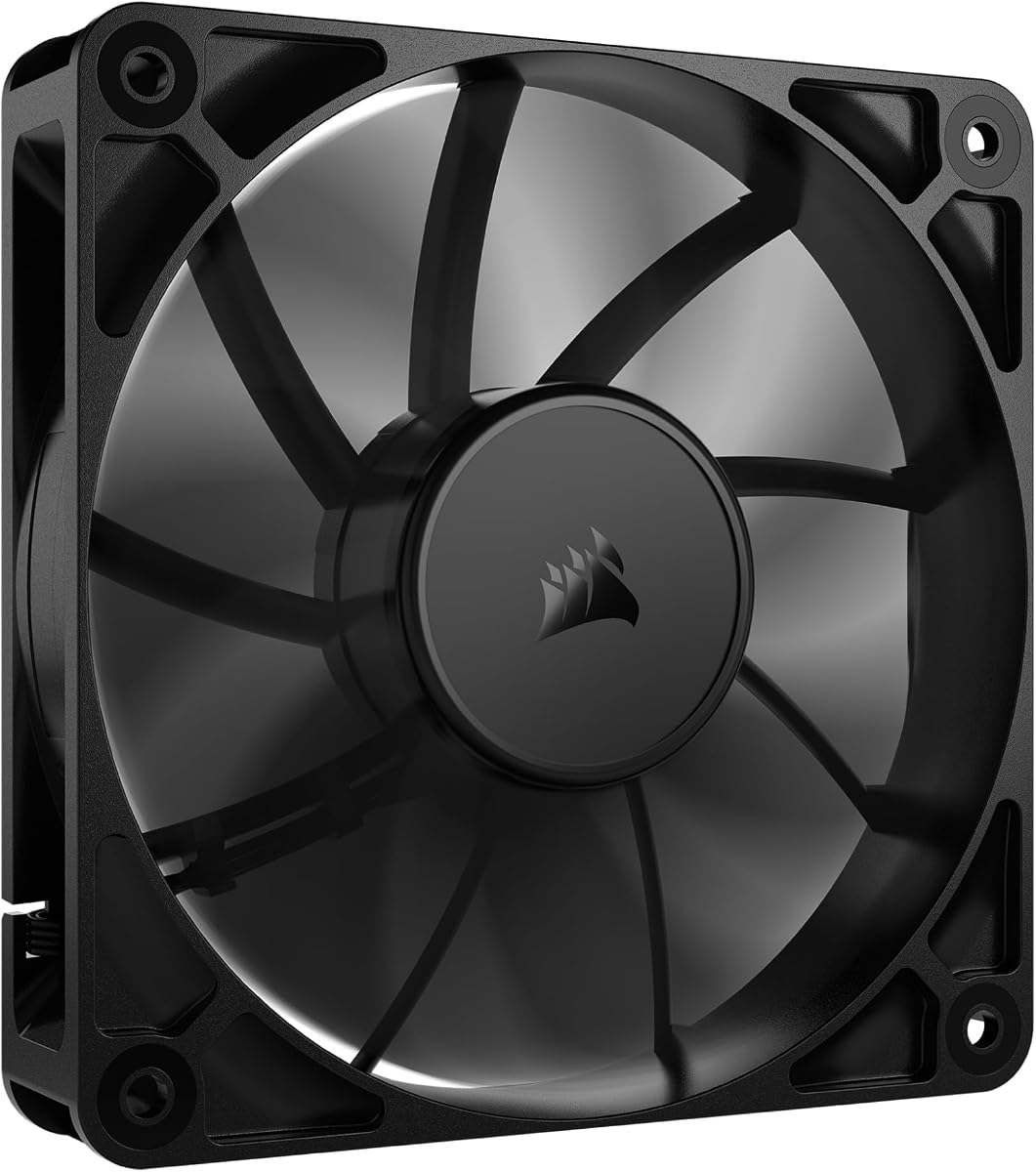
CORSAIR RS120
4.6Editor score
Single-connector daisy-chain support
Up to 72.8 CFM airflow
Directional AirGuide airflow vanes
Four-pin PWM speed control
Our Exhaust Fan for PC guide compares ten 80mm and 120mm case fans for airflow, PWM control, noise levels, bearing life, installation, and cooling.
An exhaust fan for a PC works as part of a balanced airflow system, drawing warm air out of the case while intake or rear-mounted fans bring cooler air in. A worthwhile model combines useful airflow, manageable noise, durable bearings, reliable speed control, and a connector that matches your motherboard or controller.
The products in this guide include standard 120mm case fans, a high-speed 120mm model, an 80mm option for compact or legacy installations, a multi-pack with lighting, and a USB-powered fan for external electronics. Their supplied specifications, ratings, dimensions, noise claims, and control methods are compared side by side.
Each review explains where the fan is most suitable and where compromises may arise. The guide covers native PC cases, radiators, CPU coolers, routers, consoles, and other electronics without implying that every model can replace every fan. Product availability and pricing change, so confirm the current listing and connector details before buying.
4.6Editor score

4.8Editor score

4.6Editor score
This side-by-side comparison shows the dimensions, airflow, speed-control method, noise specifications, and intended use of every fan in the guide, making it easier to identify the correct model for a PC case or nearby electronic device.


This 120mm variable-speed axial fan is an unusual but practical option when the device that needs cooling cannot accept a conventional motherboard fan cable. It carries a 4.4 rating and stands out for its AC-powered controller, broad range of 700 to 2,800 RPM, and supplied ability to operate as an external cooling source for equipment ranging from PC cabinets to entertainment hardware.
We may earn a commission when you buy through this link, at no additional cost to you.
The included three-to-twelve-volt controller provides a direct way to tune output, which is useful when a fixed-speed fan would be either too aggressive or insufficient. Its dual-ball bearings are rated for 50,000 hours, while the stated airflow of 95.8 CFM and maximum noise below 41 dB make it more substantial than a typical decorative USB fan. The 120 by 120 by 25 mm dimensions also allow it to occupy a standard 120mm footprint.
Its main compromise is the AC plug. The fan must be positioned near a wall outlet, and the controller introduces an external component that will not fit neatly into every PC build. It also lacks the familiar four-pin PWM interface, so it is better suited to external cooling duties than to replacing a fan header inside a conventional ATX case. Buyers must also be comfortable routing a mains-powered cable around the equipment.
This is a good recommendation for a server cabinet, DVR, receiver, router, Xbox, greenhouse, or other enclosure where a removable external fan is more convenient than internal case airflow. It is less suitable for a tidy desktop build or any location without a safe outlet nearby. For those applications, a native PWM model offers simpler integration and cleaner cabling.
The AC-powered arrangement allows the fan to cool compatible equipment without using a motherboard header or internal power rail. It is particularly useful for cabinets and electronics positioned away from the PC power supply.
A 700-to-2,800 RPM control range lets the user balance airflow against noise more directly than a fixed-speed model. That flexibility also makes the fan reusable across changing equipment and ambient-temperature conditions.
We may earn a commission when you buy through this link, at no additional cost to you.
The be quiet! Pure Wings 3 is a 120mm PWM case fan built for users who want strong ventilation without making a workstation or gaming system unnecessarily loud. Its 4.7 rating reflects a favorable overall reception, while the seven-blade design, radiator-focused frame, and ability to run at very low minimum RPM distinguish it from conventional high-speed case fans.
We may earn a commission when you buy through this link, at no additional cost to you.
The frame outlet is optimized for peak performance around radiators, where unobstructed airflow matters. Its blade design is intended to reduce noise while retaining performance in demanding configurations. The long-life rifle bearing is rated for 80,000 hours, which gives the model a credible durability advantage over entry-level options. PWM support allows the motherboard to adjust the fan according to its configured speed curve.
One limitation is that the supplied information does not provide a precise airflow figure, maximum RPM value, or detailed noise measurement. That makes direct numerical comparison with the more fully specified models less straightforward. It is also a single-fan package, so building a balanced exhaust and intake arrangement may require more than one purchase. Its quieter emphasis may not suit a user who wants the highest possible raw CFM regardless of acoustics.
Buyers should choose the Pure Wings 3 for a quiet workstation, a radiator, or a case where PWM-controlled acoustics matter. It is a particularly sensible option for a build where a high minimum RPM would make inexpensive fans irritating. For maximum airflow at a specific price, more specification-heavy models may be easier to evaluate, but this fan provides a strong balance of operation and construction quality.
Running at a very low minimum RPM can make a case fan less distracting during desk work or light computing. Motherboard-controlled PWM lets the fan increase output when internal temperatures rise and settle back down when cooling demand decreases.
The seven-blade design and optimized frame target useful flow through constrained spaces. That makes the fan relevant to radiator positions as well as ordinary open case locations, provided the mounting pattern and connector match.
We may earn a commission when you buy through this link, at no additional cost to you.
The DARKROCK 3-Pack is an appealing choice for a builder who wants to establish several 120mm airflow positions at once. Its 4.6 rating is strong, and the package includes three black case fans with nine-blade rotors, silicone vibration cushions, hydraulic bearings, and a three-pin motherboard connection. The stated maximum speed is 1,200 RPM, with maximum noise listed at 32.1 dBA.
We may earn a commission when you buy through this link, at no additional cost to you.
Four silicone cushions on each fan help absorb vibration at higher speeds, addressing the familiar buzz and transferred movement associated with inexpensive case fans. The hydraulic bearing design is intended to provide stable rotation, reduce noise, and extend service life, with an average working life of 30,000 hours stated in the product information. PBT material adds insulation and heat resistance, while the standard 120mm dimensions ease installation in compatible cases.
The important limitation is the three-pin interface. It may support basic voltage-based speed control, but it does not provide the precise four-pin PWM control offered by several competing models. The package also does not state a precise airflow value, making it harder to compare directly with fans whose CFM figures are published. These are minor planning limitations, but they matter for radiator placement or tightly controlled acoustic setups.
The DARKROCK set is well suited to a new basic build, an older desktop needing replacement circulation, or a case with multiple open mounting positions. It offers an easy way to create a more balanced internal airflow pattern without sourcing fans individually. It is less compelling for advanced users who require native PWM, specific static-pressure data, or maximum performance from every installed position.
Three matching fans make it easier to place intake and exhaust units in compatible openings. A balanced arrangement can move air through the case more consistently than a single fan surrounded by blocked or unused mounting positions.
Soft silicone cushions help reduce vibration transmitted through the frame at higher speeds. The design is aimed at keeping a multi-fan installation steadier and less noticeable than an unisolated setup.
We may earn a commission when you buy through this link, at no additional cost to you.
The X1 USB Cooling Fan is designed less like a traditional PC case fan and more like a portable external cooling solution. It has a 4.4 rating, a 120mm internal fan housed in a 130 by 130 by 48.6 mm box-style frame, and an integrated 530mm USB cable. It can be placed flat or upright beside a mini PC, router, console, receiver, DVR, or other compatible electronic device.
We may earn a commission when you buy through this link, at no additional cost to you.
The supplied specifications list 55.8 CFM airflow, an operating speed of 850 RPM plus or minus 10 percent, and a nine-blade rotor. Its most notable claim is an operating level of 18 dBA plus or minus 10 percent, supported by four shock-absorbing pads intended to limit surface scratches and vibration. The product information also states that the ABS housing can support a weight of up to 11 pounds and gives the fan a listed lifespan of 40,000 hours.
This fan is not a standard 120mm panel-mount replacement. The 130mm square enclosure and 48.6mm depth are designed for freestanding use rather than a flush case panel, and its performance is not positioned for pushing air through a dense radiator or heatsink. It also requires access to a USB power source. Buyers should treat the temperature-reduction and ultra-quiet figures as supplied claims rather than assume they will match every installation.
The X1 is ideal for adding gentle airflow to a crowded media cabinet, network corner, or compact electronics setup without modifying the host device. It is less appropriate for a conventional PC case where a native 120mm mounting hole, motherboard fan header, and PWM control are available. For those users, a dedicated case fan offers a more integrated result and usually more flexible placement.
The integrated cable and freestanding frame remove the need to open a device or attach a fan to an internal header. The fan can be moved between compatible products or repositioned as a cabinet layout changes.
Shock-absorbing pads and a low stated noise level make the model suitable for living rooms and offices where visible or audible equipment noise would be distracting. It is a practical addition rather than a substitute for internal case ventilation.
We may earn a commission when you buy through this link, at no additional cost to you.
The CORSAIR RS120 combines a high maximum speed of 2,100 RPM with a stated airflow of up to 72.8 CFM, giving it a clear performance profile within this guide. Its 4.6 rating, magnetic dome bearing, PWM control, and daisy-chain connection make it especially appealing for builders installing several case fans and wanting to reduce the number of occupied motherboard headers.
We may earn a commission when you buy through this link, at no additional cost to you.
AirGuide technology uses anti-vortex vanes to direct air toward components that need cooling. This focused approach is useful when a fan is mounted to a radiator or heatsink rather than simply placed against an open case panel. The stated static pressure of 4.15 mm-H2O also makes the model suitable for radiator use. Its magnetic dome bearing is designed to reduce friction and noise while supporting long-term operation.
The packaging contains one fan, so users still need to buy enough units for a complete intake and exhaust arrangement. While the daisy-chain design simplifies connections, the exact number of fans that can be chained should be confirmed with the product instructions and current motherboard capabilities. It also reaches a higher maximum speed than several alternatives, which may be unnecessary in a quiet workstation and could produce more noticeable sound under maximum load.
The RS120 is a strong recommendation for a modern gaming PC, a radiator-assisted build, or any system where several high-speed PWM fans are needed without a complicated splitter arrangement. It may be excessive for a small office desktop, but its high airflow, useful static pressure, and clean connection strategy make it a flexible choice for performance-oriented installations.
Daisy-chaining allows multiple compatible fans to be linked and controlled through one four-pin PWM connection. This can reduce cable clutter and preserve motherboard fan headers for other components.
The anti-vortex vanes help move air in a deliberate direction instead of allowing it to disperse immediately. Combined with the stated static-pressure figure, that design supports radiator and heatsink positions.
We may earn a commission when you buy through this link, at no additional cost to you.
The Thermalright TL-C12C-S X5 package includes five matching 120mm ARGB fans, combining cooling performance with coordinated illumination. It has a 4.7 rating, a maximum speed of 1,550 RPM, 66.17 CFM airflow, and a stated maximum noise level of 25.6 dBA. The four-pin PWM connection supports automatic motherboard control according to configured temperature and speed settings.
We may earn a commission when you buy through this link, at no additional cost to you.
Each fan uses a four-pin PWM connector and draws 0.20A, while the listed air pressure is 1.53 mm H2O. The supplied description identifies an S-FDB bearing designed to limit blade shake and reduce noise. ARGB lighting offers up to 17 effects and can be coordinated through a compatible motherboard port, giving the package visual appeal as well as functional airflow.
ARGB requires additional consideration. A compatible header or controller must be available, and the five lighting cables can create a routing challenge in a compact case. The package also produces much more visible lighting than a basic black fan set, which may not suit a restrained office build. Beyond those points, the published 25.6 dBA ceiling is appealing for a performance-oriented five-fan installation.
This set is a strong fit for a gaming desktop with several 120mm mounting positions, a coordinated RGB build, or a user who wants to establish a complete five-fan cooling layout. It can also serve CPU cooler or radiator positions where the fit and static-pressure requirements are suitable. For a plain workstation, a non-lit alternative may provide a simpler and less visually busy installation.
Five matching fans streamline the process of building a balanced intake and exhaust arrangement. The package is especially useful when the case has multiple standard 120mm positions available.
ARGB effects can be synchronized through compatible motherboard controls, allowing the lighting to follow a wider system theme. The feature is most useful in visible glass-panel cases and with existing RGB equipment.
We may earn a commission when you buy through this link, at no additional cost to you.
The Kingwin 80mm Silent Fan serves a narrower but still useful role: cooling systems with an 80mm mounting position. Its 4.5 rating and stated emphasis on quiet operation, high airflow, long-life bearing construction, and compatibility with computer cases, CPU coolers, water-cooling radiators, and mining rigs make it a consideration for older or compact systems rather than a modern full-size build.
We may earn a commission when you buy through this link, at no additional cost to you.
The optimized blade design is intended to move air through the case and reduce heat buildup. Its standard 80mm dimensions allow it to serve as a direct replacement in equipment designed around that size. A rugged black frame and long-life bearing are also useful for sustained operation, while the product is marketed toward applications that require persistent ventilation without the physical space used by a 120mm fan.
The limitation is obvious but important: an 80mm fan cannot be installed in a 120mm opening, and the supplied information gives no exact airflow, speed, or noise measurements. Modern cases overwhelmingly use 120mm positions, so this model is primarily relevant to legacy equipment, specialist mining enclosures, or specific CPU coolers with 80mm mounting options. Its performance should be judged against the location rather than against large modern case fans.
The Kingwin is a sensible recommendation for a compact PC with an 80mm vent, an older case that needs a replacement fan, or a specialized cooling assembly with matching holes. It is not the first choice for a new ATX build where 120mm options provide more airflow with broader compatibility. Buyers should confirm the physical mounting pattern and electrical connector before ordering.
The 80mm format provides access to ventilation positions that newer 120mm alternatives cannot use. It can be valuable in older cases, selected CPU coolers, and custom equipment designed around the smaller standard.
The blade and bearing design focuses on steady airflow with reduced noise. That makes the fan relevant to home servers and compact systems where quiet operation matters as much as moving warm air away.
We may earn a commission when you buy through this link, at no additional cost to you.
The Noctua NF-P12 redux-1700 PWM is the highest-rated option in this guide at 4.8. It combines a 120 by 120 by 25 mm format, 12V operation, four-pin PWM control, a maximum speed of 1,700 RPM, and a maximum noise specification of 25.1 dBA. The pressure-optimized design is intended to balance strong airflow with quiet operation across air-cooled CPU heatsinks, water-cooling radiators, and chassis ventilation.
We may earn a commission when you buy through this link, at no additional cost to you.
Automatic motherboard speed control is a major practical advantage. Users can set a low idle speed and allow the fan to accelerate as temperatures rise, avoiding the constant noise of a fan running at full speed. The listed MTTF of more than 150,000 hours is the highest endurance figure provided among the 120mm options in this comparison, and the redux version is positioned as a streamlined edition of Noctua's established NF-P12 design.
The maximum airflow figure is not included in the supplied information, so buyers cannot directly compare its CFM with the RS120, Thermalright, Wathai, or DARKROCK products. The package also includes a single fan, which means a complete balanced configuration may require several purchases. Accessories such as anti-vibration mounts, SATA adapters, Y-splitters, and extension cables are available according to the product description, adding flexibility when the case layout is restrictive.
The NF-P12 redux-1700 PWM is an excellent recommendation for a quiet workstation, a well-tuned gaming PC, or any build where a low sound floor and dependable PWM behavior are priorities. It is less compelling for a user seeking a multi-pack with coordinated lighting or a fan with a published maximum airflow figure. Even so, its strong rating, low stated maximum noise, and long service life make it one of the most balanced standalone choices here.
PWM control allows the fan to remain at a low RPM during idle periods and accelerate under sustained heat. This is particularly valuable in a work environment where a continuously loud exhaust fan can become tiresome.
The pressure-optimized blade design targets components and radiators that require more than open-case circulation. Combined with the stated MTTF above 150,000 hours, it suits builders who prioritize long-term reliability.
We may earn a commission when you buy through this link, at no additional cost to you.
The Wathai 12038 is built for maximum airflow rather than quiet operation. Its 4.5 rating accompanies exceptional published figures: 230 CFM airflow, a maximum speed of 5,300 RPM, and a 120 by 120 by 38 mm frame. It also uses a four-pin PWM connection, allowing motherboard or controller-based speed regulation for mining rigs, server-style GPU chassis, gaming PCs, and other demanding ventilation projects.
We may earn a commission when you buy through this link, at no additional cost to you.
The fan includes a grille, mounting screws, and nuts, making the package reasonably self-contained for a build. Its dual-ball bearings are listed at a 67,000-hour lifespan, and the housing can operate flat or upright. A red wire indicates positive, black indicates negative, yellow provides the FG function, and blue handles PWM, allowing a compatible controller or BIOS software to adjust fan percentage in response to temperature.
The trade-off is substantial acoustic output and power draw. Maximum noise is listed at 60 dBA, maximum power at 22.8 watts, and rated current at 2.0 amps. Its 38mm depth is also much thicker than a standard 25mm case fan, so users should check clearance from drive cages, radiators, thick heatsinks, and cable bundles. At full speed, it can be too loud for a typical office or quiet living space.
The Wathai 12038 is recommended for high-output mining rigs, server-style chassis, and performance builds where maximum cooling takes priority over compactness and silence. PWM control provides a way to keep it quieter during lighter loads, provided the speed curve is configured sensibly. It is a poor choice for a compact office PC where a 25mm standard fan and a lower sound floor are priorities.
The stated 230 CFM airflow and 5,300 RPM maximum speed make this model suited to equipment that generates substantial heat. It can provide aggressive cooling where open-case circulation alone is insufficient.
The four-wire connection allows compatible systems to increase fan speed as temperature rises. A carefully configured curve can reduce noise during idle periods while preserving high output under heavy workloads.
We may earn a commission when you buy through this link, at no additional cost to you.
The Thermalright TL-C12C-S X3 is a three-fan version of the ARGB case-cooling design, offering a 4.7 rating and a more moderate package than the five-fan configuration. Each 120 by 120 by 25 mm fan reaches a maximum of 1,550 RPM, produces 66.17 CFM airflow, and is rated at no more than 25.6 dBA. Four-pin PWM connectors allow motherboard-controlled speed adjustment.
We may earn a commission when you buy through this link, at no additional cost to you.
The fans draw 0.20A and provide 1.53 mm H2O air pressure according to the supplied specifications. Their S-FDB bearings are designed to minimize blade shake and noise while supporting long-term cooling performance. Up to 17 ARGB effects are available, and lighting can be synchronized through a compatible motherboard port, allowing the set to match a broader coordinated system theme.
The package includes only three fans, so a large case may need additional units to create a fully balanced layout. ARGB also adds a lighting connection beyond the standard PWM power cable, so a compatible header and controller are necessary. A discreet workstation without an RGB ecosystem can find a simpler option elsewhere in this guide. Otherwise, the published noise ceiling and PWM capability are favorable for a visible gaming case.
The X3 is a strong recommendation for a mid-size gaming PC that needs three matching 120mm positions, particularly one with an existing ARGB lighting system. It can also support CPU cooler, case, and radiator positions when its dimensions and static-pressure rating are appropriate. The recommendation is best for buyers who want coordinated lighting and responsive control without moving to the larger five-fan set.
Up to 17 lighting effects can be managed through a compatible motherboard header. This allows the fans to blend into a coordinated system rather than operate as visually separate components.
The stated maximum of 25.6 dBA is suitable for a performance fan that can also run quietly at reduced RPM. Four-pin PWM control makes it easier to balance the stated 1,550 RPM peak with lower everyday output.
We may earn a commission when you buy through this link, at no additional cost to you.
The right PC exhaust fan depends on the case layout, heat source, mounting pattern, power source, and acceptable sound level. Comparing the following factors before purchasing helps prevent a mismatched connector, inadequate clearance, or unnecessary performance from undermining the installation.
Start by checking the fan openings in the case rather than assuming every fan will fit. Most modern cases use 120mm positions, while some compact, legacy, and specialized systems still use 80mm mounts. Measure both the opening and the space behind it because thicker fans, including the 38mm Wathai model, may collide with drive cages, radiators, heat pipes, or cable bundles. A standard 25mm depth offers more flexibility in crowded interiors.
The connector determines how easily a fan can be controlled. Four-pin PWM fans connect directly to compatible motherboard headers and support adjustable speed curves. Three-pin fans commonly rely on voltage control, which may be less precise. USB-powered models are useful for external electronics but are not direct replacements for internal case headers. Daisy-chained fans can reduce header usage, although the supported chain length and connector requirements should be verified before purchase.
Raw CFM indicates how much air a fan can move, while static pressure indicates how well it can push air through obstructions. Open exhaust positions often reward high airflow, whereas radiators, dense heatsinks, and mesh filters create resistance. Some listings emphasize CFM without publishing pressure, and others provide pressure without a maximum airflow figure, so neither number alone gives a complete picture. Consider the installation position and the components that need cooling.
Maximum RPM is only one part of the noise story. A fan capable of reaching 5,300 RPM can still run relatively quietly when its PWM curve is configured sensibly. Models with low minimum speeds and broad control ranges are often better for offices and living rooms. Pay attention to the stated maximum noise level as well as the design claims, since exact sound output can vary with the enclosure, mounting surface, workload, and motor speed.
Bearing construction influences stability, noise, and expected service life. Dual-ball and magnetic dome bearings appear among the higher-speed or long-life options, while hydraulic and S-FDB designs are intended to reduce vibration and blade shake. The listed longevity figures range from 30,000 hours to more than 150,000 hours, but these are not identical measurement standards. Consider expected daily use, operating temperature, and the amount of maintenance the system will receive.
A single exhaust fan does not automatically guarantee balanced airflow. In most conventional cases, the exhaust should be paired with one or more intake fans in positions that feed clean, reasonably cool air toward internal components. A fan with directional vanes may be particularly useful around a radiator or heatsink. Avoid creating a short circuit in which intake and exhaust are placed directly opposite each other without directing useful air through the components.
Lighting is useful for matching a gaming build, but it adds requirements that basic cooling fans do not have. ARGB fans need compatible headers or controllers, and multi-fan packages can require additional space for lighting cables. If appearance is secondary, a non-lit model may create a simpler installation. If appearance is important, confirm the case has room for the bundled cables and that the motherboard or controller can synchronize the listed lighting effects.
An exhaust fan for a PC may actually be needed beside a router, receiver, DVR, console, mini PC, or other electronics. Native case fans are best for internal airflow, while USB-powered box fans are easier to place next to equipment. AC-controlled axial fans offer an even broader manual speed range but require a safe outlet. Match the power method, physical space, noise level, and direction of airflow to the actual device rather than treating every listed application as an internal case installation.
Before installation, switch off and unplug the computer or electronic device, then confirm that the replacement fan matches the opening and connector. Mount it securely in the intended exhaust position, route the cable away from sharp edges and hot components, and connect a four-pin PWM lead to a compatible motherboard header or controller. For a three-pin fan, use the correct power and speed-control arrangement, while a USB model should connect to a suitable powered port.
After connecting the fan, power the system gradually and listen for vibration, cable contact, or unexpected rubbing. Configure the PWM or voltage curve in the motherboard BIOS or control software so the fan idles quietly and accelerates as temperatures rise. If the fan is mounted behind a radiator or restrictive filter, monitor component temperatures because the exhaust location alone does not guarantee adequate cooling throughout the case.
For maintenance, disconnect power before removing the fan or cleaning around its opening. Use a soft brush or controlled stream of air to remove dust without dislodging the rotor or pushing debris into the case. Keep cables clear of the blades, avoid obstructing the frame, and periodically check the mounting screws. Replace the fan if it develops persistent noise, vibration, slow rotation, or a noticeable decline in cooling performance.
Many cases include at least one exhaust fan, but additional airflow can help when components generate substantial heat, the case has blocked vents, or several mounting positions remain unused. A balanced setup with suitable intake and exhaust fans is generally more effective than adding an isolated fan without planning its position. Check the case manual and internal temperature readings before deciding.
The 120mm size is standard in most modern desktop cases, while 80mm positions remain common in compact and older systems. Measure the opening before purchasing, and check the space behind it for radiators, drive cages, and cables. A fan that matches the hole but is too thick may still be impossible to install.
A four-pin PWM fan generally provides more precise automatic speed control because the fourth wire communicates the requested speed to the fan. A three-pin fan may use voltage-based control, which is simpler but less exact. If the motherboard has a native PWM header, a four-pin model is usually the more flexible choice.
Yes, provided the fan has sufficient static pressure and the mounting arrangement directs air through the radiator rather than away from it. The CORSAIR RS120 provides a stated static-pressure figure for this use, while other models may be considered when their published pressure and airflow meet the radiator requirements.
No. High maximum RPM and airflow can help with severe heat or restrictive components, but they may also create more noise, consume more power, and require more clearance. A controllable fan that runs quietly at low temperatures and accelerates when needed is often more comfortable for daily use.
It is possible if there is room and a safe way to route the USB cable, but a USB box fan is primarily designed for freestanding external use. Its larger enclosure and fixed mounting style may make it awkward inside a case. A native 120mm PWM fan is usually easier to mount and control internally.
Not necessarily. Equal speed is a simple starting point, but different settings may better manage particular components or noise levels. The important goal is to create a consistent path from intake through the hardware to the exhaust. Moderate adjustments can help reduce noise without allowing internal heat to accumulate.
Use a fan with PWM control, enable a temperature-based speed curve, and set a low minimum speed that still maintains safe airflow. A quieter fan model, vibration-isolating mounts, and removing cable obstructions can also help. Avoid pushing the fan to maximum speed unless the system genuinely requires that output.
The Noctua NF-P12 redux-1700 PWM is the strongest all-around recommendation for a quiet, controllable single-fan installation, while the CORSAIR RS120 stands out for daisy-chain convenience, high airflow, and radiator-oriented static pressure. The DARKROCK three-fan package is a practical way to populate several standard 120mm mounting positions at a budget-oriented level.
Before choosing, prioritize exact mounting compatibility, the connector you actually have available, and the location where the fan will operate. Native PWM control is valuable inside a modern case, ARGB suits a coordinated gaming build, and a thick high-speed fan belongs where maximum output matters more than quiet operation. External USB or AC-powered models solve different problems for routers, consoles, and other electronics.
Ratings, specifications, product availability, and prices can change over time, so review the current listing before ordering. Check the dimensions, included hardware, electrical requirements, and mounting instructions against your system, and compare the current cost with the number and type of fans your case actually needs.