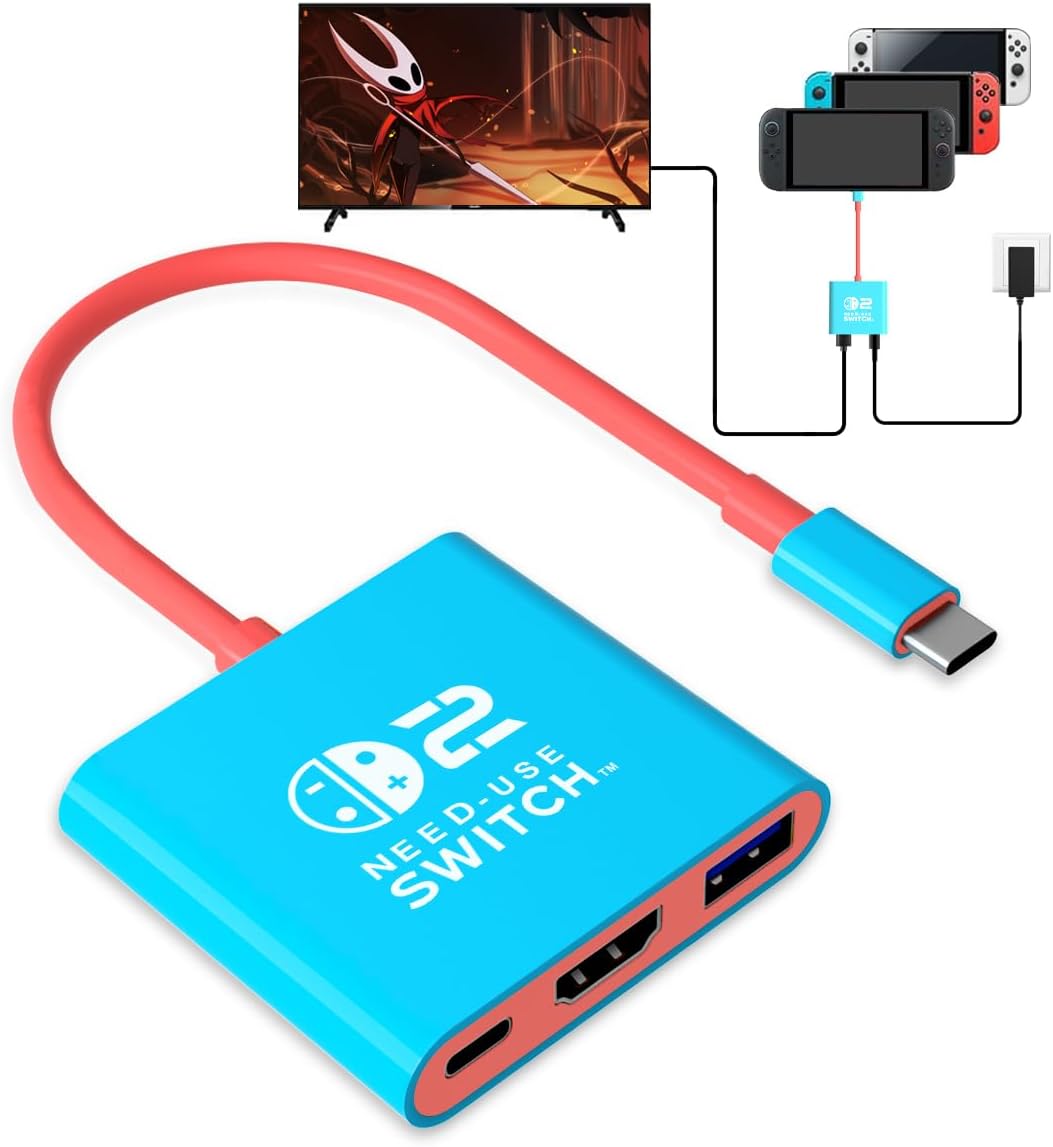
Switch 2 USB C Dock 4K
4.2Editor score
Portable three-port design
Up to 100W PD charging
4K and 1080p output
Compare the 10 best Porable Switch 2 USB C Dock to HDMI options, including video output, charging, portability, and compatibility for travel and home gaming
A portable Switch 2 USB C dock to HDMI gives handheld gamers a simpler way to connect to a television, monitor, or projector without carrying the official desktop dock. The most useful models combine plug-and-play video output, USB-C power delivery, a sturdy cable, and enough portability for hotel rooms, dorms, and travel.
This guide compares ten compact docks using the specifications and compatibility information available for each product. We examine video resolution, refresh rate, charging capacity, USB connectivity, cable design, device support, and portability. The list includes cable-style adapters, compact multi-port docks, and options made for Nintendo Switch 2, Switch, Steam Deck, and other USB-C devices.
Each review identifies the feature that makes a particular dock stand out while also noting limitations that may matter to buyers. The top selections cover a budget-oriented adapter, a strong all-around option, and a premium model with extensive high-resolution support. Availability and prices can change, so compare current listings and device requirements before ordering.
4.2Editor score

4.7Editor score

4.8Editor score
The comparison below places the ten docks side by side, highlighting their output standards, charging capabilities, USB connectivity, and intended level of portability.


This cable-style Switch 2 adapter combines a USB-C connection to the console, a 6.6-foot HDMI cable, and a separate USB-C charging input. It carries a 4.4 rating and stands out as a particularly convincing travel alternative to a desktop dock. Its integrated design reduces the number of loose components that need to be packed for a hotel, dorm, or family visit.
We may earn a commission when you buy through this link, at no additional cost to you.
The supplied specifications describe HDMI 2.0 video output at up to 4K60Hz with HDR support. A built-in signal-booster chip is intended to maintain a stable connection, while triple shielding protects the signal from electromagnetic interference. The charging input uses PD 3.0 and can negotiate 45W, 65W, or 100W, allowing the handheld to charge while a game is displayed on an external screen.
Its main limitation is simplicity. This model does not include a USB-A data port, so it is aimed primarily at players who need video and power rather than accessories such as a keyboard, mouse, or wired controller adapter. Compatibility is also selective: the product is not designed for Switch Lite, and other USB-C devices must support DisplayPort Alt Mode. A suitable PD charger is still required for television mode.
This is an excellent choice for travelers who want one self-contained cable rather than a dock, adapter, and separate HDMI lead. The generous cable length also makes it practical when the console must remain near a sofa or gaming table while the television sits farther away. For users who need more ports, the aluminum multi-port options later in this guide offer a broader connection arrangement.
Because the 6.6-foot HDMI lead is integrated into the adapter, travelers can leave a separate HDMI cable behind. The compact 2.5-ounce housing is designed to slide into a pocket, backpack, or carrying case, making setup at a destination television straightforward.
The PD charging input allows the console to run on a television display while it receives power from a compatible charger. For uninterrupted extended sessions, use a reputable USB-C PD supply and avoid relying on an unverified cable or low-output power bank.
We may earn a commission when you buy through this link, at no additional cost to you.
This compact aluminum travel dock combines HDMI 2.1 video, USB-A connectivity, and USB-C power delivery in a small alternative to the official station. It has a 4.4 rating and is particularly appealing for gamers who want more functionality than a simple display cable. The aluminum alloy housing also provides a meaningful advantage in heat management during longer sessions.
We may earn a commission when you buy through this link, at no additional cost to you.
The advertised output range reaches 4K at 60Hz to 120Hz with HDR, while 1080p output is also supported. It includes a 100W charging input and a USB port that can be used for keyboards, mice, and other peripherals or for bidirectional file transfer. Built-in short-circuit, overcurrent, and overheat protection is also listed among its features, adding reassurance for travel use.
One important detail concerns the Switch 2 connection: the dock must use the USB-C port on the bottom of the console because the upper USB-C port does not carry video output. The broad 120Hz specification also needs careful interpretation because actual resolution and refresh rate depend on the source device, connected display, game, and mode. A compatible television or monitor remains necessary for the full advertised benefit.
Choose this dock when a compact all-in-one hub, high-refresh compatibility, and an aluminum body matter more than having the entire HDMI cable built in. It is a strong option for a shared family setup, a gaming monitor, or a travel kit that also includes a controller dock. Those wanting the very highest listed rating may notice the newer HDMI 2.1 models farther down the list.
The USB-A port turns this from a basic display adapter into a useful compact hub. It can support common accessories without requiring the larger official dock, while the USB-C input handles simultaneous charging.
Aluminum alloy is better suited to heat dissipation than many plastic housings. That can help maintain stable performance when the dock is used for extended gaming sessions in a well-ventilated location.
We may earn a commission when you buy through this link, at no additional cost to you.
This portable three-port dock is a practical entry point for Nintendo Switch 2 owners who want television output without carrying the official dock. It has a 4.2 rating and offers a balanced collection of features: HDMI 2.0 video, USB 3.0 data connectivity, and PD charging up to 100W. Its small size and plug-and-play approach suit travel, dorm rooms, and occasional family gaming sessions.
We may earn a commission when you buy through this link, at no additional cost to you.
The dock supports 4K and 1080p output for compatible USB-C devices, including Switch 2, Switch OLED, and Steam Deck. Its USB 3.0 port can accept supported controllers and other accessories, while the USB-C power path supports charging during use. The product also supports HDCP and PD functions, making it a more versatile accessory than a fixed-purpose video adapter.
The main compromise is output flexibility. There is no advertised 120Hz capability, and the HDMI 2.0 interface is more conservative than the HDMI 2.1 products in this list. As with the other docks, the connected source and television must support the selected resolution. Switch Lite is also outside the stated compatibility range, so owners of that model should choose a product explicitly designed for it.
This is the best value pick for users who need the essential functions of video output, power, and one USB port at a restrained cost. It is particularly useful for occasional TV play rather than a dedicated desktop replacement. If future firmware compatibility, higher refresh rates, or a more polished metal housing are priorities, the higher-rated alternatives offer additional headroom.
The three-port arrangement covers the most common needs of a portable console setup. A player can connect the television, supply charging power, and use a supported USB accessory without carrying a full-size station.
Beyond Nintendo systems, video output can work with phones, laptops, and other USB-C devices that support the required video functions. Always confirm DisplayPort Alt Mode and device-specific compatibility before traveling.
We may earn a commission when you buy through this link, at no additional cost to you.
This dock earns the highest rating in the guide at 4.9 because it combines a generous list of capabilities with a particularly convenient integrated-cable design. It includes a built-in 6-foot HDMI 2.1 cable, a 100W PD charging path, a USB-A port, and support for output up to 4K120Hz. It is built for Switch 2, Steam Deck, ROG Ally, Legion Go, laptops, and other compatible USB-C devices.
We may earn a commission when you buy through this link, at no additional cost to you.
The integrated cable removes the need to pack a separate HDMI lead, which is a meaningful benefit in a travel bag. At the same time, the USB-A port allows connection of controllers, keyboards, and other peripherals, and the charging input supports extended play. Aluminum housing is used to improve heat dissipation while keeping the overall design light enough to carry.
Users should not expect every source to deliver 4K120Hz. The final resolution and frame rate are determined by the capabilities of the source hardware, the application or game, and the television or monitor. For Nintendo Switch 2 specifically, a 60W-or-higher PD charger is needed to use television mode, and the connection should use the console's video-capable USB-C port.
This is a particularly strong recommendation for people who value quick setup and minimal loose cables. It may be less attractive than a tiny adapter if bag space is extremely tight, because the six-foot lead cannot be detached. Even so, the combination of the guide's highest rating, broad device support, charging, and USB connectivity makes it one of the most complete options here.
The built-in HDMI lead means a user can unpack, connect, and play without searching for a separate television cable. It also reduces the chance of leaving a required cable behind when moving between rooms or destinations.
The USB-A port makes the compact dock more useful than a basic video adapter. It provides a way to attach supported controllers, keyboards, or other accessories when a full gaming setup is required.
We may earn a commission when you buy through this link, at no additional cost to you.
This compact adapter is designed for households that include more than one generation of Nintendo hardware. Its 4.2 rating reflects a straightforward approach: provide television-mode support for Switch 2, original Switch, Switch OLED, and Steam Deck, with 4K60Hz output for newer compatible devices and 1080p60Hz for the original Switch.
We may earn a commission when you buy through this link, at no additional cost to you.
The adapter includes a USB-A 3.0 port for wired controllers, dance pads, charging docks, and other USB expansion devices. It follows a straightforward connection process: wake the console, attach the charger and HDMI connection, and then place the game on the television. The listing also states compatibility with ROG Ally, Legion Go, newer iPads, Mac systems, and Samsung DeX stations that support the required video functions.
The most important limitation is the difference between console generations. Original Switch hardware tops out at its native 1080p60Hz, while Switch 2 can use the listed 4K60Hz output. Charger requirements also differ: the product recommends a 15V 2.6A source for Switch 1 and a 20V 3A PD charger for Switch 2.
Buyers who want one inexpensive adapter for several Nintendo systems will find this model easy to justify. It does not offer the highest refresh rate or the most advanced data port, but it focuses on the fundamentals: video, charging, and one useful accessory connection. It is a sensible choice for a family that alternates between first-generation and second-generation handhelds.
Supporting both generations makes the adapter convenient for shared homes or collections that include older Switch systems. The original console's 1080p ceiling is a hardware limitation rather than a missing feature.
The USB-A 3.0 port expands the adapter beyond basic screen mirroring. Compatible controller adapters and other approved peripherals can be used when a player needs more than the handheld's built-in controls.
We may earn a commission when you buy through this link, at no additional cost to you.
This long-cable travel dock supports Nintendo Switch 2, Switch, Switch OLED, Steam Deck, ROG Ally, and other compatible displays. Its 3.9 rating is the lowest among the ten products, but the core feature set is clear: 4K60Hz HDMI 2.0 output, 100W PD charging, and a USB 3.0 connection rated at 5Gbps.
We may earn a commission when you buy through this link, at no additional cost to you.
The two-meter cable provides more reach than most compact adapters, which is helpful when the console cannot sit directly in front of the television. It supports mirrored and extended display modes as well as resolutions ranging from 4K60Hz to 2K, 1440p, 1080p, and 720p on suitable devices. Triple electromagnetic shielding, an aluminum heat sink, and gold-plated connectors are intended to support a stable connection.
There are some important restrictions. The PD interface is for charging and does not carry data, so a USB-C storage or network device should not be connected to it. The product listing specifically recommends the official Switch power adapter for optimal safety. The 3.9 rating may also reflect the model's less advanced HDMI version and mixed experiences relative to the higher-rated docks.
This adapter is most useful when cable reach and charging matter more than HDMI 2.1 features. It can serve as a shared travel accessory for several USB-C devices and a long television setup. Buyers who want a more modern port arrangement or a shorter, more flexible cable should consider the aluminum HDMI 2.1 models for a stronger feature set.
A two-meter lead offers flexibility in rooms where the console must remain near a table, couch, or media console. It reduces the need for a separate long HDMI cable and makes travel packing simpler.
The USB-C PD input is dedicated to power negotiation. Do not treat it as a general-purpose USB-C data connection; use the labeled USB-A port for compatible peripherals and file-transfer needs.
We may earn a commission when you buy through this link, at no additional cost to you.
This red and blue cable adapter combines the appearance of a Nintendo Switch accessory with the convenience of an integrated HDMI connection. It has a 4.0 rating and is designed for Switch 2, Switch, Switch OLED, Steam Deck, ROG Ally, laptops, tablets, and compatible phones. Its most distinguishing feature is the two-tone housing rather than a conventional dock-shaped body.
We may earn a commission when you buy through this link, at no additional cost to you.
Video output is specified at up to 4K60Hz, and the aluminum alloy construction is intended to dissipate heat and reduce the chance of thermal-related frame drops. A nylon-braided 6.6-foot cable resists tangling and damage during travel. The USB-C charging port supports PD 3.0 up to 100W, enabling play while charging when a suitable power source is connected.
The adapter has no listed USB-A data port, so it is more limited as a general docking station than several compact alternatives. It also does not support Switch Lite. For PC, tablet, and smartphone output, the source device's USB-C port must support DisplayPort Alt Mode, and the Switch 2 must be connected through the bottom video-capable USB-C port.
This is a good fit for buyers who prioritize a small, visually coordinated travel cable and solid 4K60Hz support. Its dual-purpose design can also serve presentations, media viewing, and phone-to-screen connections. Users who need controller ports or a faster data interface should favor one of the multi-port HDMI 2.1 docks instead.
The red and blue housing immediately distinguishes the adapter from generic travel docks. It is a small aesthetic advantage for players who want accessories that visually match their handheld and controllers.
The nylon-braided 6.6-foot lead is designed to tolerate bending and tangling better than a basic exposed cable. That makes it a practical choice for repeated packing and unpacking.
We may earn a commission when you buy through this link, at no additional cost to you.
This aluminum 4K60Hz HDR dock is one of the strongest all-around options in the guide, combining a 4.7 rating with a compact three-in-one layout. It supports Nintendo Switch 2, Switch OLED, the original Switch, Steam Deck, ROG Ally, and other compatible USB-C devices. Video, charging, and USB connectivity are handled without requiring the original desktop dock.
We may earn a commission when you buy through this link, at no additional cost to you.
Its HDMI 2.0 output supports 4K at 60Hz with HDR, along with backward-compatible 2K at 120Hz. The USB-C PD input can deliver up to 100W, and the USB 3.0 port is listed at 5Gbps for compatible accessories and data transfer. The premium aluminum shell provides durable construction and passive heat dissipation during longer sessions.
The dock does not advertise 4K120Hz, so buyers seeking the highest possible refresh rate should look to the HDMI 2.1 options. It is also important to distinguish what the adapter supports from what the source device can generate. A television must accept the selected resolution and refresh rate, while individual games and applications may impose their own limits.
This model is an excellent recommendation for someone seeking a compact, attractive, and versatile dock without a built-in six-foot cable. It handles the common needs of gaming, charging, and accessory connection in a pocket-sized format. Its high rating, metal housing, and balanced feature set make it a particularly safe choice for both home and travel use.
The combination of HDMI, PD charging, and USB 3.0 covers the most common portable-docking needs without a large enclosure. It is small enough for a backpack while remaining practical beside a television.
The aluminum shell disperses heat more effectively than many plastic alternatives. This supports stable operation during extended play, provided the dock is not covered or placed in a confined, poorly ventilated space.
We may earn a commission when you buy through this link, at no additional cost to you.
This HDMI 2.1 dock is built for buyers who want a modern interface and broad device support. Its 4.7 rating reflects a strong balance of features, including firmware compatibility for recent Nintendo Switch 2 versions, plug-and-play operation, 100W charging, and a USB-A 3.2 data port. It can serve as both a portable Switch dock and a general USB-C display adapter.
We may earn a commission when you buy through this link, at no additional cost to you.
The HDMI 2.1 output reaches up to 4K120Hz on compatible laptops and high-resolution monitors. The product description is careful to clarify that Switch 2 hardware itself is limited to 4K60Hz or 2K120Hz, so the headline refresh rate is primarily relevant when the dock is connected to a capable computer. Lower resolutions such as 4K30Hz, 1080p, and 720p are also supported.
The USB-A 3.2 port is listed at up to 10Gbps and can be used with a mouse, keyboard, flash drive, or other peripheral. The separate PD charging port supports up to 100W, but it does not provide data transfer. A PD 3.0 power adapter is required for charging while working. Firmware support is listed for Switch 2 version 22 and plug-and-play use with version 21 and later.
This is a strong choice for a mixed-device household that uses both a console and a laptop. The modern HDMI interface provides more flexibility than a basic 4K60Hz adapter, while the compact form keeps it suitable for travel. It is not necessary for a console-only user seeking the absolute maximum refresh rate, because the Switch 2 cannot produce 4K120Hz natively.
HDMI 2.1 makes this adapter especially useful with recent laptops and high-end monitors. A Switch 2 owner still benefits from the modern connection and broad port support, even though the console's maximum output is lower.
The 10Gbps USB-A interface can handle compatible storage and everyday peripherals. It is a meaningful upgrade over slower USB 2.0-style connections in a compact travel dock.
We may earn a commission when you buy through this link, at no additional cost to you.
This firmware-updated HDMI 2.1 hub is the premium multi-device option in the guide, carrying a 4.8 rating and explicit compatibility with Switch 2 version 23. Its slim aluminum body combines 4K120Hz HDMI output, a 100W USB-C PD input, and a USB-A 3.2 port. The result is a versatile travel dock for consoles, laptops, tablets, phones, and Steam Deck.
We may earn a commission when you buy through this link, at no additional cost to you.
Display output can use mirrored or expanded modes, with listed compatibility across 4K, 2K, 1440p, 1080p, and 720p. The USB-A port supports data transfer up to 10Gbps and can accept flash drives, mice, keyboards, portable hard drives, and card readers. Its USB-C power input can charge compatible notebooks, tablets, and phones while they work.
Some hardware qualifications remain important. The full 4K120Hz mode depends on the source device and display, while Nintendo Switch 2 cannot generate that frame rate. The PD port is charging-only, so data must use the USB-A port or the host's native connection. As with any display adapter, the source's USB-C port must support video output, and a PD 3.0 charger is required for simultaneous charging.
This dock is ideal for buyers who want a single compact hub spanning home, work, and travel. It supports Windows, ChromeOS, Linux, and Mac OS X 10.5 or later, according to the product information, and requires no driver. For a dedicated Switch 2 setup, simpler HDMI 2.0 adapters may be sufficient, but this model provides the most modern and flexible feature set in the comparison.
The combination of display, high-speed USB, and charging lets the dock serve both gaming and productivity setups. A user can move between a Switch 2, Steam Deck, MacBook, tablet, or phone with fewer separate adapters.
Explicit version 23 compatibility is useful for buyers who want information tailored to recent Switch 2 software. Firmware requirements can evolve, so checking the current listing and console update status remains sensible before purchase.
We may earn a commission when you buy through this link, at no additional cost to you.
The best portable dock balances the video standard, charging behavior, connector layout, cable length, and device support you actually need. Because a dock may look simple but behave differently across consoles and displays, compatibility deserves as much attention as headline resolution figures.
Resolution is the first specification to compare because it determines what the dock can send to an external television or monitor. Most of the recommended products support 4K at 60Hz, which is a practical target for Nintendo Switch 2 and modern gaming displays. HDMI 2.1 models may advertise 120Hz, but the actual result depends on the source device, game, display, and cable. The original Switch is limited to 1080p output, and a dock cannot overcome that hardware ceiling.
Most Nintendo Switch 2 television setups require an external power connection in addition to video. PD charging inputs rated up to 100W give the dock flexibility, although the console itself will not draw the full advertised wattage. A reputable PD 3.0 charger of 60W or more is generally the safer target for extended play. Check whether the product's charging port supports data, because several compact docks provide power only through that connection. Using the official Switch power adapter is also recommended by some manufacturers.
The Switch 2 has two USB-C ports, but they do not perform identical functions. Television output must use the USB-C port on the bottom of the console; the top USB-C port does not support video output. Dock mode also generally requires compatible power. Several products explicitly exclude Switch Lite, so owners of that system should not rely on broad Nintendo branding and should verify the exact model. Recent firmware compatibility can also change over time, making version-specific claims worth noting.
A USB-A port can be valuable for a controller, keyboard, mouse, charging accessory, or flash drive, but not every port performs the same role. Some advertise USB 3.0 at 5Gbps, while the newest docks list USB-A 3.2 at 10Gbps. A docking station's separate PD port may carry no data at all. Consider the peripherals you plan to connect, verify whether the dock supports them, and avoid paying for data-transfer speed that you will never use.
Integrated-cable adapters can be exceptionally convenient because only one accessory needs to be carried. Six-foot and two-meter leads provide useful reach when a console must sit away from the television. The tradeoff is bulk and the inability to use a shorter cable for a tightly packed desk. Separable HDMI systems may pack flatter and offer greater flexibility. Think about the most common setup rather than the most compact possible arrangement, especially if the dock will share a bag with a charger and other travel gear.
A dock handles video conversion and power delivery while the console is running, so stable operating temperature matters. Aluminum housings are available on many leading choices and can dissipate heat more effectively than plastic. Look for ventilation openings, a stable connection, and a design that is not buried beneath fabric or stacked against another device. Durable braided cables are also useful in travel kits because they tolerate repeated bending and packing better than unprotected alternatives.
A dock that works with the Switch 2 may also work with Steam Deck, ROG Ally, Legion Go, laptops, tablets, phones, and desktop systems that expose video through USB-C. The important requirement is DisplayPort Alt Mode, supported by the source device's USB-C port. Some products also mention mirror mode, extended mode, HDCP, or operating-system support. These features are useful for presentations, media viewing, and desktop work, but they should be confirmed for the specific device you own.
A cable adapter is often enough for occasional travel, while a multi-port aluminum hub better serves a permanent living-room or desk arrangement. Frequent travelers may prioritize a self-contained design, minimal weight, and a case-friendly form factor. Fixed setups benefit more from a broader port array, a short detachable cable, and stronger housing. Consider how often the dock will travel, how many accessories need to remain connected, and whether the display is a television, desktop monitor, or projector.
Before connecting the dock, wake the Nintendo Switch 2 and confirm that the television, projector, or monitor is powered on with the correct HDMI input selected. For Switch 2 television mode, attach a suitable USB-C PD charger through the dock's charging input. Then connect the dock's USB-C plug to the video-capable port on the bottom of the console and plug the HDMI end into the display. Following the product instructions, allow the system to recognize the connection before launching the game.
Use only compatible, reliable PD chargers and quality charging cables. Do not force connectors, and do not plug or unplug the dock repeatedly while a game is running. If the display remains black, confirm the source is awake, the correct input is selected, the bottom Switch 2 port is being used, and the charger is connected before the video cable. For other USB-C devices, verify that the port supports DisplayPort Alt Mode and that the operating system is configured to mirror or extend the display.
After use, unplug the charger and HDMI connection before placing the dock in a bag. Coil an integrated cable loosely rather than making a tight bend around the housing. Keep the connector and ventilation area free of dust, and do not cover the dock with cloth while it is operating. Periodic cleaning with a dry microfiber cloth and careful inspection of the cable jacket will help maintain reliable connections over repeated travel and use.
The USB-C port on the bottom of the Nintendo Switch 2 supports video output. The port on the top is intended for other functions and does not provide TV-mode video through a portable dock. Connect the dock there and use a compatible PD power source for the most reliable television setup.
Yes, provided the dock has a separate USB-C PD charging input and the connected charger supplies suitable power. Most recommendations in this guide support up to 100W input, although the console will not consume the entire rating. For best results, use a reputable PD 3.0 charger of 60W or more and connect power before the display.
No. The console hardware is limited to 4K60Hz or 2K120Hz according to the product information reviewed here. An HDMI 2.1 dock can offer up to 4K120Hz when connected to a capable laptop and display, but the source device determines what is actually transmitted.
No. Compatibility depends on the USB-C port, device support, firmware, and whether the dock includes the required video and charging functions. Most products here target Switch 2, but several explicitly exclude Switch Lite, and a general USB-C display adapter may not support the console's television mode.
No. A dock with an integrated HDMI cable is designed to connect directly to the television without another lead. This is especially convenient for travel because it reduces the number of accessories to pack. The trade-off is that the fixed cable cannot be replaced or shortened independently.
A cable adapter primarily handles video and may also include a separate charging input. A multi-port dock adds a USB-A data connection and often uses a compact housing, making it more useful for controllers, keyboards, mice, and storage. Cable adapters are usually simpler and lighter, while multi-port docks are better suited to a complete gaming setup.
The console and laptop may use different USB-C video modes, and the Switch 2 requires its bottom video-capable port. Television mode can also require a connected PD charger and compatible firmware. Check the display input, power arrangement, port location, and source-device requirements before assuming the cable has failed.
Yes, all or most of the listed products state compatibility with Steam Deck, and many also support ROG Ally, Legion Go, and other USB-C handhelds. The source must support DisplayPort Alt Mode, and its video requirements must match the dock. Check whether the handheld's port placement and power needs are also compatible.
The best overall choice is the cable-style adapter with 4K60Hz output, 100W PD charging, and a generous 6.6-foot integrated lead because it offers an easy balance of portability and function. The aluminum multi-port dock is the strongest all-around hub for users who also need a USB-A connection, while the firmware-focused HDMI 2.1 model is the premium option for newer consoles, laptops, and high-refresh displays.
Prioritize the features you will use rather than the largest printed specification. Video support must match the source, the Switch 2 requires its bottom USB-C port, and television mode generally needs a proper charger. Consider port count, cable reach, housing material, firmware claims, and compatibility before deciding which design best fits a permanent setup or a travel bag.
Finally, check the current product listing, supported firmware information, charger requirements, and present price before purchasing. Portable dock designs and compatibility claims can evolve as console software and USB-C hardware change. A current listing is the best final source for confirming that the selected adapter meets your exact television, monitor, and accessory requirements.