
FMOUSE Ultra-Mini 2-in-1 Wireless Bluetooth Mouse & Micro SD Card Reader
4.2Editor score
Bluetooth mouse and card reader
Three adjustable DPI levels
USB-C rechargeable design
A Mini Travel Mouse should make a laptop setup more comfortable without taking over the user’s work surface. The right choice balances a genuinely compact body, predictable tracking, simple connectivity, and enough comfort for short work sessions, meetings, and journeys where a full-size mouse is inconvenient.
We compared ten options using the specifications and product details provided for each model, focusing on physical size, connection method, sensor resolution, button layout, portability features, operating-system support, and the practical compromises associated with each design. The list covers wired, 2.4GHz wireless, Bluetooth, and multi-mode mice.
Each review highlights the features that distinguish that model, from retractable cables and receiver storage to silent clicks, rechargeable batteries, adjustable sensitivity, and card-reader functions. Ratings and specifications can change over time, so confirm the latest product listing and current offers before making a final purchase.
4.2Editor score

4.5Editor score

4.2Editor score
As an Amazon Associate we earn from qualifying purchases.
This side-by-side comparison shows how the ten compact mice differ across connection style, physical footprint, tracking sensitivity, and portability features. It provides a quick way to identify the right model for a laptop bag, shared workspaces, quiet environments, or travel where every accessory must be compact.


The Logitech M187 Ultra Portable earns a 4.5 rating and stands out as the most balanced entry in this guide. It combines a pocket-ready shape, 1000 DPI optical tracking, a three-button layout, and uncomplicated 2.4GHz wireless connectivity in a package designed to complement a laptop rather than compete with it for desk space.
We may earn a commission when you buy through this link, at no additional cost to you.
Its most useful travel feature is the tiny nano receiver. The receiver can remain plugged into the computer, but it also fits inside the mouse when it is not in use, reducing the chance of leaving a small component behind. Setup only requires connecting the receiver, while the stated compatibility includes modern and older Windows versions, Mac OS X, Chrome OS, and Linux systems with a USB port.
The fixed 1000 DPI resolution is a limitation compared with adjustable-sensor models, but it provides dependable everyday tracking for browsing, document work, email, and general navigation. There are no premium features such as silent switches, adjustable sensitivity, or USB-C charging, yet those omissions are reasonable for a straightforward portable mouse designed around convenience and low-friction setup.
This is the strongest general recommendation for someone who wants a recognizable, uncomplicated mini travel mouse that works across several computer systems. It suits students, business travelers, and anyone who prefers wireless freedom without managing a rechargeable battery. The main alternative to consider would be a multi-device model if adjustable DPI or Bluetooth pairing is a priority.
The nano receiver is small enough to remain connected without blocking access to neighboring ports, and its internal storage location means the mouse and receiver can travel together. That is particularly useful for people who use shared office computers, hotel workspaces, and temporary hot desks.
A 1000 DPI optical sensor gives the M187 enough precision for routine productivity work without making it feel specialized for gaming or highly precise design tasks. Its simple three-button arrangement also makes it immediately familiar to new users.
We may earn a commission when you buy through this link, at no additional cost to you.
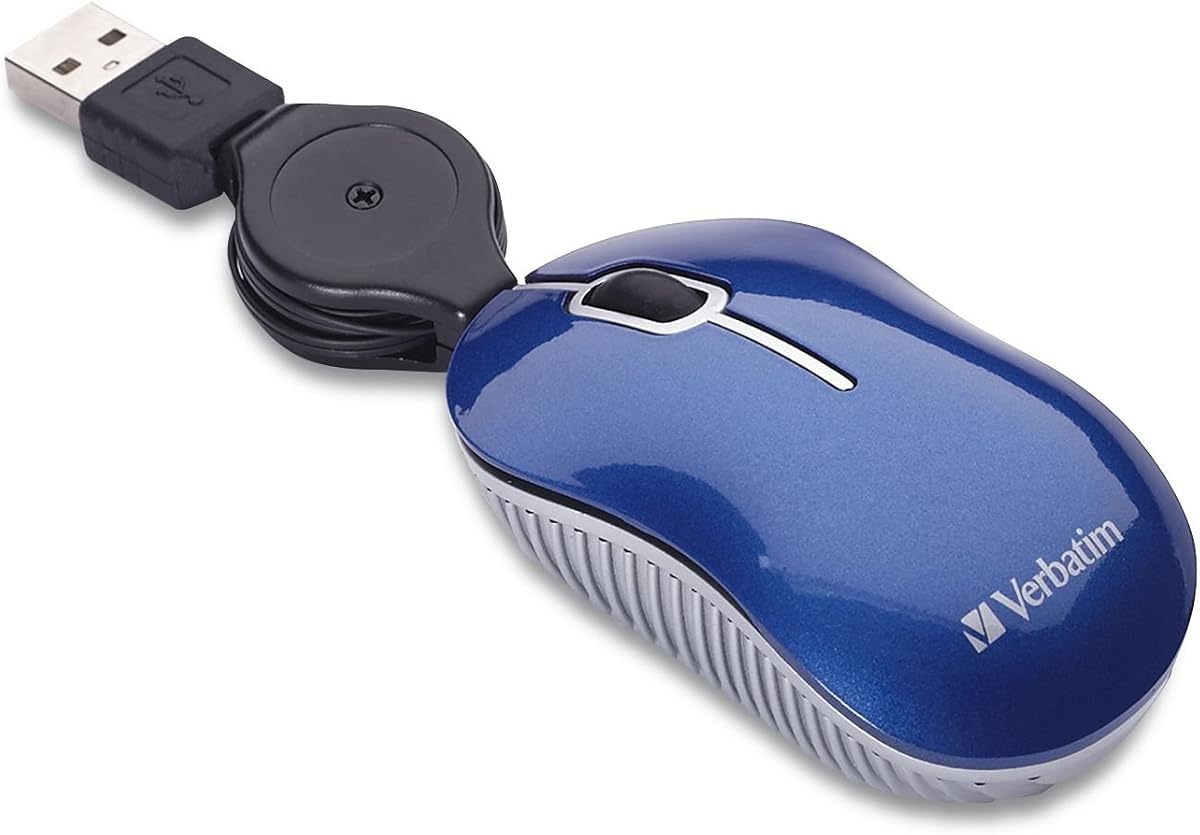
The Verbatim Mini Wired Mouse has a 4.2 rating and offers one of the simplest ways to add precise pointing to a portable computer. Its wired USB-A design removes the need for batteries, charging, radio pairing, or a separate receiver, while the retractable 27-inch cable helps the mouse remain neat inside a bag.
We may earn a commission when you buy through this link, at no additional cost to you.
The optical sensor is designed for responsive cursor control and accurate everyday tracking on notebooks and laptops. The mouse's extremely compact body takes up little room, and the cable can retract when the device is not in use, so the user does not have to wrap a loose cord around the shell. Plug-and-play operation keeps the setup process short.
Compatibility is the main constraint. The listed system requirements emphasize Windows 2000 and Windows XP, and the broad USB requirement may be less reassuring for buyers using a modern computer with limited legacy support. There is also less freedom to position the mouse than with a wireless model because the cable must reach the computer.
For travelers who prefer physical connections and want one fewer accessory to manage, this remains a practical choice. It is especially appealing for quick work sessions, shared computers, and older systems that work reliably with basic USB mice. Buyers who need broader modern compatibility or wireless placement flexibility should compare the other entries.
Because the mouse works through a standard USB connection, users do not need to carry batteries, a charging cable, or a radio receiver. The cable retracts into the body, leaving a single compact accessory for the travel kit.
The retractable 27-inch cable provides enough length for normal laptop placement while reducing the loose loops that commonly create snags in briefcases. It keeps the mouse ready to remove and use without an additional cable pouch.
We may earn a commission when you buy through this link, at no additional cost to you.
The second Verbatim option also carries a 4.2 rating and focuses on a compact, dependable USB connection. Its USB 2.0 implementation supports USB 1.1 as well, while the optical sensor and retractable cable make it a straightforward choice for a travel bag, classroom, or temporary workstation.
We may earn a commission when you buy through this link, at no additional cost to you.
Like the preceding wired model, this mouse requires no batteries and includes no wireless receiver. That simplicity reduces the number of things that can fail to work during a journey. The 27-inch retractable cable extends for use, retracts for storage, and avoids wrapping excess cord around the compact housing.
The main trade-off is the same one associated with compact wired mice: the mouse remains tethered to the computer. Its stated operating-system support includes Windows 2000 and Windows XP, so a buyer should confirm compatibility with a particular modern setup. The mouse also lacks adjustable sensitivity, silent clicks, and multi-device switching.
This listing is worth considering when USB version support is important or when a user wants a direct wired connection without wireless accessories. It shares many core strengths with the other Verbatim model, so the distinction comes down to the stated USB 2.0 and USB 1.1 compatibility and the corresponding product listing.
Supporting both USB 2.0 and USB 1.1 provides useful flexibility when the computer system is older or uses a port implementation different from newer machines. The connection remains cable-based, so no wireless software or pairing process is involved.
The retractable lead keeps the mouse presentable in a compact bag and prevents the cable from occupying a separate section of the compartment. It is a small physical feature with a meaningful effect on travel organization.
We may earn a commission when you buy through this link, at no additional cost to you.
This three-mode mini mouse has a 4.4 rating and is the most flexible wireless model in the list. It supports 2.4GHz wireless as well as Bluetooth 4.0 and Bluetooth 5.0, allowing it to move between computers, tablets, and other compatible devices without being restricted to one receiver or pairing mode.
We may earn a commission when you buy through this link, at no additional cost to you.
The 1200 DPI optical sensor, silent clicks, and rechargeable battery system support a productivity-oriented use case. A charging indicator changes from red while charging to green when full, and a power-saving sleep mode reduces activity after the mouse has been left on the desktop. The supplied USB receiver has a magnetic storage area on the bottom of the mouse.
Connection support varies by device. Desktop computers and Windows 7 systems are specifically noted as not supporting Bluetooth, while computers without USB ports cannot use the 2.4GHz receiver. Users must also learn the long-press pairing process for the separate Bluetooth 4.0 and 5.0 modes, so this is less automatic than a single-mode wireless mouse.
It is a strong choice for a traveler who alternates among a laptop, desktop, and Bluetooth-enabled tablet. The included case adds another layer of protection, while the small rounded shell is intended to fit medium and smaller hands. Those who need the simplest possible setup should favor a dedicated 2.4GHz model instead.
The 2.4GHz receiver offers direct plug-and-play access, while separate Bluetooth 4.0 and 5.0 modes broaden compatibility with mobile devices. This makes the mouse useful in mixed work environments where the available port or pairing method changes from one session to the next.
Silent clicking is especially valuable in offices, conference rooms, cafes, libraries, and shared homes. The feature reduces distracting click noise without changing the familiar three-button layout, while the 1200 DPI sensor maintains smooth everyday tracking.
We may earn a commission when you buy through this link, at no additional cost to you.
The Logitech M187 Wireless Mini Mouse carries a 4.2 rating and delivers the same travel-friendly concept as the ranked leader: an extra-small wireless mouse with a nano receiver and a body designed to fit into a laptop bag without ceremony.
We may earn a commission when you buy through this link, at no additional cost to you.
Its defining strengths are straightforward. Users plug in the nano receiver and begin working, while the receiver can stay connected or be stored inside the mouse. The ambidextrous shape accommodates either hand, and the design is intended to provide more precise cursor control than a laptop touchpad for short productivity sessions.
This listing provides less technical detail than the more specific M187 listing, including no stated DPI figure in the supplied information. It is therefore best viewed as a straightforward wireless option rather than a feature-rich productivity mouse. Buyers who require a particular sensor resolution, silent clicks, adjustable sensitivity, or a rechargeable battery should verify those details before ordering.
The M187 is a sensible recommendation for a user who prioritizes portability, quick setup, and freedom from a trailing cable. It is particularly appropriate for office travel, student use, and quick laptop sessions. For a more heavily specified alternative with explicit sensor and compatibility details, the leading Logitech listing may be easier to assess.
Keeping the nano receiver inside the mouse when it is not connected avoids the need for a separate storage pouch. During use, the small receiver can remain in the USB port without requiring a dedicated adapter or substantial desk space.
The ambidextrous design follows a symmetrical layout, making the mouse approachable for both left- and right-handed users. Its extra-small proportions suit travel, although users with particularly large hands may still prefer a more substantial mouse.
We may earn a commission when you buy through this link, at no additional cost to you.
The Wireless Cute Mini Computer Mouse has a 3.9 rating and offers a compact, approachable alternative for users who want a straightforward 2.4GHz mouse. It fits into a pocket, uses a three-button layout, and provides 1000 DPI optical tracking for routine laptop and desktop navigation.
We may earn a commission when you buy through this link, at no additional cost to you.
Operation is uncomplicated. The USB receiver is stored on the bottom of the mouse, and no driver installation is required. The listing also states broad operating-system support across multiple Windows generations, Linux, and Mac OS, making it a potentially flexible choice for mixed environments.
The product requires one AAA battery, which is not included. That detail matters because the mouse is not rechargeable and may need a replacement battery during an extended trip. It also offers only 2.4GHz wireless connectivity, with no Bluetooth pairing or direct multi-device switching. The claimed 1000 DPI resolution is suitable for everyday work but not adjustable.
This option works best for students, children, casual users, and anyone seeking a small wireless mouse with uncomplicated controls. The low rating and basic feature set make it less compelling than more highly rated models, but its compact size and broad system compatibility can still make it a practical alternative.
The mouse is explicitly positioned for medium and smaller hands and for pockets or small compartments. This makes it useful where a full-size pointing device would be awkward, such as a crowded café table or a travel workstation with limited room.
A 2.4GHz receiver and driver-free setup minimize the learning curve. Storing the receiver under the mouse helps keep the two pieces together, although the removable AAA battery introduces an accessory that must also be considered when packing.
We may earn a commission when you buy through this link, at no additional cost to you.
The Logitech M170 Compact earns a 4.5 rating and distinguishes itself with a stated wireless range of up to 33 feet or 10 meters. That reach makes it more flexible than a desk-bound travel mouse and useful for presentations, shared rooms, or operating a computer placed on a nearby surface.
We may earn a commission when you buy through this link, at no additional cost to you.
Its compact ambidextrous body is designed to fit naturally into either hand, while controlled line-by-line scrolling and optical tracking support accurate navigation. The wireless receiver connects through a USB port, and the mouse can be ready in a few seconds according to the stated plug-and-play behavior.
Power is handled with one AA battery, an automatic sleep function, and a stated battery life of up to 12 months. It does not offer rechargeable power, Bluetooth, multi-device switching, or adjustable DPI, but its focus is reliable everyday pointing across a wide range of systems, including Windows, macOS, Linux, Chrome OS, iPadOS, and Android.
The M170 is a strong choice for users who want a compact mouse with unusually generous stated range and long battery life. It is especially useful in presentations, living-room computers, shared workspaces, and travel situations where the computer may not be immediately beside the user.
The stated 33-foot range provides room to move around a room without the mouse being tethered to the computer. That flexibility can be valuable for presentations, media playback, and situations in which the laptop is positioned on a sofa, stand, or separate table.
The claimed 12-month battery life, combined with automatic sleep, reduces the likelihood of frequent battery changes. An AA cell is a widely available format, making replacement convenient when the mouse is used while traveling.
We may earn a commission when you buy through this link, at no additional cost to you.
The FMOUSE Ultra-Mini 2-in-1 has a 4.2 rating and offers the most unusual feature set in the guide. It combines a Bluetooth mouse with a Micro SD card reader, allowing both functions to operate simultaneously without mode switching, extra software, or a separate reader for supported cards.
We may earn a commission when you buy through this link, at no additional cost to you.
The body measures 3.07 by 1.49 by 0.87 inches and weighs 30 grams, making it one of the most pocket-conscious choices. Its 120mAh lithium battery supports USB-C charging, including charging while the mouse remains in use. The included USB-C cable doubles as a lanyard, and a USB-C-to-USB-A adapter supports older computer ports.
Sensitivity can be adjusted among 800, 1200, and 1600 DPI, and a bottom-button long press resets Bluetooth pairing when moving between devices. The stated wireless range is 33 feet, with compatibility for macOS, Windows, Chrome OS, and Android. Its 2-year manufacturer warranty also provides more stated coverage than several alternatives.
This mouse is best for a minimalist travel kit, a mobile professional who needs file transfer support, or a user who values adjustable sensitivity in an exceptionally small body. The included 8GB TF card adds immediate storage utility, though buyers should verify card format support and ensure the very small shape suits their hand.
The built-in card reader supports TF cards up to 2TB and can operate at the same time as the Bluetooth mouse. This reduces the number of accessories needed to move photos, documents, and other files, particularly when a separate reader would be easy to forget.
Three selectable DPI levels let users move between 800, 1200, and 1600 sensitivity, offering more control than the fixed 1000 DPI sensors used by several simpler models. The compact 30-gram body remains highly portable, though it may feel especially small for extended sessions.
We may earn a commission when you buy through this link, at no additional cost to you.
The Donut Pink Bluetooth Mouse has a 4.7 rating, the highest customer rating among the ten listed products. It combines a distinctive pink design with a compact travel shape, quiet operation, 1200 DPI tracking, and the flexibility of both Bluetooth and 2.4GHz wireless connections.
We may earn a commission when you buy through this link, at no additional cost to you.
A single button switches between connection types, allowing the mouse to move between a Bluetooth-equipped device and a computer using the 2.4GHz receiver. The stated range reaches 30 feet, and the mouse works with Windows, macOS, iOS, iPadOS, and Android without requiring drivers, broadening its relevance beyond a single laptop ecosystem.
Silent clicks make it appropriate for shared offices, classrooms, libraries, and quiet homes, while the rechargeable battery is stated to last up to 20 days and can be used while charging. The 1200 DPI sensor provides smooth tracking, although the supplied information does not mention adjustable sensitivity or a scroll-wheel-specific feature beyond the general description.
This is a compelling option for a user who values quiet operation, strong rating, attractive styling, and broad device compatibility. It may also appeal to anyone building a coordinated travel setup. Buyers seeking the smallest dimensions or a mouse with explicit adjustable DPI should examine the FMOUSE alternative first.
The pink finish gives the mouse a more expressive appearance than a conventional office accessory, while silent clicks support use in shared environments. Its compact body is intended to fit easily into bags or pockets without becoming a bulky addition to a travel kit.
Bluetooth and 2.4GHz modes provide a useful path for connecting to laptops, desktops, tablets, and phones. Broad operating-system support and driver-free operation reduce setup friction when the available device changes.
We may earn a commission when you buy through this link, at no additional cost to you.
The EEEKit Ultra Compact USB Mouse carries a 4.2 rating and ranks as the smallest explicitly dimensioned wired model in the guide. At 3 by 1.57 by 0.98 inches, it is built for tight spaces, and the product listing appropriately advises buyers to compare the dimensions with their hand before purchasing.
We may earn a commission when you buy through this link, at no additional cost to you.
Its three buttons consist of left click, right click, and a scroll wheel for text selection and general navigation. The fully retractable cable extends to approximately 31.4 inches and retracts into the mouse, removing the need to wrap a loose cord around the body or sort through tangles when packing.
The wired USB design needs no charging, battery, receiver, or driver installation. Listed compatibility covers Windows 2000 through Windows 11 and Mac OS X, giving it a broad modern system range. As with other ultra-compact mice, its most significant limitation is physical comfort: the body may feel too small during long sessions or for users with larger hands.
It remains a useful choice for children, students, shared computers, and anyone who needs a mouse that nearly disappears into a pocket. For extended daily use, a slightly larger model may be more comfortable, while for the smallest possible wired footprint with a retractable lead, the EEEKit stands out.
The three-inch length is particularly useful in compact travel bags and crowded work areas. The listing's recommendation to estimate the size in one's palm is sensible because extreme compactness can be less comfortable than a slightly larger alternative.
The retractable lead stores inside the mouse and extends to roughly 31 inches when needed. It offers more freedom than a very short fixed cord while keeping the travel setup visually neat and reducing the chance of tangling.
We may earn a commission when you buy through this link, at no additional cost to you.
The most useful mini travel mouse is not defined by size alone. Connection reliability, hand fit, tracking precision, power requirements, and the environments in which it will be used are just as important when narrowing down the right option.
A wired mouse provides immediate plug-and-play operation and avoids battery management, radio interference, and the need to carry a receiver. It is a dependable choice when the computer will remain nearby, although the cable can restrict placement and may be less convenient during presentations. A 2.4GHz wireless mouse offers more freedom but requires a small USB receiver, which should have a secure place to live inside the mouse, bag, or laptop case.
Bluetooth removes the receiver requirement and makes it easier to move between a laptop, tablet, or phone. Multi-mode mice offer flexibility, but they also require more setup and may not support every connection method on every computer. Check the operating system and available ports before choosing a wireless model.
Compact dimensions help a mouse fit into a pocket, laptop sleeve, or crowded work surface, but a very small body may not remain comfortable for long sessions. Consider the mouse's height, width, curvature, and button spacing together. Rounded, symmetrical designs are often easier to use with either hand, while sculpted shapes may feel more natural but can suit only one grip.
Compare the listed dimensions with the size of your hand before ordering. A product intended for smaller hands may still be suitable for occasional travel use, while a regular office user may prefer a slightly larger travel mouse that offers better finger support.
A 1000 DPI optical sensor is normally sufficient for web browsing, office applications, document editing, and general laptop use. Adjustable DPI settings provide finer control, which can be helpful for high-resolution displays, detailed work, or users who want to move the pointer more quickly. A higher number does not automatically make a mouse better, since speed and precision must remain balanced.
Look for optical tracking when consistent movement on ordinary surfaces matters. If the mouse will be used only for general productivity, a fixed 1000 DPI sensor is a practical choice. If the computer serves creative, analytical, or precision-oriented tasks, adjustable levels offer more flexibility.
Battery-powered wireless mice keep their bodies simple and often use common cell sizes, but users need to carry spare batteries or accept the possibility of a sudden shutdown. Rechargeable mice remove that ongoing maintenance and can be more convenient for frequent travelers. Charging while in use is another valuable feature, though it may depend on the included cable and available ports.
Consider the stated battery duration, sleep behavior, charging connector, and indicator lights. A mouse that sleeps automatically can preserve power, but a user who needs immediate response should confirm that it wakes with any button. Also check whether batteries or charging cables are included.
A three-button layout with left click, right click, and a scroll wheel covers standard computer navigation. Silent switches can make a major difference in offices, libraries, shared homes, and recorded calls, where ordinary mechanical clicks may be disruptive. Silent operation does not mean completely silent, but it generally reduces the perceived sound of each press.
Users who rely on extra buttons, side controls, or extensive shortcut mapping should confirm that the mouse provides them. Conversely, a simple three-button design is easy to learn and keeps the body simple. Noise control matters most when the mouse will be used around other people.
Wireless mice create one additional small item to manage: the receiver. Models with internal receiver storage allow the receiver to remain with the mouse when disconnected, which is useful in shared environments and during travel. Magnetic storage areas can make the small component easier to retrieve. Users should still confirm that the receiver is included in the package.
For wired options, a retractable cable is the key portability feature. It reduces tangles and avoids carrying a separate cable pouch. Check the extended cable length to ensure it can comfortably reach the computer, especially when the laptop is elevated on a stand or used in a presentation.
A mini travel mouse may need to work with several computers, including an office laptop, a personal notebook, a shared desktop, and a tablet. Verify the stated operating-system support, USB port type, and whether Bluetooth is available on every device that matters. Wireless mice that support Bluetooth 5.0 may not support older versions, and some systems cannot use the included 2.4GHz receiver.
Driver-free operation is convenient for travel because it avoids installing software on unfamiliar or restricted computers. Plug-and-play 2.4GHz setups are generally the least complicated, while Bluetooth pairing may require a specific device name or button combination. A wired USB mouse remains the most universally simple option.
Some travel mice add functions beyond pointing, such as a built-in Micro SD card reader, a protective case, adjustable lanyard, or a USB-C adapter. These additions can reduce the total number of accessories in a bag. They are most useful when they match a genuine need rather than simply adding complexity to a device the user will rarely use.
Consider whether the extra function improves the travel setup. A card reader is valuable for photographers or people moving files, while a case is useful for a mouse carried in a loose compartment. Check included media, supported formats, adapter details, and warranty coverage before relying on a multifunction design.
Before first use, install the required battery or fully charge the mouse, then connect its receiver or enter the appropriate Bluetooth pairing mode. For a 2.4GHz mouse, plug the receiver into a compatible USB port and move the mouse until it is recognized. For Bluetooth, hold the specified pairing control until the indicator shows the correct status, then select the named mouse in the computer's device settings.
Give the mouse a small test area before beginning important work. Move it across the desk, scroll through a document, click in a text field, and confirm that tracking feels smooth. A mouse used on an unfamiliar surface should be kept close to that surface, and users should avoid adding protective films that could interfere with optical tracking. If movement is inconsistent, test it on a clean, plain desk mat.
Before packing, turn off a mouse that has a power switch, remove loose batteries from models that use them, and return a wireless receiver to its storage compartment. Retract a wired cable, clean the mouse gently with a soft dry cloth, and avoid liquids around the buttons and scroll wheel. Store the device in a protective pouch or compartment so it cannot shift against keys, pens, or a laptop screen.
A good travel mouse is small enough to fit easily in a laptop bag but still wide enough to support your fingers. Models around three inches long are especially compact, while slightly larger options may be more comfortable for extended work. Compare the listed dimensions with the size of your hand and consider whether you will use the mouse briefly or throughout the day.
They are generally better suited to browsing, office applications, travel, and casual laptop use than to competitive gaming. Some offer adjustable DPI and silent clicks, but dedicated gaming mice usually provide polling information, specialized sensors, programmable controls, and more substantial grips. A compact mouse can still work for light gaming, but sensor and button specifications should be checked first.
Choose wired if you prioritize zero charging, no receiver, and immediate reliability. Choose wireless if you want freedom from the cable and easier use with a laptop positioned away from the pointer. A 2.4GHz receiver is usually simple, while Bluetooth is convenient for switching among laptops, tablets, and phones.
DPI controls how far the pointer moves for a given physical movement of the mouse. A lower setting offers finer control on a large or high-resolution display, while a higher setting allows quicker movement across the screen. Fixed 1000 DPI models are adequate for most productivity tasks, but adjustable mice provide more flexibility.
Silent switches can be especially useful in offices, libraries, meeting rooms, and shared homes because they reduce the sound of ordinary clicking. They are not completely noiseless, and the scrolling or charging sounds may still be audible, but they are generally less disruptive than a standard mechanical mouse during extended work.
Put the mouse into its advertised Bluetooth pairing mode, which may involve holding a particular button for several seconds until an indicator changes. Open the Bluetooth or wireless-device settings on the computer, select the mouse from the available devices list, and confirm the connection when requested. The exact button and pairing procedure depend on the model.
Multi-mode models can work with multiple devices, but only if they support the connection method required by each one. Bluetooth makes pairing with phones and tablets straightforward, while a 2.4GHz receiver generally connects to one computer at a time. A dedicated device-switch button can make it easier to change between a laptop and tablet.
Check the exact dimensions, hand-size guidance, button spacing, and intended use. A three-inch model can be excellent for occasional travel but uncomfortable for long daily sessions, particularly for users with larger hands. Also confirm the connector or wireless modes, operating-system support, sensor resolution, power requirements, and whether any receiver or battery is included.
The Logitech M187 Ultra Portable is the most balanced overall recommendation because it combines a pocket-friendly body, 1000 DPI optical tracking, dependable 2.4GHz wireless operation, and receiver storage. The FMOUSE Ultra-Mini stands out for advanced features, including adjustable DPI, USB-C charging, Bluetooth, and a built-in Micro SD reader, while the Verbatim Mini Wired Mouse offers the simplest battery-free travel experience.
Prioritize the connection method that fits your work, then check size and hand comfort. Frequent travelers who switch among computers may prefer Bluetooth or multi-mode operation, while users who want no charging or receiver should focus on a retractable-cable wired model. Quiet switches, adjustable sensitivity, protective cases, and card-reader functions should remain secondary unless they solve a specific need.
Before buying, confirm the product's current specifications, included accessories, compatibility, and available listing details. Ratings and manufacturer information can change, and availability may vary. Checking the latest listing helps ensure that the selected Mini Travel Mouse still matches your devices, hand size, and travel routine.
