
Canon MegaTank G3270
4.1Editor score
Wireless print copy scan
High-capacity MegaTank system
Large included ink supply
Square LCD control display
Cartridge free printers replace small replaceable ink cartridges with larger refillable tanks fed by ink bottles. This approach can reduce replacement frequency, simplify maintenance, and provide more predictable ink access, making it especially useful for households that print documents, school projects, photographs, or colorful graphics regularly.
This guide compares ten cartridge free printers from HP, Epson, and Canon, focusing on the features supported by their published specifications. We consider included ink, refill systems, wireless connectivity, scanning and copying, automatic duplex printing, displays, paper handling, print speed, resolution, and suitability for different home workloads.
Each review identifies the strongest reasons to choose a model while also noting important limitations. The top picks highlight a budget-friendly option, a versatile overall choice, and a feature-focused premium model. Product listings, configurations, ratings, and prices can change, so readers should verify the latest details and current price before purchasing.
4.1Editor score

4.3Editor score
4.2Editor score
As an Amazon Associate we earn from qualifying purchases.
The comparison below places the ten printers side by side, highlighting refill systems, included ink, connectivity, document features, and the types of households each model is best equipped to serve.





The HP Smart Tank 5003 is a cartridge free all-in-one aimed at home users who want straightforward wireless printing without cartridge replacements. Its 4.1 rating reflects a practical balance of useful functions and recognizable weaknesses, while the headline advantage is an initial ink supply that can cover up to 6,000 color pages or a comparable stated black-page allowance.
We may earn a commission when you buy through this link, at no additional cost to you.
Its standout qualities are easy refilling and a versatile device format. HP's tank system uses easy-access bottles that plug into the printer and drain into the reservoirs, reducing the need to squeeze or handle cartridges. The printer also combines printing, copying, and scanning, supports wireless and mobile printing, and can produce borderless images, making it suitable for schoolwork, household documents, and occasional photos.
The most important trade-off is the lack of automatic two-sided printing. That means multipage documents must be printed or copied one side at a time unless another workflow is used. The listing also does not highlight an automatic document feeder, so buyers who routinely process long multi-page paperwork should not assume that this model can handle those jobs without manual page-by-page intervention.
This is a strong recommendation for a household seeking one easy-to-refill machine for mixed color and black printing. It is especially attractive for families that value wireless access and scanning without needing a large office workflow. Those who print large, frequently duplexed business documents should compare it with the Epson ET-2850 or ET-2988, which provide automatic duplex printing.
HP's refill design plugs ink bottles directly into the cartridge free tanks and allows the ink to drain into place. This is simpler and less exposed than handling a small cartridge, although users should still follow the supplied filling instructions and confirm that each bottle is seated correctly.
Wireless printing, borderless output, scanning, and copying cover the core needs of many homes. The combination makes this printer more versatile than a basic single-function model without pushing it into the category of high-volume office equipment.
We may earn a commission when you buy through this link, at no additional cost to you.
The Epson EcoTank ET-2803 is a wireless color all-in-one built around Epson's cartridge free EcoTank system. With a 4.2 rating, it offers a compelling mix of print quality, connectivity, and document functions. The supplied information describes enough ink for up to two years and a replacement set capable of producing up to 4,500 black pages or 7,500 color pages.
We may earn a commission when you buy through this link, at no additional cost to you.
Refilling is designed to be approachable. Epson's EcoFit bottles fit into high-capacity tanks, while the associated listing emphasizes worry-free filling and simple operation. Output quality is another major strength because Micro Piezo Heat Free technology is intended to deliver sharp text alongside detailed color photographs and graphics on a wide range of paper.
The printer includes a high-resolution flatbed scanner, color display, wireless connectivity, voice-activated printing, and mobile printing through AirPrint or Epson Smart Panel. These extras make it a sensible general-purpose home printer. Its limitation is that it does not include automatic duplex printing, so saving paper when printing multipage documents will require manual handling.
Buyers should choose the ET-2803 when they value a mature refill ecosystem, strong photo output, and a generous stated color-page allowance. It is a particularly good fit for students, families, and home offices that regularly mix photographs with everyday color documents but do not need automatic two-sided printing.
The stated yield of up to 7,500 color pages makes the ET-2803 compelling for users who produce more color work than traditional text. Its heat-free printing technology also supports the brand's emphasis on sharp documents, vivid graphics, and photo-friendly output.
A flatbed scanner, color display, wireless connection, voice-assisted controls, and app-based mobile printing provide a broad set of ways to handle documents. This makes the printer convenient for shared family spaces and home offices where several devices may need access.
We may earn a commission when you buy through this link, at no additional cost to you.
The Epson EcoTank ET-2903 stands out as the strongest overall option in this comparison, combining the highest listed customer rating with a generous initial ink supply and capable all-in-one design. It is built for homes that want a long interval between refills without giving up scanning, copying, mobile printing, or sharp color output.
We may earn a commission when you buy through this link, at no additional cost to you.
Its published specifications include up to three years of ink, enough for up to 3,600 black pages or 6,500 color pages. Black printing reaches 11 ISO pages per minute and color reaches 6 ISO pages per minute, both without a warmup time. A 100-sheet paper tray, 1.44-inch color display, and high-resolution flatbed scanner make routine operation more convenient.
The main compromise is the absence of automatic duplex printing. The scanner also appears to be a flatbed unit without a listed automatic document feeder, so lengthy copy jobs require manual page placement. For many households, those limitations matter less than the strong refill capacity, modern mobile support, and 5760 by 1440 dpi output resolution.
The ET-2903 is the most broadly balanced recommendation here. Choose it for a busy family or home office that produces a meaningful mix of color documents, school projects, photos, and text. If automatic two-sided printing is essential, step up to the ET-2850 or renewed ET-2988, both of which include that capability.
An initial supply lasting up to three years can reduce the pressure to reorder replacement ink soon after setup. The stated page allowances also make the printer practical for users who want to print photos and color pages without managing frequent cartridge changes.
The stated 11 black and 6 color ISO pages per minute are more useful when a printer can begin work quickly. A 100-sheet tray and dedicated color display support the needs of students and home workers handling varied document types throughout the day.
We may earn a commission when you buy through this link, at no additional cost to you.
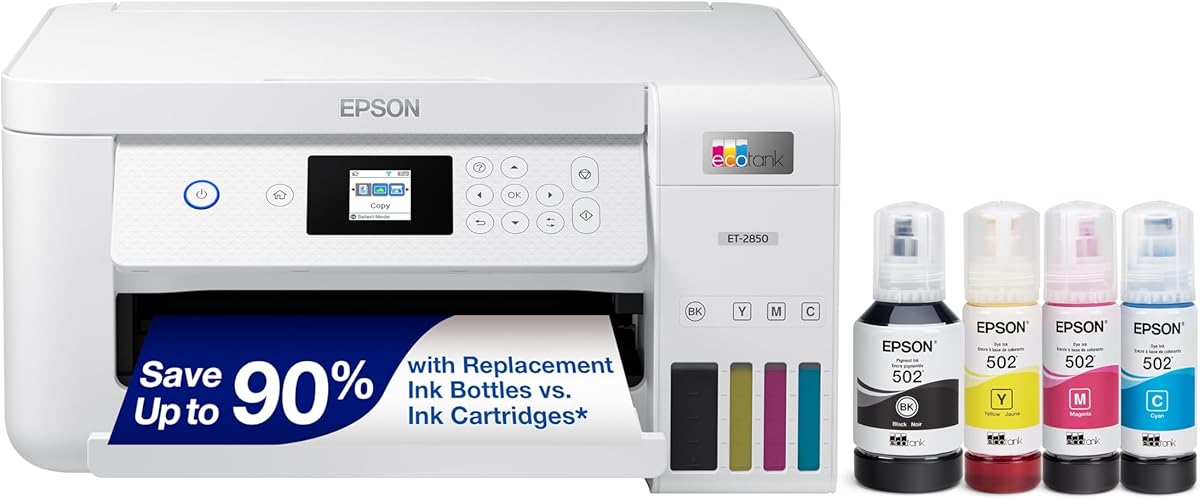
The Epson EcoTank ET-2850 earns the premium recommendation because it adds automatic two-sided printing to an already capable EcoTank platform. Its 4.2 rating is supported by a feature set that includes a scanner, copier, color display, wireless connectivity, voice-assisted printing, and sharp output from Epson's heat-free technology.
We may earn a commission when you buy through this link, at no additional cost to you.
Automatic duplex printing is the feature that distinguishes it from several similarly priced cartridge free alternatives. It can reduce paper consumption during multipage documents and eliminate manual page flipping, making the ET-2850 more appropriate for home offices, students, and users who regularly produce reports or lengthy school projects.
The cartridge free format remains a major advantage. Epson EcoFit bottles refill high-capacity tanks, and the listing describes enough included ink for up to two years. The printer can produce up to 7,500 black pages or 6,000 color pages per stated replacement set, depending on the color mix. Wireless and voice-assisted functions add convenience for shared spaces.
There is still no listed automatic document feeder, so copying multiple pages remains a manual process. The ET-2850 is most attractive to buyers who value duplex printing and polished output enough to prefer a larger, feature-focused home machine. For basic color use without automatic duplexing, the ET-2803 or ET-2903 may be more streamlined.
Automatic duplex printing is especially valuable for reports, worksheets, and other long documents. It saves paper and removes a repetitive manual task, which can make the printer noticeably more practical for students and people who work from home.
Epson's Micro Piezo Heat Free technology and pigment black ink are designed for sharp text and impressive color photographs and graphics. That makes the ET-2850 suitable when output quality matters across both ordinary office documents and creative projects.
We may earn a commission when you buy through this link, at no additional cost to you.
The Epson EcoTank ET-4800 is a wireless color all-in-one designed around high-capacity refillable tanks and easy-to-use EcoFit bottles. Its 3.8 rating is the lowest among the ten products, but the published feature set still covers the essentials for a home printer: printing, scanning, copying, wireless use, and color output.
We may earn a commission when you buy through this link, at no additional cost to you.
Its core attraction is straightforward high-volume ink management. Rather than dealing with small cartridges, users refill the internal tanks with dedicated bottles. Epson describes this process as easy and worry-free, and the cartridge-free approach can also reduce the amount of cartridge plastic sent to landfills.
The Micro Piezo Heat Free technology is designed to produce sharp text plus impressive photographs and graphics across many paper types. A high-resolution flatbed scanner and color display make copying and navigation convenient. The printer's lack of listed automatic duplex printing, however, narrows its appeal for lengthy documents that are printed frequently on both sides.
The ET-4800 may suit value-oriented buyers who prioritize tank capacity, refill convenience, and wireless all-in-one functions over every advanced productivity feature. Its lower rating means careful attention to current customer feedback is wise, especially if automatic two-sided printing or fast monochrome output is a priority.
The refillable tank design removes the need to replace a small cartridge whenever one color runs low. EcoFit bottles provide a familiar refill method and make the printer attractive to people who prefer fewer replacement actions and larger onboard ink supplies.
The built-in flatbed scanner and copier extend the machine beyond printing, while the color display assists navigation. Wireless connectivity allows flexible placement and shared use, although buyers who handle lots of pages should investigate manual versus automatic duplex requirements.
We may earn a commission when you buy through this link, at no additional cost to you.
The Canon MegaTank G3270 is the budget pick in this guide, offering a cartridge free ink system, wireless connectivity, and a three-function all-in-one design. Its 4.1 rating suggests a solid general-purpose option for buyers who want useful capacity without moving into the upper end of the market.
We may earn a commission when you buy through this link, at no additional cost to you.
Canon states that the included inks can cover up to two years and produce up to 6,000 black-and-white pages or 7,700 color pages per set. That is a substantial starting allowance for households that routinely print homework, recipes, shopping lists, reports, and colorful activity pages. The refillable MegaTank concept also avoids the routine cycle of replacing individual small cartridges.
The G3270 supports wireless printing, copying, and scanning, and its 1.35-inch square LCD helps with basic navigation. Its clearest limitation is single-sided printing, a meaningful drawback for users who regularly produce long documents. There is no automatic duplex function in the supplied specifications, so paper savings must come from choosing one-sided layouts.
This printer is a sensible choice for budget-conscious families, students, and casual home offices seeking substantial ink coverage and wireless all-in-one functions. Those who need automatic two-sided printing should instead consider the Epson ET-2850 or renewed ET-2988, while buyers prioritizing the highest stated black-page yield may favor the Canon model for its strong color allowance.
The stated allowance of up to 6,000 black-and-white or 7,700 color pages provides a generous buffer for everyday use. It can be especially valuable for families that print many school assignments or color pages and do not want to manage replacement ink frequently.
The square LCD gives users an on-device way to review basic settings and navigate common functions. Wireless connectivity and the combined printer, scanner, and copier design make it convenient for a home office or shared family workspace.
We may earn a commission when you buy through this link, at no additional cost to you.
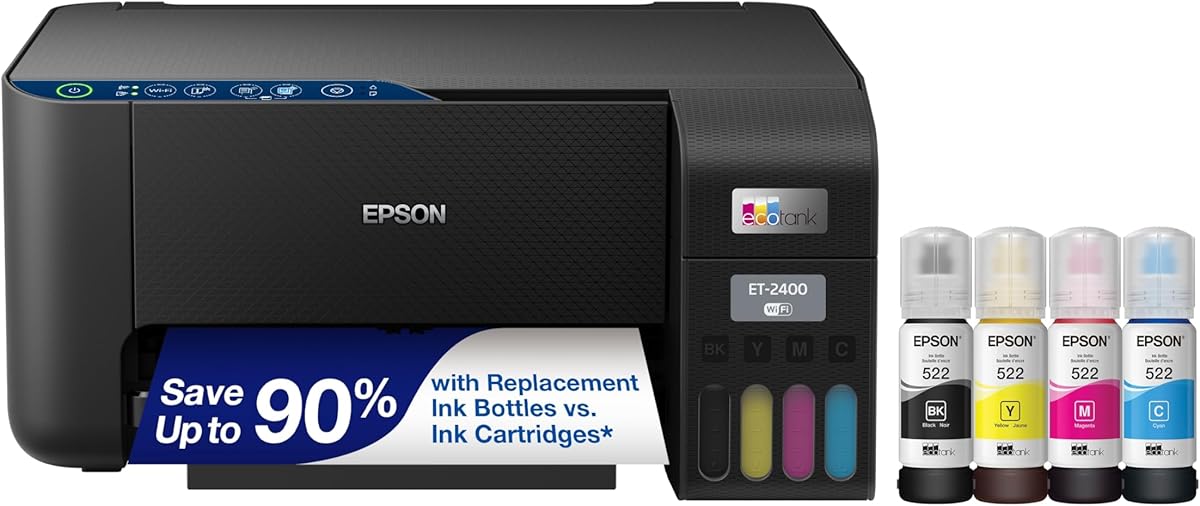
The Epson EcoTank ET-2400 is a color all-in-one aimed at users who want a substantial ink allowance in a simple home setup. It carries a 4.0 rating and combines printing, scanning, and copying with refillable tanks that accept Epson EcoFit ink bottles.
We may earn a commission when you buy through this link, at no additional cost to you.
The stated output allowance reaches up to 4,500 black pages or 7,200 color pages, and each replacement set is associated with up to two years of ink. That long interval between refills is the model's defining advantage. It is particularly relevant for homes that print a high proportion of color pages, such as children's activities, charts, photographs, and school materials.
Epson's Micro Piezo Heat Free technology is intended to produce sharp text as well as detailed photos and graphics. The refill process uses high-capacity tanks and keyed EcoFit bottles, reducing uncertainty about fitting each container correctly. The cartridge-free design also means less recurring cartridge packaging and fewer small cartridges to discard.
The principal compromise is the lack of automatic duplex printing. A flatbed scanner and copier support occasional reproduction tasks, but the supplied information does not identify an automatic document feeder. This is most attractive to value-focused households that prioritize ink longevity and color results rather than advanced document automation.
Up to 7,500 black pages or 7,200 color pages is a useful distinction for buyers who create colorful materials. The cartridge-free system also reduces the frequency of replacements, helping keep printing available when a project produces many pages.
Epson's EcoFit bottles are designed to be easy to handle and pair with the high-capacity tanks. The refill approach is more substantial than replacing a small cartridge and is one of the main reasons EcoTank models remain popular with frequent home printers.
We may earn a commission when you buy through this link, at no additional cost to you.
The Epson EcoTank ET-2800 is a wireless document and photo printer with a 4.0 rating, a 10 ISO-page-per-minute black print speed, and a large stated color-page allowance. Its black finish and all-in-one configuration make it a practical option for homes that need color and basic document functions without advanced finishing features.
We may earn a commission when you buy through this link, at no additional cost to you.
The printer can produce up to 4,500 black pages or 7,500 color pages from a bottle set, with enough ink in the box for up to two years. Micro Piezo Heat Free technology supports vivid, detailed documents and photographs, while the refillable tank system uses EcoFit bottles instead of small replaceable cartridges.
Its 10 black ISO pages per minute is useful for quickly finishing larger black-and-white jobs. Wireless printing adds placement flexibility, and the scanning and copying functions turn the unit into a general-purpose home device. The design is described as focused on reliability for home use rather than commercial production.
Automatic duplex printing is not listed, and there is no automatic document feeder in the supplied information. Those are meaningful limits for people who print lengthy reports or copy many pages. For ordinary household color use, though, the combination of speed, refill convenience, and strong stated yields is compelling, particularly for photo and school-project needs.
A stated speed of 10 ISO black pages per minute helps when a large school packet or batch of forms needs to be printed. The speed figure applies to black output, while color speed is not highlighted in the supplied specifications.
Detailed color output, scanning, and copying cover the most common home tasks. The refillable system reduces interruptions caused by depleted cartridges, while wireless connectivity makes the printer convenient to share.
We may earn a commission when you buy through this link, at no additional cost to you.
The Epson EcoTank ET-2980 is a wireless color all-in-one with a 4.0 rating and one of the largest stated included-ink allowances in the guide. Epson says the box contains enough ink for up to three years, with the set capable of producing up to 6,600 black pages or 5,500 color pages.
We may earn a commission when you buy through this link, at no additional cost to you.
Its refill process uses supersized tanks and uniquely keyed EcoFit bottles, which helps reduce the risk of mix-ups during filling. Each bottle set is equivalent to roughly 90 individual cartridges according to the supplied listing. For buyers who print frequently, that scale can make the transition to cartridge free ink especially appealing.
Mobile printing and scanning through the Epson Smart Panel app allow convenient operation from a phone or other smart device. The all-in-one format also supports traditional home workflows, while the substantial black-page allowance suits users who produce many reports, forms, worksheets, or text-heavy documents.
Automatic duplex printing is not highlighted, limiting its efficiency for two-sided documents. Its stated color-page allowance is also lower than that of the ET-2903 and ET-2800 in this comparison. It is therefore best suited to text-heavy households that prioritize the size of the initial supply and long refill interval over maximum color output and duplex automation.
The initial supply is listed as enough for up to three years, reducing early refill pressure. Buyers who are unsure how quickly their household uses ink may appreciate a large starting buffer before establishing a regular replacement routine.
Printing and scanning through the Epson Smart Panel app support a modern mobile workflow. Wireless access is valuable in homes where the printer is shared among computers, tablets, and phones or placed away from a central workstation.
We may earn a commission when you buy through this link, at no additional cost to you.
The Epson EcoTank ET-2988 is a renewed all-in-one that combines cartridge free printing with the fastest stated black print speed in this comparison. Its 3.9 rating reflects the tradeoff inherent in renewed products, while the feature set includes up to three years of ink, automatic duplex printing, and a 1.44-inch color display.
We may earn a commission when you buy through this link, at no additional cost to you.
Its headline speed is 15 black ISO pages per minute, accompanied by 8 color ISO pages per minute and no warmup time. A 100-sheet paper tray supports substantial runs, and automatic two-sided printing helps reduce paper use during longer documents. The box is stated to contain up to 6,600 black pages or 5,500 color pages.
Output resolution is listed at 4800 by 1200 dpi, supporting detailed photos and text. The printer also supports wireless mobile printing and scanning through Epson Smart Panel, Apple AirPrint, Mopria Print Service, and Mopria Scan. The permanently installed heat-free printhead is engineered to remain with the printer for its useful life.
The primary caution is its renewed status. Buyers should review the seller's condition description, included accessories, warranty coverage, and return terms. Its advanced duplexing and speed features make it compelling for high-output users, but the standard ET-2988 may offer more straightforward purchasing confidence for those who prefer a new unit.
A stated 15 black pages per minute, automatic two-sided output, and a 100-sheet tray form a capable combination for long documents. This is particularly attractive for students and home workers who print multipage reports and want automatic paper savings.
A renewed product may provide useful specifications at a different cost point, but its physical and cosmetic condition can vary. Reviewing the listing's current condition details, warranty, accessory information, and return policy is essential before considering this model.
We may earn a commission when you buy through this link, at no additional cost to you.
The right cartridge free printer depends on how much you print, which documents and media you create, where the machine will live, and how much maintenance you want to manage. Use the following factors to narrow the field before comparing individual models.
The amount of ink included with a cartridge free printer determines how long it can operate before the first refill. Models with up to two years of included ink are convenient for new households, while options with up to three years offer a larger starting buffer. Stated page allowances can also indicate which color mix the manufacturer expects: a model with a high color-page figure may be better for photo and graphic-heavy use, whereas a strong black-page allowance suits reports and worksheets.
Compare both duration and page yield. More time between refills is useful if your printing pattern is unpredictable, but total page allowances are often more informative than the time label.
Think about both daily and monthly demand. A fast black ISO speed helps with large packets of forms, schoolwork, and routine text, while color speed matters for photographs and graphics. None of the cartridge free models listed is intended to compete with a dedicated commercial production machine, so the best choice is usually the model that comfortably covers your household's needs without becoming unnecessarily complicated.
For light use, speed may not justify paying for extra capabilities. For frequent users, a stated speed above 10 black pages per minute and no warmup period can make a meaningful difference.
Every printer in this guide is an all-in-one, but the usefulness of scanning and copying varies. Flatbed scanners handle documents, photos, and delicate items, yet they usually require each page to be placed manually. Automatic document feeders are not highlighted in the supplied information for these models, so buyers with large copying jobs should not assume they will receive one.
If scanning is occasional, a flatbed is sufficient. If you routinely copy multipage packets, check the current listing for an automatic feeder and compare that missing convenience with the available duplex models.
Automatic duplex printing produces both sides of a sheet without manual flipping. It saves paper and time with lengthy documents, making it one of the most important productivity features for students and home offices. The Epson ET-2850 and renewed ET-2988 explicitly include it, while the Canon G3270 is identified as single-sided and the other models do not list automatic duplexing.
Choose duplex capability when you routinely print reports, presentations, or multi-page assignments. For occasional short documents, a simpler single-sided model may still meet your needs.
Wireless capability lets you place the printer away from a computer and print from a phone, tablet, or networked device. Several Epson models support AirPrint, Mopria, Epson Smart Panel, voice-assisted printing, or a combination of those options. The Canon and HP models also provide wireless printing, with mobile support forming part of the broader connected ecosystem.
Check app compatibility and operating-system requirements before buying. A printer can offer excellent wireless hardware but still be inconvenient if its setup process or app does not suit your devices.
Cartridge free printers should be evaluated on more than whether they can produce color. Resolution is one signal, but text clarity, photo detail, supported media, and consistent color are more meaningful in real use. Epson's listed models emphasize Micro Piezo Heat Free technology and resolutions up to 5760 by 1440 dpi, while the renewed ET-2988 lists 4800 by 1200 dpi. Canon and HP also describe borderless or high-quality color output.
Choose a model according to the mix of your work. School projects and home documents require legible text, while dedicated photo use benefits from higher stated resolution and stronger color specifications.
The refill process is central to the cartridge free experience. Epson EcoFit bottles use keyed designs intended to simplify filling and reduce mix-ups, while HP's Smart Tank system uses bottles that plug into the tank and drain into place. High-capacity internal tanks mean fewer replacements and less time spent changing a small cartridge at the exact moment a job needs to be printed.
Consider the workspace as well as the mechanism. Large tanks need adequate vertical clearance, and the printer should be placed where refilling will not create spills around computers, school materials, or important documents.
A 100-sheet input tray is more convenient than a small tray for families that print long documents or batches of photos. A color display also helps users navigate common settings without repeatedly referring to a computer, while models with faster output and no warmup period suit quick, intermittent tasks. Auto duplex support adds another layer of convenience when handling multipage work.
Match controls and paper capacity to your routine. Larger trays and displays help heavy users, while occasional printers may not need advanced navigation or the largest possible supply.
Begin by unboxing the printer, removing packing material, and placing it on a stable, level surface near the intended network connection. Install the provided ink bottles before powering up if the manufacturer directs you to do so, and remove any transport locks. Connect the printer to Wi-Fi, install the relevant Epson Smart Panel, Canon, HP, AirPrint, or Mopria software where appropriate, and confirm that a test page prints correctly.
Treat refilling as a controlled process. Read the quick-start instructions for the specific model, use the correct ink color and bottle type, and avoid leaving bottles open longer than necessary. Keyed EcoFit containers and HP's plug-in refill design can reduce accidental mix-ups, but bottles still need to be inserted fully and checked for leaks. Keep spare compatible ink nearby and note the current page count so refills happen before an important job is interrupted.
For routine care, keep the paper feed and scanner glass clean, use suitable media, and avoid leaving damp paper inside the printer. Review the manufacturer's guidance for printhead cleaning and align the printhead if output shows banding or alignment problems. Run the recommended maintenance cycle rather than interrupting it repeatedly, and keep vents clear. For storage over an extended period, follow the manual's instructions and make sure the ink and printhead are positioned correctly to reduce drying risks.
Cartridge free printers use refillable internal ink tanks instead of small replaceable cartridges. Ink is poured or drained into the tanks from refill bottles, so users replace larger supplies less often. This design can reduce cartridge waste and make bulk printing more convenient, although the printer and its refill ink should be handled according to the manufacturer's instructions.
They are often designed to have a lower ongoing ink cost because refill bottles may cost less than a complete set of replacement cartridges. Actual operating expense depends on page coverage, color use, ink pricing, and how much ink is purchased. Buyers should compare current ink-bottle costs with their likely output rather than relying only on the printer's purchase price.
Yes. Several models in this guide explicitly support strong color photographs, graphics, and high stated print resolutions. The Epson ET-2903 lists 5760 by 1440 dpi, the renewed ET-2988 lists 4800 by 1200 dpi, and the HP Smart Tank 5003 supports borderless printing. Photo quality also depends on the ink, paper, settings, and source image.
They require different maintenance from cartridge printers rather than no maintenance. You periodically refill the tanks, keep the print path clean, and use the manufacturer's cleaning programs when needed. Because the ink tanks remain exposed internally, prompt refilling and proper bottle handling are important. Regular use can also reduce issues associated with ink sitting unused for long periods.
A flatbed scanner is useful for copying documents, preserving photos, and producing scans for email or cloud storage. It is especially convenient for a few pages at a time and for originals that should not be fed through rollers. For long copy jobs, an automatic document feeder would be preferable, but none of the supplied product information clearly lists one for these models.
Automatic duplex printing is worth prioritizing if you print multipage reports, assignments, or presentations. It reduces paper use and removes the need to flip every sheet manually. The Epson ET-2850 and renewed ET-2988 explicitly include it, while the Canon G3270 is single-sided and automatic duplexing is not listed for the other models.
Most models in this guide support wireless or mobile printing, with Epson models emphasizing Epson Smart Panel, AirPrint, and Mopria compatibility. The HP Smart Tank 5003 and Canon MegaTank G3270 also support wireless printing. Before purchasing, confirm that the printer's app and wireless functions work with your particular phone, tablet, and computer operating systems.
Check the seller's description of physical condition, included accessories, warranty coverage, and return policy. Confirm that the ink tanks are properly sealed, the printer has not been stored improperly, and the listing provides suitable setup and refill supplies. The renewed Epson ET-2988 has attractive specifications, but the condition terms are as important as the feature set.
The Epson EcoTank ET-2903 is the strongest overall choice because it combines a 4.3 rating, up to three years of included ink, useful 11 black PPM speed, a 100-sheet tray, wireless mobile functions, and sharp stated resolution. The Canon MegaTank G3270 is a practical budget option, while the Epson ET-2850 stands out for households that need automatic two-sided printing in a capable all-in-one design.
Prioritize the features your routine will actually use. Heavy color users should examine stated color yields, text-heavy households should look at black speed and capacity, and frequent document users should strongly consider automatic duplexing. Scanner needs, paper tray size, display quality, wireless support, refill convenience, and available desk space also influence which model will feel most suitable.
Finally, verify the current listing, included ink, warranty, accessories, and price before purchasing. Ratings and product details can change, and retailer pricing may fluctuate. The links in this guide point to current product pages, making it worthwhile to compare the latest configuration and offer at the time of purchase.