
BENFEI 2.5 Inch SATA Enclosure
4.6Editor score
Tool-free 2.5-inch installation
USB-C and USB-A connectivity
UASP support up to 5Gbps
A laptop hard drive adapter kit provides a practical bridge between older storage devices and modern computers. The right kit can make an obsolete IDE hard drive accessible, connect a spare SATA drive for backup, or support a quick transfer from an M.2 SSD. Good adapters combine broad drive compatibility, dependable power delivery, useful connection options, and an understandable setup process.
We compared the ten featured kits by examining supported drive types and sizes, host interfaces, external power requirements, data-transfer specifications, operating-system compatibility, hot-swap support, included accessories, and the practical limitations stated by each manufacturer. The list includes universal IDE-to-SATA readers, focused SATA docks, simple 2.5-inch adapters, and a more advanced 4-in-1 unit for M.2 storage.
Each pick highlights the setup best suited to a particular need, from lightweight laptop use to recovering files from large legacy drives. The highest-rated option is a simple 2.5-inch SATA adapter, while universal readers offer greater flexibility but usually require more cables and external power. Product availability and pricing can change, so check the current listing and drive connector before ordering.
4.6Editor score

4.4Editor score
4.6Editor score
As an Amazon Associate we earn from qualifying purchases.
The comparison below highlights the drive formats, host connections, power arrangements, and practical strengths of every featured laptop hard drive adapter kit.


The Unitek USB 3.0 IDE/SATA Adapter earns a 4.4 rating and stands out as the most flexible conventional option in this guide. It accepts both IDE and SATA drives, accommodates 2.5-inch and 3.5-inch hardware, and can operate one IDE drive and one SATA drive at the same time. That combination makes it especially useful for migrations involving both generations of storage.
We may earn a commission when you buy through this link, at no additional cost to you.
The adapter provides dedicated 40-pin and 44-pin IDE connectors alongside a SATA III port. Its USB 3.0 interface is rated for transfer rates up to 6Gbps through SATA III, while backward compatibility allows it to work with USB 2.0 and 1.1 connections. A USB-A data cable, 4-pin power lead, and 12V/2A power adapter are included, so the core setup is reasonably complete.
The requirement to connect external power adds a cable and wall outlet to the working arrangement, but it is a sensible trade-off for stable operation with 3.5-inch IDE drives and when two disks are connected. The USB-A-only host connection may also require an additional adapter on a USB-C-only laptop. Neither limitation diminishes its broad drive compatibility.
This is the strongest choice for a user who needs to work with both IDE and SATA media or wants one adapter to remain useful across several generations of equipment. It suits system migrations, backups, data recovery, and optical-drive access, provided the host has USB-A and the included power supply is used as directed.
The separate IDE and SATA connections make this adapter more than a basic drive cable. Users can attach one drive from each interface simultaneously, reducing the need to repeatedly reconnect a single legacy disk during a transfer.
A 12V/2A supply and dedicated 4-pin cable support the electrical demands of larger IDE drives. Hot-swapping, an on/off switch, activity lighting, and driver-free operation add everyday convenience.
We may earn a commission when you buy through this link, at no additional cost to you.
The Vorodcip USB 3.0 & Type C to SATA IDE Adapter has a 4.1 rating and offers broad drive compatibility in a relatively approachable package. It supports 2.5-inch and 3.5-inch SATA hard drives and SSDs, IDE drives, and SATA or IDE internal Blu-ray drives. This makes it useful for file retrieval, backups, cloning, and recovery tasks involving mixed hardware.
We may earn a commission when you buy through this link, at no additional cost to you.
A supplied USB-C-to-USB adapter allows the kit to connect to both traditional USB hosts and USB-C laptops. The manufacturer states maximum interface rates of 5Gbps for SATA and 133Mbps for IDE, with actual results depending on the source drive and connected equipment. The reader also lists support for drives up to 20TB and requires no additional drivers.
Its principal limitation is the much lower theoretical rate for IDE media. That is primarily a limitation of the older interface rather than an obvious defect, but users should expect legacy transfers to take longer. The unusually high 20TB capacity claim should also be treated as a compatibility specification rather than a guarantee for every drive model, firmware version, or file system.
Choose this adapter when a USB-C-capable laptop and a wide selection of legacy drives are the main priorities. It is a sensible general-purpose reader for transfers and backups, provided realistic expectations are applied to older IDE hardware.
The included USB-C adapter removes one common barrier to using traditional drive readers with newer laptops. Users can choose the appropriate host connection without treating USB-C compatibility as an optional feature.
Support for SSDs, hard drives, optical drives, and internal Blu-ray hardware expands the reader beyond a basic data-transfer role. Detailed instructions and stated technical support are helpful for first-time users.
We may earn a commission when you buy through this link, at no additional cost to you.
The YINNCEEN USB 3.0 to SATA IDE Hard Drive Reader carries a 4.3 rating and delivers a balanced combination of compatibility, power, and cross-platform support. It can connect 2.5-inch and 3.5-inch IDE or SATA hard drives and SSDs through USB 3.0, making it relevant for backups, copies, transfers, and recovery work.
We may earn a commission when you buy through this link, at no additional cost to you.
The listed USB 3.0 rate reaches 5Gbps, with backward compatibility for USB 2.0 and 1.1. A SATA III connector and both 40-pin and 44-pin IDE connectors are provided. The kit includes a 12V/2A supply and 4-pin power cable, and the reader supports plug-and-play operation, hot-swapping, and an on/off switch.
Legacy IDE hardware introduces small procedural complications. Some older drives require a jumper to be set as master or slave, and 3.5-inch devices need external power. Users should consult the drive manufacturer's jumper documentation rather than guessing. Capacity support is listed up to 6TB, and file-system or drive compatibility still depends on the individual device and computer.
This reader is a good general choice for recovering files from older desktops, moving SATA data to a laptop, or maintaining a small collection of legacy disks. It is less suitable for users who demand USB-C-native connectivity or a simple cable-only arrangement.
The included power adapter and four-pin lead help older 3.5-inch IDE devices start and remain connected. LED indicators provide visible confirmation of power and activity during longer transfers.
Windows, macOS, and Linux support makes the reader useful beyond a single computer platform. A detailed manual is valuable when accessing unfamiliar hardware or resolving recognition issues.
We may earn a commission when you buy through this link, at no additional cost to you.
The FEMORO USB 3.0 & Type C to SATA IDE Adapter has a 4.6 rating, making it one of the highest-rated products in the group. It supports 2.5-inch and 3.5-inch SATA HDDs and SSDs, IDE drives, and SATA or IDE internal Blu-ray drives. That range is well suited to recovery, archival, backup, and upgrade tasks.
We may earn a commission when you buy through this link, at no additional cost to you.
The kit includes a USB 3.0 cable, USB-C adapter, 12V/2A power supply, four-pin cable, and manual. It has a flexible USB 3.0 cable and an extended body intended to make the 3.5-inch IDE connection easier. Plug-and-play operation removes the need to install drivers, and an LED indicator reports power and activity.
The manufacturer describes the extended body, softer four-pin lead, and flexible host cable as practical upgrades. These details are especially relevant when a reader must be used with an awkwardly positioned legacy connector. Even so, the unit still relies on external power and cannot resolve every file-system, jumper, or failing-drive problem on its own.
Users who value clearer support alongside universal drive compatibility will find this a strong option. The stated 12-month after-sales period and professional technical assistance add reassurance for those attempting their first recovery or working with unfamiliar hardware.
The extended housing and softer four-pin power cable appear designed around the awkward reality of connecting older 3.5-inch IDE drives. A flexible data cable also reduces strain at the host connection.
The reader can be used to retrieve files, expand temporary storage, archive office data, and access compatible Blu-ray media. Its included guidance and support coverage add value for less experienced users.
We may earn a commission when you buy through this link, at no additional cost to you.
The SABRENT USB 3.0 to SATA Hard Drive Docking Station holds a 4.4 rating and offers a clean, tool-free way to access 2.5-inch and 3.5-inch SATA drives. It supports SATA I, II, and III hard drives and SSDs, giving it broad relevance for backups, temporary storage, drive testing, and system upgrades.
We may earn a commission when you buy through this link, at no additional cost to you.
Its lay-flat bay accepts a bare drive without a screwdriver, and hot-swapping allows users to exchange devices without rebooting. USB 3.0 with UASP can improve transfer efficiency on compatible hosts, while backward compatibility covers slower USB connections. The included 12V/2A power adapter ensures that 3.5-inch hard drives have a dependable startup and operating supply.
The adapter intentionally excludes IDE/PATA, M.2 NVMe, M.2 SATA, SAS, and drives already installed in USB enclosures. Its host cable also terminates in USB Type-A, so a USB-C-only computer requires another adapter. Direct connection to the computer is recommended, as hubs and USB 2.0 ports can contribute to intermittent disconnections.
This is a strong pick for a workspace where drives are changed frequently. Choose it when all storage is SATA and a stable docking experience matters more than supporting legacy IDE connectors.
The open, lay-flat design makes a bare SATA drive easy to insert or remove. Hot-swapping is particularly convenient for users alternating between backup media and working drives.
A 3.5-inch mechanical hard drive cannot reliably run from USB bus power alone. The included adapter prevents startup and dropout problems that can occur when the dock is connected without external power.
We may earn a commission when you buy through this link, at no additional cost to you.
The SABRENT USB 3.0 to 2.5-inch SATA Adapter Cable has a 4.7 rating, the highest stated rating in this roundup. Its appeal lies in simplicity: a 2.5-inch SATA HDD or SSD connects directly to a USB 3.0 host without a bulky enclosure, dock, or separate power brick.
We may earn a commission when you buy through this link, at no additional cost to you.
The adapter supports 2.5-inch SATA I, II, and III drives and offers UASP support for compatible systems. It is generally bus-powered, and its host-side USB Type-A plug works with common laptop and desktop ports. The device is hot-swappable, needs no drivers, and is listed for Windows, macOS, and Linux.
Compatibility is intentionally limited. It does not handle 3.5-inch desktop hard drives, M.2 NVMe, M.2 SATA, or slim SATA optical drives. Some older or high-capacity 2.5-inch mechanical drives may also demand more current than one USB port can provide, in which case a powered USB hub or another host port may be necessary.
This is the most portable choice for someone who regularly moves 2.5-inch SSDs or laptop hard drives. It is particularly attractive for quick backups, file transfers, and testing a drive without committing to a larger docking station.
The direct cable format keeps the setup small and easy to carry. There is no enclosure to assemble and, for most supported 2.5-inch drives, no external power adapter to locate.
UASP can improve transfer performance when both the adapter and host support it. The five-gigabyte interface ceiling is useful for SSDs, although the source drive remains the deciding factor.
We may earn a commission when you buy through this link, at no additional cost to you.
The BENFEI 2.5 Inch SATA to USB Enclosure carries a 4.6 rating and offers a straightforward, economical way to turn a spare 2.5-inch drive into external storage. It accepts SATA I, II, and III hard drives and SSDs up to six terabytes and is designed for common 7mm and 9.5mm thicknesses.
We may earn a commission when you buy through this link, at no additional cost to you.
Installation requires no tools. The cover slides off, the drive is placed inside, and the cover is replaced before connection. USB Type-C and USB-A options make the enclosure suitable for modern laptops, desktops, phones, tablets, and other compatible devices. UASP support enables transfer rates up to 5Gbps, with backward compatibility for USB 2.0 and 1.1.
Its scope is limited to standard 2.5-inch SATA devices, so it cannot serve as a universal IDE reader. It is also a drive enclosure rather than a bare adapter cable, which adds a small amount of physical protection and makes the unit easier to store. The stated compatibility list includes major drive manufacturers such as Western Digital, Seagate, Toshiba, Samsung, Kingston, Crucial, and Hitachi.
This is the top budget pick for a user who wants a simple, reusable external drive housing. It is particularly suitable for old laptop hard drives, spare SSDs, and routine file-transfer tasks where broad legacy support is unnecessary.
The removable cover makes installation approachable even for users who have never connected a bare drive. A drive can also be moved between hosts without repeatedly handling exposed connectors.
Supporting both USB-C and USB-A helps the enclosure fit a wider range of equipment. Plug-and-play operation avoids driver installation on supported systems.
We may earn a commission when you buy through this link, at no additional cost to you.
The USB 3.0 to SATA IDE Adapter Hard Drive Reader has a 4.3 rating and is built for practical two-drive workflows. It supports 2.5-inch and 3.5-inch SATA and IDE media, with listed capacity up to 6TB. More importantly, its SATA III and IDE connections allow one IDE disk and one SATA disk to operate simultaneously.
We may earn a commission when you buy through this link, at no additional cost to you.
The included USB and USB-C cable provides host flexibility, while USB 3.0 transfer rates are listed up to 5Gbps. Hot-swapping is supported, and the on/off design helps protect connected devices. A 12V/2A power adapter and four-pin cable are included for 3.5-inch IDE drives and older SATA hard disks.
The two-drive arrangement is not unrestricted: the product cannot operate two IDE drives at the same time. The default master is described as a 2.5-inch IDE hard drive, and jumper configuration may be necessary for older hardware. New blank drives also need initialization through the operating system's Disk Management before they can be used normally.
Choose this reader when copying directly between a legacy IDE disk and a SATA disk is the central task. Its two-drive design can shorten that process, while the supplied cable and power components cover the main connection needs.
Attaching one IDE and one SATA disk together is ideal for copying data from an older machine to modern storage. Both interfaces remain available without forcing the user to choose a different adapter halfway through the task.
The two-in-one host cable accommodates USB and USB-C computers. Backward compatibility with USB 2.0 and 1.1 broadens the reader's practical reach, although actual speed depends on the connected devices.
We may earn a commission when you buy through this link, at no additional cost to you.
The Universal IDE/SATA Data Reader earns a 4.5 rating and offers one of the broadest formats in the collection. It supports 2.5-inch and 3.5-inch HDDs and SSDs, 2.5-inch and 3.5-inch IDE drives, and 5.25-inch optical devices such as DVD-ROM, CD-ROM, CD-RW, DVD-RW, and DVD+RW media.
We may earn a commission when you buy through this link, at no additional cost to you.
A dual-head IDE connector covers 40-pin and 44-pin layouts, while a SATA III connector handles modern hard drives and SSDs. The USB 3.0 interface supports rates up to 5Gbps and remains backward compatible with USB 2.0 and 1.1. Hot-swapping, an on/off switch, and power and activity LEDs are included for everyday management.
The 12V/2A power supply and four-pin cable are mandatory for 3.5-inch HDDs and SSDs according to the product guidance and are recommended for older SATA drives. Blank disks must be initialized and formatted in Disk Management, while legacy IDE devices may require the correct jumper setting. These are standard storage-management steps rather than flaws in the reader.
This kit is a good choice for a technician, collector, or user with a mixed storage archive. Its support for optical media and multiple IDE connector types reduces the need to keep several specialized adapters on hand.
Compatibility with several optical-drive formats makes the reader useful for disc recovery or media access. It extends the practical value of the kit beyond hard drives and SSDs.
The on/off switch helps isolate connected hardware, and the LEDs make power and data activity easier to monitor. External power is essential for high-demand 3.5-inch devices.
We may earn a commission when you buy through this link, at no additional cost to you.
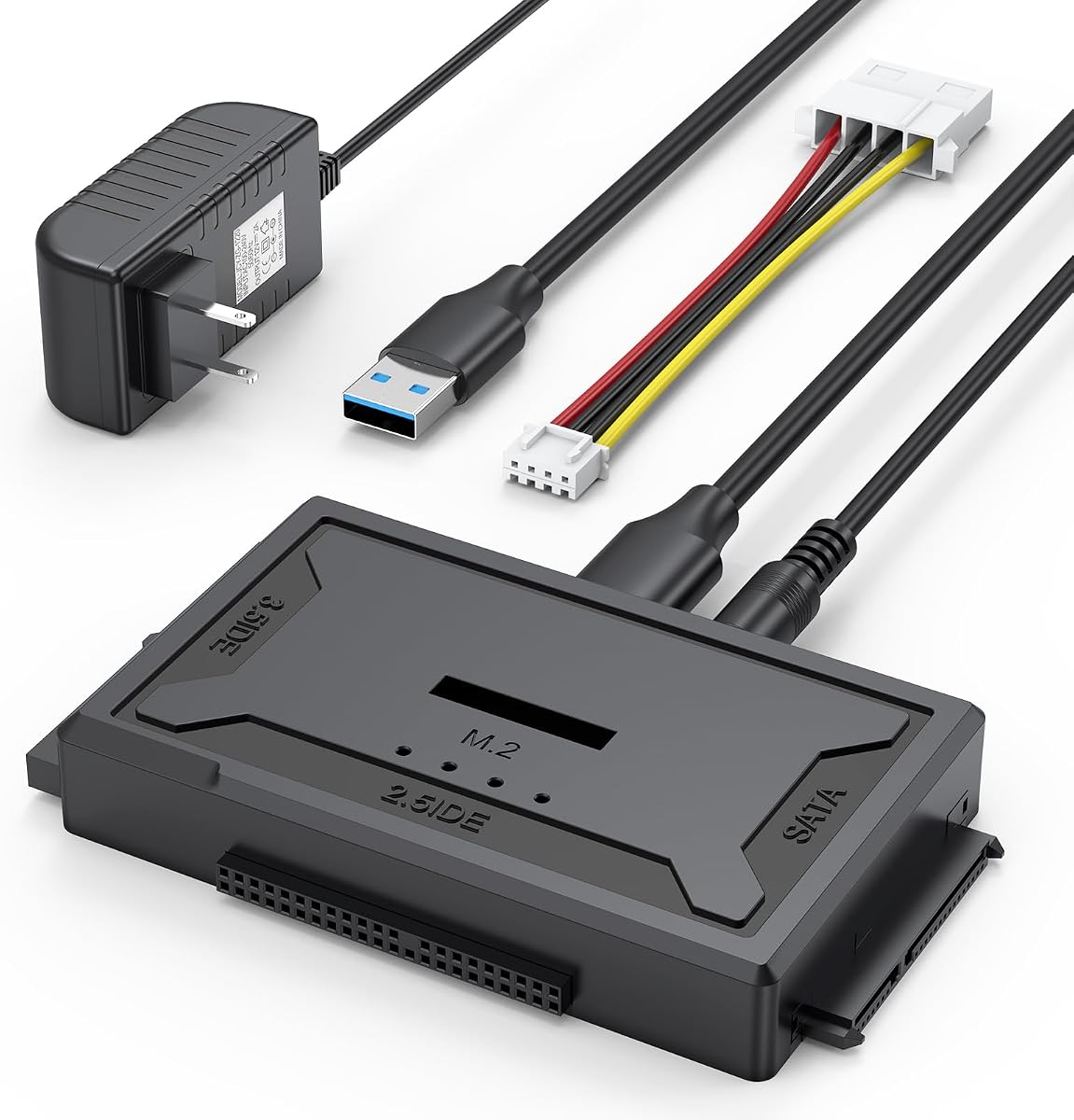
The 4-in-1 Hard Drive Reader has a 4.6 rating and is the most technically ambitious product in the guide. It can work with IDE, SATA, and M.2 storage, allowing users to handle legacy hard drives alongside contemporary laptop SSDs without moving between several completely different adapters.
We may earn a commission when you buy through this link, at no additional cost to you.
Its open M.2 design accommodates M-key NVMe drives and B+M-key SATA drives in various sizes. The manufacturer states M.2 transfer speeds up to 10Gbps, while SATA reaches 5Gbps and IDE is listed around 100MB/s. The enclosure includes a USB-A-to-USB-A cable, a soft 4-pin power lead, a power adapter, and a manual.
Compatibility has clear boundaries. B-key mSATA is not supported, and 3.5-inch IDE drives need the four-pin power connection, with dual-IDE operation requiring the external adapter. The operating system must also be able to read the drive's file-system format. These constraints make careful compatibility checking essential before a purchase.
This premium pick is ideal for a technician or power user who works across generations of drives. It is especially valuable when M.2 performance matters and a basic SATA or IDE cable would be too limited.
Combining IDE, SATA, and M.2 interfaces in one unit reduces desk clutter and setup changes. The reader is intended for retrieval, transfer, and storage tasks spanning older and newer devices.
The open-slot design and stated 10Gbps M.2 capability suit compatible NVMe and B+M-key SATA drives. Faster media still depends on the host interface, drive, file system, and transfer workload.
We may earn a commission when you buy through this link, at no additional cost to you.
The most useful kit is the one that matches your drive connector, computer port, power requirements, and intended task. Compatibility should be checked before speed, because a fast interface cannot compensate for an unsupported drive or an unreliable power connection.
Start by determining whether the drive uses IDE/PATA, standard SATA, or M.2. IDE drives use broad ribbon connectors and may be 2.5-inch or 3.5-inch. SATA drives use a wide, flat L-shaped data connector, while M.2 drives are narrow cards that may use NVMe or SATA protocols. The kit must explicitly support the connector and protocol of the drive you intend to use.
Match the drive before matching the computer. A USB-C host cable cannot make an IDE connector compatible, and a standard SATA adapter does not automatically read M.2 storage.
Check both physical dimensions and the stated capacity limit. Many universal readers support 2.5-inch and 3.5-inch drives, while compact adapters are often limited to 2.5-inch SATA devices. The 4-in-1 reader offers broader coverage and lists support for various M.2 sizes, while several other products list capacity limits of 6TB or 20TB.
Treat maximum capacity as a compatibility ceiling, not a blanket promise. The drive's model, interface, file system, and firmware can all affect whether it is recognized.
Bus-powered adapters are ideal for 2.5-inch SATA SSDs and many laptop hard drives. Larger 3.5-inch hard drives generally need an external 12V supply, especially when connected through a dock or reader. Universal IDE kits often include both a 12V/2A adapter and a four-pin Molex-style lead for that purpose.
Use external power whenever the drive manufacturer calls for it. A high-current 2.5-inch mechanical drive may also need a powered USB hub if it does not spin up from a single port.
Many drive readers use a USB-A host plug, while newer laptops may expose only USB-C ports. A USB-C-to-USB-A adapter can bridge that gap, but it is not always included. Some kits ship with a USB-C adapter or a combined USB-A and USB-C cable, which reduces the need for an extra accessory.
For the most stable performance, connect directly to the computer rather than through an unpowered hub. USB 2.0 ports and hubs can contribute to disconnections, particularly with 3.5-inch mechanical drives.
Advertised interface rates describe theoretical maximums, not the speed of every file operation. The source drive, file size, host controller, file system, and workload all matter. SATA III readers commonly list 5Gbps or 6Gbps, IDE readers are much slower, and the featured 4-in-1 product lists up to 10Gbps for compatible M.2 drives.
UASP support can improve throughput on compatible systems. Real-world results are commonly lower, especially when reading from older mechanical hard drives.
A bare adapter or reader provides direct access to a drive and is often useful for recovery or swapping media. An enclosure provides a more finished protective shell and is convenient for turning a spare drive into reusable external storage. The BENFEI enclosure is a good example of the latter, while universal readers better suit mixed hardware and repeated migrations.
Choose based on workflow rather than appearance. Frequent travel favors a small enclosure or cable, while legacy recovery favors a reader with IDE connectors, jumpers, and external power.
Hot-swapping allows a drive to be changed without restarting the computer, while an on/off switch helps isolate power to connected hardware. LED indicators for power and activity are useful during lengthy copies. Detailed instructions and technical support are particularly valuable when diagnosing a drive that is not recognized.
For new blank drives, be prepared to initialize and format them through Disk Management. For old IDE disks, consult the manufacturer's jumper guide to set master or slave correctly.
Most featured products state support for Windows, macOS, and Linux, but the exact versions and file-system behavior can differ. A reader cannot normally read a file system the host operating system does not understand. Cross-platform compatibility therefore depends on both the adapter's drivers and the format on the connected drive.
The 4-in-1 reader explicitly notes that the drive's file-system format must match the computer's supported format. This requirement is worth checking before assuming any adapter will mount every disk.
Before connecting a drive, identify its connector type, confirm that the adapter supports its size and protocol, and read the drive manufacturer's instructions. Inspect the adapter, power lead, and data cable for visible damage. For a new blank disk, have the host operating system's disk-management tool ready because the drive may need initialization and formatting before it can be used.
Install the drive according to the adapter design. With a cable-style SATA adapter, connect the bare drive directly. With an enclosure, open the tool-free cover, seat the drive correctly, and close it firmly. For a universal IDE reader, attach the appropriate 40-pin or 44-pin connector and set any required jumper before applying external power. Connect the four-pin power lead and 12V supply whenever a 3.5-inch IDE drive or another power-hungry device is involved.
After connection, use the host's file manager or disk utility to locate the drive, and avoid unplugging it while files are being transferred. Shut down or safely eject the volume when finished, especially if the drive is older or contains the only copy of important data. Keep the adapter dry, avoid exposed dust and sudden temperature changes, and use the on/off switch before changing media.
Yes, but only if the specific model includes both connector types. Look for a SATA connector plus 40-pin and 44-pin IDE connectors, rather than relying on a broad description such as universal reader. Many compact SATA-only products cannot connect an IDE ribbon-cable drive. Confirm the physical connector on the drive before ordering.
In most cases, yes. A 3.5-inch mechanical hard drive generally requires more power than a laptop USB port can provide, so an adapter with a 12V supply and four-pin power cable is necessary for reliable startup and operation. Some older SATA disks may also benefit from external power, while 2.5-inch SATA SSDs and typical laptop hard drives are usually bus-powered.
It can if you have the correct host connection. A reader with a USB-A plug usually needs a USB-C-to-USB-A adapter, while kits that include a USB-C adapter or combined cable connect more directly. Confirm whether the required adapter is included and use direct computer connections for better stability.
They can provide the physical connection needed to access an old drive, but they cannot repair mechanical damage or guarantee that damaged files will open. Legacy drives may also need correct master or slave jumper settings and enough external power. If the data is irreplaceable, work from a read-only copy and consider professional recovery assistance when the drive makes unusual noises.
A reader is primarily designed to connect a bare drive directly to a computer, often for migration, recovery, or testing. An enclosure surrounds a 2.5-inch drive and makes it function as portable external storage. Readers tend to support more formats and connector types, while enclosures are usually simpler and better suited to everyday storage.
A new blank drive may be visible as unallocated space but still require initialization, partitioning, and formatting. Open the host operating system's disk-management utility, choose the new volume, and follow the prompts. The relevant options may be called Disk Management on Windows or Disk Utility on macOS, depending on the connected computer.
No, not unless it has a dedicated M.2 slot and compatible protocol support. Standard SATA connectors and ordinary 2.5-inch SATA adapters do not accept M.2 cards. The featured 4-in-1 reader supports M-key NVMe and B+M-key SATA drives, but it does not support B-key mSATA, so model and key must both be checked.
The advertised rate is a theoretical interface maximum. A mechanical hard drive, older IDE connection, file system, host controller, cable, and individual files can all reduce real performance. IDE media is particularly limited, while compatible M.2 NVMe storage has the greatest potential when paired with a capable host and cable.
The Unitek USB 3.0 IDE/SATA Adapter is the most balanced general choice because it combines IDE and SATA support with simultaneous two-drive operation. The BENFEI 2.5-inch enclosure is the best budget option for simple, portable external storage, while the 4-in-1 Hard Drive Reader is the most advanced choice for users who also need M.2 support.
Prioritize the connector and protocol before considering transfer speed. Confirm whether the drive is IDE, SATA, or M.2, determine whether it needs external power, and check the computer's available USB port. External power and a small host adapter may be necessary, but those added components are usually worthwhile for dependable access to older or larger drives.
Product details and pricing can change over time, so review the current listing before purchasing. Check the included accessories, supported file systems, capacity statement, and any jumper instructions, especially when the goal is data recovery rather than routine file transfer.