
Hisense Roku TV IR Remote
4.7Editor score
No pairing required
Supports Hisense Roku TVs
Straightforward infrared operation
Compact practical replacement
Compare 10 of the best Hisense TV Replacement Remote options for compatibility, voice control, shortcut keys, range, setup, and overall suitability for
Finding a replacement remote can restore convenience to a Hisense television whose original controller was lost, damaged, or worn out. A useful replacement must match the TV platform, remote model, and functions that matter, whether those include voice commands, streaming shortcuts, broad model compatibility, or simple out-of-the-box operation.
The products in this guide cover traditional infrared remotes, Android and Google TV controllers, Roku TV replacements, voice-enabled designs, and multipack options. They were compared using the supplied specifications, including supported Hisense series, remote model numbers, signal technology, shortcut buttons, range, setup requirements, and stated construction.
Each review explains where a remote is most appropriate and highlights limitations such as missing voice control, incomplete button compatibility, or platform-specific fit. Ratings and availability can change over time, as can product prices, so confirm your television model and the replacement part number before ordering.
4.7Editor score

4.4Editor score
4.3Editor score
This side-by-side comparison highlights platform compatibility, voice support, shortcut access, signal method, and setup demands. Use it to identify the remote most likely to match your specific Hisense television before making a purchase.


This universal replacement has a 4.5 rating and targets Hisense 4K LED, HD, UHD, ULED, and Android Smart TVs. Its principal strength is the large collection of original remote part numbers listed as compatible, including EN2A27, EN2A127H, EN2B27, EN2C27, EN2D27, EN2G27, EN33922A, and several related variants.
We may earn a commission when you buy through this link, at no additional cost to you.
The remote operates by infrared and requires no programming, meaning that installing two batteries is generally all that is needed to begin using it. Four quick-launch buttons provide direct access to favorite channels, while the stated operating range extends beyond 35 feet. Its ABS construction is designed for regular handling and is described as durable.
The main limitation is platform specificity. It does not support Hisense Fire TV or Roku TV models, making it unsuitable for owners of those platforms despite the broad wording of the product title. It also does not include batteries, and its compatibility depends on using one of the listed remote models rather than every Hisense television sold.
This is a practical choice for an older or mid-range Hisense Android television whose original remote uses an EN2 or EN3-series controller. Confirm the model number printed on the original remote and compare it with the supported list before buying. It is less appropriate if your set runs Google TV, Roku, or Fire TV.
The no-setup design makes this remote appealing when the original controller has simply worn out or disappeared. Install two batteries, aim the infrared signal toward the television, and the listed compatible models should respond without a separate pairing procedure.
Compatibility with numerous EN2 and EN3 part numbers gives the remote more value than a controller tied to just one television. The long model list is especially useful for identifying a match when the replacement can be identified only by remote part number.
We may earn a commission when you buy through this link, at no additional cost to you.
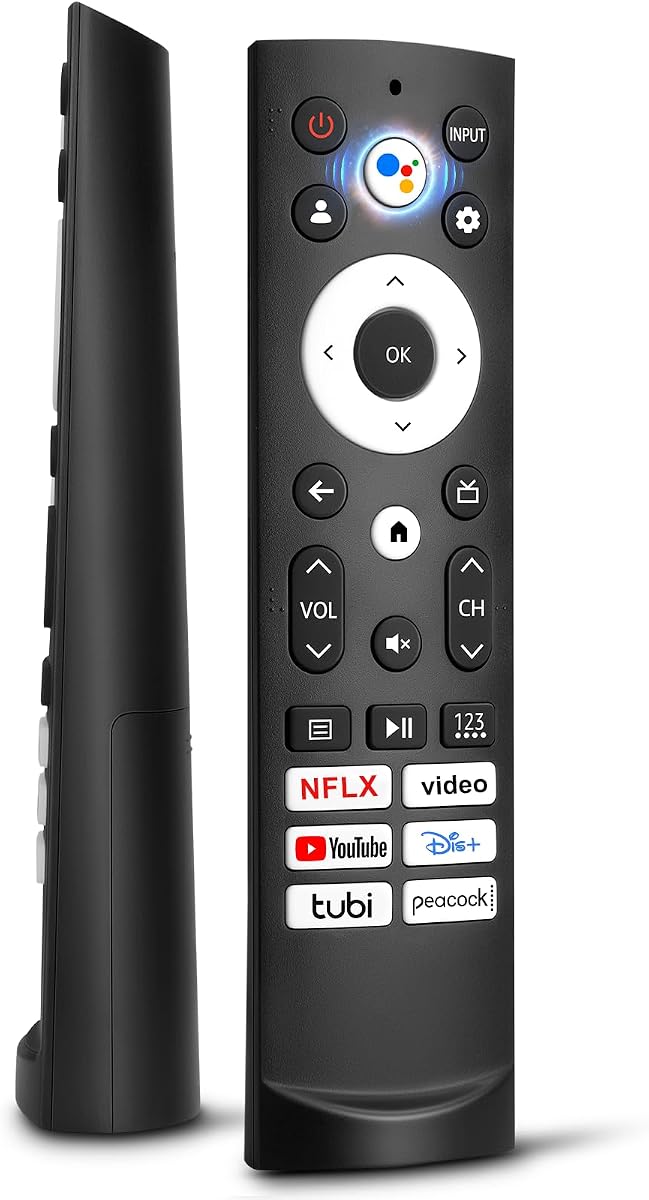
This replacement is designed for Hisense Smart Google TV sets, including A6, A65H, A6H, A7, U6, U6H, U7H, U8H, U6K, and U8 series televisions. Its 4.4 rating reflects a well-liked controller with a clear platform focus, six streaming shortcuts, and a straightforward installation process.
We may earn a commission when you buy through this link, at no additional cost to you.
Its shortcut buttons cover Netflix, Video, YouTube, Disney, tubi, and Peacock, giving users quick access to a broad mixture of entertainment services. The remote operates through infrared, offers a stated range of more than 35 feet, and needs two AAA batteries. No programming or setup is required for the supported models.
There are important exclusions. It is not intended for a Google Chromecast remote, a Google TV streaming remote, or Google TV streaming hardware, and the supplied information does not indicate voice functionality. The narrow top and wide bottom shape helps it stand on a tabletop, though that design should not be confused with voice-control support.
Choose this remote for a non-voice Hisense Google television in one of the listed series. It is especially attractive for households that use the supported streaming applications frequently. Owners of a newer Google TV model equipped with voice search should look instead at a remote explicitly providing a microphone function and pairing instructions.
The dedicated application buttons reduce the need to navigate menus. Netflix, YouTube, Disney, tubi, Peacock, and the listed Video service are available with a single press when the TV is connected and signed in.
Its narrow upper section and wider base allow the remote to rest securely on a table. That small practical detail can make it easier to locate after setting it down between viewing sessions.
We may earn a commission when you buy through this link, at no additional cost to you.
This replacement targets the EN2A27 family and many Hisense LCD, LED, HD, and Smart TV models. The product carries a 4.4 rating and stands out for its extensive compatibility list, one-year warranty, and inclusion of Netflix, YouTube, and Google Play shortcut buttons.
We may earn a commission when you buy through this link, at no additional cost to you.
Compatibility spans 40-inch, 43-inch, 50-inch, 55-inch, and 65-inch model designations, along with several H, CU, and EN2-series remote part numbers. It uses infrared technology and works without programming after two AAA batteries are installed. The seller also directs buyers to the product listing for an expanded compatibility list.
This remote is only a television controller and does not work with Hisense Roku TVs. It also should not be expected to control Blu-ray players, DVD players, home theater systems, sound bars, AV receivers, or subwoofers. Batteries and instructions are not included, so both should be prepared before setting up the remote.
This is a strong candidate for owners of an older Hisense television that originally used an EN2A27, EN2A127H, EN2B27, EN2C27, EN2D27, or EN2G27 remote. Its one-year warranty adds reassurance. Check both the television model and original remote number because similarly named Hisense sets can use entirely different platforms.
The EN2A27 and related EN2 controller numbers cover many television sets still found in homes. This makes the product a practical option when the TV remains functional but its original remote has become unreliable or lost.
The one-year warranty provides a defined support period, and the listing directs customers toward product-support options for assistance. A detailed model list also reduces the chance of buying a controller for the wrong television platform.
We may earn a commission when you buy through this link, at no additional cost to you.
This dedicated Hisense Roku TV remote has a 4.7 rating, the highest among the products considered. It is designed for Hisense televisions running the Roku platform and is explicitly presented as a remote without voice control, making its purpose straightforward.
We may earn a commission when you buy through this link, at no additional cost to you.
Full support is stated for the Hisense H4030F1 and R6ER8F series, with compatibility also extending to other Hisense Roku TVs. It uses infrared communication and offers a familiar alternative to the original Roku-style controller for basic navigation, playback, volume, and power functions.
The seller notes that a few buttons may not be compatible with the television. That qualification makes the remote model numbers worth checking carefully, especially if the original controller included an unusual function. The lack of voice control is also a meaningful limitation for viewers accustomed to speech-based search.
This is the best budget-oriented choice for a Hisense Roku television that needs a basic physical controller. It is less suitable for Android, Google, VIDAA, Fire, or conventional Hisense sets because those platforms can require different remote protocols. Confirm that your television is a Roku model and compare its original remote before ordering.
Because this controller is dedicated to Hisense Roku televisions, it offers a more targeted alternative to broad universal listings. That focus makes it a sensible low-cost choice when the platform is already known.
The stated possibility that a few buttons may not be compatible should be considered before purchase. It reinforces the importance of verifying the television series and original remote layout.
We may earn a commission when you buy through this link, at no additional cost to you.
This Google Smart TV voice remote has a 4.2 rating and an extensive list of supported Hisense series, including A6H, A65K, U75K, UX, L5H, L9, U6K, and U7K. It is aimed at modern 4K QLED, ULED, Mini-LED, Quantum ULED, Laser, and TriChroma televisions.
We may earn a commission when you buy through this link, at no additional cost to you.
A dedicated microphone button enables voice commands when the television's built-in assistant supports the function. Six shortcut keys provide quick access to entertainment applications, while the remote is stated to activate commands in 0.2 seconds and operate as far as 50 feet away. Its ABS construction is designed for everyday use.
Voice control is not entirely self-contained: it depends on the television's built-in voice assistant functionality. The extensive compatibility list can also be difficult to interpret, and users must match either their TV series or the ERF3M90H remote part number carefully. Batteries are not included.
This is the top all-around choice for a newer Hisense Google TV whose original remote uses ERF3M90H. The combination of voice activation, extensive modern-series support, long stated range, shortcut keys, and a one-year warranty makes it especially useful for owners who want to restore more than basic navigation.
The microphone button can help users search for content, request information, or control menus hands-free. The feature depends on the television's own voice assistant, so compatibility with the smart functions is as important as physical button fit.
A claimed 50-foot operating range provides useful flexibility in a living room or viewing area. The stated 0.2-second activation time also supports a more responsive experience when moving through applications or adjusting settings.
We may earn a commission when you buy through this link, at no additional cost to you.
This two-pack remote has a 4.3 rating and supports Roku televisions from Hisense, TCL, Onn, Sharp, Philips, Westinghouse, Element, Insignia, JVC, RCA, and Sanyo. Its multi-brand coverage makes it more versatile than a replacement intended solely for Hisense televisions.
We may earn a commission when you buy through this link, at no additional cost to you.
Four shortcut buttons provide direct access to Netflix, Disney, Hulu, and VUDU. The remote operates without programming, uses two AAA batteries, and is stated to respond in 0.3 seconds. Its buttons have been tested for more than 120,000 clicks, while the stated signal range exceeds 35 feet.
It is important to distinguish Roku televisions from standalone Roku streaming media players. The product does not support streaming sticks, streaming devices, Premiere devices, Ultra models, Express models, and several standalone boxes. Because it fits multiple brands, a buyer should verify the layout and functions of the original television remote rather than relying only on the Roku label.
This pack is appealing for households with more than one compatible Roku television, or for buyers who want a spare remote. It is also a broader option for someone who owns several supported brands. For a single Hisense Roku set, however, the dedicated Hisense Roku remote may offer a more focused fit.
The two-pack format provides an immediate spare, which is useful in a shared home or when one controller is frequently misplaced. It also allows compatible televisions in separate rooms to use separate remotes.
Netflix, Disney, Hulu, and VUDU buttons give direct access to popular services. These shortcuts are particularly useful on Roku televisions, where the platform is designed around streaming applications.
We may earn a commission when you buy through this link, at no additional cost to you.
This replacement has a 4.4 rating and stands out for covering Hisense Android TV, Google TV, Laser TV, VIDAA TV, ULED, and Mini-LED ULED models. It supports three principal remote part numbers: ERF3A90, ERF3J80H, and ERF3M90H.
We may earn a commission when you buy through this link, at no additional cost to you.
The supported television families include U7G, U8, U9G, A45H, A4H, A6G, U68G, U6G, PX1, L5, L9, A65H, A6H, A7, U6H, U7H, U8H, U6K, and UX. Netflix, Video, YouTube, Disney+, tubi, and Peacock shortcuts are included, and the remote works after installing two AAA batteries.
Its stated transmission distance is approximately 19 to 26 feet, which is shorter than the ranges claimed by several other products in this guide. Compatibility lists are comprehensive but require attention: identify the television series and, ideally, the original remote part number before purchase. No voice function is listed.
This is the top choice for a buyer whose Hisense television uses one of the three covered ERF remote models. It offers an unusually broad combination of Android and Google TV support without programming, making it a strong middle ground between specialized and general-purpose replacements.
Covering ERF3A90, ERF3J80H, and ERF3M90H allows the controller to serve several generations of Hisense smart televisions. Matching the remote part number is often the most reliable approach.
The remote spans Android, Google, VIDAA, Laser, ULED, and Mini-LED families. That breadth is valuable only when the corresponding television and original remote are included in the listing.
We may earn a commission when you buy through this link, at no additional cost to you.
This two-pack replacement carries a 4.4 rating and supports numerous Hisense Smart Google TV series, including U7, A65H, A4K, A6H, A7H, U6, U6H, U7H, U8H, L5H, U6K, U7K, U8K, U75K, UX, U76, A76K, L9, and A65K.
We may earn a commission when you buy through this link, at no additional cost to you.
The remote is ready to use after installing two AAA alkaline batteries and does not require complicated pairing. Its six shortcut buttons cover Netflix, Prime Video, YouTube, Disney, tubi, and Peacock. Infrared transmission is stated to work as far as 40 feet, with a response time of 0.2 seconds.
Its housing is made from ABS plastic, while upgraded silicone is used for buttons that are described as soft and sensitive. Batteries are not included. As with other platform-specific controllers, the television model or original remote number should be verified before ordering.
This multipack is a strong pick for households with two compatible Hisense Google televisions or for anyone who prefers keeping a spare nearby. The combination of a broad current-series list, rapid response, six shortcuts, and a generous signal range makes it particularly practical for modern smart-TV setups.
Keeping a second remote reduces interruptions when one controller is misplaced or temporarily unavailable. The identical design also makes the multipack useful for two compatible televisions in separate rooms.
Six shortcut buttons combine commonly used streaming services in a single layout. The stated 0.2-second response time and 40-foot range support quick control from a normal viewing position.
We may earn a commission when you buy through this link, at no additional cost to you.
This non-voice replacement has a 4.4 rating and supports Hisense Android and Google television models associated with the ERF3A90 and ERF3J80H remote families. The supplied compatibility list covers many A4, A45, A6, A68, A6G, A6GV, U6G, and U68G model combinations.
We may earn a commission when you buy through this link, at no additional cost to you.
Six shortcut buttons provide direct access to Netflix, Video, YouTube, Disney+, tubi, and Peacock. The remote operates without programming after two AAA batteries are installed, and it is positioned as a replacement for a lost or damaged controller. Sellers also offer to help identify the correct remote when a customer cannot find a match.
The listing explicitly says it is not compatible with Hisense Fire, Roku, or Google TV platforms and does not support voice functions. That wording creates some potential confusion because many Hisense Google TV sets use ERF3-series remotes. Carefully check the exact model rather than relying on the platform name alone.
This is a practical option for an owner of a supported Android or Google television who does not need speech control. It offers a broad model list, six convenient shortcuts, and easy setup, but buyers whose original remote includes a microphone should choose a voice-enabled alternative instead.
The remote focuses on conventional infrared control without voice search. For viewers who primarily navigate menus and launch streaming applications, that arrangement can remain straightforward and dependable.
The seller invites customers to contact the company when they cannot locate the correct remote. That assistance may be helpful when the television label is damaged or the original controller is already missing.
We may earn a commission when you buy through this link, at no additional cost to you.
This voice replacement remote has a 4.3 rating and is intended for modern Hisense Google televisions, including 4K Mini-LED, ULED, QLED, Laser, and TriChroma Laser models. The supported series list includes A6H, A65H, A65K, U8K, U6H, U7H, U7K, A4K, U6K, U75K, U8H, L5H, L9, A76K, A7H, and UX.
We may earn a commission when you buy through this link, at no additional cost to you.
Its built-in intelligent voice assistant can be used to search, play music, check information, or interact with television features. Five one-touch shortcuts cover Netflix, Video, YouTube, Disney+, and tubi. The controller is made from ABS material, and its buttons reportedly passed a 100,000-click test for durability and sensitivity.
Unlike the basic infrared replacements in this guide, this model has a defined pairing process. After inserting two AAA batteries and turning on the television, the user holds the Back and Home buttons for five seconds until the indicator blinks and the television displays a successful pairing message. Batteries are not included.
This is the premium pick for a compatible Hisense Google TV owner who wants voice assistance and a modern remote layout. Confirm the television series first, since platform-specific fit is more important than the remote's broad appearance. Buyers should also be comfortable with the short pairing procedure.
The integrated assistant expands the remote beyond traditional button navigation. It can support content searches and information requests, making it useful for users who prefer spoken commands.
The instructions describe how to start pairing and how to recognize success through the indicator light and on-screen message. Clear steps help prevent confusion during the initial setup.
We may earn a commission when you buy through this link, at no additional cost to you.
Compatibility is the decisive factor when selecting a Hisense TV replacement remote. After identifying the television platform and original remote part number, compare voice functions, shortcut layout, signal method, range, and setup requirements.
In short, determine the platform before comparing remotes, and avoid any controller whose listing explicitly excludes your television type.
In short, use the original remote number as the strongest compatibility check and then verify the television model as a second step.
In short, choose voice control when the television supports the corresponding assistant and you value spoken search; otherwise, a conventional infrared remote may be sufficient.
In short, compare stated range, but prioritize a confirmed model match and consider where the television's sensor is located before settling on a controller.
In short, choose a layout that matches your most-used applications, while remembering that disabled services may make one or more shortcut buttons inactive.
In short, no-pairing models offer the fastest setup, while voice controllers require an extra pairing step and two compatible batteries.
In short, buy one controller for a single set and consider a multipack when you need a backup or control more than one compatible television.
In short, consider warranty and build quality after confirming fit, since durable construction cannot compensate for the wrong platform or remote model.
Begin by confirming the television series and original remote part number, then compare both with the replacement listing. Install the correct batteries, noting the required type and quantity. Most infrared remotes need no programming, but voice-enabled models may require a short pairing procedure that involves holding the Back and Home buttons until the indicator light blinks.
Point the remote toward the television's infrared sensor and allow a short distance without obstructions for the first test. If commands do not respond, move closer, replace the batteries, and try again. Button functions can also vary by platform or application, so a service shortcut may remain inactive if that application is unavailable on the television.
Keep the remote away from moisture, excessive heat, and heavy impact. Remove the batteries if it will be stored for a long period, and clean it with a dry or lightly dampened cloth rather than liquid poured over the buttons. Avoid pressing controls forcefully, and use the included shortcut buttons only with services installed and signed in on the television.
First, find the complete model number on the television's rear label or in its settings menu. Then identify the platform, such as Roku, Google TV, Android TV, VIDAA, or Fire TV, and look for the part number printed on the original remote. Cross-check both details against the replacement listing because similarly named Hisense televisions can require different controllers.
No. A universal Hisense remote is usually universal only within the platforms and model numbers covered by its listing. Many products exclude Fire TV, Roku TV, Chromecast devices, or newer Google TV controllers. Treat the supported series and remote part numbers as firm boundaries rather than assuming every current Hisense television is included.
Most of the conventional infrared replacements in this guide work without programming after batteries are installed. Some voice remotes require pairing by holding the Back and Home buttons for five seconds until the television confirms success. Follow the instructions supplied with the specific remote because procedures can vary.
It can replace basic navigation and power functions if the model and platform are compatible, but it will not restore microphone-based search or other voice commands. For a complete functional replacement, choose a controller that includes a microphone and is explicitly compatible with the television's voice assistant.
A shortcut may do nothing when the associated application is not installed, requires a sign-in, or is unavailable on that television's platform. Some remotes also contain buttons that do not map to every model. Check the television's app list and the remote's compatibility notes before assuming the replacement is faulty.
The listed models generally use two AAA batteries, and most do not include them. The Hisense Roku TV IR Remote does not state a battery configuration in the supplied information, so check the original remote or the product listing before inserting batteries. Using fresh alkaline batteries can also reduce intermittent infrared response problems.
Weak batteries, infrared sensor placement, direct sunlight, and objects blocking the signal can reduce range. Try fresh batteries, face the television sensor, and remove obstructions between the controller and television. If the issue continues, compare the problem with the stated range for the selected model and verify that the remote is fully compatible.
A two-pack is helpful if remotes are frequently misplaced, if another household member needs a controller, or if you own two compatible televisions. For one stable viewing location, a single remote is generally sufficient. The multipack's usefulness depends more on backup convenience than on any change to the television's functionality.
The Hisense Roku TV IR Remote is a focused budget choice for compatible Roku sets, while the Universal Android Google Remote offers the strongest balance of platform coverage and straightforward operation. The Hisense Smart Google Voice Remote is the premium selection for users who want speech-based control, pairing, and a modern smart-TV layout.
Prioritize exact compatibility over appearance or shortcut placement. Identify the platform, locate the original remote part number, verify voice requirements, and check whether the application buttons correspond to services you use. A model list is most useful when combined with a careful comparison of every letter and digit.
Ratings, stock status, and prices can change, so review the current listing before purchasing. Confirm the latest compatibility information, included accessories, warranty terms, and battery requirements, and make sure you are choosing the remote for the correct Hisense television platform.