
50W Six-Port Charging Dock
4.4Editor score
Six-device charging capacity
Case-friendly fixed slots
Watch holder included
Six mixed cables included
Tablet Charging Station guide compares 10 models for power, ports, tablet fit, cables, safety, and device organization for home or work setup.
A tablet charging station does more than recharge a single device. It combines charging power, cable management, and a stable place to leave phones, tablets, and accessories in one organized hub. The best model depends on your device mix, available outlet space, and whether you need laptop-level charging or simply a convenient home for everyday electronics.
We compared the 10 stations in this guide by examining total power, USB-A and USB-C availability, tablet and case compatibility, included accessories, protective features, and physical organization. The list covers compact six-port docks, larger mixed-port organizers, and open racks designed for shared workspaces with laptops, Chromebooks, and tablets.
Each review highlights the features that distinguish a particular station and explains where it may fall short of the more specialized alternatives. Ratings and specifications reflect the supplied product information, while product availability and pricing can change, so readers should verify current listing details before making a purchase.
4.4Editor score

4.6Editor score

4.5Editor score
The comparison below shows how the 10 stations differ in charging capacity, port mix, device support, physical design, and included accessories, making it easier to identify the right option for a home, office, classroom, or shared device area.




The Zobirez 750W Charging Station is the most versatile option in this guide, combining five USB-C ports and five USB-A ports with a substantial 750W total output. Its 4.6 rating reflects a strong balance of charging flexibility, physical organization, and useful included accessories. It is especially appropriate for households or workspaces where several tablets, phones, and USB-C laptops need a single organized charging point.
We may earn a commission when you buy through this link, at no additional cost to you.
The standout feature is power distribution. Each USB-C port is listed as capable of delivering up to 120W, which gives compatible laptops and high-demand tablets more headroom than conventional phone-oriented docks. The USB-A side provides up to 30W per port for accessories and older devices. A complete kit adds one power cord and ten cables in USB-C-to-C, USB-C, iPhone, and Micro USB configurations, reducing the need to assemble a separate charging setup.
Physical design is equally important for a tablet station. The one-piece flame-retardant ABS construction avoids the wobbling associated with removable dividers, while two wide center bays can accommodate a laptop or a cased tablet. This makes the unit less dependent on carefully sized dividers when device thicknesses vary. Built-in protection against over-current, over-voltage, overload, overheating, overcharging, and short circuits adds practical assurance for unattended charging.
The trade-off is that the power and included cable selection may exceed the needs of a simple bedside dock. Buyers whose devices are limited to phones, earbuds, and small accessories may find a lower-capacity station easier to manage. Even so, for a mixed device ecosystem or a high-output charging hub, this model offers the most convincing all-around balance in the roundup and earns the Editor's Choice recommendation.
The five USB-C connections can each reach 120W, allowing the station to serve compatible laptops, iPad Pro models, and other high-power devices rather than limiting it to phone charging. Actual charging speed still depends on the device, its power-management system, and the attached cable.
A fixed one-piece frame gives devices consistent support and avoids divider damage. Wide central bays are especially useful when a tablet has a thick protective case or when a laptop must stand upright alongside smaller devices.
We may earn a commission when you buy through this link, at no additional cost to you.
The black Zobirez 420W station offers a balanced combination of 10 ports, 420W total output, and a one-piece organizer. Its 4.5 rating and support for up to 10 simultaneous devices make it a strong candidate for family nightstands, shared offices, and home workspaces. It provides more flexibility than a basic USB-A dock without reaching the extraordinary output of the 750W model.
We may earn a commission when you buy through this link, at no additional cost to you.
The port configuration is one of its most useful traits. Two USB-C ports can supply up to 65W, three additional USB-C ports reach 45W, and five USB-A ports provide 30W apiece. That spread makes it practical for compatible MacBook models, iPads, iPhones, Galaxy devices, headphones, Kindles, watches, and game controllers. A collection of eight short mixed charging cables is included, along with the station and power cord.
The organizer uses flame-retardant ABS in a one-piece design rather than fragile removable dividers. Two enlarged center slots, each listed as 1.57 inches wide and 1.77 inches high, help accommodate a laptop or a child's tablet without removing its case. Four non-slip rubber pads keep the base stable and help protect the surface underneath from scratches.
Its main limitation is that eight included cables may not cover ten connected devices without reusing a cable or supplying extras. Users seeking maximum aggregate power or a larger cable kit could favor the first-ranked station instead. For shoppers who want capable laptop charging, ten organized ports, and a durable fixed-slot design at a more moderate specification level, however, this model offers an excellent balance.
Rather than giving every port the same maximum, the station separates 65W, 45W, and 30W outputs. This makes it easier to reserve the strongest USB-C connections for compatible laptops or tablets while using the other ports for phones and accessories.
The enlarged center bays and rubber base create a secure resting area for varied device sizes. Devices remain upright and accessible while connected, which also reduces the temptation to pull on cables or leave equipment scattered across a counter.
We may earn a commission when you buy through this link, at no additional cost to you.
The 20-Port 270W Charging Station is built for volume. It combines ten USB-C and ten USB-A connections, allowing up to 20 devices to charge at once, and carries a 4.5 rating. This makes it a natural choice for busy households, classrooms, offices, libraries, and other shared environments where the number of connected devices matters more than laptop-level output.
We may earn a commission when you buy through this link, at no additional cost to you.
Its 270W total capacity is distributed across the many ports, with listed per-port support up to 5V/3A for USB-C and 5V/2.4A for USB-A. Auto-Detect Technology is designed to identify connected devices and provide suitable charging. Eleven high-strength removable dividers can be repositioned or removed to accommodate slim phones, thick tablets, and protected cases, giving this model more layout flexibility than fixed-slot alternatives.
The package includes the charging station, 11 adjustable dividers, ten mixed cables, and a power cable. The cable assortment covers USB-C-to-iPhone or iPad, USB-C-to-C, USB-A-to-iPhone or iPad, USB-A-to-C, and USB-A-to-Micro-USB connections. An intuitive on/off switch also allows the entire station to be powered down without unplugging it.
Its primary compromise is size. Twenty ports and eleven dividers create a larger station than a conventional 10-port model, and the 270W total does not provide dedicated laptop charging. For large groups using phones, tablets, earbuds, watches, e-readers, and power banks, it is nevertheless one of the most capacity-focused choices available.
Twenty independently accessible ports reduce the need for multiple wall adapters in offices, classrooms, and homes where several people charge different devices. The broad port mix supports newer USB-C equipment as well as USB-A accessories and legacy connections.
Removable baffles can be arranged around tablets of different thicknesses and then removed when the station is not being used for device storage. This flexibility is useful for groups whose devices change from one session to the next.
We may earn a commission when you buy through this link, at no additional cost to you.
The Unitek 10 USB Charging Station specializes in straightforward organization for USB-A devices. It has 10 built-in BC1.2 ports with a combined 60W output, earning a 4.4 rating. The station is aimed at phones, smaller tablets, and accessories rather than high-power laptops, making it a straightforward option for households that still rely heavily on USB-A connections.
We may earn a commission when you buy through this link, at no additional cost to you.
Each port is listed as supporting up to 5V/1.5A, with support for 5V/2.4A fast charging for Apple devices. A smart IC detects connected products and distributes charging output, while an automatic function stops charging when a battery reaches full capacity. The included power adapter carries UL, CE, FCC, and RoHS certification, adding reassurance at the point where wall power enters the system.
Eleven strong removable baffles allow the layout to be adjusted around thick phones and tablets. The dividers support the devices while leaving their charging ports exposed, and the resulting upright arrangement can clear cables from a desk, kitchen counter, bedroom table, office, or bedside surface. The package includes the station, dividers, and 60W DC power adapter.
The important limitation is that charging cables are not included. The station also has USB-A ports only, and its guidance limits use to devices smaller than 11 inches and explicitly advises against placing laptops. It is therefore most appropriate as a simple, dedicated USB-A dock for compatible tablets and phones rather than a universal charging hub.
Every connection uses USB-A, which keeps the design easy to understand for households with older accessories. The shared 60W limit means it is best for a collection of modest-demand devices rather than several high-power tablets charging at once.
Removable baffles let users match the spacing to the thickness of each connected device. Keeping dividers close to the equipment helps it remain upright without relying on the dividers to bear the device's full weight.
We may earn a commission when you buy through this link, at no additional cost to you.
This 10-Port USB Fast Charger combines five USB-C and five USB-A connections within a 100W total output. Its 4.2 rating is the lowest among the listed stations, but the specification set remains balanced for people who need several modern and legacy ports without a large desktop footprint. It is most suitable for charging groups of phones, tablets, and accessories in an office or home.
We may earn a commission when you buy through this link, at no additional cost to you.
Auto-Detect Technology is designed to identify attached devices and provide suitable charging current, with listed rates up to 5V/3A through USB-C and 5V/2.4A through USB-A. The station also includes a switch button for immediate power control. Its protection system covers over-temperature, over-voltage, overload, short-circuit, and overcurrent conditions, creating a useful safeguard for frequently used shared setups.
Eleven removable baffles can be repositioned or removed to accommodate slim smartphones, thick tablets, and devices in protective cases. The package contains the station, dividers, ten mixed cables, and a power cable. The cable mix includes connections for iPhone and iPad, USB-C-to-C, USB-A-to-C, and USB-A-to-Micro-USB devices.
Because the total output is 100W across ten ports, it does not offer the power needed for most laptops. Its lower rating also makes it less compelling when the highest possible customer rating is a priority. For a mixed group of tablets and phones in a non-laptop environment, however, the port balance, removable layout, and included accessories remain practical.
Five USB-C ports allow newer tablets, phones, and accessories to use their native cables, while five USB-A ports preserve compatibility with established accessories. The result is more versatile than a single-standard dock without requiring 20 ports.
A dedicated switch lets the entire hub be turned off without unplugging it. The listed thermal, voltage, overload, short-circuit, and overcurrent protections add layers of protection suitable for regular charging in shared environments.
We may earn a commission when you buy through this link, at no additional cost to you.
The 10-Device Laptop and Tablet Charging Station stands apart with an open vertical rack and six full AC outlets. It also provides four USB charging ports, a surge-protected 110V/10A power strip, and integrated cable routing. Its 4.5 rating reflects a specialized design for offices, classrooms, libraries, reception areas, and other environments where full-size devices need storage as well as power.
We may earn a commission when you buy through this link, at no additional cost to you.
Rather than relying entirely on USB connections, the rack accepts the wall adapters used by laptops, Chromebooks, tablets, and other electronics through its AC outlets. The open vertical slots make each device easy to insert, remove, inspect, and charge. This makes the station especially useful for shared device collections that would otherwise be scattered across counters, desks, or storage areas.
Integrated cable routing is another major advantage. Power leads and charging cords can follow a defined path through the rack instead of dangling into the main work area. The space-saving vertical format also preserves more usable desk or countertop space than laying laptops flat in a row of charging stands.
The tradeoff is that this is not a conventional high-wattage USB charging hub, and the supplied information does not specify output for the four USB ports. It is also larger and more specialized than a compact bedside dock. Buyers seeking a premium organizer for full-size devices and AC-powered accessories will find its combination of vertical storage, outlets, and cable management more valuable than raw USB charging speed.
The vertical rack accommodates laptops, Chromebooks, tablets, iPads, e-readers, and mobile devices in a shared footprint. Open slots avoid the access restrictions of a closed cabinet and make it easy to connect or disconnect each item.
Six AC outlets support devices that use traditional wall chargers, while four USB ports cover smaller accessories. Built-in routing and a surge-protected strip help consolidate both equipment and cords in one dedicated area.
We may earn a commission when you buy through this link, at no additional cost to you.
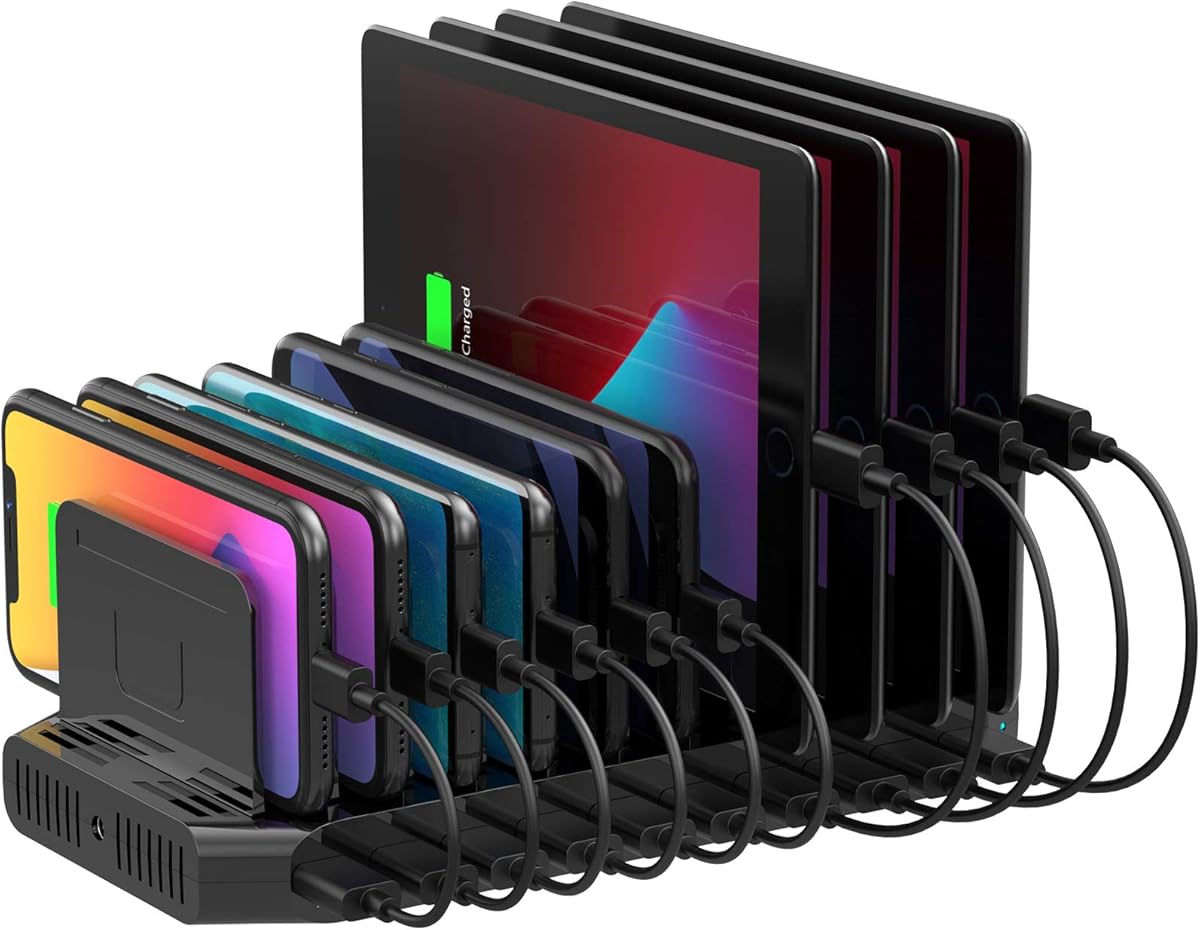
The 50W Six-Port Charging Dock is a compact and economical way to bring phones, tablets, earbuds, and e-readers into one tidy location. It has a 4.4 rating and a 50W total output, making it most appropriate for a small family, a couple's nightstand, or a limited collection of personal devices. Its one-piece case-friendly slots also make it less fragile than divider-based organizers.
We may earn a commission when you buy through this link, at no additional cost to you.
The package is unusually complete for an entry-level station. It includes six mixed charging cables, a built-in watch holder, a USB-A-to-USB-C adapter, and the dock itself. A smart chip is designed to detect connected devices and provide suitable current, while the included UL-tested adapter provides overvoltage, overcharge, and short-circuit protection.
Its fixed slots are listed as 1 inch wide and 1.3 inches high, allowing large tablets and phones to stand upright even with thick cases. Four anti-slip rubber pads help prevent sliding and scratching. The dock is also compatible with Apple and Android phones, tablets, earbuds, Kindles, and other compatible electronics.
The central compromise is capacity. Six ports support a limited number of devices, and 50W is not sufficient for laptop charging. The watch holder is only a holder because a watch charging cable is not included. Even with those limitations, this is a strong budget pick for a smaller device ecosystem that values a tidy, sturdy dock and a generous accessory bundle.
Six mixed cables and a USB-A-to-USB-C adapter cover several common connection styles immediately. The watch holder adds a dedicated place for a compatible watch, although its charging cable must be supplied separately.
The fixed one-piece body avoids loose dividers and provides enough space for large tablets and protected phones. Anti-slip pads keep the dock stable on a desk or bedside table while it is being used.
We may earn a commission when you buy through this link, at no additional cost to you.
The MERGROLY 320W station combines ten mixed USB ports with a physical organizer for phones, tablets, and compatible laptops. Its 4.4 rating reflects solid performance across charging capacity, fixed-slot durability, and smart device detection. It is a good middle ground for a home or office that needs meaningful USB-C power without moving to a 20-port or 600W system.
We may earn a commission when you buy through this link, at no additional cost to you.
Two USB-C ports provide up to 65W, three more provide up to 30W, and five USB-A ports round out the selection. The station is listed as capable of charging a phone from 20% to 80% in 30 minutes under compatible conditions. Smart chips identify attached devices and supply appropriate charging current, helping the hub adapt to a mixed collection of electronics.
Eight short cables are included: four Type-C-to-Type-C, three USB-to-Lightning, and one USB-to-Micro connection. A watch charger holder is also provided, though the watch charging cable is not included. Flame-retardant ABS construction, widened and raised slots, an anti-slip central partition, and eight rubber pads create a stable base for cased devices.
The included cable count is lower than the number of charging ports, and the product guidance recommends using the original included cable for optimal performance and safety. Some laptops may also require compatible cables and sufficient power. For users who want 320W of aggregate capacity, two 65W connections, and a tidy mixed-device dock, the station remains a capable option.
The two 65W ports are useful for compatible higher-demand devices, while the 30W USB-C connections handle many tablets and phones. USB-A outputs broaden the station's usefulness for older accessories and cables.
Raised slots accommodate thicker cases, while the central anti-slip section helps keep phones from sliding. Rubber feet reduce movement and surface scratches, making the rack practical for a frequently used desk or nightstand.
We may earn a commission when you buy through this link, at no additional cost to you.
The white Zobirez 420W station offers the same capable ten-port charging concept as the black version in a finish suited to lighter desks, bedrooms, and modern workspaces. It carries a 4.5 rating, supplies up to 420W total output, and includes five USB-C and five USB-A ports. The result is a versatile charging and organization hub for a broad range of devices.
We may earn a commission when you buy through this link, at no additional cost to you.
Its two leading USB-C ports provide up to 65W and are intended for compatible laptops such as MacBook models. Three other USB-C ports deliver up to 45W, while five USB-A ports support up to 30W. This tiered arrangement makes it easier to connect demanding devices without expecting every port to provide laptop-level output.
The station is built from flame-retardant ABS in a one-piece design. Two enlarged center bays measure 1.57 inches wide and 1.77 inches high, allowing a laptop or a cased tablet to stand securely. Four non-slip pads help prevent movement and protect the surface below. A power cord and eight short mixed charging cables are included for common phone, tablet, USB-C, and Micro USB devices.
Its core performance is very close to the black Zobirez option, so the deciding factor may be appearance and listing availability. The cable bundle remains smaller than the port count, and users must still verify that a tablet, laptop, and wall adapter are compatible with the available power and connector formats.
The white housing is a meaningful difference in bedrooms, modern offices, and light-colored nightstands where a black dock may stand out. Its functional design and charging layout remain equivalent to the black model.
Two 65W, three 45W, and five 30W connections let users match demanding and standard devices to appropriate ports. The varied output levels are more useful than forcing all devices to share one charging rate.
We may earn a commission when you buy through this link, at no additional cost to you.
The Moezuti 20-Port 600W Charging Station combines the largest listed port count in this guide with the highest customer rating at 4.7. It can charge up to 20 devices simultaneously through 12 USB-C and eight USB-A ports. That scale makes it especially interesting for large families, offices, classrooms, and other environments where device volume is the central concern.
We may earn a commission when you buy through this link, at no additional cost to you.
Its 600W total output provides considerable charging headroom. Two USB-C ports can deliver up to 65W for compatible MacBook Air, MacBook Pro, and other USB-C laptops, while ten additional USB-C ports provide up to 30W. Eight USB-A ports are listed at 20W, supporting phones, tablets, Kindles, Android devices, AirPods, and other compatible accessories.
The physical organizer uses a flame-retardant ABS one-piece design with two wide center bays for laptops or thick-cased tablets. This fixed construction avoids the breakage associated with removable dividers. A GaN V chip monitors temperature and includes protection against overcharging, overheating, short circuits, overcurrent, and overvoltage, with real-time checks cited in the product information.
The station includes a five-foot power cord and ten 11-inch cables: four Type-C, two iPhone, two USB-C, and two Micro USB. Its size and power may exceed the needs of an ordinary household, and the cable count does not cover all 20 ports simultaneously. For a genuinely large device collection, however, the combination of 600W, 20 ports, and a 4.7 rating is exceptionally strong.
The 600W aggregate output provides room for compatible laptops alongside numerous smaller devices. Two 65W USB-C ports and ten 30W USB-C ports make the charger more versatile than a conventional accessory-focused dock.
The GaN V chip combines active monitoring with overcharge, heat, short-circuit, and current or voltage protection. This is particularly relevant for a large station expected to run many devices at once or remain active for extended periods.
We may earn a commission when you buy through this link, at no additional cost to you.
The right tablet charging station depends on more than port count. Consider device power requirements, connector types, case thickness, available space, cable needs, and the setting where the station will be used before selecting a model.
Total wattage indicates how much power the station can distribute across all connected devices. A compact 50W dock may be ideal for a couple of phones and one tablet, while a 270W, 320W, 420W, 600W, or 750W station can support larger groups and higher-demand equipment. The advertised maximum is an aggregate limit, so the number and requirements of connected devices still matter. Check individual port ratings to see which connections can deliver laptop-level power and which are intended for accessories.
In short, match total output to the largest device and the size of your collection rather than choosing the highest number available.
Modern tablets increasingly use USB-C, but USB-A remains important for older accessories, legacy phones, and chargers that are already in circulation. Five USB-C and five USB-A ports provide a balanced setup for most mixed households. All-USB-A designs can be simpler, while 20-port models offer greater flexibility but may take up more space. Inspect the port mix and ensure the connectors match the cables you already own or intend to use.
In short, choose the mix that supports your newest tablet without making legacy accessories impossible to connect.
A station must physically support a tablet without the device leaning, falling, or placing strain on its charging connector. Fixed slots are especially useful for varying case thicknesses because they provide consistent spacing. Removable dividers offer more control but can loosen or break over time. Look for wide central bays, raised slot dimensions, and a stable base, particularly if the tablet has a thick protective case.
In short, check both the stated slot dimensions and the thickness of your actual device before choosing an organizer.
Many charging stations can power a phone or tablet but cannot safely charge a laptop. If a USB-C laptop is part of your setup, look for one or more ports explicitly rated around 65W or higher and confirm that the laptop is compatible with the station's power delivery. The 750W Zobirez, 420W Zobirez models, MERGROLY, Moezuti, and open rack all offer more substantial power options. Even then, the correct cable and device support remain necessary.
In short, treat a high-watt port label as useful only when it matches the laptop, cable, and protocol requirements.
Six-port docks are easy to manage for individuals or couples. Ten-port stations suit a larger family or a desk shared by several people. Twenty-port models can dramatically reduce outlet clutter in a classroom or office, but they require more horizontal space and may look oversized in a home. Consider not only the station itself but also the space needed to insert devices, route cords, and access each port.
In short, choose the smallest model that can serve your actual device count without turning it into a bottleneck.
A cable bundle can make a station immediately useful, especially when assembling a new household charging area. The products in this guide include between six and ten cables, with some providing dedicated laptop-length USB-C-to-C cables and others offering shorter connector mixes. An included cable does not guarantee compatibility with every device, so check the connector type and length. The Unitek station is the notable exception and does not include charging cables.
In short, count your existing cables and compare their connector types before treating the included bundle as a complete solution.
All ten stations describe multiple layers of protection, but the specific features differ. Common safeguards include overcurrent, overvoltage, overcharge, overload, overheating, and short-circuit protection. Smart device detection and automatic current adjustment can also improve compatibility. Stations with an on/off switch are convenient for shared environments, while surge protection is especially relevant to open racks with multiple AC outlets. A UL-tested or certified adapter can provide additional assurance at the mains connection.
In short, favor recognizable safety controls and a properly certified power supply, especially for overnight or unattended use.
The best station for a family nightstand is not necessarily the best station for a classroom. Bedside users may value a compact footprint, case-friendly slots, and a watch holder. Offices may prioritize mixed USB connectivity and a manageable number of ports. Classrooms and libraries may need vertical storage, cable routing, and surge-protected AC outlets. Choose a design that organizes the way people in your setting actually collect and return devices.
In short, select for the habits of your space rather than focusing only on charging specifications.
Place the station on a dry, level surface with enough clearance to insert devices and access the ports. Connect its power cord to a suitable wall outlet, then inspect the slots and dividers. Adjust removable baffles to sit close to each device's thickness, or confirm that a fixed-slot model is wide enough for the tablet and its case. Do not force a connector into a port or lean a device against an unsupported divider.
Connect devices with compatible cables and distribute high-power devices across the appropriate ports. For stations with separate power levels, reserve the highest-output USB-C connections for compatible laptops or demanding tablets. Avoid exceeding the station's total output or the requirements of its power supply. If the dock has an on/off switch, use it when the area will be unattended for long periods rather than leaving every connected device charging indefinitely.
Keep the charging area ventilated and free of liquid, excessive heat, and loosely tangled cords. Periodically disconnect the power before cleaning, then wipe the housing and base with a soft, dry or lightly damp cloth. Do not spray liquid into the ports. Check dividers for looseness, inspect cables for damage, and replace any cable that exposes conductors or no longer charges reliably. With basic care, a sturdy one-piece station can remain a dependable central charging point.
It depends on the station's total output and the power requirements of each tablet. A higher-wattage model is more likely to charge several demanding tablets at once, but even strong stations divide available power among connected devices. Check the individual port ratings as well as the total wattage, and remember that the tablet's own charging system determines the final rate.
Not automatically. Check the width and height of the slots, the thickness of the tablet's protective case, and whether the charging connector can remain unobstructed. Fixed-slot stations may be easier for cased devices, while adjustable dividers can accommodate more sizes. A device should rest upright without the dividers carrying its weight.
Many modern tablets use USB-C, but compatibility depends on the exact model and the charger protocol it supports. USB-A-only stations can still work with tablets that use USB-A connections or appropriate adapters, although charging speed may differ. If you want to avoid adapters and retain flexibility for future devices, a mixed USB-C and USB-A station is generally more convenient.
Some can, but not every model. The Unitek station explicitly advises against laptop use, while several higher-output models include USB-C ports capable of 65W or more for compatible laptops. You will also need a suitable USB-C cable and a device that supports the station's power delivery. Verify all three requirements before connecting a laptop.
Removable dividers provide more layout flexibility, allowing you to create spaces for phones, tablets, and accessories of different thicknesses. Fixed slots are generally sturdier and avoid the loosening or breakage that removable plastic pieces can experience. The better choice depends on whether you regularly change devices or want a stable station for a consistent set.
The ideal number equals the number of devices you intend to charge simultaneously, provided each cable has the correct connector type. The stations in this guide include between six and ten cables, while the Unitek model includes none. Count your devices, check their connector styles, and add compatible cables if you expect to use every port at once.
It can provide a convenient charging location, but it does not necessarily reproduce the charging experience of the tablet's original wall adapter. A dedicated station with adequate port power may be useful for a bedside dock, while a multi-device model is more advantageous when several devices need charging and organization. Check the charging speed and connector requirements to avoid a downgrade.
Products in this guide include multiple layers of protection, such as overcurrent, overvoltage, overcharge, overheating, overload, and short-circuit safeguards. Even with those protections, it is sensible to use a sound power supply, inspect cables, keep the station ventilated, and turn it off when it will be unattended for extended periods. Never use damaged or uncertified charging cables.
The Zobirez 750W 10-Port station is the strongest all-around choice for buyers who want substantial aggregate output, high-power USB-C connections, a durable one-piece organizer, and a complete cable kit. The Moezuti 20-Port 600W model offers the highest rating and greatest device capacity, while the 50W Six-Port Dock provides an affordable and compact solution for a smaller collection of phones and tablets.
Prioritize the features your setup genuinely needs. Choose a higher-output model for multiple demanding tablets or compatible laptops, a large port count for shared environments, and a rack with AC outlets and cable routing when full-size device storage is the main goal. For a modest home setup, a six- or ten-port dock with case-friendly slots may be more practical than a large specialist system.
Before buying, verify the station's port ratings, connector types, slot dimensions, and included accessories against the devices you own. Confirm laptop compatibility and use suitable, undamaged cables. Product specifications, ratings, availability, and pricing can change, so checking the current listing before ordering will help ensure that the selected station still meets your requirements.