
Shure MV7+ USB-C & XLR Podcast Dynamic Mic with Stand
4.8Editor score
USB-C and XLR connectivity
Real-time denoising and isolation
Touch panel with tap-to-mute
A podcasting microphone determines how clearly listeners hear your voice, but the right model depends on your room, recording software, and production setup. Good options combine accurate speech capture, practical noise control, dependable monitoring, and compatibility with the equipment you already own.
This guide compares ten USB, XLR, and wireless podcast microphones across important factors such as sound capture, connection type, onboard controls, monitoring options, included accessories, and suitability for interviews, remote conversations, streaming, and home production. The selections are organized by use case rather than simply by product age.
Each review explains the microphone's strongest qualities, limitations, and ideal recording environment. The top selections represent our recommended choices for premium features, editing flexibility, and value, while the remaining entries help identify a specialized option. Prices and availability can change.
4.8Editor score

4.7Editor score

4.4Editor score
As an Amazon Associate we earn from qualifying purchases.
The comparison below highlights each microphone's connection type, core recording features, included equipment, and strongest use case so podcasters can quickly narrow the field.




The Logitech Blue Yeti Blackout earns a 4.6 rating by combining a familiar plug-and-play design with a surprisingly broad set of recording options. Its three-capsule array can handle spoken-word podcasts, interviews, music demonstrations, and livestreams, making it one of the most approachable desktop microphones for new creators.
We may earn a commission when you buy through this link, at no additional cost to you.
Cardioid, omnidirectional, bidirectional, and stereo patterns allow a podcaster to change capture strategies without buying additional microphones. Cardioid mode focuses on the speaker, while bidirectional mode can support a two-person exchange. Onboard controls for gain, headphone volume, pattern selection, and mute make it possible to adjust the microphone without opening recording software.
The principal drawback is its relatively large body and broad studio-like feature set for someone who only needs clean speech. Blue VO!CE also provides effects and modulation, but those features should be used selectively because excessive processing can make a natural voice sound less convincing. The included desktop stand is convenient, although a boom arm can improve mouth alignment and free desk space.
This is a strong recommendation for a first podcast, a creator who wants to alternate between solo and interview formats, or anyone who values direct hardware control. It is less ideal for a highly mobile production because the desktop-oriented design is bulkier than a compact USB microphone, but its flexibility and straightforward setup make it an excellent general-purpose podcast tool.
Pattern selection is the Blue Yeti's most useful differentiator. A solo host can use cardioid capture, while a recorded conversation can benefit from bidirectional or omnidirectional settings, provided the room is quiet and the microphone is positioned thoughtfully.
Gain, mute, headphone volume, and pattern buttons are easy to reach during recording. That hardware access is especially helpful for live interviews, where opening a software panel could interrupt the conversation.
We may earn a commission when you buy through this link, at no additional cost to you.
The ZealSound Podcast Microphone provides a 4.4-rated package that is unusually complete for an entry-level USB microphone. It combines a cardioid condenser capsule, intelligent noise reduction, zero-latency monitoring, mute, gain, headphone volume, and echo controls in a single desktop unit.
We may earn a commission when you buy through this link, at no additional cost to you.
Its 40Hz–18kHz frequency response and 46kHz sampling rate support a full-range vocal presentation. The noise reduction mode is intended to lessen keyboard clicks, fan noise, air-conditioning hum, and background chatter, although processing should be used conservatively so the voice remains natural. Separate microphone and monitoring volume controls are valuable when the host wants to hear the mix without altering the recorded level.
The many knobs may feel excessive for a beginner, and the echo control is more relevant to streaming or performance than conventional podcasting. It is also important not to mistake digital noise reduction for a cure for a poorly treated room. Background reflections and unstable acoustics still require placement, gain management, and possibly post-production editing.
This microphone is well suited to new podcasters who want monitoring and direct controls without assembling a complicated signal chain. It also appeals to mobile creators because USB-C and Lightning adapters are included. For someone starting with one microphone, a quiet room, and a desire to monitor in real time, it delivers a capable and cost-conscious foundation.
The 3.5mm headphone output supports zero-latency monitoring, allowing a creator to hear the microphone input immediately. Independent monitoring volume helps prevent excessive headphone levels and makes it easier to identify clipping, uneven delivery, and unwanted room sound.
Holding the mute button activates the noise reduction mode, which can help with steady distractions such as computer fans and keyboard noise. It works best when combined with close microphone placement and restrained post-processing.
We may earn a commission when you buy through this link, at no additional cost to you.
The Shure MV7+ with Stand holds a 4.8 rating and stands out as a premium podcast microphone that can begin as a simple USB device yet grow into a professional XLR setup. Its dynamic capsule is designed for speech, while its USB mode adds processing that would otherwise require additional software.
We may earn a commission when you buy through this link, at no additional cost to you.
Voice Isolation Technology and built-in DSP work together to reduce ambient sound, fan noise, and room echo. Updated Auto Level Mode adjusts gain according to distance and vocal volume, reducing the need for repeated manual corrections. A virtual pop filter helps soften harsh plosives, and the multicolor touch panel provides level information, visual customization, and tap-to-mute operation.
The app-based controls require more setup than a basic plug-and-play microphone, and a creator may need to compare different processing settings to find a natural sound. Users who want to bypass the onboard processing can move to XLR and connect an audio interface or mixer. That makes the microphone flexible, but the best results still depend on gain staging, room treatment, and post-production discipline.
This is our preferred choice for serious podcasters, streamers, and hybrid creators who want one microphone to serve desktop and studio workflows. It also suits on-camera use because the touch panel makes mute status obvious. For a beginner, the included stand reduces the learning curve, while the MOTIV Mix app provides room to refine the sound as skills develop.
USB-C offers a direct path to a computer, while XLR supports an audio interface or mixer. That makes it possible to begin recording immediately and later move into a more conventional studio signal chain without replacing the microphone.
Voice isolation, denoising, automatic level adjustment, and digital pop filtering address common spoken-word problems. The controls are most effective when the microphone is close to the speaker and the recording gain is not pushed excessively high.
We may earn a commission when you buy through this link, at no additional cost to you.
The FIFINE T669 Studio Condenser combines a USB microphone with a complete desktop arm setup, making it attractive for creators who want a broadcast-style arrangement without assembling multiple accessories. Its 4.6 rating reflects a microphone that covers podcasting, voice-over work, music recording, and communication applications.
We may earn a commission when you buy through this link, at no additional cost to you.
The cardioid condenser capsule focuses on sound from the front, and the listed wide frequency response and high-SPL capability make the microphone more versatile than a basic speech-only USB model. The included steel scissor arm offers 180-degree vertical rotation, 135-degree forward and backward extension, and a stated 30-inch reach, allowing the capsule to sit close to the speaker's mouth.
A double pop filter helps reduce the force of plosives, while the shock mount and long USB cable support practical placement. The full setup occupies a noticeable amount of desk space, and the adjustable arm may be more than a fixed-stand user needs. The microphone is also listed as incompatible with Xbox, so console streamers should confirm their requirements before buying.
The T669 is a strong choice for a home studio built around spoken word, online teaching, dubbing, or casual music capture. Its included arm and filters make it particularly convenient for beginners who would otherwise need to source those components separately. Users seeking a compact travel microphone or a device for console chat should consider a smaller, more broadly compatible alternative.
Keeping the condenser capsule closer to the mouth improves the relationship between direct voice sound and room reflections. The included adjustable arm gives podcasters more positioning control than the small fixed stands found on many entry-level microphones.
The double pop filter helps disperse bursts of air that can create plosives. Although the condenser design is sensitive enough to reward careful gain control, the bundled accessories make a controlled desktop setup easier to assemble.
We may earn a commission when you buy through this link, at no additional cost to you.
The Shure MV7X earns a 4.6 rating as a straightforward professional podcast microphone built around XLR connectivity. Its dynamic cardioid design and integrated shock mount prioritize focused speech capture, making it a logical choice for creators who already understand gain staging and audio interfaces.
We may earn a commission when you buy through this link, at no additional cost to you.
The cardioid pattern concentrates attention on the speaker and helps limit pickup from the rear, which is useful in an untreated office or bedroom studio. Because it is a dynamic microphone, it is generally less dependent on the acoustic energy of the environment than a sensitive condenser, although placement and room treatment remain important. The included yoke and 3/8-inch adapter make it compatible with common stands and boom arms.
Its main limitation is that it does not connect directly to a computer. A podcaster needs an XLR audio interface or mixer, which increases the complexity of the setup and adds another device to configure. The absence of built-in USB processing may be a drawback for beginners, but it can be an advantage for studio operators who prefer full manual control over gain, conversion, and signal routing.
Choose the MV7X when you want a durable, flexible XLR microphone for podcasting, streaming, voice-over, and vocal recording. It is particularly suitable for a permanent desk setup and for creators who may eventually add a larger interface or mixer. For immediate computer recording, a hybrid USB-C and XLR model is more convenient.
The dynamic capsule is a practical match for podcasting because it emphasizes the direct voice source and can handle less-than-perfect rooms more confidently. A close position still improves clarity, especially when adding a soft source such as a reflective desktop nearby.
XLR output gives the MV7X a familiar path into professional recording chains. The audio interface must provide mic-level XLR input, and its gain and monitoring controls should be set before recording to avoid clipping or unexpectedly low signal.
We may earn a commission when you buy through this link, at no additional cost to you.
The Midnight Blue Blue Yeti shares the core recording strengths of the Blackout version while bringing a distinctive finish to a streaming or video setup. Its 4.6 rating reflects a capable USB condenser with multiple pickup patterns, onboard controls, and broad suitability for speech and media creation.
We may earn a commission when you buy through this link, at no additional cost to you.
The custom three-capsule arrangement supports cardioid, omnidirectional, bidirectional, and stereo capture. That versatility makes it useful for a solo podcast, a multi-person round-table discussion, acoustic instruments, or voice-over work. Headphone volume, pattern selection, instant mute, and microphone gain are handled through physical controls, while no-latency monitoring helps the host hear the input during recording.
The body is relatively large and may crowd a compact workspace. The mic also has more onboard versatility than a traditional broadcast microphone, so beginners may not understand when to use each pattern. Blue VO!CE can add useful modulation and effects for streaming, but a clean podcast recording usually benefits more from restrained processing and a properly controlled room.
This version is an appealing choice when appearance matters alongside performance, such as a visible desk setup for livestreaming or video content. It also works well for a first podcast because installation is immediate and the included stand requires little setup. Those seeking a compact travel microphone or an XLR studio unit should choose a different form factor.
The microphone connects directly to a Mac or PC without extra hardware, which shortens the path from unboxing to recording. Its adjustable desktop stand and pivoting body make it easy to align the capsule with the speaker.
Switching from solo speech to an interview or room capture is as simple as changing the selected pattern. This makes the microphone useful for creators whose podcast format evolves over time.
We may earn a commission when you buy through this link, at no additional cost to you.
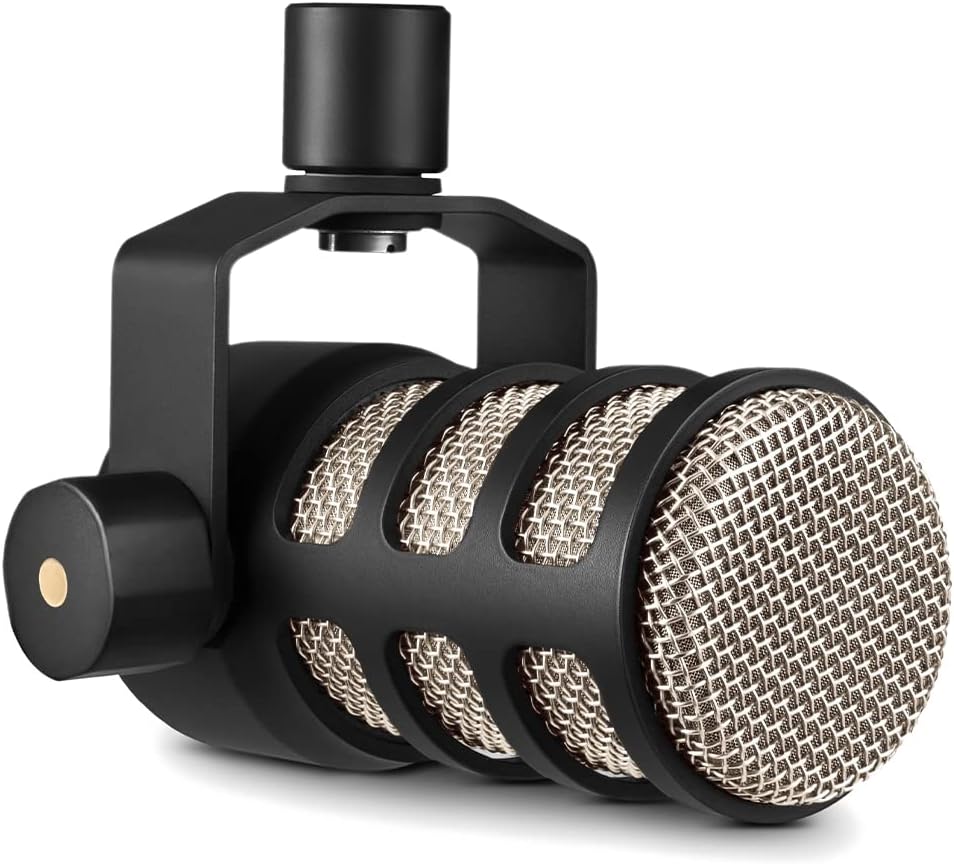
The RØDE PodMic receives a 4.8 rating for delivering focused podcast capture in a compact broadcast-style package. Its dynamic cardioid capsule is tuned for speech and designed to reject room noise in untreated spaces, offering a practical alternative to more sensitive condenser microphones.
We may earn a commission when you buy through this link, at no additional cost to you.
An internal pop filter and shock mounting help control plosives and desk thumps without requiring separate accessories. The all-metal body is built for frequent use, while the integrated swing mount allows the microphone to be positioned close to a host or guest. That close placement is important for dynamic microphones because it increases the direct voice signal relative to distant room sound.
The PodMic requires an audio interface or mixer with an XLR input, so it is not a direct computer microphone. It also lacks onboard gain, mute, or digital processing controls. A new podcaster could spend more time learning the signal chain than expected, but an experienced creator will appreciate a straightforward broadcast microphone that leaves level control to the interface.
The RØDE PodMic is an excellent fit for a compact home studio, a dedicated podcast desk, or an RØDECaster-style production environment. It works especially well for two-person conversations when each microphone is placed near its speaker. Choose it for reliable speech capture and integrated protection, and add an appropriate XLR interface for complete operation.
The internal pop filter handles the initial blast of air associated with plosives, while shock mounting reduces transmission of vibration. Together, they make the microphone easier to deploy in a working podcast desk.
A dynamic microphone generally benefits from being placed close to the source. The swing mount helps creators maintain that distance, which can produce a stronger voice signal and less audible room reflection.
We may earn a commission when you buy through this link, at no additional cost to you.
The Amazon Basics Condenser Microphone offers a straightforward route into podcast recording, with a 4.4 rating and a design centered on simple USB operation. Its 14mm diaphragm, low-noise characteristics, and cardioid pattern provide a familiar condenser format for solo speech, streaming, conferences, and basic music recording.
We may earn a commission when you buy through this link, at no additional cost to you.
The stand rotates through 360 degrees so the microphone can be adjusted toward the speaker, while the built-in shock absorber and silicone boot help limit movement and vibration. A one-tap mute function is convenient during calls or live sessions, and the standard 5/8-inch thread allows the microphone body to be removed from the stand and mounted on a compatible boom arm or tripod.
Compared with more advanced models, there are few onboard controls and no real-time processing beyond the mute function. Condenser sensitivity can also reveal keyboard noise, fans, and room reflections more readily than a broadcast dynamic microphone. A quieter workspace, closer placement, and restrained software processing remain important for a clean result.
This microphone is best for a beginner, a student, or a casual creator who needs dependable speech capture without a complicated signal chain. It can also serve as a secondary microphone when its standard mounting thread makes placement easier than that of a larger desktop model. Creators seeking detailed onboard monitoring or hybrid XLR operation will find more specialized options elsewhere in this guide.
The USB connection requires no additional drivers, making the microphone approachable for first-time podcasters. Its small stand and straightforward controls also make it convenient for occasional online meetings and livestreams.
The 5/8-inch thread allows the microphone to be transferred from the included desktop stand to another compatible stand or boom arm. That flexibility can help a creator improve consistency between different recording locations.
We may earn a commission when you buy through this link, at no additional cost to you.
The DJI Mic Mini is a 4.7-rated wireless system built for interviews, livestreams, travel, and content production. Each transmitter weighs only 10 grams and includes a lavalier format, giving hosts a much more discreet option than a large desk microphone while supporting two simultaneous wearable sources.
We may earn a commission when you buy through this link, at no additional cost to you.
The package includes two transmitters, one receiver, and a charging case. Audio is sampled at 48kHz, the stated maximum transmission range reaches 400 meters, and the system supports a 120dB SPL capability. Basic and Strong noise cancellation levels provide different levels of environmental control, while automatic limiting reduces the likelihood of clipping when the input rises too high.
Wireless recording introduces considerations that a wired desktop microphone does not. The receiver still needs a dependable connection to the computer or camera, storage must be adequate for the captured files, and a creator should understand how the system behaves around interference or across large distances. The single receiver also creates a limit when two transmitters are in use, even though the case supports extended recording.
DJI ecosystem users gain direct connection options with several listed cameras and mobile devices, while the lav form factor suits field interviews and dual-camera production. This is our recommended pick for creators prioritizing mobility and battery life. It is less suitable for a stationary solo podcast where a wired microphone offers simpler signal routing, lower-latency monitoring, and fewer points of failure.
The 10-gram transmitters are designed to be worn rather than aimed at the speaker. That allows guests to move naturally, which is especially useful for location interviews, collaborative streams, and video recorded in changing environments.
Basic cancellation is suited to quieter indoor spaces, while Strong mode is intended for busier surroundings. Automatic limiting adds another layer of protection by managing unexpectedly loud input before it causes severe clipping.
We may earn a commission when you buy through this link, at no additional cost to you.
The standalone Shure MV7+ shares the core versatility of the stand-equipped version, providing a 4.6-rated USB-C and XLR microphone with onboard processing. It is particularly attractive to creators who already own a suitable boom arm or stand and want to build a more deliberate recording environment.
We may earn a commission when you buy through this link, at no additional cost to you.
Auto Level Mode adjusts gain according to the user's distance and speaking volume, while the real-time denoiser reduces background noise. The multicolor touch panel displays level information, supports tap-to-mute, and allows visual customization for streams and on-camera podcasts. Integrated Plate, Hall, and Studio reverb modes can add depth to a voice, although a conventional spoken-word podcast may need little or none.
Because the stand is not included, a first-time creator may need to source a suitable mount separately. The menu-driven app and touch interface also carry a steeper learning curve than a simple volume knob. In addition, digital effects cannot fully replace acoustic treatment: a highly reverberant room may still create artifacts that aggressive processing accentuates.
This MV7+ configuration is ideal for an established creator who wants hybrid connectivity and sophisticated digital tools without replacing a preferred stand. It is also a strong option for livestreamers and on-camera podcasters because mute status and levels are easy to see. For the simplest premium setup, the stand-equipped variant is the more complete package.
Auto Level responds to both vocal volume and distance, which can make remote or spontaneous interviews more consistent. It reduces repetitive gain changes, though the final level should still be checked against the recording software's meter.
Plate, Hall, and Studio modes provide useful options for narrative podcasting, voice-over, and live performance. For clear spoken word, the effect should remain subtle because excessive reverberation can reduce intelligibility and obscure the natural character of the voice.
We may earn a commission when you buy through this link, at no additional cost to you.
The best podcast microphone depends on how you record, where you record, and how much control you want. Connection type, capsule behavior, monitoring, accessories, and room conditions should be considered together rather than independently.
Choose USB for simplicity, or XLR for a permanent studio setup. A hybrid model offers the most flexibility.
Dynamic mics favor untreated rooms, while condensers reward a controlled recording environment. Test both if possible.
Use cardioid for most solo shows, and bidirectional only when it suits a genuine two-person layout.
Look for direct headphone monitoring, especially if you want to hear your voice naturally while speaking.
Prioritize placement and room control first, then use noise reduction and automatic leveling conservatively.
Choose accessories that improve stable positioning and reduce noise rather than simply adding more pieces.
Choose wireless for mobile and multi-person field work, and wired for dependable fixed-studio recording.
Begin by choosing a stable position close to your mouth, generally in a soft, quiet area and away from computer fans, air conditioners, and hard reflective surfaces. Connect the microphone according to its output type, select the appropriate input in recording software, and perform a short sound check. Keep gain below the point where the loudest speech clips, and watch the software meter rather than relying only on the microphone's own indicator.
Speak at a natural volume and distance throughout the session. If using a condenser, remain alert to keyboard taps and mouth sounds; if using a dynamic microphone, move it closer if the voice sounds thin or the room is reflective. Use headphones for monitoring, check the first minute of audio, and save a backup copy before editing. Avoid speaking into the pop filter as though it were a grille, because that can create a muffled result.
For care, unplug the microphone before changing cables or moving it between a stand and an interface. Keep condensation, drinks, and loose cables away from the body, and clean the exterior with a soft dry cloth rather than liquid cleaners. Windshields, foam covers, and external pop filters can trap moisture, so let them dry fully before storage. Store the microphone in a padded case, protect XLR pins from impact, and periodically inspect cables, adapters, threads, and mounting hardware.
A USB microphone is usually the easiest starting point because it connects directly to a computer and often includes gain, mute, and headphone monitoring. A cardioid USB condenser works well for a quiet room and solo host, while a USB dynamic can be easier to control in a noisier space. Choose according to the room and recording format rather than assuming one capsule type always sounds better.
Neither is universally better. Dynamic microphones are often easier to use in untreated rooms because they emphasize the nearby voice and handle room reflections confidently. Condenser microphones can capture more detail and sensitivity, but they may reveal more keyboard noise, fans, and reverberation. Placement, gain control, and room treatment remain influential in either case.
You need one if the microphone uses XLR output or if you want a dedicated interface for gain, monitoring, and multiple inputs. You do not need one for a standard USB microphone that connects directly to the computer. Hybrid microphones support both approaches, allowing a creator to start with USB and move to XLR later.
Two separate microphones placed near each speaker usually provide clearer and more consistent results than one microphone shared across the desk. Cardioid dynamic microphones or compact broadcast models are often practical for conversation because they limit the pickup of opposite speakers. Wireless lavalier systems can also work well when mobility and visual discretion matter more than a fixed desk setup.
Yes, most USB podcast microphones function as standard computer microphones and work with streaming, conferencing, and recording applications. Models with onboard mute and a visible status light are particularly convenient for live use. Confirm operating-system compatibility and check whether a monitoring feature or included app requires additional setup.
No. Digital noise reduction and voice isolation can reduce steady distractions, but they cannot fully remove reverberation or prevent a microphone from recording an entire room. Soft furnishings, strategic placement, a close speaking distance, and restrained gain are still the most important tools for clear podcast audio.
Headphones are highly recommended because they let you monitor the microphone, hear level problems, and avoid accidental speaker feedback. Zero-latency monitoring makes speech easier to record. Use a comfortable volume level, keep one ear open when monitoring a live conversation is necessary, and save regular backup recordings throughout the session.
Wireless microphones do not inherently lose sound quality simply because they use a wireless connection, although recording format, interference, transmitter range, and receiver handling can affect the workflow. Keep transmitters and receivers charged, maintain a reasonable distance, confirm compatibility, and monitor the recording. The DJI Mic Mini's 48-hour stated case battery life is designed to support extended trips and intensive production.
The Shure MV7+ with Stand leads the guide because its hybrid USB-C and XLR design, speech-focused dynamic capsule, voice isolation, automatic leveling, and touch controls support everything from first recordings to advanced studio production. The DJI Mic Mini stands apart for mobile interviews and two-person wearable capture, while the ZealSound Podcast Microphone offers an accessible entry point with monitoring, noise reduction, and extensive physical control.
Choose based on the recording environment as much as the specification list. A quiet room can make a modest USB microphone perform well, while an untreated room may benefit more from a close-positioned dynamic microphone and restrained digital processing. XLR models suit permanent studio systems, whereas wireless systems prioritize mobility. Accessories, monitoring, and ease of use should be judged according to how often and where the podcast will be recorded.
Before purchasing, verify current specifications, device compatibility, included components, and current pricing. Product details and availability can change, so check the latest listing and accessories carefully. With the correct microphone, thoughtful placement, controlled gain, and a reliable recording habit, a home creator can produce clear and engaging podcast audio.