
Celeron N5105 Industrial NAS Motherboard
4.5Editor score
Quad-core N5105 processor
Four 2.5GbE network ports
Six SATA and two M.2 slots
This Low Power Motherboard guide compares 10 efficient models for NAS, home servers, firewalls, compact PCs, and everyday computing needs.
A low power motherboard can provide an excellent foundation for a compact NAS, home server, firewall, media center, or quiet office computer. The most useful board balances processor efficiency, networking, storage options, memory support, and expansion potential without requiring a large, power-hungry desktop platform.
The products in this guide were compared using their published specifications, including processor type, chassis size, Ethernet capabilities, memory support, storage connectivity, display outputs, and intended applications. The list covers purpose-built industrial boards, mini-ITX models, and micro-ATX options for buyers with different case, processor, and networking requirements.
Each review identifies the role the motherboard is best suited to fill, along with its standout features and practical limitations. Ratings and product details reflect the supplied marketplace information, while availability and pricing can change. Always confirm processor inclusion, case support, BIOS behavior, and operating-system requirements before ordering.
4.5Editor score

5.0Editor score

4.0Editor score
This side-by-side comparison highlights each board's processor, form factor, networking, storage, and memory capabilities so you can quickly identify the most appropriate platform for a compact, energy-conscious system.



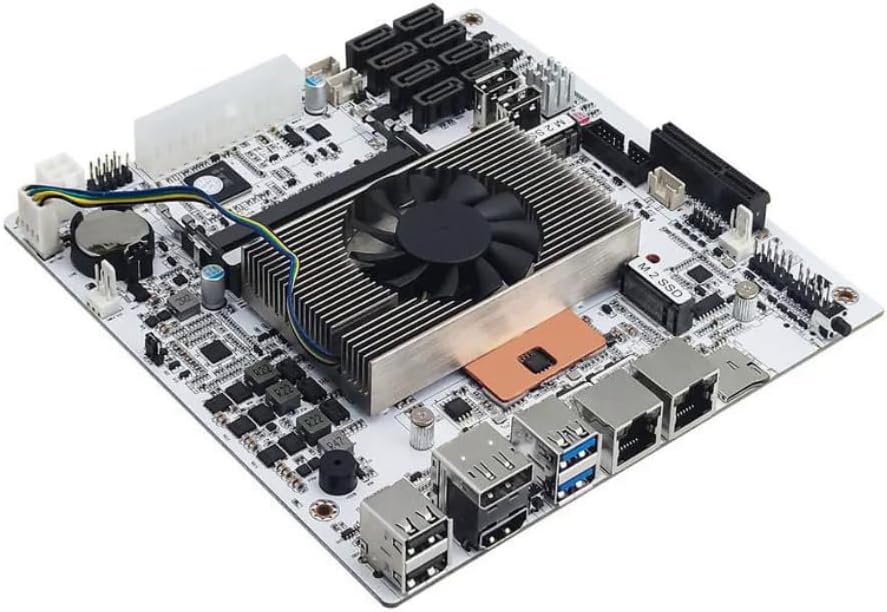
This Celeron N5105 industrial motherboard combines an efficient 4-core, 4-thread processor with networking and storage capabilities rarely found together in a compact package. Its 4.5 rating reflects a strong balance for NAS, firewall, and network-security applications, while the integrated Intel UHD Graphics makes it practical for systems that also need a local display.
We may earn a commission when you buy through this link, at no additional cost to you.
The standout feature is the set of four Intel i226 2.5GbE ports. Multiple wired connections allow separate networks, virtualized routers, direct client access, and aggregation workflows without requiring an assortment of add-in adapters. Six SATA connectors and two M.2 NVMe 2280 slots provide a flexible mix of hard-drive capacity and high-speed cache, while two DDR4 slots support up to 32GB of non-ECC memory.
There are trade-offs. The board needs both 24-pin and 4-pin power connections, making the power-supply arrangement more involved than a standard desktop installation. It also takes several minutes to read memory information during its initial boot. Buyers wanting a simpler consumer experience should understand that this is an industrial platform rather than a polished general-purpose desktop board.
This is the strongest recommendation for a dedicated low power NAS or multi-network appliance with substantial storage requirements. It is particularly compelling when four fast Ethernet interfaces are more valuable than upgradeable desktop graphics. Confirm your enclosure accepts the 17-by-17-centimeter Mini-ITX layout and verify the SATA-port population before planning a high-drive-count system.
Four Intel 2.5GbE controllers create a flexible foundation for segmented networks, virtualized firewalls, VPN gateways, and direct-to-NAS transfers. Separate interfaces can also reduce bottlenecks when several users access stored media concurrently.
Six SATA ports support conventional hard drives, while two M.2 slots allow NVMe devices to accelerate system operations or provide fast scratch storage. This combination suits a tiered setup in which frequently accessed files sit on flash and bulk media remains on hard drives.
We may earn a commission when you buy through this link, at no additional cost to you.
The ASRock NA D1800M is a straightforward low power option for lightweight tasks, with the dual-core Intel J1800 processor already installed. Its 4.0 rating indicates a capable basic platform for file serving, downloads, thin-client work, and simple office use, although its older platform is not designed for demanding modern workloads.
We may earn a commission when you buy through this link, at no additional cost to you.
The board includes dual-channel DDR3 memory support across two slots, a maximum capacity of 16GB, and two SATA 2.0 connectors. Gigabit Ethernet makes it suitable for a modest home server, while VGA, HDMI, and DVI-D outputs provide unusual display flexibility for an embedded board of this type. Four USB 3.0 and six USB 2.0 connections cover common peripherals.
The limitations are significant for anyone planning future expansion. DDR3 memory, SATA 2.0, and PCIe 2.0 are dated technologies, while the CPU has only two cores. There is also no M.2 connector for compact NVMe storage. These constraints make the board better suited to a fixed-purpose build than a system expected to grow rapidly.
Choose the NA D1800M when simplicity and affordability matter more than modern connectivity. It can work well as a download box, printer server, lightweight file server, or basic desktop replacement when the operating system and software have modest requirements. Confirm your case supports micro-ATX and that the included processor and memory configuration meet your software's needs.
Because the J1800 processor is included, builders can focus on memory, storage, and operating-system installation rather than shopping for a separate CPU. That simplicity makes this model approachable for first-time compact-system builders.
VGA, DVI-D, and HDMI outputs make the board easy to deploy with different monitors and display styles. That flexibility is useful for recycling older equipment or building a dedicated information display.
We may earn a commission when you buy through this link, at no additional cost to you.
The Gigabyte B550M K is a value-focused micro-ATX board for builders who want the low power potential of an efficient Ryzen processor without moving to a specialized industrial product. Its 4.4 rating reflects broad platform support and a practical collection of storage and expansion options.
We may earn a commission when you buy through this link, at no additional cost to you.
Support for Ryzen 5000, 4000, and 3000 series processors gives buyers a wide choice of CPUs. Four DDR4 DIMM slots are more flexible than the two-slot configurations found on many embedded boards, while one PCIe 4.0 M.2 slot and one PCIe 3.0 M.2 slot allow fast and inexpensive solid-state storage. A PCIe 4.0 x16 slot, four USB 3.2 Gen1 ports, and Gigabit LAN cover common needs.
The board requires a compatible AM4 processor and separate memory. Its 3+3 power phase is suitable for mainstream efficient chips, but buyers should avoid assuming it is equivalent to a higher-end board designed for sustained heavy workloads. The micro-ATX format is also larger than Mini-ITX, so a compact enclosure must specifically support 244-by-244-millimeter boards.
This motherboard suits an efficient office PC, lightweight home server, or general desktop where a modern AM4 processor already exists or is readily available. It is less attractive for a four-network NAS because it has only one Ethernet controller. Verify the CPU support list, case dimensions, and memory configuration before purchasing.
The broad Ryzen support and four DIMM slots make this board easier to tailor to different budgets and workloads. A low-wattage Ryzen processor can create a capable, efficient system without requiring a proprietary board.
Two M.2 positions support both high-speed and value-oriented SSDs. That makes it possible to use a fast Gen4 drive for operating-system tasks and a less costly drive for general storage.
We may earn a commission when you buy through this link, at no additional cost to you.
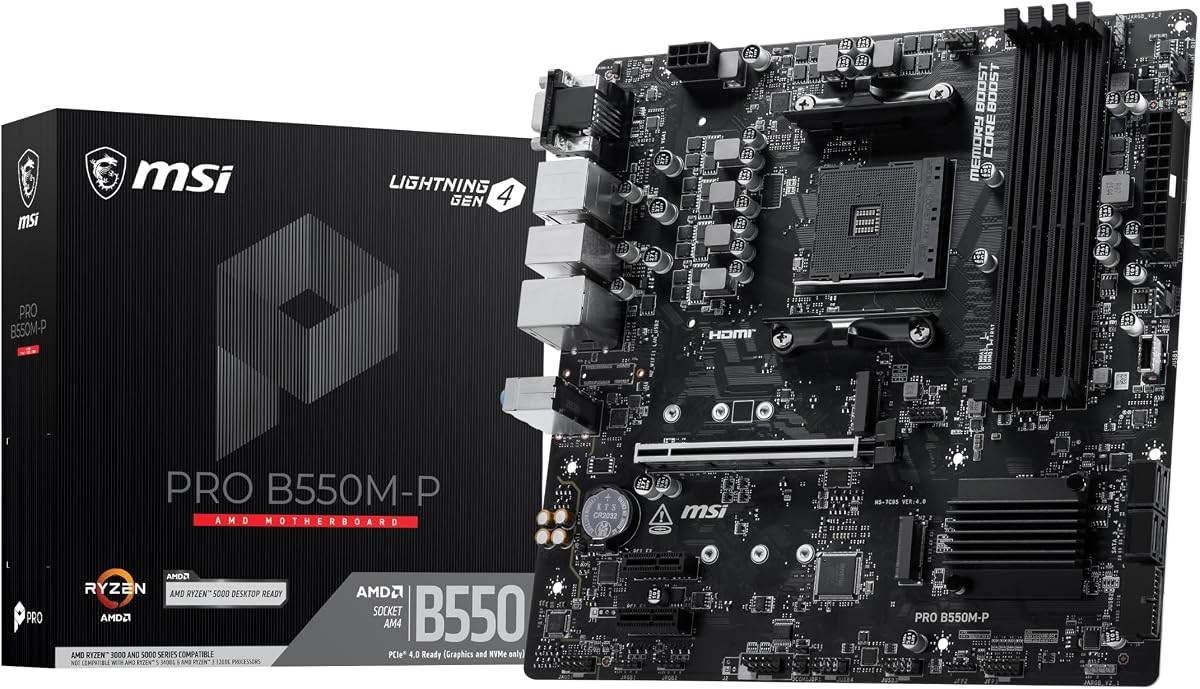
The MSI PRO B550M-P is a well-balanced micro-ATX AM4 platform for efficient desktop processors. It carries a 4.4 rating and offers a combination of four memory slots, modern storage connectors, PCIe 4.0 expansion, and passive chipset cooling that makes it particularly practical for compact productivity systems.
We may earn a commission when you buy through this link, at no additional cost to you.
The board supports several generations of Ryzen desktop processors, and its MSI Core Boost VRM design is intended to improve stability and performance. One PCIe 4.0 M.2 x4 slot provides a high-bandwidth path for NVMe storage, while the second PCIe 3.0 M.2 x4 slot offers additional flexibility. Four DDR4 DIMM positions can accommodate larger memory configurations than many embedded boards.
Its primary limitation is that it does not include a processor, so the total system configuration depends on the chosen CPU and cooler. One Gigabit Ethernet controller is adequate for standard networking but not for segmented or aggregated NAS networks. The micro-ATX dimensions also demand a compatible enclosure, and any desktop-class processor should be paired with suitable cooling.
This MSI board is a good match for a low-power productivity computer, compact gaming platform, or workstation using an efficient supported Ryzen chip. It is especially attractive when storage performance matters and you want flexibility without moving to a full-size motherboard. Check CPU support, BIOS requirements, and case clearance before ordering.
The Gen4 x4 slot can take advantage of compatible high-speed NVMe drives, while the second M.2 connector reduces the need to share SATA bandwidth for less demanding storage. This makes the board useful for editing, development, and fast game-loading tasks.
The chipset relies on passive heatsinks, reducing fan noise compared with actively cooled alternatives. Frozr AI cooling can also adjust system fan behavior according to processor and graphics-card temperatures.
We may earn a commission when you buy through this link, at no additional cost to you.
The ASRock J4125M is an integrated, low power motherboard built around the Intel J4125 quad-core processor, which operates up to 2.7GHz. Its 3.4 rating is the lowest among the selections, so buyers should approach it as a specialized embedded option rather than a broadly capable modern desktop platform.
We may earn a commission when you buy through this link, at no additional cost to you.
Integration simplifies the build by eliminating the need to purchase a CPU. The board supports DDR4 2133 or 2400 long DIMMs and includes a PCIe 2.0 x16 slot operating in x1 mode plus two PCIe 2.0 x1 slots. An M.2 Key E socket provides a route to compatible Intel CNVi Wi-Fi and Bluetooth modules.
The older PCIe generation and limited slot count constrain graphics, accelerator, and storage expansion. Some potentially useful features may also depend on the exact system configuration, making detailed documentation review important. The lower rating suggests that buyers should have clear expectations about performance and support.
Choose this board for a small embedded terminal, lightweight kiosk, simple media device, or dedicated management system where quad-core processing and DDR4 support matter more than modern expansion. It may appeal to builders already familiar with J4125 platforms. Verify case fit, available rear connections, storage attachment, and wireless-module compatibility before purchasing.
The J4125's four cores can handle several lightweight services more comfortably than a basic dual-core platform. Keeping the processor on the board also simplifies installation and makes the board attractive for dedicated appliances.
The M.2 Key E socket supports compatible Intel CNVi wireless modules, useful when running a network appliance without a permanent wired connection. Module, antenna, and operating-system support should be checked before assembly.
We may earn a commission when you buy through this link, at no additional cost to you.
The ASRock B550M-HDV earns a 4.5 rating by combining a modern AM4 platform with unusually practical display and storage support. It supports Ryzen 5000, 4000, and 3000 processors and offers a micro-ATX layout that balances expansion capability with a manageable footprint.
We may earn a commission when you buy through this link, at no additional cost to you.
One of its most useful traits is the choice of HDMI, DVI-D, and VGA outputs. That makes it easy to reuse various displays in an office, home, or kiosk-style computer. Its Hyper M.2 slot supports PCIe Gen4 x4 and SATA operation, while four SATA 3.0 ports handle multiple conventional drives. Six USB 3.2 Gen1 ports, Gigabit LAN, and 7.1-channel audio cover standard desktop connectivity.
Only two DDR4 slots are provided, which can constrain memory capacity and future upgrades. AMD's Ryzen 5000 family is supported, but motherboard BIOS versions and processor exceptions should be verified. The board also needs a separate CPU, and some users may find its basic feature set less compelling than newer alternatives.
This motherboard is a sensible choice for an efficient office computer or home server with mixed display requirements. Its combination of NVMe and SATA support also works well when one fast boot drive is accompanied by several hard drives. Confirm micro-ATX case support and inspect the current CPU compatibility list before ordering.
Having HDMI, DVI-D, and VGA allows the system to connect to both modern and older displays without requiring adapters. This is valuable for offices, labs, and installations that inherit equipment rather than choose everything from scratch.
Full Spike Protection is listed for USB, audio, and LAN connections, adding resilience against electrical surges. Its six-phase power design and premium chokes are intended to support stable operation with compatible processors.
We may earn a commission when you buy through this link, at no additional cost to you.
The Gigabyte A520I AC is a compact Mini-ITX board aimed at efficient third-generation Ryzen systems. Its 4.4 rating reflects a well-equipped small-form-factor option, particularly for users who value built-in wireless connectivity, a modest footprint, and straightforward desktop features.
We may earn a commission when you buy through this link, at no additional cost to you.
Intel dual-band Wi-Fi and Bluetooth eliminate the need for a separate wireless adapter, while Gigabit Ethernet provides a wired option. A PCIe 3.0 x16 slot, one PCIe 3.0 x4 M.2 connector, and two DDR4 DIMM slots cover the core requirements of a compact PC. Rear DisplayPort and dual HDMI outputs also provide more display choices than many boards in this size class.
Its support is centered on third-generation Ryzen processors, so buyers should verify the exact CPU list and BIOS status. There is only one M.2 slot and two memory positions, reducing room for later expansion. Like other desktop boards, it requires a processor, memory, cooler, and a case designed for Mini-ITX components.
The A520I AC is well suited to a compact office computer, living-room media machine, or small system where wireless access is more important than extensive storage expansion. It may also serve as a quiet everyday desktop when paired with a suitably efficient Ryzen CPU. Check processor support and M.2 lane compatibility before finalizing the build.
Integrated Intel dual-band Wi-Fi and Bluetooth provide immediate network flexibility, which is valuable in homes and offices where a cable cannot easily reach the final system location. An antenna is included for wireless use.
The Mini-ITX format fits small enclosures, and the combination of DisplayPort with two HDMI connections supports several display arrangements. Q-Flash Plus provides a convenient route for updating the BIOS without relying entirely on a fully booted operating system.
We may earn a commission when you buy through this link, at no additional cost to you.
The ASRock B550M WiFi is the feature-rich all-rounder of this guide, carrying a 5.0 rating and a broad collection of capabilities in a micro-ATX design. It supports Ryzen 3000 through 5000 processors and is aimed at buyers who want modern connectivity without moving to a larger motherboard.
We may earn a commission when you buy through this link, at no additional cost to you.
Its eight-phase power design, four DDR4 slots, and stated support for up to 128GB make it more flexible than many embedded alternatives. Storage includes a PCIe Gen4 x4 M.2 slot and four SATA 3.0 ports. Wi-Fi 6E with 6GHz support, HDMI 2.1, DisplayPort 1.4, eight USB 3.2 Gen1 ports, and six USB 2.0 ports create a particularly well-connected desktop platform.
The board is not as specialized for a NAS as the purpose-built four-network models, since it has one Gigabit Ethernet port. It also requires a separate AM4 processor and a compatible micro-ATX case. As with any high-feature board, buyers should check the CPU support list, BIOS version, wireless antenna arrangement, and operating-system drivers.
This is our Editor's Choice because it balances efficiency-related flexibility with the largest number of useful consumer features in the lineup. Pair it with a suitably efficient supported Ryzen processor for an office PC, compact workstation, or gaming system that still needs to live in a smaller enclosure. It offers the broadest all-round package for general-purpose low power builds.
Wi-Fi 6E and Bluetooth provide fast wireless access and convenient peripheral pairing. Including these functions on the board keeps the build tidier and avoids occupying a PCIe slot with a separate adapter.
Four memory slots and support for up to 128GB make the board suitable for more demanding operating systems and creative workloads. The combination of a PCIe Gen4 M.2 slot with four SATA ports supports both fast flash storage and multiple conventional drives.
We may earn a commission when you buy through this link, at no additional cost to you.
This industrial Mini-ITX motherboard pairs an eighth-generation U-series quad-core, eight-thread processor with a 15-watt TDP and a strong storage platform. Its 4.1 rating reflects capable server-oriented specifications, while the inclusion of virtualization support and dual 2.5GbE networking makes it relevant for firewalls, virtual machines, and compact NAS systems.
We may earn a commission when you buy through this link, at no additional cost to you.
The board offers eight SATA 3.0 ports, two PCIe 3.0 x2 M.2 NVMe 2280 slots, and a PCIe x4 Gen3 expansion slot. Two DDR4 SO-DIMM positions accept modules from 2133 to 3200MHz, with up to 32GB per slot. A six-layer moisture-resistant PCB, dual ball-bearing cooler with copper heat pipes, and dual 4K display support make it a credible appliance-oriented platform.
A known sleep-mode bug is explicitly associated with this version, which is a serious concern for systems that depend on power-saving states or wake-on-network behavior. It also needs both 24-pin and 4-pin power connections, and first boot may take several minutes while memory information is read. These points should be evaluated before deployment.
Choose this model for a compact, always-on home server with substantial drive support or a virtualized network appliance. Its processor provides more threads than typical low-power embedded chips, making it attractive for multiple lightweight services. If sleep functionality is essential, verify the issue with the seller and avoid relying on the affected behavior.
The processor's eight threads offer more scheduling capacity than basic quad-core embedded chips while retaining a low 15-watt TDP. This makes the board useful for virtual machines, container services, and lightly shared storage workloads.
Eight SATA connectors reduce dependence on expansion cards for conventional drives, and two NVMe slots provide fast storage paths. The additional PCIe slot remains available for compatible networking or storage adapters.
We may earn a commission when you buy through this link, at no additional cost to you.
The Core i5 8265U NAS M11 is built specifically around eight-bay storage, making it one of the clearest choices for a dedicated low power NAS. Its integrated Core i5 8265U ES processor has four cores, eight threads, a 15-watt TDP, and support for VT-x and VT-d virtualization.
We may earn a commission when you buy through this link, at no additional cost to you.
Eight SATA 3.0 connectors cover conventional hard drives, while two PCIe 3.0 x2 M.2 slots support 2280 NVMe drives. Dual Intel i226-V 2.5GbE controllers provide fast wired networking and can support link aggregation. The board is listed as compatible with open-source NAS systems such as TrueNAS or Unraid, along with Windows, Linux, and Proxmox virtualization environments.
Sleep mode is not supported, which may matter for some power-management strategies, although continuous-operation NAS use is the likely application. The listed 4.5 rating should not be confused with the marketplace's numeric field, where no rating is supplied. The white Mini-ITX enclosure-oriented design and included I/O shield add convenience, but enclosure clearance still needs verification.
This motherboard is best for a multi-bay home NAS that prioritizes storage, efficient processing, and dual fast networking. It can also serve as a virtualization host when paired with compatible software and sufficient memory. Review the manual, BIOS behavior, storage controller arrangement, and case dimensions before committing to the build.
Eight SATA ports allow a storage-focused system to be assembled without sacrificing expansion slots to drive adapters. Two native SATA ports and six expanded ports are provided for flexible drive layouts.
Dual i226-V controllers support high-speed transfers and link aggregation, while VT-x and VT-d support opens virtualization options. The board is suitable for NAS operating systems, Linux, Windows, and Proxmox-style environments.
We may earn a commission when you buy through this link, at no additional cost to you.
Choosing a low power motherboard starts with the role of the finished system. Processor efficiency, networking, storage, memory, form factor, display needs, and expansion requirements should be evaluated together rather than as isolated specifications.
The processor usually determines most of a system's idle and workload power use. Low-power embedded chips such as the Intel Celeron N5105, J1800, and J4125 are suitable for basic services, while the Core i5 8265U and eighth-generation quad-core U-series option provide more threads for virtualization or heavier background work. Desktop-oriented AM4 boards offer broader CPU choice but require the builder to select an efficient Ryzen model separately.
A single Gigabit Ethernet port is sufficient for ordinary browsing, office use, and light file sharing. A 2.5GbE connection can accelerate transfers to modern NAS clients and create separation between management and data networks. Four-port boards support more elaborate routing, firewall, virtual-machine, and aggregation designs, but they also require a chassis with enough openings and a careful network configuration.
SATA remains essential for inexpensive high-capacity hard drives, while M.2 NVMe slots provide fast solid-state storage for operating systems, databases, caches, and active projects. The strongest NAS-oriented models in this guide provide eight SATA connectors, whereas the most compact general-purpose boards offer one or two. Consider whether additional PCIe adapters, power cables, and cooling are needed for the intended drive count.
Mini-ITX and the compact 17-by-17-centimeter boards in this guide fit many small NAS and server cases, while micro-ATX requires a larger chassis. Compare board dimensions, not just socket support, and check rear-port alignment, mounting-hole patterns, standoff positions, and clearances for coolers and expansion cards. A compact board still needs adequate airflow around processors, drives, and power components.
Two SO-DIMM slots are common on embedded NAS boards, while four DIMM slots appear on the AM4 micro-ATX options. More slots offer easier capacity expansion, but maximum supported memory varies by model. Confirm supported module type, speed, size, and operating-system limits. For virtualization, large-memory support and stable operation under sustained memory pressure can matter more than a high advertised clock rate.
Display outputs are essential for local administration, troubleshooting, kiosks, and media systems. HDMI, DisplayPort, VGA, and DVI provide different levels of compatibility, while integrated Wi-Fi and Bluetooth can simplify an office or living-room installation. Also count USB ports needed for external drives, boot devices, encryption keys, front panels, and other accessories rather than focusing only on the rear panel.
Purpose-built server boards may target Linux, TrueNAS, Unraid, or virtualization software, while desktop boards are commonly used with Windows or Linux. Confirm network-controller drivers, storage-controller behavior, boot support, display output availability, and hardware-management features under your intended operating system. Embedded firmware can also differ in BIOS options, automatic power behavior, and recovery features.
Several industrial boards require both a 24-pin ATX connection and a 4-pin CPU power lead, so the power supply and cable routing must support that arrangement. Embedded processors usually need less cooling than desktop CPUs, but integrated boards still require unobstructed airflow and suitable storage cooling. Review first-boot behavior, sleep limitations, recovery controls, and included coolers when reliability matters.
Begin by confirming that the processor, memory, storage devices, cooler, operating system, and case are mutually compatible. Assemble the system on a nonconductive surface, install the processor and memory according to the board markings, attach the required power leads, and connect storage before adding peripherals. Follow the manufacturer's instructions for CPU support and BIOS configuration rather than assuming every AM4 or embedded board behaves identically.
On first startup, allow additional time for memory detection, especially on the industrial models whose specifications mention a prolonged initial boot. Enter the BIOS with the specified key if you need to confirm boot order, storage mode, virtualization, or network settings. Install the operating system, update the BIOS and drivers as appropriate, configure networking, and enable only the storage services the system actually needs.
For long-term operation, provide airflow around the board and hard drives, use a surge-protected and appropriately sized power supply, and schedule regular data verification. Keep drive firmware and operating-system software current, maintain replacement drive availability, and back up critical data to a separate system. If the board uses continuous server operation, avoid sleep-dependent schedules and test recovery behavior periodically.
Mini-ITX is often the easiest choice for a compact server because many small NAS cases support it directly. Some specialized industrial boards use the same general 170-by-170-millimeter dimensions but have proprietary features, so physical fit should still be confirmed. Micro-ATX provides more expansion and memory options when the enclosure can accommodate it. The best format is ultimately the one that matches the case, cooling arrangement, and number of drives you need.
Some do, while others require the builder to install one separately. The Celeron N5105, J1800, J4125, eighth-generation quad-core U-series, and Core i5 8265U products described here include their processors. The ASRock, Gigabyte, and MSI AM4 boards generally require a compatible Ryzen processor and compatible cooler. Always check the listing details before planning a parts list.
For most homes and small offices, one 2.5GbE port is more than sufficient for routine backups, media streaming, and document access. Two ports can support link aggregation or separate management and data networks, provided the network equipment and operating system support the intended configuration. Four ports are useful for advanced firewall, virtualization, and segmented-network designs.
A lightweight Linux service or small file-sharing installation may need only a modest amount of memory, while virtualization and multi-user storage workloads benefit from substantially more. The boards in this guide range from two slots with limited capacity to four slots supporting larger configurations. Choose memory based on the operating system's requirements, the number of concurrent users, and the planned virtualization workload.
Several models are explicitly positioned for NAS, firewall, or continuous-operation use, and their low-power processors can suit always-on services. Actual reliability also depends on the power supply, cooling, drive quality, vibration, and system configuration. Review the product notes for known sleep issues, ensure the operating system can remain active continuously, and implement tested recovery and backup procedures.
Yes, on models that include a compatible M.2 connector and BIOS support for booting from NVMe. The purpose-built NAS boards in this guide provide two M.2 NVMe slots, while the general-purpose models offer one or two M.2 positions with different PCIe generations. Confirm slot width, key type, lane configuration, boot support, and operating-system driver requirements before purchasing a drive.
Many of the included processors provide integrated graphics, allowing a monitor to be connected through the board's HDMI, DisplayPort, VGA, or DVI output. Desktop AM4 boards generally require a processor with integrated graphics unless a discrete card is installed. An embedded board's available display output can depend on the specific CPU configuration, so verify connector availability in the product details.
A desktop AM4 board is ideal when you want flexible processor selection, a familiar operating system, better graphics and peripheral support, or easier general upgrades. An industrial NAS board is better when storage count, multiple fast network ports, a compact embedded processor, and appliance-style operation matter most. Compare BIOS behavior, driver support, case fit, sleep functionality, and included cooling rather than relying on form factor alone.
The Celeron N5105 industrial NAS motherboard is the standout choice for storage-rich, multi-network appliance builds, while the ASRock B550M WiFi offers the most versatile general-purpose package. The ASRock NA D1800M provides the most approachable entry point for basic servers and lightweight desktop duties when older interfaces and modest expansion are acceptable.
Before buying, prioritize the workload over headline features. Multi-bay NAS users should count SATA connectors and verify power delivery, network-intensive projects should assess Ethernet speed and port count, and general-purpose systems should confirm processor support, memory limits, graphics output, and case fit. Sleep-mode limitations and unusual first-boot behavior deserve equal attention to expansion specifications.
Finally, check current pricing, availability, warranty terms, and the latest product documentation at the time of purchase. Marketplace listings can change, and compatible memory, processors, storage, cases, and power supplies can materially affect both cost and reliability. Treat the guide as a technical shortlist, then build a complete, verified system around the model that matches your actual workload.
