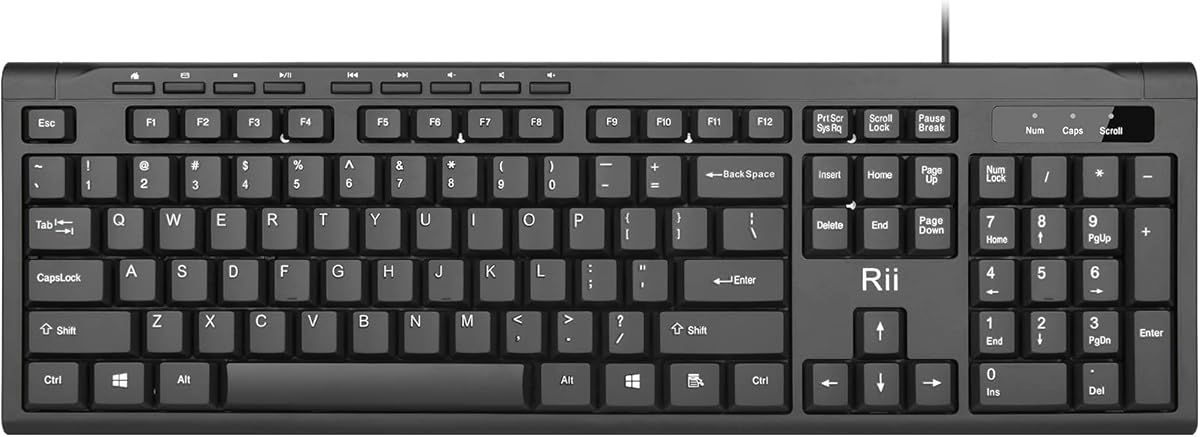
Rii RK907 Ultra-Slim Compact Keyboard
4.5Editor score
Low-profile wired construction
Quiet everyday typing
Mac and PC compatibility
Splash-resistant design
Our lightweight keyboard guide compares 10 compact, portable models for typing, gaming, travel, media control, multi-device work, and everyday productivity.
A lightweight keyboard can make a crowded desk feel more open, fit comfortably into a travel bag, or give a phone and tablet a more productive typing experience. The best model balances low weight with familiar keys, dependable connectivity, useful controls, and a layout that suits the way you work.
We compared all 10 products by examining their stated dimensions, weight, key layouts, connection methods, battery behavior, portability, and intended uses. The list covers compact gaming boards, wireless office models, foldable travel keyboards, full-size alternatives, a media-focused keyboard, and premium desktop-style options.
Each review highlights the product that matters most to different shoppers, from a straightforward wired model to a premium illuminated board for multi-device work. Ratings reflect the supplied customer feedback, while features, availability, compatibility, and retailer offers can change over time.
4.5Editor score

4.4Editor score

4.4Editor score
The table below compares the ten keyboards by layout, connectivity, portability, and key features, making it easier to identify the model that best matches your desk, devices, and travel habits.



The GEODMAER 65% Gaming Keyboard combines a compact 68-key arrangement with features aimed specifically at PC gamers. Its 4.3 rating reflects generally favorable customer feedback, while the strongest attractions are the anti-ghosting behavior, wired responsiveness, dedicated arrow keys, and adjustable backlighting. The layout saves desk space without reducing the board to an extremely limited mobile-style arrangement.
We may earn a commission when you buy through this link, at no additional cost to you.
The keyboard uses a detachable Type-C cable, providing a consistent connection without requiring batteries or wireless pairing. Its 26-key no-conflict design is intended to register simultaneous inputs, and the lockable Windows keys can reduce accidental presses during fast play. The two-color injection-molded keycaps use transparent characters, making the legends easier to locate in a dark room.
Several useful lighting modes are available. The backlight can remain constant, turn off, or use a breathing effect, while the supplied controls adjust brightness and breathing frequency. The membrane switches are quieter than many mechanical gaming keyboards, which may suit shared rooms, although some players may prefer the sharper feel and longer service life commonly associated with mechanical switches.
This is a strong option for a gamer who wants a small desk footprint, stable wired performance, and visible controls without paying for a full-size board. It is less suitable for someone seeking Bluetooth flexibility or a premium mechanical feel. For competitive-style convenience in a compact package, however, the GEODMAER offers a focused and practical feature set.
The backlighting system goes beyond a single fixed glow with constant, breathing, and off modes, plus brightness and frequency adjustments. Lockable Windows keys can also help keep an accidental desktop shortcut from interrupting a game.
Keeping separate arrow keys makes this more practical for gaming than many smaller layouts that omit or combine navigation keys. The 68-key format preserves familiar controls while eliminating the number pad and unnecessary desktop space.
We may earn a commission when you buy through this link, at no additional cost to you.
The Logitech Pebble Keys 2 K380s is designed for people who want a slim, familiar keyboard that can move between several computers. Its 4.3 rating supports its reputation as a practical everyday option. The rounded, scooped keys feel visually distinctive while preserving a laptop-like typing posture, and the overall design is better suited to portability than to gaming features.
We may earn a commission when you buy through this link, at no additional cost to you.
Bluetooth connectivity is the central advantage. The keyboard can pair with up to three devices running Windows, macOS, iPadOS, or ChromeOS, and the Easy-Switch buttons make it straightforward to change between them. Dedicated Fn shortcuts provide quick access to search, screen capture, and the emoji menu, and the ten Fn keys can be personalized through the Logi Options+ app.
The slim body uses plastic that includes a minimum of 49 percent certified post-consumer recycled material. It includes three years of battery use, an auto-sleep power-saving mode, and a stated 50 percent increase in battery life compared with the previous generation. These details make it convenient for regular travel, although the lack of illumination may be a drawback in dim conditions.
Choose the Pebble Keys 2 K380s if you regularly switch among a laptop, tablet, and desktop and value quiet typing in a compact package. It is less suitable for spreadsheet-heavy work that requires a number pad or for users who need adjustable lighting. As a general-purpose portable keyboard, it stands out for its clean design, cross-platform flexibility, and simple device management.
Pairing up to three Bluetooth devices turns the keyboard into a shared tool for several systems. Dedicated Easy-Switch buttons make the transition quick when moving between a work computer, personal laptop, and tablet.
The scooped round keys provide a laptop-like experience with a softer visual identity. Their quiet operation is useful in offices and shared spaces, while the absence of backlighting keeps the design simple.
We may earn a commission when you buy through this link, at no additional cost to you.
The Arteck 2.4G Full-Size Keyboard is a rare combination of familiar full-size functionality and a relatively slim profile. It earns a 4.4 rating and stands out for users who want a number pad, arrow cluster, and familiar spacing without the bulk of a traditional desktop keyboard. Its 16.9-by-4.9-by-0.6-inch dimensions and 14.9-ounce weight keep it manageable.
We may earn a commission when you buy through this link, at no additional cost to you.
The 2.4GHz nano receiver offers immediate plug-and-play operation, and the included USB charging cable supports the built-in rechargeable lithium battery. Arteck states that a single charge can last up to six months when the keyboard is used for two hours per day. This makes the model practical for regular office use and avoids routine battery replacement.
The stainless steel body provides a sturdy, substantial impression, while low-profile keys are described as quiet and comfortable. Its full-size layout is the key advantage over smaller models: number-entry, navigation, and spreadsheet work remain straightforward. The tradeoff is that even a thin full-size board occupies more horizontal space and weighs more than a true mini keyboard.
This is our Editor's Choice because it balances mobility, familiar typing, wireless convenience, and function-key coverage without imposing a premium-tier complexity. It is ideal for home offices, shared workstations, and travelers who still need a number pad. Those wanting multi-device Bluetooth or a foldable design should consider the more specialized alternatives in this guide.
The number pad and complete arrow cluster make this a practical extension of a compact laptop setup. At 0.6 inches thick, it remains noticeably slimmer than many full-size office keyboards.
A rechargeable battery and stated six-month runtime reduce interruptions from depleted cells. The nano receiver stores the wireless link in a simple, familiar 2.4GHz setup.
We may earn a commission when you buy through this link, at no additional cost to you.
The ProtoArc XK01 is built for a specific compromise: retaining a complete 105-key layout while making the board easier to carry. It has a 4.3 rating, and its defining features are the tri-fold body, internal aluminum hinges, 0.65-inch keycaps, number pad, navigation cluster, and dedicated function row. Unlike a conventional compact board, it does not ask the user to relearn a majorly reduced layout.
We may earn a commission when you buy through this link, at no additional cost to you.
The keyboard folds to 8.46 by 4.68 by 0.78 inches, reducing the space it occupies in a bag. Its hinges were tested for more than 10,000 folds, according to the product information, while a no-clip design is intended to make setup straightforward. This construction is a better fit for frequent travelers than for someone simply seeking a thin stationary keyboard.
Bluetooth 5.1 allows pairing with up to three devices, which is useful when moving between a laptop, tablet, and phone. The included USB-C cable handles recharging, and auto-sleep standby is stated to last up to 150 days. Quiet low-profile scissor switches make sense in cafes, open offices, and shared rooms, while 12 shortcut keys add direct access to media and function controls.
The XK01 is ideal for remote workers who refuse to give up a number pad but need a keyboard that fits more easily in luggage. Its main disadvantages are the extra material created by the folding structure and the lack of a 2.4GHz receiver option. When a complete typing layout matters more than minimum size, this model delivers a convincing travel solution.
The tri-fold frame protects a conventional 105-key arrangement, including the number pad and navigation keys. It is a practical choice when frequent spreadsheet entry or desktop-style shortcuts outweigh the need for an ultra-mini footprint.
Three-device Bluetooth switching reduces the need to carry different input devices. The rechargeable battery and long auto-sleep period also suit travel where charging opportunities may be limited.
We may earn a commission when you buy through this link, at no additional cost to you.
The TECKNET 2.4G Mini Keyboard prioritizes portability and uncomplicated wireless operation. Its 4.4 rating makes it one of the stronger compact options in the group, and its 11.5-by-4.9-inch frame and 10.4-ounce weight are clearly suited to coffee shops, offices, and business trips. It offers the familiar functions of a larger board without the number pad.
We may earn a commission when you buy through this link, at no additional cost to you.
Connection uses a 2.4GHz USB receiver, with a stated range of up to 32.8 feet. It works with Windows, Mac, Chrome OS, and Linux systems, making it broadly useful for computers that do not have Bluetooth. Media hotkeys provide quick control of common playback functions, while the compact key design is described as smooth, quiet, and comfortable.
The board requires two AAA batteries, which are not included, and the stated 12-month battery life is a major selling point. One important layout detail is the differing Enter-key arrangement. Users accustomed to a full-size keyboard may need time to adjust, making the model less ideal for touch typists who rely heavily on that key.
The TECKNET is a good choice for someone seeking a tiny wireless keyboard that uses a familiar USB receiver rather than Bluetooth. It is particularly useful with desktop computers, smart TVs, and shared systems where setup must remain simple. Buyers who switch frequently among modern mobile devices should instead consider one of the Bluetooth models in this roundup.
The 2.4GHz receiver makes this an approachable choice for desktop and smart-TV setups. It can be used with several major operating systems, but it requires a USB-A port and does not pair directly over Bluetooth.
The smaller body saves substantial space, but the Enter key is arranged differently from a standard full-size board. Prospective buyers who use the Enter key constantly should compare the pictured layout with their usual habits.
We may earn a commission when you buy through this link, at no additional cost to you.
The Rii RK907 offers the simplest route to a lightweight keyboard: connect it and begin typing. Its 4.5 rating is the highest among the ten products, reflecting a favorable overall response to an inexpensive, low-profile design intended for business, office, and everyday use. There are no batteries, pairing menus, or charging routines to manage.
We may earn a commission when you buy through this link, at no additional cost to you.
A standard wired USB connection provides a dependable link to both Mac and PC computers. The low-profile keys are designed to deliver quiet, comfortable typing, and the desktop-oriented layout suits extended writing sessions. A splash-resistant design adds a practical layer of protection for an office or home desk where drinks and ordinary spills may occur.
The primary tradeoff is the lack of wireless flexibility. A cable can limit placement, particularly in presentations, shared meeting rooms, or spaces where a clean desk is important. There is also no mention of backlighting, so the board is best suited to well-lit environments rather than late-night use.
This is our Best Value pick because it delivers the core needs of a compact everyday keyboard without unnecessary complexity. It is ideal for fixed desks, travel in a laptop bag, and users who value quiet operation and a high customer rating. People who need to move around freely or switch among several devices should favor a rechargeable wireless alternative.
The wired design removes charging and pairing from the equation, making the RK907 easy to deploy at a fixed workstation. A USB keyboard can also be a dependable fallback when a wireless connection is inconvenient or unavailable.
Low-profile keys support a quieter working environment, while the splash-resistant build suits everyday office use. It is a functional choice rather than a feature-heavy gaming or media keyboard.
We may earn a commission when you buy through this link, at no additional cost to you.
The Logitech MX Keys Mini is the premium option in this collection, bringing together a compact footprint, smart illumination, multi-device connectivity, and a polished typing experience. Its 4.4 rating indicates strong customer satisfaction. The low-profile board is sized for travel and smaller desks but retains the sculpted key shapes and smart controls associated with Logitech's productivity keyboards.
We may earn a commission when you buy through this link, at no additional cost to you.
Backlighting activates when the user's hands approach and automatically adjusts to surrounding light levels. This provides useful visibility without requiring a separate mode change. The keyboard can pair with up to three devices through Bluetooth Low Energy, and its cross-computer workflow can move the cursor and typing focus between compatible systems for a more fluid workday.
Additional smart keys provide voice-to-text dictation, microphone mute or unmute, and emoji access. USB-C recharging keeps the setup cable-based while the keyboard runs for up to 10 days with lighting active or as long as five months when the backlight is turned off. The Graphite version uses 30 percent certified post-consumer recycled plastic in its plastic parts.
This model is best for professionals who move among several computers, work in changing lighting, and value refined controls. It lacks a number pad, so heavy financial or data entry may be better served by the full-size Arteck or ProtoArc options. It is also the most specialized and costly board here, making its broader productivity features the reason to choose it.
Smart illumination is more useful than a single manual brightness setting because the keys react to hand proximity and ambient conditions. It improves visibility while avoiding the need to adjust lighting throughout the day.
Three-device pairing and cross-computer control make the keyboard especially useful for people who alternate between a desktop and laptop. Sculpted keycaps, dedicated smart controls, and USB-C charging reinforce its productivity focus.
We may earn a commission when you buy through this link, at no additional cost to you.
The ProtoArc XK04 is among the smallest and lightest keyboards in the roundup, designed specifically for phones and tablets. It carries a 4.4 rating and weighs just 7.8 ounces. Its two-fold body, compact layout, and integrated PU leather cover make it easy to carry in a small bag or briefcase without requiring a separate sleeve.
We may earn a commission when you buy through this link, at no additional cost to you.
When unfolded, the keyboard measures 10.76 by 4.07 inches and uses 0.55-inch keycaps. This scale is optimized for mobile use rather than desktop-style data entry, but it can still make messaging, note-taking, and document work more physical and efficient. The small size is particularly useful on airplane trays, cafe tables, and other limited work surfaces.
Bluetooth 5.1 allows connection to up to three devices, with a stated range of 33 feet and dedicated switching keys. A USB-C cable handles recharging, while auto-sleep standby is stated to last up to 150 days. The keyboard must be powered on before pairing, a small setup detail worth remembering when changing between phones and tablets.
Choose the XK04 when portability is the dominant requirement and you mainly type on a phone, tablet, or other compact device. It is less appropriate as the primary keyboard for a desktop because it omits a full-size layout and number pad. Within the specialized travel category, its weight, protective cover, and three-device support create a particularly practical package.
The 7.8-ounce foldable format is designed to disappear into a bag until needed. Its compact footprint also creates a comfortable temporary typing station on surfaces where a conventional keyboard would be impractical.
The integrated PU leather cover protects the folding keyboard while it is stored in a bag. USB-C recharging and long standby behavior reduce the need to carry charging accessories for short trips.
We may earn a commission when you buy through this link, at no additional cost to you.
The Arteck 2.4G Ultra-Slim Keyboard emphasizes a very thin stationary design. Its 4.4 rating, 0.16-inch thickness, and 10.2-ounce weight distinguish it from conventional full-size boards. It provides a full-size key arrangement, a number pad, and low-profile keys while remaining easy to reposition or carry between nearby spaces.
We may earn a commission when you buy through this link, at no additional cost to you.
The built-in rechargeable lithium battery is stated to last up to six months when usage is limited to two hours per day. Setup is straightforward: the nano receiver is inserted into a USB port, and the keyboard can be used without complicated pairing. The stainless steel body gives the product a durable appearance and a more substantial feel than many all-plastic alternatives.
Its thin construction and low-profile keys are intended to provide quiet, comfortable typing in offices and shared environments. The tradeoffs are limited connectivity and a more conventional wireless approach. It uses a 2.4GHz receiver rather than Bluetooth, so it is best paired with a computer that has an available USB-A port.
This Arteck model is worth considering for a fixed desk where a full-size layout, number pad, and extremely thin profile are priorities. The newer full-size Arteck in this guide offers a somewhat larger stated footprint and a six-month charging claim as well, so buyers should compare dimensions and complete key layouts carefully. For simple, dependable wireless typing, however, this slim model remains effective.
At only 0.16 inches thick, the keyboard can sit low on a desk and remain easy to store. The number pad and familiar full-size arrangement add capability without returning to the height of a traditional desktop model.
The built-in lithium battery and nano receiver create a wireless experience that does not depend on Bluetooth. This can be especially convenient in offices with fixed USB ports and older desktop systems.
We may earn a commission when you buy through this link, at no additional cost to you.
The Logitech K400 Plus is built for a different environment from most conventional keyboards: the living room. It combines quiet keys with a large integrated touchpad so a PC connected to a television can be controlled without a separate mouse. Its 4.4 rating reflects a well-regarded approach to simple, uncluttered media use.
We may earn a commission when you buy through this link, at no additional cost to you.
The Unifying receiver plugs into a USB port and provides a wireless connection with a stated range of up to 33 feet. The keyboard includes media-friendly controls, and Logitech Options software allows users to adjust settings and save preferences. A physical on/off button and an up-to-18-month battery-life claim make long-term use convenient.
Broad compatibility includes Windows 7, Windows 8, Windows 10 and later, Android 7 or later, and Chrome OS. The spill-resistant construction and durable keys help the board tolerate the risks of a busy entertainment area. Its carbon footprint is stated as 4.9 kilograms of carbon dioxide equivalent, and the product is described as certified carbon neutral.
This is the best fit for users who regularly browse media or manage a home-theater PC from the couch. The integrated touchpad removes the need to find a separate pointing device, making the package simpler. It is not the most versatile option for intensive office work, and the product information points to the K830 as an upgrade for users wanting illumination, USB or Bluetooth, and a rechargeable battery.
The large integrated touchpad handles navigation directly from the couch, while the media-oriented layout minimizes the need for separate controls. This makes the K400 Plus especially useful for PC-connected televisions.
The Unifying receiver offers a dependable 2.4GHz connection, and the stated 18-month battery life is appropriate for an entertainment keyboard used intermittently. The physical power control can further reduce unnecessary consumption.
We may earn a commission when you buy through this link, at no additional cost to you.
The most useful lightweight keyboard is not necessarily the model with the fewest keys or lowest stated weight. Your device ecosystem, typing habits, workspace, and need for portability should guide the decision.
Choose a compact layout for travel and crowded desks, but retain a full-size or 65% layout if number entry, navigation, and gaming controls matter.
Prioritize a genuinely foldable or mini form when carrying weight is your main concern; a thin full-size keyboard is best for a fixed workspace.
Match the connection method to your devices: USB for simplicity, 2.4GHz for receiver-based desktops, and Bluetooth for frequent multi-device switching.
Choose three-device Bluetooth switching when you routinely work across several systems; a single receiver is simpler for one stationary computer.
Prefer USB-C recharge for frequent travel, while replaceable batteries or a receiver-based board can suit users who already maintain a simple charging routine.
Choose quiet keys for offices and travel, while gamers should give more attention to anti-ghosting and their preferred switch feel.
Prioritize backlighting for dark-room use, choosing manual gaming controls or automatic illumination according to your routine.
Choose specialized controls only when they match your main activity; a straightforward keyboard is usually easier to master for general work.
Begin by placing the keyboard in the position you expect to use most often. Keep the entire unit on a stable, flat surface and allow enough room for your wrists to rest naturally rather than on a sharp front edge. For a foldable model, open it fully and ensure each section is level before beginning to type. Adjust the viewing angle of the associated display so you do not need to hunch over the keys.
Connect wired models directly to the intended USB port. For a 2.4GHz board, insert the nano receiver into a compatible USB-A port and turn on the keyboard. With Bluetooth models, enable the keyboard's pairing mode, select it from the device's Bluetooth menu, and confirm the connection. Remember to power on the ProtoArc XK04 before pairing, and use the Easy-Switch or device-selection controls when moving among paired systems.
To care for the keyboard, disconnect it before cleaning and use a soft, lint-free cloth lightly dampened with water. Avoid spraying cleaner directly onto the keys or into seams, since liquid can damage the electronics. Remove loose dust with compressed air held at a safe distance, and avoid eating over the board. Charge rechargeable models regularly, keep the receiver in a consistent place, and store foldable keyboards fully closed and dry inside their protective cover.
The ProtoArc XK04 is listed at 7.8 ounces, making it the lightest model among these ten products. The TECKNET mini keyboard weighs 10.4 ounces, while the Arteck ultra-slim model is listed at 10.2 ounces. Weight alone does not determine portability, so you should also consider the folded dimensions, layout, and whether the keyboard meets your device connection requirements.
A lightweight keyboard can be suitable for gaming if it provides responsive input, useful key registration, and an appropriate layout. The GEODMAER 65% model is the most gaming-focused option here, with a wired connection, anti-ghosting support, lockable Windows keys, and adjustable backlighting. General-purpose models may work for casual games but do not list gaming-specific features.
Choose a mini keyboard for maximum portability, a 65% layout for gaming or a balance of compact size and dedicated controls, and a full-size board for number entry and complete navigation. The TECKNET and ProtoArc XK04 are optimized for small spaces, while the Arteck and ProtoArc XK01 preserve a number pad. If you are accustomed to a standard layout, check key and Enter-key placement before ordering.
Bluetooth is usually more convenient when you switch among a computer, tablet, and phone because it avoids carrying a receiver. A 2.4GHz keyboard can be a better fit for a fixed computer because setup is extremely direct and the USB receiver stays plugged into the system. Neither method automatically means better typing, so the key layout and intended devices should carry more weight in the decision.
Several models are designed with low-profile or quiet keys, including the Rii RK907, Logitech Pebble Keys 2 K380s, and Arteck boards. The Logitech MX Keys Mini adds sculpted key shapes and smart illumination for desktop-style productivity. Personal comfort still depends on key spacing, desk height, and habits, so anyone with persistent discomfort should adjust their setup and seek ergonomic guidance.
The ProtoArc XK04 is specifically optimized for phones and tablets, while the Logitech Pebble Keys 2 K380s, MX Keys Mini, and ProtoArc XK01 support Bluetooth pairing across multiple operating systems. Check the relevant product's compatibility information and ensure the device supports the required Bluetooth keyboard profile. Mobile accessories may also need to be configured to use an external keyboard.
Keep the 2.4GHz receiver close to the keyboard and away from high-interference USB devices, or maintain the keyboard within the stated Bluetooth range. Make sure the device is powered on and fully charged, then re-pair it if the connection becomes unstable. Turning the keyboard off while it is not in use can also preserve its charge and prevent accidental input.
A separate keyboard can improve comfort, screen positioning, and workspace organization while reducing strain if the laptop is raised. A full-size model is useful when you need a number pad, while a mini model is better for travel. A wireless option also keeps the desk visually cleaner, provided the laptop can connect through Bluetooth or a compatible USB receiver.
The Rii RK907 is the straightforward value choice for quiet, low-profile wired typing, while the Arteck 2.4G Full-Size Keyboard offers the best balance for users who want a number pad, slim construction, and wireless charging. For a premium productivity experience, the Logitech MX Keys Mini stands out with automatic illumination, smart controls, and seamless three-device switching.
Prioritize the feature that most affects your daily routine. Choose the ProtoArc XK04 for phone and tablet work, the ProtoArc XK01 for full-size travel typing, the GEODMAER for compact gaming, and the Logitech K400 Plus for television and media navigation. Layout familiarity and device compatibility should take priority over small differences in weight or thickness.
Before making a final purchase, verify the keyboard layout, supported systems, connection method, and dimensions against your own setup. Customer ratings and retailer offers can change, so check the latest product page and current availability at the time of purchase.
