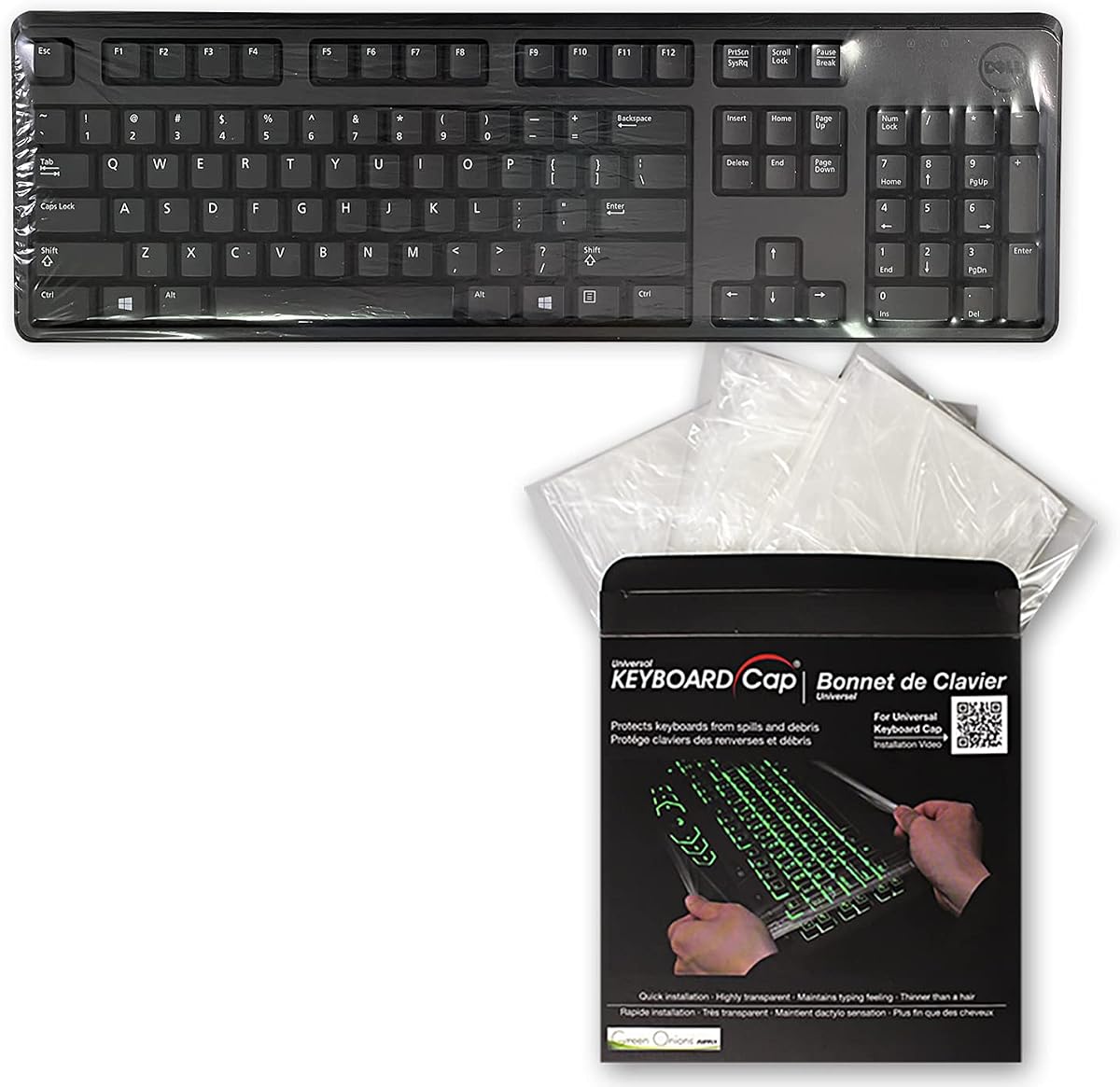
Green Onions Supply Universal Keyboard Cap Cover
4.1Editor score
Three-cover multipack
Thin wipeable surface
Blocks dust and spills
A keyboard cover helps keep a PC keyboard cleaner by forming a protective barrier against dust, crumbs, spills, hair, and everyday wear. The right choice depends on keyboard size, layout, material, coverage style, and whether you prioritize easy cleaning, unobtrusive appearance, or complete physical protection.
We compared ten covers using the details provided for each product, including stated dimensions, compatible keyboard models, material, thickness, cleaning guidance, and protective features. The list includes stretch sleeves, ultra-thin silicone skins, wipeable caps, vinyl covers, and rigid acrylic lids for standard, compact, and gaming keyboards.
Each review explains the strongest reason to consider the cover along with its important limitations. The recommendations span different use cases rather than treating every keyboard as interchangeable, and product availability, seller details, ratings, and prices can change over time.
4.1Editor score

4.4Editor score

4.7Editor score
As an Amazon Associate we earn from qualifying purchases.
The table below compares every featured PC keyboard cover by coverage, compatibility, material, and standout protective features, making it easier to identify the option that matches a particular keyboard and workspace.


This is the most flexible general-purpose selection in the guide, combining a broad stated size range with a soft, stretchable sleeve design. Its 4.4 rating reflects a generally favorable reception, while the fabric construction distinguishes it from molded silicone skins, vinyl enclosures, and rigid acrylic lids. It is especially useful for owners who want basic dust and dirt protection without removing the cover for every keystroke.
We may earn a commission when you buy through this link, at no additional cost to you.
The cover stretches from approximately 14.9 by 5.9 by 1.57 inches to 19.5 by 7.5 by 1.57 inches. That adjustment lets it accommodate many 75%, 80%, 96%, and full-size PC keyboards, including models named in the product information such as the MK120, MK275, MK270, MK345, Rapoo V500PRO, Razer, Dell KB216, and KM117. The adjustable fabric is also less likely to require an exact molded match than a skin designed for one keyboard.
The main limitation is that fabric can shield against dust, hair, grit, scratches, and minor surface contamination but does not create the liquid-resistant barrier of the Green Onions cap or silicone skins. It also cannot absorb a hard strike from a pet, an object falling from a desk, or a spill that reaches the keyboard before the cover is installed. Even so, its fabric is described as soft, lightweight, and crush-resistant, helping it sit over keys without appearing bulky.
This is the best choice for a varied household or office collection of PC keyboards, especially when one cover must serve different sizes. Measure the keyboard and compare its dimensions and key arrangement with the listing illustrations before ordering. Buyers wanting spill containment or impact resistance should instead select a wipeable cap or rigid cover. For routine dust control and flexible compatibility, however, this sleeve offers the most balanced specification set.
The generous stretch range is the defining advantage for people who own more than one keyboard. It can move between compact and full-size layouts without requiring separate molded covers, although exact model verification remains important because unusually narrow or unusual layouts may not fit.
The cover can be removed, washed, folded, and stored away when the keyboard is in use. That makes it practical for people who prefer to uncover the keyboard completely rather than work through a thin membrane.
We may earn a commission when you buy through this link, at no additional cost to you.
This three-pack of fully covered, ultra-thin keyboard caps is an appealing choice for shared desks, clinical settings, food-service environments, and other places where a keyboard needs to become a flat, cleanable surface. Its 4.1 rating indicates a solid but not exceptional customer reception. The practical advantage comes from combining three interchangeable covers with a membrane only 0.025mm thick.
We may earn a commission when you buy through this link, at no additional cost to you.
According to the supplied information, the cap fits desktop keyboards measuring 15.75 to 19.69 inches wide and 6 to 8 inches deep. It forms a complete barrier over the keys and is described as helping block dust and accidental liquid spills such as coffee, beer, or milk. The flat configuration is particularly appropriate when the keyboard is idle, allowing a workstation surface to remain more sanitary and easy to wipe.
The trade-off is workflow. Because it is a cap rather than a permanently attached skin, it must be placed over the keyboard and removed before typing. Its thin construction is intended to preserve tactile feedback, but typing through any membrane can feel different from direct contact with the original keys. The stated range also cannot account for every full-size shape, and unusual layouts should be compared with the product imagery before purchase.
Choose this set when cleanability, spill resistance, and having spare covers matter more than leaving a protector permanently installed. It is particularly relevant to clinics, hospitals, kitchens, service counters, manufacturing areas, and other demanding workspaces. Buyers should verify width, depth, and key arrangement, then confirm that the cap can be removed and stored without creasing. The three-cover format makes it a versatile choice for rotation and replacement.
Turning the keyboard into a covered flat surface makes sense in clinical, restaurant, and industrial environments where crumbs, liquids, and disinfecting wipes are common. The cover can remain in place whenever the keyboard is not actively being used.
Including three covers makes replacement easy if one is being cleaned or damp. It also provides practical redundancy for offices managing several compatible keyboards.
We may earn a commission when you buy through this link, at no additional cost to you.
The vinyl keyboard cover brings a more finished, furniture-like appearance to the category while providing an antistatic, moisture-resistant barrier around a standard PC keyboard. Its 4.4 rating is among the stronger results in this roundup, and the coconut cream color with blue trim gives the cover a distinctive look compared with transparent skins.
We may earn a commission when you buy through this link, at no additional cost to you.
The listed dimensions are 18 inches wide by 2 inches high by 7 inches deep. The soft, pliable copolymer is described as silky smooth, antistatic, and resistant to dust, moisture, food, and other contaminants. Because the product surrounds the keyboard rather than adhering to each key, it can provide broad coverage without leaving a silicone layer over the typing surface.
As a full enclosure, it must be removed during normal use, and the 18-inch width means it may not suit compact 75% keyboards or unusually large layouts. Vinyl is also not equivalent to a rigid impact-resistant lid. A pet could still create enough force to deform or displace the cover, and very deep keyboards may not fit within the stated two-inch height.
This cover is well suited to a standard desktop office keyboard where appearance, antistatic properties, and protection from everyday dust or light moisture matter. It works well in reception areas, professional offices, and home setups where a conventional keyboard protector is preferred. Measure the keyboard first and compare it with the stated dimensions. For mechanical or gaming boards, choose a purpose-built rigid or model-specific solution instead.
The antistatic vinyl construction distinguishes this option from ordinary fabric sleeves. Its cream-and-blue styling also lets it function as a visible desktop accessory rather than disappearing completely.
Sliding the cover over the entire keyboard creates a broad barrier against dust and contaminants. It is most convenient when the keyboard spends substantial time idle, such as overnight or between work shifts.
We may earn a commission when you buy through this link, at no additional cost to you.
This clear silicone skin is designed for standard 104/107-key desktop PC keyboards and provides an unobtrusive layer of dust and spill protection. Its 4.1 rating reflects generally positive feedback, and the clear appearance preserves the original look of the keyboard while helping keep worn or frequently touched keys looking cleaner.
We may earn a commission when you buy through this link, at no additional cost to you.
The protector measures 17.59 by 5.1 inches and is listed at 0.3mm thick. Its silicone construction is described as durable, washable, and removable, allowing the user to lift it off for cleaning without affecting its usefulness. A skin like this is practical when continuous protection is desired, since it does not need to be fitted and removed for every typing session.
Compatibility is the critical limitation. The listing expressly says that it is not intended for mechanical keyboards, gaming keyboards, or wave-key designs. Those boards often have taller profiles, different spacing, rounded edges, or elevated keycaps that can prevent a standard membrane from seating correctly. The listing also advises checking the layout image and measuring the keyboard before ordering.
This is a sensible choice for a conventional office keyboard that uses a standard 104/107-key layout and has dimensions close to the stated size. It is especially helpful in homes, call centers, and shared offices where crumbs and ordinary surface dirt accumulate. If the keyboard belongs to a gaming or mechanical category, choose one of the model-specific options instead. For compatible users, the ability to wash the cover makes it a practical long-term accessory.
The clear skin maintains the appearance of the keyboard while reducing exposure to dust, food residue, and ordinary wear. It is less conspicuous than an opaque sleeve or colored cap.
This cover works best with familiar 104/107-key office keyboards whose dimensions and key spacing match the listed design. Mechanical, gaming, and wave-key boards should use a different protection format.
We may earn a commission when you buy through this link, at no additional cost to you.
This colorful silicone skin is built for a broad group of Logitech desktop keyboards, making it a strong option for people who own one of the supported MK or K-series models. Its 4.3 rating indicates favorable feedback, while the added color gives a standard office keyboard a more distinctive appearance than a clear protector.
We may earn a commission when you buy through this link, at no additional cost to you.
Compatible models include the Logitech MK295, MK275, MK270, MK200, MK260, K200, K260, K270, K275, and K295. The ultra-thin silicone is intended to fit closely over the keycaps, reduce dust and food residue entering the gaps, and lessen visible wear on frequently used keys. It can also be washed with soapy water and reused after cleaning.
The fit depends on the US version of the keyboard. The listing explains that the Enter key should be rectangular; a keyboard whose Enter key resembles the numeral seven uses a European or Japanese layout and is unsuitable. Even when the model name matches, buyers should compare the key layout and product image because regional versions can differ substantially.
This cover is a good fit for a compatible Logitech keyboard that experiences heavy daily use and benefits from regular washing. It is less appropriate for a mixed keyboard setup, a non-Logitech board, or a keyboard with a different regional layout. Those shopping for this product should identify the exact model printed on the underside and verify the Enter key shape before ordering. With that check completed, it offers a tidy, colorful, low-profile way to preserve frequently used keys.
Unlike a transparent protector, the colorful silicone gives a supported keyboard a fresh appearance while still providing a removable layer over the keys. It is especially useful for aging office peripherals that show worn legends.
The ability to remove and wash the cover makes routine maintenance straightforward. It can be cleaned with soapy water and returned to the keyboard after drying.
We may earn a commission when you buy through this link, at no additional cost to you.
The ZIYOU LANG KC04 offers rigid acrylic protection for standard 98-key keyboards, including both membrane and mechanical designs that fit within its dimensions. Its 4.1 rating reflects a practical product with a clear purpose: creating a durable, transparent enclosure that protects a keyboard while it is not being typed on.
We may earn a commission when you buy through this link, at no additional cost to you.
The cover measures 17.4 by 6.5 by 1.89 inches. According to the supplied details, it can protect a keyboard with dimensions at least one inch smaller than the cover in each relevant direction. Its hot-bent acrylic construction creates a rigid rectangular shell with rounded edges, while the transparent material allows the keyboard to remain identifiable and visible underneath.
The important constraint is size. The listing states that the KC04 cannot fit a full-size keyboard or any keyboard equal to or larger than its dimensions. Smaller boards may fit, but with substantial extra room around them, potentially reducing stability or leaving gaps. The keyboard also must be removed before use, so this is an idle-time protective accessory rather than a typing surface.
This cover suits a compact mechanical or membrane keyboard that needs stronger protection than a fabric sleeve can provide. It is particularly useful for shared desks, home offices with pets, or setups where the keyboard is left exposed overnight. Measure the board and allow the stated clearance before purchasing. Buyers seeking a universal full-size solution should choose a larger sleeve or cap; those with a compatible 98-key board can enjoy the more substantial rigid protection here.
Acrylic provides a firmer barrier than fabric, silicone, or vinyl. It is better suited to protecting against dust, light water, and accidental contact with objects while the keyboard is idle.
The transparent shell lets users identify the covered keyboard and see its general condition. Its lightweight, compact form also makes it easy to store when the keyboard is in use.
We may earn a commission when you buy through this link, at no additional cost to you.
This two-pack of clear silicone skins is a straightforward option for standard 104/107-key desktop keyboards. Its 3.9 rating is the lowest among the featured products, so buyers should pay close attention to layout compatibility. In return, the package offers two thin protectors, a transparent finish, and the practical benefits of removable silicone coverage.
We may earn a commission when you buy through this link, at no additional cost to you.
Each skin measures 17.59 by 5.1 inches and is described as 0.01 inch thick. The material is engineered-grade silicone with an anti-fading coating print. It is intended to keep dust, water, coffee, and other accidental spills from entering the key openings, while the transparent construction allows keyboard illumination to shine through.
Its 0.01-inch thickness is unusually thin and is intended to minimize typing interference. Even so, some users may notice a changed feel, and the listing explicitly says the covers do not fit mechanical or gaming keyboards. A standard office membrane keyboard is the more natural application. The second cover provides a spare for rotation, washing, or use on a second compatible computer.
This two-pack makes sense for standard PC offices that want continuous dust and spill protection with a spare available. It is less compelling for gamers, owners of mechanical boards, or anyone who needs a rigid enclosure. Before ordering, compare the keyboard dimensions and key layout with image 2 referenced in the listing. For a compatible conventional keyboard, the thin design and two-piece format remain the main reasons to consider it.
The skin remains on the keyboard during use, so it protects continuously rather than only while the board is idle. Its transparency also allows the original keyboard design and lighting to remain visible.
Two included skins allow one to remain in use while the other is cleaned or stored. The same benefit applies to households maintaining two compatible standard PC keyboards.
We may earn a commission when you buy through this link, at no additional cost to you.
This universal silicone skin is a straightforward way to protect a desktop keyboard from dust, crumbs, and accidental spills. Its 4.0 rating is moderate, but the practical feature set is easy to understand: a transparent cover, thin construction, removable washing, and a size that can be checked before purchase.
We may earn a commission when you buy through this link, at no additional cost to you.
The protector is listed at 17.52 by 5.51 inches, or approximately 44.5 by 14 centimeters. The seller emphasizes measuring the keyboard before ordering because the cover is described as universal but still depends on actual dimensions and layout. The soft, flexible silicone is described as environmentally friendly, durable, and resistant to everyday incidents such as coffee, milk, crumbs, powder, and pet urine.
The cover can be removed for cleaning or disinfection, which is valuable in offices where keyboards are shared. Because it is ultra-thin and transparent, it is designed not to substantially change the appearance or typing experience. Nevertheless, a skin can alter the texture of keycaps, and unusually compact, sculpted, mechanical, or gaming layouts may not seat as intended.
This is a practical choice for a conventional PC keyboard with dimensions close to the stated size. It provides a good balance of visibility, cleaning convenience, and daily protection without requiring a bulky enclosure. Confirm the measurements and inspect the key layout before purchase. If a precise model-specific match is important, one of the dedicated Logitech, Dell, or Redragon covers may be the better choice; for a standard desktop board, this universal skin is simple and economical.
Removing the skin allows the keyboard surface to be cleaned or disinfected, then the cover can be dried and returned. This makes it useful in offices, clinics, and home workspaces with frequent keyboard contact.
The transparent design allows the keyboard to remain visible while adding a protective membrane. It is a less visually intrusive choice than a colored, opaque, or full enclosure.
We may earn a commission when you buy through this link, at no additional cost to you.
The Redragon K556 Design Wish cover delivers the strongest combination of specialized fit and rigid protection in this guide. Its 4.7 rating is the highest listed rating, and its transparent acrylic construction is aimed squarely at owners who want to protect an illuminated gaming keyboard without hiding its appearance.
We may earn a commission when you buy through this link, at no additional cost to you.
This cover is specifically designed for the Redragon K556 104-key mechanical gaming keyboard. Its stated internal dimensions are 16.9 by 4.7 by 0.6 inches, and precision cutting is used to create a close fit. Side bulges make it easier to lift, while the clear acrylic permits the keyboard lighting to remain visible.
The protection extends beyond ordinary dust. The rigid lid helps defend against cat hair, stains, dust accumulation, and harder impacts that could occur when the keyboard is unattended. A wipeable surface also makes periodic maintenance simple. The trade-off is that this is not a universal gaming keyboard cover; it is tailored to one model and must be removed during play.
This is the strongest recommendation for a Redragon K556 owner, especially someone concerned about pets or accidental objects. Buyers should verify the exact model before ordering and compare the keyboard's shape and key layout with the listing. It is premium in purpose rather than featuring unnecessary universal claims: the focused fit, rigid material, and visibility of the backlighting justify the specialization for compatible owners.
A model-specific cover avoids the loose corners and uncertain compatibility associated with universal sleeves. Precise cutting gives the K556 a more intentional fit and makes the protected keyboard easier to identify.
Rigid acrylic offers a stronger barrier than fabric or thin silicone against cat hair and accidental contact with hard objects. The clear design retains the gaming keyboard's illuminated appearance while it is covered.
We may earn a commission when you buy through this link, at no additional cost to you.
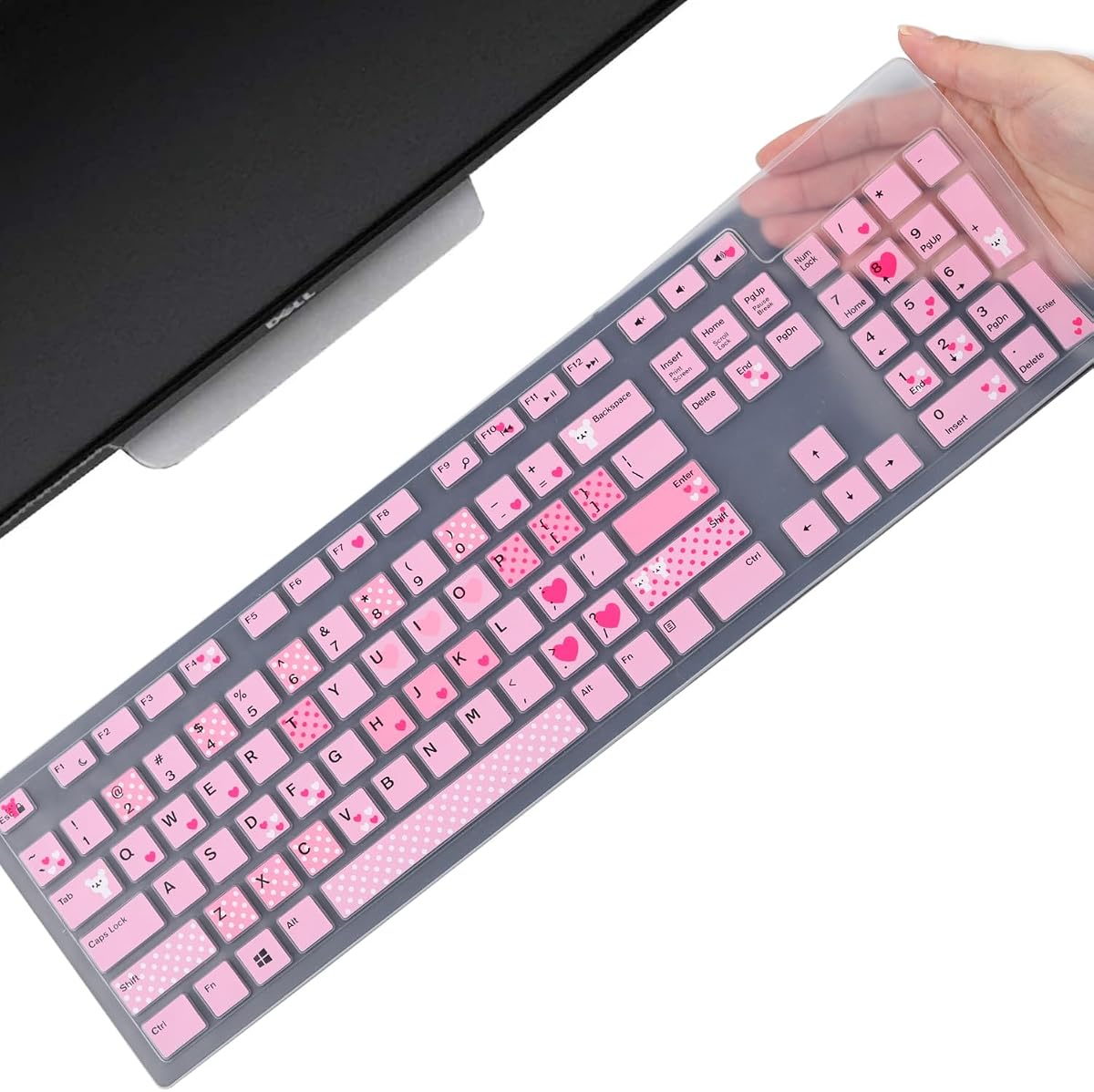
This molded silicone skin is tailored to a wide selection of Dell desktop keyboards and all-in-one systems. Its 4.4 rating is among the guide's strongest, and the range of supported models makes it especially useful for offices that standardize on Dell KM636, KB216, Optiplex, or Inspiron equipment.
We may earn a commission when you buy through this link, at no additional cost to you.
The cover is made from durable, non-toxic silicone with an anti-fading coating print. Each key is individually molded for a close fit, while the 0.3mm thickness is intended to minimize interference while typing. It protects against dust, water, coffee, and accidental spills, and it can be removed and washed as part of a regular cleaning routine.
Compatibility remains more important than the long model list. The product is designed for the US keyboard layout, so a similarly named keyboard from another country may have different key shapes or legends. The listing specifically advises checking the layout illustration before buying. A cover that does not align with every key can sit unevenly, leave exposed openings, or produce an unsatisfactory visual result.
This skin is an excellent fit for Dell owners who can confirm one of the listed models and use the US arrangement. It is especially helpful in shared offices, reception areas, and home offices where a frequently used Dell keyboard is exposed to dust and ordinary spills. For a mixed-brand setup, the stretch sleeve or a measured universal skin is more adaptable, but for a confirmed Dell model this option offers a close, cleanable fit.
Molded key shapes help the cover sit more precisely than a loose universal membrane. Supporting numerous Dell families also reduces the need to source a separate protector for every compatible board.
The removable silicone design supports regular cleaning in environments where keyboards are shared. Washing and drying the skin helps maintain a clean barrier between the keycaps and ordinary workplace contaminants.
We may earn a commission when you buy through this link, at no additional cost to you.
The most useful cover is one that matches the keyboard's size, layout, height, and daily exposure to dust or spills. Comparing protection style and maintenance needs is just as important as finding a visually suitable design.
Begin with the keyboard's external dimensions, including width, depth, and height. A cover can be advertised as universal while still being too long, too deep, too shallow, or arranged around a different key layout. Compare the product dimensions with a tape measure and review any layout illustrations supplied by the seller. Leave enough clearance for a rigid cover to slide over the keyboard without forcing the material.
In short, measure first and verify the listed dimensions before ordering.
Model names are useful, but regional versions can differ substantially. US keyboards commonly have a wide rectangular Enter key, while European and Japanese layouts often use a tall number-seven-shaped key. Compact gaming boards may also place differently shaped keys in the navigation cluster. Check the key arrangement rather than relying on the nominal size alone.
In short, compare the key layout and regional arrangement with the cover images.
A fabric sleeve is lightweight and effective against dust, hair, and scratches, but it is not a sealed spill barrier. A thin silicone skin offers continuous coverage and easy washing, while a cap creates a cleanable flat surface during idle periods. A rigid acrylic enclosure adds impact resistance but is generally limited to a particular size or model. Match the product format to the risks present in the workspace.
In short, choose fabric for basic protection and silicone or acrylic for stronger daily defense.
Material affects flexibility, visibility, cleaning, and the way the product feels during typing. Silicone skins must be thin enough to avoid interfering with key travel, and stretch fabric should be soft enough to avoid pressing keys down. Acrylic is rigid rather than flexible, so its main value is enclosure protection when the keyboard is not in use. Vinyl combines enclosure coverage with a polished appearance.
In short, favor a thin flexible material for typing and rigid material for impact protection.
Waterproof or moisture-resistant claims are most relevant to keyboards in shared offices, clinics, kitchens, and other high-contamination environments. A closed cap or fitted silicone skin creates a stronger barrier than an open-ended fabric sleeve. Even so, a cover cannot protect against every incident, and liquid should not be allowed to pool around its edges. Dust-only protection calls for a lighter sleeve.
In short, choose an enclosed or well-fitted cover when spills are a genuine concern.
Washable silicone skins and removable caps are convenient when keyboards need frequent cleaning. Confirm that the material can be washed or wiped as directed, and allow it to dry fully before reinstalling. A multi-pack can provide a clean replacement while another cover is being maintained. Rigid acrylic is also easy to wipe clean, although it must be handled carefully to avoid scratches.
In short, prioritize removable and washable parts for convenient maintenance.
A transparent skin preserves the original design, while a colorful model can refresh an older keyboard. Opaque sleeves provide more visual separation from the desk, and rigid clear lids keep illuminated gaming boards visible. Consider whether the keyboard is used in a professional setting, a colorful home office, or a public-facing workspace, and choose a finish that suits that environment.
In short, select clear, colored, or opaque coverage based on appearance and visibility.
Before installation, confirm that the keyboard is powered off or disconnected and clean both the keyboard and the cover. For a sleeve or rigid enclosure, dry the keyboard and position the cover over it slowly, working from the rear toward the front so that the material does not catch on a key edge. For a silicone skin, align the Enter key and the navigation cluster first before pressing down across the remaining keys.
A skin can usually remain installed while typing, but a cap, sleeve, or rigid lid should be removed before use. Remove the cover by lifting an edge rather than pulling sharply from one corner, which can distort a molded fit or stretch the fabric. Model-specific covers should be lifted using any provided edge bulges or grips. Do not force a cover onto a keyboard that does not match its stated dimensions.
For washable silicone, remove the skin carefully and clean it with mild soapy water as described in the product instructions, then let it dry fully before use. Wipe vinyl and acrylic with a soft, lint-free cloth, avoiding abrasive cleaners and excessive liquid around the edges. Allow fabric to dry before folding or storing it, and periodically inspect the cover for tears, discoloration, loose fit, or damage that could expose the keyboard.
It depends on the cover's design. Thin universal silicone skins often specify that they do not fit mechanical or gaming keyboards because elevated keycaps, sculpted profiles, and different spacing can prevent a proper seal. Model-specific silicone or acrylic covers are usually more appropriate when those features are present. Always compare the exact model, dimensions, and key layout before purchasing.
A keyboard skin fits closely over the keys and may remain in place while typing. A keyboard cover is generally a larger sleeve, cap, or enclosure placed over the entire keyboard and removed during use. Skins are convenient for continuous dust protection, while covers often create a larger barrier against spills, debris, pets, or impacts.
A fitted silicone skin, wipeable cap, or enclosed cover can reduce the chance that a small accidental spill reaches the key openings. It is not a guarantee against larger spills or liquid around the cover's edges. Power down the computer, disconnect it if appropriate, and dry the keyboard promptly even when a protective cover is in use.
Measure the keyboard's width, depth, and height, then compare those measurements with the product specifications. Review the seller's layout image as well, because a similarly sized keyboard may have a different Enter key, navigation cluster, or number-pad arrangement. For rigid covers, allow the manufacturer-stated clearance so the shell can be installed without force.
The effect depends on material thickness, key shape, and personal preference. Ultra-thin silicone is designed to preserve feedback and minimize interference, but some users still notice a slightly different texture or sound. A removable skin can be tested on a compatible keyboard, and the keycaps should be checked to ensure they do not rub against the cover.
Only follow the care instructions supplied with the specific product. The washable silicone covers in this guide are described as removable and cleanable with soapy water, while rigid acrylic and vinyl covers are more naturally suited to gentle wiping. Let every part dry completely before reinstalling it or placing it on the keyboard.
A fitted silicone skin helps keep hair from reaching the gaps around keycaps, while a rigid acrylic lid provides a stronger physical barrier when the keyboard is unattended. A model-specific cover generally creates a better seal than a loose universal sleeve. Regular cleaning remains important because hair and dander can accumulate on the cover's exterior.
Transparent covers preserve the keyboard's original appearance and allow illumination to remain visible. Colored covers can give an older keyboard a refreshed appearance and make the protector easier to notice. Opaque sleeves and polished vinyl covers are more noticeable on the desk, while rigid clear lids balance visibility with enclosure protection.
The Keyboard Dust Cover for 75%, 80%, 96%, and full-size PC keyboards is the most versatile general pick because its soft fabric stretches across several keyboard classes. The Green Onions Supply three-pack stands out for cleanable, spill-resistant protection in demanding workspaces, while the Redragon K556 Design Wish cover provides the strongest rigid, model-specific protection for its compatible gaming keyboard.
Prioritize compatibility before any other feature. Measure the keyboard, confirm its model and regional layout, and select a style that suits how it is used. Thin skins offer continuous daily coverage, sleeves and caps are convenient for a fully exposed keyboard, and rigid acrylic is best when impact or pet protection matters most.
Ratings, seller information, product availability, and prices can change over time, so check the current listing before purchasing. Reconfirm dimensions and care instructions rather than assuming all standard or universal covers will fit the same PC keyboard.