
NOYAFA NF-488 POE Cable Tester
4.5Editor score
Detects PoE information automatically
Checks opens, shorts, and crossovers
Large backlit LCD display
Our Inline POE Tester guide compares ten tools for voltage, current, power, standards detection, cable checks, portability, and field troubleshooting needs.
An Inline POE Tester helps network installers diagnose power and data problems at the point where an Ethernet cable is connected. The right unit can identify PoE standards, display voltage, current, and wattage, test passive systems, and reveal cable faults, saving time when a camera, phone, or access point refuses to power up.
We compared the ten featured testers by examining their supported PoE technologies, measurement ranges, inline and remote-testing functions, display options, power sources, and practical field features. The list includes dedicated inline monitors, multifunction cable testers, passive-PoE detectors, and devices intended for broader installation diagnostics.
Each review explains what the tester is best suited to identify, which technical details matter, and where its limitations may affect a technician. Ratings reflect the supplied customer feedback, while availability and prices can change, so readers should confirm current product details before making a purchase.
4.5Editor score

4.6Editor score

The table below summarizes the major capabilities of each tester, including supported PoE technologies, electrical measurements, cable diagnostics, display type, and operating method.




The TRENDnet TC-NTP1 is a compact inline tester built around practical power diagnostics. It has a 4.1 customer rating and stands out for combining standard PoE, PoE+, 4-pair PoE, and passive-device testing in a battery-free package. A Gigabit connection to the PSE and another to the PD let it remain in the link while presenting useful information about the connected power source.
We may earn a commission when you buy through this link, at no additional cost to you.
Three operating modes make the device more versatile than a simple pass/fail detector. T-mode evaluates the PSE and reports the supported PoE standard and voltage output. N-mode addresses non-standard passive PoE devices, while I-mode provides an inline view of voltage, amperage, and wattage. The step button cycles through those measurements or locks one value for real-time observation.
Compatibility extends to IEEE 802.3af, 802.3at, and 802.3bt devices up to 100W, while passive systems are supported across an 11–60V range. Those limits are broad enough for most contemporary access points, cameras, phones, and other powered network equipment. The absence of a battery also removes charging downtime and makes the tester ready for immediate use.
This is a strong choice for technicians who need power measurements more than extensive cable certification. It cannot report cable length, resistance, or detailed conductor faults, so it works best alongside a dedicated wire tester when those diagnostics are required. Overall, the TC-NTP1 offers a focused and approachable solution for common inline PoE troubleshooting.
Because the TC-NTP1 draws its operating power from the connected line, technicians can carry it without managing a rechargeable cell or spare batteries. The inline mode then exposes voltage, current, and wattage while the cable remains in service.
Support for 802.3af, 802.3at, 802.3bt, 4PPoE, and passive PoE makes the tester useful across both modern and legacy installations. Its range of supported methods also reduces the need to carry separate detectors for different power systems.
We may earn a commission when you buy through this link, at no additional cost to you.
The PoE-T100 is a feature-rich inline tool for users who need more than basic PoE presence detection. Its 4.1 rating reflects a balanced reception, while the bright OLED screen and single-page display separate it from simpler LED indicators. It combines PoE diagnostics with general DC supply testing, making it relevant to installers handling more than one kind of low-voltage power system.
We may earn a commission when you buy through this link, at no additional cost to you.
PD Mode can simulate a powered device up to 802.3bt, which is useful when diagnosing a PSE without attaching the final endpoint. Inline Mode measures the connection between PSE and PD, while DC Mode checks voltage, current, and polarity on non-PoE sources. The tester covers 802.3af, 802.3at, 802.3bt, PoE++, passive PoE, and 12–57V DC supplies.
Readouts include voltage, current, power, and polarity, allowing a technician to distinguish standard 36–57V PoE from non-standard passive power in the broader 12–57V range. Its self-powered design eliminates external power and battery requirements. That makes the tool dependable in installations where USB charging or a nearby outlet would be inconvenient.
The main limitation is its focus on electrical power rather than physical cable integrity. It does not offer a remote wire map, continuity checker, or cable-length measurement. Even so, the PoE-T100 is well suited to professionals who need a detailed, screen-based diagnostic instrument for commissioning, troubleshooting, and PD power negotiation.
The OLED display brings standard identification, power level, and inline measurements together, reducing the need to cycle among separate indicator lights. This is especially helpful when distinguishing a non-standard source from a conventional PSE.
The dedicated DC Mode extends the tool beyond Ethernet-powered devices. Installers can use it to inspect general 12–57V supplies, measure current and power, and verify polarity before attaching equipment.
We may earn a commission when you buy through this link, at no additional cost to you.
The PoE Texas tester earns a 4.3 rating and targets technicians who need a portable, self-powered instrument for rapid PoE diagnostics. It identifies the type of PoE, measures relevant electrical values, and can estimate how much power a connected device draws. Its pocket-sized design makes it convenient for field work where a larger instrument would be cumbersome.
We may earn a commission when you buy through this link, at no additional cost to you.
A particularly useful feature is the Simulate PoE Device mode. It allows a technician to test managed or auto-negotiating power equipment without having the final powered device connected. The tool can also detect power loss occurring in an Ethernet cable, making it a practical aid for isolating failures between a PSE and endpoint.
The measurement range is broad for a portable unit. It checks DC supplies from 3.5 to 56V and handles current and power measurements up to 280W at 56V. The LCD automatically cycles through voltage, current, and power, while Mode A and Mode B readings are shown across 20–56V. It also supports the newest 802.3bt devices.
As a dedicated electrical tester, it does not perform a full remote cable wire map or report conductor length. Users focused on installation certification should keep a separate continuity tester nearby. For everyday PoE troubleshooting, however, the self-powered operation, useful simulation mode, and compact construction make the PoE Texas a convincing choice.
Simulate PoE Device mode is valuable when the endpoint is unavailable or the goal is to verify the switch or injector directly. It can expose whether a managed PSE negotiates power correctly before deployment.
The ability to examine 3.5–56V DC and up to 280W broadens the tool beyond ordinary endpoint checks. It suits technicians working with varied cameras, phones, access points, and passive installations.
We may earn a commission when you buy through this link, at no additional cost to you.
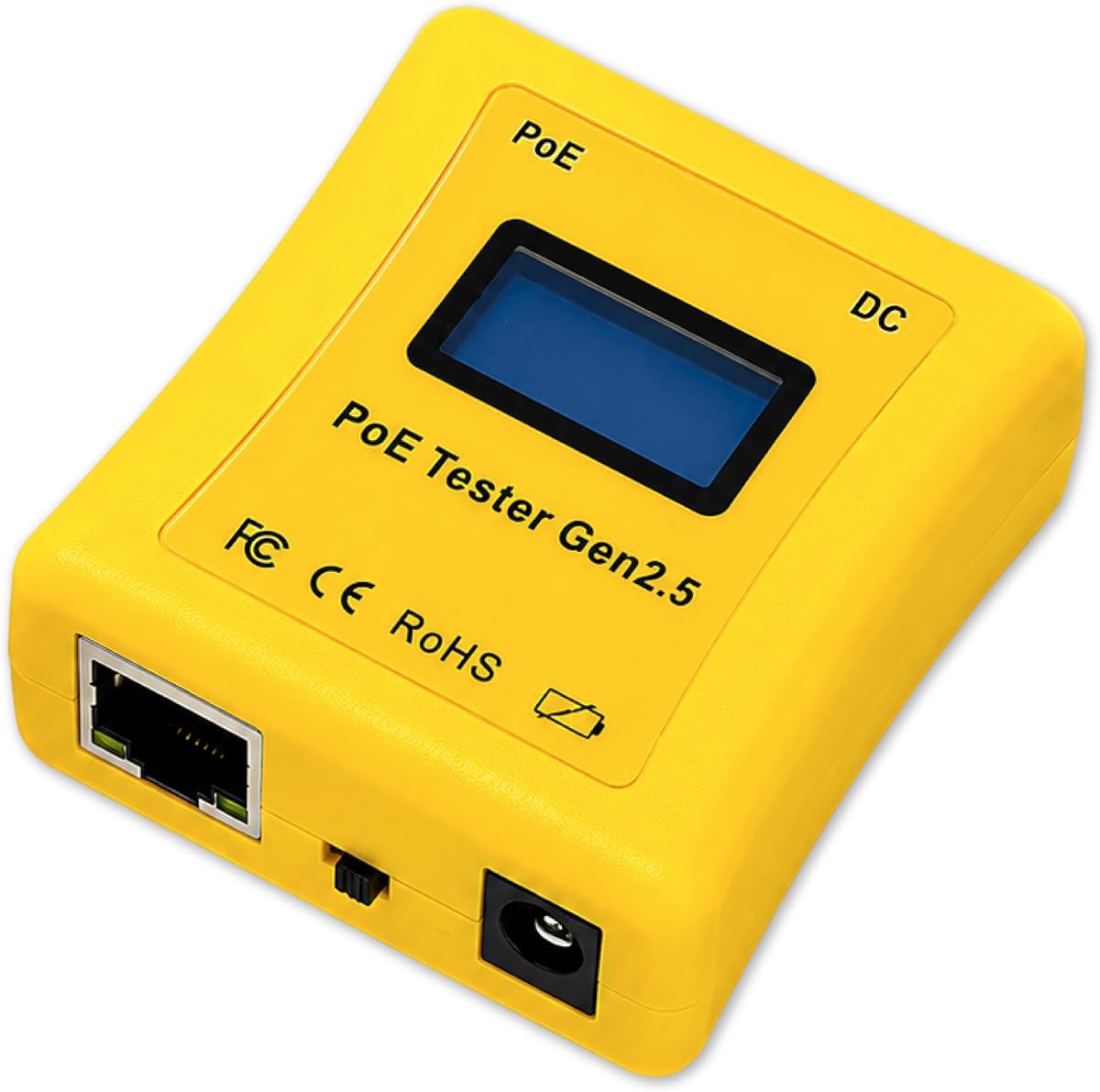
The NOYAFA NF-488 provides an unusually useful combination of PoE detection and remote cable continuity testing. It holds a 4.5 rating, making it one of the strongest-rated products in this group. Rather than concentrating only on inline power readings, it can also check the physical wiring of a network cable and confirm whether a switch-side circuit is functioning.
We may earn a commission when you buy through this link, at no additional cost to you.
Its PoE function automatically identifies standard and non-standard information, including af and at voltage standards, polarity, and jumper methods. The voltage range extends from 0 to 60V. For wire work, the remote unit checks for open circuits, short circuits, and crossovers, and it can also measure shielded wires. A large backlit LCD keeps those results readable at a glance.
The tester also measures DC current and reports voltage, current, and power between a power supply and connected equipment. A circuit-test function checks whether the cable circuit connected to a switch is operational. Independent backlighting and shutdown timers help manage field use, while the anti-slip casing improves handling in less-than-ideal working conditions.
This is the most balanced budget-oriented option for users who need both installation and troubleshooting tools. Its main limitation is that it is not presented as a continuous inline monitor. A technician who needs real-time power readings while a link remains active may prefer the TRENDnet or PoE-T100. For basic PoE identification paired with conductor diagnostics, the NF-488 is a strong and economical choice.
The remote cable functions let a technician distinguish a damaged run from a power-delivery problem. That combination reduces the need to carry separate equipment for basic installation checks.
The large backlit display and independently controlled illumination make results easier to interpret in closets, crawl spaces, and other poorly lit locations. An anti-slip shell also supports steadier one-handed operation.
We may earn a commission when you buy through this link, at no additional cost to you.
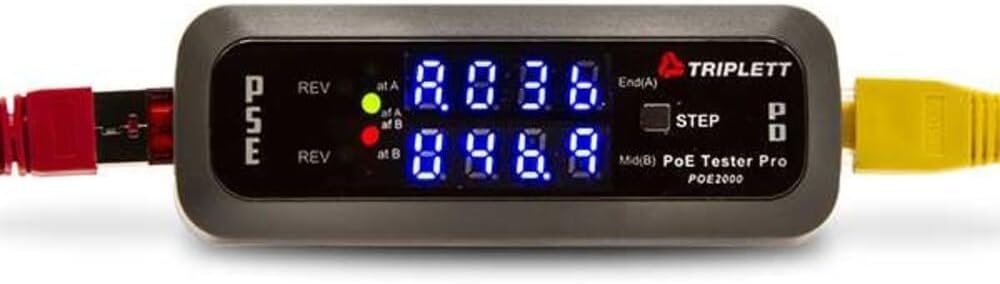
The Triplett POE2000 is an inline detector focused on identifying the source, type, class, polarity, and electrical condition of PoE. Its 3.5 rating indicates that some users may find the indicator-based interface less intuitive than a screen-based tester, but the underlying feature set is well targeted at network installers.
We may earn a commission when you buy through this link, at no additional cost to you.
Dual seven-segment LED arrays identify whether power comes from an End Span, a Mid Span, or all four pairs. This distinction can help a technician understand how a PSE is delivering power. Two yellow LEDs warn of reversed polarity, and the device can determine whether the source uses standard PoE or non-standard passive PoE.
When connected inline, the display alternates between voltage, current, and power. A step button lets the user select and retain a specific value, which is useful when one measurement is more relevant during a particular test. This inline capability distinguishes the POE2000 from basic detectors that only show whether power is present.
The primary drawback is presentation. Users accustomed to a full LCD may find the segmented indicators less immediately readable, particularly when interpreting several source and polarity signals. There is also no stated battery-free operation. Even so, its source identification and pair-level information make it a solid choice for technicians who prefer a simple, dedicated inline display.
Showing whether power arrives on one pair, another pair, or all four provides context that a simple present-or-absent detector cannot. This can help narrow down unusual switch or injector behavior.
The step button can leave voltage, current, or power on the display. Holding a chosen reading makes ongoing troubleshooting easier when the other values are not currently needed.
We may earn a commission when you buy through this link, at no additional cost to you.
The Triplett POE3000 is the most specification-focused inline detector in this lineup, earning the Best Premium designation for its comprehensive PoE classification capabilities. It identifies PSE type and class, the source of power, polarity, voltage, current, power, and whether the source is an End Span, Midspan, or a four-pair arrangement.
We may earn a commission when you buy through this link, at no additional cost to you.
Four primary LEDs indicate whether the connection follows IEEE 802.3af or 802.3at/bt, while two yellow LEDs warn about reversed polarity. The device also recognizes standard and non-standard passive PoE. Together, these indicators give installers a broader view of power delivery than tools limited to a single yes-or-no result.
Inline monitoring alternates among voltage, current, and power, and the step button allows a specific value to be selected. This makes the POE3000 appropriate for commissioning new links as well as investigating an existing endpoint that is drawing unexpected power or refusing to start.
No customer rating was supplied for this product, so its real-world reception cannot be compared directly with the rated models. The description also does not specify battery-free operation or a full cable wire-map function. Even with those points requiring confirmation, the POE3000 is a compelling premium option for technicians who prioritize detailed PSE and power-source identification over general cable testing.
Identifying PSE type, class, and source helps explain why a device may be operating differently than expected. It also gives field technicians more evidence when evaluating a problematic switch or injector.
Support for 802.3af, 802.3at, 802.3bt, and passive PoE allows one instrument to handle both standards-based and non-standard deployments. The separate warning indicators draw attention to reversed polarity.
We may earn a commission when you buy through this link, at no additional cost to you.
The Jonard Tools POE-1 combines PoE verification, electrical measurements, and copper-cable continuity testing in a compact kit. It supports passive PoE as well as 802.3af, 802.3at, and 802.3bt. The absence of a published rating means there is no supplied customer feedback to weigh, but the included components make it appealing to installers who want a coordinated field kit.
We may earn a commission when you buy through this link, at no additional cost to you.
Voltage and amperage readings help determine whether an Ethernet run is supplying appropriate power. The tester also measures resistance and checks continuity for Cat5, Cat5e, Cat6, and Cat6a cables. That makes it useful when a suspected problem could involve either inadequate power delivery or a damaged conductor.
Flexible power options broaden the situations in which it can be used. When a PoE source is present, the tool can draw operating power directly from it. For unpowered cables, the included AA batteries allow cable testing. The package contains a cable remote, female-to-female RJ45 adapter, instruction manual, and two AA batteries, reducing the need to source accessories separately.
Its compact, lightweight housing and included belt clip suit mobile technicians. One consideration is that it does not appear to offer a continuous inline display in the same way as several dedicated inline monitors. Even so, the combination of standards detection, electrical readings, continuity checks, and a complete accessory set makes the POE-1 a versatile installation tool.
The two included AA batteries make continuity and resistance checks possible on cables that are not connected to a powered Ethernet source. This is valuable during early-stage installation or when a suspected run is completely dead.
The supplied remote and RJ45 adapter support the tester's cable functions, while the belt clip and compact housing support field mobility. This makes it easier to organize a service kit around a single PoE and wire-testing solution.
We may earn a commission when you buy through this link, at no additional cost to you.
The IEEE 802.3af/at/bt Cable Tester combines PoE verification with some of the most complete cable diagnostics in the group. Its 4.6 rating is the highest supplied customer rating among the ten products. It supports standard 802.3af, 802.3at, and 802.3bt power along with non-standard PoE from 5 to 60V, while its 2–80W load detection helps confirm actual power delivery.
We may earn a commission when you buy through this link, at no additional cost to you.
The cable-testing functions broaden its value considerably. It measures CAT5 and CAT6 runs from 5 to 300 meters and performs continuity testing up to 600 meters, identifying shorts, opens, and miswires. Both STP and UTP cables are supported. Port-flash detection can locate active network ports, giving technicians another way to verify connectivity and trace a cable's destination.
A 1500mAh rechargeable battery makes the tester practical for extended field sessions without a constant PoE source. Adjustable automatic shutoff options of 15, 30, or 60 minutes help conserve power, and a low-battery indicator provides a clear warning before work is interrupted.
Its main limitation is that it is not described as a continuous inline meter for voltage, current, and wattage. Users who need live PSE-to-PD monitoring may prefer one of the dedicated inline models. For general installation and troubleshooting, however, the combination of PoE, length, continuity, fault, and port functions makes this an excellent all-purpose choice.
Length measurement, continuity checks, and fault identification go well beyond basic PoE detection. These functions can reveal whether a failed endpoint is caused by power delivery, a distant fault, or an incorrectly terminated run.
The rechargeable battery supports testing of unpowered cables and remote locations. Selectable shutoff periods and a low-battery warning help balance endurance with reliable operation.
We may earn a commission when you buy through this link, at no additional cost to you.
The Inline Cat5/6 DVM and Network PoE Tester is presented as a combined electrical and network diagnostic instrument. Its supplied listing identifies a Cat5/Cat6 DVM power panel and network PoE capability, suggesting that it is intended for technicians who want cable measurements and Ethernet power testing in the same inline format.
We may earn a commission when you buy through this link, at no additional cost to you.
That combination is relevant in installation work where a fault could involve either the physical cable or the power delivered over it. A DVM-style function can provide general voltage information, while the network PoE side is intended to help evaluate the Ethernet connection. The product appears geared toward users already familiar with this class of combined tester.
The available product information is extremely limited, however. It does not state the supported PoE standards, measurement ranges, current or power limits, display details, power requirements, or whether a remote cable tester is included. No customer rating was supplied, so buyer feedback cannot be used to assess ease of use or durability.
Those uncertainties should be checked on the listing before purchase. If the stated DVM and inline PoE functions align with a specific diagnostic need, the product may be useful. For a purchase requiring clearly published standards coverage, supported measurements, and included accessories, the better-documented alternatives in this guide offer a safer basis for comparison.
The stated combination of DVM-style voltage measurement and network PoE testing can help narrow down faults involving both cabling and delivered power. It is most relevant to users who understand the intended test workflow.
Because the supplied description omits detailed limits and operating features, buyers should confirm compatibility, power source, and included accessories directly. Clear specifications are essential when selecting a meter for safety-critical installation work.
We may earn a commission when you buy through this link, at no additional cost to you.
The NF-488 Network Cable Tester is a multifunction diagnostic tool with a 4.4 customer rating. It checks Cat5 and Cat6 cables for short circuits, crossovers, and open circuits, while its PoE functions identify af and at standards, voltage, polarity, and operating mode. This combination makes it a practical option for basic installation troubleshooting.
We may earn a commission when you buy through this link, at no additional cost to you.
Its electrical measurements are more substantial than a simple presence detector. The tester measures DC voltage from 0 to 60V, current from 0 to 3A, and power up to 180W. Those figures allow a technician to examine what a DC appliance consumes and compare that information with the available supply. Standard and non-standard PoE information is also presented.
A loop-back test helps determine whether a problem exists in a loop, while standard continuity checks identify common wiring faults. The integrated LED lamp is a useful field addition because cable closets and equipment rooms are often poorly illuminated. The device also has a backlit screen for viewing results in those conditions.
This model does not claim continuous inline power monitoring, and its 3A current ceiling is lower than some higher-powered options. Still, its documented ranges, fault detection, and work light make it a capable budget tool for routine service calls. It is especially attractive to users who need more than a pass-or-fail PoE detector but do not require advanced source classification.
The 0–60V voltage range and power measurement up to 180W cover many common deployment scenarios. Current readings up to 3A help confirm the consumption of connected DC equipment.
Open circuits, shorts, crossovers, and loop-back problems are the kind of faults that can make a network installation appear unreliable. Dedicated checks for these conditions help separate physical cabling issues from PoE power concerns.
We may earn a commission when you buy through this link, at no additional cost to you.
Choosing an Inline POE Tester means balancing power diagnostics, supported standards, cable testing, display readability, and the way the tool will be used in the field. The most important distinction is whether you need a live inline monitor, a port detector, or a broad installation tester.
An inline monitor sits between the PSE and PD so it can observe power while traffic or an endpoint remains connected. This arrangement is valuable for measuring voltage, current, and wattage or locking a reading during troubleshooting. A detector, by contrast, is normally connected to one end of a cable and mainly answers whether PoE is present, what standard it uses, and how power is paired. Choose inline monitoring when you need real-time power behavior; choose detection when you mainly need to identify a switch output or test a newly terminated run.
IEEE 802.3af, 802.3at, and 802.3bt cover many standard PoE deployments, but the exact meaning of compatibility can vary by measurement and operating mode. Passive PoE support is also important because some non-standard injectors use unusual voltages or pair arrangements. A tester that only recognizes af and at may mischaracterize a newer endpoint or passive source. Check for the specific standards and power levels handled by the device, especially if the installation includes high-power cameras, access points, or USB-powered network equipment.
A useful inline tester should report more than a simple present-or-absent signal. Voltage identifies the power level, current shows consumption, and power combines the two into the figure most often used to assess PoE capacity. The display range must cover both standard PoE and any passive voltage used on site. Pay attention to whether maximum power and current are specified independently, because a high wattage rating may be limited by a lower current ceiling. General DC capability is an added advantage when the same technician also works with non-PoE low-voltage supplies.
A tester that can simulate a powered device is valuable when the endpoint is not yet installed or is suspected to be faulty. By presenting itself as a PD, it can check whether a managed switch or injector provides power and negotiates an appropriate class. Other devices may instead test a PSE directly or provide both modes. For commissioning work, confirm whether the tool can test a PSE without the final device and whether it reports the expected power class and source type.
PoE measurements cannot reveal every physical cable problem. A cable may have adequate power while still having an open, short, miswire, or crossover that prevents data from passing. A multifunction tester with a remote unit can check conductor continuity and identify common wiring faults. Length measurement is useful for confirming that a run falls within the expected Ethernet distance, while loop-back testing can help diagnose recurring connectivity issues. Choose based on whether you also perform cabling work or primarily troubleshoot established PoE links.
Inline testers range from segmented LEDs to full LCD or OLED screens. LEDs can provide quick source, polarity, and pairing results, but they may take more interpretation than a labeled screen. An LCD or OLED display is more useful when voltage, current, and power must be compared, and a step button helps retain the reading that matters. Backlighting, independent shutdown controls, and a dedicated work light are valuable in dark closets. Consider both display clarity and the number of controls you need to learn.
Battery-free testers draw power from the line they are testing, which is convenient when working near live equipment. Rechargeable models are better for cable-only inspections and remote locations where no PoE source is available. Some devices can operate from PoE while also accepting batteries for unpowered testing. Field ergonomics matter too: a compact housing, pocketable dimensions, belt clip, anti-slip grip, and low-battery warning can make a meaningful difference during a full service day.
Field tools are repeatedly connected, disconnected, and carried between locations, so a durable housing and secure connectors matter. Look for a clear display, straightforward controls, and a protective shape that is easy to grip. Multifunction testers should include the correct remote unit, adapters, instructions, and any required batteries. A limited manufacturer warranty or local technical support can add confidence, particularly for professional users who depend on the tool for service calls.
Begin by identifying the test objective. If checking a switch or injector output, connect the tester directly to the suspected port and note the detected standard, pairing, polarity, and voltage. If monitoring an installed link, place the tester between the PSE and PD using the appropriate inline connections, then power the system and read the displayed values. Follow the device instructions for PD simulation, remote wiring, or DC measurement because the correct sequence varies among models.
For accurate power readings, allow the connected equipment to reach a normal operating state and compare voltage, current, and wattage with the expected PoE class and the endpoint's power requirements. Unexpected voltage can indicate a non-standard source, cable loss, or an overloaded PSE. Low current with a high requested class can point to a device that is not negotiating as expected, while high current may reveal an excessive load. Use continuity, length, or loop-back functions when the electrical readings appear normal but data links remain unstable.
Care for the tester by keeping connectors clean and free of moisture, using the protective case or storage pouch when available, and avoiding cables that are pulled sideways while the tester is attached. Charge or replace batteries according to the instructions, particularly if the device uses a shutdown timer. Periodic wire-map checks can confirm that a remote unit and adapter remain dependable, and a visual inspection of the housing and screen helps identify damage before the next field assignment.
An Inline POE Tester commonly reports whether power is present and may display voltage, current, wattage, polarity, PoE standard, power class, and source arrangement. The exact measurements depend on the model. A true inline tester stays connected between the PSE and PD, allowing real-time readings while the link remains operational.
Standard PoE follows defined IEEE methods, including 802.3af, 802.3at, and 802.3bt. Passive PoE uses a non-standard method and may employ different voltages, currents, or pair assignments. A tester supporting both is more useful across mixed installations, but users should still verify the voltage and polarity expected by the passive endpoint.
A properly used tester is designed for the voltages and PoE systems it supports, but mismatched or unsupported equipment can still create risk. Check the tester's supported standards and voltage range before connecting it. Follow the manual, avoid unsupported high-voltage sources, and do not use continuity or resistance functions on a live powered cable unless the manufacturer expressly permits it.
It depends on the work. A dedicated inline monitor is ideal for diagnosing power delivery, while a multifunction tester is valuable when opens, shorts, miswires, or incorrect length may be responsible for a failed link. Installers who routinely terminate and certify cabling often benefit from having both capabilities in one unit.
Several causes are possible, including an inactive or disabled switch port, insufficient PoE allocation, an unsupported power class, a non-standard injector, bad cable pairs, reversed polarity, or a faulty endpoint. Use a tester that can distinguish source detection, voltage, current, class, and pairing to narrow the cause. PD simulation can also reveal whether the switch works without the endpoint attached.
Battery-free operation is convenient because the tester can draw power from the connected PoE line, removing charging and battery-replacement concerns. It is not essential for every job. A rechargeable or battery-powered model is more useful when testing unpowered cables, tracing passive circuits, or working in locations without a live PoE source.
PoE power tests primarily establish whether power is present and may reveal cable power loss, but they do not automatically prove that the data pairs are correctly wired. A tester with remote continuity, wire-map, or loop-back functions provides a better assessment of the physical data path. Port-flash and switch loop-back functions can also help identify an active connection.
An OLED display is easier for comparing numeric voltage, current, and power values, while LEDs can provide quick at-a-glance status indications with less need to interpret screens. The best choice depends on the technician's workflow. Complex diagnostics generally benefit from a labeled display, whereas simple source and polarity checks may be faster with clearly grouped indicators.
The IEEE 802.3af/at/bt Cable Tester stands out for the broadest overall diagnostic coverage, combining PoE checks with length measurement, fault detection, port flash, and rechargeable field operation. The NOYAFA NF-488 is a strong budget-focused option for users who need both PoE identification and basic remote wire testing, while the Triplett POE3000 offers the most detailed premium classification for source, class, polarity, and pair arrangement.
For live troubleshooting, prioritize the tool that matches the actual question. The TRENDnet TC-NTP1 and PoE-T100 are practical choices for inline power monitoring, with the latter adding a bright OLED and broad DC support. The PoE Texas is particularly useful for simulated-device testing, while the POE2000 provides straightforward LED-based source and polarity diagnostics. Professionals who work with physical cabling should prioritize continuity, fault, and length functions.
Before ordering, verify the exact PoE standards, voltage and current limits, operating modes, power requirements, and included accessories for the model you choose. Customer ratings and product availability can change over time, and current listings may contain updated revisions or package details. Comparing those specifications against the equipment actually deployed will lead to the most dependable purchase.