
KVZOO 4K HDMI Extender 230FT
4.3Editor score
4K30 over Cat6
1080p60 up to 230ft
IR and loop-out
This HDMI over Ethernet guide compares 10 extenders for 4K performance, distance, IR control, EDID, loop-out, and installation needs.
HDMI over Ethernet extenders make it practical to carry an HDMI source to a distant television, projector, monitor, or digital display without relying on a long HDMI cable. A good extender should balance resolution, reliable transmission distance, power delivery, remote-control support, and compatibility with the equipment in your installation.
The products in this guide were compared using the supplied specifications, including supported resolutions, maximum cable runs, EDID behavior, IR support, loop-out, power-over-cable arrangements, and included accessories. The list covers point-to-point kits, a four-display distribution system, a KVM model, and an HDBaseT extender for demanding professional installations.
Each review explains the most useful capabilities and the practical limitations of the corresponding model. The top selections represent a balanced overall choice, a value-oriented option, and a premium multi-display system, while detailed reviews cover the remaining alternatives. Product availability and pricing can change, so check the current listing before purchasing.
4.3Editor score

4.6Editor score

4.6Editor score
This side-by-side comparison highlights each extender's maximum distance, headline resolution, control features, and most notable functional difference.



The OREI HDMI Extender Over Cat5 165ft is a well-rounded point-to-point solution for anyone who needs to move a display beyond the practical reach of a conventional HDMI cable. Its 4.6 rating reflects a generally positive reception, while the combination of 4K30, IR pass-through, loop-out, EDID, and power over cable makes it more versatile than a basic transmitter-receiver set.
We may earn a commission when you buy through this link, at no additional cost to you.
The transmitter can send HDMI to a remote display while also feeding a nearby monitor through its HDMI loop-out, which is useful for live monitoring, presentations, or installations where the source needs a local visual reference. EDID management can help the source negotiate a suitable display mode, and the included IR cables allow compatible source devices to be controlled from the remote location. Power over cable also reduces the number of external power connections around the display.
Its primary limitation is video bandwidth. This model reaches 4K at 30Hz rather than 60Hz, so it is better suited to conventional home viewing, presentations, and surveillance than to demanding 4K gaming or high-frame-rate computer use. The supplied information also explicitly excludes HDMI ARC and IP or network functions. The advertised distance can vary by resolution and cable quality, meaning a high-quality solid-core cable is important for a reliable long run.
This is an excellent general recommendation for a home theater, office, classroom, or conference room that values useful extras without requiring 4K60. It provides more installation flexibility than a bare-bones 1080p kit while remaining simpler and more focused than a multi-screen distribution system. Buyers should simply confirm that 4K30 meets their source and display requirements.
The loop-out lets a local screen mirror the content being sent to the remote display, eliminating the need to move the source whenever someone at the control point needs to see what is on screen.
Power over cable supplies the receiver through the network cable, reducing cable clutter and making it easier to place the remote unit behind a television, inside a cabinet, or near a projector.
We may earn a commission when you buy through this link, at no additional cost to you.
The HT202P is a straightforward HDMI over Ethernet kit aimed at installations that only require full HD video. It carries 1080p at 60Hz and 3D content as far as 164 feet or 50 meters over a single Cat5e, Cat6, or Cat7 run. Its 4.4 rating indicates solid general appeal, especially for users who value uncomplicated setup over a broad collection of advanced features.
We may earn a commission when you buy through this link, at no additional cost to you.
This extender uses uncompressed HDMI rather than converting the source into a streaming format, so it can work with PCs, laptops, DVD players, media players, televisions, monitors, and projectors. EDID copy helps the source and display establish a compatible resolution, while power over cable means only the transmitter needs the included adapter. No drivers or software are required, reducing the likelihood of configuration problems in offices, classrooms, and home installations.
The tradeoff is that it does not provide 4K, local HDMI loop-out, or IR remote-control forwarding. If the source device must be controlled from the receiving room, you will need to use another control method or choose an extender with IR support. The 164-foot claim also depends on the network cable and installation, so high-quality solid-core wiring is advisable for long-distance use.
For a 1080p television, conference monitor, classroom projector, or security display, this is a practical and uncomplicated recommendation. It is not the right fit for a 4K60 home theater, a dual-screen workstation that needs local monitoring, or an installation where source-device IR control is essential.
The extender is centered on dependable 1080p60 delivery over familiar network cabling, making it a sensible choice when the target display does not need 4K bandwidth.
Copying the display's identifying information helps the source select a compatible mode, which can prevent avoidable blank-screen or resolution-selection issues in permanent installations.
We may earn a commission when you buy through this link, at no additional cost to you.
The OREI HDMI Over Ethernet Extender via CAT6 4K is the strongest high-performance choice in this guide. It supports 4K at 60Hz in YUV 4:4:4 across a single Cat6, Cat6A, or Cat7 run of up to 230 feet. The 4.6 rating and extensive format support make it especially relevant to modern home theaters, gaming displays, professional AV rooms, and high-end digital signage.
We may earn a commission when you buy through this link, at no additional cost to you.
Its support for HDMI 2.0a, HDCP 2.2, HDR10+, Dolby Digital, and 18Gbps bandwidth allows it to handle demanding modern content without reducing 4K60 to chroma-subsampled 4:2:0. The compact metal housing is designed to dissipate heat effectively, and the zero-latency point-to-point transmission suits interactive displays as well as conventional viewing. Power over cable leaves only the transmitter requiring external power.
The main compromises concern convenience rather than core video performance. There is no HDMI loop-out for a local preview display, and IR control works only in one direction. A network switch or router cannot be inserted into the cable path, so the setup must remain a direct point-to-point connection. As with any long high-bandwidth run, cable quality, terminations, and the route through walls can affect stability.
This model is ideal for a buyer who refuses to compromise on 4K60 picture quality. Choose it when the source, display, and gaming equipment can take full advantage of the additional bandwidth. For simpler 1080p use it offers more capability than needed, but it remains the most technically ambitious option among the point-to-point extenders reviewed.
YUV 4:4:4 support preserves substantially more color detail than subsampled 4:2:0 output, making the model a strong fit for sharp computer interfaces, detailed graphics, and high-end 4K television viewing.
The compact metal enclosure is more appropriate for permanent AV use than a lightweight plastic-only design and helps manage heat around the internal electronics.
We may earn a commission when you buy through this link, at no additional cost to you.
The OREI HDMI Splitter Extender 1×4 is the premium pick for buyers who need one source to appear on four remote displays rather than a simple point-to-point link. It includes one transmitter, four receivers, a local loop-out, IR control, and four Cat6 receiver connections. The 4.6 rating indicates a favorable reception for a system designed around large exhibition, meeting, hospitality, and signage environments.
We may earn a commission when you buy through this link, at no additional cost to you.
The transmitter distributes one HDMI source across four Cat6-connected receivers, allowing displays to be placed in separate rooms or at widely separated positions. Its additional local HDMI output can drive a nearby monitor, while EDID support and one-way IR forwarding improve operation with compatible source equipment. The receivers draw power through their network cables, so only the transmitter-side adapter is required for the complete system.
The specification conflict should be noted carefully. The product title advertises 4K30 and a 230-foot class extender, but the supplied bullet details also state that the highest supported resolution is 1920 by 1080 at 60Hz and that 4K30 extends up to 165 feet. Because the listed description is internally inconsistent, buyers should confirm the exact operating modes with the seller before relying on 4K across all four runs.
This system is best for exhibitions, conference rooms, bars, retail displays, and other locations where synchronized video is needed in several locations. It is not the simplest choice for one display, and the 1×4 configuration, larger component count, and more involved cabling make it better suited to installers or users who genuinely need multi-screen distribution.
Four receiver outputs and four included receivers make the kit a complete starting point for synchronized displays in separate rooms, corridors, booths, or presentation areas.
Power over cable eliminates the need for a separate power adapter at every remote display, a meaningful convenience in large venues and installations with several wall-mounted screens.
We may earn a commission when you buy through this link, at no additional cost to you.
The OREI 4K@60Hz HDMI Over Cat6 Balun is a feature-rich 165-foot extender with a broad set of audiovisual formats. It sends uncompressed 4K60 RGB or YCbCr 4:4:4 video and audio through one Cat6 or Cat7 cable, making it suitable for high-end displays, gaming consoles, home theaters, and professional presentation environments.
We may earn a commission when you buy through this link, at no additional cost to you.
Its 18Gbps bandwidth, HDMI 2.1 support, HDCP 2.2, HDR, and up to 12-bit 4:4:4 color provide ample headroom for high-quality content. The included audio format list covers LPCM, Dolby Digital, Dolby TrueHD, DTS-HD, and DSD. EDID management supports resolution matching, one-way IR pass-through allows source control from the receiver side, and the transmitter loop-out permits a local screen to monitor the same feed.
The product requires a direct Cat6 or Cat7 connection and cannot be placed through a network switch or router. Its maximum stated distance is 165 feet, shorter than the 230-foot options in the guide. A high-speed cable is specifically recommended for long-distance 4K performance, so cable selection is part of achieving the advertised result rather than an optional refinement.
This is a compelling recommendation for users who want 4K60 color depth, extensive audio compatibility, and remote-control support in one point-to-point package. Choose it when the 165-foot range is sufficient and a local preview display is useful. If the run must exceed that distance, the OREI 230-foot 4K60 model offers more reach but no loop-out.
Twelve-bit 4:4:4 video and a broad audio-format list make this extender appropriate for displays and receivers capable of taking advantage of the richest available signals.
One-way IR forwarding lets someone near the extended display operate a compatible media player, streaming device, or cable box without exposing the source equipment.
We may earn a commission when you buy through this link, at no additional cost to you.
The HT275 4K HDMI Extender Over Ethernet is a versatile long-distance kit that accommodates different resolution and distance requirements. It carries 4K at 30Hz up to 131 feet or 40 meters, while 1080p at 60Hz can travel as far as 230 feet or 70 meters. This distinction is important because maximum cable reach naturally varies with the bandwidth of the selected video mode.
We may earn a commission when you buy through this link, at no additional cost to you.
Uncompressed video and audio, an HDMI loop-out, IR control, EDID management, and power over cable create a feature set that works well in home theaters, conference rooms, churches, classrooms, and security installations. The local loop-out supports monitoring, while the included IR cables allow compatible source devices to be operated from the remote viewing position. Only the transmitter needs an external adapter.
The model is not appropriate for 4K60 workflows, so demanding gaming systems and high-end computer users should look elsewhere. The 230-foot figure applies to 1080p60 rather than 4K, and stable results still depend on the quality of the Cat6 or Cat7 run. It is also a one-output solution, meaning it will not distribute video to several screens without an additional system.
For a buyer who wants 4K capability, long reach, IR operation, and a local preview at the same time, the HT275 offers an attractive balance. It is particularly useful where the exact distance requirements vary, such as a church installation that may operate 1080p for the longest run and 4K for a closer screen.
Providing separate 4K and 1080p limits makes it easier to match a selected extender to the actual cable route rather than treating maximum distance as a single universal figure.
Combining IR forwarding with a local loop-out allows the remote viewer to operate the source while an on-site operator monitors the same content close to the transmitter.
We may earn a commission when you buy through this link, at no additional cost to you.
The OREI KVM 4K HDMI Over Ethernet Extender Balun is designed for installations where the remote end must both display and control a computer. Its 4.6 rating… correction: its supplied rating is 4.2, reflecting a positive but less emphatic reception than the leading point-to-point models. The defining feature is USB KVM 1.1 extension, which carries keyboard and mouse control to the receiver end.
We may earn a commission when you buy through this link, at no additional cost to you.
It supports 4K at 60Hz across a stated 230-foot run using high-quality Cat6 or Cat7 LAN cable, along with 4K30, 1080p at 24, 25, 30, 50, and 60Hz, and standard HDMI formats. HDR, HDR10, HDR10+, Dolby Vision, and HLG are listed, while PCM, LPCM, DTS-HD, and DTS formats are supported. A 3.5mm output can extract analog audio to separate speakers or headphones.
The source of 4K60 over a long run demands careful cable selection, and the stated distance should not be interpreted as a guarantee in every installation environment. The included specification does not mention IR pass-through, so users who rely on a remote control for a media source should investigate that requirement separately. EDID copy, local loop-out, and power over cable make the package otherwise well suited to concealed computer installations.
This model is the clear choice for a remote workstation, control room, or AV rack where the viewer needs a keyboard and mouse at the display. It is less relevant for a simple television setup because those extra USB and analog-audio capabilities add complexity that a standard point-to-point extender does not require.
USB KVM forwarding means the remote display location can be a functional workstation rather than merely a passive screen, which is particularly useful in studios and control rooms.
A transmitter loop-out supports local monitoring, while the receiver's 3.5mm output can feed dedicated speakers or headphones without taking over the primary display's audio.
We may earn a commission when you buy through this link, at no additional cost to you.
The KVZOO 4K HDMI Extender over Ethernet is the value-focused selection in this guide, combining useful installation features with broad compatibility. It transmits 4K30 and 1080p60 over one Cat5e, Cat6, Cat6A, or Cat7 cable. Its 4.3 rating reflects a broadly positive result, and the included IR cable, loop-out, EDID cloning, and power-over-cable functions make it more capable than a basic two-box kit.
We may earn a commission when you buy through this link, at no additional cost to you.
Maximum distance depends on the selected mode and cable. The stated guidance places 4K30 at up to 130 or 164 feet depending on the cable category, while 1080p can reach 230 feet. This distinction is essential for installation planning, especially when a route passes through walls or exceeds typical room dimensions. The transmitter's mounting holes also help make the hardware less conspicuous in permanent installations.
The kit's 4K mode is limited to 30Hz and does not provide native HDR because of its HDMI 1.4 protocol. The manufacturer recommends high-quality Cat6, Cat6A, or Cat7 cabling for optimal image quality. IR support and loop-out are valuable additions, but the source's own remote-control system and the placement of the IR emitter will determine how smoothly commands travel back to the transmitter.
This is a strong budget recommendation for home theaters, offices, churches, classrooms, outdoor screens, and temporary events. It is especially attractive when 4K30 is enough, 1080p is required over a very long route, or a permanent installation benefits from the mounting design. High-end 4K60 gaming and HDR-critical viewing are better served by more advanced models.
The combination of long-distance 1080p support, 4K capability, IR forwarding, EDID cloning, and loop-out covers the most common needs without adding multi-screen distribution complexity.
Mounting holes and single-side power reduce the visual and electrical clutter associated with placing an extender behind a television, on a wall, or inside a concealed cabinet.
We may earn a commission when you buy through this link, at no additional cost to you.
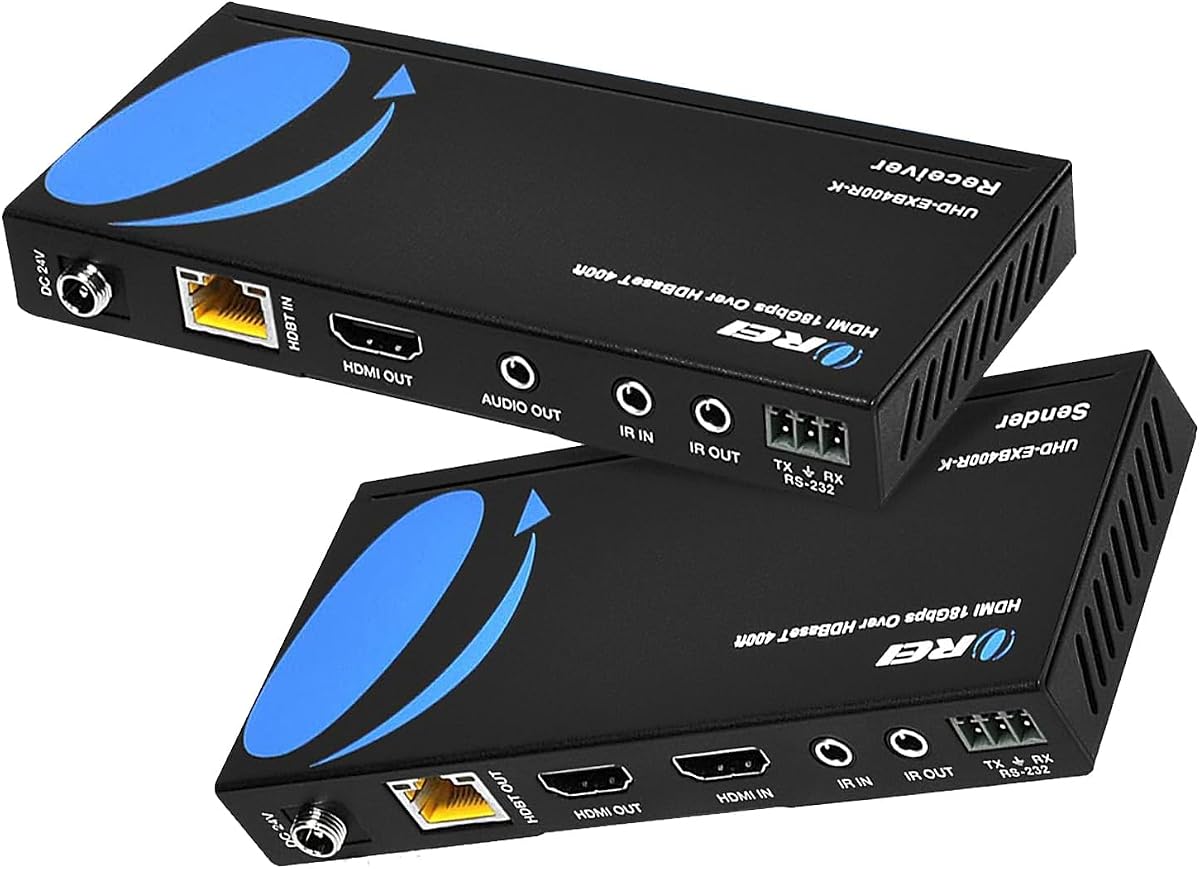
The OREI HDMI Extender HDBaseT 400ft is the most specialized and long-reaching option in this guide. Built around HDBaseT technology, it can carry an HDMI signal as far as 400 feet over Cat5e, Cat6, or Cat7 cabling with zero latency. Its 4.2 rating reflects a solid but less emphatic score, which should be considered alongside its unusually extensive professional control features.
We may earn a commission when you buy through this link, at no additional cost to you.
Video support includes HDMI 2.0a, HDCP 2.2, 4K at 60Hz, 2K at 60Hz in YUV 4:4:4, HDR, HDR10+, Dolby Vision, and 18Gbps bandwidth. It also supports CEC, RS-232 commands, bidirectional IR, and power over cable from either end. Audio formats include DTS-HD, Dolby TrueHD, and 7.1-channel digital audio, making it suitable for high-end rooms and commercial control systems.
Compatibility is a crucial qualification. The supplied information says OREI HDBaseT models work only with their own matching transmitter and receiver. They are not interchangeable with other OREI HDBaseT models and are not compatible with HDBaseT products from other brands because of chipset differences. Buyers must treat the sender and receiver as a matched set rather than mixing components across models or manufacturers.
This extender is the premium specialist option for large venues, campuses, digital signage networks, and professional AV installations that require long reach, two-way IR, RS-232, and flexible endpoint powering. It is unnecessary for a normal room-sized installation, but where those control methods and 400-foot reach are genuinely required, the specialized hardware is justified.
Two-way IR, CEC, and RS-232 give integrators ways to control source equipment and displays that a basic point-to-point HDMI extender may not support.
Power over cable can operate the pair from the transmitter or receiver side, providing installation flexibility in installations where power access differs between the two locations.
We may earn a commission when you buy through this link, at no additional cost to you.
The PWAY HT275 is a practical point-to-point extender for users who need 4K capability, long-distance 1080p, IR control, and a local display loop. It carries 4K at 30Hz up to 130 feet and 1080p up to 230 feet over a single Cat6 cable. Its 4.6 rating is among the strongest in the guide, indicating generally favorable user reception.
We may earn a commission when you buy through this link, at no additional cost to you.
The transmitter can send the same source to a remote display while providing a local loop-out for previewing or monitoring. It supports both mirroring and extended-display modes, giving computer users some flexibility in how the local and remote screens interact. The included IR cable allows a compatible source device to be controlled from the receiver side, and power over cable supplies the receiver through the Ethernet run.
The 230-foot figure is tied to 1080p, while 4K30 is limited to a shorter distance. The model is therefore best matched to the source's actual output and the available cable route. It is a single-screen extension solution rather than a distribution system, and buyers requiring 60Hz 4K, native HDR, or advanced control protocols will need a more specialized model.
The PWAY HT275 is a strong general-purpose recommendation for home theaters, meeting rooms, live streaming setups, offices, and educational spaces. Its combination of loop-out, IR, flexible display modes, and mounting holes makes it particularly practical for semi-permanent installations where both local monitoring and remote viewing matter.
Mirror and extended-display support gives computer users more control over the relationship between the local loop-out screen and the remote presentation display.
Power over cable and integrated mounting holes make the transmitter and receiver easier to conceal and organize behind televisions, projectors, or mounted digital signage screens.
We may earn a commission when you buy through this link, at no additional cost to you.
The right extender depends on video bandwidth, physical distance, source control, installation complexity, and the number of displays that need to receive the signal.
Resolution and refresh rate determine how much signal bandwidth must travel through the cable. A model advertised as 4K may support only 30Hz, while 4K60 is preferable for modern televisions, high-refresh computer displays, and demanding gaming. The OREI 4K60 230ft model, OREI 4K60 Cat6 Balun, OREI KVM model, and HDBaseT extender support 4K60, but they also call for suitable source, display, and cabling.
The longest advertised cable run usually applies to 1080p, while 4K demands a shorter route. For example, the HT275 and PWAY models reach 230 feet for 1080p but only 130 feet for 4K30. The OREI 4K60 Cat6 Balun lists 165 feet, while the professional HDBaseT model extends as far as 400 feet. Wall materials, cable category, connectors, and installation quality can all affect real-world results.
These extenders use network cable as a transmission medium, but they are not ordinary network devices. A direct point-to-point connection is generally required, and a router or network switch cannot be inserted into the path. High-quality solid-core Cat6 or Cat7 is advisable for demanding 4K runs. The more bandwidth you need, the more important cable construction, installation, and connector quality become.
EDID allows a source to identify the capabilities of the connected display. Copying or cloning EDID can help the source select a compatible resolution, which is especially helpful when the remote screen cannot be reached easily for manual configuration. Models described as EDID pass-through, EDID copy, or EDID cloning may not behave identically, so buyers should understand whether the function is automatic or requires a setup step.
IR forwarding allows a remote viewing location to operate a source device that is physically elsewhere. One-way IR is sufficient when the receiver side needs to control the source, while two-way IR supports commands traveling in both directions. The OREI HDBaseT model offers two-way IR, most point-to-point options provide one-way control, and the basic HT202P does not list IR support.
Power over cable supplies the receiver through the network cable, allowing one end of the kit to operate with a single external adapter. This is particularly useful behind wall-mounted televisions and inside cabinets. Some systems can be powered from either endpoint, while others require power at the transmitter. Confirm where a power outlet is available before choosing the installation arrangement.
A transmitter loop-out feeds a nearby display while the main signal travels to the remote receiver. This can support presentations, event monitoring, security observation, and dual-screen computer workflows. It is not equivalent to sending the source to two independent remote destinations; that requires a multi-output distribution system such as the OREI 1×4 model.
Most products in this guide are point-to-point systems with one remote display. The OREI 1×4 extends one source to four receivers and four remote displays. The OREI KVM model adds keyboard and mouse control at the receiver, while the HDBaseT model adds RS-232 and CEC. Count displays and control tasks before choosing, since extra outputs or control methods may require additional hardware.
Begin by identifying the source, the remote display, and the exact cable path. Connect the source to the transmitter and the receiver to the remote display using suitable HDMI cables. Run one continuous Cat5e, Cat6, Cat6A, or Cat7 cable between the transmitter and receiver, matching the cable category to the model and intended resolution. Do not insert a network switch, router, or other network device into the transmission path.
Power the appropriate endpoint and confirm that the source recognizes the remote display before finalizing the installation. Connect and position the included IR emitter or receiver as directed when remote source control is required. If the system has a transmitter loop-out, connect the local screen and choose mirroring or an extended mode as appropriate. Then adjust the source output to a resolution and refresh rate supported by the extender and display.
For permanent use, secure the transmitter and receiver, strain-relieve the HDMI and network cables, and avoid leaving the network cable loosely folded or sharply bent. Keep connectors dry and clean, allow the units to dissipate heat, and avoid covering ventilation openings. If a display is blank or unstable, test the system with a shorter cable, a known-good network cable, and a simpler source before troubleshooting more complex EDID, IR, or control features.
An HDMI over Ethernet extender includes a transmitter and receiver that carry an HDMI signal over a network cable. The source connects to the transmitter, the receiver connects to the display, and one Ethernet run links the two units. This makes long-distance display connections easier to route through walls, ceilings, or commercial cable pathways.
No. The units listed here are designed primarily for direct point-to-point connections, not for routing the transmission through routers or network switches. The OREI models are explicitly described as incompatible with network switches and routers. A direct connection also avoids introducing unwanted network behavior into a dedicated AV signal path.
It depends on the extender's specifications and the distance involved. Some models list Cat5e compatibility, while OREI recommends high-speed Cat6 for optimal long-distance 4K performance and the KVM model is described over Cat6 or Cat7. For 4K60 over longer runs, Cat6 or Cat7 is the more prudent choice, particularly when the cable passes through walls.
No. Many of the listed products support 4K only at 30Hz, and the basic HT202P is limited to 1080p60. Models that explicitly support 4K60 include the OREI 4K60 230ft Extender, OREI 4K60 Cat6 Balun, OREI KVM model, and OREI HDBaseT extender. Check both resolution and refresh rate before buying.
The loop-out provides the transmitter's HDMI signal to a local display while the main transmission continues to the remote receiver. It is useful for local monitoring, presentations, and computer workflows that need a nearby preview screen. It does not independently distribute the source to multiple remote destinations.
An IR emitter at the receiver side sends remote-control commands back through the extender to the source. Most models provide one-way IR, which is enough for controlling a source from the remote display. The OREI HDBaseT model supports two-way IR, and the HT202P does not list IR functionality.
Power over cable sends power to the receiver through the Ethernet run, so only one endpoint requires an external power adapter. This is useful for wall-mounted displays and concealed equipment where finding a second outlet is inconvenient. The installation manual should still be followed because some systems expect power at the transmitter while others allow either endpoint to supply it.
Only if it is a distribution system designed for multiple outputs. Most kits in this guide provide one remote display, and their loop-out is intended for local monitoring rather than another independent remote location. The OREI 1×4 HDMI Splitter Extender is the listed option that sends one source to four displays using four receivers.
The OREI HDMI Over Ethernet Extender via CAT6 4K stands out as the strongest all-around high-performance pick because it combines 4K60 YUV 4:4:4, 18Gbps bandwidth, HDR support, a 230-foot stated reach, and power over cable. The KVZOO model is the leading value choice when 4K30, long 1080p runs, IR, and loop-out are enough, while the OREI 1×4 system is the premium solution for distributing one source to four remote displays.
Start with the resolution and refresh rate your actual equipment requires, then work backward to the appropriate cable length. Consider whether you need local loop-out, IR control, multiple remote displays, KVM functions, RS-232, or two-way IR. High-quality network cabling and a direct point-to-point route are just as important as the extender itself, particularly for long 4K60 runs.
Finally, check the current product listing, included accessories, compatibility notes, and electrical details before ordering. Product configurations and seller information can change, and some listings contain overlapping or slightly inconsistent specifications. Confirming the current source and display requirements will help ensure that the selected HDMI over Ethernet kit fits the installation without unexpected compromises.