
Seagate 2TB Game Drive
4.5Editor score
Two-terabyte game storage
Xbox-certified compatibility
Illuminated Xbox-style design
Our External SSD Xbox Series X S guide compares 10 top drives for storage, speed, compatibility, portability, and everyday gaming value.
An external SSD for Xbox Series X|S can transform a crowded console into a larger gaming hub, but the best option depends on how you play. Some drives are dedicated Xbox storage cards, while others are portable SSDs designed to work across consoles, PCs, and mobile devices. The right choice balances compatibility, capacity, speed, convenience, and durability.
We compared ten officially licensed or broadly compatible products using their published specifications, stated Xbox support, storage capacity, interface, physical design, and feature sets. The list covers dedicated expansion cards, gaming drives, and portable external SSDs, with particular attention to whether games can run directly from the drive and whether Xbox Quick Resume is supported.
Each recommendation highlights a different use case, from budget-conscious library expansion to high-capacity storage for large modern games. Specifications and availability can change over time, so check the current product listing and your console's storage options before making a final purchase.
4.5Editor score

4.8Editor score

5.0Editor score
The table below compares all ten drives across their most important qualities: Xbox compatibility, storage capacity, interface, and gaming-focused features. Dedicated expansion cards offer the most integrated experience, while portable SSDs offer broader use across gaming and computing devices.




The Sandisk 1TB Optimus GX C50 is an officially licensed storage expansion card for Xbox Series X|S consoles, and its 5.0 rating reflects a strong combination of tight console integration and modern NVMe performance. Unlike a conventional external SSD connected by USB, it occupies the console's dedicated expansion slot and is designed to behave like an extension of the console's internal storage. Games can be played directly from the card, making it one of the most focused options in this guide.
We may earn a commission when you buy through this link, at no additional cost to you.
Its standout qualities are speed and continuity. The product is described as matching the latency profile associated with Xbox Velocity Architecture, allowing supported titles to launch directly from the card rather than requiring constant transfers to internal storage. It also supports Quick Resume, so a game suspended on the card can be returned to without losing progress. For players who move frequently among demanding modern releases, that combination can be more valuable than the headline transfer speed of a generic USB drive.
The main trade-off is physical format. This card only fits the expansion bay of an Xbox Series X or Series S, so it cannot serve as a portable drive for a laptop, phone, or older console. Its listed 1TB capacity may also feel modest for collectors who own several enormous titles, although it still provides meaningful room to move games away from the console's internal drive. Some buyers may prefer a less specialized device that works across several platforms.
This is the premium recommendation for Xbox Series X|S owners who want storage that feels integrated into the console rather than merely attached to it. Choose it when your priority is playing games directly from expanded storage, fast access, Quick Resume, and official licensing. For a multi-device generalist drive or a lower-cost storage solution, the WD_BLACK C50 and Seagate Game Drive offer different balances.
Because the Optimus GX C50 uses the dedicated expansion-card format, supported games can run directly from it. That makes it a better fit than a drive that only acts as a transfer destination when seamless library management is the goal.
Quick Resume support is especially useful for players who keep several large games suspended. The drive's low-latency design helps reduce the friction of moving between those sessions.
We may earn a commission when you buy through this link, at no additional cost to you.
The Seagate 2TB Game Drive is an Xbox-certified external drive designed primarily to expand console storage through transfers. Its 4.5 rating and two-terabyte capacity make it a practical choice for players who need more room but do not necessarily require the lowest loading times or direct game execution. It works with Xbox Series X, Series S, and all generations of Xbox One, giving it broader usefulness within the Xbox ecosystem.
We may earn a commission when you buy through this link, at no additional cost to you.
The strongest feature is its balance of capacity and accessibility. Two terabytes can hold a substantial collection of installed games, and the drive's refined enclosure, built-in green LED bar, and clear Xbox orientation make it feel at home beside a console. Buyers also receive three years of Rescue Data Recovery Services and a one-year limited warranty, which is reassuring for a drive expected to hold an extensive personal game library.
Its important limitation is explicit: games cannot be played directly from this external hard drive. The drive serves as a storage location to which games can be moved and later transferred back to internal console storage. That workflow is useful for managing a packed console, but it is not equivalent to native expansion-card performance. It also uses a mechanical hard-drive design rather than the responsiveness of an NVMe SSD.
Choose the Seagate Game Drive when library capacity, recognizable gaming design, and broad console compatibility matter more than instant switching between games stored externally. It is a sensible budget-oriented way to maintain a large game vault and free internal console space. Players who want to launch games directly from an attached drive should instead consider the WD_BLACK C50 or Sandisk Optimus GX C50.
The two-terabyte capacity gives you room to preserve a sizable collection of titles outside the console's internal storage. Moving games to the drive and back again makes it easier to keep frequently played titles close at hand.
Xbox certification and compatibility with both current Xbox Series consoles and Xbox One systems simplify setup. The illuminated enclosure also makes the drive easy to identify in a shared gaming setup.
We may earn a commission when you buy through this link, at no additional cost to you.
The WD_BLACK 1TB C50 is an officially licensed NVMe storage expansion card for Xbox Series X|S consoles. Its 4.8 rating makes it the strongest all-around recommendation for players who want console-level integration, quick access to games, and support for Quick Resume. The card is designed to work with the Xbox Velocity Architecture rather than imitate it with a generic USB connection.
We may earn a commission when you buy through this link, at no additional cost to you.
This approach provides several practical benefits. Games stored on the expansion card can be accessed without treating the device as an ordinary external drive, while the NVMe core is intended to reduce waiting and support responsive transitions. Quick Resume compatibility lets players switch among suspended games and return to their current state. The combination of official licensing, plug-and-play positioning, and high customer feedback makes this an easy recommendation for Series X and Series S owners.
The trade-offs are mostly about flexibility. A one-terabyte card provides less space than the Seagate Game Drive, the WD_BLACK 4TB P40, or the two-terabyte Lexar ES3. Its physical format also prevents use with PCs, phones, and other consoles. Furthermore, the largest games can consume a significant portion of one terabyte, so active library management remains necessary even with dedicated expansion.
The WD_BLACK C50 is the best overall choice for an Xbox Series X|S buyer who wants a straightforward, officially supported way to expand internal storage. It suits players who value low-latency access and Quick Resume but do not need a portable SSD for other devices. If portability matters more, the guide's Lexar, Samsung, and WD_BLACK P40 alternatives provide that broader compatibility.
The NVMe expansion card is designed to take advantage of the console's storage architecture. Direct access and low latency make it more appropriate for gaming than a conventional drive used only as a transfer destination.
The card integrates with the console's Quick Resume feature, allowing suspended titles to be returned to without starting over. That is especially valuable for modern games with substantial installation sizes and lengthy sessions.
We may earn a commission when you buy through this link, at no additional cost to you.
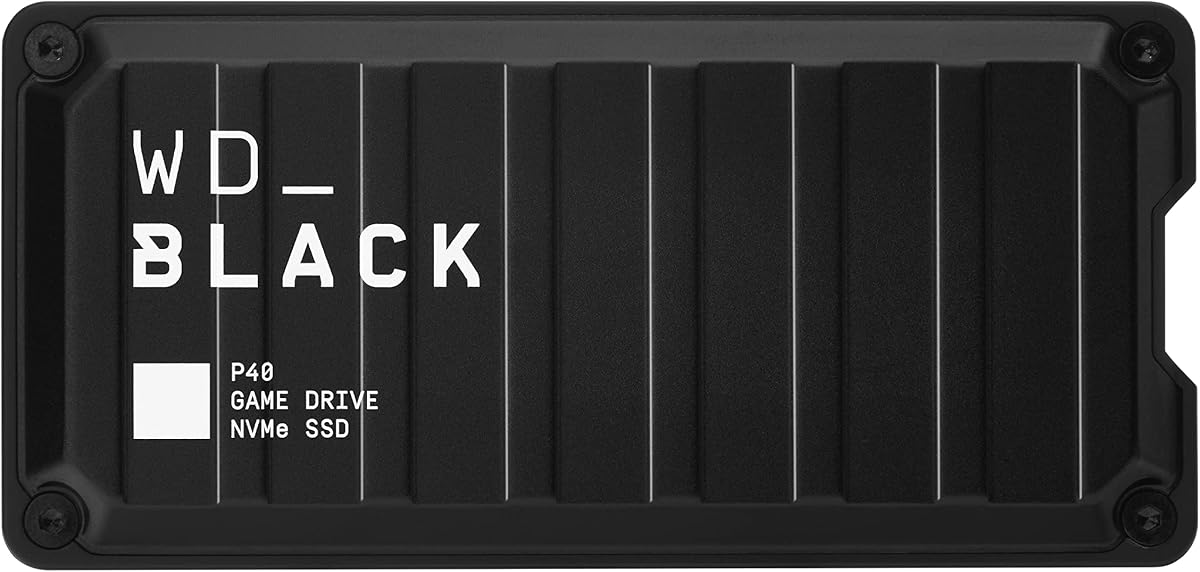
The WD_BLACK 1TB P40 is a portable external SSD with a strong focus on gaming aesthetics and high transfer performance. Its 4.6 rating reflects a solid combination of speed, broad platform support, and a distinctive illuminated design. It can be used with Xbox Series X|S, PlayStation 5, Xbox One, PCs, and Macs, making it more versatile than a dedicated expansion card.
We may earn a commission when you buy through this link, at no additional cost to you.
The interface is USB 3.2 Gen 2×2, with a stated read speed of up to 2,000MB/s. This makes the P40 particularly useful for moving large game installations, creative files, and media between compatible devices. Customizable RGB lighting adds a visual feature that is unusual for a portable drive, and the Windows-only WD_BLACK Dashboard provides control over the lighting. Its shock-resistant structure is also designed to survive drops of up to two meters.
Compatibility requires careful interpretation. The drive can store and archive supported Xbox One and Xbox Series X|S games, but Xbox Series X|S games generally need to be moved to the console's internal storage before direct play. It is therefore a transfer and backup device rather than a native expansion card. Actual transfer speed also depends on the host device, connected cable, usage conditions, and other factors, so the advertised maximum does not always represent everyday console performance.
Choose the P40 when you want one fast drive to support several devices and value appearance as much as function. It is a strong choice for organizing a mixed console setup, transporting a game library, or backing up content from PCs and consoles. If your sole priority is running games directly from an Xbox Series X|S drive, the dedicated C50-family expansion cards are the more appropriate choices.
The RGB lighting can be customized through the downloadable WD_BLACK Dashboard on Windows. It brings a distinctive visual element to a setup where many competing gaming drives use plain enclosures.
Broad console and computer compatibility makes the P40 useful beyond Xbox. It can serve as a central transfer and archive device for players who regularly move between current and previous-generation systems.
We may earn a commission when you buy through this link, at no additional cost to you.
The Lexar ES3 1TB is a slim portable SSD built for users who want to carry a compact storage device between an Xbox, laptop, camera, phone, or other compatible hardware. Its 4.4 rating reflects a capable portable design with respectable transfer speeds and unusually broad compatibility. The enclosure weighs 42 grams and is 10.5 millimeters thick, making it easy to carry in a pocket or small gaming bag.
We may earn a commission when you buy through this link, at no additional cost to you.
Its USB 3.2 Gen 2 interface supports read speeds up to 1,050MB/s and write speeds up to 1,000MB/s, though performance can be lower when the host does not support that interface generation. The drive includes a USB-C cable for plug-and-play convenience, and its listed compatibility extends across Xbox X|S, PS4, PS5, Android devices, laptops, cameras, and newer iPhone models. Lexar DataShield software provides 256-bit AES encryption for protecting files.
The central limitation is its role on Xbox. It is not a native expansion card, and the product data does not claim that Xbox Series games can be run directly from it. It is better viewed as a flexible drive for transfers, archives, and other files. The included MagSafe-compatible version note is also worth noting for buyers comparing it with other portable Lexar configurations, because the version reviewed here does not offer MagSafe.
Choose the Lexar ES3 1TB when portability and cross-device usefulness matter more than direct game execution. Its small size is especially attractive for travel or for use with a laptop and console in the same setup. Xbox owners who require integrated storage should choose a dedicated C50 expansion card, while those seeking more room may consider the two-terabyte ES3.
At 42 grams and 10.5 millimeters thick, the ES3 is designed to travel easily. A small footprint is helpful when console storage must be moved between a TV unit, desk, and traveling setup.
Compatibility with cameras, Android devices, laptops, and multiple console families expands the drive's role. It can function as a general-purpose file transfer device rather than an Xbox-only accessory.
We may earn a commission when you buy through this link, at no additional cost to you.
The Lexar SL500 1TB is a slim, high-speed external SSD aimed at people who transfer large files frequently and want more performance than a basic USB drive can offer. Its 4.4 rating reflects a well-rounded combination of speed, portability, and broad device support. It supports Xbox X|S, PS4, PS5, iPhone 15 and 16 series, laptops, cameras, and other mobile devices.
We may earn a commission when you buy through this link, at no additional cost to you.
The USB 3.2 Gen 2×2 interface delivers advertised read speeds of up to 2,000MB/s and write speeds of up to 1,800MB/s. That makes it well suited to moving large game folders, high-resolution media, and demanding creative projects. A unique thermal control design is intended to maintain appropriate temperatures and preserve performance during sustained transfers. The thin metal body adds a refined appearance without sacrificing portability.
As with other conventional external SSDs in this category, the SL500 is not an Xbox Series expansion card. Although the drive is compatible with Xbox Series X|S, its role is most useful for storage and transfers rather than native direct execution of Series X|S titles. Performance may also be lower on systems that lack USB 3.2 Gen 2×2, including certain Mac configurations. A suitable high-speed cable and host interface are important for reaching the advertised maximum.
The SL500 is a good choice for Xbox owners who also use the drive with PCs, mobile devices, cameras, or other consoles and want a slim transfer hub. Choose it over the standard ES3 when interface speed and active thermal management matter most. If your primary goal is storing and running Xbox games without transfers, select one of the officially licensed C50 expansion cards instead.
The Gen 2×2 interface offers substantial theoretical throughput for modern game installations and media files. It is most valuable when the connected host device and cable can fully support the standard.
The integrated thermal control design is intended to keep the drive at suitable operating temperatures. Temperature management helps maintain speed during extended, data-heavy transfers.
We may earn a commission when you buy through this link, at no additional cost to you.
The Samsung T7 1TB is a refined portable SSD with a 4.7 rating, solid transfer performance, and a durable aluminum unibody design. It is a general-purpose drive for files, backups, high-resolution video, and game data, but it can also complement an Xbox Series X|S setup as a convenient transfer and archive device. Its understated enclosure makes it equally suitable for a gaming shelf, office, or travel kit.
We may earn a commission when you buy through this link, at no additional cost to you.
The T7 uses PCIe NVMe technology and offers stated read and write speeds of up to 1,050MB/s and 1,000MB/s. It supports direct recording of ultra-high-resolution 4K video at 60 frames per second with compatible cameras and mobile devices, including iPhone 15 Pro ProRes workflows. Its solid aluminum body provides shock resistance and protection from falls of up to six feet, while the compact form is easy to carry.
For Xbox use, the T7 should be understood as a portable file drive rather than a native console expansion card. It does not provide the direct game execution and Quick Resume integration of the C50 expansion cards. Its USB 3.2 Gen 2 interface is also not as fast on paper as the Gen 2×2 drives in this list, although real-world results depend on the source device, cable, and workload. The one-terabyte version may be insufficient for very large game collections.
Choose the Samsung T7 when durability, a proven portable design, and broad creative or computing use are priorities. It is an excellent companion drive for moving game folders, keeping backups, and handling large media files while also using Xbox Series X|S. Players who want the console to run games directly from storage should choose a dedicated licensed expansion card.
The T7 combines NVMe transfer performance with a compact, pocketable enclosure. It is a practical middle ground for users who need speed without a bulky desktop drive.
The aluminum unibody and stated six-foot drop protection suit frequent transport. That resilience makes the drive more appropriate for a mobile game library than a stationary HDD.
We may earn a commission when you buy through this link, at no additional cost to you.
The WD_BLACK 4TB P50 is the high-capacity option in this guide, providing four terabytes for games and other large files. Its 4.7 rating indicates that buyers are generally satisfied with the combination of storage, speed, portability, and gaming-focused design. The drive uses a high-performance USB 20Gb/s interface and advertises SSD read speeds of up to 2,000MB/s.
We may earn a commission when you buy through this link, at no additional cost to you.
That capacity makes the P50 particularly relevant to owners of large modern game libraries. A single drive can consolidate many installed titles, archives, videos, and project files while retaining a portable form factor. The drive is compatible with PlayStation and Xbox consoles as well as PCs and Macs, and its shock-resistant construction is intended to protect it during transport. The included USB Type-A to Micro-B cable supports SuperSpeed transfers, although cable length may vary.
There are important qualifications. Actual speed depends on the host device, usage conditions, drive capacity, and other variables, so not every connected system will achieve the stated maximum. The four-terabyte version also represents a larger financial commitment than the one- and two-terabyte alternatives. Most importantly for Xbox Series X|S users, it acts as an external transfer and archive device rather than a native expansion card, so supported games generally need to be moved to internal storage for direct play.
Choose the P50 when maintaining the largest possible portable game vault is the priority and you want fast movement of sizable files. It can reduce pressure on limited internal console storage, especially for users with extensive libraries. If you want a smaller, less expensive drive, the 1TB P40 offers the same gaming-oriented concept with a more compact capacity footprint.
The 4TB capacity is the standout feature. It offers room for many installations and archives in one portable device, reducing the need for frequent deletion and transfer cycles.
The USB 20Gb/s interface and advertised speed of up to 2,000MB/s are well suited to large game folders. Host hardware and cables must support the interface to realize the greatest benefit.
We may earn a commission when you buy through this link, at no additional cost to you.
The Crucial X10 Pro 1TB is a rugged, high-speed portable SSD designed with professional creators in mind, though it remains compatible with Xbox consoles and other devices. Its 4.0 rating is the lowest among the products in this guide, but the underlying specifications are still strong: up to 2,100MB/s read speed, up to 2,000MB/s write speed, and a USB 3.2 Gen 2×2 interface.
We may earn a commission when you buy through this link, at no additional cost to you.
Durability is a major part of the X10 Pro's appeal. It has an IP55 rating for water and dust resistance, is drop resistant up to 7.5 feet, and includes a lanyard loop and activity light. SSD password protection adds a useful security layer, while broad compatibility covers Windows, Mac, iPad Pro, Chromebooks, Android, Linux, PS4, PS5, and Xbox. The one-terabyte capacity is intended for high-resolution photos, 4K or 8K video, and current creative projects.
For Xbox Series X|S, it is a compatible transfer and archive drive, not a native expansion card. Direct execution of current-generation Xbox titles is not part of its stated proposition. Its 1TB capacity also holds fewer games than the larger P50 and ES3 options. As with other high-speed portable drives, achieving maximum throughput depends on a compatible host and cable, so users should not expect the theoretical figure in every environment.
Choose the X10 Pro if you need one durable drive for both Xbox-related transfers and demanding creative work. Its physical protection and password features make it appealing for field use, while the fast interface helps move large creative assets efficiently. If direct Xbox game execution is more important than durability, select the WD_BLACK C50 or Sandisk Optimus GX C50 instead.
The IP55 rating and stated drop resistance make the X10 Pro suitable for field use. It is built to tolerate the dust, moisture exposure, and handling associated with active work outside a desk.
High transfer speeds benefit large media projects, while password protection adds privacy. Together they make the drive useful for sensitive or high-value working files.
We may earn a commission when you buy through this link, at no additional cost to you.
The Lexar 2TB ES3 combines a roomy two-terabyte capacity with a slim USB-C portable design. Its 4.5 rating reflects a solid general-purpose drive capable of fast transfers, storage expansion, and backups. It is particularly attractive for Xbox owners who want a substantial portable archive without moving up to a four-terabyte gaming drive.
We may earn a commission when you buy through this link, at no additional cost to you.
The drive offers read speeds of up to 1,050MB/s and write speeds of up to 1,000MB/s, which is more than sufficient for moving game folders, media, and general files. A two-in-one USB-C and USB-A cable broadens connection options across PCs, Macs, tablets, and smartphones. Double-layer graphite sheets are designed to conduct heat away from the drive, helping preserve performance during sustained transfers.
Durability is another advantage. The ES3 is stated to resist drops of up to two meters, making it better suited to regular transport than a bare internal drive. The limitation for Xbox owners is that it is not a native Series X|S expansion card. Its value comes from transfers, expanded file storage, and backups rather than direct execution of current-generation Xbox games through the console's dedicated expansion mechanism.
Choose the Lexar 2TB ES3 when you want a balanced portable drive with more room than one-terabyte models and broad device compatibility. It is a sound option for maintaining an off-console game archive or moving large game directories. For gaming that runs directly from attached storage, move up to the licensed C50 expansion cards; for a higher-capacity dedicated gaming aesthetic, consider the WD_BLACK 4TB P50.
The larger capacity gives players more flexibility for storing game folders and related media. It is a middle ground between one-terabyte portability and the four-terabyte P50.
Double-layer graphite sheets help dissipate heat during demanding transfers. The design supports more consistent performance when the drive is used for large, continuous file movements.
We may earn a commission when you buy through this link, at no additional cost to you.
The most important distinction is whether you want native console expansion or a portable drive for transfers and archives. Capacity, interface, direct-play support, portability, durability, and intended use should guide the decision.
An Xbox Series X|S storage expansion card slots directly into the console and can run supported games from that card when the product is designed for direct play. A USB external SSD is a separate device that can hold game folders and other files, but most current-generation Xbox titles must be moved back to internal storage before they can be played. This distinction affects loading behavior, convenience, and cable management, so decide whether native console integration matters more to you than portability.
Modern game installations can occupy a large portion of a one-terabyte drive, particularly when several large titles, updates, or downloadable content are stored together. A two-terabyte drive offers more breathing room, while four terabytes is best for extensive libraries and consolidated media storage. Estimate how many games you want to keep installed, leave some room for updates, and consider whether the drive is intended to hold only games or also backups, videos, and other files.
The wording around compatibility can be misleading. Some drives can store or archive Xbox games but cannot run them directly, while dedicated expansion cards explicitly support direct game execution. Read the compatibility notes carefully and distinguish current Xbox Series X|S titles from Xbox One games that the console can archive. If the goal is uninterrupted gaming without moving files back to internal storage, prioritize products that explicitly state direct-play support.
Quick Resume allows a suspended game to return without a traditional cold start, which is particularly useful with large modern titles. The WD_BLACK C50 and Sandisk Optimus GX C50 explicitly support this feature through the native expansion-card format. If you regularly rotate among several games, prioritize a drive that integrates with Quick Resume. It can make moving between sessions feel much more convenient than repeatedly launching titles from the console's main storage.
USB 3.2 Gen 2 and Gen 2×2 offer different potential throughput, with higher figures generally indicating better performance for large transfers. However, the console, host computer, cable, drive capacity, and workload all influence results. A faster interface helps when moving large game folders, but it does not turn a conventional USB drive into native expansion. Match the interface to the devices you will actually use and ensure the supplied or recommended cable supports the intended connection.
A portable SSD is valuable when you want one drive for an Xbox, laptop, phone, camera, or another console. Small, lightweight enclosures such as the Lexar ES3 are easy to carry, while larger-capacity models provide more room for a growing library. Consider the physical footprint, included cable, connector type, and whether you need to move the device frequently. Dedicated expansion cards offer excellent console integration but have virtually no cross-platform flexibility.
A drive that travels between locations needs stronger physical protection than one that stays beside a console. Look for shock-resistant or drop-resistant construction, dust and water resistance, and a sturdy metal or reinforced housing. For personal files, encryption and password protection can add another layer of security. These features are less important for replaceable game data but may matter for backups, photographs, videos, and sensitive documents.
The best external drive depends on what you do beyond gaming. The Samsung T7 supports high-resolution video workflows, the Crucial X10 Pro emphasizes ruggedness and creator features, and the WD_BLACK P40 adds customizable RGB lighting. Some products are optimized for one ecosystem, while others accept several device families. Review the included accessories, software, connector format, and host compatibility so the drive remains useful after your game library needs change.
Begin by checking the drive's format and confirming that the console or computer recognizes it. For a native Xbox Series X|S expansion card, power the console off before installation, insert the card into the expansion bay, and follow the on-screen storage prompts. For a USB drive, connect it directly to the console or use the appropriate port, then open the console's storage settings to format it if requested. Follow the manufacturer's setup instructions before moving important files.
When transferring games, prioritize the titles you play most often and allow each transfer to finish before disconnecting the drive. Do not unplug a USB device while data is moving, and avoid repeatedly removing a card while the console is writing data. For a clean transfer, move a title from internal storage to the external drive, verify that the move is complete, and then confirm the title can launch if the drive supports direct play. Keep backups of irreplaceable files separate from the game drive.
Protect the drive by keeping the port and connector clean, using the correct cable, and avoiding abrupt removal. Store portable SSDs in a padded case during travel, and do not leave them in extreme heat, moisture, or direct prolonged sunlight. Periodically check the drive's free space, review game updates, and replace or reformat storage that shows signs of failure. Safe habits reduce the chance of corrupted transfers and help extend the useful life of the device.
No. An external drive may be compatible with the console for storage while still lacking the ability to run current-generation Xbox Series games directly. Native expansion cards such as the WD_BLACK C50 and Sandisk Optimus GX C50 explicitly support direct play. With a conventional USB SSD, games generally need to be moved back to the console's internal storage before launching.
An expansion card is better when direct game play, low-latency access, and Quick Resume are your main priorities. It integrates directly with Xbox Series X|S storage and is optimized for console use. A USB SSD is better when you want portability, broader device compatibility, large archives, and the ability to use one drive with PCs, phones, cameras, or multiple console families.
It can make file transfers faster, but maximum advertised SSD speed does not automatically translate into faster game launches. Direct loading depends on whether the drive supports the title and the console's storage architecture. Native expansion cards are designed for that role, while ordinary USB SSDs are generally used to transfer games back to internal storage.
The requirement depends on the games you own because installation sizes vary substantially. A one-terabyte drive can be useful but may fill quickly with several large releases, updates, and downloadable content. Two terabytes offers more flexibility, while four terabytes suits collectors who want to consolidate a large library, media collection, and backups in one portable device.
Many portable SSDs support both consoles and computers, but file systems can affect what each device can read. A drive may need a different format when moving between systems, and formatting can erase its contents. Check current compatibility requirements, back up important files, and avoid reformatting a drive containing titles unless you intend to transfer them again.
No. Quick Resume support is specifically associated with compatible native storage expansion cards, including the WD_BLACK C50 and Sandisk Optimus GX C50 in this guide. A generic USB drive may store or archive games without providing the same suspended-game experience. Verify the feature in the product listing before purchasing if quick game switching is important.
Portable SSDs generally have no moving parts, so they are less vulnerable to damage from movement and accidental knocks. Their actual resistance still depends on enclosure quality, and some products add stated drop resistance, IP ratings, or reinforced construction. Check those specifications if the drive will travel frequently or work in less controlled environments.
It is not always necessary. Gen 2×2 can provide faster transfers when both the host device and cable support it, which is useful for moving large game folders. However, interface speed does not determine direct-play support. If native game execution and Quick Resume are your priorities, choose a licensed expansion card rather than selecting only on interface generation.
The Sandisk 1TB Optimus GX C50 is the premium choice for native Xbox integration, while the WD_BLACK 1TB C50 offers the strongest balanced recommendation with official licensing, NVMe performance, and Quick Resume support. The Seagate 2TB Game Drive stands out for budget-conscious buyers who need substantial storage and broad Xbox compatibility, accepting that games must be transferred back to internal storage for play.
Prioritize the experience you actually need. Choose an expansion card if you want to launch supported games directly and switch quickly between suspended sessions. Choose a portable external SSD if you need one device across Xbox, PC, mobile, or camera workflows, and select capacity based on your current library, update needs, and plans for future titles. Also consider durability, included cables, encryption, and appearance alongside headline speed.
Specifications, package contents, compatibility details, and prices can change, so review the current listing before ordering. Confirm direct-play and Quick Resume support for your particular console and game library, and check that the included connection suits your setup. With those details confirmed, the right external SSD can provide a cleaner, faster, and more spacious Xbox experience.

