
5.25-Inch USB A/C 3.0 Enclosure
4.4Editor score
Supports 171mm drive depth
Offers USB-A and USB-C
Uses aluminum alloy housing
An external optical drive enclosure can revive a spare internal CD, DVD, or Blu-ray drive, provide a portable way to read discs, or create a flexible external storage setup. The right enclosure depends on drive thickness, SATA compatibility, USB connection, power requirements, and how often you plan to move it.
We compared the available options by examining their supported drive formats, connection standards, installation method, materials, dimensions, and practical features. The list covers both full-size 5.25-inch desktop enclosures and slim laptop-style designs, with both bare SATA adapters and more protective external cases included.
Each review identifies the strongest reason to consider that model while also noting important limitations, such as excluded optical drives, protocol restrictions, external-power requirements, or narrower drive compatibility. Product details and pricing can change, so confirm the current specifications and listing information before purchasing.
4.4Editor score
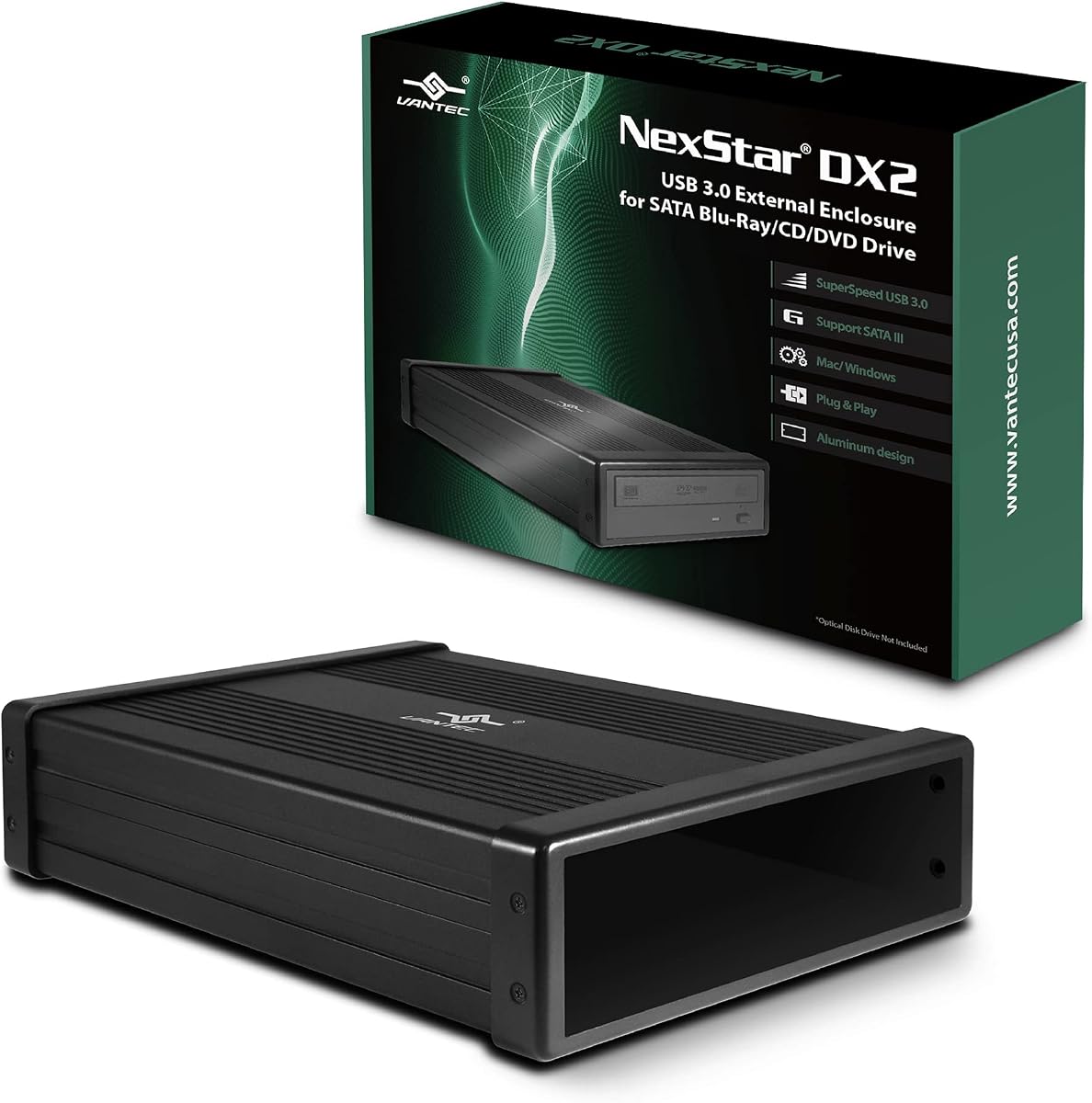
4.6Editor score

4.6Editor score
As an Amazon Associate we earn from qualifying purchases.
The comparison below highlights each enclosure's drive fit, connection style, major feature, and intended use. Because optical drives differ substantially in size and power needs, start with the physical drive you already own rather than choosing only by interface.


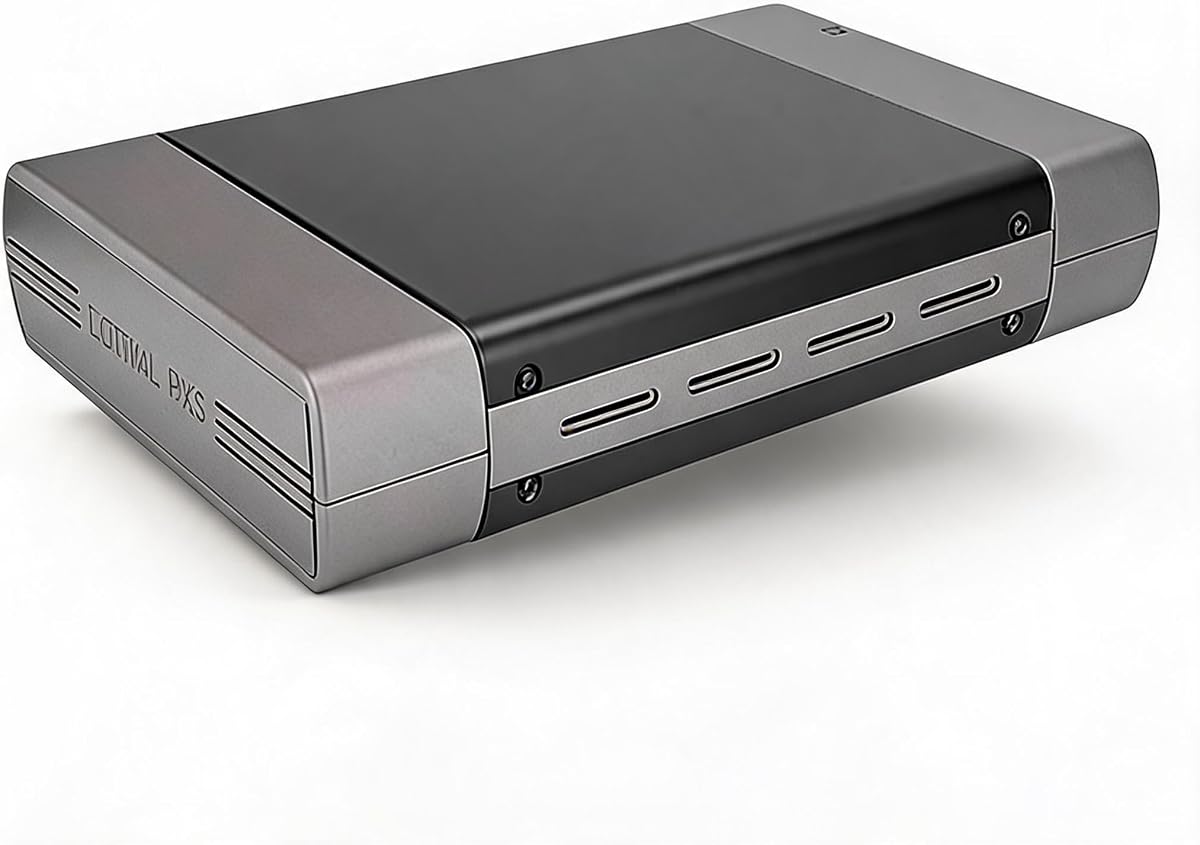


The NexStar DX2 stands out as the most complete option for full-size desktop optical drives. Its 4.6 rating reflects a favorable balance of useful capacity, broad drive-depth support, and straightforward USB 3.0 operation. The aluminum alloy housing and included 12V, 3A adapter also make it a practical choice for drives that need reliable outside power.
We may earn a commission when you buy through this link, at no additional cost to you.
Its most important advantage is the unusual ability to fit any optical-drive depth up to 185mm. A flexible internal SATA cable reduces installation constraints, while the second-generation DX design also supports 3.5-inch and 2.5-inch hard drives or solid-state drives when an optional 5.25-inch mounting bracket is used. Hot-swapping support and plug-and-play operation add convenience for systems with compatible USB ports.
The enclosure is not as small or immediately simple as a slim laptop-drive case, and it is built around a SATA optical-drive format rather than every possible legacy interface. It also does not include an optical drive, so the buyer must already own a compatible drive or add one separately. The power adapter may also be unnecessary for certain storage devices, although it is useful for demanding optical drives.
This is the strongest general recommendation for a desktop optical drive, especially when depth measurements or unusual drive dimensions are a concern. Buyers seeking a compact travel accessory should choose one of the slim enclosures, while users with a standard SATA desktop drive and a reliable USB 3.0 port will find the DX2 unusually accommodating.
The 185mm maximum depth and flexible SATA cable reduce the risk that a desktop optical drive will not fit correctly. This is particularly useful for older CD, DVD, or Blu-ray mechanisms with dimensions that differ from more compact models.
The included 12V, 3A adapter provides dedicated power for compatible optical drives, while the optional mounting bracket broadens the enclosure's use with SATA hard drives and SSDs. That versatility can justify the larger footprint.
We may earn a commission when you buy through this link, at no additional cost to you.
This full-size enclosure combines a 5.25-inch form factor with both USB-A and USB-C connectivity, making it a strong premium choice for a modern desktop or laptop setup. Its 4.4 rating reflects a capable design that supports optical drives up to 171mm deep and communicates through USB 3.0 at up to 5Gbps.
We may earn a commission when you buy through this link, at no additional cost to you.
The aluminum alloy housing is intended to reduce heat, noise, and vibration, all of which are relevant when a mechanical optical drive is operating. Hot-swapping support is another meaningful convenience, and the enclosure is designed to work without additional drivers. Drives that lack side mounting screw holes can also be used, according to the supplied product information.
Its most important restriction is that it supports only the SATA protocol; IDE-interface optical drives are excluded. Installation may also require care when aligning screw holes, so buyers should review the product's installation guidance before beginning. The optical drive itself is not included, and the 171mm depth limit is slightly less generous than the NexStar DX2's 185mm allowance.
Choose this model when you want a full-size, thermally conscious enclosure with the convenience of both modern USB-C and legacy USB-A connections. It is less suitable for a slim laptop drive, but for a standard desktop SATA optical mechanism it offers an attractive mix of compatibility, portability, and straightforward operation.
Having both USB-A and USB-C lets the same enclosure serve desktop computers, laptops, and setups with different port arrangements. USB 3.0 is listed at up to 5Gbps, while the plug-and-play design avoids routine driver installation.
Aluminum alloy construction supports heat dissipation and reduces vibration around a moving optical mechanism. These properties are useful in a full-size enclosure intended for sustained disc reading or writing.
We may earn a commission when you buy through this link, at no additional cost to you.
The Zunate enclosure is a portable, budget-minded option for converting a 9mm SATA optical drive found in many laptops into a USB device. It supports USB 3.0 and Type-C connections at up to 5Gbps, while its integrated cable avoids carrying a separate lead. No customer rating is currently supplied, so the specification details are the main basis for comparison.
We may earn a commission when you buy through this link, at no additional cost to you.
Its removable installation panel makes it straightforward to place an internal optical mechanism inside the case. The enclosure is designed for plug-and-play operation without drivers or an external power supply, and the supplied information lists compatibility with Windows and OS X systems. Backward compatibility with USB 2.0 makes it usable on older ports, though performance will depend on the host connection.
The 9mm target is restrictive compared with enclosures that accept 12.7mm drives, and users must verify their drive thickness before ordering. The product information also lists an eject function intended to prevent discs from becoming stuck. Because no rating is available, long-term reliability cannot be evaluated from customer feedback in the provided dataset.
This is a sensible choice for a compatible ultra-slim laptop drive when portability and a self-contained cable matter most. It is not the right enclosure for a desktop optical mechanism, and buyers should confirm both the drive thickness and SATA interface before purchase.
The enclosure targets the 9mm SATA drives commonly used in slim laptops, including compatible CD, DVD, and Blu-ray mechanisms. Accurate thickness and interface checks are essential because the case is not a general-purpose desktop optical enclosure.
The integrated USB-C and USB 3.0 cable can be stored with the enclosure, reducing the number of loose accessories. Its lightweight, compact form makes it easier to carry than a full-size 5.25-inch case.
We may earn a commission when you buy through this link, at no additional cost to you.
The JOTEC enclosure is a slim 9.5mm SATA option that includes two data cables and a broad list of supported disc formats. No customer rating is available in the supplied data, but its specification set is extensive, covering CD, DVD, dual-layer, VCD, EVD, and related media through software playback.
We may earn a commission when you buy through this link, at no additional cost to you.
The aluminum-alloy shell is designed for heat dissipation, and the built-in controller includes a power-saving sleep mode. Four nonslip feet help keep the unit stable during disc access, while the ventilated layout supports cooling. Both USB 3.0 and Type-C cables are included, and the product is presented as driver-free and backward compatible with older USB connections.
There is a notable wording inconsistency in the supplied specifications: the compatibility section refers to 12.7mm-thick drives, while the interface section specifies a 9.5mm enclosure. A careful buyer should confirm the precise model dimensions and drive thickness with the seller. Only SATA-interface optical drives are supported, and the optical drive is not included.
The JOTEC model is worth considering for a 9.5mm SATA optical mechanism when broad disc-format support, cooling, and included dual cables matter. It should not be selected without resolving the thickness discrepancy, and its lack of a listed rating means it offers less customer feedback than several alternatives.
The stated format list extends beyond ordinary CD and DVD playback to include CD-R, CD-RW, DVD-5, DVD-9, DVD+R, DVD-R, DVD-RW, DVD+RW, VCD, EVD, and DL formats. Actual software behavior can also depend on the operating system and playback application.
Aluminum construction, ventilation, and a power-saving sleep mode support stable operation. The four bottom feet also reduce movement on a desk while a disc is being read.
We may earn a commission when you buy through this link, at no additional cost to you.
The Tbest enclosure accommodates both 12.7mm and 9.5mm SATA optical drives, which makes it more flexible than many slim cases. Its 3.4 rating is the lowest numerical score among the products with listed customer feedback, so buyers should weigh that result carefully against the broad physical compatibility.
We may earn a commission when you buy through this link, at no additional cost to you.
USB 3.0 is listed at up to 5Gbps with backward compatibility for USB 2.0 connections, while USB-A and Type-C provide useful port flexibility. The INIC3609 chipset solution includes an automatic sleep mode, and the enclosure supports SATA I at 1.5Gbps and SATA II at 3.0Gbps. Listed operating-system support includes several Windows versions, Linux, and OS X.
The main drawback is that the product is limited to SATA I and SATA II rather than the more extensive compatibility claimed by some alternatives. The relatively modest rating suggests that some buyers may have encountered less satisfactory aspects of fit, performance, or reliability. Buyers should also understand that the optical drive itself is not part of the enclosure package.
This model is most useful when the user owns either a 12.7mm or 9.5mm drive and values connector choice over a higher customer rating. It is less compelling for users who can identify a well-rated enclosure tailored to their exact drive thickness.
Supporting both 12.7mm and 9.5mm drives is helpful for users who may replace an old laptop mechanism with another optical drive of a different thickness. The enclosure still must be matched to the correct SATA interface.
The listed INIC3609 solution includes automatic sleep behavior for energy efficiency. USB 2.0 backward compatibility broadens host support, while the 5Gbps USB 3.0 specification offers a faster path on suitable ports.
We may earn a commission when you buy through this link, at no additional cost to you.
The Vantec CB-ST00U3 is a compact USB-to-SATA adapter with a 4.6 rating and support for optical drives as well as SATA hard drives and solid-state drives. Instead of placing the drive inside a full enclosure, this design exposes it through a lightweight adapter that is easy to carry and store.
We may earn a commission when you buy through this link, at no additional cost to you.
It is optimized for SATA I, SATA II, and SATA III optical, hard-drive, and solid-state devices. UASP support can improve transfer performance on compatible USB 3.0 systems, while hot-swappable, plug-and-play operation makes the adapter convenient for changing between compatible drives. An anti-slip mat is included to dampen noise and protect the connected device.
The supplied information notes that the SATA-to-USB bridge controller may limit commands available from a connected drive. Some optical drives also require more current than the included 12VDC, 2A adapter can provide, in which case a more capable adapter is needed. It should not be confused with a protective full-size box that shields the entire optical mechanism.
Choose the Vantec adapter when you want a flexible, low-profile way to connect several types of SATA devices and value its 4.6 rating and UASP support. It is less suitable if you need a full protective shell or if your optical drive has unusually high power requirements.
The adapter is not limited to optical mechanisms and can also be used with compatible SATA hard drives and SSDs. That makes it a practical choice for technicians, builders, or users who want to reuse several types of storage hardware.
Its compact, lightweight body is easier to carry than a desktop enclosure, while hot-swappable and driver-free operation simplifies repeated use. Check the power requirement of the specific drive before relying on the included adapter.
We may earn a commission when you buy through this link, at no additional cost to you.
This enclosure is a straightforward option for standard 5.25-inch optical drives, including Blu-ray, DVD, and CD mechanisms. It carries a 4.5 rating and includes the power hardware, cable, screws, manual, and mounting accessories needed for a basic installation. It also supports 3.5-inch hard drives.
We may earn a commission when you buy through this link, at no additional cost to you.
The included AC adapter supplies the stable external power that desktop optical drives generally need for reading, writing, software installation, backup tasks, and movie playback. A lightweight aluminum housing helps protect the installed drive from everyday wear, bumps, and scratches while keeping the overall package suitable for a home office or study space.
The decisive limitation is USB 2.0. While that interface remains simple and widely supported, it offers much lower potential throughput than the USB 3.0 alternatives in this guide. The enclosure is explicitly not compatible with slim laptop optical drives, so physical fit should be checked before ordering.
This model makes the most sense for a user with a standard desktop optical drive who values a complete kit and simple setup more than maximum transfer speed. Users seeking faster connections should favor a USB 3.0 full-size model, while this enclosure remains a functional option for infrequent disc access on older systems.
The package includes the enclosure, manual, screws, USB cable, adapter, and power cable. Including the mounting hardware reduces uncertainty when setting up a standard desktop optical mechanism.
The aluminum housing surrounds the installed drive and offers some protection from bumps and scratches. Its full-size format is better suited to desktop use than to compact travel.
We may earn a commission when you buy through this link, at no additional cost to you.
The Bewinner enclosure converts a compatible 9.5mm CD, DVD, or Blu-ray drive into a portable USB device. No customer rating is supplied, but the specification details present a clear use case for laptop users who want to reuse a thin internal mechanism without installing it permanently in a computer.
We may earn a commission when you buy through this link, at no additional cost to you.
Installation involves replacing the original front panel, inserting the drive, and sliding it into the enclosure. The unit supports plug-and-play operation without extra drivers, while the integrated USB 3.0 and Type-C cable keeps the accessory compact. A woven cable is intended to reduce interference and signal loss during data transfer.
The primary limitation is the 9.5mm drive requirement, which excludes thicker 12.7mm laptop drives and full-size desktop mechanisms. The brushed ABS housing is lightweight and scratch-resistant, but it does not provide the heat-dissipation benefits associated with an aluminum enclosure. The optical drive is not included, and no customer rating is available for added confidence.
Buy this option when portability, a simple conversion process, and integrated connectors are the main priorities. Buyers should verify the drive thickness and interface, and they should not expect it to accept a standard desktop optical drive.
A spare internal optical mechanism can be placed into the enclosure and used over USB. The front-panel replacement method keeps the process focused on physical fit rather than complex configuration.
The integrated USB-A and Type-C cable folds into the enclosure, reducing clutter in a laptop bag. The woven construction is designed to support a stable connection while traveling.
We may earn a commission when you buy through this link, at no additional cost to you.
The detachable USB-C 9mm enclosure is designed for ultra-slim SATA optical mechanisms commonly found in laptops. It converts the internal drive into an external USB unit, supports up to 5Gbps over USB 3.0, and remains backward compatible with USB 2.0 ports. No customer rating is available in the supplied information.
We may earn a commission when you buy through this link, at no additional cost to you.
The front panel helps with swapping and inserting the drive, while the detachable cable includes USB 3.0 and USB-C connectors and can be stored at the bottom of the enclosure. No external power supply or additional driver is required for the compatible slim drive. The woven cable is intended to minimize interference and maintain a stable connection.
The 9mm fitment is the primary constraint. It will not serve as a general enclosure for 12.7mm or desktop optical drives, and the SATA interface must be confirmed before installation. The slim, lightweight design also offers less physical protection than a substantial aluminum full-size case.
This is a useful choice for turning a compatible 9mm laptop optical drive into a convenient external accessory. It is especially useful for users who value a detachable, packable cable and driver-free operation more than a full protective housing.
The detachable USB-A and USB-C lead can be folded into the bottom of the case. This makes the enclosure easier to organize in a bag and prevents a loose cable from becoming tangled.
A removable front panel and SATA-based construction support a straightforward conversion from an internal laptop mechanism to an external drive. Drive thickness and interface should be verified before installation.
We may earn a commission when you buy through this link, at no additional cost to you.
The tool-free enclosure is designed for standard 12.7mm SATA optical drives, providing a simple way to reuse a spare laptop CD, DVD, or Blu-ray mechanism. No customer rating is listed, so the physical design and stated compatibility should guide the decision. The removable panel is the product's defining feature.
We may earn a commission when you buy through this link, at no additional cost to you.
Instead of requiring screws, the user slides the drive into position and snaps the cover back into place. USB 3.0 and Type-C connections are supplied through a fold-away integrated cable, and the enclosure is described as requiring no extra drivers or external power adapter. Transfer rates are listed at up to 5Gbps, with backward compatibility for USB 2.0 ports.
The 12.7mm limit means this is not appropriate for 9mm ultra-slim drives or full-size desktop mechanisms. The description also contains incomplete operating-system wording, so buyers should confirm current compatibility with their intended computer. Although the woven cable is designed to reduce interference, the lack of customer feedback leaves reliability less well documented.
Choose this model when you have a 12.7mm SATA drive and want installation without tools. It offers a practical balance of portability, connector flexibility, and simple assembly, but a slim-enclosure alternative would be necessary for a thinner laptop drive.
The detachable panel slides and snaps into place, removing the need for screws during installation. This makes the enclosure approachable for users converting a spare drive without opening a desktop computer.
The enclosure targets standard 12.7mm SATA optical drives rather than ultra-slim 9mm mechanisms. Confirming thickness before ordering prevents the most common installation mismatch.
We may earn a commission when you buy through this link, at no additional cost to you.
The right enclosure starts with the optical drive you already own. Its thickness, interface, power needs, and intended role should be checked before comparing USB connectors, materials, or portability features.
Optical drives come in several physical formats, and an enclosure only works when its internal dimensions match. Full-size 5.25-inch desktop mechanisms require a 5.25-inch housing, while laptop drives may measure 12.7mm or as little as 9mm. The NexStar DX2 and the 5.25-inch USB A/C model fit desktop drives, while the remaining slim-oriented products are generally intended for specific laptop-drive thicknesses. The Tbest enclosure is notable for accepting both 12.7mm and 9.5mm drives.
Measure the drive before ordering and compare both width and depth with the enclosure specifications. Do not assume that every slim optical drive will fit every portable case.
The interface inside the optical mechanism must match the controller in the enclosure. Nearly all models in this roundup are limited to SATA optical drives, and the 5.25-inch USB A/C product explicitly says that IDE is unsupported. A physical fit is therefore necessary but not sufficient; a drive can be the correct size and still use an incompatible connection.
Look for explicit SATA support in the listing and inspect the drive connector before buying. If the enclosure describes broad operating-system support but does not clearly identify the drive interface, contact the seller or manufacturer for confirmation.
Desktop optical drives vary in depth, and a case that only fits the nominal 5.25-inch width may still be too shallow for the mechanism inside. The NexStar DX2 supports drives up to 185mm deep and uses a flexible internal SATA cable, while the 5.25-inch USB A/C enclosure supports up to 171mm. These limits matter when repurposing an older or unusually deep drive.
Measure the drive from its front bezel to the rear connector area and compare that figure with the enclosure's stated maximum depth. Allow room for the internal connection and mounting hardware rather than relying on the broad form-factor label alone.
Most modern options use USB 3.0 with a listed maximum interface rate of 5Gbps, while the full-size 5.25-inch USB 2.0 model uses the older connection. Actual optical-media performance is influenced by the drive mechanism and disc format, so the enclosure's headline rate should be treated as a connection capability rather than a guaranteed disc-reading speed.
Check whether the computer has the matching connector. USB-A is broadly useful, while USB-C is convenient for modern laptops and increasingly common desktops. Several slim products include or integrate both connector styles.
Slim laptop optical drives generally operate directly from USB power, and the Zunate, Bewinner, detachable 9mm, and tool-free 12.7mm products are described as not needing external power. Full-size desktop mechanisms generally require a dedicated power source, so the NexStar DX2, the 5.25-inch USB A/C model, and the 5.25-inch USB 2.0 enclosure include or reference an adapter. The compact Vantec adapter includes a 12VDC, 2A supply but notes that some drives need more current.
Match the enclosure's included power supply with the connected mechanism and use the specified connection. If a drive stalls, disconnects, or fails to eject, check power requirements before troubleshooting the USB side.
Full-size aluminum housings provide a substantial structure for desktop optical mechanisms, while slim cases prioritize low weight and compact storage. The Vantec CB-ST00U3 is even smaller because it is an adapter rather than a full box, although that means it offers less physical shielding. Among portable models, the Zunate, Bewinner, and detachable 9mm enclosure emphasize integrated or folding cables.
Choose a full-size housing for a stationary drive and a slim model for travel. Consider material, cable storage, and the likelihood of moving the drive rather than selecting only by the advertised transfer rate.
Some products use a simple front-panel replacement, while the tool-free model specifically avoids screws. Other full-size enclosures require mounting an optical mechanism with screws and may require care when aligning holes. Hot-swappable support can also be useful, allowing compatible systems to recognize a changed drive without the usual internal installation procedure.
Read the installation instructions and review any video guidance offered by the seller before beginning. A secure mount, correct cable connection, and adequate clearance around the drive are important for reliable operation.
Customer ratings provide useful context, but they are unavailable for several products in the supplied data. Models with listed ratings range from 3.4 to 4.6, and a higher score can be reassuring when specifications are otherwise similar. Still, the enclosure and optical drive are separate components, and the type of drive installed can strongly affect the overall experience.
Confirm that the listing includes the enclosure, necessary cables, mounting pieces, and any required power adapter. None of the optical mechanisms reviewed here should be assumed to be included unless the listing explicitly says so.
Begin by confirming that the optical drive's thickness, depth, SATA interface, and power requirements match the enclosure. For a slim case, compare the drive and front-panel dimensions, align the mechanism with the internal connector, and secure it according to the instructions. For a desktop enclosure, mount the drive with the supplied screws and connect the internal SATA cable without forcing it.
Connect the enclosure to the computer using the appropriate USB-A or USB-C port, attach external power when the drive and enclosure require it, and wait for the operating system to detect the optical drive. Insert a disc with the printed or recorded side facing the appropriate side of the tray. Before removing media, use the operating system's eject command or the enclosure's eject control so the disc is fully released.
Handle full-size optical drives carefully and keep them on a stable surface during reading or writing. Do not move the enclosure while a disc is spinning, and avoid operating a drive without ventilation around its vents. When changing a slim drive, power down the system, disconnect the cable, remove the front panel or cover as applicable, and keep the mechanism supported until it is fully secured. Store unused drives and adapters in a dust-free place to reduce contamination of the lens and internal electronics.
No. The products reviewed here are enclosures, adapters, or cases for an optical mechanism, and the supplied listings indicate that the drive itself is not included. You need a compatible SATA CD, DVD, or Blu-ray drive unless the seller explicitly states otherwise. Confirm the listing contents before purchase so you know whether a drive must be supplied separately.
Only if the physical dimensions and interface match. A 12.7mm or 9mm laptop drive generally requires a slim enclosure designed for that thickness, while a 5.25-inch desktop enclosure is intended for desktop mechanisms. Most of the models here support SATA only, so verify both the drive size and its connector before ordering.
It depends on the drive. Slim 9mm and 9.5mm laptop mechanisms commonly operate from USB power, while full-size 5.25-inch drives usually need an external adapter. The NexStar DX2 includes a 12V, 3A adapter, and the compact Vantec adapter includes a 12VDC, 2A adapter but notes that some drives may require more power.
A 5.25-inch enclosure holds a full-size desktop optical mechanism, including many Blu-ray, DVD, and CD drives. A slim enclosure holds a much thinner laptop mechanism, generally 9mm or 12.7mm depending on the model. The desktop format is typically heavier and needs external power, while slim designs emphasize portability and may run directly from the USB connection.
No. A USB 3.0 connection can provide more available bandwidth than USB 2.0, but the optical drive itself, the disc format, and the media being accessed determine actual performance. The listed 5Gbps figure describes the enclosure's connection capability. For ordinary disc playback, the physical drive may remain the limiting factor.
No. The enclosures in this roundup primarily support SATA optical drives, and the 5.25-inch USB A/C model explicitly states that IDE is not supported. A drive may physically fit while remaining electrically incompatible. Check the interface printed on the drive or its original specifications before making a purchase.
The enclosure's disc support largely follows the optical mechanism installed inside it. The JOTEC model lists a broad range of CD, DVD, VCD, EVD, and dual-layer formats, but playback also depends on the drive and software. An enclosure does not add Blu-ray capability to a drive that lacks it.
Protect the drive from impact, dust, and moisture, especially when the disc tray is open. Retract or remove the disc before transporting the unit, and do not leave it in a vehicle or extreme temperature. For models with integrated cables, store the connector neatly inside the case where the design permits it, and keep the optical lens and disc surface free from fingerprints and debris.
The NexStar DX2 is the strongest all-around choice for a standard desktop optical drive because it supports deep drives up to 185mm, includes a capable power adapter, and can also serve compatible SATA storage devices. The 5.25-inch USB A/C enclosure is an appealing premium desktop option for users who want both USB-A and USB-C, while the Vantec CB-ST00U3 provides a compact, well-rated adapter for optical drives and other SATA devices.
For portable use, the deciding factor is the physical drive. The Zunate suits a 9mm mechanism, the Bewinner targets 9.5mm, the Tbest case accepts both 12.7mm and 9.5mm, and the tool-free model is built around 12.7mm drives. Prioritize a verified thickness and SATA interface, then consider power, connector availability, cooling, and whether the optical drive is already in your possession.
Product specifications, availability, and prices can change, so review the current listing before ordering. Verify what is included, confirm the enclosure supports the exact drive you own, and check the power requirements. Those checks can prevent the most common disappointment: buying a polished enclosure that is simply the wrong size or interface for the optical mechanism inside.