
Timetec 16GB DDR3L Kit
4.7Editor score
Dual 8GB DDR3 modules
Dual-voltage 1.35V operation
Intel and AMD compatible
This cheap RAM guide compares ten affordable memory kits across capacity, speed, timings, voltage, compatibility, form factor, and upgrade needs for modern
Cheap RAM can deliver a noticeable improvement to an older desktop, but the lowest cost does not always mean the best match for a particular system. Useful upgrades depend on supported memory generation, module capacity, voltage, physical dimensions, and the motherboard's compatibility with the installed processor.
This guide compares ten affordable desktop memory kits using the specifications and feature information supplied for each product. It covers DDR3 and DDR4 options, single-module and dual-module configurations, several speed and latency levels, low-profile designs, XMP support, and the practical differences between capacity and raw performance.
Each review explains where the kit stands out, where compromises appear, and which type of builder it may suit. The top picks highlight strong combinations of affordability, ratings, specifications, and usefulness, although product prices and availability can change and should be checked before buying.
4.7Editor score

4.8Editor score

4.8Editor score
The table below places all ten kits on a common footing, comparing memory generation, capacity, rated speed, and the most important compatibility detail. Because desktop RAM is not interchangeable across generations or form factors, the specifications should be checked before narrowing the list to a particular upgrade.



The CORSAIR Vengeance LPX 32GB kit combines a high rating with a capacity that remains useful for demanding desktop workloads. Its two 16GB modules provide 32GB in total, while the 34mm low-profile heatspreaders make it more practical than tall memory in compact cases or beneath large graphics-card coolers.
We may earn a commission when you buy through this link, at no additional cost to you.
The kit is specified for speeds up to 3200MHz with CL16-20-20-38 timings at 1.35V. Hand-sorted memory chips and an aluminum heatspreader support consistent operation and overclocking headroom, while the stated Intel XMP and AMD EXPO support makes it relevant to both major desktop platform families.
Maximum speed is not automatic in every system. The supplied disclaimer states that reaching the top data rate requires overclocking or BIOS adjustments and that the processor and motherboard can limit the result. That is a normal platform limitation rather than a flaw unique to this kit, but buyers should not expect every computer to run it at the headline rate.
This is the most versatile pick for a builder seeking capacity now and flexibility later. It suits content creation, gaming, multitasking, virtualization, and compact systems where memory height matters. For an older DDR3 machine, it is not a valid upgrade, but for a compatible DDR4 desktop it offers the strongest balance of capacity, dimensions, rating, and performance features in this list.
The 32GB capacity provides substantially more room for large applications, multiple browser workloads, creative tools, and virtualized environments. Two 16GB modules also give users a straightforward path to a balanced dual-channel configuration when the motherboard supports it.
At just 34mm tall, the modules can fit in many small-form-factor cases and work under CPU coolers that overhang the DIMM area. This physical clearance is as important as clock speed when fitting a complete system.
We may earn a commission when you buy through this link, at no additional cost to you.
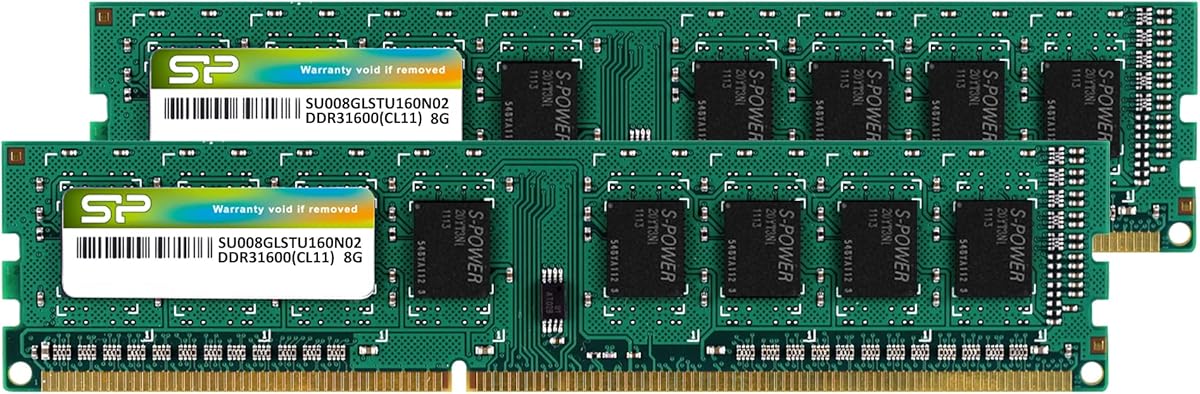
The Timetec 16GB DDR3L kit is a practical way to add usable memory to a compatible older desktop. Its two 8GB modules provide more capacity than a basic 8GB configuration while remaining based on broadly recognized 1600MHz DDR3L specifications suitable for many Intel and AMD systems.
We may earn a commission when you buy through this link, at no additional cost to you.
Dual-voltage operation at 1.35V or 1.5V increases flexibility when matching an existing motherboard. The modules are unbuffered, non-ECC 240-pin desktop UDIMMs with CL11 timings and dual-rank 2Rx8 organization. A lifetime warranty and free United States technical support add reassurance for a straightforward upgrade.
The main limitation is platform age. This kit is for desktop DDR3 systems and cannot serve as a DDR4 replacement or fit a laptop. Its 1600MHz speed and CL11 latency also trail newer DDR4 kits, although real-world improvement will depend as much on the old system's existing memory and processor as on the advertised specifications.
Choose this kit when maintaining or improving a DDR3 desktop is the goal and 16GB of capacity is more important than maximum bandwidth. It is a sensible budget refresh for compatible office, school, media, and everyday home systems, provided the motherboard accepts 240-pin unbuffered modules and supports the kit's voltage and organization.
Matching two 8GB modules can help systems run more than one demanding application without immediately exhausting memory. It is a meaningful improvement for older office PCs that previously operated with a single small module or a very limited total capacity.
The ability to operate at either 1.35V or 1.5V makes the kit relevant to systems with different DDR3 power specifications. The motherboard and CPU still need to support the memory generation, so system documentation remains essential.
We may earn a commission when you buy through this link, at no additional cost to you.
The OLOy Black Owl 16GB kit delivers a conventional DDR4 upgrade with two matched 8GB modules. Its 2666MHz speed and CL19-19-19-43 timings make it more likely to run directly at a standard supported setting than an aggressive overclocking kit, while 1.2V operation keeps it in line with conventional DDR4 power requirements.
We may earn a commission when you buy through this link, at no additional cost to you.
The 288-pin UDIMM format is intended for desktop motherboards and is stated to work with both Intel and AMD platforms. A lifetime warranty adds long-term support, and the uncomplicated 16GB capacity is useful for general-purpose builds that want to avoid a bare single-module configuration.
Compared with the 3200MHz CL16 options elsewhere in this guide, the Black Owl sacrifices some bandwidth and uses looser timings. That makes it less compelling for a new performance-focused build, but it can still be a sensible choice where value, standard voltage, and broad compatibility matter more than maximizing memory frequency.
The kit is best for a compatible DDR4 desktop that handles everyday applications, browsing, media, and light gaming. Buyers should verify the motherboard's supported memory speed and check whether their processor can use the full advertised data rate under the intended configuration.
The 2666MHz target falls within a widely supported part of the DDR4 landscape. It is less dependent on aggressive memory overclocking than higher-rated kits, which can make installation and troubleshooting more approachable.
With no advanced profile emphasized in the supplied specifications, this kit is aimed at users who value a conventional 16GB configuration. It offers a clean fit for general desktop workloads rather than enthusiast tuning.
We may earn a commission when you buy through this link, at no additional cost to you.
The TEAMGROUP T-Force Vulcan Z combines a 4.8 rating with a strong enthusiast-oriented specification set. Its 16GB kit includes two 8GB modules rated at 3200MHz with CL16 timings, placing it among the faster and more responsive options in this comparison.
We may earn a commission when you buy through this link, at no additional cost to you.
XMP 2.0 support lets compatible systems apply the advertised performance settings with less manual tuning. The cooling module is protected by a simple heatspreader design, while high thermal-conductive adhesive helps transfer heat from the memory area. Intel and AMD motherboard support is stated in the supplied product information.
As the product details make clear, the CPU's integrated memory controller and motherboard BIOS version can affect the final operating frequency. The Qualified Vendor List should be checked before purchase, and a system that does not enable XMP may run the modules at a lower JEDEC setting. These caveats are normal for high-speed memory.
This kit is recommended for builders who want a rated 3200MHz CL16 configuration without moving to a larger-capacity 32GB option. It is particularly appealing for compatible modern gaming and productivity systems, provided the motherboard and processor combination is checked and the BIOS can apply the intended profile.
A 3200MHz data rate paired with CL16 timings improves on basic 2666MHz memory in bandwidth-sensitive tasks. The advantage is most useful when the platform can actually run the modules at their rated settings.
The spreader and conductive adhesive are intended to move heat away from the memory chips. Thermal management matters during extended workloads because sustained heat can undermine the stability of an otherwise capable memory kit.
We may earn a commission when you buy through this link, at no additional cost to you.
The Timetec 8GB DDR3 kit gives compatible older desktops a modest but meaningful capacity increase over systems carrying very little memory. Two 4GB modules form a matched pair, and the 1600MHz PC3-12800 specification is designed for straightforward use in compatible desktop platforms.
We may earn a commission when you buy through this link, at no additional cost to you.
The modules are unbuffered, non-ECC, dual-rank 2Rx8 240-pin DIMMs operating at 1.5V with CL11 latency. The product information says they are tested for stability, durability, and compatibility before shipment, while lifetime service and technical support provide additional buyer reassurance.
The central compromise is total capacity. Sixteen gigabytes is generally more comfortable for modern multitasking, especially in systems where the processor or integrated graphics share system memory. This 8GB kit is better viewed as a low-cost legacy refresh than a long-term solution for heavy creative work or many simultaneous applications.
It makes sense for an older office, school, or home desktop that needs more memory than a single 4GB module provides. The buyer should confirm that the system accepts 240-pin unbuffered DDR3 and inspect the specification list of a higher-capacity alternative if demanding applications are expected.
Moving from one 4GB module to two 4GB modules can improve usable memory capacity and avoid operating with a single stick. It is a modest intervention that can make older systems feel more responsive during ordinary multitasking.
The kit uses familiar DDR3-1600, CL11, 1.5V desktop specifications. Those details make it easier to compare against a motherboard manual and determine whether the modules are physically and electrically suitable.
We may earn a commission when you buy through this link, at no additional cost to you.
The PUSKILL DDR4 16GB kit combines a 3200MHz target with CL16-18-18-42 timings and a two-module configuration. On paper, it sits in the performance-focused part of the list while retaining the approachable capacity that many desktop users need for gaming and productivity.
We may earn a commission when you buy through this link, at no additional cost to you.
Intel XMP 2.0 support offers a convenient route to the rated data rate in compatible systems. The supplied information also highlights broad platform positioning for common Intel Core and AMD Ryzen generations, along with an anodized aluminum heatspreader intended to dissipate heat and reduce the risk of thermal throttling.
The product description presents compatibility and stability in broad terms, so checking the exact motherboard, processor, and BIOS is still essential. Its 4.3 rating is the lowest among the ten selections, giving prospective buyers a somewhat less established customer-feedback signal than the kits rated 4.7 or 4.8.
Choose this kit when its listed 3200MHz CL16 profile, simple profile activation, and heatspreader design align with a verified motherboard. It is most appropriate for a modern gaming or productivity build where a user wants stronger memory specifications without moving to 32GB immediately.
The included XMP 2.0 profile is intended to apply the rated performance settings from the BIOS with minimal manual work. If the platform does not support the profile, the modules can still run at a standard JEDEC setting, subject to motherboard behavior.
An anodized aluminum heatspreader provides a surface for moving heat away from the modules. It is a useful feature for gaming sessions and intensive productivity tasks, although case airflow remains relevant to sustained stability.
We may earn a commission when you buy through this link, at no additional cost to you.
The Patriot Viper 3 16GB kit is a performance-oriented option for users whose desktops still rely on DDR3. It provides two 8GB modules, a 1866MHz tested frequency, and CL10-11-10-30 timings, making it more ambitious than the 1600MHz CL11 kits in this comparison.
We may earn a commission when you buy through this link, at no additional cost to you.
Its 240-pin non-ECC unbuffered DIMM format operates at 1.5V and includes an XMP 1.3 feature profile. That profile can simplify the move to the advertised performance settings on a compatible board, while the dual-module layout gives a balanced 16GB configuration for a suitable older platform.
The obvious limitation is that DDR4 and DDR5 cannot be installed in the same slots or used interchangeably with this kit. A system that accepts the modules still must support 1866MHz, and not every older motherboard or processor combination will operate at that speed. The memory can also fall back to a lower supported setting.
This is a sensible recommendation for a compatible DDR3 gaming or productivity system that wants more capacity and speed than basic 1600MHz memory. It is less relevant to a new build, but for preserving a capable older platform, the Viper 3 offers a strong combination of 16GB capacity and 1866MHz CL10 performance.
The 1866MHz rated frequency and CL10 timing create a clear specification advantage over basic 1600MHz DDR3. That advantage is useful in memory-sensitive tasks, provided the motherboard and processor can drive the modules at the intended settings.
Two 8GB modules provide enough room to keep several standard applications active at once. The balanced arrangement also makes better use of dual-channel memory support when the motherboard provides it.
We may earn a commission when you buy through this link, at no additional cost to you.
The Patriot Viper Steel 8GB module offers a fast DDR4 specification in a particularly flexible single-module format. Its 3200MHz rating and CL16-20-40 timings make it attractive for a compatible modern desktop that may receive a second matching module later.
We may earn a commission when you buy through this link, at no additional cost to you.
XMP 2.0 support provides an automatic overclocking profile on compatible systems, and the aluminum heatspreader has a distinctive design intended to assist cooling. The product details state that the module was tested across recent Intel and AMD platforms for reliable, fast performance.
Because only one 8GB module is included, a new system will have only half of the channel bandwidth available to a matched two-module configuration. That can matter in gaming and other bandwidth-sensitive workloads. Adding a second compatible module later is convenient, but the resulting performance still depends on the motherboard's dual-channel layout and memory controller.
This product suits a builder who wants a single fast upgrade module, needs to preserve an open slot for future expansion, or wants to add matching memory gradually. It is less suitable when maximum performance is required immediately and a complete 16GB dual-module kit is readily available.
A single-module kit can be a sensible starting point for a compatible system. Later adding a matching 8GB module creates a 16GB configuration and may unlock dual-channel operation on a suitable motherboard.
The 3200MHz CL16 specification provides a strong upgrade over slower DDR4 configurations. XMP 2.0 makes the target easier to apply, while the actual result remains subject to processor and motherboard support.
We may earn a commission when you buy through this link, at no additional cost to you.
The Silicon Power DDR3 16GB kit offers two 8GB modules for older desktop systems that need more capacity than a basic upgrade provides. Its 1600MHz PC3-12800 speed and CL11 latency align with common DDR3 specifications, making it easier to match with a broad range of compatible platforms.
We may earn a commission when you buy through this link, at no additional cost to you.
The ability to operate at 1.35V is the distinguishing feature in the supplied information. Lower voltage is stated to reduce power consumption by 20%, which can be attractive in an always-on office, home, or media system that does not need the higher performance of a 3200MHz DDR4 kit.
The product is described as factory-tested for stability, durability, and compatibility with major DDR3L and DDR3 motherboards. A lifetime warranty and technical support are included. As with the other DDR3 choices, however, the motherboard must accept 240-pin unbuffered desktop modules, and the CPU and board must support the memory generation.
This kit is a good match for extending the useful life of a compatible DDR3 desktop while keeping power requirements modest. It is better suited to sustained general use than to a new enthusiast system, and buyers should compare it with a 16GB CL10 DDR3 kit when the older platform can take advantage of a faster rating.
Operating at 1.35V can reduce memory power consumption compared with a conventional 1.5V configuration. The benefit is especially relevant in systems that remain powered for long periods without needing high memory bandwidth.
Factory testing and a stated focus on stability, durability, and compatibility make this kit appealing for maintaining an older desktop. Its standard 1600MHz speed favors broad platform fit over performance specialization.
We may earn a commission when you buy through this link, at no additional cost to you.
The Silicon Power DDR4 16GB kit pairs a 3200MHz data rate with a 1.2V operating voltage and two 8GB modules. It is a credible general-purpose DDR4 set for compatible desktops, particularly when a 16GB capacity and a high nominal speed matter more than tight memory latency.
We may earn a commission when you buy through this link, at no additional cost to you.
JEDEC-standard compliance and strict testing are emphasized in the supplied product information. The kit is backed by a lifetime warranty and technical support. At CL22-22-22-52, its timings are looser than those of the 3200MHz CL16 alternatives, so it is better positioned as a straightforward high-speed capacity option than a latency-optimized enthusiast kit.
The 3200MHz label should still be treated as a platform-dependent target. Processor memory controllers, motherboard support, and BIOS behavior can determine the final stable speed. In addition, a system that does not support that rate may run the modules at a lower JEDEC setting, making the dual-voltage compatibility of the platform important to check.
Choose this kit for a compatible DDR4 desktop that benefits from 16GB and 3200MHz specifications but does not require the tightest possible timings. It works well as a general gaming, productivity, or multitasking upgrade, provided the builder confirms memory support and accepts the more relaxed latency profile.
The 16GB capacity is more useful for contemporary multitasking than 8GB, while 3200MHz provides a high nominal data rate. The combination serves general-purpose systems that need both capacity and responsive memory access.
JEDEC compliance, factory verification, and lifetime support strengthen the appeal for buyers who prefer established standards. These features complement the 1.2V design and make the kit a practical option for standard desktop upgrades.
We may earn a commission when you buy through this link, at no additional cost to you.
Choosing the right inexpensive RAM starts with the computer rather than the advertised headline speed. Memory generation, physical format, supported capacity, voltage, and processor compatibility determine whether a kit can work at all; performance features and capacity then determine how well it serves the intended workload.
DDR3 and DDR4 are not interchangeable. They use different notch layouts, electrical standards, and motherboard support, so a physically similar module may not fit or initialize. Start with the system manual or the memory information printed on the motherboard rather than assuming that all desktop memory uses the same standard.
Check the generation before comparing capacity or speed. Choose DDR3 only for a platform designed for it, and choose DDR4 for a compatible newer system.
Capacity determines how much data can remain active at once. An 8GB kit can be enough for a light office system, but 16GB is more comfortable for many browser tabs, applications, and background processes, while 32GB offers additional room for demanding work. Integrated graphics and memory-heavy applications make the higher capacities more attractive.
Choose 8GB for a modest legacy refresh, 16GB for a versatile modern desktop, and 32GB for heavier multitasking or professional workloads. Consider the processor and operating system as well as the memory kit.
A kit containing two modules can use dual-channel memory on compatible platforms, increasing available bandwidth compared with one module. The modules should be matched, and the motherboard should support the installed capacity and module organization. A single module can still be a flexible choice when the plan is to add a matching stick later.
For immediate performance, favor a matched two-module kit when the motherboard supports dual-channel operation. Choose a single module only when expansion flexibility matters more.
Frequency describes the memory clock, while latency indicates the timing of specific operations. A kit rated at 3200MHz with CL16 can be more responsive than one rated at 2666MHz with CL19, although real results depend on the processor and workload. Raw speed alone should not determine the purchase.
Compare frequency and primary latency together, then check whether the platform can run the rated setting. Higher numbers do not guarantee an improvement if the CPU or motherboard cannot support them.
Even within one memory generation, CPUs and motherboards can support different maximum speeds and capacity totals. A qualified vendor list is useful for higher-frequency kits, while the motherboard manual remains the authority for supported module types. BIOS updates may also expand or refine memory compatibility.
Verify the exact processor, motherboard model, supported memory type, and maximum capacity. Avoid relying on a broad statement that a kit works with a hardware brand when motherboard models within that brand can differ.
Desktop memory heatspreaders vary in height. Tall modules may interfere with a large CPU cooler, while low-profile designs such as the CORSAIR Vengeance LPX at 34mm fit more readily in compact cases. The graphics card, chassis, and cooler should be considered together rather than separately.
Measure the available DIMM clearance and check cooler specifications. Choose low-profile memory when space is tight or when a large air cooler overhangs the slots.
XMP and EXPO profiles store performance settings that compatible motherboards can apply from the BIOS. They simplify overclocking, but the memory may run at a slower standard setting if the profile is not enabled or the platform cannot support it. Some systems may require manual tuning for best results.
Look for an XMP or EXPO profile when convenience is important, and learn where to enable it in the BIOS. Treat the advertised speed as a target rather than an unconditional guarantee.
Voltage affects power use, heat, and platform compatibility. DDR3L dual-voltage modules can operate at 1.35V or 1.5V, while standard DDR4 kits commonly use 1.2V. Heatspreaders help move heat away from the memory chips, and case airflow supports stable operation during sustained workloads.
Match the supported voltage to the system and avoid forcing a module to operate outside its specification. For long sessions, choose modules with effective heatspreaders and maintain reasonable airflow inside the case.
Before installing memory, power the desktop down completely, unplug it, and use suitable electrostatic-discharge precautions. Consult the motherboard manual for the correct slot order, supported module organization, and memory limitations. Install the kit into the recommended slots and press each module firmly until the retaining clips close.
After installation, restore power and enter the BIOS to confirm the recognized capacity and speed. If the modules are rated above the default operating speed, enable the appropriate XMP or EXPO profile when the motherboard supports it. If instability appears, return to the standard setting, update the BIOS, and confirm that the chosen memory is listed as compatible.
To care for the modules, keep them away from moisture, excessive heat, and strong static discharge. Do not remove the heatspreaders, touch the memory contacts, or force a module into a slot. When upgrading, replace the complete matched kit when possible, and avoid mixing unrelated modules if consistent dual-channel behavior is important.
Affordable RAM can be perfectly suitable when it matches the platform and provides enough capacity. The important factors are memory generation, voltage, module format, motherboard support, and stability. A cheaper kit that is fully compatible may serve an office or home computer better than an expensive kit that cannot be installed.
An 8GB kit is still useful for light tasks, but 16GB provides a more comfortable balance for browsing, office applications, media, and everyday gaming. A 32GB kit is more appropriate for heavy multitasking, creative software, large datasets, and virtual machines. The best amount ultimately depends on the operating system and workload.
It is possible, but mixed modules may operate at a common, lower speed and timing setting, and capacity use can vary. Mixing kits with different capacities, voltages, or organizations can also prevent both modules from operating at their advertised specifications. A matched two-module kit is the safer choice for predictable dual-channel behavior.
It can help, but the result depends on the game, processor, graphics settings, and whether the system is already memory constrained. Modern CPUs often benefit more from a suitable memory ratio than from the highest possible frequency alone. Capacity and stable dual-channel operation are also important.
These profiles store a set of memory frequency, voltage, and timing settings that the motherboard can apply through the BIOS. They make it easier to run compatible modules at their rated performance. Without an enabled profile, the same modules may use safer standard settings.
No. DDR3 and DDR4 use different notch patterns, voltage standards, and signaling arrangements, and they are not interchangeable. A DDR4 motherboard requires DDR4 UDIMMs, while a DDR3 board requires compatible DDR3 modules. Check the board's manual before purchasing any replacement.
Most modern desktop platforms use dual-channel memory, and two matched modules allow the controller to operate in that mode. A single module can still work, but it usually provides less available bandwidth. Some older or specialized platforms use different memory-channel arrangements, so the motherboard documentation should be checked.
Enter the BIOS after installation and verify that the full capacity is recognized. Then enable the intended memory profile, if available, and watch for crashes, boot failures, or application errors. Running a memory diagnostic can help identify problems, while using a manufacturer diagnostic or a reputable hardware-testing utility provides additional verification.
The Timetec 16GB DDR3L kit stands out as the best budget-focused choice for a compatible older desktop, while the CORSAIR Vengeance LPX 32GB leads the overall field with capacity, a 4.8 rating, and a low-profile 34mm design. The TEAMGROUP T-Force Vulcan Z is the premium DDR4 pick, combining 3200MHz speed, CL16 timings, XMP 2.0, and a strong rating.
For most compatible DDR4 systems, capacity and platform support should come before small differences in advertised speed. A matched 16GB two-module kit offers a useful balance, while 32GB provides more headroom for demanding workloads. Older DDR3 systems can gain meaningful responsiveness from a 16GB upgrade even when the data rate is lower.
Prices and availability change, so check the current listing for every shortlisted kit and compare the full specifications. Confirm the motherboard, processor, memory generation, supported capacity, voltage, physical clearance, and warranty terms before ordering. Those checks are essential for turning an inexpensive purchase into a dependable upgrade.
