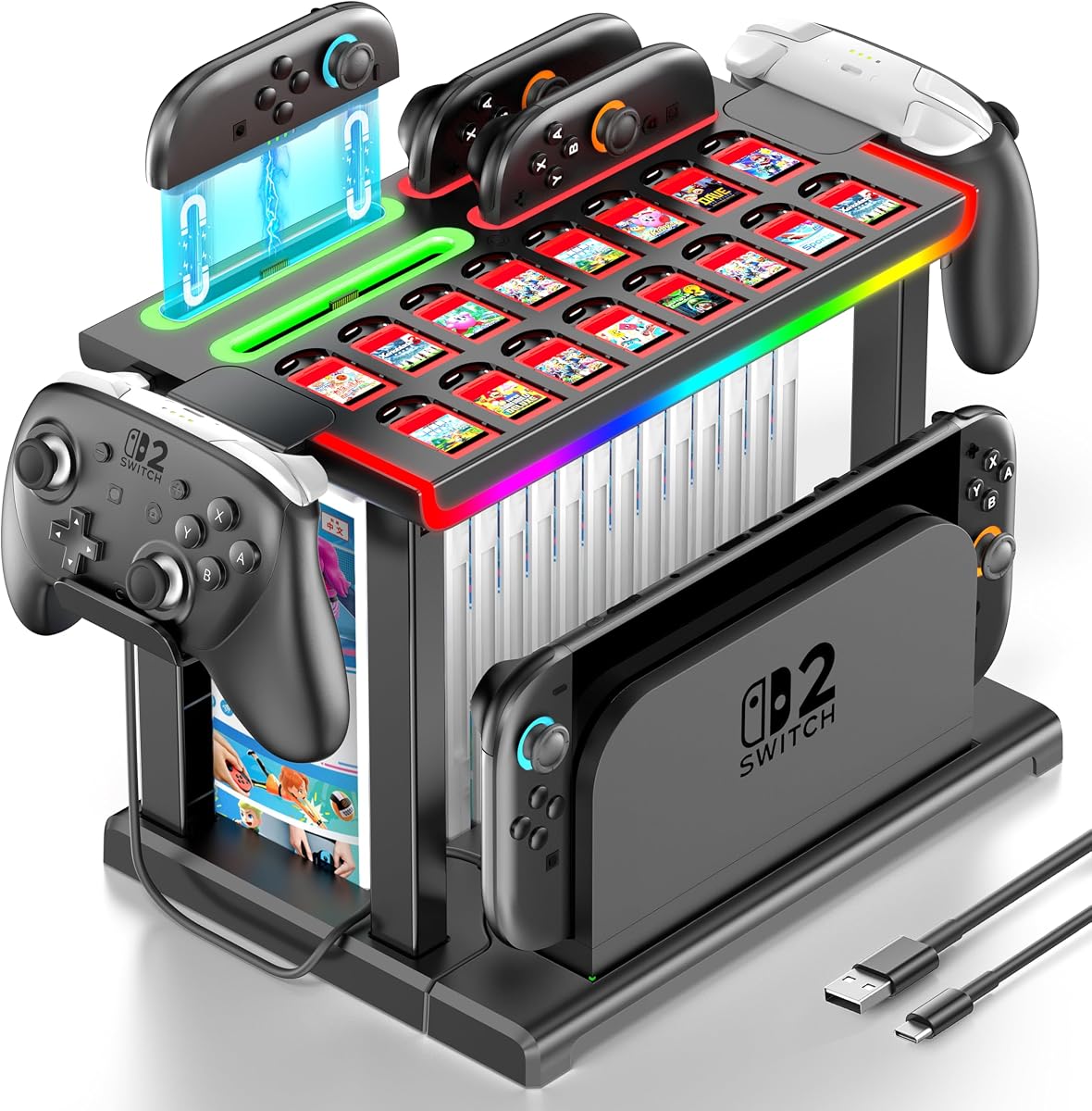
Switch 2 RGB Organizer Station
4.6Editor score
Charges four Joy-Cons
Extensive accessory storage
Nine lighting effects
This guide compares the best controller charging dock for Switch 2 options, covering Joy-Con compatibility, capacity, charging speed, lighting, safety, and
A controller charging dock for Switch 2 should do more than provide a convenient place to rest your controllers. The best models offer reliable charging, clear status indicators, secure controller alignment, useful safety protections, and compatibility with the exact controllers and accessories you own. Whether you use detachable Joy-Cons, complete Pro Controllers, or several different controller types, matching the dock to your setup is essential.
We compared all ten products by examining their stated controller compatibility, number of charging positions, power requirements, status lights, lighting features, safety protections, storage functions, and included accessories. The list covers dedicated Joy-Con 2 chargers, dual Pro Controller stands, universal charging stations, and organizer-style docks designed to keep a larger gaming area tidy and accessible.
Each review explains the strongest features, limitations, and ideal buyer for that particular dock. Ratings and specifications reflect the supplied product information, while practical compatibility details receive particular attention because naming can be misleading. Prices and promotions can change over time, so check the current listing before choosing a model or confirming that the included cable and adapters meet your setup.
4.6Editor score

4.7Editor score

4.0Editor score
The comparison below highlights the most important differences among the ten docks, including supported controller types, charging capacity, power requirements, lighting, safety features, and storage. Always verify the precise model of your controllers before ordering.


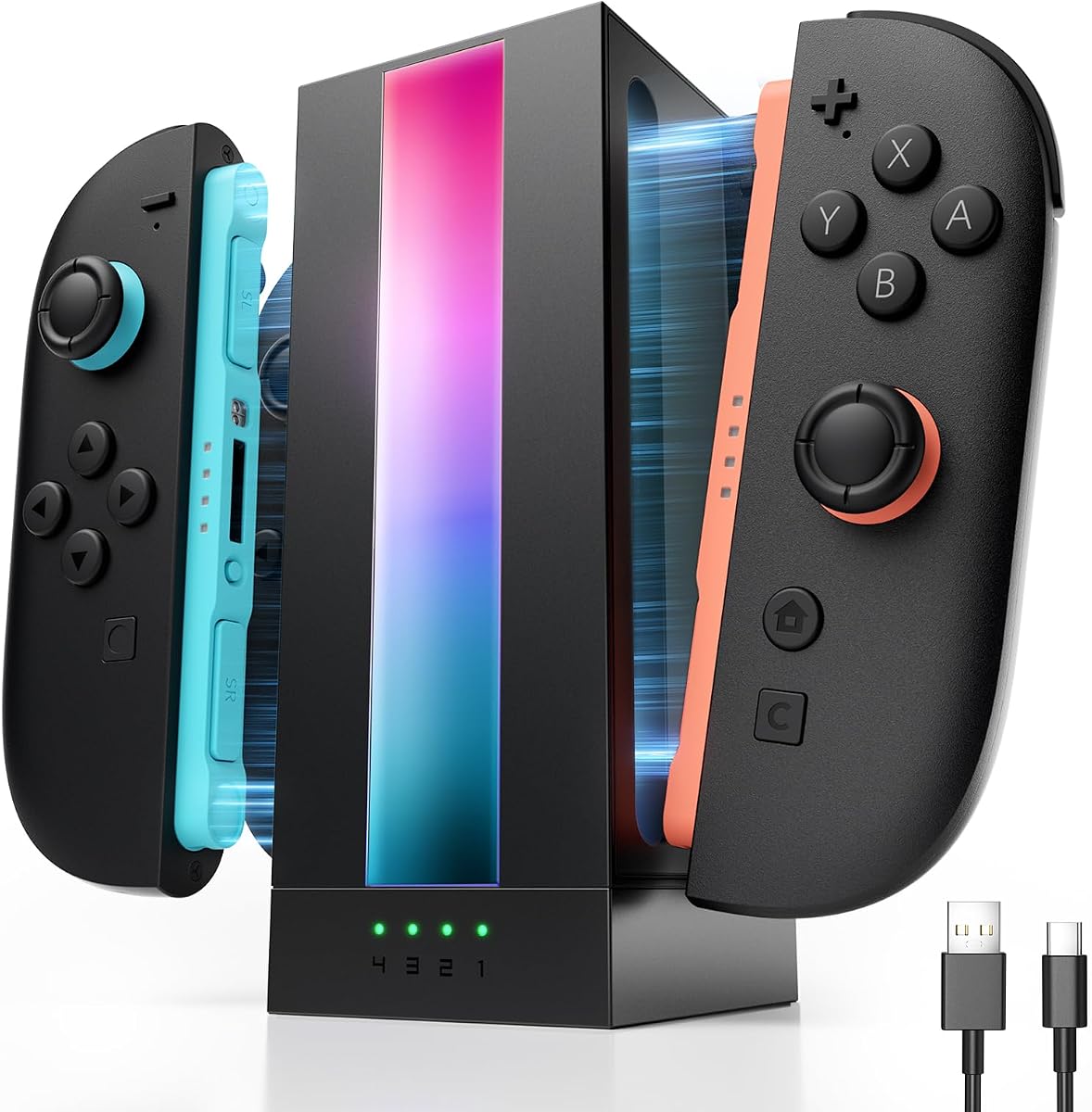
The FASTSNAIL Magnetic Joy-Con Dock is a 4.7-rated dedicated charger for Nintendo Switch 2 Joy-Con 2 controllers. It combines four simultaneous charging positions with magnetic alignment, making it one of the most focused and practical options in this guide. Its compact format also provides a convenient place to keep all four detachable controllers together when they are not in use.
We may earn a commission when you buy through this link, at no additional cost to you.
Magnetic placement removes the need to distinguish between left and right Joy-Cons, while the secure hold is intended to reduce repeated plugging and possible port wear. The dock supports up to four controllers, reportedly reaches a full charge in about two and a half to three hours, and can draw power from an AC adapter, the console dock, or a computer. Blue indicators represent standby or full charge, while orange indicators show active charging.
Its nine lighting modes include seven static colors and two dynamic effects, and the memory function restores the previous lighting choice when power returns. A touch control can disable the lights for a quieter sleeping environment. The stated overcharge, overcurrent, short-circuit, and overvoltage protections add useful safeguards, although the dock remains designed specifically for Switch 2 Joy-Con 2 controllers rather than Pro Controllers.
This is the strongest choice for a household or gaming group that regularly uses four Switch 2 Joy-Cons. It balances capacity, straightforward alignment, informative lighting, and a relatively compact footprint without attempting to be a general-purpose charging station. Buy it if your primary goal is a dedicated, well-organized home for all four magnetic Joy-Con 2 controllers.
The magnetic system helps each Joy-Con settle into the correct position without forcing users to check left and right orientation. That convenience is particularly useful during multiplayer sessions when controllers are repeatedly picked up, docked, and returned to charge.
Nine modes, including static and breathing effects, let the dock complement a gaming setup, while memory and touch-off controls reduce the need to reconfigure it each time. A power-off light setting is particularly helpful in a shared room or bedroom.
We may earn a commission when you buy through this link, at no additional cost to you.
The Switch 2 RGB Organizer Station is a 4.6-rated charging and storage system for owners who want more than a simple controller cradle. It can hold four Joy-Cons, 16 game cards, 16 memory cards, 16 game cases, two Pro Controllers or headsets, and the Switch 2 TV Dock simultaneously. That breadth of organization makes it particularly attractive for a dedicated gaming station.
We may earn a commission when you buy through this link, at no additional cost to you.
Its four-position Joy-Con charger does not require users to distinguish between plus and minus controllers. Red lighting indicates charging, while green indicates a full charge or standby. The station also provides seven single-color modes and two multicolor breathing effects. A short press cycles through the choices, while a long press turns the lighting off. Tool-free installation and non-slip pads make the larger structure easier to position.
This is not simply a compact charging puck. It is a large multi-function organizer whose storage capacity is its defining advantage, and that also means it will occupy more desk or shelf space than a dedicated four-slot charger. The Switch 2 TV Dock is not included, even though a compartment is provided for one. Buyers should also account for the organizational benefit only if they own enough games and accessories to fill the station.
Choose this model when you want a central Switch 2 command center that combines charging, game storage, controller storage, lighting, and a place for the TV Dock. It is our premium recommendation for an enthusiast's gaming room and may be unnecessary for a single-player setup with little physical media or accessory clutter.
The ability to organize 16 game cards, 16 game cases, memory cards, controllers, and the TV Dock gives the station a role beyond temporary charging. It can turn a scattered collection of Switch 2 accessories into a defined, accessible gaming area.
The stated tool-free installation process lowers the barrier to setup, while non-slip pads help prevent sliding and protect the surface underneath. Buyers should still follow the enclosed manual and confirm the station has adequate room before assembly.
We may earn a commission when you buy through this link, at no additional cost to you.
The Universal Two-Port Controller Dock is a 4.0-rated option for gamers who want a simple, versatile place to charge two supported controllers. It works with Switch Pro and Switch 2 Pro Controllers, PS5 controllers, Xbox Series X|S controllers, and Xbox Elite Series 2 controllers. Its broad platform support gives it an advantage over docks limited to Joy-Cons.
We may earn a commission when you buy through this link, at no additional cost to you.
The dock uses removable USB-C adapters, allowing controllers to drop into place without repeatedly connecting a cable directly to their charging port. A front LED turns red during charging and green when full, while a built-in smart protection system is described as providing low power consumption and stable operation. A recommended five-volt, two-amp wall adapter supports faster and steadier charging, although that adapter is not included.
Compatibility deserves careful attention. The listing specifically excludes PowerA, Luna, and other third-party Pro controllers, so a console generation or platform label alone should not determine whether it will work. Low-power USB ports may also cause slow or intermittent charging. Its two-port capacity is modest compared with four-slot Joy-Con docks, but it can serve users who own two full-size controllers.
This dock is best for someone seeking a straightforward, inexpensive two-controller station that spans several gaming ecosystems. It is a sensible budget choice when your main devices are the supported official controllers, but it is less appropriate for four-Joy-Con households or owners of third-party Pro Controllers who need guaranteed fit.
Support for Nintendo, PlayStation, and Xbox controller families makes this useful for mixed-device households. The key requirement is that each controller must be one of the supported official models, since several third-party Pro Controllers are explicitly excluded.
The included USB-C adapters allow a controller to be seated in the dock without a cable being bent or repeatedly unplugged from the controller itself. Fully inserting the adapter and removing a thick case can help resolve connection problems.
We may earn a commission when you buy through this link, at no additional cost to you.
The Switch 2 Pro Dual Charger is a 3.5-rated desktop stand designed specifically to charge two Switch 2 Pro Controllers at once. Its basic proposition is straightforward: keep two full-size controllers powered and organized in a compact footprint. The design is aimed at users who do not need detachable Joy-Con charging or broad platform support.
We may earn a commission when you buy through this link, at no additional cost to you.
It supports five-volt, two-amp input for stable charging, with red and green LEDs providing at-a-glance status feedback. The stated smart protection system is designed to guard against overcharging, overheating, overcurrent, and short circuits. Combining charging with storage also avoids the need to find an unrelated stand when a session ends.
The main drawback is its limited scope and lower customer rating relative to most products in this list. It charges only two Pro Controllers, and the supplied information does not indicate a wide power-source selection, included cable, or support for other controller styles. It also does not provide the decorative lighting found on several competing options.
This is a reasonable choice for a two-player household that exclusively uses Switch 2 Pro Controllers and values a small, uncomplicated charging stand. For anyone needing more capacity, broader compatibility, or additional storage, the alternatives provide more flexibility. Confirm the required power source is available before purchasing.
The stand keeps two Pro Controllers upright and ready to pick up, which is useful on a television unit or compact gaming shelf. Its straightforward layout avoids the extra bulk associated with larger organizer systems.
Separate color meanings make it easy to see whether a controller is charging or ready. Stated protections against overheating, overcurrent, overcharging, and short circuits add confidence, provided the dock is connected to a suitable power supply.
We may earn a commission when you buy through this link, at no additional cost to you.
The PowerA Controller Charging Base is a 4.6-rated charging solution for Nintendo Switch controllers. It supports Joy-Con and wireless controller charging, including Nintendo Switch Pro Controllers and all PowerA Wireless Nintendo Switch Controllers. That explicit PowerA support distinguishes it from many universal docks that reject third-party Pro Controllers.
We may earn a commission when you buy through this link, at no additional cost to you.
LED lights indicate when the connected controllers are charged, and the base can charge Joy-Con and wireless controller styles simultaneously. Its stated compatibility list makes it a strong option for Nintendo users who own PowerA hardware and have been disappointed by docks that only support official controllers.
However, the product information focuses on the original Nintendo Switch ecosystem and does not explicitly identify Switch 2 Joy-Con 2 compatibility. It is therefore better suited to original Switch or OLED owners with Joy-Cons and Pro Controllers than to someone whose primary requirement is a confirmed magnetic Switch 2 Joy-Con charging connection. The supplied data also does not mention a specific input requirement or included accessories.
Choose this base if you rely on PowerA Wireless Nintendo Switch Controllers and want assured brand-level compatibility. For a new Switch 2 setup, check the current product listing and controller markings carefully, because the product name and supplied details do not establish explicit support for Joy-Con 2.
Many generic charging stands exclude PowerA products. This base explicitly supports all listed PowerA Wireless Nintendo Switch Controllers, making it a safer choice for owners whose hardware would not fit an official-controller-only dock.
The ability to charge Joy-Con and wireless controller types at the same time reduces the number of separate accessories needed. LED indicators make completed charging visible without requiring a separate display or application.
We may earn a commission when you buy through this link, at no additional cost to you.
The Six-Device Universal Charging Dock is a 4.7-rated station built around flexibility. Its stated layout can charge four Joy-Cons plus two Nintendo Pro Controllers, or two PS5 Controllers, at the same time. A track-inspired design makes placement intuitive, and the mixed six-in-one arrangement is useful for households with a substantial Nintendo or PlayStation controller collection.
We may earn a commission when you buy through this link, at no additional cost to you.
Power can come from the game console, a USB charging hub, or a wall charger through the USB-C input. Status LEDs show charging activity, and the built-in smart protection chip is described as guarding against overcharging, overvoltage, overcurrent, and short circuits. The package includes an 80-centimeter USB-C cable, although controllers and Joy-Cons are not included.
Compatibility is the important qualification. The supplied description specifically references Nintendo Switch Joy-Cons, Nintendo Pro Controllers, and PS5 Controllers, not the magnetic Joy-Con 2 controllers used with Switch 2. As a result, it should not be assumed to charge Switch 2 Joy-Cons merely because it is sold as a Switch controller charging accessory. Its missing lighting features also make it more utilitarian.
This dock is an excellent high-capacity option for original Switch, OLED, and compatible PS5 controller collections. Buy it if you need to recharge many controllers of those types at once and prioritize capacity and cross-platform flexibility over dedicated Switch 2 magnetic charging or decorative lighting.
Six available positions distinguish this model from two-port universal stands. The combination of four Joy-Con positions and two full-controller positions suits a shared console, a gaming event, or a household that keeps many controllers docked together.
Powering the dock through a console, USB hub, or wall charger offers flexibility near the television or elsewhere. The stated chip-level safeguards are designed to manage common electrical faults, while the included cable provides a basic connection option.
We may earn a commission when you buy through this link, at no additional cost to you.
The HEATFUN Dual USB-C Dock is a 3.9-rated two-port station for official full-size controllers from several major platforms. It supports Switch Pro and Switch 2 Pro Controllers, PS5 controllers, Xbox Series X|S controllers, and Xbox Elite Series 2 controllers. That makes it a practical choice for gamers who alternate among console ecosystems.
We may earn a commission when you buy through this link, at no additional cost to you.
Removable USB-C adapters support easy drop-in charging and reduce wear on controller ports. A five-volt, two-amp input is recommended for stable charging, although low-output USB sources can produce slower or intermittent results. LED indicators report charging status, and the low-standby footprint is designed for desks, television stands, and compact gaming stations.
The compatibility exclusions are significant. PowerA, Luna, and some other third-party controllers are not supported, and there is no stated magnetic charging support for detachable Switch 2 Joy-Con 2 controllers. The dock is therefore for full-size Pro-style controllers rather than a complete Switch 2 accessory solution.
Choose this model when you want two official full-size controllers charged from one station and value cross-platform support. It is less suitable if your main priority is charging four detachable Joy-Cons, accommodating third-party hardware, or organizing games and accessories in the same unit.
The four supported controller families make the dock useful for a living room shared by Nintendo, PlayStation, and Xbox players. Compatibility is still limited to specified official models, so verify the exact hardware before ordering.
The low-standby form factor helps conserve shelf and television-stand space. Removable adapters keep charging simple while avoiding repeated cable handling at the controller's port.
We may earn a commission when you buy through this link, at no additional cost to you.
The SUPCASE Four-Port Joy-Con Dock is a 4.7-rated magnetic charger built specifically for the 2025 Nintendo Switch 2 Joy-Con controllers. It provides four charging slots, individual status indicators, and dual-side charging, allowing a Joy-Con to charge regardless of how it is positioned. The design also serves as a compact storage point for a complete set of Joy-Cons.
We may earn a commission when you buy through this link, at no additional cost to you.
Magnetic alignment is intended to make seating the controllers more convenient and reduce repeated wear on their charging contacts. Nine RGB modes offer options for static and atmospheric lighting, while the smart chip detects charging status and stops supplying power once a controller is full. The stated protection is intended to prevent overcharging and overheating.
Its focus is narrow but clear: the dock charges Switch 2 Joy-Cons and does not include support for Pro Controllers. The supplied information also does not state a full-charge time, so users who need a precise estimate before starting a session should look for that detail in the current listing or documentation.
This model is a strong alternative for owners who want four magnetic charging positions but prefer individual status lights and dual-side flexibility. Select it when all four Joy-Cons are your main charging priority and magnetic convenience matters more than compatibility with full-size controllers.
Dual-side charging removes an easy source of user error. Whether a Joy-Con is placed in its familiar position or turned the other way, the dock is designed to establish a stable charging connection.
Individual indicators show the charging and full status for each attached Joy-Con. This is useful for a complete set, where knowing that one controller is ready while another is still charging can prompt an easy player swap.
We may earn a commission when you buy through this link, at no additional cost to you.
The FASTSNAIL Ten-Slot Universal Dock is a 4.2-rated organizer and charger for Nintendo Switch 2, original Switch, and OLED families. Its ten positions can hold one to four Joy-Con 2 or Joy-Con 1 controllers and one or two Pro Controllers at the same time. This mixed capacity makes it especially practical for a multi-generation Nintendo collection.
We may earn a commission when you buy through this link, at no additional cost to you.
The product description recommends using the included Y-type cable with the Switch 2 official dock as the power source. Blue indicators show standby or full charge, and orange shows active charging, with a stated full-charge time of roughly three to three and a half hours. The touch control can disable charging and lighting, while its memory function restores the selected lighting effect.
Eleven lighting modes include marquee, breathing, gradient, fast-flash, and seven static-color options. Two USB 2.0 ports provide additional data-transfer or charging utility, and a multi-protection chip is described as guarding against overcharge, short circuits, overvoltage, and overcurrent. Third-party controllers are explicitly not compatible, so the broad Nintendo-generation support should not be mistaken for universal third-party support.
Choose this dock for a large, mixed Nintendo controller setup or a gamer who maintains several console generations. It is more expansive than necessary for a single-player household, but its ten positions and extra USB ports offer a convenient centralized solution when compatibility is limited to the listed Nintendo controller types.
Supporting Joy-Con 2, Joy-Con 1, and Pro Controllers is useful for households that have upgraded without disposing of earlier hardware. The mixed positions also reduce the need to keep several small charging stands in reserve.
Two USB 2.0 ports add data-transfer or charging options for other devices. The included Y-type cable and recommended official-dock power source are important details to check before setting up the station.
We may earn a commission when you buy through this link, at no additional cost to you.
The JSAUX EnergyFlow Four-Port Dock is a 4.3-rated charging station dedicated to the 2025 Switch 2 Joy-Con controllers. It can charge two pairs, or four individual Joy-Cons, simultaneously. The focused compatibility makes it straightforward for a Switch 2 household that wants a dedicated magnetic charging home for every detachable controller.
We may earn a commission when you buy through this link, at no additional cost to you.
The product states that all four controllers can charge in about two and a half hours, which is useful information for multiplayer sessions. A dynamic RGB light bar adds visual character, and a top-mounted one-touch button turns the lighting on or off. Each port has its own LED, with flashing green indicating charging and solid green representing a full charge or standby state.
The included 1.5-meter USB-C cable provides a connection to power, but a wall adapter is not included. The dock is explicitly incompatible with Joy-Cons from the 2017 Switch and OLED models, so users with a mixed controller collection need a separate solution for older detachable controllers. Alignment also requires matching the plus and minus marks on each Joy-Con with the corresponding dock symbols.
Choose this model when four Switch 2 Joy-Cons are the only detachable controllers you need to charge and fast full-set charging is a priority. Its dedicated design, individual indicators, and simple lighting control make it especially approachable, while older-generation owners should consider the more versatile FASTSNAIL Ten-Slot dock instead.
A stated two-and-a-half-hour full-charge time is convenient for owners who alternate players frequently. Charging all four positions together avoids the inconvenience of swapping partially charged controllers between smaller docks.
Each port has an independent indicator, making it easier to identify a controller that is charging or ready. The distinction between flashing and solid green provides a simple visual reference for the whole set.
We may earn a commission when you buy through this link, at no additional cost to you.
The right charging dock depends on controller type, household size, power setup, and whether storage, lighting, or broad compatibility matters more than a compact footprint. Review the following factors before ordering to avoid an expensive compatibility mistake.
Switch 2 uses magnetic Joy-Con 2 controllers, and a dock designed for original Switch Joy-Cons may not fit them. Look for explicit references to Joy-Con 2, the 2025 Switch 2 release, magnetic charging, or dual-direction placement. Some products are labeled broadly as Switch chargers while actually supporting only Joy-Con 1, official Pro Controllers, or another platform. The dedicated Joy-Con 2 models in this guide include the FASTSNAIL Magnetic dock, SUPCASE dock, JSAUX EnergyFlow dock, and the RGB organizer, but not every feature is identical.
Choose a dock only when the listing clearly identifies your controller generation. If you still own original Switch or OLED Joy-Cons, look for a model that supports both Joy-Con 1 and Joy-Con 2 or plan to maintain separate charging solutions for each generation.
A two-port dock is enough for a solo gamer or a two-player household using Pro Controllers. Four slots are the practical minimum for a family or group that plays with two complete pairs of Joy-Cons. Larger stations, such as the ten-position FASTSNAIL model, suit collectors, event spaces, and households maintaining several Nintendo generations. Mixed layouts that include both Joy-Con and Pro Controller positions can be more versatile than a dock made up of identical slots.
Count the controllers you expect to charge at once, not merely the accessories you own. Include regularly used Pro Controllers if detachable Joy-Cons are not your primary devices, and consider whether your dock should remain empty when only one player is gaming.
Compatibility should be checked at the model level. Several docks support official Nintendo, PlayStation, and Xbox controllers, but exclude PowerA, Luna, and some third-party Pro Controllers. Other products focus specifically on Switch 2 Joy-Cons and offer no Pro Controller charging at all. A magnetic-looking USB-C connector does not necessarily mean a dock supports the magnetic Joy-Con 2 interface, so read the full description rather than relying on the product title.
Make a list of every controller model in your household and compare it with the explicit compatibility statement. This is especially important if you own licensed third-party controllers, because a dock designed for official hardware may use different rails, adapters, contacts, or charging protocols.
Several models recommend a five-volt, two-amp USB source for stable charging, while some include a cable and others do not. A low-power computer or hub port can result in slow or intermittent charging even when the dock itself is working correctly. Products that recommend the Switch 2 official dock as a power source offer another approach, but they require that hardware to be present. The JSAUX EnergyFlow includes a 1.5-meter USB-C cable but no wall adapter, and the universal two-port dock likewise requires an appropriate adapter.
Check both the input standard and the included accessories. A USB-C connector alone does not guarantee adequate output, so use a suitable power source and avoid a cable that is too short for your intended dock location.
Magnetic alignment, removable USB-C adapters, and dual-direction charging can make a substantial difference in daily convenience. Magnetic contacts help Joy-Cons settle into the correct position, while removable adapters allow a full-size controller to rest in a stand without repeatedly bending a cable at its port. The JSAUX EnergyFlow instead asks users to match plus and minus symbols, so it is worth confirming that the charging ports are physically easy to reach in your setup.
Choose the system that encourages correct placement. A dock that is simple to operate may prevent slow charging, interrupted sessions, and accidental wear better than one with attractive but unnecessarily complicated controls.
A charging dock solves power and organization, but a full organizer can do considerably more. The Switch 2 RGB Organizer Station includes capacity for game cards, game cases, memory cards, controllers, and the TV Dock, while other products focus only on charging and holding controllers. Larger organizers look impressive and can tidy a dedicated gaming area, but they require more room and assembly. A dedicated four-slot dock is usually easier to position beside a television or on a smaller desk.
Measure the intended location before selecting a storage-heavy model. If you already use a game case, cartridge, or accessory organizer, a compact charger may deliver better value without duplicating functions.
Charging lights should make it obvious when a controller is charging, fully charged, or disconnected. Some docks use a shared red-and-green system, while others provide an indicator for every port. That individual feedback is valuable when four controllers share a charging session because you can tell which one needs more time without picking it up. Touch-sensitive controls and remembered lighting preferences are conveniences rather than essential charging features.
Prioritize a dock whose status scheme you can understand immediately. Make sure the colors are also visible from your usual viewing angle and that the charger offers an option to disable distracting illumination in a shared or sleeping space.
Protection against overcharging, overcurrent, overvoltage, short circuits, and overheating is a desirable baseline. RGB lighting can complement a gaming setup, but it should not compromise basic charging visibility or create unnecessary complexity. A touch-off function, low standby consumption, non-slip feet, and tool-free assembly are practical refinements that can make a dock easier to live with daily.
Treat lighting and organizer features as secondary to fit, electrical requirements, and protection. The best dock is not necessarily the most decorative one; it is the one that charges your exact controllers reliably and remains convenient in the space where you actually play.
Before first use, inspect the dock, power cable, and controller contacts for damage. Place the charging station on a stable, level surface with enough ventilation, then connect it to the recommended power source. For models that specify five volts and two amps, use a compatible USB wall adapter rather than assuming every USB port can supply sufficient current. Read the included instructions before assembling an organizer station or attaching any removable adapter.
Seat each controller carefully until it is held securely. Magnetic Joy-Con 2 docks should use the magnetic contact to guide the controller into place, while USB-C-based Pro Controller docks require a fully inserted removable adapter. If charging does not begin, remove and reinsert the controller or adapter, check the orientation, and take off a thick protective case that may prevent a complete connection.
Keep the charging contacts and ventilation openings free of dust, lint, and liquid. Unplug the dock before cleaning it, use a dry or lightly damp soft cloth, and avoid harsh chemical cleaners. Do not place the station in direct sunlight, near a heat source, or where cables are likely to be pulled. Occasionally check the indicator lights and connections, and replace the dock if it becomes unusually hot, shows repeated charging interruptions, or has a damaged connector.
Switch 2 Joy-Con 2 controllers attach magnetically and have a different shape and charging arrangement from original Switch and OLED Joy-Cons. A dock made only for Joy-Con 1 should not be assumed to fit Joy-Con 2. Look for explicit Joy-Con 2 or 2025 Switch 2 compatibility, and also check the listing if you own controllers from more than one Nintendo generation.
Only if the product explicitly lists Pro Controller support. Most dedicated magnetic docks in this guide charge Switch 2 Joy-Cons only, while several cross-platform stations support official Pro Controllers. Charging ports designed for Joy-Cons are not automatically interchangeable with full-size controller rails or USB-C adapters, so verify both the controller model and the connection method before ordering.
Four charging positions are the most practical choice for two players using complete pairs of Joy-Cons. A two-port dock is sufficient for a smaller household, while larger mixed stations are useful for additional Pro Controllers, event spaces, or collectors. Consider the number of people who play simultaneously and whether older Nintendo controllers also need a home.
Several products specifically recommend a five-volt, two-amp adapter for fast and stable charging, and some do not include a wall adapter. A low-power USB port may charge slowly or intermittently. If the listing specifies a minimum power output, follow that guidance and use a cable long enough to position the dock comfortably near your gaming area.
Not with every dock in this guide. The universal two-port dock and HEATFUN dual dock explicitly exclude PowerA, Luna, and some other third-party Pro Controllers. The PowerA charging base, by contrast, is designed to support PowerA Wireless Nintendo Switch Controllers. Always compare the exact controller model against the compatibility statement rather than assuming platform branding guarantees a fit.
Magnetic alignment is designed to make placement easier and can reduce repeated handling of a charging cable or port. It also helps secure the controller in the correct position. Contact cleanliness and full seating still matter, so periodically inspect the contacts and avoid placing the controllers on the dock when they do not attach securely.
They can be worthwhile if appearance and a tidy gaming space matter to you, but they do not improve basic electrical compatibility. Some organizer stations provide substantial storage for games and accessories, while dedicated docks save desk space and focus on charging. Prioritize controller fit, power requirements, and status indicators before paying for decorative features.
First, confirm that the controller model is supported and is fully seated. Check that any removable USB-C adapter is inserted completely, that the charging indicator is on, and that the power source meets the listed requirement. A thick controller case, dirty contacts, an insufficient wall adapter, or an incompatible controller can all interrupt charging.
The FASTSNAIL Magnetic Joy-Con Dock stands out as the strongest all-around choice for a household using four Switch 2 Joy-Cons, combining magnetic alignment, clear indicators, nine lighting modes, and multiple power options. The Switch 2 RGB Organizer Station is the premium pick for users who want extensive game and accessory storage, while the Universal Two-Port Controller Dock offers a budget-friendly way to charge supported official controllers from Nintendo, PlayStation, and Xbox.
Prioritize exact controller compatibility above every other feature. Dedicated Joy-Con 2 docks are best for magnetic controllers, cross-platform stands are useful only when their exclusions do not affect you, and mixed-generation systems make sense for collectors. Also consider charging capacity, the required power source, alignment method, status visibility, and whether your available space can accommodate an organizer.
Ratings provide a useful snapshot, but the current product listing remains the best source for final details because accessories, availability, and promotions change. Confirm that the dock includes the cable and adapters you need, review the stated compatibility list, and check the current offer before purchasing.