
Elgato Stream Deck Mini
4.7Editor score
Six customizable LCD keys
Drag-and-drop software setup
Sequenced and simultaneous actions
Broad creative app support
Our guide compares the best streaming decks for Twitch by keys, controls, software integrations, audio features, compatibility, and setup ease for streamers.
A streaming deck turns repeated keyboard commands into visible, one-touch controls for scenes, audio, media, cameras, lighting, and other production tools. For Twitch, the right model can make live switching faster while reducing the chance of missing an important moment during a busy show.
We compared the 10 products in this guide on control layout, programmable keys, touch and dial options, audio capabilities, supported applications, system compatibility, customization features, and ease of use. The list covers compact macro pads, full production consoles, premium Elgato models, and a Stream Deck-compatible Twitch camera.
Each pick highlights a different approach to stream control, from a simple six-key pad for beginners to expansive consoles for advanced productions. Ratings and specifications reflect the supplied product information, while prices and availability can change, so readers should confirm current details before purchasing.
4.7Editor score

4.8Editor score

4.6Editor score
This side-by-side comparison shows how the featured devices differ in key count, physical controls, software integration, audio support, and platform compatibility, helping Twitch streamers identify the most practical layout for their setup.




The VSD M18 Macro Pad is a programmable 18-control option for Twitch creators who want more than a handful of shortcut keys without moving to a large production console. It combines 15 visual LCD keys with 3 physical buttons, giving users a sizeable command surface for OBS scene changes, media controls, app launches, text insertion, and multi-step sequences. Its supplied rating is 4.4.
We may earn a commission when you buy through this link, at no additional cost to you.
The most appealing feature is the ability to personalize individual LCD keys with JPG, PNG, or GIF images and animations. That visual organization can make complicated commands easier to identify during a live broadcast. The Operation Follow function also allows several macro steps to run in a selected order or simultaneously, while the surrounding RGB ring supports automatic cycling and custom firmware-controlled tones for visual desk ambience.
Its broad application list includes OBS, Streamlabs, YouTube, Twitter, Discord, Excel, Word, and Photoshop, which makes it relevant beyond broadcasting. Built-in tools such as a clock, stopwatch, calendar, weather, and schedule reminders add value between shows. The trade-offs are that Windows 11 or newer and macOS 11 or newer are required, native Linux plug-and-play operation is unavailable, and the product does not provide the same selection of precision dials found on higher-end studio controllers.
This is a practical choice for streamers who prioritize customizable visual keys, generous macro capacity, and desktop utilities in one device. Choose it if you want flexible shortcuts and a gaming-oriented appearance but do not need extensive physical dials or a full production surface. It is especially attractive for creators who already work comfortably with macro software and want to assign several related actions to a single press.
Each visual key can carry a custom image or animation, which is useful when several commands perform related production tasks. Recognizable labels can make scene changes, alerts, media actions, and application launches easier to find at a glance.
The Operation Follow function can execute multiple steps in a chosen order or simultaneously. This helps consolidate repetitive workflows into a single press without requiring separate keyboard commands for every stage.
We may earn a commission when you buy through this link, at no additional cost to you.
The Elgato Stream Deck + is a versatile audio mixer and studio controller for streamers who want tactile production control in a relatively compact format. It combines LCD keys, a touch strip, and dials for controlling audio, video, lighting, and other parts of a broadcast. Its supplied rating is 4.6, and the broad integration list makes it a natural fit for Twitch production workflows.
We may earn a commission when you buy through this link, at no additional cost to you.
The physical controls serve different purposes. LCD keys provide visible, customizable commands, the touch strip offers an additional interactive area, and the dials support fine adjustments where a button alone would be less precise. Multi Actions can run commands together or in sequence, while Smart Profiles can automatically change the controller configuration for different applications. This makes it easier to move between streaming, editing, communication, and general desktop tasks.
Its software ecosystem is one of its strongest features. The Elgato Stream Deck App and Store support drag-and-drop configuration, plugins, icons, and royalty-free tracks and sound effects. Listed integrations include OBS, Twitch, YouTube, Twitter, Discord, Spotify, Philips Hue, Elgato Wave Link, Camera Hub, and Control Center. The trade-off is that users must plan profiles and assign commands thoughtfully to avoid confusing layouts, and the standard model offers fewer keys than the larger XL options.
The Stream Deck + is a strong all-around recommendation for a streamer who wants more control than a basic macro pad without the footprint of a large console. It works particularly well for live audio adjustments, scene changes, camera actions, and application launches. Anyone building a mixed production system should prioritize its combination of tactile dials, visual feedback, profiles, and deep plugin support.
Dials are useful for settings that benefit from gradual changes, while the touch strip adds another way to access and review actions. Together, the controls support both discrete commands and continuous adjustments during a production.
Smart Profiles can change the controller layout for different applications. Streamers can keep broadcast commands separate from editing or communication tools and move between contexts with less manual reorganization.
We may earn a commission when you buy through this link, at no additional cost to you.
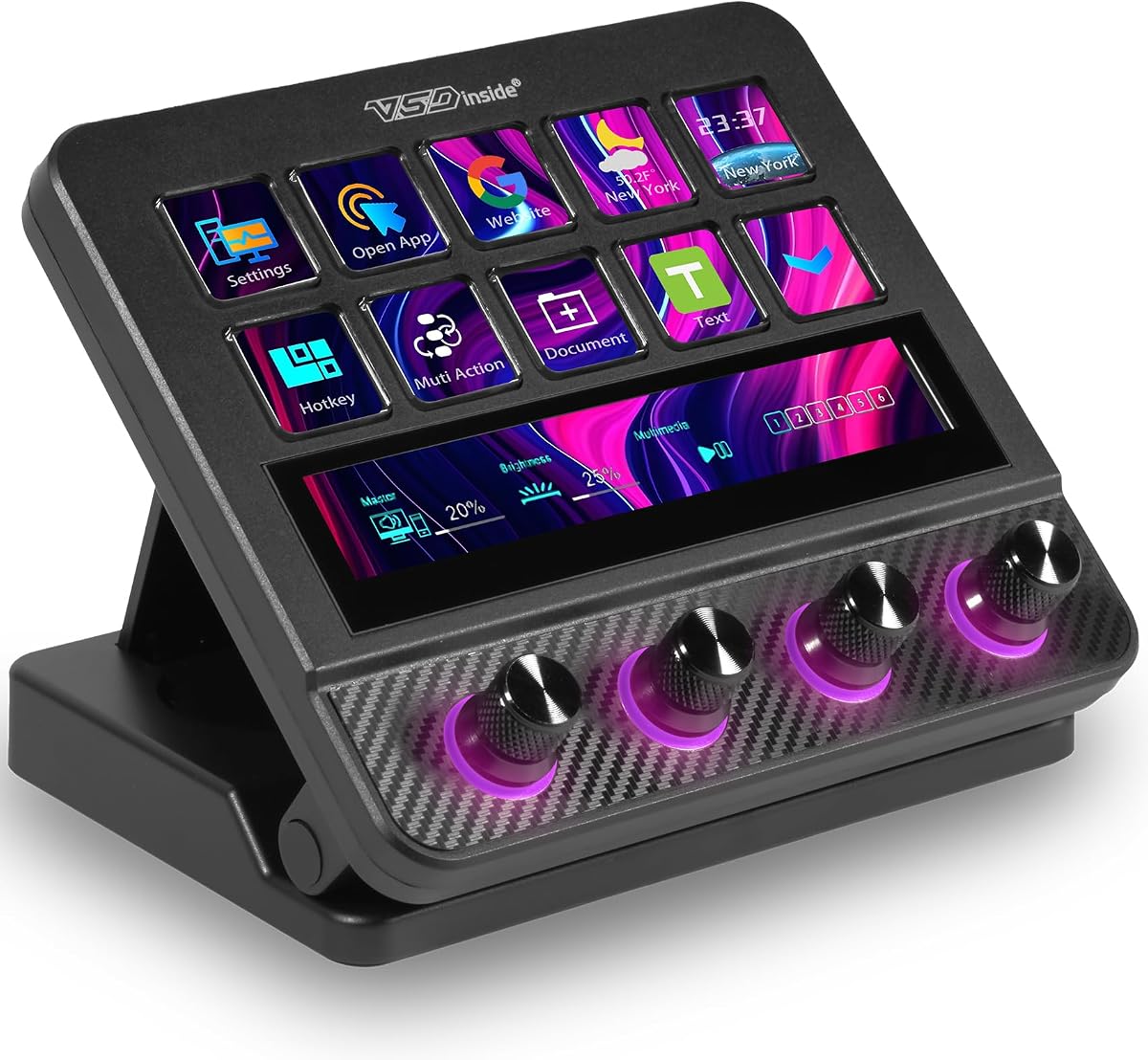
The VSD N4 Pro combines 10 LCD keys, 4 RGB knobs, and an interactive touch bar in a controller aimed at streamers, editors, and gamers. It can store unlimited independent scene presets and supports single commands as well as chained operations, giving users a flexible way to organize different parts of a production. Its supplied rating is 4.4.
We may earn a commission when you buy through this link, at no additional cost to you.
Visual customization is a major strength. Each LCD key accepts custom PNG, JPG, or GIF icons, while the lighting can be adjusted and synchronized with audio. GIF, MP4, and MOV media compatibility further extends the visual options. The built-in USB dock provides passive additional ports for peripherals such as mice, keyboards, and storage drives, reducing the need for a separate dock in some desk arrangements.
The macro system can turn repeated editing shortcuts, application launches, text presets, and web access into one-touch commands without coding. The software description also references more than 500 downloadable plugins and preloaded widgets for daily productivity. A key limitation is that its USB soundboard function sends audio control commands to the computer rather than providing built-in speakers for direct sound output. Compatibility is listed for Windows 10 or later and macOS 11 or later.
This model is well suited to creators who want a broad command surface, adjustable visuals, and several ways to automate repetitive work. The four knobs make it better suited to detailed adjustments than a purely key-based pad, while the foldable 60-degree stand supports comfortable viewing. It is a compelling option for Twitch streamers who also edit video, produce music, or manage a complex desktop workflow.
Ten LCD keys, four knobs, and a touch bar create a versatile mix of command types. The layout supports both clearly labeled one-touch actions and finer adjustments without requiring a much larger controller.
The controller can maintain unlimited independent scene presets for streaming, editing, gaming, and office use. This makes it easier to keep specialized commands organized and avoid rebuilding a layout for each activity.
We may earn a commission when you buy through this link, at no additional cost to you.
The Elgato Stream Deck + XL is a large control platform built for creators who need many dedicated commands and precise physical adjustments. Its 36 macro keys, 6 multifunction dials, and expanded touch strip offer one of the most comprehensive layouts in this guide. The supplied rating of 4.8 reflects a particularly strong combination of capacity, feedback, and integration options.
We may earn a commission when you buy through this link, at no additional cost to you.
The expanded touch strip can display important information in real time and provide access to additional action pages through swiping. Each of the 6 dials can also be assigned multiple functions using tools such as Action Trigger, so the physical controls are not limited to a single role. Multi Actions automate entire sequences with one press, while the free Stream Deck app for PC and Mac provides the setup environment for these commands.
Its integration support extends from digital audio workstations and video switchers to creative applications and connected production equipment. Optional accessories such as the Network Dock can expand connectivity, and unlimited custom profiles support separate layouts for workflows, projects, or team members. The principal trade-off is physical: a 36-key platform requires more desk space than a compact macro pad, and users with a small setup may find the additional controls excessive.
This is the most capable choice for a serious Twitch production desk that regularly handles cameras, switching, audio, lighting, creative applications, and networked equipment. It is less compelling for a beginner who only needs to change a few OBS scenes, but it offers room to grow into advanced workflows. For creators who want visible buttons, accurate dials, and extensive customization in one surface, this is the strongest premium recommendation in the list.
Thirty-six macro keys provide room for scene changes, media actions, camera presets, sound effects, communication commands, and application shortcuts. A complex broadcast can therefore have visible controls rather than a crowded collection of keyboard combinations.
Each of the 6 dials can perform multiple assigned functions through Action Trigger. This allows the same physical control to handle different tasks in different contexts, improving both precision and flexibility.
We may earn a commission when you buy through this link, at no additional cost to you.
The Insta360 Link 2 Pro is not a conventional keypad-based streaming deck, but it belongs in this roundup because it supports Stream Deck integration and can become a controllable part of a Twitch production setup. It is a 4K pan-tilt-zoom webcam for PC and Mac with a 1/1.3-inch sensor, AI tracking, HDR, and a redesigned dual-microphone system. Its supplied rating is 4.5.
We may earn a commission when you buy through this link, at no additional cost to you.
The most relevant feature for this category is its Elgato Stream Deck integration. Users can switch modes, trigger presets, and control multiple cameras from a compatible deck, reducing the need to operate the webcam's software during a live segment. Gesture or smartphone control offers alternatives for starting tracking, zooming, switching modes, and activating Whiteboard Mode, while dedicated Link Controller software provides additional settings and personalization.
Image quality is supported by the large sensor, 4K capture, improved low-light performance, and a natural bokeh effect. The camera physically pans and tilts to follow a person or group, and its beamforming directional microphones are designed to isolate speech and reduce background noise. It supports Windows, macOS, Chrome OS, and Linux, along with major platforms such as Teams, Zoom, and Twitch. However, ARM-based Windows systems and Windows Hello Face Recognition are not supported.
Choose the Link 2 Pro when camera movement, tracking, and framing are central to the stream and you already use or plan to use a compatible Stream Deck. It is not a substitute for a traditional macro controller, so streamers who need dedicated buttons for scenes, audio, and alerts will still need a keypad-based device. Its strength is combining high-quality camera operation with a path to deck-based control.
Stream Deck integration can switch camera modes, trigger presets, and control multiple cameras. This lets a creator manage framing from the same command surface used for other production tasks.
The camera physically pans and tilts to follow movement around the room. AI Tracking and Auto Framing can reduce the need to reposition a conventional webcam manually during a broadcast.
We may earn a commission when you buy through this link, at no additional cost to you.
The Elgato Stream Deck Mini distills the streaming deck concept into 6 customizable LCD keys. It is a compact option for Twitch creators who regularly forget keyboard shortcuts, want to launch applications, or want visible access to a small set of essential actions. Its supplied rating is 4.7, making it a highly rated straightforward choice.
We may earn a commission when you buy through this link, at no additional cost to you.
The software setup is described as user-friendly: actions are dragged onto keys, and settings can then be personalized. A key can execute a single command or a multi-action sequence, with the ability to run actions at once or in a precisely timed sequence. This allows a compact device to handle more substantial workflows without requiring a large number of physical buttons.
Compatibility extends beyond broadcasting to Zoom, Teams, PowerPoint, Excel, Word, GoogleSuite, MS Office, Photoshop, Adobe Creative Apps, Spotify, and other applications. That cross-application support makes the Mini useful for streamers who also communicate, edit, present, or manage ordinary productivity tasks. The trade-off is its limited capacity: there are only 6 keys and no touch strip or rotary dials for continuous adjustments.
The Mini is a strong recommendation for a beginner, a streamer with limited desk space, or anyone who wants a dependable set of essential commands without a large console. It can handle scene changes, app launches, media actions, and compact macro routines while remaining visually simple. For extensive audio mixing or complex live production, a larger model offers more room, but the Mini delivers the core one-touch experience in a highly manageable form.
Dragging actions onto the LCD keys makes the Mini approachable for new users. A streamer can quickly create a small command set for scenes, media, and application launches without learning an advanced control system.
Multi-actions can run simultaneously or in a precisely timed sequence. Each key can therefore serve as a short workflow rather than a single isolated command.
We may earn a commission when you buy through this link, at no additional cost to you.
The VSD M18 Stream Controller provides 18 programmable controls, including 15 visual LCD keys and 3 physical buttons. It is designed for gamers, streamers, and professionals who want to consolidate shortcuts, launch apps, control media, and switch OBS scenes. Its supplied rating of 4.5, along with its customizable visual keys and RGB surround, makes it a distinctive alternative to conventional Elgato layouts.
We may earn a commission when you buy through this link, at no additional cost to you.
Each LCD key can display a personal JPG, PNG, or GIF image or animation, which helps users identify commands at a glance. The Operation Follow feature supports macro operations in a chosen sequence or simultaneously, making it possible to build multi-step commands for video editing, music production, photography, gaming, and other repeated tasks. The RGB surround supports automatic color cycling and custom colors.
It connects by USB-C and is listed for Windows 11 and above or macOS 11 and above. Compatibility includes OBS, Streamlabs, YouTube, Twitter, Discord, Excel, Word, and Photoshop. The controller also provides plugins for schedule reminders, clock, stopwatch, weather, and calendar functions. As with the other VSD M18 listing, native Linux plug-and-play support is unavailable, and the design offers no dedicated precision dials for continuous adjustment.
The product is best for creators who want a visually distinctive macro pad with more keys than a standard mini controller. It is particularly effective for custom icons that make a large collection of commands easier to navigate. Buy it if your workflow is primarily based on scenes, shortcuts, application launches, and media control rather than detailed live mixing. The visual personalization and RGB design also make it an attractive addition to a gaming-oriented stream desk.
JPG, PNG, and GIF support allows each LCD key to communicate its purpose through a recognizable visual. This is particularly helpful when a streamer has assigned many different commands to the keypad.
The surrounding RGB ring can cycle automatically or display custom tones. Beyond decoration, the illumination adds a visible desk accent that can be attractive in dim streaming environments.
We may earn a commission when you buy through this link, at no additional cost to you.
The Elgato Stream Deck XL is a 32-key advanced studio controller designed for live production and large command collections. Every key is customizable, and each press can trigger an action while the LCD provides visual feedback that the command has registered. Its supplied rating is 4.8, making it one of the highest-rated products in this roundup.
We may earn a commission when you buy through this link, at no additional cost to you.
Its key count gives a streamer room to assign direct controls for scene changes, media launches, camera switches, lighting adjustments, audio changes, and social publishing. Listed integrations include Elgato 4KCU, OBS, Twitch, YouTube, Twitter, Discord, Spotify, Philips Hue, vMix, and VoiceMod. This makes the XL particularly useful for creators whose productions span several software and hardware ecosystems.
The main advantage over smaller keypads is the number of visible commands that can remain available during a show. Its main limitation is that it focuses on keys rather than the dials and touch strip found on the newer Stream Deck + XL. As a result, creators who need many dedicated commands may prefer it, while those who prioritize precise continuous adjustment may find another model more suitable. The 32-key surface also requires a meaningful amount of desk space.
The Stream Deck XL is an excellent match for an established Twitch setup that needs dedicated controls for a busy production. It is less likely to overwhelm a beginner who only uses one or two scenes, but its visual organization and extensive integrations make it valuable as a production grows. Among key-heavy controllers, it offers a particularly compelling combination of capacity, recognized application support, and clear command feedback.
The large number of LCD keys allows recurring production tasks to remain available without relying on keyboard shortcuts. Streamers can assign related controls to neighboring keys for a more intuitive layout.
Support for OBS, Twitch, audio, lighting, social, and video-switching software makes the XL useful for multi-tool productions. The controller can serve as a central visual interface rather than several scattered device controls.
We may earn a commission when you buy through this link, at no additional cost to you.
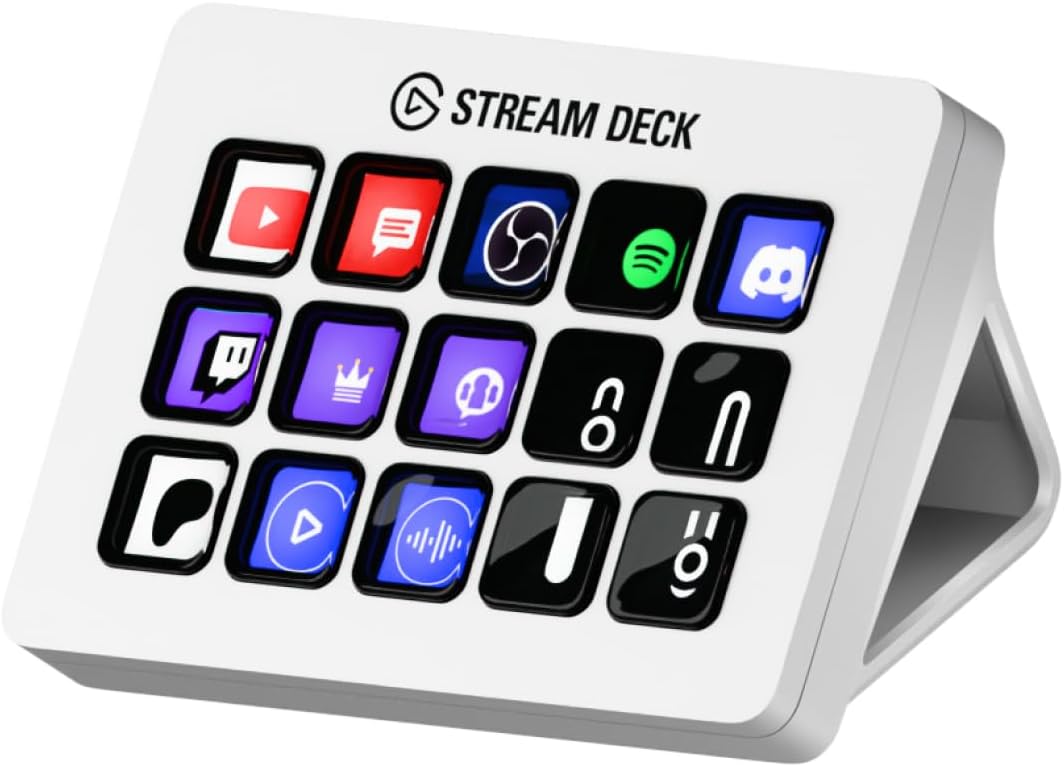
The Elgato Stream Deck MK.2 White balances 15 customizable LCD keys with a straightforward studio-controller design. It gives Twitch creators enough dedicated commands to organize scenes, applications, media, and communication tools without the footprint of a 32- or 36-key model. Its supplied rating is 4.8 reflects its strong reputation for visual control and dependable one-touch operation.
We may earn a commission when you buy through this link, at no additional cost to you.
A key can trigger a single action or multiple actions, allowing one button to launch a social post, adjust audio, mute a microphone, turn on lights, or combine a short sequence. Visual feedback confirms that a command has been executed, reducing uncertainty during a live broadcast. The white enclosure also offers a clean visual option for setups that do not use darker gaming peripherals.
The integration list includes Elgato 4KCU, OBS, Twitch, YouTube, Twitter, Discord, Spotify, Philips Hue, and many more. Hotkey actions can also streamline film editing, music production, and photography workflows, which makes this a broader desktop controller rather than a broadcast-only accessory. The trade-off is the absence of dedicated dials and a touch strip, while 15 keys are fewer than the larger XL models provide.
This controller is a strong recommendation for streamers who want a moderate number of clear physical commands and broad application support. It works well for a creator who regularly switches between broadcasting, editing, communication, and social tasks. Choose the MK.2 when you value a balanced footprint and straightforward key layout; move to an XL or Stream Deck + model if you need substantially more buttons or continuous adjustment controls.
Single and multiple actions let each key represent an individual command or an entire sequence. This reduces the need to remember combinations and keeps important functions visible throughout a broadcast.
Hotkey actions and broad plugin support extend beyond Twitch into editing, music, photography, communication, and social tasks. The controller can remain useful whenever the computer is being used.
We may earn a commission when you buy through this link, at no additional cost to you.
The Elgato Stream Deck + White combines customizable LCD keys, a touch strip, and dials in a polished production controller. Like the standard Stream Deck +, it can serve as an audio mixer, studio controller, or production console, while the white finish distinguishes it visually from many dark gaming devices. Its supplied rating is 4.6.
We may earn a commission when you buy through this link, at no additional cost to you.
The LCD keys provide direct command access, while the touch strip and dials support audio, video, lighting, and other adjustable functions. Multi-actions can execute commands simultaneously or in a precisely timed sequence, making it possible to build complete production routines. Setup uses a drag-and-drop approach, so commands and personalized settings can be assigned without writing code.
Its compatibility list includes Zoom, Teams, PowerPoint, Excel, Word, GoogleSuite, MS Office, Photoshop, Adobe Creative Apps, Spotify, and other applications. This makes it well suited to streamers who alternate between broadcasting, meetings, editing, and presentations. The trade-off is that it has fewer dedicated keys than the XL models, and the combination of controls requires deliberate organization so that each button and dial has a clear purpose during a show.
The white Stream Deck + is a strong all-around option for a creator who wants tactile mixing, visual commands, and broad software compatibility in one package. It is particularly attractive for production desks where audio levels and other continuous settings need frequent adjustment. The standard Stream Deck + offers the same fundamental control types, so this version is best for shoppers who specifically prefer its white aesthetic. For very large command collections, consider the additional key capacity of an XL platform.
LCD keys handle discrete commands, dials suit gradual adjustments, and the touch strip adds another interactive control area. Using the right control type can make complex live tasks faster and more intuitive.
Actions are placed onto keys and settings are adjusted through the Stream Deck software. This visual configuration method keeps setup approachable while allowing more involved sequences and timed routines.
We may earn a commission when you buy through this link, at no additional cost to you.
A useful streaming deck should make live production faster without adding clutter or difficult configuration. The right choice depends on your command count, preferred physical controls, software ecosystem, operating system, and the complexity of your Twitch workflow.
Key capacity determines how many commands can remain directly visible during a broadcast. A six-key Stream Deck Mini is sufficient for a focused setup with scenes, a start-stream action, and a few alerts, while 15 to 18 keys provide more room for media, applications, and secondary production functions. The 32- and 36-key Elgato models are better suited to complex shows that include switching, cameras, lighting, audio, social tools, and communication shortcuts.
Choose a key count that matches the commands you actually use. An oversized surface can look powerful but still become confusing if most buttons are assigned to occasional tasks.
Buttons are well suited to commands, but dials provide a more natural way to adjust changing levels such as audio. A touch strip can offer additional information or pages of actions, while LCD displays confirm what is assigned to each key. The Elgato Stream Deck + family and VSD N4 Pro combine several control types, whereas the Mini, MK.2, and traditional XL concentrate on keys.
Prioritize the physical controls that solve a recurring problem in your production. If you regularly mix audio, dials may be more valuable than several extra buttons.
A deck is most useful when it can connect to the tools that run your stream. OBS and Twitch compatibility appears across the list, but broader support for Discord, YouTube, Spotify, Photoshop, recording software, lighting, and video switchers can make the controller more versatile. Elgato devices benefit from a substantial plugin catalog, while the VSD models emphasize downloadable plugins and custom macro workflows.
Check whether the applications you use every day are supported before committing to a model. A large key count is less valuable if routine actions require difficult manual sequences.
Multi-action functions can run commands together or in a timed sequence, turning one key into a complete workflow. Elgato devices describe support for simultaneous and sequential actions, while both VSD M18 listings use Operation Follow to run multiple macro steps in a selected order or at the same time. These features are valuable for opening a broadcast scene, launching media, and adjusting several related settings.
Look for a macro system that is understandable and easy to test. A complicated sequence that fails under live-show pressure is less useful than a smaller action that works reliably.
Compatibility is more than a connection specification. The VSD M18 requires Windows 11 or newer or macOS 11 or newer and does not offer native Linux plug-and-play support, although SDK development documents are provided for custom secondary development. The VSD N4 Pro is listed for Windows 10 or later and macOS 11 or later. Elgato's Stream Deck app is described as available for PC and Mac. The Insta360 Link 2 Pro also supports Linux, Chrome OS, Windows, and macOS, subject to its hardware notes.
Verify the exact version of your operating system and whether your preferred software is natively supported. Avoid assuming that a USB connection automatically provides complete plugin support.
Some streaming decks send audio-control commands to the computer, while others include physical controls for live mixing. The VSD N4 Pro can act as a USB soundboard for triggering sound effects and controlling playback, but it has no built-in speakers and therefore cannot directly output audio. The Elgato Stream Deck + models include dials and describe operation as an audio mixer, making them a better fit for creators who expect live tactile level control.
Distinguish between controlling computer audio and producing sound directly. If your setup already has a mixer, a deck may only need to send transport or scene commands rather than output audio itself.
Custom icons can make a controller easier to learn and use under pressure. Elgato devices support icons through their software and plugin ecosystem, while both VSD M18 models accept JPG, PNG, and GIF images and animations on their visual keys. The VSD N4 Pro likewise supports custom image icons. Clear, consistent labels are more valuable than decorative imagery because a streamer must identify the right command instantly during a live show.
Use color and symbols consistently, and avoid placing a different meaning on the same color in each profile. Good visual organization matters as much as the number of available customization options.
Controller size affects desk layout, cable management, and how easily a streamer can reach each control. The Stream Deck Mini is the most compact conventional option in the list, while the 32-key Stream Deck XL and 36-key Stream Deck + XL require substantially more room. The VSD N4 Pro includes a foldable 60-degree stand, and the VSD N18 models also add visual illumination that may influence placement in a dim room.
Measure the intended area before ordering and make sure the deck can sit where your hand can reach it without covering keyboard or mouse controls. A larger model is not an improvement if it creates an awkward workspace.
Start by identifying the actions you perform most often, such as changing OBS scenes, launching media, toggling a microphone, or adjusting audio. Connect the controller with the supplied cable, open the compatible configuration software, and assign one command to each key before attempting a complex live routine. Clear names or custom icons make it easier to recognize the correct control without pausing the broadcast.
Build multi-actions gradually. Add one additional step, test the sequence outside a live stream, and confirm that timing works under realistic conditions. Keep separate profiles or presets for gaming, editing, meetings, and ordinary desktop use so that a button does not launch the wrong task in a different context. For dials and touch strips, assign functions that benefit from gradual adjustment or quick status review.
Keep the controller and screen free of dust, and use a soft dry cloth rather than aggressive liquid cleaners. Route the cable so it does not pull against the USB connection, and avoid placing the device where pressure or accidental impacts could affect the keys. Periodically revisit the configuration as your scenes and software change, removing unused actions and updating labels so the control surface remains clear and dependable.
A streaming deck is not required to broadcast on Twitch, but it can make repeated production actions faster and easier to see. It is especially useful for creators who switch scenes, launch media, control audio, or run multi-step macros with the same keyboard shortcuts. A simple six-key pad may be enough for a new streamer, while larger consoles suit more complex productions.
The Mini provides six customizable LCD keys and can execute individual or sequenced multi-actions, making it a practical option for essential Twitch controls. It works with major communication and creative applications in addition to streaming software. Its limitation is capacity, so a creator with many scenes and production tools may eventually want a larger model.
A macro keypad is a broad category that includes devices programmable for keyboard shortcuts and computer workflows. A Stream Deck typically provides a more established visual software environment, app plugins, profiles, and specialized production integrations. Some competing macro pads provide similar programmable behavior, but their plugin ecosystems and hardware control options can differ.
Dials are generally better when a setting needs gradual changes, because they provide a physical way to adjust a value with more precision. Buttons remain better for fixed commands such as changing scenes or launching media. Controllers with both options, such as the Elgato Stream Deck + and VSD N4 Pro, can handle both types of tasks.
Yes, all of the dedicated keypad-based products listed support OBS, and the Elgato models specifically list Twitch integration. You can commonly assign scene changes, media actions, applications, and other production commands through the supplied software. Exact plugin behavior can depend on the operating system, software version, and selected action.
Not necessarily. A deck may send audio-control commands to the computer, while a separate mixer or interface handles the actual sound output. The VSD N4 Pro clearly operates as a USB soundboard for controlling and triggering audio but does not include built-in speakers, so it cannot directly produce sound on its own.
Not in the conventional keypad sense. The Insta360 Link 2 Pro is a camera that supports Stream Deck integration, allowing compatible decks to switch modes, trigger presets, and control cameras. It complements a streaming deck but does not replace one when a creator needs dedicated buttons for scenes, media, alerts, and other tasks.
Six keys are enough for a small set of essential commands, while 15 to 18 keys provide room for separate scenes, media, audio, and application controls. A 32- or 36-key console is appropriate for busy productions with cameras, switchers, lighting, and communication tools. Choose based on the commands you will use during a show rather than the largest available layout.
The Elgato Stream Deck + XL is the strongest all-around recommendation for a large, advanced production desk, offering 36 keys, 6 multifunction dials, an expanded touch strip, extensive integrations, and unlimited profiles. The Elgato Stream Deck Mini is the most practical compact option, while the Elgato Stream Deck + provides the best balanced mix of LCD keys, dials, a touch strip, and production features for most serious streamers.
Prioritize the workflow you actually have. Choose a small keypad when scene changes and a few shortcuts are enough, a dial-equipped controller for live audio work, and an XL platform for a complex setup full of cameras, switching, lighting, media, and communication tools. VSD options may appeal to streamers who prioritize custom visual icons, RGB lighting, programmable sequences, and downloadable plugins.
Before purchasing, confirm operating-system support, the applications you rely on, the available desk space, and whether the control types match your production style. Prices, ratings, software features, and availability can change, so check the current listing and configuration requirements at the time of purchase.