
USB Fingerprint Reader for Windows 10/11 ONLY
4.3Editor score
Native Windows Hello support
Match-in-sensor fingerprint processing
Four-foot extension cable
Our best Fingerprint Reader for Windows 11 guide compares ten USB scanners for Windows Hello, security features, setup, multi-user support, and convenience.
A fingerprint reader for Windows 11 can make everyday sign-in faster, reduce reliance on typed passwords, and add biometric protection to a desktop or laptop without a built-in sensor. The right device should work naturally with Windows Hello while offering accurate recognition, secure fingerprint handling, flexible placement, and straightforward USB setup.
We compared ten Windows-compatible readers based on the supplied feature information, focusing on Windows Hello support, authentication standards, match-in-sensor or anti-spoofing capabilities, user capacity, cable length, FIDO support, and ease of setup. The list includes compact budget models, established business-oriented readers, and options designed for shared computers or extended security workflows.
Each review explains the reader's strongest attributes, practical limitations, and ideal user so the list can be compared without relying on vague marketing claims. Reader ratings and product details reflect the available information, while availability and pricing can change over time, so confirm the current listing before buying.
4.3Editor score

4.1Editor score

3.7Editor score
The comparison below places all ten readers side by side, highlighting their Windows platform, authentication features, user support, and practical distinctions. Ratings provide context, but compatibility and intended workflow should carry more weight than rating alone.


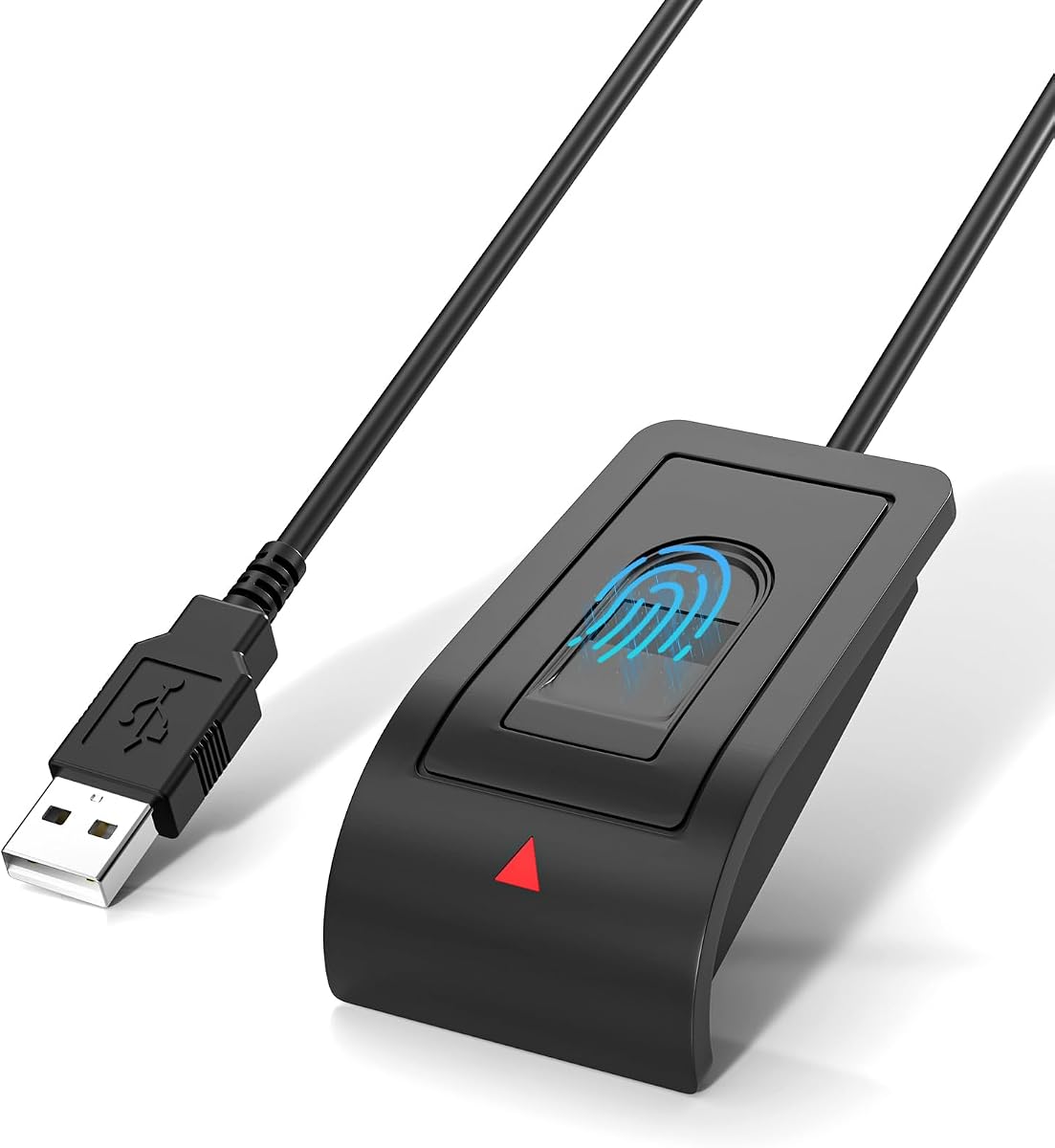


The first-ranked reader is a straightforward Windows Hello accessory for a genuine Windows 10 or 11 computer. Its 4.3 rating reflects a generally favorable reception, while its strongest selling points are local biometric processing, a 10-fingerprint capacity, and genuinely simple setup. It is designed to act as an input device for Windows rather than as a separate account or security platform.
We may earn a commission when you buy through this link, at no additional cost to you.
Match-in-sensor processing means matching occurs inside the sensor, reducing the need to transfer raw fingerprint data for comparison. The supplied information says fingerprint data remains on the Windows device and is never uploaded, synchronized, or stored externally. A four-foot cable and angled sensor also make it practical to position the reader comfortably beside a monitor, which is especially useful when the computer itself lacks a fingerprint sensor.
The main limitation is its deliberately narrow platform focus. It does not support Mac or Linux, and website or application sign-ins remain dependent on Windows Hello and the relevant service. A system update or Windows configuration change may also be necessary if Windows Hello is missing or disabled, so buyers should confirm that biometric sign-in is available on their PC before purchasing.
This is the strongest general choice for a Windows 11 home office, study machine, or shared household computer. It offers the core benefits people expect from an external fingerprint reader without introducing complicated software requirements, while its multi-user support makes it more versatile than a single-user design.
With match-in-sensor operation, the reader performs comparison within the sensor and limits what biometric information needs to leave the device. Windows manages enrollment and sign-in through its native Windows Hello framework, giving users a familiar and understandable security model.
The included four-foot extension cable makes it easier to keep the sensor in a natural resting position rather than reaching awkwardly toward a USB port. The angled surface is designed to support comfortable finger placement during repeated daily sign-ins.
We may earn a commission when you buy through this link, at no additional cost to you.
The Kensington VeriMark Desktop 1.0 combines Windows Hello biometric sign-in with FIDO U2F and FIDO2 WebAuthn compatibility. Its 4.1 rating places it among the stronger all-purpose choices in this guide. The major attraction is flexibility: the same hardware can support Windows authentication, passwordless workflows, multifactor setups, Tap-and-Go security-token behavior, and participating online services.
We may earn a commission when you buy through this link, at no additional cost to you.
Its biometric architecture combines match-in-sensor fingerprint technology, 360-degree readability, and anti-spoofing measures. The stated performance figures are a 2% false rejection rate and a 0.001% false acceptance rate. Windows Hello certification includes Windows Hello for Business, while listed Microsoft service support extends to Office365, Microsoft Entra ID, Outlook, and other compatible offerings.
Compatibility is the main point to verify. The supplied data states that ARM-based Windows computers are not currently supported, so buyers with an ARM device should look for updated compatibility information. Another drawback is that the advanced feature set makes this reader more specialized than a simple Windows Hello dongle, particularly for organizations that do not use FIDO credentials or business authentication services.
Choose the VeriMark Desktop 1.0 when you want one reader for Windows sign-in and broader passwordless or two-factor workflows. It is well suited to compatible business PCs, security-conscious professionals, and users who want a recognized desktop reader with a long cable and extensive protocol support.
FIDO U2F and FIDO2 compatibility expands the reader beyond unlocking a Windows session. Compatible websites and applications can use the hardware as a security key, allowing users to combine biometrics with a physical touch where the service and browser support that workflow.
Windows Hello for Business certification and compatibility with major Microsoft services make this reader relevant to managed environments. Its security positioning also supports organizational privacy and compliance goals such as GDPR, BIPA, and CCPA.
We may earn a commission when you buy through this link, at no additional cost to you.
This USB-A reader is built around fast Windows Hello access, a stated 0.05-second response time, and 360-degree fingerprint detection. Its 4.2 rating is solid for a compact peripheral, and the combination of capacitive sensing, anti-spoofing technology, and multi-user enrollment makes it appealing for desks shared by family members, coworkers, or several authorized users.
We may earn a commission when you buy through this link, at no additional cost to you.
The supplied specifications list a 1.92% false rejection rate and a 0.002% false acceptance rate. It can store up to 10 user IDs, while the product information also discusses protecting website credentials and designating private folders. Those functions still depend on the features and settings of the relevant Windows installation, rather than on the reader acting as a standalone password manager.
Setup is refreshingly simple: connect the reader, follow the Windows Hello enrollment instructions, and register a fingerprint. No third-party application or complicated driver installation is required. The lightweight housing and included 1.5-meter cable make it easy to carry or position beside a laptop, although its Windows-only design excludes Mac and Linux users.
This reader suits anyone who values immediate sign-in and shared-computer convenience more than FIDO security-key functions. It is a particularly practical option for a Windows 11 home office, workshop, or reception computer where several people need convenient but personalized Windows access.
The capacitive sensor is advertised as responding in 0.05 seconds, making it attractive for users who want minimal delay between touching the sensor and reaching the desktop. Its 360-degree detection approach is intended to make finger placement less finicky than a narrow reading area.
Support for up to 10 user IDs allows family members or coworkers to enroll separate Windows accounts. The device is therefore more than a convenience for one account, provided each user has the appropriate Windows permissions and enrollment access.
We may earn a commission when you buy through this link, at no additional cost to you.
The ineo reader focuses on a compact and uncomplicated way to add Windows Hello sign-in to a desktop. It has a 4.1 rating and centers on two daily routines: unlocking Windows with a touch and locking the computer quickly with the Win plus L shortcut. The high-precision optical sensor is designed to provide quick, dependable recognition without a complex setup process.
We may earn a commission when you buy through this link, at no additional cost to you.
Its five-foot cable is one of the more generous lengths in this category, allowing the sensor to sit comfortably near the keyboard or monitor instead of remaining fixed at the computer. The housing has a small footprint, which helps keep desks uncluttered, and the plug-and-play approach allows a user to begin enrollment through Windows rather than install separate biometric software.
Its limitations are largely about scope. The reader is expressly not for Mac, and the supplied data does not describe FIDO U2F, FIDO2, business-management features, or support for many simultaneous accounts. It is therefore best treated as a focused desktop convenience for personal Windows access and quick session locking.
This is an appealing choice for someone who wants a simple, neatly placed fingerprint reader for a Windows 11 PC. It is especially useful for people who already rely on the Windows lock shortcut and want the same quick action to perform a fingerprint-based lock operation.
The reader supports a convenient workflow in which a touch confirms the Windows lock action invoked with Win plus L. This helps users secure a workstation when stepping away without reaching for a separate password prompt.
A five-foot cable provides ample room to place the compact reader wherever it feels natural. The device can remain near a monitor or keyboard without stretching toward a USB port, improving both appearance and everyday usability.
We may earn a commission when you buy through this link, at no additional cost to you.
This Windows Hello reader is a compact, privacy-conscious option for adding biometric sign-in to a compatible Windows 10 or 11 PC. Its 4.1 rating reflects solid general appeal, while match-in-sensor processing and local fingerprint storage form the core of its security proposition. It is designed for quick access, screen locking, and account management through the native Windows interface.
We may earn a commission when you buy through this link, at no additional cost to you.
The supplied information emphasizes that fingerprint information stays on the Windows device and is not uploaded or shared externally. This makes the reader appealing to users who want biometric convenience without sending biometric information to an external service. It works through Windows Hello, without requiring complicated drivers or a third-party application.
The device is not a universal cross-platform security key, however. Mac and Linux systems are not supported, and the listing does not identify FIDO U2F or FIDO2 functions. The four-foot cable is adequate for flexible placement, while the angled sensor and compact body help it blend naturally into a home or office setup.
Choose this reader if local processing, native Windows integration, and a simple setup are the most important considerations. It is a sensible pick for a personal Windows 11 desktop or laptop that lacks built-in biometric hardware and does not need broader security-token functions.
Match-in-sensor processing helps keep fingerprint matching close to the device. Combined with local Windows storage, this approach minimizes the amount of biometric information that needs to move through the wider sign-in process.
The reader is controlled through Windows Hello, so users can enroll and use it without a separate application. That keeps setup within the familiar Windows environment and avoids creating a separate proprietary account system.
We may earn a commission when you buy through this link, at no additional cost to you.
The Kensington VeriMark Gen2 is designed for users who want more than local Windows sign-in. Its 3.7 rating is the lowest in this roundup, but the specification set makes it a premium feature option for compatible passwordless workflows. Windows Hello, Windows Hello for Business, and Tap and Go CTAP2 support create a broader security path than a basic biometric dongle.
We may earn a commission when you buy through this link, at no additional cost to you.
Match-in-sensor technology isolates and secures fingerprint data in the sensor, transferring only an encrypted match. The stated false rejection and false acceptance rates are 2% and 0.001%, respectively, and 360-degree readability is intended to support consistent placement. Up to 10 different fingerprints can be registered for Windows access.
The main drawback is that the broader feature set is not useful to every consumer. Tap and Go is not compatible with macOS or ChromeOS, and support for passkeys or password managers depends on the relevant service, browser, and premium tier. Some popular password manager integrations are specified for Dashlane, LastPass Premium, Keeper Premium, and Roboform.
This reader is best for a compatible Windows business environment, a security-conscious professional, or a user who wants one device for Windows Hello, CTAP2 passkeys, and password-manager authentication. Enterprise-oriented privacy support and modern web standards make it especially relevant for organizations reducing reliance on centrally stored passwords.
Tap and Go CTAP2 support allows compatible websites and password managers to treat the reader as a security key. Instead of relying solely on a stored password, a supported service can request a local biometric confirmation through the device.
Windows Hello for Business support, encrypted match transfer, and compatibility with organizational security goals make this option relevant to managed deployments. The reader can be used with up to 10 fingerprints and supports current web authentication standards.
We may earn a commission when you buy through this link, at no additional cost to you.
The RGB Windows Hello reader is the most visually distinctive model in the group, adding 38 flowing lighting effects and touch control to an otherwise standard external fingerprint sensor. Its 3.0 rating is the lowest shown, so prospective buyers should weigh the feature set carefully. It supports Windows 10, 11, and 12, FIDO U2F and FIDO2, and up to 10 fingerprints.
We may earn a commission when you buy through this link, at no additional cost to you.
The supplied information reports authentication in under 0.5 seconds, a 0.001% false acceptance rate, and a 0.1% false rejection rate. It also describes AES256 file encryption and FIDO use with compatible websites and applications. These features make it more versatile than a basic Windows Hello reader, although individual capabilities remain dependent on Windows and service support.
Compatibility deserves attention. The listing states more than 95% system compatibility with genuine Windows devices, but some individual systems may require a manual driver update. It is not for Mac or Linux. Those caveats, together with the lower rating, mean it is best for buyers who value RGB styling and FIDO functionality enough to accept a more hands-on setup check.
This reader is a good fit for a gaming desk, colorful workspace, or setup where the sensor will be visible and used with both Windows Hello and supported web authentication. For a business-only deployment, one of the more established Kensington models may offer a clearer and less uncertain proposition.
Thirty-eight flowing RGB effects give the reader a distinctive appearance. Touch controls can power the device or adjust the breathing light, making its status easier to notice while adding visual interest to a desktop.
FIDO U2F and FIDO2 certification allows compatible services to use the device as a security key. This creates a phishing-resistant second factor for supported sites and applications in addition to the local Windows Hello function.
We may earn a commission when you buy through this link, at no additional cost to you.
The Yoidesu reader is a small, Windows-focused fingerprint accessory with a 3.9 rating. It supports Windows Hello on standard Windows 10 and 11 systems, uses capacitive technology for approximately 0.5-second recognition, and offers 360-degree touch recognition. Its primary appeal is a compact design that suits laptops, offices, and shared home computers without built-in sensors.
We may earn a commission when you buy through this link, at no additional cost to you.
No extra application is needed on most genuine Windows installations. Users connect the reader and complete enrollment through Windows Hello, then use a touch for normal account access. Support for multiple Windows accounts and up to 10 fingerprints per account adds utility for shared systems, while the Smart-ID security function is associated with protecting saved passwords and encrypted folders.
The most important limitation involves Windows editions and USB arrangements. The supplied data says the reader supports original 32-bit and 64-bit Windows 10 and 11 systems but not the streamlined version. It also recommends a motherboard USB 2.0 interface because some USB 3.0 docking stations can introduce power or interference problems and unstable recognition.
Choose this reader for a direct Windows Hello upgrade when you can connect it to a stable USB port. It is less suitable for users of Windows Home, S mode, or other streamlined installations, and it does not offer the same level of documented FIDO and enterprise functionality as several premium alternatives.
The small, lightweight enclosure can move easily between a desktop, laptop bag, and shared workstation. Its simple one-cable design also makes it a practical addition for a home setup that lacks an integrated fingerprint sensor.
Before buying, confirm that the PC runs a full supported edition of Windows 10 or 11 rather than a streamlined version. Users who rely on USB 3.0 docks should also test direct USB 2.0 connectivity if recognition proves inconsistent.
We may earn a commission when you buy through this link, at no additional cost to you.
The Verifi P2000 is a desktop-oriented Windows Hello reader built around high-definition fingerprint imaging and 3D touch capacitance technology. Its 3.9 rating places it in the middle of the list, but the device offers a broad compatibility story: Windows Hello certification, passkey support, leading password manager compatibility, and additional Microsoft service support.
We may earn a commission when you buy through this link, at no additional cost to you.
Its 3D capacitive approach is intended to improve the consistency of fingerprint capture across the sensor surface. For supported websites, the passkey capability can provide a familiar alternative to a conventional account password. Integration with password management software may also make the reader useful in workflows where the same hardware supports both local Windows access and online authentication.
The supplied product information is concise and does not provide a numerical response time, fingerprint capacity, cable length, or detailed false acceptance and false rejection rates. Those missing specifications make it harder to compare the P2000 with newer models on measurable paper specifications. Users who prioritize modern FIDO2 details or extended multi-account specifications may want clearer documentation.
The P2000 makes most sense for a Windows 11 desktop that benefits from a stationary reader and an established Windows Hello ecosystem. It is a good match for users of Microsoft services, compatible password managers, and passkey-enabled sites, provided they do not need the newest cable or multi-user features highlighted by other models.
The 3D touch capacitance technology is designed to capture detailed fingerprint ridges consistently. This gives the desktop reader a different imaging approach from many optical options while preserving native Windows Hello integration.
Passkey compatibility and support for leading password managers make the reader useful beyond a local Windows session. The exact online functions depend on the browser, service, and password manager involved, so compatibility should be checked before purchase.
We may earn a commission when you buy through this link, at no additional cost to you.
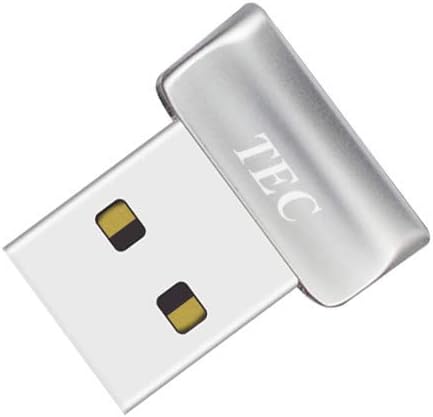
The TEC Mini reader is a compact biometric dongle with a 4.2 rating, offering Windows Hello authentication alongside document and folder encryption. Its most distinctive feature is the ability to associate fingerprint access with protected content, making it more relevant to users who want to use biometrics for more than simply reaching the Windows desktop.
We may earn a commission when you buy through this link, at no additional cost to you.
The supplied information highlights fast fingerprint authentication, 360-degree recognition, and registration of multiple fingerprints. Its small dongle format is easy to leave connected to a desktop or carry between compatible systems. Windows Hello supplies the native sign-in environment, while the encryption feature can add a biometric gate around selected documents or folders.
Buyers need to be mindful of two limitations. The device is not compatible with ARM-based chipsets, which rules it out for some modern Windows hardware. The listing also points buyers to troubleshooting instructions for driver installation, suggesting that setup may occasionally require more attention than a completely automatic installation.
This reader is best for an Intel- or AMD-based Windows 10 or 11 computer where protected file access is a priority. It is particularly suitable for a private workstation that benefits from a compact fingerprint-controlled workflow, while users seeking broad FIDO support should choose a reader with more detailed security-key specifications.
Document and folder encryption support is the defining feature of this model. Rather than limiting fingerprint authentication to the Windows login screen, the reader can participate in a workflow for controlling access to protected content.
The mini dongle design occupies little desk space, while multi-fingerprint registration and 360-degree recognition support convenient daily use. Drivers and unsupported ARM systems are the main points to verify before installation.
We may earn a commission when you buy through this link, at no additional cost to you.
The best fingerprint reader for Windows 11 depends on the computer, operating-system edition, intended users, and security workflow. These factors help separate a simple sign-in accessory from a more capable Windows Hello and FIDO authentication device.
Every reader in this guide is intended for Windows, but the precise requirements differ. Some support Windows 10 and 11, one also lists Windows 12, and the Kensington VeriMark Desktop 1.0 does not currently support ARM-based computers. The Yoidesu model does not fit streamlined Windows editions, while the TEC reader is explicitly incompatible with ARM chipsets. Check the processor architecture and Windows edition before ordering rather than assuming every Windows 11 PC behaves identically.
In summary, verify both the Windows version and processor type before purchase.
A fingerprint reader does not necessarily work immediately after it is connected. Windows must have the appropriate biometric hardware support available, and the user must follow the Windows Hello enrollment process to add a fingerprint. Depending on the PC, a Windows update or configuration change may be required. This is an operating-system task rather than evidence that the reader itself is defective, so having a password available during setup is important.
In summary, expect setup through native Windows Hello rather than a separate sign-in account.
Match-in-sensor processing performs fingerprint comparison inside the sensor, which helps keep raw biometric information local. Anti-spoofing technology is intended to make copied or artificial fingerprints less likely to be accepted. Some readers publish false rejection and false acceptance figures, but these should not be treated as identical across every model because the supplied information provides differing levels of detail. Local processing is valuable, but enrollment security, device protection, and Windows account controls still matter.
In summary, prioritize match-in-sensor processing and anti-spoofing features for stronger biometric design.
Windows Hello sign-in and FIDO security-key use serve different purposes. Windows Hello authenticates with a supported Windows PC, while FIDO U2F and FIDO2 can support passwordless or multifactor workflows on compatible websites and applications. The Kensington VeriMark Desktop 1.0, VeriMark Gen2, and RGB reader list these broader protocols. A basic Windows-only reader may be sufficient for one desktop, but FIDO support offers more value to users who manage many online accounts or work in a business environment.
In summary, choose FIDO-capable hardware when you want one reader for local and supported online authentication.
Several readers support up to 10 fingerprints or 10 user IDs, making them suitable for a shared household or office computer. Each person should still enroll through the appropriate Windows account rather than assuming a shared fingerprint is convenient or secure. Readers with less explicit multi-user information are best for a personal workstation. If several people will use the same PC, verify the stated capacity and ensure that Windows account permissions separate each user's files and applications.
In summary, choose ten-user support for shared systems and verify individual account enrollment.
A fingerprint sensor is easier to use when it sits beside the keyboard or monitor instead of dangling from a USB port. Cable lengths in this guide range from 1.5 meters to five feet, with several models including a desktop-friendly extension. Consider desk layout, monitor clearance, cable routing, and whether the device will remain connected. An angled sensor can also improve finger placement and make repeated sign-ins more comfortable.
In summary, prioritize enough cable length and an angled surface for natural positioning.
Some readers add functions beyond Windows Hello. The TEC Mini supports document and folder encryption, the Yoidesu lists Smart-ID protection for saved passwords and encrypted folders, and the Kensington options support Windows Hello for Business or password managers. These features can be useful, but they remain dependent on Windows settings, compatible applications, service support, and sometimes premium password-manager tiers. Review the exact function rather than assuming every privacy feature works automatically.
In summary, verify specialized security functions against your operating system and applications.
Basic readers in this list focus on native Windows Hello, local processing, multi-user enrollment, and a long cable. Premium models add FIDO protocols, business certification, anti-spoofing systems, passkey workflows, or broader service compatibility. The lowest listed customer rating belongs to the feature-rich RGB model, while several basic models have higher ratings, showing that extra features do not always translate into the most universally satisfying experience. Compare the functions you will use rather than assuming the most feature-packed device is the right choice.
In summary, pay for useful protocols and support, not for unused features or decorative extras.
Begin by connecting the reader to a compatible USB port on a genuine, supported Windows 10 or 11 installation. Open the Windows Settings interface, locate the sign-in options, and check that Windows Hello is available. Add a fingerprint using the Windows enrollment wizard, then repeat the scan when requested until the system recognizes the finger consistently. Keep a password available in case Windows asks for administrative confirmation.
After enrollment, test the reader during a screen lock or restart. Clean the sensor with a dry or lightly dampened soft cloth, avoiding liquids that could enter the device, and never use abrasive cleaners. Do not scratch the sensing surface or press excessively hard. If recognition becomes unreliable, reconnect the reader, inspect the USB connection, and try a direct port instead of a dock when the manufacturer recommends it.
For a shared computer, each authorized person should enroll their own fingerprint under their own Windows account. Avoid sharing one enrolled finger for convenience, and remove fingerprints from the Windows account if someone leaves or no longer has access. Update the device only through a trusted source, review Windows security settings after major system changes, and recheck compatibility if the PC moves to a streamlined Windows edition, an ARM processor, or a different docking arrangement.
No. The PC must be a genuine supported Windows 11 installation, and some readers have additional exclusions. The Kensington VeriMark Desktop 1.0 and TEC Mini reader do not support ARM-based computers, while the Yoidesu reader does not support streamlined Windows editions. Check the processor, Windows edition, USB connection, and supplied compatibility notes before buying.
They can replace routine password entry for supported Windows Hello sign-in, but Windows normally retains a password as a fallback. That fallback is useful for recovery, administrative actions, updates, or circumstances where a fingerprint cannot be read. Application and website access may also require separate configuration, and online services do not automatically accept every fingerprint reader.
A reader with match-in-sensor processing and anti-spoofing protection can improve biometric security, but it should be part of a broader security setup. Keep Windows updates current, use a strong fallback password, enable appropriate account protections, and use full-disk or folder encryption for sensitive data. Biometrics are convenient, but they are not a substitute for device encryption and sensible account security.
Windows Hello is Microsoft's built-in biometric sign-in system, while FIDO2 is a web authentication standard used by compatible websites and applications. A FIDO2-capable reader can function as both a Windows Hello device and a security key for supported online services. A Windows-only reader remains useful for local access but does not automatically provide that broader online authentication capability.
Windows may need an update or a hardware-support setting may not be active, particularly on a freshly installed system. Connect the reader directly, restart Windows, and check the sign-in options for fingerprint availability. A streamlined Windows edition or an unsupported processor can also limit compatibility. If the problem continues, consult the manufacturer's setup instructions and confirm that the exact model is supported by your edition and hardware.
Yes, if the device and Windows setup support multiple users. Several products in this guide list support for up to 10 fingerprints or 10 user IDs. Each person should enroll under their own Windows account, and a shared computer should also use separate account permissions so one person cannot access another user's files merely by touching the same device.
A desktop reader with a long cable is convenient for a permanent workstation because it can sit near the keyboard and remain connected. A compact mini reader is better for users who move between laptops or want less visual clutter. The more important checks are Windows compatibility, supported protocols, sensor performance information, and whether the connection remains stable through the ports or docks you use.
No, the products in this guide are Windows-focused. The first model explicitly excludes Mac and Linux, the Yoidesu reader lists Mac, macOS, Linux, and Chrome OS as unsupported, and the TEC Mini excludes ARM chipsets. Windows Hello is the central authentication framework, so buyers should plan to use these accessories with compatible Windows hardware.
The Windows 10/11 USB Reader is the strongest all-around value for most compatible home and office PCs, combining native setup, local match-in-sensor processing, ten-fingerprint support, and a useful four-foot cable. The Kensington VeriMark Desktop 1.0 is the Editor's Choice for users who also want FIDO U2F, FIDO2, and Windows Hello for Business support, while the VeriMark Gen2 is the premium choice for Tap and Go and passwordless workflows.
Prioritize exact Windows and processor compatibility, then decide whether your requirement is simply fast local sign-in or broader online authentication. A longer cable, multi-user enrollment, anti-spoofing measures, and local fingerprint processing can improve daily use, but specialized features such as encryption, password-manager integration, and RGB lighting should match your actual workflow.
Product listings, ratings, availability, and pricing can change, so review the current Amazon page and confirm the manufacturer's compatibility notes before ordering. With the right match between your Windows edition, hardware architecture, and authentication needs, an external fingerprint reader can make everyday access both faster and more thoughtfully secured.