
Yamaha MGX12
5.0Editor score
18-channel compact design
4.3-inch touchscreen
Dual USB-C interface
Bluetooth audio input
Explore the best digital mixing consoles for live sound, studio recording, streaming, podcasting, and installations, comparing features, connectivity
Digital mixing consoles combine microphones, instruments, playback devices, processing, and monitoring into one controllable system. A capable console can simplify live performances, streamline studio recording, and make complex routing easier to understand while preserving the tactile control that matters when cues must be changed quickly.
We compared ten consoles based on input and output capacity, microphone preamps, bus flexibility, internal processing, displays, motorized controls, USB recording, remote-control options, and practical workflow features. The list covers tabletop, compact, rack-mountable, tablet-controlled, and touring-oriented models for different kinds of users.
Each review explains the console's strongest capabilities, likely trade-offs, and best-suited users. Ratings reflect the supplied customer feedback, while feature details come from the product information. Product prices can change, so check the current listing and confirm that its connections match your equipment.
5.0Editor score

4.7Editor score

4.2Editor score
The table below compares all ten consoles by their core channel counts, control surfaces, recording options, and expansion capabilities, making it easier to identify the model that best fits a live, studio, mobile, or hybrid workflow.



The Behringer X32 earns the top position because it balances channel capacity, tactile control, and flexible routing without moving into the WING's larger-scale touring category. Its supplied rating is 4.7, and the console's defining features include 40 input channels, 25 buses, 32 fully programmable MIDAS-designed microphone preamps, and 25 automated motorized 100 mm faders.
We may earn a commission when you buy through this link, at no additional cost to you.
Its strongest benefit is the visible relationship between sources, processing, and destinations. Individual and dynamic LCD Scribble Strips identify channels and buses, while motorized faders provide a clear overview of the entire mix. The 16 XLR outputs, additional line connections, two headphone connectors, talkback section, scene management, and DAW-oriented control make the console useful in rehearsal rooms, studios, churches, theaters, and touring rigs.
The X32 is not the smallest or simplest console in the group. Twenty-five physical faders require desk space, and a full-size X32 can feel more elaborate than necessary for a solo creator or a small podcast. A compact X32 model offers a similar routing concept with fewer faders, while the Producer edition changes the physical format. The additional size is justified when quick visual access and direct control matter.
Choose the X32 when you need a substantial number of inputs and outputs, dependable motorized faders, and clear labeling without moving to the WING's remote I/O scale. It is our strongest all-around recommendation for serious live work and studio control because it offers more direct feedback and routing depth than the entry-level and tablet-focused alternatives.
Twenty-five motorized 100 mm faders and dynamic Scribble Strips make gain structure and channel assignments easier to read at a glance. This is particularly useful when an engineer must locate a source quickly or reproduce a previously prepared show state.
With 40 input channels and 25 buses, the X32 can handle elaborate source counts, multiple monitor mixes, and dedicated output paths. The 16 XLR outputs provide a substantial foundation for live speakers, studio monitoring, and external processors.
We may earn a commission when you buy through this link, at no additional cost to you.
The Yamaha DM3 is a compact digital console built around a large 9-inch touchscreen, and its supplied rating of 4.4 reflects a favorable reception among users seeking a capable surface in a smaller package. It combines a 22-channel architecture with Yamaha sound quality, 96kHz operation, and an 18-by-18 USB audio interface.
We may earn a commission when you buy through this link, at no additional cost to you.
The touchscreen becomes the console's main control center. Its size makes channel selection, mixing, and setup more visually direct than on a unit with a small display, while the physical form remains practical for small stages, rehearsal spaces, and mobile production. Sixteen professional Yamaha preamps, 12 XLR connections, four combo connections, and eight analog XLR outputs cover many conventional mixing requirements.
Its main limitation is that it does not offer the tactile certainty of a motorized-fader console. Users who make frequent physical level adjustments may prefer a surface with dedicated faders, and the 8-channel output section is modest for large live systems. The DM3 is still well suited to smaller ensembles, teaching environments, podcast production, and compact live rigs where routing requirements are simpler.
Choose the DM3 if screen size, compact dimensions, and USB recording are your priorities. It offers a polished alternative to crowded physical surfaces, and the combination of 22 channels, 96kHz operation, and a large display makes it a strong fit for creators who want most mixing tasks concentrated in one responsive touchscreen.
The 9-inch display gives channel processing, routing, and mix selection much more room than a compact console's usual screen. That additional space can reduce navigation when the setup has more sources or destinations than a simple live setup.
The 18-by-18 USB interface supports playback and recording, while the 2-by-2 USB recorder offers a focused stereo capture path. These options make the console useful as the center of a compact recording or rehearsal system.
We may earn a commission when you buy through this link, at no additional cost to you.
The Behringer WING is the premium live-focused option in this group, with a 48-channel, 28-bus full-stereo architecture and a supplied rating of 4.2. Its strengths become most apparent in professional environments where a console must manage more sources, more destinations, and potentially more than one physical operator.
We may earn a commission when you buy through this link, at no additional cost to you.
Twenty-four motorized 100 mm faders are divided into three separate, fully configurable sections, allowing the surface to adapt to different operating roles. A large capacitive touchscreen with an adjustable swivel is paired with a touch-sensitive channel editing section, 11 rotary controls, and a dedicated color TFT display. These controls provide multiple ways to reach important channel properties.
Remote expansion is the defining technical feature. Plug-and-play connectivity supports up to 144 input and output signals across three AES50 ports using Klark Teknik's SuperMAC technology. The tradeoff is a substantial control surface and a more complex setup process, particularly for users who only need a handful of channels and a few stereo mixes.
Choose the WING for professional live sound, fixed installations, and large production environments where remote I/O and a scalable architecture justify the additional complexity. It is the most expansive premium workflow here, but buyers should account for desk space, expansion planning, and the time needed to configure the console effectively.
Three AES50 ports can extend the console to as many as 144 input and output signals, allowing stage boxes, remote preamps, and additional output locations to be planned into a larger system.
The three fader sections can be configured around different operating tasks. This helps a team divide input adjustment, mix management, and output control without relying on a single fixed console layout.
We may earn a commission when you buy through this link, at no additional cost to you.
The Yamaha MGX12 stands out as the approachable digital option, pairing a supplied rating of 5.0 with a compact 18-channel design and a 4.3-inch touchscreen. It gives new users access to digital mixing, onboard processing, USB connectivity, and software tools without requiring a large touring surface.
We may earn a commission when you buy through this link, at no additional cost to you.
The MGX12's interface combines tactile faders with five control knobs and the small touchscreen. Versatile I/O includes MGX preamps with an 86 dB gain range, Bluetooth audio input, and a microSD card slot. A built-in DSP processor provides low-latency monitoring, while the USB-HDMI interface supports 4K video capture and pass-through for hybrid streaming and presentation work.
Compared with the X32, DM3, or WING, the MGX12 has less channel depth, a smaller screen, and fewer advanced routing options. It is better suited to rehearsal, small performances, teaching, content production, and compact installations than to large touring systems. Bundled Cubase AI, WaveLab Cast LE, Basic FX Suite, and Steinberg Plus software also broaden its creative utility.
Choose the MGX12 if you want a manageable entry into digital mixing with useful recording and assistive features. Simple and Standard Modes, Auto Gain, Clip Safe, and Scene Recall make it approachable, while the physical faders and touchscreen provide enough tactile feedback for regular work.
Simple and Standard Modes can reduce the number of decisions presented at once, while Auto Gain and Clip Safe assist with foundational gain management. These features make the console approachable for users building their first mixing workflows.
Bluetooth input, microSD playback, dual USB-C functionality, and 4K video capture and pass-through support rehearsals, streaming, and compact multimedia productions. The broad connection set is valuable when one desk must serve several roles.
We may earn a commission when you buy through this link, at no additional cost to you.
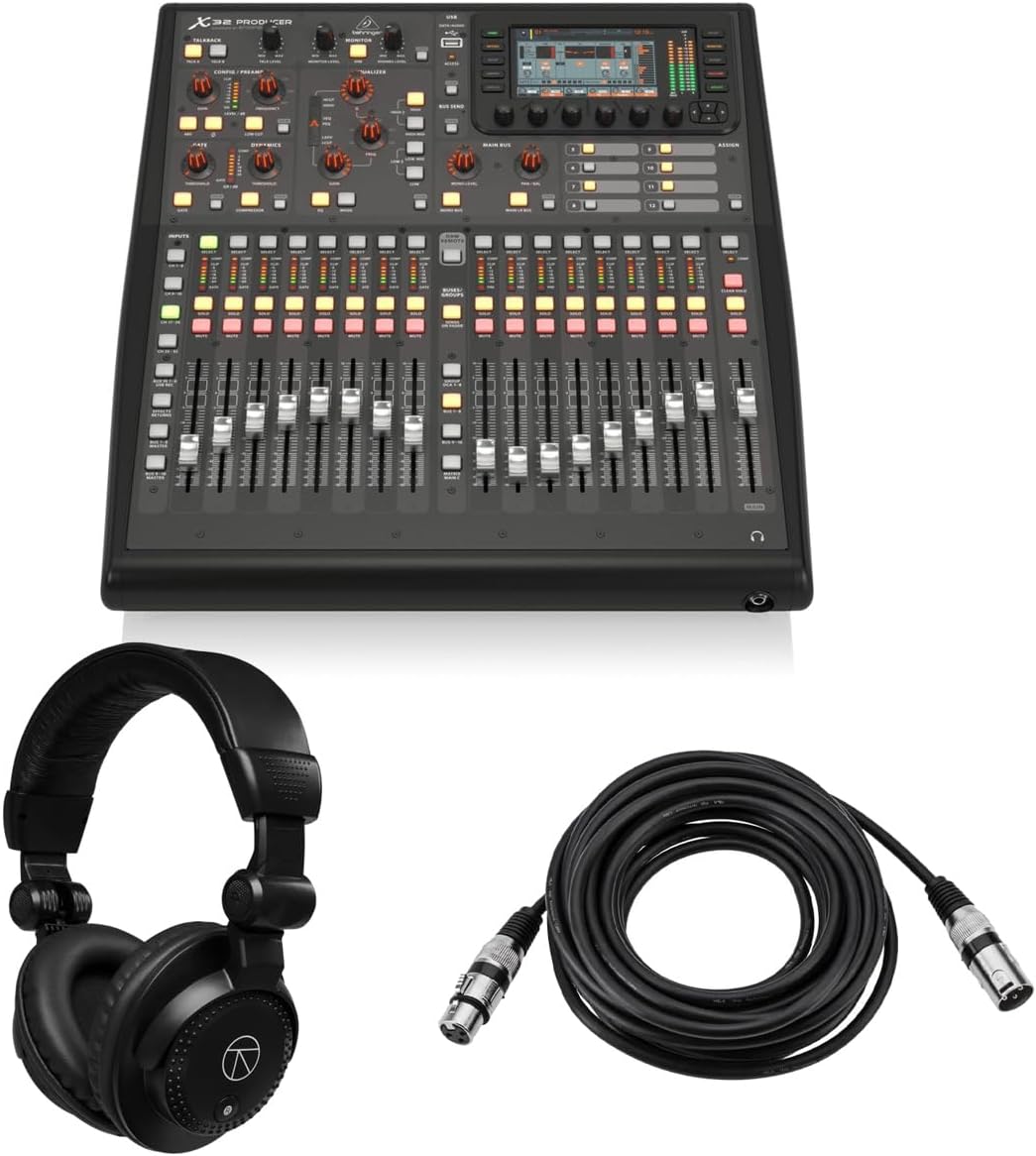
The Behringer X32 PRODUCER takes the familiar X32 routing concept into a rack-mountable form, and its supplied rating of 5.0 makes it a notable option for studios with limited desk space. It retains 40 input channels, 25 buses, 16 programmable MIDAS preamps, and 17 motorized faders within a more compact physical arrangement.
We may earn a commission when you buy through this link, at no additional cost to you.
Its 5-inch, 800-by-480 color TFT presents workflow components and parameters, while the rack-oriented layout improves density rather than providing the broad physical overview of the full-size X32. The main LCR, six matrix buses, and 16 mix buses have inserts, 6-band parametric equalization, dynamics processing, eight DCA groups, and six mute groups, creating a detailed routing and control structure.
The console is less convenient when a performer or engineer needs many direct fader movements in a live setting. It also requires a suitable rack and space for a separate control display or computer-based workflow. Its strengths are more apparent in recording rooms, production suites, and installations where rack density matters more than a large hands-on surface.
Choose the X32 PRODUCER for a feature-rich studio control core in a rack enclosure. The bundle also includes closed-back studio monitor headphones and a 25-foot XLR microphone cable, while 24-bit/48 kHz conversion, a 114 dB dynamic range, and eight true-stereo effects engines add production value.
Forty input channels and 25 buses provide extensive signal-management capacity even in a compact enclosure. Inserts, equalization, dynamics, matrices, DCA groups, and mute groups support a structured studio mixing architecture.
One hundred total recall scenes can store project states for quick setup. This is useful when moving between sessions or restoring a known configuration without rebuilding channel settings by hand.
We may earn a commission when you buy through this link, at no additional cost to you.
The Behringer X32 Compact preserves much of the standard X32's routing power in a smaller control surface. Its supplied rating is 4.7, and the specification combines 40 input channels, 25 buses, 16 programmable MIDAS-designed microphone preamps, 17 motorized 100 mm faders, and a useful set of analog and headphone connections.
We may earn a commission when you buy through this link, at no additional cost to you.
Individual and dynamic LCD Scribble Strips make source and bus identification easier, while the motorized faders provide physical feedback that a touchscreen-only design cannot. The console is intended for both studio and live applications, making it a flexible middle ground between compact tabletop models and full-size digital touring surfaces.
Eight XLR outputs are the main limitation compared with the full X32's 16, and the 17-fader layout offers less of a total mix overview. A larger system with many output zones may therefore outgrow it sooner. For rehearsals, small venues, churches, mobile rigs, and project studios, however, those trade-offs may have little practical effect.
Choose the X32 Compact when you want recognized X32-style control and generous internal routing in less space. It is particularly suitable for users who value motorized faders and dynamic labeling but do not need the output quantity or physical scale of the full X32.
The 40-input, 25-bus architecture gives the compact model more internal flexibility than its size suggests. It can serve as a central mixer for a rehearsal, a small live rig, or a multitrack project.
Seventeen motorized 100 mm faders preserve the physical behavior of larger consoles. Dynamic Scribble Strips add useful identification without requiring the full 25-fader layout of the standard X32.
We may earn a commission when you buy through this link, at no additional cost to you.
The PreSonus StudioLive Classic 16.0.2 is a digital console with a strong recording-software ecosystem and a supplied rating of 3.9. Its 16-channel input section includes 12 Class A XMAX solid-state preamplifiers, while four auxiliary buses and two internal effects buses provide a practical foundation for live and studio mixing.
We may earn a commission when you buy through this link, at no additional cost to you.
Every channel and bus receives Fat Channel processing with 3-band semi-parametric equalization, compression, downward expansion, and limiting. A stereo 31-band graphic equalizer is included on the main bus, and two stereo 32-bit digital effects processors add more shaping options. The 18-in/16-out USB 2.0 interface records all channels and the main stereo mix at 24-bit/44.1 kHz or 48 kHz.
Its USB 2.0 interface and 44.1 kHz option look dated beside newer multichannel interfaces, and the 3.9 rating is the lowest listed among the rated products. In return, the package includes Studio One Artist, Capture live-recording software, UC Surface mixer control, and QMix-UC touch wireless auxiliary control for compatible mobile devices.
Choose the StudioLive Classic 16 when integrated DAW and live-recording tools matter as much as the mixer itself. It is well suited to project studios, rehearsal spaces, and small live environments where users want familiar software tools, detailed channel processing, and direct multitrack capture.
Studio One Artist, Capture, UC Surface, and QMix-UC extend the console beyond mixing. The included tools support recording, mixer control, scene recall, effects management, and wireless auxiliary adjustment on supported devices.
Fat Channel processing applies equalization, compression, expansion, and limiting across channels and buses. This consistent processing model can simplify decisions when moving between inputs, returns, and mix destinations.
We may earn a commission when you buy through this link, at no additional cost to you.
The Behringer XR18 is a rack-style digital mixer controlled from an iPad or Android tablet, and its supplied rating of 4.6 reflects the appeal of a portable, software-centered workflow. It provides 18 inputs, 12 buses, 16 fully programmable MIDAS-designed microphone preamps, and an 18-by-18 bidirectional USB interface.
We may earn a commission when you buy through this link, at no additional cost to you.
The integrated tri-mode Wi-Fi router allows direct operation without an external router, simplifying setup in rehearsal rooms, small venues, and mobile rigs. The tablet interface concentrates channel control into a flexible display, while the two main XLR outputs form the basic output path for a compact live system.
A Dugan-style automatic mixing function is described as available through future firmware, so buyers should verify its current status in the product software. The reliance on a tablet also means the control experience depends on the device, application, and operator's comfort with touch-based workflows rather than physical faders.
Choose the XR18 for rehearsals, small performances, mobile audio, and users who prefer controlling a mixer from a tablet. It is especially convenient when a dedicated hardware surface would add unnecessary bulk and the goal is to use a device the operator already owns.
An iPad or Android tablet becomes the primary console, reducing the need for a separate physical mixer. The software-based layout can also present a different set of controls or channel views for each operator.
The built-in tri-mode Wi-Fi router removes the need for an external router in direct operation. That makes the system more approachable for rehearsals and mobile use, provided the surrounding wireless environment is suitable.
We may earn a commission when you buy through this link, at no additional cost to you.
The Allen & Heath Qu-5 is built around 96kHz XCVI FPGA processing, 38 inputs, 24 outputs, and a flexible architecture that supports up to 12 configurable mixes, 4 matrix outputs, and customizable channel layers. It is among the most technically ambitious consoles listed, with a supplied customer rating that was not provided.
We may earn a commission when you buy through this link, at no additional cost to you.
Its connectivity includes 16 XLR/TRS combi inputs, 12 XLR outputs, AES3 digital output, a 128-by-128 SLink expansion port, and a USB-C 32-by-32 multichannel interface. Six multi-FX engines, dedicated returns, USB-A stereo recording and playback, USB-C multitrack recording, and SD card capture for as many as 32 channels make it versatile for production and capture.
The 7-inch capacitive touchscreen, 17 motorized faders, eight programmable SoftKeys, and chromatic channel metering provide a modern control surface. Remote control is offered through applications for Windows, macOS, iOS, and Android. The sophistication is useful for a demanding professional environment, but it can also make initial setup and operation more involved than on simpler compact consoles.
Choose the Qu-5 when high-resolution processing, advanced recording, and expansion potential are priorities. It is suited to professional live sound, recording, and installed audio applications where the user can take advantage of its extensive routing and multichannel options.
The 96kHz XCVI FPGA engine processes the console at a high sample rate with very low latency. This benefits users who need detailed control and a modern foundation for demanding live and recording tasks.
USB-C multitrack recording, USB-A stereo playback, and SD card capture provide several ways to save and play back audio. The interface options make it possible to integrate the console with more than one kind of production workflow.
We may earn a commission when you buy through this link, at no additional cost to you.
The QSC TouchMix-16 is a compact digital mixer with a supplied rating of 4.4 and a clear emphasis on practical live inputs, monitor outputs, and channel processing. Its 20 full-function inputs include 12 microphone connections, four XLR/TRS combo connections, two stereo TRS line inputs, talkback, and USB 2-track access.
We may earn a commission when you buy through this link, at no additional cost to you.
The output section is particularly useful for performers. Six XLR auxiliary outputs can feed stage mixes, while two stereo TRS outputs, main left and right XLR outputs, cue, and monitor connections cover common live-system functions. The TRS auxiliary outputs can drive wired in-ear monitors directly, reducing the need for extra distribution in a compact rig.
Every input channel includes 4-band full parametric equalization, variable high-pass and low-pass filters, a gate, and a compressor. That built-in processing reduces reliance on external rack gear for common source shaping, although the console focuses less on high-channel-count multitrack USB recording than several newer competitors.
Choose the TouchMix-16 for portable live work, rehearsals, small venues, and musicians who need substantial monitor control from a compact mixer. The included bag and wide range of analog connections make it particularly practical for mobile use.
Six XLR auxiliary outputs and TRS auxiliary connections support separate performer mixes. Direct wired IEM capability is especially useful for bands that want personal monitor control without a larger monitor system.
Full parametric equalization, variable filters, gates, and compressors are available on every input. A single console can therefore handle a range of microphones and instruments while keeping each channel's processing close at hand.
We may earn a commission when you buy through this link, at no additional cost to you.
The right digital mixing console depends on where it will live, how many sources you need to manage, and whether the surface must handle live control, recording, streaming, or all three. Use the factors below to narrow the decision before comparing detailed features.
Start with the number of simultaneous sources rather than the headline channel count. A console may advertise 40 input channels because that figure includes multiple mix buses, returns, and processing paths rather than 40 physical microphone sockets. Check the actual XLR, TRS, combo, and stereo connections that will accept your microphones, instruments, playback devices, and talkback source. Then inventory every destination, including main outputs, auxiliary mixes, monitor feeds, in-ear monitor systems, and recording connections.
Buses determine how many independent destinations you can create from the same source material. Performers may need separate monitor mixes, rehearsal rooms may require several stereo or mono zones, and studios often need flexible paths into recorders or external processors. Look for a clear number of mix buses, matrix outputs, inserts, and dedicated return channels. A console with fewer buses may be adequate for a single room but restrictive in a multi-zone installation.
The preamp is the first active stage for microphone signals, so its gain range and signal handling deserve attention. Consider whether you will use passive dynamics, demanding condensers, instruments with different output levels, or long cable runs. The listed consoles range from 12 to 32 microphone preamps, with stated gain ranges or conversion specifications on selected models. Pay attention to preamp count, available gain, converter specifications, and whether the console accepts the source types you actually use.
Think about how the console will actually be operated under pressure. Motorized 100 mm faders provide tactile level feedback and a clear overview, while a large touchscreen can expose deeper settings without taking up desk space. Tablet control can make a mixer highly portable, though it shifts the control burden to software and a separate device. Smaller tactile surfaces may suit rehearsals, while complex live and production work often rewards more direct access to channel states.
USB specifications can determine whether a console is merely a mixer or the center of a recording system. Pay attention to input and output channel counts, supported sample rates, stereo versus multitrack recording, and whether playback is also possible. Some consoles offer an 18-by-18 or 32-by-32 multichannel interface, while others focus on compact 2-by-2 recording. Confirm compatibility with your computer operating system, audio software, and intended recording resolution before buying.
Onboard equalization, dynamics, filters, and effects can reduce external hardware requirements and speed up setup. Look for processing on every input rather than only on selected channels, and determine whether the console includes multiple internal effects engines, dedicated returns, inserts, graphic equalization, parametric equalization, gates, compressors, and limiters. These tools are valuable for live work, but they must also fit your sound without making the console a bottleneck.
Expansion matters when a system may grow beyond the room where it began. AES50, SLink, multichannel USB, tablet control, and platform-specific remote applications can each add different kinds of flexibility. Remote I/O is valuable for placing inputs near performers or distributing outputs across a large venue, while remote control can let a second operator adjust specific functions. Confirm the maximum supported ecosystem and whether the required cables, interfaces, or software are included.
The most capable console is not always the easiest to transport or install. Full-size desktop designs offer wide control surfaces but require substantial desk space. Compact and rack-mountable units can be ideal for mobile rigs and fixed installations, although some rely more heavily on touchscreens, computers, or separate displays. Consider the carrying case, power needs, ventilation, weight, available rack space, and whether the surface will be operated in a cramped or shared position.
Begin by connecting power and outputs before inserting sensitive sources, then power the console according to the manufacturer's startup sequence. Use balanced connections where possible, label inputs and outputs, and confirm each preamp's gain before raising the fader. Set initial channel levels conservatively, establish a usable main mix, and add processing only after listening to the unprocessed signal.
Create a consistent gain structure and organize channels by source type or responsibility. Use scenes, presets, or recallable mixes for recurring projects, but verify the recalled state before the next show or session. For recording, test the USB routing and sample rate in advance, monitor for clipping, and keep a separate listen path so playback does not accidentally contaminate captured audio.
Protect the console from heat, moisture, dust, impact, and unstable power. Clean the surface gently with a dry or lightly damp cloth, avoid spraying liquid directly onto controls, and keep ventilation paths clear. Route cables to reduce strain on connectors, store microphones and adapters in dedicated cases, and update software or firmware only after reviewing release details and saving important show files or scenes.
An analog mixer routes and processes signals with physical circuitry, while a digital mixer converts audio into digital data and uses software-based control and processing. Digital consoles often provide scene recall, extensive routing, USB recording, remote control, and visual channel management. The best choice depends on your workflow as well as the console's physical controls and input capacity.
Count the microphones, direct instrument connections, playback devices, and talkback sources that may operate at the same time. Allow some room for future sources, but do not rely only on the advertised total channel count, which may include buses and returns. Check the number of physical XLR, TRS, and combo sockets to determine whether the console can accept your equipment.
A touchscreen is convenient for detailed settings, routing, and compact operation, but physical faders provide immediate tactile feedback during a performance. The best workflow may combine both, as several consoles in this guide do. Consider how the surface will be used, whether multiple operators need feedback, and how much space is available.
Many digital consoles can send audio to a computer through USB, but the available channels and recording quality depend on the model. Look for multichannel versus stereo recording, input and output counts, supported sample rates, and computer compatibility. Test the complete signal path and monitor the recording before relying on it for an important session.
It depends on the console. Models with sufficiently capable USB interfaces can connect directly to a computer for multitrack or stereo capture, so a separate interface may be unnecessary. If the console only offers limited playback, provides no computer connection, or cannot meet your channel and sample-rate needs, an external interface can provide the missing conversion and routing options.
A digital mixing console is optimized for combining sources, controlling levels, applying live processing, and routing signals. A digital audio workstation is primarily a computer-based recording and editing environment with detailed multitrack production tools. Some consoles include DAW software or USB recording, but they still differ from a full workstation in their primary emphasis and operation.
A tabletop model is usually easier to transport, position, and operate as a standalone control surface. A rack-mountable console can be valuable in a permanent studio or installation where conserving desk space matters, though it may require a separate display or computer workflow. Consider your existing rack space, monitor placement, transport needs, and preferred level of physical control.
Choose a compact console when your source count, output requirements, transport needs, and operating experience fit within its simpler architecture. Move to a larger model when you need more physical faders, independent output paths, motorized scene recall, extensive processing, remote I/O, or a faster visual overview. Buying for your most demanding realistic setup is generally more useful than reserving capacity you will never use.
The Behringer X32 stands out as the most balanced overall choice, combining 40 inputs, 25 buses, 32 programmable preamps, motorized faders, extensive output routing, and clear channel labeling. The Yamaha MGX12 is the practical budget selection for smaller and newer workflows, while the Behringer WING represents the premium end with large-scale routing, configurable fader sections, and AES50 expansion.
Prioritize physical input and output availability, the number of independent mixes you truly need, and the control method that remains reliable under pressure. USB channel counts, recording formats, preamp specifications, internal processing, and remote expansion should determine the remaining decisions. A smaller console with the right connections is often more useful than a larger model that includes features your setup cannot use.
Finally, check the current listing, compatibility information, and available accessories before purchasing. Ratings and product bundles can change, and a console's usefulness depends on how closely its routing, recording, and control features match your actual equipment. Use the product links to review the latest configuration and select the digital mixing console that fits the job best.
