
GE Big Button Universal Remote
4.2Editor score
Controls up to two devices
Automatic code search
Direct code entry
Master volume control
Our Simple TV Remote Control guide compares ten easy-to-use remotes for seniors, low vision, limited dexterity, smart TVs, cable boxes, and basic TV setups.
A simple TV remote should make watching television easier, not create another frustrating technology challenge. The best models emphasize oversized buttons, clear labels, tactile feedback, uncomplicated setup, and compatibility with the devices actually used in your home.
We compared all ten remotes based on control layout, button size, visibility, programming requirements, supported equipment, power features, battery needs, and overall suitability for seniors or anyone with low vision or limited dexterity. The list includes TV-only, brand-specific, universal, cable-compatible, and smart-TV options.
Each review explains the strongest reasons to choose a model, along with important limitations such as lack of streaming navigation, device restrictions, or required setup. Ratings reflect supplied customer feedback, and prices and availability can change, so confirm current details before buying.
4.2Editor score

4.2Editor score

4.2Editor score
The comparison below highlights each remote's device coverage, controls, setup method, and best use case so readers can quickly identify the option that matches their television setup and accessibility needs.


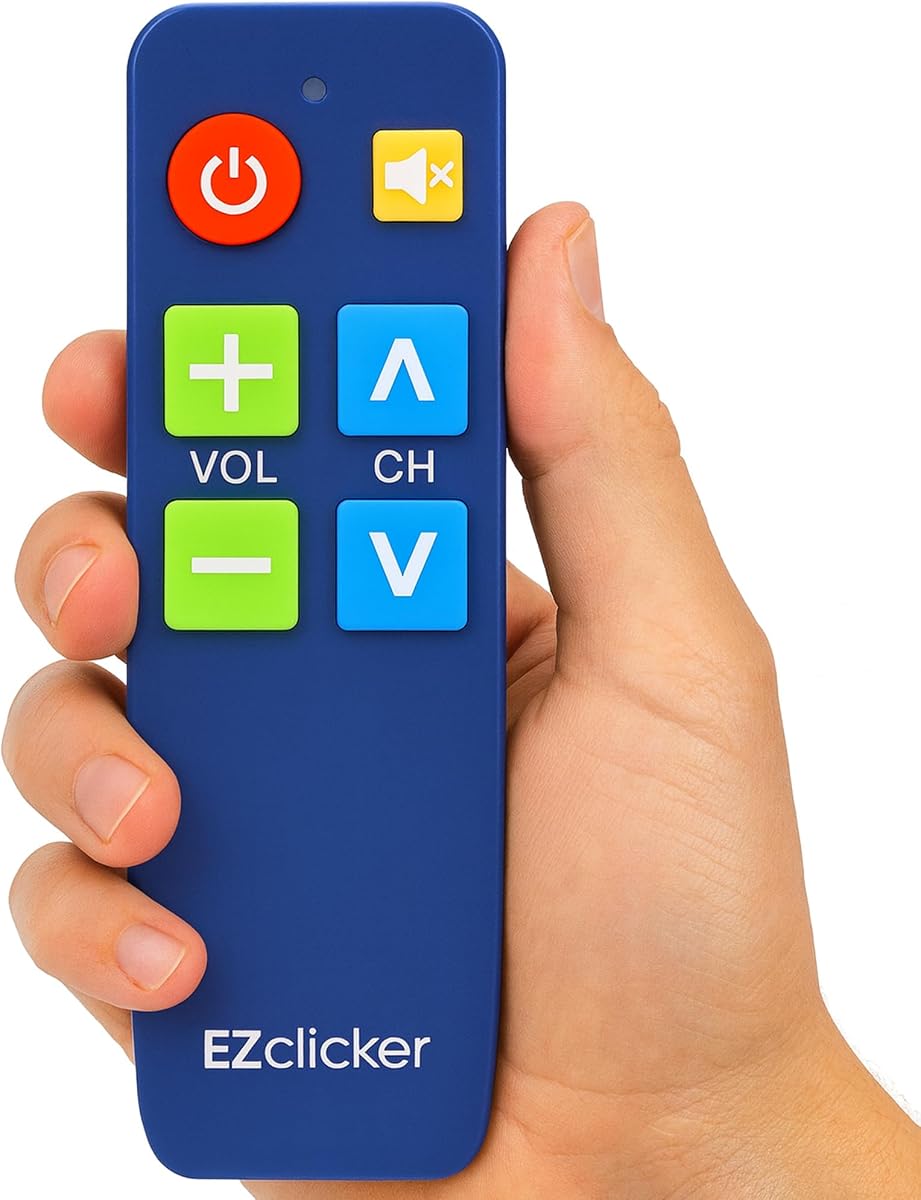


The EZclicker TV Remote for Seniors, Extra Simple Big Button Remote in black is a focused option for viewers who want to operate a television without navigating a crowded original-equipment remote. Its 4.2 rating reflects broadly positive customer feedback, while the compact body and emphasized tactile controls make it particularly practical for seniors, people with impaired vision, and anyone who prefers a smaller remote with obvious functions.
We may earn a commission when you buy through this link, at no additional cost to you.
Its defining strength is visual and physical simplicity. Big universal controls are easier to identify and press, and tactile feedback helps users confirm a selection by touch. The remote measures 6 by 2 by 1 inches, making it light and easy to store. Compatibility covers top television brands, but cable boxes, Firestick, Roku Stick, and streaming applications are explicitly outside its scope, so it is best suited to a straightforward television-only viewing arrangement.
Setup is manageable but not entirely automatic. The TV must be turned on, and the user points the remote toward it while holding the Mute and Volume Up buttons together for as long as necessary, up to 60 seconds. Releasing those buttons when the television's volume changes completes programming. This method is less complex than entering a multi-digit code, although it still requires a calm, guided first-time setup. Two AAA batteries are required and not included.
This is an excellent recommendation for a household with a conventional TV and a user who values a short learning curve, large targets, and a lightweight design. It may frustrate someone who expects to scroll streaming menus or change channels on a set-top box. Even with those limitations, it is a thoughtfully simplified remote that focuses on the most common television functions without adding unnecessary complexity.
The oversized button arrangement gives users a clearer visual hierarchy and reduces the chance of pressing an adjacent control. Tactile feedback is especially helpful when eyesight is limited because the user can confirm a press without looking closely at the labels.
This remote keeps the focus on power, volume, channel, and navigation functions commonly needed with a television. Its compact dimensions support easy handling and reduce the chance of it being misplaced in a large room.
We may earn a commission when you buy through this link, at no additional cost to you.
The Flipper Big Button TV Remote is the most deliberately simplified design in this guide, with only four visible controls for power, volume, channel, and mute. Its 4.2 rating indicates solid customer satisfaction, and the color-coded, oversized interface is built for seniors and people living with dementia, Alzheimer's, low vision, arthritic hands, or other dexterity challenges.
We may earn a commission when you buy through this link, at no additional cost to you.
Unlike remotes that display a dense collection of keys, Flipper hides secondary functions beneath sliding panels. The main face remains visually calm, yet the concealed controls allow a caregiver to configure favorite channels and other preferences. Up to 25 favorite channels can be programmed for quick access. The four primary buttons are green for power, orange for volume, blue for channel, and gray for mute, providing a strong visual distinction that does not depend on subtle text differences.
Device coverage is one of its most valuable distinctions. Flipper can control a television and a compatible cable or satellite box on basic functions, and its listed compatibility includes major TV makers and providers such as Sony, Samsung, LG, Vizio, Toshiba, Panasonic, Insignia, Hisense, Xfinity, Spectrum, DirecTV, Dish, AT&T, and TiVo. Compatible soundbars and infrared devices are also mentioned. It cannot navigate Netflix, YouTube, Prime Video, Hulu, Roku, Google TV, Apple TV, or Fire TV menus because it lacks app-navigation buttons.
This is the strongest choice for someone who primarily watches traditional broadcast, cable, or satellite television and benefits from a radically uncluttered interface. The inability to move through streaming applications is a meaningful limitation, but the four-button design, tactile construction, cable-box support, and favorite-channel memory more than compensate for that restriction in the right household.
Limiting the visible face to four commands reduces visual search and makes the remote easier to teach. Caregivers can explain a consistent color and position system without walking through a long list of unfamiliar keys.
Programming up to 25 favorite channels lets a user move directly to familiar content. That avoids searching through long channel lists, which can be tiring and disorienting for someone with memory or vision challenges.
We may earn a commission when you buy through this link, at no additional cost to you.
The EZclicker Samsung TV Remote Big Button is a highly rated 4.5 option for households that use a compatible Samsung television and want the shortest possible setup process. Inserting two AAA batteries is all that is required, making this an attractive choice when setup complexity is the main concern for a senior or caregiver.
We may earn a commission when you buy through this link, at no additional cost to you.
The layout includes an extra-large enter button alongside other oversized universal controls and tactile feedback. Those physical design choices make the remote easier to understand and operate, particularly for someone with limited vision or dexterity. At 7 by 2 by 1 inches, it remains compact and lightweight, offering a slightly longer body than the smaller EZclicker model in the first review.
Its narrow compatibility is the defining limitation. The remote is designed only for Samsung television models and is not compatible with streaming devices, cable boxes, or unrelated television platforms. This focus can be an advantage because it removes uncertainty: users do not need to navigate a code list, select a device mode, or perform a general programming procedure. It is not a universal remote despite sharing a similar layout with models that are.
Choose this remote when the television is a supported Samsung model and the household only needs basic TV operation. It is particularly convincing for anyone who values a 4.5 customer rating and immediate use over broad device compatibility. For a mixed entertainment setup or a non-Samsung television, a more flexible model would be a better investment.
A remote that is ready to use immediately can be a major advantage for caregivers and older adults. The absence of pairing steps removes one common source of confusion when replacing an original remote.
The extra-large enter button provides a clear focal point for confirming selections. Combined with tactile feedback, it supports a more confident interaction than a standard remote with many similarly sized keys.
We may earn a commission when you buy through this link, at no additional cost to you.
The EZclicker Big Button Universal TV Remote in black is a general-purpose simplified remote with a 4.1 rating and support for major television brands. It works best for households that want an accessible replacement for a television remote but do not need to operate a cable box, streaming stick, or full smart-TV interface.
We may earn a commission when you buy through this link, at no additional cost to you.
Its universal television support provides more flexibility than a brand-specific model, while the extra-large enter button, large controls, and tactile feedback preserve the ease of use that makes this type of remote appealing. The streamlined layout is suitable for seniors and children, as well as anyone who has simply had enough of hunting through densely labeled remotes.
Programming follows a direct physical procedure. Turn on the television, point the remote toward it, then hold the Mute and Volume Up buttons together for up to 60 seconds. Once the television's volume changes, the user releases the buttons. Although it requires active participation, this method avoids asking the user to identify a long numerical code. The remote measures 7 by 2 by 1 inches and uses two AAA batteries, which are not included.
The main caveat is that universal here does not mean capable of controlling every component in an entertainment center. Cable boxes, Firestick devices, Roku Sticks, and streaming functions are explicitly excluded. It is a strong recommendation for a conventional television in a multigenerational home, but buyers with set-top boxes or streaming habits should select a model designed for those devices.
The universal television compatibility is useful for households that may replace televisions over time or use different major brands in separate rooms. It offers more flexibility than a remote tied to one manufacturer.
Large controls, tactile feedback, and a prominent enter button make the remote approachable for seniors, children, and less technical viewers. The uncluttered arrangement helps reduce mistakes when selecting functions.
We may earn a commission when you buy through this link, at no additional cost to you.
The Big Button Universal Remote is a high-rated 4.4 option built for major television brands including Samsung, LG, Vizio, Sony, Hisense, Philips, Panasonic, and Sharp. It combines a broad compatibility list with a 4.4 rating, making it one of the most compelling choices in the guide for a simple television-only arrangement.
We may earn a commission when you buy through this link, at no additional cost to you.
The product description emphasizes no programming or pairing. Users insert batteries, select the appropriate television brand, and begin using the remote for supported televisions. This is a meaningful convenience over remotes that require a code search, and the simplified process can also make setup easier for family members providing technical assistance.
Physical usability comes from the extra-large enter button, large universal controls, and tactile feedback. The remote is not restricted to a single television manufacturer, yet it avoids the complexity of a full multi-device universal remote. It is also supported by an after-sales service that offers free replacement within 90 days under the stated warranty, along with stated direct customer support.
Cable boxes, streaming devices, and unrelated platforms remain outside its compatibility, so it is not suitable for viewers who expect to scroll apps or change channels through a set-top box. For a household with a compatible television and a preference for immediate operation, however, this is an excellent balance of broad brand coverage, accessibility, and customer-rated satisfaction.
The long television compatibility list gives the remote useful longevity within traditional TV setups. Selectable brand presets appear to remove the need for a conventional programming sequence, simplifying ownership from the outset.
The stated 90-day replacement policy and direct support offer reassurance for a product whose usefulness depends on matching the correct television. Buyers should still verify their exact television model and brand before ordering.
We may earn a commission when you buy through this link, at no additional cost to you.
The EZclicker LG TV Remote Big Button in black delivers a 4.5 rating and is tailored specifically to compatible LG televisions. It is a logical choice for an LG household seeking a simple replacement with large controls rather than a full-featured remote that expects regular app navigation.
We may earn a commission when you buy through this link, at no additional cost to you.
The design follows the same accessible formula as the other EZclicker options: an extra-large enter button, big universal television controls, and tactile feedback. These features make the control positions easier to identify and confirm through touch. Its 7 by 2 by 1-inch body is compact and light, while the large button layout provides a comfortable visual target for users with limited dexterity or impaired vision.
Compatibility is deliberately limited. It works with LG television models but not with streaming devices, cable boxes, or unrelated television platforms. Two AAA batteries are needed, and they are not included. That makes verifying the television brand especially important before purchase, since the remote is not designed as a general replacement for a mixed set of components.
This remote is best for viewers who mainly operate an LG television and want uncomplicated controls. Its 4.5 rating is among the strongest shown in this guide, and the focused brand design avoids the uncertainty associated with programming a more general remote. If the home also relies on a cable receiver or streaming applications, choose one of the multi-device options instead.
A remote dedicated to one television brand provides a clearer use case than a highly generalized model. Users are less likely to encounter device-selection menus or codes when their home has only one compatible television.
Tactile feedback helps users know when a button has been pressed. Combined with the extra-large enter key, this improves confidence for people who may not always look directly at the remote.
We may earn a commission when you buy through this link, at no additional cost to you.
The GE Big Button Universal Remote Control is the most versatile low-cost option in this guide, combining a 4.2 rating with support for up to two compatible devices. Unlike most simplified television remotes in the list, it can manage a television and a second component such as a cable box, satellite receiver, soundbar, or other infrared-compatible device.
We may earn a commission when you buy through this link, at no additional cost to you.
Its large, simplified keyboard uses big, readable buttons and an ergonomic shape designed for comfortable holding. The remote can be programmed through an automatic code search or direct code entry, and it includes master volume control that adjusts audio regardless of the active device. It is preprogrammed for Samsung televisions and is also listed for Vizio, LG, Sony, and Roku in the product title.
The broader control is particularly practical for traditional cable and satellite arrangements. It also makes sense in homes, hotels, nursing homes, and assisted-living environments where a familiar, durable-style remote may be easier to standardize. Free U.S.-based technical support and online programming videos provide additional assistance when matching components or entering codes.
Compared with the very minimalist Flipper remote, this GE model asks the user to manage more controls and may require a little more setup. It also does not describe app-menu navigation as its primary strength. Even so, the combination of two-device control, large buttons, multiple programming methods, master volume, and strong support makes it the most balanced choice for a conventional home entertainment system.
Controlling a television and a compatible cable box, satellite receiver, soundbar, or similar device can simplify the living room. Consolidating basic functions reduces clutter and the need to remember which remote belongs to which component.
Automatic code search is convenient for users who do not know a device code, while direct entry provides a backup method. This combination makes the remote more adaptable to a range of compatible equipment.
We may earn a commission when you buy through this link, at no additional cost to you.
The blue EZclicker TV Remote for Seniors shares the accessible design and television-focused compatibility of the black version but offers a visually distinctive housing. Its 4.2 rating is positive, and the combination of large buttons, tactile feedback, and a compact 6 by 2 by 1-inch body makes it easy to handle and identify from a distance.
We may earn a commission when you buy through this link, at no additional cost to you.
The remote is intended to help seniors and people with limited dexterity or vision use a conventional television without confronting a complicated button layout. It supports top television brands, but the product information clearly excludes cable boxes, Firestick, Roku Stick, and all streaming functions. That makes it most appropriate for a room where the television is the only device being operated.
Its programming method relies on a simultaneous Mute and Volume Up hold. The user turns on the television, points the remote toward the screen, and holds both buttons for up to 60 seconds, releasing when the volume display changes. The process avoids numerical code entry and may be easier to teach than a conventional universal remote, though some patience is required during the first setup.
The blue finish is a modest but useful distinguishing feature for a senior's room or a multi-user household, where identifying a particular remote quickly can matter. Two AAA batteries are required and not included. It is a sound alternative to the first-ranked black model, particularly for buyers who prefer a more colorful housing, while sharing the same essential strengths and limitations.
A blue remote is easier to distinguish from many standard black television remotes. That simple visual difference can reduce the need to ask a family member which remote belongs to the television.
The small, lightweight body is easy to pick up, carry, or return to a designated location. Its reduced size is beneficial for users who find large full-size remotes difficult to hold steadily.
We may earn a commission when you buy through this link, at no additional cost to you.
The GE Big Button Universal Remote Control, Replacement Remote for Samsung, stands apart from the most minimal remotes in the guide because it includes a directional pad for smart-TV and streaming-device navigation. Its 4.0 rating remains positive, and the combination of large controls, two-device capability, and familiar navigation features makes it relevant to viewers who need more than basic power and volume functions.
We may earn a commission when you buy through this link, at no additional cost to you.
The remote can control up to two compatible devices, including a television, streaming media player, cable box, satellite receiver, soundbar, and other supported equipment. A directional pad allows users to move through smart-TV menus, while automatic code search, direct code entry, and master volume control support setup and everyday operation. It is preset for Samsung televisions.
The large simplified keyboard remains easier to read and navigate than many original-equipment remotes, making the product potentially useful for impaired vision or anyone seeking fewer obstacles in daily use. The tradeoff is that the broader feature set introduces more complexity than the four-button Flipper or the television-only EZclicker models. A user who only needs essential TV controls may prefer a more focused design.
This is a strong fit for a Samsung-centered smart-TV household that still wants large buttons. It is also suited to users who must move through streaming menus but do not want a dense modern remote. Program carefully, confirm the directions for your connected equipment, and use the provided support resources if the initial setup does not behave as expected.
A directional pad makes this remote more useful with smart televisions and compatible streaming players. It balances larger accessibility-focused keys with the navigation controls required to move through onscreen menus.
Supporting up to two devices allows the remote to consolidate basic control of a television and a connected component. This can reduce remote clutter in homes with cable, satellite, soundbar, or streaming equipment.
We may earn a commission when you buy through this link, at no additional cost to you.
The UltraPro OneTouch Backlit Remote is the clearest dedicated smart-TV option in the guide, combining a 4.1 rating with a fully illuminated keypad and dedicated streaming-app buttons. It is designed for compatible Samsung, LG, Sony, Vizio, Fire TV, and Roku TV models, making it a practical choice when a user spends more time in modern television menus than on traditional channel surfing.
We may earn a commission when you buy through this link, at no additional cost to you.
The backlight is the most distinctive feature. Illuminated buttons improve visibility in dark rooms, bedrooms, and media areas without requiring the user to turn on an overhead light. Dedicated hotkeys for Netflix, Prime Video, Disney+, and YouTube can open those services when the television manufacturer has installed them, though support for user-installed applications may vary.
Setup is designed to remain approachable. Users insert two AAA batteries and select their television brand; no programming is required for the six supported brands. Some Sharp and Insignia Roku television models may require programming, which is an important exception to check before purchase. The remote is built for compatible smart television models throughout the home and includes the navigation functions expected by that category.
It is best suited to a viewer who benefits from visible buttons in a dim room and values direct access to popular streaming services. It is less focused on the extreme physical simplification of the EZclicker and Flipper options, and application availability depends on the television itself. For a supported smart-TV setup, it offers a particularly useful combination of illumination, hotkeys, and straightforward setup.
A fully illuminated keypad makes labels and controls easier to locate during evening viewing. This can improve convenience in a bedroom and reduce the need to direct a light toward the remote.
Dedicated buttons can reduce the number of navigation steps needed to reach popular services. Their usefulness depends on whether the television manufacturer has installed and exposed the corresponding applications.
We may earn a commission when you buy through this link, at no additional cost to you.
Choosing a simple TV remote starts with the devices you actually use, followed by the visibility, programming, and control features that matter most to the person operating it.
Match the choice to the entire setup rather than to the television alone. Check the exact television brand and model, identify whether a provider box is involved, and confirm whether streaming app navigation is essential.
Choose oversized, visually distinct, tactile controls whenever the remote is intended for a senior, a person with low vision, or someone with arthritic hands. Simplicity of the everyday layout matters more than a large feature count.
Prefer immediate operation when possible. If programming is necessary, ensure the method is clearly documented and choose a model whose setup process matches the user's technical comfort and available assistance.
Fewer visible buttons reduce mistakes, but a lack of navigation can be a serious drawback for smart-TV users. Decide whether the priority is maximum simplicity or enough functionality to open and navigate streaming content.
Add backlighting for frequent nighttime viewing. Otherwise, prioritize high-contrast labels, large lettering, tactile responses, and a physical layout that can be understood by touch.
Choose multi-device control only when it solves a real remote-clutter problem. For a user who mainly needs one function at a time, a television-only or low-feature model may be easier to learn.
Note the required battery type, keep spare cells available, and retain the setup instructions. Reliable support and a clear replacement policy add practical value beyond the button layout.
For limited dexterity, favor a lightweight body, separated controls, and an easy grip. Avoid choosing solely by apparent feature count if the remote feels cumbersome in the user's hand.
Begin by confirming the remote's compatibility with your television brand and any connected cable, satellite, soundbar, or streaming device. Install fresh batteries of the required type, with the correct polarity, and test the remote at a close range. For an automatic or button-based setup, follow the included instructions exactly and keep the remote pointed toward the equipment while the signal is being received.
For a simple television, use only the functions printed on the main interface. On remotes with hidden panels, slide the panel open only when changing programming, and close it afterward so advanced controls do not distract the daily user. Program favorite channels before handing the remote to someone with memory or cognitive challenges, and write down the programming sequence for caregivers or future setup needs.
Keep the remote away from food, moisture, and crowded surfaces, and store it in the same designated place after each use. Remove batteries if it will remain unused for an extended period, and replace them as a group when performance declines. Clean the exterior with a dry or lightly damp cloth, avoid liquid entering the openings, and do not use abrasive cleaners that could damage the button labels.
The easiest remote is usually the one with the fewest visible buttons, strong color contrast, large labels, and tactile feedback. Flipper stands out with only four primary controls, while the EZclicker models offer oversized buttons and an extra-large enter key. The best choice also depends on the user's vision, grip strength, and familiarity with the television.
Only if it includes the necessary directional and selection controls and the app is accessible through the connected television. Several minimalist models in this guide explicitly cannot navigate streaming applications. The UltraPro and the GE Samsung replacement remote offer more relevant navigation features, but application availability still depends on the television and its installed software.
Not always. A television-only remote is generally limited to the TV itself, even if it works across several television brands. Flipper and the GE Big Button Universal Remote explicitly support compatible cable or satellite equipment, while the EZclicker television remotes exclude cable boxes. Always check the exact device list before ordering.
Requirements vary by product. The EZclicker Samsung remote and the Big Button Universal Remote offer no-programming use for their supported television brands, while other EZclicker models use a short button-hold procedure. GE models support automatic code search and direct code entry, and Flipper requires initial configuration for its channel and device settings.
Flipper is the strongest candidate because its everyday interface is reduced to four large, color-coded buttons and additional functions are hidden. That design limits opportunities for confusion and supports a predictable control scheme. Caregivers should still simplify the television setup, label the remote, and use favorite-channel programming to make the experience even more predictable.
Most of the EZclicker options use two AAA batteries, while Flipper and the GE Big Button Universal Remote use two AA batteries. The GE Samsung replacement remote also uses two AAA batteries, as does the UltraPro. Batteries are not included with the listed products, so users should purchase the correct size and type before setup.
It can if the device is compatible and the replacement includes the functions you need. Basic power, volume, and channel control is easier to replace than app navigation, which requires directional controls and compatible television software. Verify the exact television model, connected devices, and any manufacturer-specific remote restrictions before purchasing.
Replace the batteries first, as weak power is a common cause of incomplete or unreliable infrared responses. Then confirm that the remote is aimed at the correct device and that the required device mode has been selected. If it still fails, repeat the programming sequence, check the compatibility list, and use the manufacturer's stated support resources for additional help.
The strongest overall choice depends on the viewing system. Flipper offers the clearest four-button layout, traditional cable or satellite support, and programmable favorite channels. GE's Big Button Universal Remote is the best budget-style multi-device option, while the black EZclicker Extra Simple Remote is a refined choice for a television-only setup.
For a single-brand television, the EZclicker Samsung and LG remotes may be the most direct solutions. The broader Big Button Universal Remote covers many television manufacturers, and the UltraPro OneTouch stands apart for backlighting and streaming hotkeys. Prioritize compatibility first, then the number of visible controls, visibility, grip comfort, and setup method.
Ratings and product availability can change, and current prices should always be checked before purchase. Comparing the television, set-top box, soundbar, and streaming equipment against the remote's exact support list will prevent most disappointing purchases and help ensure that the selected model genuinely simplifies daily television use.