
Perlegear 26–70 Inch Mount
4.8Editor score
Up to 100-pound capacity
31.65-inch extension
180-degree swivel range
Single-stud installation
A 180 degree swivel TV mount brings more freedom to your viewing setup than a fixed bracket, letting you pull the screen toward different seats, reduce glare, and reclaim space when the television is not in use. The best models combine generous articulation, sturdy construction, broad television compatibility, and simple installation.
This guide compares ten long-arm and corner-style mounts using the specifications supplied for each product. We examine swivel range, extension, retraction depth, tilt and leveling, weight limits, VESA compatibility, wall requirements, installation resources, and cable-management features, with a separate review for every mount.
Each pick highlights the type of room and television it suits best, while also noting practical limitations. Ratings and product configurations can change over time, and current prices, availability, and retailer details should always be confirmed before purchase, so compare the latest listing information before making a final decision.
4.8Editor score

4.8Editor score

4.7Editor score
As an Amazon Associate we earn from qualifying purchases.
The comparison below shows how the ten mounts differ in television size, load capacity, reach, articulation, and installation demands, making it easier to identify the model that matches a particular room and display.
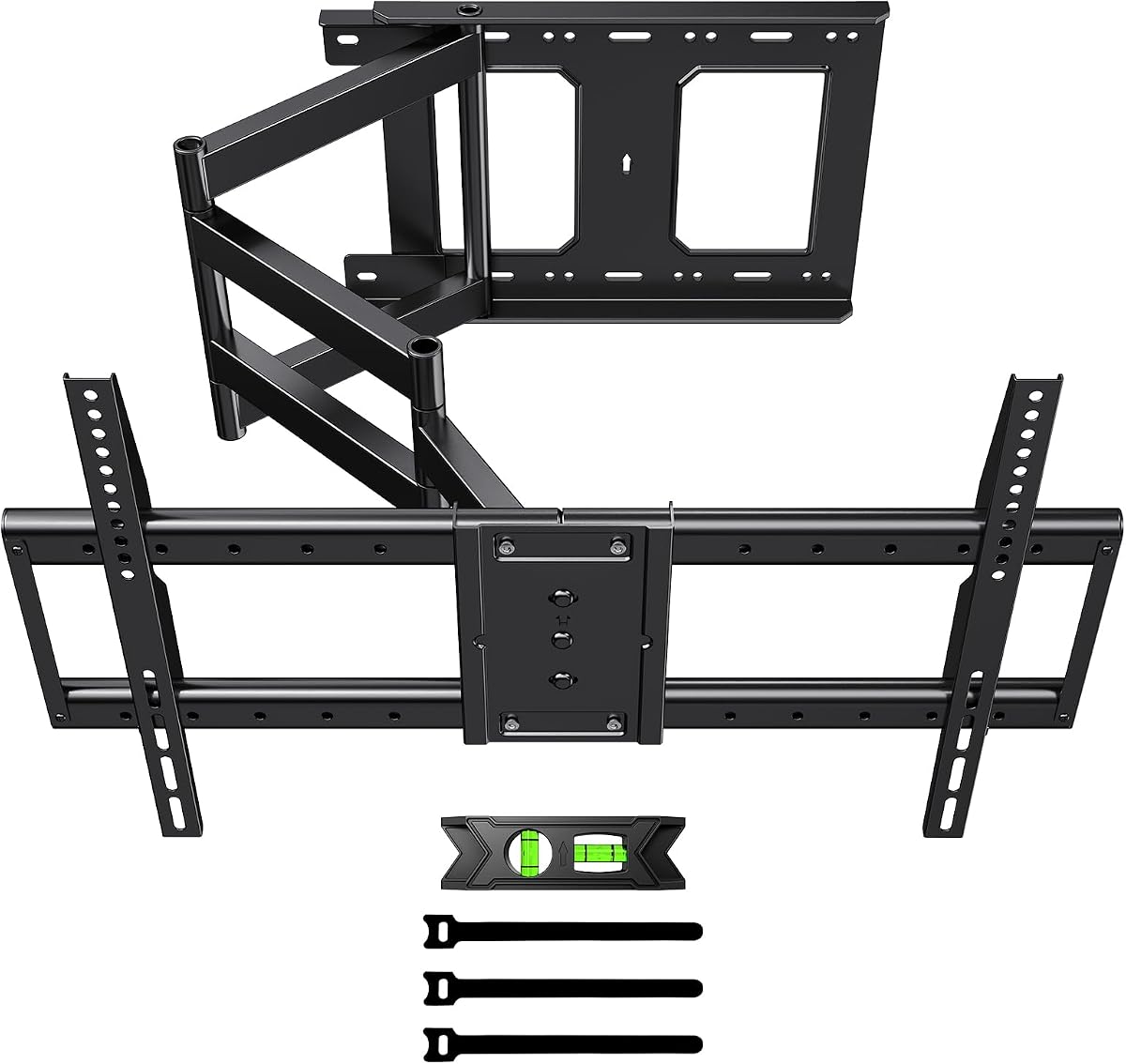


The PERLESMITH Long Arm Full Motion TV Wall Mount for 42–90 inch TVs is a high-capability articulating bracket with a 4.7 rating. It stands out for its 42.72-inch extension arm, heavy-duty steel construction, 150-pound capacity, and ability to place a large television deep into a room or around a corner. The arm also retracts to only 4.5 inches, helping it disappear when it is not being viewed.
We may earn a commission when you buy through this link, at no additional cost to you.
Its movement system is designed around real-world viewing problems. The television can swivel 90 degrees left and right, tilt upward 5 degrees or downward 15 degrees, and be leveled by 4 degrees in either direction after mounting. Those controls make it possible to redirect the screen toward a sofa, kitchen area, or second seating zone while reducing reflections. Compatibility extends across 42- to 90-inch LCD, LED, OLED, and curved flat screens with VESA patterns from 200 by 100 millimeters through 800 by 400 millimeters.
There are trade-offs. A bracket with this much reach needs a secure wall connection, and the listed installation surfaces include 16- to 24-inch wood studs plus concrete or brick. The extension also creates more leverage than a short-arm bracket, so careful wall selection and installation are essential. The 4.5-inch retracted depth is not as shallow as some competing models, although it remains practical for reducing visual clutter.
This mount is a strong recommendation for someone with a large television who wants substantial reach, corner flexibility, and broad articulation. It suits living rooms, open-plan spaces, and commercial viewing areas where the screen needs to serve more than one focal point. Buyers should verify the television weight, VESA pattern, and wall structure before ordering, and arrange adequate help during installation.
The 42.72-inch extension is the central attraction, allowing the screen to move well beyond the wall and reach seating areas that a fixed bracket cannot cover. It is particularly effective for corner mounting, recessed spaces, and open rooms with multiple viewing positions.
Swivel, tilt, and post-installation leveling work together to make the display easier to watch from different seats. These controls can reduce glare and help the screen sit more comfortably when it is mounted above the usual seated eye line.
We may earn a commission when you buy through this link, at no additional cost to you.
The Long Arm TV Wall Mount with 180° Swivel and Tilt combines a 4.6 rating with one of the most flexible adjustment packages in this roundup. It supports televisions from 32 to 75 inches, carries up to 132 pounds, and fits VESA patterns from 200 by 100 millimeters to 600 by 400 millimeters. Its defining feature is the ability to rotate the screen 90 degrees between horizontal and vertical orientations.
We may earn a commission when you buy through this link, at no additional cost to you.
That vertical rotation makes this mount more versatile than a standard full-motion bracket. It can be useful for vertical video, online meetings, video recording, mobile-style games, and digital documents. The arm extends from 2.6 inches to 40.9 inches and provides 180-degree left-right swivel, allowing the display to move between different areas of a room or serve adjacent spaces. A +5/-20-degree tilt range and horizontal leveling adjustment add further control.
The main caution is that screen rotation is a physical reorientation rather than an electronic feature, so users should consider the size of their content and whether rotating the television is practical for their setup. Installation requires wood studs, concrete, or brick and must not rely on drywall alone. The stated 15-minute assembly estimate may be straightforward for experienced installers, but the television itself is typically best handled with two people.
This is an appealing choice for users who want both long-arm articulation and portrait orientation. It fits flexible living rooms, offices, studios, gaming areas, and multi-use spaces. Choose it when the ability to rotate the screen will be used regularly; for a conventional living room, a simpler swivel-only bracket may be more appropriate.
The manual 90-degree rotation expands the mount beyond conventional television use. It can support vertical feeds, meetings, recordings, documents, and short-form content without requiring a separate display or stand.
With a 40.9-inch extension and 180-degree swivel, the arm can serve a main seating area and a nearby dining or work zone. Retracting to 2.6 inches preserves a clean appearance when the extra reach is unnecessary.
We may earn a commission when you buy through this link, at no additional cost to you.
The WHYFONE 43” Long Arm 180° Rotating Full Motion TV Wall Mount earns a 4.4 rating and offers the highest stated weight capacity in the group. It supports displays from 42 to 90 inches, including 77-, 80-, 85-, 86-, and 90-inch models, with a capacity of 165 pounds. Its long arm extends 43 inches, giving it exceptional reach for corner rooms, corridors, hospitality spaces, and large domestic interiors.
We may earn a commission when you buy through this link, at no additional cost to you.
The mount uses high-quality cold-rolled steel and includes a porous, multi-hole television plate intended to accommodate several VESA sizes and improve heat dissipation. Its spider-style plate spreads force across four corners. Movement includes 90-degree swivel to either side, a manual 90-degree shift between landscape and portrait, up to 5 degrees of upward tilt, 12 degrees of downward tilt, and 3 degrees of level adjustment in each direction.
The physical design is substantial, and that is a benefit for large displays but also something to consider before installation. A dual-arm arrangement can occupy more visual and wall space than a single-arm mount. The instructions state that two people are required and that installation should take under 30 minutes, yet those figures should be treated as guidance rather than a guarantee for every wall or television.
This mount is best suited to buyers with a large, heavy television who need serious reach and rigid steel construction. It is a practical option for expansive living rooms, villas, hotel lobbies, exhibition areas, and other settings where the display must project far from the wall. Confirm both the wall structure and television measurements before installation.
A 165-pound capacity and heavy steel tubes give this model a clear advantage when supporting very large displays. The four-corner spider plate is also designed to distribute forces more evenly across the television mounting interface.
The 43-inch arm can pull a screen into areas inaccessible to short-arm mounts. That makes it useful where seating wraps around a corner or where the display must be visible from more than one zone.
We may earn a commission when you buy through this link, at no additional cost to you.
The Perlegear Long Arm TV Wall Mount for 26–70 inch TVs up to 100 lbs is a highly rated 4.8 option that balances useful reach with a relatively compact design. It supports most flat and curved televisions from 26 to 70 inches, with VESA compatibility from 100 by 100 millimeters through 400 by 400 millimeters. The single articulating arm extends 31.65 inches and retracts to 2.83 inches.
We may earn a commission when you buy through this link, at no additional cost to you.
Its movement is well suited to corner installations. The bracket swivels 90 degrees in either direction, providing the advertised 180-degree total range, while tool-free tilt adjusts up 5 degrees or down 15 degrees. A further 3 degrees of leveling in either direction helps correct the screen after installation. These functions are enough to redirect a display toward a separate seating area, work around an awkward corner, or lower the angle for easier viewing.
The 100-pound capacity is the principal limitation. While sufficient for many mainstream televisions, it provides less margin than the 132-, 150-, 165-, and 220-pound options in this guide. Installation requires a single wood stud or solid concrete and cannot be completed on drywall alone. The single-stud design also makes wall placement more flexible than a plate that must span two studs.
This is an excellent selection for someone seeking dependable corner positioning without a huge mount. It works well in apartments, bedrooms, living rooms, and other spaces where a 31.65-inch reach is enough. It is particularly attractive for buyers who value a 4.8 rating, a narrow retracted profile, straightforward adjustment, and a simpler single-arm footprint.
The single arm can pull the television away from a corner and redirect it toward a sofa, chair, or kitchen seating area. Retracting to 2.83 inches keeps the setup visually tidy when the television is not in use.
Tool-free tilt and swivel controls make routine repositioning easier. Post-installation leveling provides a final correction for installations where the bracket or wall is not perfectly balanced.
We may earn a commission when you buy through this link, at no additional cost to you.
The HCMOUNTING Corner TV Wall Mount Long Arm has a 4.7 rating and a 132-pound capacity. It fits most 26- to 70-inch flat-panel televisions, including common 32-, 40-, 50-, 55-, 60-, 65-, and 70-inch sizes, with VESA patterns from 75 by 75 millimeters to 400 by 400 millimeters. The mount extends 30.2 inches and retracts to 2.68 inches.
We may earn a commission when you buy through this link, at no additional cost to you.
Its standout feature is a center-aligned retraction design. According to the supplied information, the VESA plate realigns with the wall plate when the arm is pushed in, helping the television remain centered rather than sitting crooked. The full 180-degree swivel works with a tilt range of 5 degrees up to 15 degrees down and 3 degrees of leveling in each direction, making the mount appropriate for corner rooms, kitchens, bedrooms, and open living spaces.
The 30.2-inch reach is shorter than the 40-plus-inch arms found on several competitors, so it may not satisfy a buyer who needs to pull a screen around a deep corner. The product is also intended for wood studs and solid concrete or brick, with anchors included, and should not be installed into drywall alone. A two-person lift is recommended for 55- to 70-inch televisions.
This mount is best for buyers who prioritize centered retraction, a generous load rating, and full swivel movement over maximum extension. It is a strong option for rooms where the television is often viewed from different seats and where the bracket must return neatly to the wall. Confirm that a 30.2-inch reach provides enough positioning for your furniture layout.
The center-aligned design helps preserve a tidy appearance when the screen is pushed back. This is especially valuable in rooms where the mount is visible and the television should look centered over the wall plate.
The 132-pound limit provides a useful margin for many larger televisions. It is a more substantial specification than the 100-pound capacity of several compact mounts in the same size range.
We may earn a commission when you buy through this link, at no additional cost to you.
The FORGING MOUNT Full Motion Corner TV Wall Mount receives a 4.7 rating and offers a balanced set of positioning controls. It is designed for 32- to 75-inch televisions, supports loads up to 110 pounds, and accepts VESA patterns from 100 by 100 millimeters to 600 by 400 millimeters. The arm extends 33 inches from the wall and retracts to 2.5 inches.
We may earn a commission when you buy through this link, at no additional cost to you.
Unlike standard full-motion mounts, it combines 90-degree swivel in either direction with 90-degree rotation of the screen between vertical and horizontal orientations. It also tilts 10 degrees down or 5 degrees up and permits 3 degrees of leveling after installation. These controls make it possible to use the television in different rooms, display vertical social feeds or documents, and reduce glare without changing the wall position.
The 110-pound limit may be the deciding constraint for buyers with larger high-end displays, especially if additional equipment is attached beneath the screen. Installation information is less detailed than for some competing models, but the package includes a manual, drilling template, and necessary hardware. Buyers still need to establish that the wall can support the bracket and account for the leverage created by the extended arm.
This is a good option for apartments, bedrooms, man caves, and living rooms where a corner mount can free a main wall. It is especially attractive to users who want both full-motion movement and physical screen rotation. For conventional landscape viewing, buyers who do not need portrait mode may find a simpler swivel mount more appropriate.
Swiveling directs the screen toward different seats, while rotation changes the orientation of the display itself. Together they allow a television to serve vertical content and multiple viewing positions.
At a 2.5-inch retracted depth, the mount can remain close to the wall when extended reach is unnecessary. That helps free the corner area for furniture, storage, or decoration.
We may earn a commission when you buy through this link, at no additional cost to you.
The Perlegear Long Arm TV Wall Mount for 32–65-inch TVs provides a 4.7 rating, 37.4-inch extension, and a 2.6-inch retracted profile. It supports most flat and curved televisions from 32 to 65 inches with VESA patterns between 100 by 100 millimeters and 400 by 400 millimeters. The 110-pound capacity suits a wide range of mainstream displays.
We may earn a commission when you buy through this link, at no additional cost to you.
The single-arm design can be installed on a single wood stud or a solid concrete wall, making placement around corners and within unusual room layouts easier than a two-stud bracket. It swivels 90 degrees in each direction, tilts up 5 degrees or down 15 degrees without tools, and allows 3 degrees of leveling in either direction after installation. The reinforced wall plate and solid central pivot are intended to limit wobble and sagging even when the arm is extended.
The mount is not intended for outdoor use, which is an important limitation for anyone considering a patio, poolside, or backyard installation. Drywall alone is also insufficient. While the 37.4-inch reach is substantial, it falls short of the 40- to 43-inch arms offered by several large-screen models, and the maximum compatible screen size is 65 inches.
This is a sensible choice for a medium-size television in a room with multiple seating areas or a challenging corner. It may be especially helpful in a compact home where a single mounting point must serve both a living area and an adjacent space. Buyers should confirm the wall construction and television measurements before ordering.
The contrast between a 37.4-inch extension and 2.6-inch retracted depth gives the mount useful flexibility. It can move far when needed and sit close to the wall when it is not.
Single-stud compatibility gives installers more freedom in locating a suitable wall position. It can be especially helpful in rooms where the television must be moved away from a corner or placed around an obstruction.
We may earn a commission when you buy through this link, at no additional cost to you.
The Perlegear PGXLF02 is the strongest all-around choice in this guide, combining a 4.8 rating with unusually broad compatibility. It supports most flat and curved televisions from 42 to 97 inches, accommodates VESA patterns from 200 by 100 millimeters to 800 by 400 millimeters, and carries displays up to 150 pounds. It is particularly well suited to owners of large TVs who want professional-looking reach and articulation.
We may earn a commission when you buy through this link, at no additional cost to you.
The arm extends 40.1 inches and retracts to 3.7 inches. Movement includes 90-degree swivel in each direction, a tilt range of 5 degrees upward to 15 degrees downward, and 4 degrees of level correction in either direction. According to the supplied product information, the cold-rolled steel construction was tested with a four-times load test and a 6,000-cycle test, which supports its positioning as a durability-focused option.
This is a substantial bracket, and buyers should account for the wall area, television weight, and leverage created by full extension. Installation requires 8-, 12-, 16-, or 24-inch wood studs, concrete, or brick and should never rely on drywall alone. The pre-assembled design may reduce setup work, but the display remains heavy and should be supported appropriately during mounting.
The PGXLF02 is an excellent recommendation for large living rooms, corner installations, built-in cabinet arrangements, and multi-zone homes. It offers the widest maximum screen-size range in the group while retaining enough retraction for a clean appearance. It is the top choice for buyers who prioritize compatibility, reach, rating, and pre-assembled convenience.
The 42- to 97-inch range and maximum 800 by 400 millimeter VESA pattern make this model useful across many large displays. Its 150-pound capacity also provides a meaningful margin over lighter home televisions.
The supplied bracket arrives pre-assembled and includes detailed instructions, a complete hardware kit, a drilling template, and a bubble level. These resources simplify preparation, although wall selection and television handling still require care.
We may earn a commission when you buy through this link, at no additional cost to you.
The Mount-It! Corner TV Wall Mount has a 4.6 rating and the highest stated capacity in the comparison at 220 pounds. It is designed for 43- to 70-inch flat-screen televisions and focuses on a practical problem: moving a screen out of an awkward corner so it can face the seating area. The 26-inch arm extends 25.75 inches from the wall and retracts to 2.25 inches.
We may earn a commission when you buy through this link, at no additional cost to you.
Its 180-degree swivel consists of 90 degrees in either direction, providing a broad range for aiming the screen toward a couch or chair. The mount also tilts up to 15 degrees up or down, which helps with elevated installations, recessed corners, and glare reduction. Although the reach is shorter than most long-arm models, the wall plate spans two studs on 16-inch centers, creating a broad and stable base for a heavy display.
The two-stud requirement is less flexible than single-stud designs, and the 25.75-inch maximum extension may not bring the screen far enough around a deep corner. The mount can be installed on wood or metal studs, brick, block, or concrete, and includes a bubble level and hardware. A second installer is recommended.
This bracket is a strong choice for heavier displays and corner rooms where stability matters more than extreme reach. It is also appealing to buyers who recognize the established Mount-It! brand and value the stated lifetime warranty and US-based product support. Confirm that the corner geometry works with the available arm extension before purchasing.
A 220-pound rating gives this model clear separation from the rest of the field. It provides a high level of support for large displays, provided the wall connection and installation are completed correctly.
The wall plate spans two studs rather than relying on one central anchor. That wider base is designed to resist movement while the arm swings the display away from the corner.
We may earn a commission when you buy through this link, at no additional cost to you.
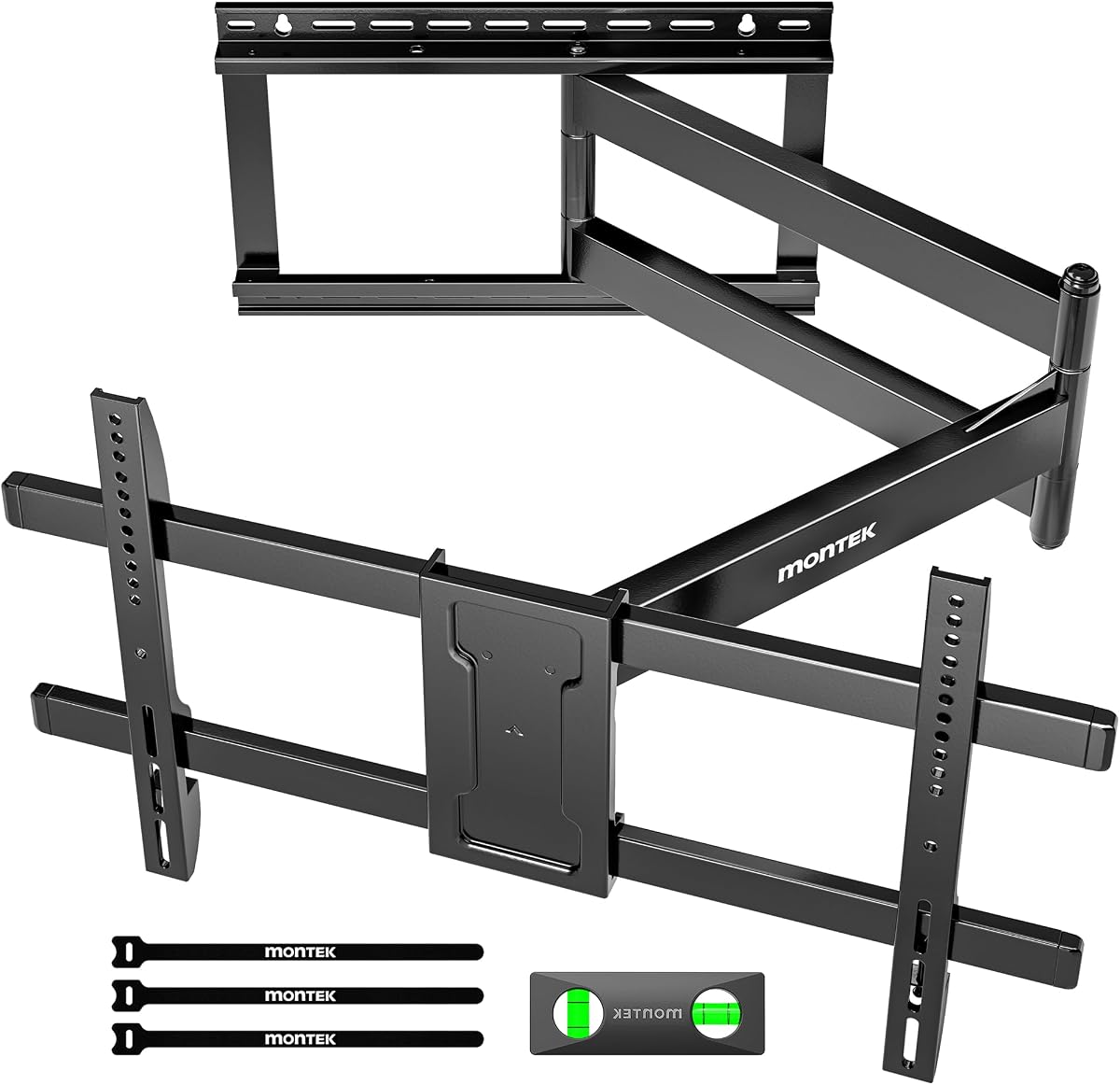
The monTEK Long Arm TV Wall Mount has a 4.7 rating and combines a 42-inch extension with a compact 2.4-inch retracted profile. It fits most 43- to 80-inch LCD, LED, OLED, and curved flat-screen televisions, including models with VESA patterns from 200 by 200 millimeters through 600 by 400 millimeters. The mount supports displays up to 110 pounds.
We may earn a commission when you buy through this link, at no additional cost to you.
Its movement range includes 180-degree left-right swivel, 10 degrees of downward tilt, 5 degrees of upward tilt, and 3 degrees of level adjustment after installation. That combination is useful for a television serving several seating areas, especially when the screen must move away from a corner or around furniture. Built-in hook-and-loop cable management helps conceal and organize connected cables.
The 110-pound limit is worth checking against the exact television weight, especially for large premium models. The mount is designed for 16- or 18-inch wood studs, concrete, and brick, and it must not be installed into drywall alone. The package includes instructions, a bubble level, a mounting template, and labeled hardware, although installation and safe television handling remain the installer's responsibility.
This is a well-rounded option for medium and large televisions in living rooms, kitchens, bedrooms, and offices. It works especially well when substantial reach matters but portrait rotation is unnecessary. It may be one of the more balanced choices for buyers comparing long extension, narrow retraction, and organized cable routing.
The arm can extend 42 inches to reach distant seating areas, then return to only 2.4 inches from the wall. This balance is particularly useful in rooms where the screen is needed in more than one location.
Integrated hook-and-loop routing helps keep cords organized as the television moves. This reduces visual clutter around the wall and makes the extended setup look more intentional.
We may earn a commission when you buy through this link, at no additional cost to you.
Choosing a long-arm swivel mount requires balancing television size, weight, wall construction, reach, and the room layout. The most important checks are compatibility and installation safety, followed by the range of motion and space-saving features that will matter in daily use.
Choose a capacity comfortably above the television's listed weight, especially if a soundbar or other accessory is mounted beneath the screen. Match the exact VESA dimensions found in the television manual or on its rear mounting hardware.
For normal living-room positioning, prioritize true left-right swivel and useful tilt. Choose a rotating model only when landscape-to-portrait changes will be frequent.
Measure from the proposed wall position to the farthest desired viewing location. Also consider whether the extended screen could hit furniture, doors, lights, or a nearby wall.
A useful range includes upward tilt for lower viewing positions and downward tilt for high installations. Pair tilt with leveling for the cleanest final result.
Locate a stud or other structural anchor before ordering, and verify the required spacing. Never rely on drywall anchors as the sole support for a heavy, articulating television.
Match structural design to screen size and extension. Large displays combined with long reach deserve a higher-capacity mount and a broad, secure wall connection.
Read the manual before purchase and inventory the included parts. Use two people for large televisions and make sure the wall is accessible before beginning.
Test every adjustment with cables connected. If the mount lacks integrated guides, add secure clips that travel with the arm rather than fixed only to the wall.
Begin by confirming that the television, bracket, wall structure, and selected drilling position are fully compatible. Assemble the mount according to the included manual, use the provided template to locate structural anchors, and check the wall plate for level before tightening the final fasteners. Attach the television to the VESA plate with a second person supporting the display, then connect the cables with enough slack for full movement.
Move the arm slowly through its swivel, tilt, extension, and rotation ranges while the television is powered off. Learn the adjustment controls, avoid forcing a joint, and do not exceed the stated extension or load limits. For portrait-mode models, rotate the display only when the content format and mounting hardware are suitable. Once the preferred position is found, tighten locking hardware and confirm the television remains stable.
Periodically inspect the fasteners, pivot, wall connection, and television plate for loosening, unusual movement, or visible wear. Keep the arm away from children and pets, avoid hanging objects from the television or arm, and do not use the mount as a step or support. Clean the steel and moving joints with a dry or lightly damp cloth, and route or secure cables so they cannot catch as the arm swings.
A swivel mount primarily rotates the television horizontally so it can face different directions. A full-motion mount generally combines swivel with extension, tilt, and sometimes leveling. The exact controls vary by model, so compare the stated degrees of movement rather than relying on the category name alone.
Not necessarily. A 180-degree swivel usually means 90 degrees to each side while the screen remains in landscape orientation. Only models that specifically advertise 90-degree screen rotation can turn the display into portrait mode, and users must consider the content format, wall clearance, and secure positioning before rotating it.
They can be when the mount's weight limit, VESA range, wall structure, and installation quality all match the display. Check the television's exact weight and mounting pattern, use the required anchors, and follow the manufacturer's instructions. Full extension creates additional leverage, so a sound wall connection is essential.
The listed products should not be installed on drywall alone. Their installation requires a suitable wood stud, solid concrete, brick, or another approved structural surface. Some models accept a single stud, while the Mount-It! bracket spans two studs on 16-inch centers.
The right reach depends on the room, furniture, and desired viewing positions. A 30- to 33-inch arm may be sufficient for a typical corner, while a 40- to 43-inch arm can reach farther into an open room. Measure from the wall to the farthest viewing location and ensure the extended screen will not collide with furniture or nearby walls.
Swivel and tilt serve different purposes. Swivel redirects the screen toward a seating area, tilt changes the upward and downward angle to manage glare or viewing comfort, and leveling corrects final alignment. Having all three is useful in rooms with multiple seats, high installations, or reflections from nearby windows.
The most important accessory is proper structural anchoring into a stud or masonry wall using the supplied or manufacturer-approved hardware. A bubble level, template, and complete fastener kit also help improve accuracy, but none replaces a secure wall connection. For large televisions, a second installer is strongly recommended.
The cables need enough slack to remain connected throughout the intended extension and swivel range. Some products include clips, straps, or built-in cable management, while others require separate guides. Check the full movement with cables connected and ensure the wiring is not stretched, pinched, or sharply bent.
The Perlegear PGXLF02 stands out as the best overall choice because it combines a 4.8 rating, wide compatibility for 42- to 97-inch televisions, a 150-pound capacity, 40.1-inch reach, and pre-assembled construction. The Perlegear model for 26- to 70-inch TVs is a strong budget-oriented alternative, while the PERLESMITH long-arm mount offers a premium combination of 42.72-inch extension and heavy-duty steel support.
Prioritize the television's weight, exact VESA pattern, wall structure, and required installation method before focusing on swivel range. After confirming compatibility, choose the reach that matches the room, consider tilt and leveling for glare control, and decide whether physical portrait rotation is genuinely useful. Cable routing and the effort involved in moving the screen should also be considered before installation.
Product ratings, configuration details, availability, and prices can change, so confirm the current listing and all dimensions before ordering. Recheck the television weight, VESA measurements, wall requirements, included hardware, and manufacturer instructions. Those final checks are essential for obtaining the articulation and secure support you expect from a 180 degree swivel TV mount.