Podcast Equipment Bundle for 4
4.3Editor score
Four-person broadcast system
Dual microphone input support
Rechargeable wireless operation
Our expert guide compares the best streaming equipment for beginners, covering microphones, mixers, webcams, lighting, and complete kits for easier setup.
Streaming equipment for beginners can feel intimidating because even a basic live broadcast requires several pieces working together. A good starting setup should prioritize clear voice pickup, simple connections, dependable controls, and enough flexibility to grow without becoming an expensive collection of disconnected accessories.
We compared the featured products by examining their microphones, audio interfaces, controls, effects, included accessories, device compatibility, and suitability for common beginner workloads. The list covers complete podcast bundles, standalone USB microphones, an all-in-one video kit, a multi-person audio system, and a DJ controller for music-focused streams.
Each pick highlights a different path into streaming, from one-person voice content to collaborative shows and live music. Ratings and product details can change over time, as can marketplace availability and cost, so readers should verify the latest specifications and current listing information before purchasing.
4.3Editor score

4.1Editor score

4.4Editor score
The comparison below shows how the ten options differ across setup size, microphone type, audio controls, effects, connectivity, and included accessories. These distinctions help identify the most appropriate beginner system for solo commentary, podcasting, collaborative broadcasts, gaming, or music-led streams.


The TENLAMP G10 Creator Audio Mixer Bundle is a 4.1-rated all-in-one solution for creators who want a microphone, mixer, and effects processor without assembling every component separately. Its strongest appeal is the combination of a condenser microphone, built-in noise reduction, real-time tone controls, and a Follow Singing mode in a beginner-friendly package.
We may earn a commission when you buy through this link, at no additional cost to you.
The sound card provides bass, treble, reverb, and pitch adjustment, allowing a new streamer to shape vocals without immediately navigating complex software. Voice styles and effects such as applause or laughter can make a live broadcast more engaging, while the original-track monitoring behavior in Follow Singing mode helps performers separate what they hear from what the audience receives.
Compatibility is another major strength. The listed setup works with Windows, Mac, iOS, and Android without requiring drivers, and the product information says it connects to PCs, phones, and tablets. That makes it useful for creators moving between desktop and mobile streams, although users should still confirm the exact connection method and compatibility of their preferred applications before recording.
This is the strongest general recommendation for a beginner who wants a ready-to-use production hub rather than a bare microphone. The tradeoff is that a bundled condenser microphone may eventually need replacing, and the many onboard effects can become distracting before a creator learns basic mixing. Even so, the G10 offers a sensible starting point for streaming, podcasting, gaming communication, singing, and short-form content.
Combining the microphone, mixer, and effects in one system reduces the number of separate devices a first-time creator must understand. It also creates a consistent path from speaking into the microphone to monitoring and processing the final stream.
Physical bass, treble, reverb, and pitch controls give creators immediate control over their sound. These features are especially helpful while learning how small adjustments affect clarity, tone, and audience perception.
We may earn a commission when you buy through this link, at no additional cost to you.
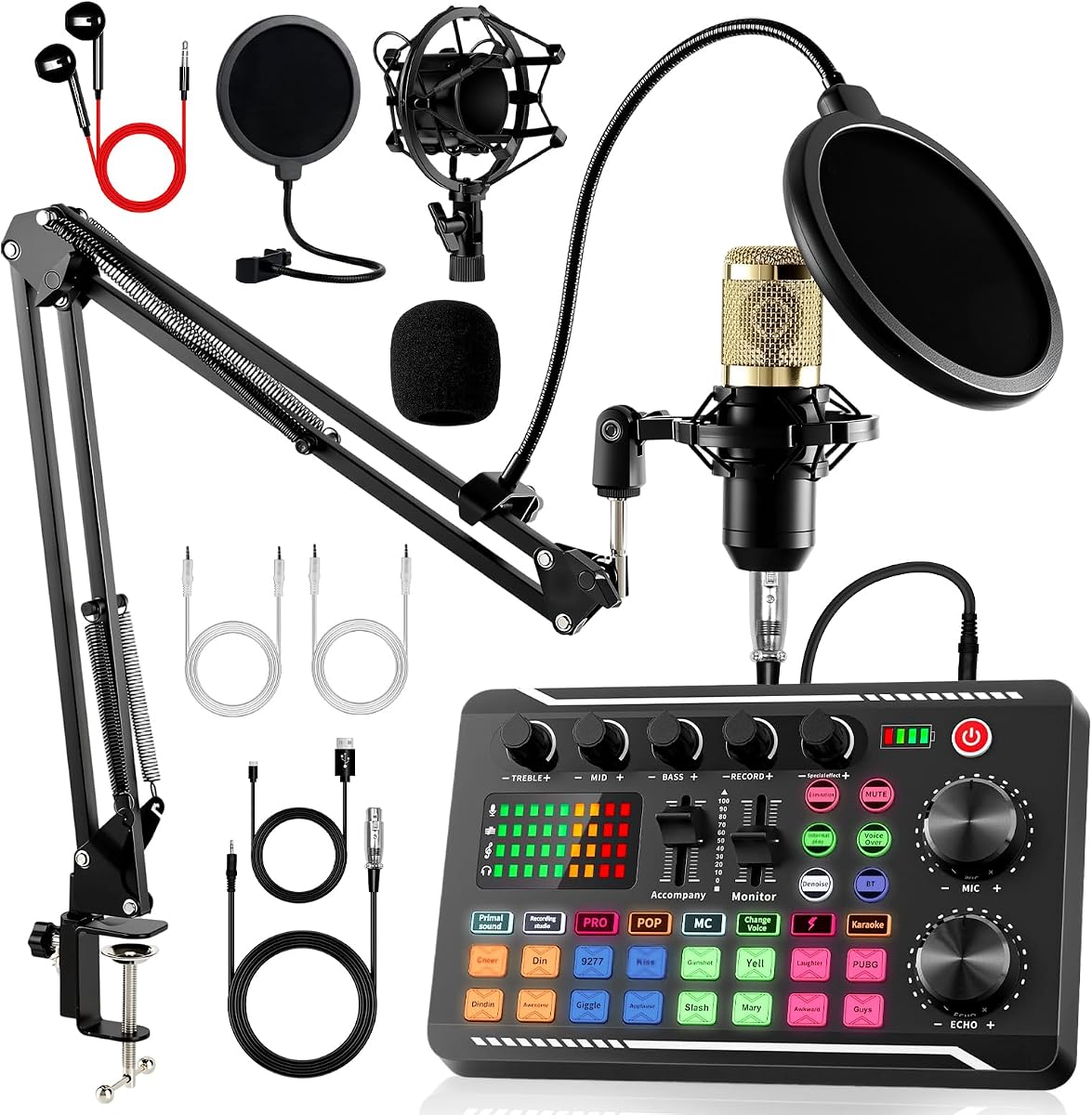
The Also GO Podcast Equipment Bundle, F998 Audio Mixer with BM800 Microphone earns a 4.2 rating and is designed for voice-over beginners who prefer a complete package. It combines an audio interface mixer, BM-800 microphone, boom arm, earphone, shock mount, pop filter, foam cap, XLR cable, USB cable, and 3.5mm audio cables.
We may earn a commission when you buy through this link, at no additional cost to you.
The F998 sound card is the main attraction. Its listed 16 background effects, seven podcast and recording modes, four voice-changer modes, and nine adjustable knobs provide more built-in experimentation than a basic audio interface. A dual-layer pop filter, windproof foam cap, cardioid pickup, and noise-reduction features help the microphone focus on speech and reduce unwanted plosives and room noise.
Connection flexibility is unusually broad for this category. The bundle works with PCs, smartphones, laptops, Xbox, Windows, Mac OS, iOS, and Android. The manufacturer recommends Bluetooth pairing for phones and tablets, while the included wired cables can be more straightforward with computers. First-time users should fully charge the mixer before initial use, particularly after a long period of storage.
This bundle makes sense for a solo podcaster, livestreamer, or beginner voice actor who wants numerous tools immediately. It may provide more than a minimalist setup needs, and the abundance of effects can initially feel busy. Still, when the goal is to explore podcasting, streaming, and voice recording without assembling a long parts list, the F998 package is comprehensive and approachable.
The included microphone, boom arm, pop filter, shock mount, earphone, and cables cover the fundamental physical needs of a first home studio. This reduces the chance that a new creator will overlook a simple but essential accessory.
Seven recording modes, sixteen background effects, four voice variations, and nine controls give the bundle substantial creative range. Beginners can begin with a straightforward setup and add effects gradually as they develop a consistent sound.
We may earn a commission when you buy through this link, at no additional cost to you.
The Brvomussy Podcast Equipment Bundle for 2 is a 4.2-rated solution aimed at gamers, streamers, singers, and collaborative podcasters. It includes two condenser microphones, two hanging arm attachments, a sound card with multiple controls, earphones, shock holders, spray protection, foam covers, XLR and 3.5mm cables, a USB cable, and a manual.
We may earn a commission when you buy through this link, at no additional cost to you.
Its defining feature is support for two people broadcasting at the same time. Intelligent noise reduction, cardioid pickup, a double-layer pop filter, and foam covers help keep each voice clear, while a DSP processor handles the signal. The sound card adds ten effects, including reverb, treble and bass adjustment, noise reduction, accompaniment, dodge, and voice change, along with four voice variations and multiple sound modes.
Compatibility extends across Windows, iOS, Android, Mac OS, Chrome OS, smartphones, PCs, PlayStation 4, Xbox, and other supported systems. It can also accept guitar, bass, and other instruments, creating an option for musical livestreams. That flexibility is valuable, but it also means beginners may need to learn signal routing before every feature works as intended.
This is a good pick for couples, friends, gaming duos, and small teams planning to talk together rather than create solo commentary. The complete accessory selection and simultaneous vocal support offer better value than buying a second microphone and cable separately. The product should be fully charged before first use, and users experiencing driver issues are directed to the seller for assistance.
Matching microphones and a mixer designed for two users simplify the physical arrangement of a joint broadcast. Separate positioning, appropriate gain levels, and headphones become the main setup tasks.
Instrument input support opens the mixer to guitar, bass, singing, and radio-style performances. It is particularly useful for streamers who want to blend live music with commentary rather than relying only on prerecorded tracks.
We may earn a commission when you buy through this link, at no additional cost to you.
The AM100-V8 Podcast Equipment Bundle is a 4.0-rated option for a beginner who wants the recognizable parts of a home recording setup in one package. It includes a BM-800 condenser microphone, adjustable suspension scissor arm, shock mount, pop filter, anti-wind foam cap, power cable, and live sound card.
We may earn a commission when you buy through this link, at no additional cost to you.
The cardioid microphone pattern is designed to capture the sound source directly in front of the microphone, making it suitable for podcasting, vocals, live streaming, music recording, and short video. The sound card adds voice changing and multiple effects, while compatibility with Windows, Mac OS, Android, and iOS broadens the possible devices. It is also listed for tablets, iPads, PS4, Xbox, Switch, and other game platforms.
The main advantage is straightforwardness. A newcomer receives the microphone, support hardware, and processing hardware without needing to research every component individually. The limitation is that it is a comparatively basic package with a 4.0 rating, so creators seeking extensive controls, sophisticated equalization, or a highly polished broadcast workflow may find it less flexible than the more advanced bundles.
This bundle is most appropriate for a first podcast, casual livestream, or short video channel where a simple microphone and live sound card are the priorities. Users should charge the condenser microphone bundle before first use and position the pop filter and wind protection close to the microphone for the most reliable result. It is a practical entry point rather than a final studio specification.
The stand, shock mount, pop filter, and foam cap create a functional recording arrangement immediately. Their presence also makes it easier for a beginner to mount the microphone correctly and reduce common plosive and vibration problems.
The system is listed for computers, mobile devices, tablets, and several game platforms. That makes it a versatile choice for creators whose streaming activity moves between desktop broadcasts and mobile production.
We may earn a commission when you buy through this link, at no additional cost to you.
The 1080P Webcam Streaming Kit is a 4.2-rated all-in-one option for creators who need video, voice, and lighting together. It combines a 1080P webcam, a 14mm RGB USB microphone with cardioid pickup, and an adjustable LED panel, making it particularly useful for Twitch, YouTube, Zoom, Teams, and other face-camera broadcasts.
We may earn a commission when you buy through this link, at no additional cost to you.
The camera uses a CMOS sensor to capture 1920 by 1080 video at 30 frames per second with 24-bit color and automatic brightness and color compensation. Its microphone includes a built-in pop filter, gain control, shock mount, and real-time headphone monitoring. The listed signal-to-noise figure exceeds 70dB, giving the kit a more intentional audio section than a typical webcam with a fixed microphone.
The LED panel is another differentiator. Its CRI is listed above 90, with a color-temperature range from 3000K to 7200K, five brightness levels, five modes, and a memory function for preferred settings. It rotates 180 degrees and can attach to a monitor. The kit works with Windows, Mac, Android, and iOS, although console streaming from PS5 or Xbox requires a separate capture card.
Choose this package if your first stream needs a polished on-camera appearance and clear voice without assembling a three-device workstation. It is less suitable for a multi-person remote panel, because only one microphone is included, and it cannot connect directly to a game console. For PC and mobile creators, however, it offers an unusually coherent and approachable visual and audio starting point.
A dedicated 1080P sensor and automatic image compensation provide a clear starting point for face-camera content. Good lighting can improve the final result even more, which is why the included adjustable panel is a meaningful part of the bundle.
Real-time headphone monitoring helps creators check their voice, detect unwanted noise, and avoid an overly loud or inconsistent level. Independent gain and headphone controls make those adjustments straightforward during a live session.
We may earn a commission when you buy through this link, at no additional cost to you.
The Pioneer DJ DDJ-FLX4 is a 4.7-rated two-channel DJ controller and the highest-rated product in this comparison. It is not a conventional all-in-one podcast kit, but it is an excellent match for a beginner whose streams center on music, DJ performance, remixing, or live mixing from streaming services.
We may earn a commission when you buy through this link, at no additional cost to you.
Its layout comes from established Pioneer DJ equipment and is designed to be approachable. Smart Fader automatically adjusts volume, bass, and BPM when blending genres, reducing the initial difficulty of matching tracks. The 16 performance pads support hot cues, pad effects, Beat Jump, and the sampler, providing shortcuts for the moments when a streamer wants to add a sound, cue a track, or transition without navigating software menus.
The controller supports Apple Music, Tidal, and Beatport and can be used for live streaming or MC-style performance from one device. It connects by USB or Bluetooth to PC, Mac, iPhone, iPad, or Android, while its built-in sound card can send audio to speakers. That compatibility makes it relevant to both desktop and mobile music creators.
This is the best choice for someone who specifically wants to perform and mix music rather than simply improve spoken commentary. A creator focused on interviews, educational videos, or gaming voice chat will get more benefit from a microphone bundle. For a beginner interested in becoming a DJ or hosting a music stream, however, the DDJ-FLX4 combines a strong rating, approachable features, and broad platform support.
Smart Fader handles volume, bass, and BPM adjustments during a blend. It does not replace DJ fundamentals, but it lowers the barrier to keeping two musical sources organized during a live performance.
The 16 pads make common actions accessible during fast transitions. Hot Cues, Pad FX, Beat Jump, and sampling functions are particularly useful for a streamer who wants to react to chat and the music without interrupting the workflow.
We may earn a commission when you buy through this link, at no additional cost to you.
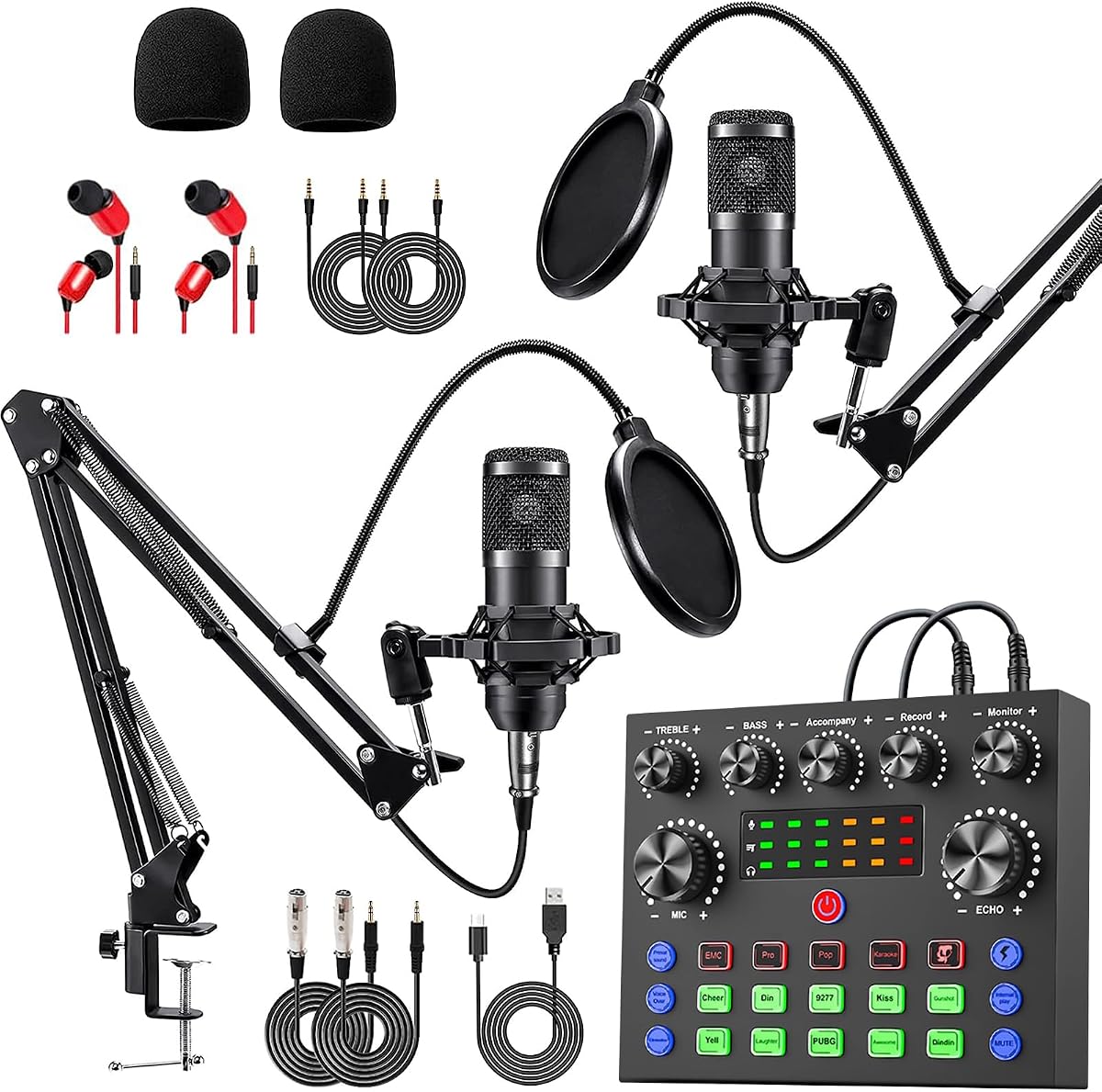
The Also GO Podcast Equipment Bundle for 2 is a 4.5-rated, all-in-one option for a duo that wants matching microphones and a capable sound card. The package includes a BM-800 microphone, mixer, boom arms, shock holders, pop filters, foam covers, and a 3.5mm earphone, providing most of the physical components needed for a two-person podcast or gaming broadcast.
We may earn a commission when you buy through this link, at no additional cost to you.
The V8s audio interface uses a DSP chip, noise reduction, and cardioid pickup to keep voices clear. Its 10 sound effects include reverb, treble, bass, and noise reduction, while four voice changes offer female, male, child, and monster variations. Four sound modes and 13 practical functions give the mixer enough range for live commentary, voice-over work, gaming, music, and general podcasting.
Compatibility includes PCs, smartphones, Xbox, Windows, Mac OS, iOS, and Android. The seller suggests Bluetooth as the simplest method for phones and tablets, while wired cables are often easier with computers. The bundle should be fully charged before first use or after long storage, and users may need to test application-specific monitoring and input behavior before going live.
This package stands out as a balanced choice for two creators who want a more substantial system without assembling every component independently. Its 4.5 rating is among the strongest in the list, and the range of built-in processing makes it adaptable to different content styles. The main drawback is the learning curve associated with a mixer and multiple effects, but those controls also provide room for experimentation as the creators improve.
Two microphones and a shared mixer make it easier to give both participants a consistent starting point. Each creator still needs to position the microphone correctly and balance levels with headphones before recording.
Four voice variations, four modes, ten effects, and 13 functions make this more than a plain podcast interface. Users can keep the processing simple at first and gradually introduce features as their production skills develop.
We may earn a commission when you buy through this link, at no additional cost to you.
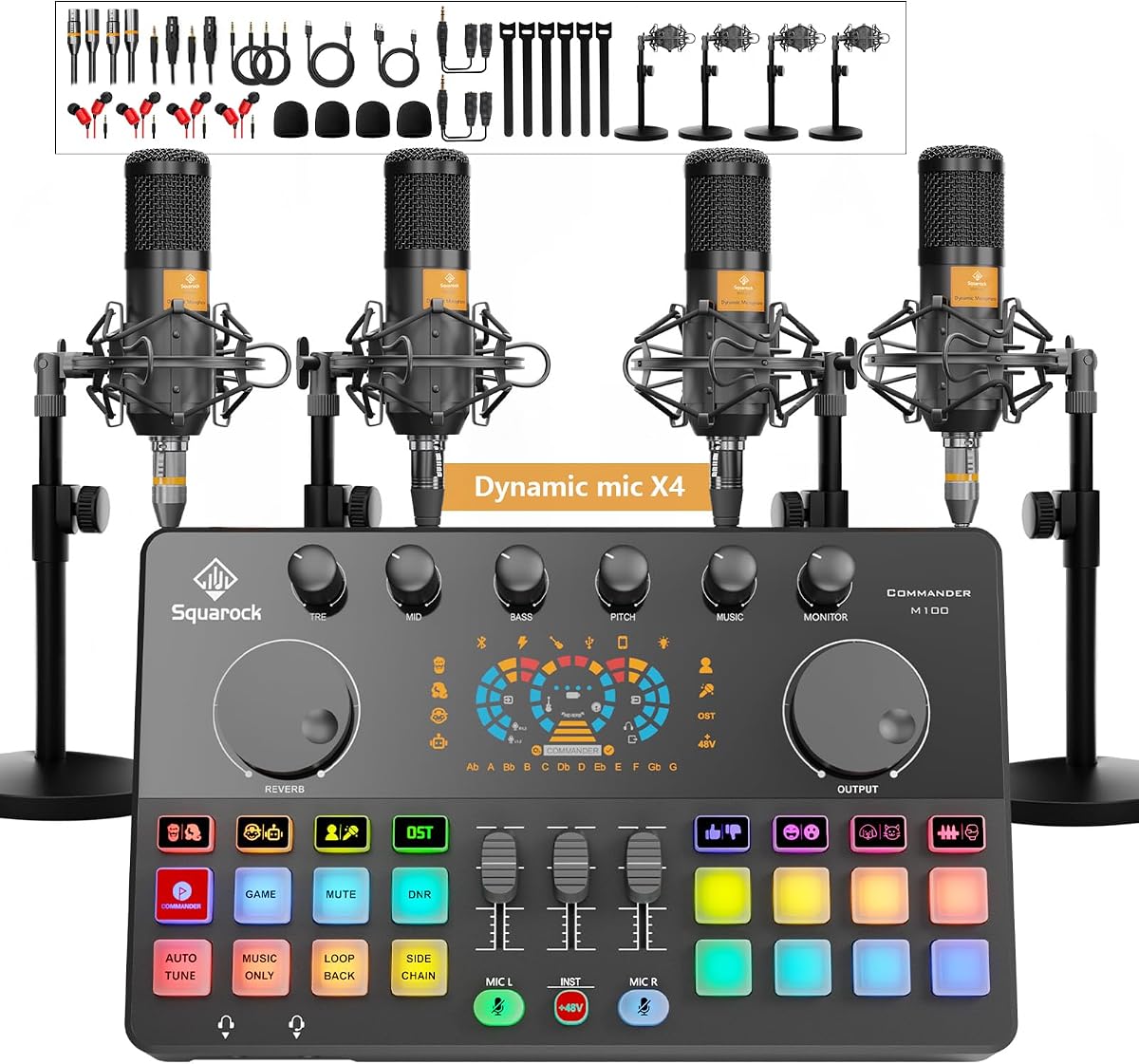
The Four-Person M100 Podcast Bundle is a 4.3-rated premium choice for a four-person podcast, group livestream, or collaborative recording session. It includes four dynamic microphones, desktop stands, monitor earphones, a complete collection of cables, shock mounts, foam covers, earphone splitters, and an audio interface mixer with an HD display.
We may earn a commission when you buy through this link, at no additional cost to you.
The mixer uses dual XLR and dual 3.5mm microphone inputs. Each independent channel provides separate volume adjustment and one-click mute, making it easier to prevent one speaker from overwhelming the others. Smart noise reduction filters ambient hum, background noise, and room interference, while treble, mid, bass, reverb, pitch correction, loopback, and side-chain controls provide a broad production toolkit.
Creative features include voice changer modes, preset effects, auto tune, customizable sound pads, and Bluetooth playback for background music. The built-in 4000mAh rechargeable battery supports wireless work, which adds flexibility for indoor recording or outdoor mobile streaming. USB plug-and-play operation is listed for Windows, iOS, and Android, with support for platforms including TikTok, YouTube, and Twitch.
This is the most capable option here for a group, but that capability is the point rather than a flaw. Four people need a larger workspace, more disciplined headphone monitoring, and careful channel management. If the user only needs a solo voice setup, this bundle is unnecessarily elaborate. For a team that intends to record together regularly, however, the M100 provides the most complete premium solution in the comparison.
Per-channel volume and mute controls make a four-way conversation easier to balance. A producer can reduce a distracting speaker or temporarily mute an open microphone without changing the settings of everyone else.
The built-in rechargeable battery and Bluetooth music playback extend the system beyond a permanently wired desk. That is useful for a team recording in different indoor or outdoor locations, provided each creator maintains appropriate microphone spacing.
We may earn a commission when you buy through this link, at no additional cost to you.
The sktome Podcast Equipment Bundle for 2 is a 4.1-rated creative kit built around two BM-800-style condenser microphones and a V8s sound card. The package includes two hanging arm clippers, two 3.5mm earphones, shock holders, spray protections, foam covers, XLR-to-3.5mm cables, a USB charging cable, 3.5mm audio cables, and a manual.
We may earn a commission when you buy through this link, at no additional cost to you.
The sound card combines an audio interface and control panel in one unit. It offers reverb, treble and bass adjustment, noise reduction, accompaniment, dodge, and voice change. The product information also lists 12 electric sounds, 12 sound effects, and 10 modes, making it one of the more creatively oriented bundles in the comparison.
Metal construction is noted for the microphones, while the cardioid pickup pattern focuses on the sound directly in front of the capsule. That can be useful in a two-person arrangement when each participant speaks toward their own microphone and remains at a consistent distance. The creator should charge the bundle after receiving it and refer to the included manual for the exact control and connection layout.
This bundle fits a creator who wants lively, effects-oriented content rather than a completely neutral recording chain. It can support podcasts, recordings, singing, streaming, and gaming, but its many modes and sounds may take time to master. For two people who value creative processing and a complete accessory set, it is a capable and flexible choice.
Dodge, accompaniment, voice change, and multiple sound effects can add character to entertainment streams. These tools are most useful when the creator has already established a clear vocal level and understands how each effect changes the final mix.
Two microphones, arm attachments, shock holders, pop protections, foam covers, earphones, and multiple cables provide a practical foundation for a shared show. A little desk space and cable planning will make the arrangement easier to operate.
We may earn a commission when you buy through this link, at no additional cost to you.
The ZealSound K66 USB Microphone is a 4.4-rated standalone microphone for beginners who need a clear voice but do not want to assemble a large bundle. It uses a condenser capsule, cardioid pickup, 40Hz to 18kHz frequency response, and 46kHz sampling rate, with a listed sensitivity of –45dB plus or minus 3dB.
We may earn a commission when you buy through this link, at no additional cost to you.
Its controls are unusually useful at an entry level. Separate knobs manage microphone volume, headphone monitoring, and echo, while a mute button provides immediate privacy control with a red indicator. Holding the mute button engages a noise-reduction mode intended to reduce keyboard clicks, computer fan noise, air-conditioning hum, and background chatter. The default mode is described as maintaining a warm, natural vocal character.
Installation is direct: the microphone uses plug-and-play USB and does not require drivers or software. It is listed for Windows, Mac, PS4, PS5, tablets, OBS Studio, Streamlabs, Discord, TikTok, YouTube, and other common creation tools. A USB-C adapter and Lightning adapter support iPhone, iPad, and modern USB-C devices, while the 3.5mm headphone jack provides zero-latency monitoring.
This is the best budget recommendation for a solo creator who wants more control than a basic USB mic without the complexity of a mixer. It does not include a boom arm, shock mount, or multi-person interface, and a separate stand may be needed depending on the included base. Even so, the physical controls, monitoring, noise reduction, wide compatibility, and strong rating make it an excellent first microphone.
Dedicated gain, monitoring, and echo knobs make immediate corrections possible without opening a mixer or settings menu. That simplicity is valuable during live streams, when software navigation can distract from the presentation.
The built-in headphone jack supports zero-latency monitoring, allowing the creator to hear the live signal as the audience does. Independent headphone volume makes it easier to balance comfortable listening against a clean recording level.
We may earn a commission when you buy through this link, at no additional cost to you.
The right beginner setup depends on the kind of content being produced, the number of people involved, the devices used for broadcasting, and how much hands-on control is desired. Start with the essential signal path, then prioritize compatibility and simple monitoring before adding advanced effects or specialized performance features.
Condenser microphones are common in the featured podcast bundles because they can capture detailed, expressive vocals, but they generally require careful placement, gain management, and protection from plosives. Dynamic microphones are less sensitive to nearby sound and often suit group or untreated rooms more easily. A standalone USB microphone such as the ZealSound K66 offers the simplest path because the interface is built into the microphone body.
A solo creator can begin with one microphone, while couples and gaming teams need separate microphones and enough mixer channels to control each voice. The Brvomussy, Also GO, and sktome bundles support two people, while the four-person M100 system includes four microphones and independent channel controls. Buying for your actual group avoids unnecessary complexity, but planning for a small expansion can prevent a complete replacement later.
USB connections are the most direct route for most PC and Mac creators, while 3.5mm, XLR, Bluetooth, and 3.5mm-to-Lightning connections support different devices. Mobile workflows may require adapters, while console streaming can require a capture card. Check the exact device list, cable contents, and connection instructions rather than assuming every product uses the same port or routing method.
Monitoring helps a creator hear what the audience hears, identify unwanted noise, and prevent clipping or an inconsistent level. Physical gain and headphone-volume controls are particularly valuable during live production. The K66 includes separate controls and zero-latency monitoring, while the webcam kit provides gain and real-time headphone monitoring. Larger mixer bundles offer per-channel adjustment and mute functions.
Noise reduction can make speech easier to hear, but it is not a substitute for microphone placement, distance control, or a treated room. The featured systems use combinations of cardioid pickup, pop filters, foam covers, DSP noise reduction, and adjustable noise-reduction modes. A double-layer pop filter helps with bursts of air, while a foam cover reduces wind and plosives. Use these features as support and position the microphone correctly first.
Voice changes, sound effects, reverb, pitch, accompaniment, and music pads can make a stream more entertaining, yet they can also obscure a clean vocal if used too heavily. A beginner may benefit from a sound card with several presets, while a creator who wants precise control may prefer a basic microphone and learns mixing in software. The right choice depends on whether the effect buttons are convenient shortcuts or distractions during a live show.
A strong microphone cannot compensate for a poorly exposed face, while excellent lighting cannot make unclear speech watchable. The webcam streaming kit combines 1080P capture at 30FPS, a cardioid USB microphone, and a CRI 90+ LED panel with several color temperatures and brightness levels. If the content is primarily voice-based, a dedicated microphone setup may be a more efficient use of the available equipment.
Bundles with boom arms, multiple microphones, headphones, splitters, and several cables require more desk space than a single USB microphone on a stand. The four-person M100 system and dual-microphone kits are better suited to a dedicated recording area, while the K66 and webcam kit are easier to position on a compact desk. Account for microphone clearance, headphone movement, cable routing, and ventilation around the mixer.
Begin by assembling the setup in a quiet, uncluttered space. Connect the microphone or mixer to the primary streaming device using the recommended method, install any required streaming or recording application, and select the correct input and output devices in its audio settings. Test the microphone with a short recording before enabling any effects, then listen through headphones to identify hiss, echo, clipping, room noise, and inconsistent volume.
Position the microphone roughly at a natural speaking distance, slightly off-axis when needed, and keep the pop filter or foam cover between the mouth and microphone. Set gain conservatively before speaking loudly, watch the level meter, and reduce the gain if peaks enter the red. For multiple-person systems, give every participant independent volume control, use headphones to prevent echo, and mute unused channels before recording begins.
Protect the equipment by charging the mixer or microphone as directed before first use, especially after long storage. Keep condenser microphones away from moisture, direct heat, and unstable surfaces. Clean foam covers and reusable pop filters according to the manufacturer’s instructions, manage cables without creating sharp pulls, and update the streaming software and device drivers when needed. Back up important recordings and keep the original setup settings before changing a working configuration.
A clear microphone is the most important starting point, followed by headphones for monitoring and a reliable connection to the streaming computer. A webcam and lighting become priorities when the format is face-camera based. New creators do not need every effect or advanced feature immediately, so a simple setup that records cleanly is more useful than a complicated one they do not yet understand.
A bundle is usually faster and more convenient for a beginner because the microphone, support accessories, cables, and mixer are selected to work together. It can also be more economical than assembling every component independently. The best bundle is one whose microphones, connections, and number of users match your actual format rather than simply having the largest feature list.
Not always. A USB microphone with integrated gain, monitoring, noise reduction, and mute can handle many solo voice streams. An audio mixer becomes more useful when the creator wants built-in effects, multiple inputs, independent channel levels, instrument support, or a more hardware-based workflow. Start with the simplest option that reliably captures the intended sound.
A two-person bundle with matching microphones, independent level control, headphones, and the required cables is the most convenient option. The Brvomussy, Also GO V8s, and sktome bundles each support two microphones and provide onboard effects. Compare their connection methods and device support, then test both voices for echo, imbalance, and background noise before going live.
A condenser microphone is generally more sensitive and can capture fine vocal detail, making it suitable for controlled speaking, podcasting, and singing. A dynamic microphone is usually more tolerant of louder sources and nearby room noise, which can help in group settings. Either can sound good when correctly positioned, and the surrounding room often affects the final result as much as the microphone type.
Console compatibility depends on the specific product and how the audio is connected. Several microphone bundles list support for game platforms, while the webcam kit explicitly states that PS5 and Xbox streaming requires a capture card sold separately. Verify the output type and the console’s current streaming requirements before purchasing, since a microphone alone may not provide the necessary console connection.
Use headphones for every person who has an open microphone, because speakers are the most common source of echo heard by the microphone. Keep microphones away from computer fans and loud electronics, position them close to the mouth, and use the mixer’s echo control only as a creative addition. The K66 includes a dedicated echo control, while mixer bundles may provide broader sound processing.
Onboard effects are convenient because they are available immediately and do not require another device or complicated routing. Software provides greater control, better presets, and more precise adjustment once the creator understands the signal path. Begin with minimal processing, record a baseline, and then add one effect at a time so each change can be evaluated without obscuring the voice.
The TENLAMP G10 is the most versatile overall choice because it combines a microphone, mixer, effects, and broad device support in a beginner-friendly system. The Four-Person M100 bundle stands out as the premium option for a group that needs four microphones and independent channel management, while the ZealSound K66 offers the simplest way to begin with a capable standalone USB microphone and practical physical controls.
Prioritize the signal path that matches your content: one clean microphone for solo voice, matching microphones and independent controls for a duo, a full camera-and-light setup for face-camera streams, or a DJ controller for music performance. Avoid buying advanced effects before learning gain, monitoring, microphone placement, and basic mixing, because those fundamentals have a greater effect on the audience experience.
Finally, confirm current specifications, platform compatibility, included accessories, and marketplace availability before purchasing. Ratings and product details can evolve, and the information available before a purchase may not reflect every firmware or listing update. Comparing the final selection against the devices, software, number of speakers, and room in which it will actually be used is the safest way to make a confident choice.