
Noctua NV-FS2
4.4Editor score
Premium 120mm PWM fan
Compact external speed controller
Soft silicone vibration isolation
Mains power supply included
An AV receiver can heat the cabinet around it, especially when the equipment remains powered for extended periods. A purpose-built cooling fan improves circulation around the receiver, reduces trapped heat, and can help protect performance. The right model depends on airflow, noise, power access, cabinet clearance, and whether drilling is acceptable.
This guide compares ten cabinet and component-cooling fans using the supplied specifications, including airflow, operating noise, power method, controls, bearing type, mounting approach, and intended applications. The list covers wall-powered systems, USB-powered cabinet fans, dual-fan sets, and premium options designed to sit beneath or beside sensitive AV equipment.
The recommendations show how each product fits a different situation: the first choice balances strong airflow and automation, while budget and no-drill models prioritize simple installation. The premium pick adds a refined controller and mains-power accessories. Ratings and specifications can change over time, and current prices should be checked before purchase.
4.4Editor score

4.8Editor score
4.7Editor score
As an Amazon Associate we earn from qualifying purchases.
The table below places all ten options side by side, highlighting the differences in airflow, noise, power, control, installation, and the environments each fan is designed to cool.


The AC Infinity AIRCOM S7 is the strongest all-around recommendation in this guide, combining a 4.8 rating with a purpose-built cabinet-cooling design. It is made for routers, modems, game consoles, AV components, and other electronics that can suffer when warm air remains trapped around them. Its top-exhaust configuration and high 140 CFM airflow make it particularly effective for moving heat out of a crowded media cabinet.
We may earn a commission when you buy through this link, at no additional cost to you.
Automation is the feature that distinguishes this model from simpler alternatives. Two thermal trigger modes let the system respond to changing temperatures, while four speed-control options provide flexibility between stronger circulation and quieter operation. The two PWM-controlled motors use dual-ball bearings, a combination associated with durability and suitable for extended cooling duty. At the same time, the listed 19 dBA noise level keeps the focus on a home-theater experience rather than constant fan noise.
The trade-off is size. Its dimensions of 11.6 by 6.3 by 1.5 inches make AIRCOM S7 more substantial than a slim 120mm fan that fits into a narrow door gap. It is also more functionally elaborate than a basic USB fan, which may not matter to every buyer. For a cabinet that contains a receiver and multiple related components, however, the additional airflow and thermal programming justify that footprint.
Choose the AIRCOM S7 when the receiver shares a cabinet with other heat-producing electronics, when automatic response is preferable to constant manual balancing, or when maximum listed airflow is the priority. Place it above or near the equipment with an unobstructed path for warm air to escape. It is the most complete choice for shoppers who want stronger cabinet ventilation and precise control in one system.
The two thermal trigger modes and four speed options allow AIRCOM S7 to adjust operation as conditions change. This is more flexible than running a single fixed speed and particularly useful in a cabinet that warms unevenly.
The specified 19 dBA noise level and PWM-controlled motors make this system appropriate where background noise would interfere with movies, television, or gaming. Dual-ball bearings also suit continuous cooling applications.
We may earn a commission when you buy through this link, at no additional cost to you.
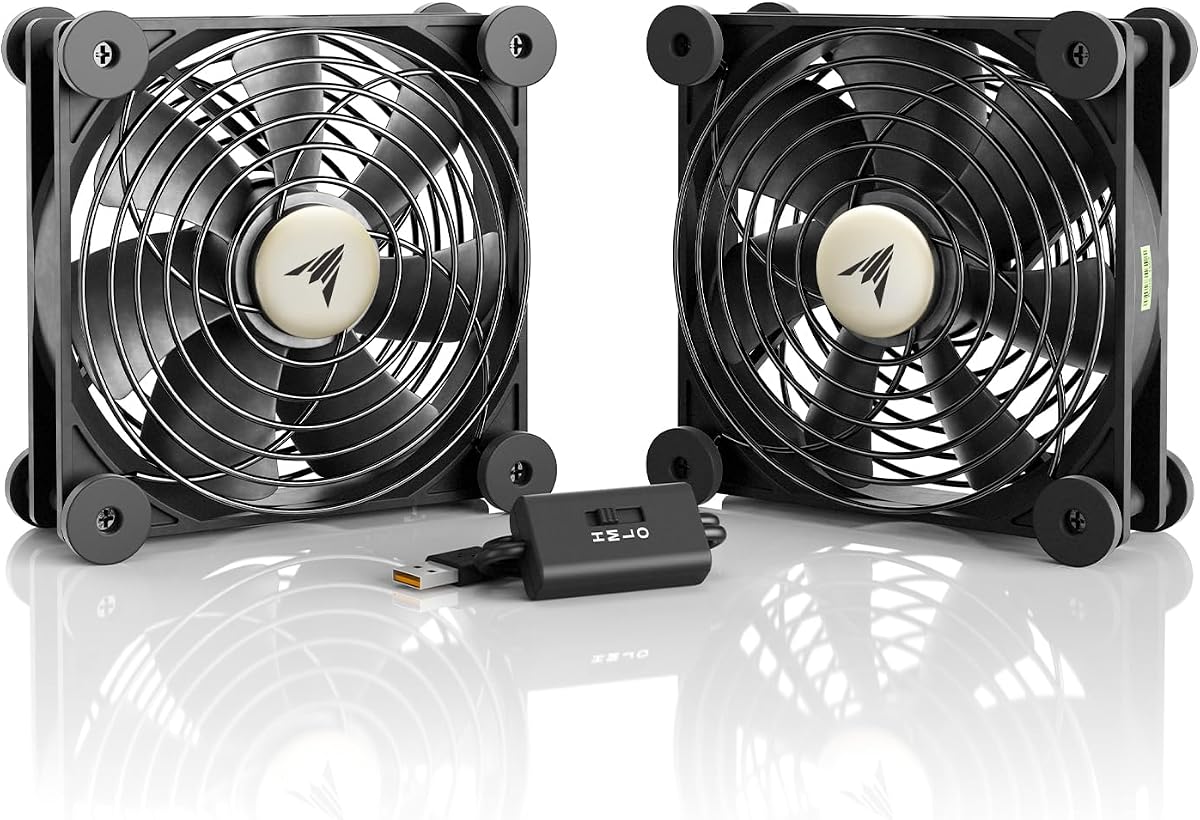
The AC Infinity MULTIFAN S7 is a budget-conscious alternative that still brings strong airflow, quiet operation, and manual speed control. Its 4.7 rating reflects a favorable overall balance, while the pair of 120mm fans provides a combined 104 CFM. That is ample for directing air around an AV receiver or several smaller pieces of AV equipment without introducing a large cabinet system.
We may earn a commission when you buy through this link, at no additional cost to you.
The multi-speed controller lets the user find a suitable point between stronger airflow and reduced noise. Each fan measures 4.7 by 4.7 by 1 inch, and the ability to lay the fans flat or stand them upright is valuable in cabinets with awkward geometry. USB power can come from ports found behind compatible AV electronics and game consoles, while the dual-ball bearings have a listed lifespan of 67,000 hours.
Unlike the AIRCOM S7, this set does not offer the same level of automatic thermal programming. It also depends on a suitable USB power source, which can be inconvenient if the receiver lacks an accessible port or if a cabinet has limited cable space. The two separate fans may also create a less unified installation than a single top-exhaust system.
This is a sensible choice for a straightforward setup in which the main priorities are quiet cooling, flexible positioning, and straightforward speed adjustment. One fan can sit above the receiver while the other improves circulation around a console, streamer, or amplifier. MULTIFAN S7 is best treated as a capable and adaptable budget pick rather than a fully automated cabinet-management system.
The matched 120mm fans can be positioned independently around the receiver. This makes the set useful when warm air accumulates in more than one part of a media console or entertainment center.
A combined 104 CFM airflow and 19 dBA noise level provide a useful balance for a home-theater environment. The inline controller makes it easy to reduce speed when quiet operation matters more.
We may earn a commission when you buy through this link, at no additional cost to you.
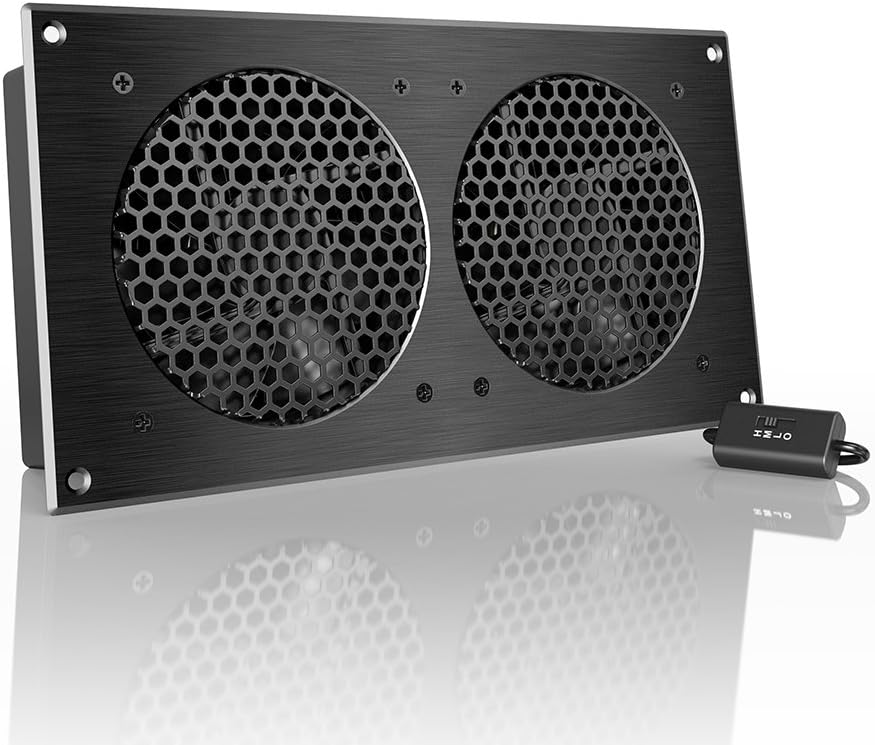
The AC Infinity AIRPLATE S7 combines 104 CFM airflow with a 19 dBA noise level and a refined cabinet aesthetic. Its 4.7 rating places it among the strongest options in the roundup, while the CNC-machined aluminum frame and brushed black finish give it a more integrated appearance than a conventional square PC fan.
We may earn a commission when you buy through this link, at no additional cost to you.
This system is designed to cool cabinets with minimal noise. A multi-speed controller allows airflow to be tuned to the room, and the fan can draw power from a wall outlet or USB port. The included Turbo Adapter is stated to increase performance by 25%, offering another way to adjust the operating characteristics according to the installation.
The main limitation is that AIRPLATE S7 is not intended to disappear into a narrow gap. Its 11.69 by 6.3 by 1.3-inch dimensions call for visible placement on or near a cabinet, and there are no listed thermal trigger modes. A homeowner who needs automatic operation or an ultra-slim door-gap design may prefer a different model.
AVPLATE S7 is best for a media cabinet where appearance, visible hardware, and straightforward power selection are priorities. It works particularly well as a dedicated top-mounted cabinet cooler, where its broad frame can direct air over a receiver and nearby components. Buyers seeking automated response should look to the AIRCOM S7, while those focused on minimal installation should consider a no-drill alternative.
The machined aluminum frame and modern finish are intended to complement entertainment-center hardware. It is a better fit for a visible top or rear cabinet position than a concealed door-gap installation.
Wall-outlet and USB power options make AIRPLATE S7 adaptable to different cabinet locations. The supplied Turbo Adapter provides an additional performance increase when stronger airflow is appropriate.
We may earn a commission when you buy through this link, at no additional cost to you.
This 120mm AC cooling fan is the most straightforward option for a receiver cabinet that has a nearby wall outlet but no convenient USB power. It earns a 4.7 rating and plugs directly into a standard 110V-240V outlet. A built-in speed controller removes the need for a separate power supply or complicated wiring, while the included metal finger guard improves safety around powered equipment.
We may earn a commission when you buy through this link, at no additional cost to you.
Its slim 120 by 25mm form factor offers more placement flexibility than a broad cabinet panel. It can be secured to a PC-style vent, fastened to a wire shelf, placed flat, or mounted to another suitable surface with zip ties. The included five-foot cord makes it suitable for a nearby outlet, and the product data specifically identifies home theater receivers among its uses.
This fan is not designed to be hidden in an extremely narrow gap, and the cord can become the most limiting factor. It also lacks the thermal triggers and multi-mode programming found in the AIRCOM S7. Buyers who want a completely self-contained cabinet system may therefore favor a dedicated exhaust product.
This model is most useful for temporary, movable, or flexible cooling where a wall outlet is available. It can also serve broader ventilation duties around PCs, routers, greenhouses, terrariums, and enclosed electronics. For an AV receiver, its main advantage is the direct mains connection and easy speed adjustment, making it a practical pick for workshops, utility shelves, and less polished installations.
Direct 110V-240V operation simplifies installations where USB power is inconvenient. The five-foot cord and built-in controller provide a short path from outlet to fan.
At 25mm thick, the fan can fit spaces that reject larger cabinet-cooling panels. Several mounting options also make it useful as a temporary exhaust or circulation tool.
We may earn a commission when you buy through this link, at no additional cost to you.
The No-Drill USB Cabinet Fan is aimed at a common obstacle: homeowners who want better ventilation but do not want to cut holes in furniture. It has a 4.0 rating and a slim door-gap design that mounts using existing gaps or vents. This makes it especially relevant to rented homes, finished media cabinets, and entertainment centers that should remain unmarked.
We may earn a commission when you buy through this link, at no additional cost to you.
The 120mm fan is stated to deliver up to 77.12 CFM, enough to improve circulation in an enclosed electronics space without requiring a large top-exhaust system. A built-in speed controller allows the user to select quieter or stronger ventilation, while standard 5V USB power eliminates the need for a mains connection near the receiver.
The installation still depends on the cabinet having a usable gap or vent. A gap that is too narrow may prevent proper airflow, while a loose or poorly positioned fan could fall or perform inefficiently. Its 4.0 rating also trails the leading models, so buyers should interpret it as a straightforward functional option rather than the most refined choice.
Choose this fan when preserving furniture is the top priority and a nearby USB source is available. It is a strong candidate for AV cabinets, network racks, entertainment centers, and game-console compartments where an exhaust path already exists. Confirm the gap dimensions and mounting position before ordering, and ensure the cable does not obstruct doors.
The no-drill approach avoids permanent modifications to cabinet doors or panels. It is especially useful for renters and for owners who may want to move or restore the furniture later.
The stated 77.12 CFM output and adjustable speed provide meaningful cabinet ventilation from a standard USB 5V source. A power bank, wall charger, or compatible device can serve as the power supply.
We may earn a commission when you buy through this link, at no additional cost to you.
The Slim No-Drill Cabinet Fan focuses on the narrow-space problem. It earns a 4.4 rating and uses an ultra-slim profile to cool AV cabinets where conventional fans cannot fit. Like the other no-drill products in this guide, it mounts through existing cabinet gaps or vents instead of requiring permanent holes.
We may earn a commission when you buy through this link, at no additional cost to you.
Its listed features emphasize quiet airflow around AV receivers, amplifiers, game consoles, and networking equipment. Standard 5V USB power makes the installation approachable, and the fan can be connected to a computer, adapter, or another compatible electronic device. The result is a simple solution for cabinets where an unobtrusive installation matters more than sophisticated control.
Compared with the No-Drill USB Cabinet Fan, this model has a slightly stronger customer rating but does not publish a specific maximum airflow figure in the supplied information. It also lacks a listed speed controller, so the user has less direct control over the balance between noise and cooling. The exact dimensions are not provided, making a fit check especially important.
This fan is best for a narrow media console, server cabinet, or entertainment center with a consistent door gap. It can also support routers, switches, and other electronics that benefit from gentle circulation. Measure the opening before buying, confirm the fan can sit securely, and make sure a USB cable can reach without preventing the door from closing.
The slim design targets spaces where a conventional 120mm square fan or broad cabinet panel would be too deep. It is intended to use an existing opening as part of the airflow path.
A standard 5V USB connection keeps power simple and avoids permanent wiring. This works well for temporary arrangements and cabinets with an accessible nearby adapter.
We may earn a commission when you buy through this link, at no additional cost to you.
The Gap-Flow No-Drill Cabinet Fan is a feature-rich installation option with a 4.2 rating. Its 120mm fan fits against the inner edge of a cabinet door, using the existing gap or ventilation slots to create an exhaust path. Included non-destructive mounting brackets allow a tool-free setup without drilling into the furniture.
We may earn a commission when you buy through this link, at no additional cost to you.
The product data specifically emphasizes home theater use, including AV receivers, game consoles, and server racks. A standard 5V USB connection provides convenient power, and the fan can connect to a receiver, computer, or suitable wall adapter. Its slim specialized design is intended for electronics enclosures and media consoles with limited internal clearance.
As with other gap-mounted fans, the outcome depends on the quality and geometry of the opening. The supplied information does not provide a maximum CFM figure, so buyers cannot compare its output directly with the 77.12, 104, or 140 CFM alternatives. It also has fewer customer ratings than the most established products in the list, which may affect confidence in long-term consistency.
Gap-Flow is a good match for renters, DIY enthusiasts, and anyone who values quick, reversible installation. It is particularly useful when the receiver is in a cabinet with ventilated doors and only a narrow exhaust path. Verify that the included brackets will fit the door edge and that the USB cable can be routed without pinching when the cabinet closes.
The included brackets allow the fan to be mounted without a drill bit, permanent screws, or complex hardware. This simplifies setup and reduces the risk of cabinet damage.
The fan is designed around the limited clearance and heat concentration common in home-theater cabinets. Its gap-oriented layout makes it more targeted than a general-purpose desk fan.
We may earn a commission when you buy through this link, at no additional cost to you.
The Noctua NV-FS2 is the premium recommendation in this guide. It carries a 4.4 rating and takes a different approach from cabinet exhaust fans: it is designed to sit underneath, beside, or on top of electronic devices with ventilation holes. The supplied data explicitly identifies A/V receivers, stereo equipment, routers, game consoles, and storage devices as suitable applications.
We may earn a commission when you buy through this link, at no additional cost to you.
At its center is a 120mm PWM fan with an NF-A12x25 design, supported by a compact NA-FC1 controller. The controller can move from maximum airflow toward near-silent operation, making it well suited to a media setup used for both movies and gaming. Soft NV-MPG1 gasket material and NV-MPP1 pads reduce vibration, while the offset design supports acoustic and ventilation performance in either intake or exhaust positions.
The package also includes a preinstalled safety grill, a 230/115V power supply with European, United States, and United Kingdom plug adaptors, and a one-meter extension cable. Together, these provide a polished and flexible installation. The trade-off is that NV-FS2 does not offer automatic thermal programming, and its component-cooling approach requires adequate space around the receiver.
Buy NV-FS2 when presentation, refined controls, and low-noise cooling are more important than maximum cabinet exhaust capacity. It is particularly attractive for a setup where the receiver is visible and the fan can sit neatly on a shelf or equipment top. The included power hardware also reduces the need to search for a suitable USB source. It is the best choice for a dedicated premium component-cooling arrangement.
The NF-A12x25 PWM fan and external controller allow airflow to be tuned toward near-silent operation. Soft silicone components help limit vibration transferred to the shelf or device.
A 230/115V supply, regional plug adaptors, and an extension cable provide a more complete setup than a basic USB fan. The preinstalled grill also improves suitability around everyday electronics.
We may earn a commission when you buy through this link, at no additional cost to you.
The Wathai 140mm Dual USB Fan set offers a low-noise approach with a 4.3 rating. Its 18 dBA noise specification is the lowest listed in this roundup, while the two large 140mm fans provide a combined 57 CFM. The flat design is intended for electronics shelves, cabinets, computers, and game-console environments where broad, low-profile airflow is helpful.
We may earn a commission when you buy through this link, at no additional cost to you.
Low, medium, and high settings give the user direct control over the operating level. USB compatibility includes AV receivers, routers, computers, PS4, and Xbox, and the product data notes that multiple USB fans can be daisy-chained. Each fan measures 11 by 5.5 by 1 inch, making the pair easy to place around equipment even though they are wider than standard 120mm options.
The stated 57 CFM airflow trails the higher-output cabinet systems, and the listed sleeve bearings differ from the dual-ball bearings used by several leading options. A buyer primarily concerned with sustained duty in a hot, enclosed cabinet may want a model with a higher published airflow figure. The lack of automatic control also means adjustments remain manual.
Wathai is best for a quiet shelf setup where the receiver has a usable USB port and the priority is subtle circulation without prominent fan noise. The two fans can be positioned on opposite sides of the receiver or directed along a cabinet shelf. It is a solid choice for modest heat management, while a high-heat cabinet is better served by a higher-CFM top-exhaust system.
The 18 dBA specification makes the lower speed settings attractive for bedrooms or listening rooms. Large fan dimensions can move air effectively without needing a high noise setting.
Compatibility with AV receivers and other USB-powered equipment simplifies setup. The inline three-speed control lets users adapt the fans as heat levels and viewing conditions change.
We may earn a commission when you buy through this link, at no additional cost to you.
The GDSTIME 240mm USB Fan Cooler has a 4.3 rating and uses two 120mm fans within a compact 240mm-format housing. It is intended for routers, modems, receivers, DVRs, amplifiers, gaming consoles, computers, and other AV electronics, giving it one of the broadest application ranges in the guide.
We may earn a commission when you buy through this link, at no additional cost to you.
Low, medium, and high speed settings allow the fan to serve both quiet and high-load situations. The product data notes that the low setting is near-silent at a short listening distance, while the high setting provides maximum airflow. Standard 5V USB power means it can connect through a type-A port on compatible electronics, a wall charger, or a power bank without a separate adapter.
An included USB extension cable with an inline switch adds placement flexibility, and the hydraulic-bearing motor is designed for quiet, long-duration operation. However, the supplied information does not include a CFM figure, making direct output comparison with AIRCOM S7, MULTIFAN S7, AIRPLATE S7, and several other models impossible. The 240mm assembly also requires more horizontal room than a single slim fan.
This model is a strong choice for cooling a receiver and another nearby device at the same time. Its flat housing can sit on top of or under heat-generating equipment, while the three-speed control helps manage noise. Choose it for a broad AV shelf and easy USB operation, and verify the available clearance before installation.
The two-fan format can sit above or beneath multiple pieces of equipment. This makes it more versatile for a shared AV shelf than a single exhaust panel.
Low, medium, and high settings let the user match output to heat and noise requirements. The inline switch on the extension cable provides convenient control away from the fan.
We may earn a commission when you buy through this link, at no additional cost to you.
Choosing a cooling fan for an AV receiver means balancing heat removal against noise, available cabinet space, power access, and installation tolerance. The most important starting point is the cabinet layout, followed by the amount of heat generated and how discreetly the fan needs to operate.
Airflow is the clearest published measure of how much air a fan can move, although it does not reveal how efficiently that air moves through a particular cabinet. Models in this guide range from 57 CFM for the Wathai set to 140 CFM for the AIRCOM S7, with the No-Drill USB Cabinet Fan listed at 77.12 CFM and several AC Infinity cabinet systems at 104 CFM. For a receiver surrounded by amplifiers, game consoles, streaming boxes, and other heat-producing equipment, a higher figure generally provides more room for effective exhaust. For a single receiver in a ventilated shelf, a quieter USB option may be sufficient.
A cooling fan is most noticeable in a quiet room, especially during dialogue-heavy films or late-night listening. Published noise levels range from 18 dBA for the Wathai 140mm set to 19 dBA for the principal AC Infinity models. A lower figure is valuable, but the actual sound also depends on fan size, motor design, mounting quality, and the selected speed. A larger airflow fan may need more speed to move the same amount of air, while a poorly mounted unit can introduce vibration that a low decibel rating does not capture.
USB 5V power is the most common option in this category because it uses the same basic power architecture as routers, consoles, computers, and many AV components. It is simple, but the cable must reach a suitable port or adapter without leaving a hazard in the cabinet. Wall-powered models remove the need for USB availability and may be more appropriate for utility shelves, equipment racks, or a nearby outlet. The 120mm AC fan supports 110V-240V power, while the premium Noctua set includes a 230/115V supply and regional plug adaptors.
A fan can have excellent specifications and still fail to fit the intended cabinet. Door-gap models are slim enough for narrow openings, while top-exhaust systems such as AIRCOM S7 and AIRPLATE S7 need broader placement. The GDSTIME and Wathai sets use 240mm and 140mm formats respectively, and the Noctua NV-FS2 is designed to sit around individual equipment. Measure the width, height, and depth of the available space, including the clearance needed to open doors, route cables, and direct air toward an opening.
No-drill fans are ideal for finished furniture, rentals, and reversible installations. They usually use an existing door gap, vent, or ventilation slot, but airflow can be restricted if the fit is too tight. Larger cabinet systems may require screws, placement on a shelf, or another secure mounting method. The 120mm AC fan supports several mounting arrangements, while the Noctua package provides soft pads and a preinstalled grill. Whichever method is chosen, the fan should remain stable and should not block equipment vents or cabinet hinges.
Controls range from a simple three-position dial to programmable thermal modes. Manual speed control is easy to understand and works well when cabinet conditions are stable. Automatic thermal control can respond to changing heat levels, reducing the need to adjust the fan manually. The AIRCOM S7 offers two thermal trigger modes and four speed options, while most competing products provide a basic multi-speed controller or no listed control beyond the fan's fixed output. More control is not automatically better, but it can be valuable in cabinets that alternate between idle listening and intensive gaming.
Fan size affects both cabinet fit and the way air moves through the equipment area. A 120mm fan can be aimed at a specific vent or placed in a narrow gap, while a 140mm or 240mm assembly can cover a wider area or support multiple devices. The most important consideration is alignment: air should reach warm equipment and then have a route out of the cabinet. A fan pointed into a solid back panel is less effective than one positioned to exhaust through a door gap, rear vent, or other opening.
Bearings, vibration control, and cable management influence long-term usability. Dual-ball bearings appear on the AIRCOM S7, MULTIFAN S7, and AIRPLATE S7, while the Wathai set uses sleeve bearings and the GDSTIME model lists a hydraulic-bearing motor. The Noctua set adds extra-soft silicone gasket material and pads to reduce vibration. In a media cabinet, it is also important to prevent cables from becoming taut, pinched, or disconnected. A stable, lightly supported installation can reduce unwanted movement and noise.
Begin by identifying the receiver's warm-air direction, the cabinet openings, and a suitable power source. Position the fan where it can pull air across the receiver vents and direct it toward a vent, door gap, or other exhaust path. Leave enough room around the fan for intake, and avoid placing it where its housing, guard, or cable blocks the receiver's own ventilation slots.
For a speed-controlled model, begin at the lowest setting and increase airflow if the area remains warm or if equipment seems to run hotter than usual. A wall-powered or USB-connected fan should use the specified connection without extensions that create excess load. With a no-drill model, confirm that the brackets hold the fan securely and that the cabinet door can close without pinching the cable. For a component-cooling fan, place it on a stable surface or use the provided vibration-isolating materials.
Check the installation periodically. Dust can reduce airflow, and bearing or motor noise can change over time. Keep the fan and surrounding vents clean, ensure cables remain loose enough to move, and verify that the fan has not shifted. If the cabinet temperature does not improve, reconsider the exhaust path, fan direction, and whether additional equipment also needs separate cooling. Never block the fan with decorations or stored items, and unplug it before cleaning.
A properly positioned fan can remove heat from around an AV receiver and improve cabinet airflow, helping the receiver operate within a cooler environment. It does not replace correct ventilation, unobstructed intake paths, or appropriate room temperature. If the receiver's own vents are blocked or the cabinet has no exit for warm air, adding a fan may not solve the underlying airflow problem.
The best position depends on where the receiver draws and releases air. A fan beneath the unit can help draw cooler air toward lower vents, while a top-mounted or rear-positioned fan can exhaust rising heat. The fan should not press against vents, block connectors, or create vibration against the chassis. Test a safe airflow path before securing the final position.
USB 5V power is suitable for many compact USB cooling fans and often simplifies cabinet installations. Confirm that the selected fan is designed for the available port or use a suitable wall adapter or power bank. Fans with higher airflow requirements or a complete multi-fan system may place more demand on the power source, so the included instructions and electrical specifications should be checked.
Yes, if the cabinet has a suitable door gap or ventilation opening. The no-drill products in this guide are designed to mount through existing spaces and avoid permanent cabinet modification. The fan still needs a secure position, a clear airflow path, and a cable that will not prevent the door from closing. Measure the opening before ordering because every cabinet has different clearances.
The Wathai 140mm Dual USB Fan has the lowest stated noise level in this guide at 18 dBA, while the principal AC Infinity options are listed at 19 dBA. Actual sound varies with speed, mounting, and cabinet resonance. Running the fan at a lower controlled speed and isolating vibration can make a noticeable difference in a quiet room.
Not necessarily. A slim USB fan, a pair of flat fans, or a premium component-cooling unit may be sufficient when the receiver sits in a ventilated shelf and generates moderate heat. A top-exhaust system is more compelling when the cabinet contains several hot components or traps substantial heat. The right choice depends on cabinet design, heat load, noise sensitivity, and available space.
Start with the lowest fan speed, secure the housing so it does not vibrate against cabinet panels, and use soft pads or gaskets when the product provides them. Route cables loosely and check whether the fan resonates against a wooden back or side panel. If the noise remains distracting, a quieter model with a lower published noise specification may be a better fit.
Yes, periodic cleaning helps maintain airflow and reduces the chance of unexpected motor noise. Disconnect power before cleaning, remove dust carefully from the blades and vents, and avoid pushing debris into the motor. Also inspect the mounting points and cables because a loose fan or pinched cable can be as disruptive as blocked airflow.
The AC Infinity AIRCOM S7 stands out as the best overall option because it combines the highest listed airflow with thermal programming, four speed options, dual-ball bearing motors, and a 19 dBA noise level. The AC Infinity MULTIFAN S7 is the best budget pick for buyers who want two quiet USB fans and manual speed control, while the Noctua NV-FS2 is the premium choice for refined component cooling, vibration isolation, and a complete controller and power package.
For the most discreet cabinet installation, prioritize a no-drill fan and confirm that the existing gap can support a useful airflow path. For a visible or shared equipment cabinet, compare higher-CFM systems such as AIRCOM S7 or AIRPLATE S7. Pay equal attention to noise, power access, and mounting quality, because the highest airflow figure does not guarantee the best result if the fan is poorly positioned or creates cabinet vibration.
Ratings, availability, and prices can change, so check the current listing and confirm compatibility before ordering. Measure the cabinet, identify the power source, and consider every heat-producing device in the enclosure. With those details settled, the most appropriate option is the one that moves heat out quietly, fits securely, and integrates cleanly into the home theater setup.