
TONGVEO 4K NDI PTZ Camera
4.5Editor score
Official licensed NDI
4K HDMI and USB
Professional SDI output
AI presenter tracking
Our PTZ camera for live streaming guide compares 10 expert picks for tracking, zoom, 4K video, connectivity, and reliable production workflows today.
A PTZ camera for live streaming gives creators the ability to pan, tilt, and zoom without a dedicated camera operator. The strongest models combine accurate motorized movement, dependable autofocus, useful subject tracking, and outputs that work smoothly with streaming software, conferencing platforms, switchers, and production networks.
We compared the ten cameras in this guide by examining resolution, frame rate, optical zoom, AI tracking modes, wired and network connectivity, installation flexibility, and multi-camera control. The list covers single-camera models, NDI-equipped options, complete production bundles, and cameras designed for everything from classrooms to large worship venues.
Each review identifies the capabilities that make a particular model useful and also explains the compromises or setup requirements to consider. Ratings reflect the supplied customer feedback, while technical details come from the listed product information. Prices and configurations can change, so confirm current availability and requirements before ordering.
4.5Editor score
4.7Editor score

4.7Editor score
This side-by-side comparison highlights each camera's resolution, zoom range, tracking approach, and production connectivity, helping you identify the right model for a single-stream setup, a networked production, or a multi-camera environment.


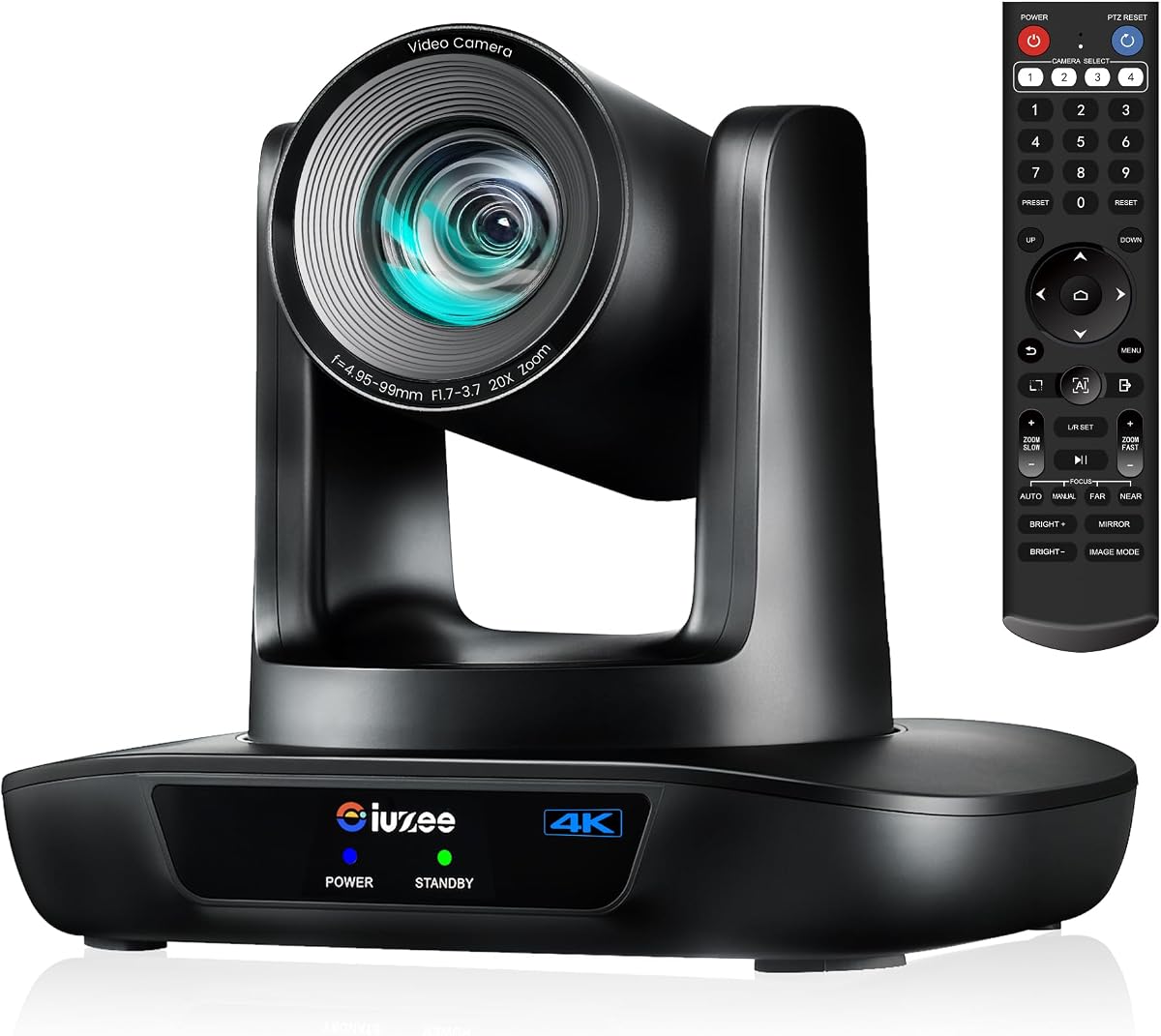
The iuZee 4K AI PTZ Camera combines 4K UHD capture, 20X optical zoom, and AI-assisted framing in a camera suited to both dedicated streamers and institutional producers. Its supplied rating is 4.7, and the standout feature is the balance between three simultaneous outputs—USB 3.0, HDMI, and LAN—with support for MJPEG, YUY2, H.264, and H.265.
We may earn a commission when you buy through this link, at no additional cost to you.
The camera uses a 1/2.8-inch 8.29-megapixel CMOS sensor to produce 4K at 30 frames per second. Its 63-degree wide-angle lens and 20X optical zoom give operators more flexibility than a fixed webcam, while 2D/3D noise reduction is intended to improve clarity. Face and human-body tracking can maintain a subject after temporary obstruction, and Presenter Mode and Auto Framing modes suit different production styles.
Setup is flexible through its web interface, included remote, PoE, and installation hardware. It supports RTMP, RTSP, and SRT, along with platforms such as YouTube and OBS. The main caveats are that a PoE switch is needed for PoE operation and there is no built-in microphone. Its preset system also deserves attention: the remote directly handles 10 presets, while the full camera configuration supports as many as 255.
This is an excellent general recommendation for churches, classrooms, conference rooms, weddings, and small-to-medium live events. Choose it when a single camera must feed a computer, presentation display, and network workflow at the same time without forcing a large, multi-camera production system.
Simultaneous USB, HDMI, and LAN output makes this camera adaptable to software-based streaming, local presentation screens, and IP-based production. You can use the connection that best fits each part of the workflow rather than committing to a single capture route.
Face and figure tracking, automatic framing, and presenter modes reduce the need for constant manual corrections. These features are particularly useful in rooms where one person moves across a stage or teaching area.
We may earn a commission when you buy through this link, at no additional cost to you.
The Tenveo 4K NDI Two-Camera Kit is built for operators who need more than a standalone webcam. It combines two 20X optical-zoom PTZ cameras with a 7-inch LCD joystick controller. The supplied rating is 4.4, and its defining advantage is the combination of NDI production support, multi-camera preview, and hands-on PTZ control.
We may earn a commission when you buy through this link, at no additional cost to you.
Both cameras provide HDMI and USB 3.0 output at up to 4K, while IP/NDI streaming is listed at up to 1080P. Supported protocols include RTSP, RTMP, ONVIF, GB28181, VISCA over IP, and multicast. The controller can display four camera feeds, adjust pan, tilt, zoom, focus, iris, backlight, presets, and movement speed, and turn AI tracking on or off.
Deep-learning tracking recognizes the human body and face, supports presenter and autoframing modes, and can retain a subject following brief obstruction. Gesture controls include toggling AI mode, entering or leaving presenter mode, zooming, and locking or unlocking gesture control. These options can reduce operator workload, although their stated effective range and hand-position requirements demand rehearsal.
The bundle is most appropriate for church services, conferences, school productions, weddings, and multi-camera live events. It may feel excessive for a single fixed room, but for a director who needs visual confirmation and repeatable camera moves, it offers a more cohesive production package than assembling cameras, networking, and a controller separately.
The controller's quad-screen preview lets an operator see multiple feeds before changing angles. That visual feedback is especially valuable in dynamic worship services, sports, and stage events where switching blindly can lead to missed moments.
NDI, VISCA over IP, and the supplied IP Search Tool support faster deployment in a multi-camera environment. Static address assignment and direct web access also make routine network management more approachable.
We may earn a commission when you buy through this link, at no additional cost to you.
The TONGVEO 4K NDI PTZ Camera combines 4K HDMI and USB capture with 1080P IP/NDI streaming, 20X optical zoom, and professional SDI output. Its supplied rating is 4.5. For creators who want NDI and broadcast connections without building a multi-camera bundle, this model offers an unusually complete connection set.
We may earn a commission when you buy through this link, at no additional cost to you.
The included NDI license supports compatibility-oriented workflows involving OBS, vMix, Streamlabs, ProPresenter, Wirecast, and Zoom. SDI is useful for longer runs and compatible ATEM switchers, while PoE can carry data and power through one network cable when a suitable switch is present. The camera can also be managed through a browser or free camera management software.
AI tracking offers presenter tracking and auto-framing modes and combines facial with human-body recognition. The supplied information explicitly notes that it tracks one person at a time and is not intended for high-speed motion. That limitation is important for fast sports, energetic performances, or scenes with frequent subject crossings.
This camera is a strong match for churches, schools, studios, hospitals, weddings, and conventional live-production rooms. It deserves the budget recommendation because it includes official NDI, SDI, 20X optical zoom, and PoE in one camera. Buyers should still confirm their switcher, software, and network requirements before installation.
HDMI, USB 3.0, IP/NDI, and SDI let the camera participate in both computer-based and broadcast-style workflows. SDI can also make longer cable arrangements more practical than an ordinary consumer connection.
Presenter and auto-framing modes are useful for lectures, services, and meetings. Because only one person is tracked at a time and high-speed motion is outside the intended use case, complex movement requires manual operation or a different production strategy.
We may earn a commission when you buy through this link, at no additional cost to you.
The Tenveo Three-Camera Production Kit includes three 20X NDI PTZ cameras, a 7-inch quad-screen joystick controller, and an eight-port full-gigabit PoE switch. Its supplied rating is 4.3. The package is aimed at productions that need several remotely controlled angles and a coordinated network rather than a single simple webcam.
We may earn a commission when you buy through this link, at no additional cost to you.
Each camera supports HDMI, USB 3.0, and LAN with PoE, plus RTSP, RTMP, ONVIF, GB28181, VISCA over IP, and multicast. The controller displays as many as four feeds and permits detailed camera adjustments, preset selection, and AI controls. Gesture control supports AI-mode changes, presenter mode, zoom, and gesture-control locking.
The included switch is a major practical advantage because it reduces the need to source and connect separate PoE infrastructure. The trade-off is complexity: three physical cameras require careful placement, wiring, network configuration, and a production workflow capable of handling multiple feeds. It also has no built-in microphone.
Choose this kit for established church services, schools, weddings, conferences, and broadcast-style events where multiple camera positions are routine. It is less sensible for a creator who needs one camera and simple computer capture. For the intended multi-camera environment, however, it reduces the number of separate components that must be sourced.
The cameras, controller, and PoE switch form a more integrated starting point than separate components. That convenience is most valuable when the production team wants to deploy several PTZ positions quickly.
A quad-screen controller view gives operators immediate feedback before selecting a shot. Detailed control over focus, iris, backlight, presets, and speed makes the package well suited to directed live work.
We may earn a commission when you buy through this link, at no additional cost to you.
The TONGVEO 1080P Conference PTZ is a straightforward conference-room camera with 1080P output at 60 frames per second and 20X optical zoom. Its supplied rating is 4.2. The camera emphasizes smooth movement, easy USB setup, and repeatable framing rather than an extensive professional output suite.
We may earn a commission when you buy through this link, at no additional cost to you.
AI tracking supports single-person tracking and multi-person auto framing, with automatic pan, tilt, and zoom adjustments intended to keep subjects centered. The motorized platform supports up to 350 degrees of pan, 180 degrees of tilt, and up to 255 presets. An included remote makes it practical to store and recall common views rapidly.
HDMI and USB 3.0 connections are described as driver-free and compatible with OBS, vMix, Zoom, Microsoft Teams, and YouTube. The lack of listed IP streaming is meaningful for productions expecting NDI, RTSP, or RTMP workflows. Likewise, 1080P limits headroom for users who need 4K recording or transmission.
This camera is well suited to meetings, online education, church streaming, and webinar rooms where smooth 1080P video and 60FPS motion matter. It is a sensible choice when USB simplicity is the priority. For network-heavy broadcast installations, one of the SDI, NDI, or LAN-equipped models would be a better fit.
The 1080P 60FPS mode is useful for fluid motion and everyday presentations. A 20X optical lens helps preserve detail when framing distant speakers without relying on digital magnification.
Up to 255 stored positions let an operator alternate between stage, audience, and presentation views. Remote recall reduces the effort involved in repeated production transitions.
We may earn a commission when you buy through this link, at no additional cost to you.
The TONGVEO 4K 10X PTZ Camera is a compact, straightforward choice for creators seeking 4K detail without a complex installation. Its supplied rating is 4.7. It combines true 4K UHD, a 10X optical zoom, AI human recognition, and simultaneous HDMI and USB 3.0 outputs.
We may earn a commission when you buy through this link, at no additional cost to you.
The 10X lens is described as capable of capturing speakers clearly from roughly 30 to 50 feet while avoiding digital distortion. AI tracking keeps a pastor, teacher, or presenter centered as they move. The camera can also serve as a conventional webcam for Zoom, Microsoft Teams, OBS, and similar platforms, while HDMI can feed a television, projector, or video switcher.
Motorized pan, tilt, and zoom movements are described as smooth and quiet, with remote-controlled presets for quickly changing angles. A 1/2.8-inch sensor supports daily use in churches, schools, and offices. The absence of listed IP or PoE connections makes this less attractive for NDI-heavy or long-distance networked productions.
This camera is a good fit for medium and large rooms where 4K image quality and simple computer capture matter more than a long zoom. It also gives education and worship teams an approachable bridge from a basic webcam to motorized live production.
USB plug-and-play operation reduces setup time for webinars, classes, and hybrid meetings. Simultaneous HDMI output allows the same camera to serve a local display and a computer-based stream.
Automatic human recognition is especially helpful when a presenter walks across a classroom or worship stage. Presets remain useful when a wider, static room view is more appropriate than a close tracking shot.
We may earn a commission when you buy through this link, at no additional cost to you.
The Generic 4K 20X PTZ Camera offers a broad mix of streaming and conferencing connections for users who want flexibility without a specialized production bundle. Its supplied rating is 4.4. It delivers 4K UHD at 30 frames per second through a 20X optical zoom lens with a 58.7-degree field of view.
We may earn a commission when you buy through this link, at no additional cost to you.
The camera supports HDMI, USB, and IP/LAN, including PoE, RTSP, RTMP, and H.264/H.265 encoding. Its stated transmission distance reaches up to 320 feet, making it potentially suitable for large venues. Compatibility is listed across Windows, Mac OS, Zoom, Skype, WebEx, Microsoft Teams, GoToMeeting, and BlueJeans.
PTZ movement covers 340 degrees of pan and 120 degrees of tilt. A CMOS sensor and 2D/3D noise reduction support image quality in low-light and bandwidth-limited environments. On the other hand, the generic brand and absence of a bundled controller may make it less attractive for teams wanting tightly integrated multi-camera operation.
Choose this model for a single-camera installation that must serve USB, HDMI, and network streaming environments. It is especially relevant for worship, conferences, and education where long transmission distance and multiple output paths are useful. Buyers should confirm the exact production software and control requirements before installation.
USB and HDMI make local computer and display connections approachable, while IP streaming expands the camera into networked production. PoE can simplify infrastructure where the required network switch is already available.
Wide pan and tilt ranges let the camera cover more of a stage or meeting space. Its stated long-distance transmission support is valuable when the camera cannot be placed immediately beside the streaming computer.
We may earn a commission when you buy through this link, at no additional cost to you.
The 4K HDMI 20X PTZ Camera stands out for its broad control compatibility and flexible output modes. Its supplied rating is 4.6. The camera combines a 1/2.8-inch CMOS sensor, a 20X optical lens, fast autofocus, AI-based human tracking, and simultaneous HDMI, USB, and IP streaming.
We may earn a commission when you buy through this link, at no additional cost to you.
Its default HDMI mode provides 4K, while the output can be configured for 1080P at 60 frames per second. The 54-degree wide-angle lens is intended to cover large spaces without conspicuous distortion. Control methods include the included IR remote, RS232, and RS485, while network protocols include ONVIF, SRT, RTSP, and RTMP.
This range of interfaces makes it suitable for installations that still rely on serial control or need multiple software paths. Compatibility is listed for Zoom, Skype, Teams, FaceTime, OBS, YouTube, Facebook Messenger, and GoToMeeting. AI tracking is described as monocular human auto-tracking, so it is less suited to tracking several people at once.
Choose it for churches, schools, weddings, hospitals, and general streaming rooms where flexible control methods matter. Keep two caveats in mind: a true 4K display is needed to see the camera's native 4K HDMI output, and teams should verify serial protocol requirements before integrating it with legacy equipment.
Switching between 4K and 1080P60 allows the camera to suit different displays and production paths. RS232 and RS485 support give integrators more options than a remote-only installation.
The range of supported conferencing and streaming applications makes this a practical shared-room camera. Installation options including hanging, wall, and tripod mounting add further placement flexibility.
We may earn a commission when you buy through this link, at no additional cost to you.
The Prisual 5th Gen AI Auto Tracking PTZ Camera is built for large worship venues, auditoriums, stages, and professional live-production networks. Its supplied rating is 4.7. The defining feature is 30X optical zoom, the longest range in this guide, paired with simultaneous HDMI, 3G-SDI, USB 3.0, and LAN output.
We may earn a commission when you buy through this link, at no additional cost to you.
Video reaches Full HD at 60 frames per second, with selectable 1080p, 1080i, and 720p broadcast formats. Its upgraded image processing focuses on exposure, white balance, and natural color consistency across multi-camera work. Fast, stable autofocus helps maintain detail while moving between distant and closer subjects.
Presenter, Zone, and Auto Frame modes offer several tracking strategies. A customizable close-up ratio adjusts framing, while Anti-Lost Lock can hold the current shot or return to a preset if the subject disappears. PoE simplifies cabling, and the camera supports RTSP, RTMP, SRT, ONVIF, H.264, and H.265. A free NDI upgrade is available with a valid order ID.
This is the strongest choice for large rooms where a 20X lens cannot frame the subject adequately and broadcast-style outputs are essential. Its main limitation is that native 4K is not offered. Operators needing both 4K and advanced broadcast connectivity should compare the TONGVEO and multi-camera Tenveo alternatives carefully.
The 30X optical range can isolate a distant speaker or performer without the softness associated with heavy digital zoom. That makes the camera particularly suitable for large stages and auditoriums.
HDMI, 3G-SDI, USB, and LAN can feed different parts of a professional workflow simultaneously. Broadcast format options and extensive protocol support also aid integration with switchers, recorders, and control systems.
We may earn a commission when you buy through this link, at no additional cost to you.
The Tenveo 1080P 20X PTZ Camera combines Full HD 60FPS video, AI tracking, gesture control, and USB, HDMI, and LAN outputs. Its supplied rating is 4.3. It is particularly interesting for church and event operators who want to change tracking modes or framing without constantly touching a remote.
We may earn a commission when you buy through this link, at no additional cost to you.
The 20X lens is supported by a 1/2.8-inch CMOS sensor with 2.07 megapixels. Deep-learning algorithms support both humanoid and face tracking, while Presenter and Autoframing modes offer different framing behaviors. Gesture commands can toggle AI mode, enter or exit presenter mode, zoom, and lock or unlock gesture control.
USB and HDMI support 4K? No: the supplied specification for this model states FHD 1080P at 60FPS, so its resolution should be understood accurately. LAN streaming supports RTSP and RTMP, and PoE requires a compatible switch. It also works with Zoom, OBS, YouTube, Teams, Facebook Messenger, Google Meet, and other listed services.
This camera is best for worship spaces, online courses, conferences, and live events where 1080P is sufficient and gesture operation adds value. It is less appropriate for workflows requiring native 4K or an integrated multi-camera controller. As with the other Tenveo cameras listed, there is no built-in microphone.
Recognized gestures can change tracking modes and adjust the framing in presenter workflows. Operators should practice the stated hand distance and camera-facing requirements before relying on gestures during a live event.
USB, HDMI, and LAN provide several routes for conferencing and streaming. The camera also supports broad meeting-software compatibility and can be positioned on a desktop, monitor, wall, or ceiling.
We may earn a commission when you buy through this link, at no additional cost to you.
A useful PTZ camera should fit the room, production platform, operator skill level, and movement demands of the event. Resolution and zoom deserve attention, but output interfaces, tracking behavior, control methods, and installation requirements often determine whether a camera integrates smoothly.
Resolution determines how much fine detail remains visible when the shot is cropped, displayed on a large screen, or recorded for later use. Models in this guide provide either 4K UHD at 30FPS or Full HD 1080P at 60FPS. For a wide stage view with distant faces, 4K can provide more detail, while 60FPS is valuable for smoother motion in lectures, meetings, and moderately active presentations.
Choose 4K when large displays, detailed stage views, recording, or future workflow flexibility matter most. Choose 1080P60 when smoother motion is the priority and your capture, encoding, and internet pipeline cannot comfortably handle 4K.
Optical zoom changes the captured image at the lens rather than cropping and enlarging a digital image. The range here runs from 10X to 30X. A 20X lens serves many conference, classroom, and worship spaces, while 30X is helpful when the camera must remain far from a large stage.
Estimate the distance from camera to subject, then select a lens that can frame the desired shot with room to pan. Do not confuse optical zoom with digital magnification, which may produce a narrower image and softer detail.
Tracking features include face recognition, body detection, presenter tracking, zone tracking, auto-framing, and anti-lost behavior. Some cameras track one person at a time, while others advertise multi-person framing. Gesture control can also provide hands-free mode changes, but it requires clear sightlines and careful rehearsal.
Read each tracking limitation carefully. A camera intended for a lecture may be unsuitable for rapid athletic motion, while a single-subject system is better for a church platform than a crowded conference floor.
USB and HDMI are the simplest routes for a computer-based stream and local display. LAN adds network workflows through protocols such as RTSP, RTMP, SRT, ONVIF, or NDI. SDI is valuable for professional switchers and longer cable runs, while VISCA over IP and serial control support larger production systems.
Match the output to the equipment already in your workflow. Do not purchase an NDI camera unless the destination software and network can consume NDI, and confirm whether a PoE switch is already available.
A single camera can be operated with an included IR remote, web interface, or serial controller. Multi-camera productions benefit from a joystick controller with live preview, especially when the operator needs to frame several feeds and switch among them quickly. Complete bundles can include multiple cameras, controllers, and PoE switches.
Choose a bundled kit when the total deployment must work as a coordinated system. For a single room, a camera and optional remote may provide more flexibility with less equipment to configure and manage.
PTZ cameras are commonly installed on a desktop, monitor, tripod, wall, or ceiling. Wall and ceiling placement can save floor space but requires secure mounting and suitable power and signal routes. PoE can reduce cable clutter, although it still requires a PoE-compatible switch or injector and network infrastructure.
Map every connection before mounting the camera. Check cable limits, control distance, network placement, and whether operators can safely access the unit for adjustments. A mount that is inconvenient to service can undermine the benefit of motorized presets.
A plug-and-play camera should present itself as a standard webcam over USB, but network modes may require different settings. Confirm compatibility with the streaming or conferencing application, operating system, encoder, switcher, and NDI software in the production chain.
Use the product's web interface or supplied management software to test the camera before an event. Practice creating the intended source in OBS, vMix, Zoom, Teams, or another platform so hardware issues do not appear during the live program.
Start by positioning the camera at a useful viewing distance, then connect power and the required signal path. For USB, install the supplied cable and select the camera as a video source. For HDMI, connect it to a compatible display or switcher. For LAN streaming, join the camera to the production network, use the supplied search or management tool where applicable, assign a stable address if needed, and confirm that the streaming software recognizes the expected RTSP, RTMP, SRT, or NDI source.
After the feed is visible, adjust exposure, white balance, focus, framing, movement speed, and presets in a quiet environment. Set up tracking only after the basic image is stable, and test presenter, auto-framing, or zone modes with the actual presenter. Define a clear loss-of-subject behavior, such as holding the current shot or returning to a preset, so an interruption does not result in an accidental pan across sensitive areas.
During routine care, keep the lens clean and the camera mounted securely. Avoid directing dust, liquids, or harsh sunlight toward the lens and sensor. Operate the motors within their normal range, use presets rather than forcing repeated manual adjustments, and inspect cables and mounts regularly. Keep ventilation clear, update firmware when appropriate, and run a complete rehearsal that includes movement, tracking, recording, streaming, and backup signal paths.
A PTZ camera is better when a production needs motorized framing, optical zoom, or automatic subject tracking. It can cover a stage or room more dynamically than a fixed webcam, but it also requires correct positioning, presets, and control setup. A fixed webcam remains simpler for a stationary talking-head presentation.
It depends on the size of the frame, display, and recording requirements. 4K preserves more detail for a distant subject or large screen, while 1080P60 can deliver smoother movement and require less bandwidth and processing. Consider the complete pipeline, including encoder, computer, network, and platform limits, rather than resolution alone.
Optical zoom changes the lens magnification and captures more detail from the subject. Digital zoom crops and enlarges an existing image, which can reduce sharpness and introduce processing artifacts. For distant speakers or performers, a larger optical zoom range generally produces a more useful close shot.
Many models support these platforms through USB or compatible network workflows, but the exact connection matters. USB generally behaves like a standard webcam, while IP, RTSP, RTMP, and NDI can require configuration in the destination software. Test the complete route before the event and confirm current platform compatibility.
Several cameras in this guide explicitly have no built-in microphone, while the supplied information does not establish that every model includes one. Treat audio as a separate production requirement. Use a suitable external microphone or mixer and confirm the audio path before relying on the camera for a complete livestream.
Power over Ethernet allows a compatible camera to receive power and network data through one Ethernet cable. This can reduce installation clutter, but the network switch or injector must support PoE. The camera also needs a stable network address and a streaming platform that understands its selected protocol.
AI tracking performance depends on the model, lighting, subject movement, and scene complexity. Some options are designed for presenters and slower movement, while others may handle more active environments. Test tracking with the actual presenter and keep manual control or a preset fallback available.
A controller is not essential for basic operation, but it becomes valuable in multi-camera productions. A model with live multiview preview can show which feeds are active and make camera selection and framing much easier, especially in worship services, sports, and stage events.
The iuZee 4K AI PTZ Camera is the strongest all-around recommendation because it combines 4K capture, 20X optical zoom, AI tracking, and simultaneous USB, HDMI, and LAN output. The TONGVEO 4K NDI model is an excellent value-oriented professional choice with licensed NDI and SDI, while the Prisual 5th Gen camera is the premium option for large venues that need exceptional zoom and broadcast-oriented connections.
Prioritize the workflow you already have. Choose a simple USB model for a single computer, an NDI or IP camera for networked production, an SDI model for switcher-based work, and a controller bundle when multiple camera positions need coordinated operation. Check tracking limitations, PoE requirements, mounting conditions, and software compatibility before making the final decision.
Ratings, bundle contents, firmware behavior, and prices can change over time. Review the current listing and manufacturer guidance before ordering, especially if your production depends on NDI, SRT, VISCA, serial control, or a particular included accessory.