
WOLFBOX G900 Core-N
4.5Editor score
True 4K front recording
Dual-channel HDR
Super capacitor power design
Battery backup for a dash cam can mean a camera with its own rechargeable power source, a hardwire kit that draws from the vehicle, or a wireless camera designed to operate away from the electrical system. The right choice depends on vehicle type, parking exposure, cable-routing tolerance, and whether continuous parking surveillance is more important than a compact factory-style installation.
We compared the ten products in this guide by examining their recording resolution, front and rear coverage, parking-mode support, collision locking, installation method, low-voltage protection, display size, wireless functions, and compatibility constraints. The list includes conventional dash cameras, mirror-style systems, fuse-box hardwire kits, an OBD2 power solution, and a battery-powered magnetic backup camera.
Each review shows where a product stands out and where its setup requirements may matter more than its headline features. A hardwire kit is not itself a recorder, while some camera packages require separate accessories for parking mode. Ratings and configurations can also change, so readers should confirm current details and compare current prices before purchasing.
4.5Editor score

4.3Editor score
4.3Editor score
As an Amazon Associate we earn from qualifying purchases.
The table below compares each option by its core hardware, recording coverage, parking capability, and most important installation requirement. Because the category includes cameras, power adapters, and a standalone wireless backup camera, the best choice depends on whether your priority is a complete recorder, reliable parked-car power, or simpler external installation.




The WECOOL 4K UHD 3 Channel Dash Cam combines a 4K front lens with rear and interior cameras, making it the most comprehensive conventional recorder in this guide. Its 3.8 rating reflects an attractive feature set, but the setup is more involved than that of a single-camera or compact mirror-style model. The synchronized three-angle approach is particularly useful for rideshare drivers, families, and anyone who wants evidence from inside as well as around the vehicle.
We may earn a commission when you buy through this link, at no additional cost to you.
Its standout strength is coverage. The front camera uses a 170-degree lens, while the rear and cabin cameras use 150-degree lenses, creating a stated 470-degree surround-style view. A built-in G-sensor locks collision footage so it cannot be replaced during ordinary loop recording. The package also includes a 64GB memory card, Wi-Fi connectivity, and an app for viewing, downloading, and sharing recordings, reducing the need to buy several accessories immediately.
The trade-off is that parking surveillance depends on a separate hardwiring kit, and a three-camera arrangement requires more routing, mounting, and attention to cable placement than a compact dual-camera unit. The supplied information also notes that the system supports full-color night vision, WDR, and automatic recording after motion or vibration. Those are valuable functions, but their usefulness depends on correct placement and uninterrupted power delivery.
This is the best pick for drivers who want one package to cover the road, rear traffic, and cabin activity. It is less appropriate for someone wanting the simplest possible installation or a vehicle where concealed wiring is impractical. Confirm that a compatible hardwire kit and the required memory-card capacity fit your vehicle before buying.
Recording the front, rear, and cabin views at once makes the system easier to assess after an incident because the relevant context stays together. It also reduces the need to run a separate interior-facing camera for passenger documentation.
A 64GB card is included, while high-speed Wi-Fi allows compatible phones to access recordings without routinely removing the card. This combination is convenient for drivers who want quick evidence retrieval after a collision.
We may earn a commission when you buy through this link, at no additional cost to you.
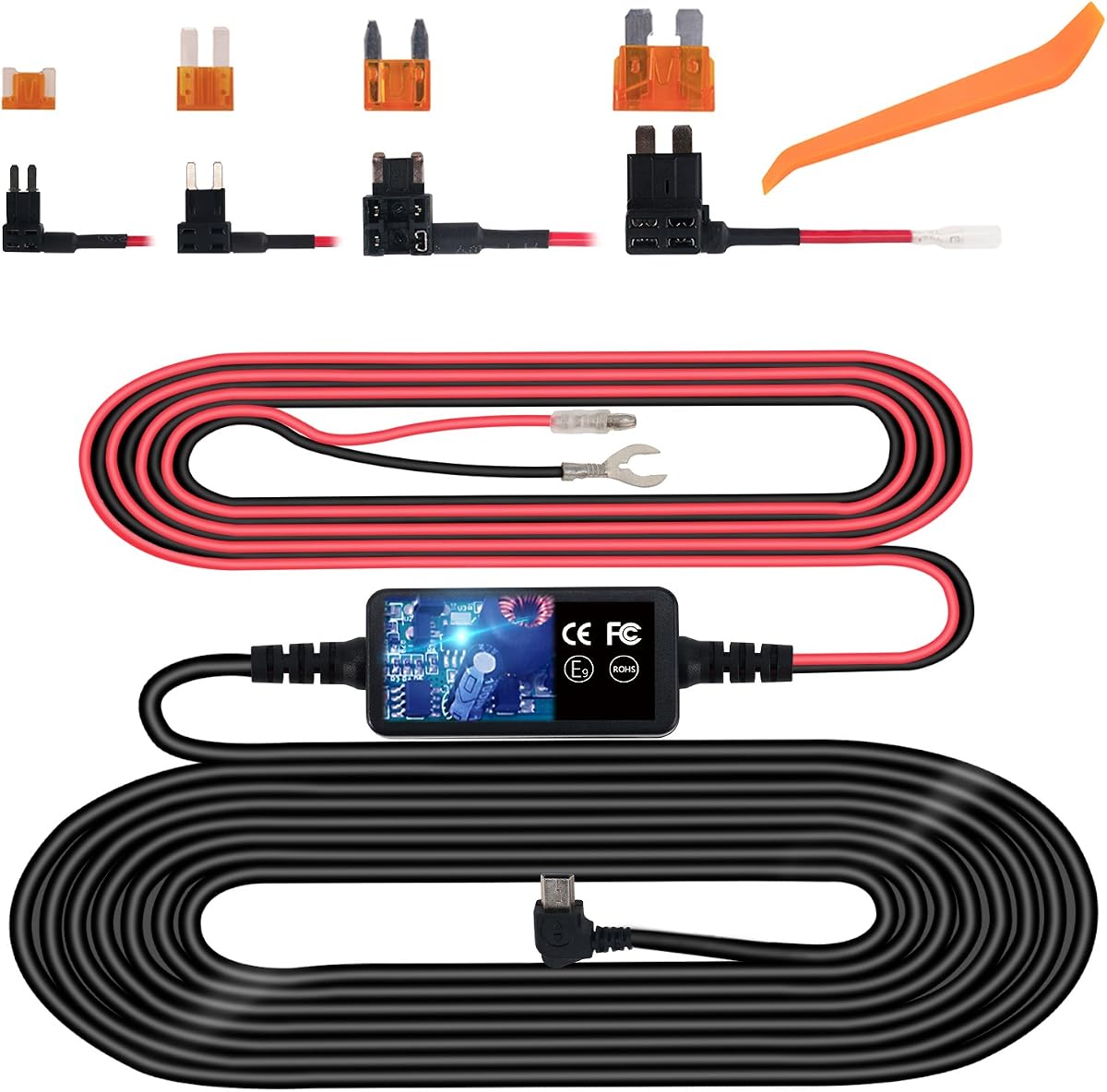
This Mini USB Hardwire Kit is a power accessory rather than a dash cam, but it directly addresses the need for reliable parking-mode operation. With a 4.3 rating, it offers one of the strongest combinations of continuous power, voltage regulation, and installation hardware in the guide. A compatible dash cam that supports hardwired parking mode is still required.
We may earn a commission when you buy through this link, at no additional cost to you.
The kit connects to the vehicle's fuse box or battery and can keep supplying 12V or 24V devices when the ignition is off. Its regulator cuts power when vehicle voltage falls to 11.6V or 23.5V, preserving enough charge to start the car. The package includes a Mini USB lead, a Mini USB female-to-Type-C male adapter, an installation crowbar, and four fuse-tap cables for different fuse configurations.
Its main limitation is connector compatibility. The product information specifically says that a dedicated USB-C hardwire kit is needed for setups requiring USB-C, so buyers should verify the port on the intended camera before ordering. It also requires routing hidden wires around the vehicle, which can be more involved than plugging an adapter into the OBD2 port.
Choose this kit when your priority is dependable continuous power for an existing Mini USB dash cam. It is particularly appropriate for vehicles with a straightforward fuse-tap arrangement and drivers comfortable with a concealed installation. Confirm connector type, parking-mode support, and local installation preferences before purchase.
Unlike a lighter that loses power when the vehicle is switched off, a hardwire kit can keep a compatible recorder active around the clock. That makes it useful for capturing impacts and movement while the car is unattended.
The automatic cutoff threshold is one of the kit's most important safeguards. It helps prevent a hardwired accessory from draining the starter battery below a useful operating level.
We may earn a commission when you buy through this link, at no additional cost to you.
The WOLFBOX G840S pairs a 12-inch mirror display with 4K front recording, a 1080p rear camera, GPS, Wi-Fi, and a 32GB card. Its 4.3 rating and broad feature set make it a strong all-around recommendation for drivers who want a complete front-and-rear system rather than an accessory. The 1.5-times-larger viewing area compared with a standard mirror also makes the screen more functional than a traditional reflective surface.
We may earn a commission when you buy through this link, at no additional cost to you.
The system supports split-screen viewing, a 170-degree front lens, and a 140-degree rear lens. A low-reflectivity display, WDR, HDR, and a six-glass lens are intended to improve visibility in bright and dark conditions. The included external GPS antenna displays location data, while the WOLFBOX app provides real-time viewing, playback, and quick sharing over Wi-Fi. A 12-month guarantee is also listed.
The main concern is installation geometry. A 12-inch replacement mirror may not fit every vehicle or rearview-mirror mount, and it blocks the reflective view when its screen is off. Parking monitoring also requires a hardwire kit, which is not part of the core package. The time-lapse parking mode is useful when correctly connected, but owners should treat the camera and the power kit as a complete setup.
This is the most balanced choice for a driver seeking rear coverage, a large display, GPS, and app-based retrieval in one package. Choose it when your vehicle can accommodate the mirror dimensions and you can add a compatible hardwire kit for parked-car recording. It is also a good option for those who dislike the need to handle memory cards during an incident.
The enlarged screen presents the road through electronic camera feeds rather than relying only on reflection. That can make the display easier to use for recording review, split-screen monitoring, and reversing assistance.
GPS data and Wi-Fi transfers give the G840S a practical evidence workflow. A driver can review, save, and share a clip without repeatedly removing the included memory card.
We may earn a commission when you buy through this link, at no additional cost to you.
This rechargeable wireless dash cam is a front-and-rear system with a touch display, motion sensing, and a 1080p front camera. Its 4.2 rating makes it a solid alternative for drivers who value touch controls and automatic activation. The rear camera is waterproof and includes six IR LEDs, while the front camera uses WDR to improve the visibility of plates and signs at night.
We may earn a commission when you buy through this link, at no additional cost to you.
The G-sensor locks footage when a collision is detected, separating important incident clips from files that ordinary loop recording can overwrite. The auto-sensing function is also described as waking and recording when impact is detected, which is useful for a parked vehicle. During normal use, the included suction mount and AVIN cable make the front unit straightforward to position, while the rear camera requires its own mounting and cable route.
Reversing is a notable strength: when reverse gear is engaged, the screen automatically displays the rear image with parking guidelines. The trade-off is that the supplied information gives no exact rear resolution, battery capacity, or standby duration. Because this is billed as a rechargeable system, the value of its wireless or battery-related functions should be judged against those missing specifications.
This camera makes sense for drivers who want a touchscreen, a rear view, and collision-triggered protection without buying separate front and rear units. It may be less attractive for someone who needs a precisely documented 4K front sensor or guaranteed long-term parking endurance. Verify the rear-camera resolution, battery behavior, and parking-mode power requirements before finalizing the setup.
Combining impact detection with a G-sensor helps preserve incident footage. Automatic activation can capture a parked-car event without requiring the driver to be seated behind the wheel.
Automatic rear-screen activation and parking guidelines make the system more than a simple insurance recorder. This is particularly helpful for vehicles where a conventional backup camera is not yet installed.
We may earn a commission when you buy through this link, at no additional cost to you.
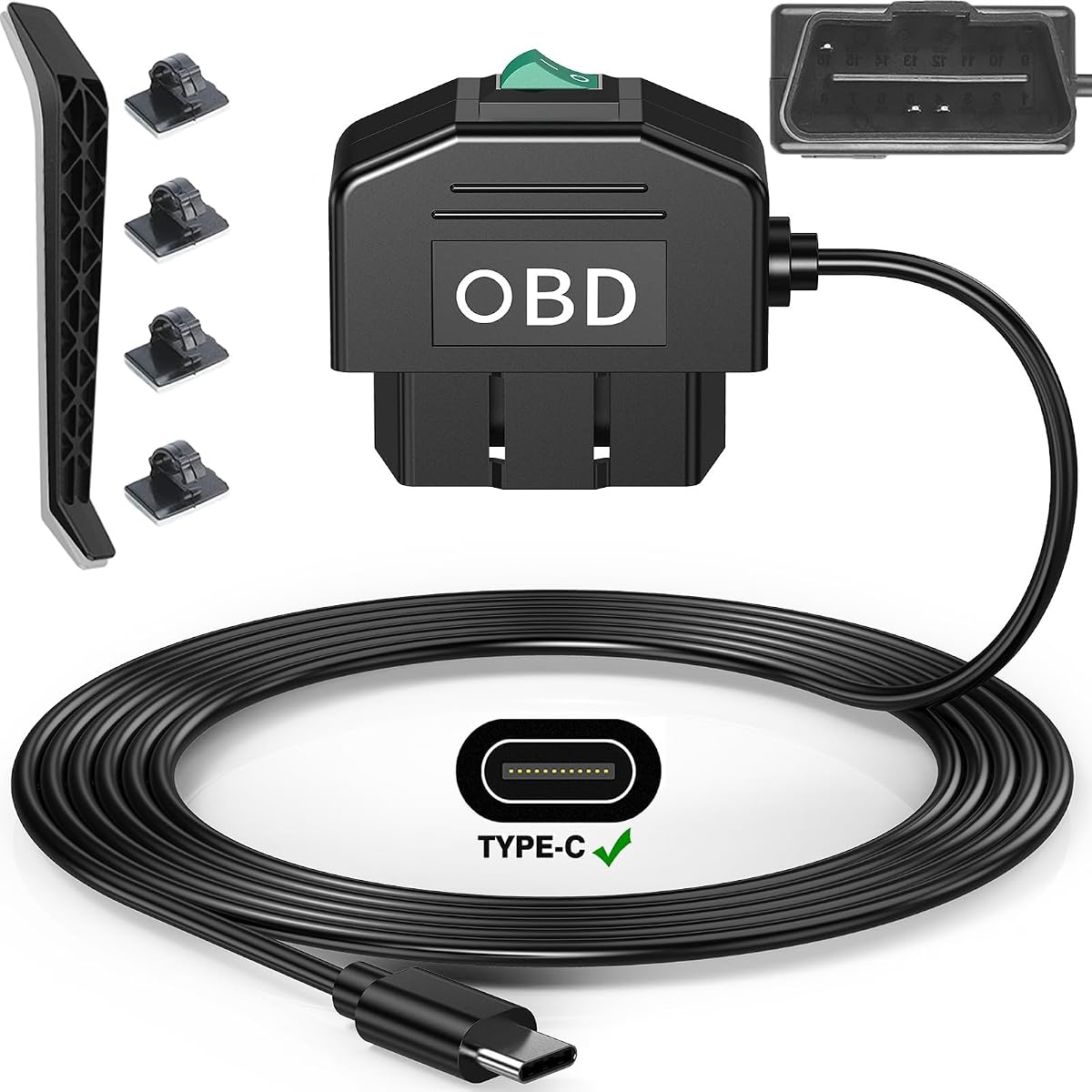
The OBD2 Type-C Hardwire Kit is a simple power adapter for compatible dash cameras, GPS units, and radar detectors. Its 4.3 rating reflects an attractive balance of installation convenience and parking-mode control. Unlike a traditional hardwire kit, it draws power through the vehicle's diagnostic port, so the installer avoids modifying the fuse box.
We may earn a commission when you buy through this link, at no additional cost to you.
MODE supports 24-hour surveillance and shuts power off when voltage drops to 11.6V or 23.2V. MODE O provides ACC-style operation, with the power turning off 20 minutes after the engine stops. The Type-C connector uses A5-B5 signal pins, so compatibility with a specific camera is essential. The listed vehicle support includes most gasoline and hybrid cars, but excludes electric and plug-in hybrid vehicles.
The tradeoff is that the OBD2 port is designed for diagnostics, and leaving a device permanently connected may not be suitable for every driver or vehicle. The extra wire also needs to be hidden for a clean appearance, and parking mode still depends on the dash cam's own compatibility. This kit provides power; it does not record video.
This is the best budget-oriented power solution for a compatible dash cam in a gas or hybrid vehicle where fuse-box wiring is undesirable. It suits drivers who value a straightforward connection and selectable operating modes. Before ordering, verify the camera's Type-C pin configuration, the vehicle's OBD2 availability, and whether the manufacturer permits permanent use of the diagnostic port.
Full parking mode keeps the camera supplied while the vehicle is off, whereas ACC mode reduces that period to 20 minutes after shutdown. Matching the mode to driving habits helps balance evidence coverage and battery preservation.
The plug-in approach removes much of the wiring work associated with traditional hardwire kits. It is a practical option when the goal is a clean, straightforward connection to a supported vehicle.
We may earn a commission when you buy through this link, at no additional cost to you.
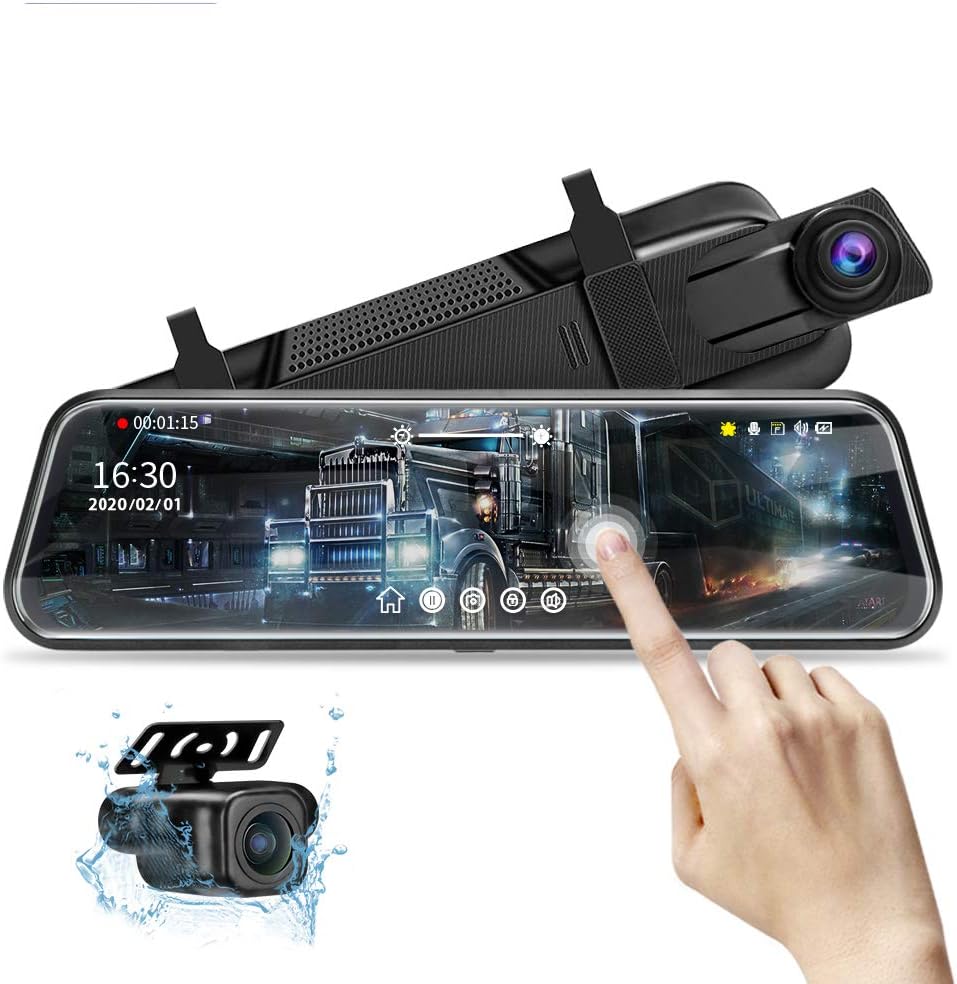
This 10-inch mirror dash cam records 1080p from both the front and rear, with a touch display, parking assistance, night vision, and collision locking. Its 4.1 rating makes it a capable mid-range alternative to the larger WOLFBOX models. The front camera uses a wide-angle lens, while the IP68-rated rear camera includes a six-layer glass lens for low-light detail.
We may earn a commission when you buy through this link, at no additional cost to you.
The IPS display provides a viewing area described as three times wider than a traditional rearview mirror. Touch controls allow the driver to switch views, adjust exposure and brightness, set the date and time, and review recordings. When reverse gear is selected, the rear image fills the screen and parking lines appear. A G-sensor preserves collision files when loop recording reaches capacity, and memory support extends to 128GB.
The package's main limitation is that the required memory card is not included. Parking monitoring and time-lapse mode also require a separate Jansite hardwire kit, identified in the supplied information as ASIN B09B92KRXL. The mirror weighs 0.72 pounds and has unusual dimensions, so buyers should compare it with their original mirror's clearance and weight capacity. The screen cannot function as a conventional mirror when powered off.
This model is a strong choice for drivers who want a large screen, dual 1080p cameras, and responsive touch controls at a moderate tier. It is less convenient for anyone seeking a complete parking-ready package because the card and hardwire kit are separate. Measure the mounting area and verify the display's off-state visibility before installation.
Changing camera views, adjusting exposure, and reviewing clips through the display reduces reliance on small physical buttons. That convenience matters most when menus need to be accessed after an incident.
The G-sensor locks collision clips so normal loop recording does not replace them. This is one of the most important features to verify in any insurance-oriented dash cam.
We may earn a commission when you buy through this link, at no additional cost to you.
The Roinvou Dual Dash Cam combines a 1080p front camera, 720p rear camera, 4-inch touchscreen, and an included 32GB card. Its 3.8 rating places it below the leading products, but the package remains a practical starting point for drivers who want front-and-rear recording, touch operation, and parking features without first buying separate storage.
We may earn a commission when you buy through this link, at no additional cost to you.
The front camera uses a 150-degree lens, while the rear camera uses a 120-degree lens. WDR and HDR are included for difficult lighting, and the built-in microphone and speaker support audio recording with an option to disable the microphone. The G-sensor detects impacts and locks important files, while parking mode monitors the vehicle when continuous power is supplied. A reverse-view function and waterproof rear camera help with parking.
The 720p rear camera is the clearest limitation, especially when compared with the 1080p and 4K rear options in this guide. The parking-mode claim also requires a continuous power source, so buyers should not treat parking surveillance as automatic merely because the feature appears in the menu. Installation may require routing a rear-camera cable through the vehicle.
This is a good budget starter kit for someone who values a straightforward touchscreen, an included card, and useful event locking. It is best suited to routine driving and entry-level evidence capture rather than demanding low-light analysis. For higher rear resolution or a more integrated parking setup, move up to one of the higher-resolution mirror systems.
The included 32GB card and two small crowbars make the package easier to start using. A buyer can install and record without separately sourcing basic storage or trim tools.
The responsive four-inch screen supports menu navigation, snapshots, manual file locking, and playback. Touch operation can be quicker than working through a row of small buttons.
We may earn a commission when you buy through this link, at no additional cost to you.
The WOLFBOX G900 Core-N is the premium recording option in this guide, combining true 4K front video, a 1080p rear camera, a 12-inch mirror display, and a 4.5 rating. It uses the Sony STARVIS 2 IMX678 8MP sensor and records the front channel at 3840 by 2160 at 30fps and the rear at 1080p at 25fps. Independent HDR on both channels is designed to preserve detail through tunnels, under bright skies, and around oncoming headlights.
We may earn a commission when you buy through this link, at no additional cost to you.
Its 5.8GHz Wi-Fi 6 connection is listed at up to 20MB/s for transferring 4K clips to a phone, and the WOLFBOX AUTO app supports review, download, sharing, and firmware updates. Voice commands can capture a photo or lock a video without touching the device. A super capacitor replaces a conventional battery in the design and is stated to work from -4°F to 158°F, improving confidence in hot vehicles and cold climates.
Parking mode offers time-lapse recording and impact detection, but a hardwire kit is sold separately. Compatible WOLFBOX memory cards are also not included, and the 12-inch form factor may not suit every vehicle. Because no internal battery is used for the main operating design, a buyer seeking fully wireless power should interpret this model as a premium hardwired mirror system rather than a stand-alone battery camera.
This is the top choice for drivers who prioritize front-camera resolution, sensor quality, fast phone transfers, and temperature resilience. It offers the most advanced feature set in the guide, but installation and accessory costs are higher than with a basic hardwire kit. Confirm mirror fit, memory-card requirements, and parking-mode wiring before purchasing.
The front channel records at 3840 by 2160, providing more detail than the 4K UHD terminology used by some competing listings. Independent HDR treatment on both channels helps balance tunnels, headlights, and abrupt changes in light.
A super capacitor is better suited to repeated hot-and-cold vehicle environments than a conventional battery-based power reserve. It supports reliable operation while avoiding dependence on a small internal rechargeable cell for core functions.
Wi-Fi 6 is listed at up to 20MB/s, reducing the waiting involved in moving high-resolution clips. App-based transfers are especially useful when the driver needs to share a recording promptly after an incident.
We may earn a commission when you buy through this link, at no additional cost to you.
This 4.5-inch mirror dash cam is one of the most compact systems in the guide, with a 1080p front camera, a rear backup camera, a 150-degree lens, and four screen arrangements. Its 3.5 rating is the lowest listed here, so buyers should interpret it as a basic, installation-focused option rather than a feature-leading recorder. The six-meter power cable and plug-and-play design simplify the main connection.
We may earn a commission when you buy through this link, at no additional cost to you.
Users can select front-only, rear-only, front-and-rear, or rear-and-front layouts. Loop recording overwrites the oldest unlocked files, while the G-sensor and motion detection trigger recordings around impacts or nearby movement. Exposure compensation is intended to improve detail in dark or overexposed scenes. The display automatically presents the rear view with guide lines when reverse gear is engaged.
The compact screen is a benefit when a large mirror might obstruct a tall windshield or crowded cabin, but the smaller display is less useful for detailed playback. The supplied information does not clearly state the rear camera's resolution, which is important when judging overall image quality. Parking monitoring also depends on power from the vehicle battery or another external source.
This model is best for drivers who want front-and-rear coverage in a relatively small mirror format and value a straightforward cable connection. It is less suitable for users who need clearly documented 4K recording, extensive parking specifications, or a high-resolution rear feed. Check the rear-camera specification and the vehicle's cable path before ordering.
Four available display arrangements make it easy to emphasize the front or rear when conditions change. The smaller housing is less likely to dominate the windshield than the larger 10-inch and 12-inch mirror models.
The system can begin recording when physical impact or motion is detected, provided the power connection remains active. That makes it more useful as a parking monitor than a simple drive-only recorder.
We may earn a commission when you buy through this link, at no additional cost to you.
The VOONOA VN003 is the clearest true battery-backed product in this guide. It combines a 15000mAh rechargeable, waterproof camera with a 7-inch 1080p monitor, a solar panel, and a magnetic base. Its 4.2 rating reflects a practical alternative to running a power cable from a truck, trailer, RV, or car to a rear-facing camera.
We may earn a commission when you buy through this link, at no additional cost to you.
Six magnets hold the camera to the selected surface, while the solar panel can supplement power on sunny days. The camera connects wirelessly to the monitor over a stated range of up to 120 feet in confined environments. A remote control lets the user operate the display without repeatedly leaving the cab, and a fast charger is included. The system is advertised as installable without power cables.
The main limitation is its role. This is a rear-view and towing camera system, not a conventional front-and-rear dash cam with G-sensor event recording, loop recording, or parking surveillance. The 120-foot range is also specified for confined environments, so open spaces and obstructions may behave differently. Solar charging is supplementary rather than a guarantee of indefinite operation.
This is the right recommendation for a driver who needs a movable, genuinely wireless backup camera and values flexible magnetic placement. It is especially relevant to trailer and RV users who want to change camera positions without rewiring. It should not be chosen as a replacement for a full dash cam that records the forward road and protects incident footage.
The large rechargeable battery eliminates the need to connect the camera to the vehicle's electrical system. That makes temporary, adjustable, or trailer-friendly placement much easier.
Six strong magnets let the camera be attached, removed, or repositioned without tools. The approach is useful when the ideal viewing angle changes between vehicles or towing situations.
The integrated solar panel can supplement battery consumption during sunny periods. The included charger and high-capacity battery still provide the primary means of maintaining a ready-to-use system.
We may earn a commission when you buy through this link, at no additional cost to you.
The most important distinction is whether you need a recorder, a continuous-power adapter, or a genuinely wireless rear camera. Once that is clear, compare recording coverage, parking behavior, vehicle compatibility, display size, and installation demands.
Battery backup can describe three different arrangements. A rechargeable camera has an internal cell, a hardwire kit draws from the vehicle while adding low-voltage cutoff, and a wireless backup camera uses a separate rechargeable battery and solar panel. These options solve different problems, so a shopper should not treat a power adapter as a camera or expect a rear-view system to provide forward incident recording.
Choose based on the desired result: self-contained power, continuous parked-car power, or cable-free rear visibility.
Parking mode generally needs uninterrupted power after the ignition is switched off. Several cameras in this guide explicitly require a separate hardwire kit, while the OBD2 adapter offers selectable 24-hour and ACC modes. Review the recorder's instructions rather than assuming that a feature shown in the interface will operate indefinitely.
Confirm hardwire compatibility, required connector type, parking mode, and low-voltage cutoff before purchase.
A front camera documents the road, a rear camera captures traffic behind the vehicle, and an interior camera can record passenger activity. Mirror systems may switch between views, while the WECOOL model records three channels at once. The wireless magnetic product focuses only on a rear view and therefore serves a different role from a complete dash cam.
Prioritize the angles and synchronized coverage that address your actual evidence needs.
The guide includes 4K front cameras, 1080p front-and-rear configurations, and lower-resolution rear cameras. Resolution should be considered alongside WDR, HDR, sensor quality, lens construction, and night-vision features. A 720p rear feed may still be adequate for casual use, but it offers less detail when license plates or distant objects matter.
Look for useful image processing and high-resolution channels rather than relying on resolution alone.
Connector compatibility is more complicated than a shape match. The Mini USB kit includes an adapter but notes that certain USB-C devices need a dedicated kit, while the OBD2 Type-C adapter uses A5-B5 pins and may not work with A8-B8 configurations. The OBD2 product also excludes electric and plug-in hybrid vehicles. Check both the dash cam port and the vehicle's power system.
Verify connector pins, OBD2 availability, vehicle type, and camera voltage requirements before ordering.
The least disruptive options are the OBD2 adapter and the magnetic wireless camera. Fuse-tap kits and three-camera systems require more careful cable routing, while large mirror units must fit the vehicle's windshield, mount, and rearview area. Consider whether a larger screen improves usability or obstructs the driver's normal sightline.
Measure mounting space, inspect cable paths, and ensure the final setup does not interfere with safe driving.
Loop recording is useful for continuous coverage, but it can replace ordinary clips. A G-sensor that locks incident files adds a layer of protection. Parking systems should ideally detect movement or impact and begin recording automatically. App access and Wi-Fi transfers also matter because they determine how quickly a driver can retrieve and share evidence after an incident.
Check collision locking, automatic triggers, app compatibility, and protected storage before installation.
Memory-card support ranges from the included 32GB and 64GB configurations to stated maximum capacities of 128GB or 512GB. Some cards are included, while premium systems may require a compatible card purchased separately. Warranty length, original-accessory requirements, and technical support can also affect long-term ownership.
Confirm card capacity, format support, included storage, warranty terms, and available customer support.
Begin by identifying the system type. Install a hardwire kit only with the ignition off, disconnect the vehicle battery if the manufacturer's guidance requires it, and choose a fuse position that matches the intended accessory circuit. For an OBD2 solution, confirm vehicle compatibility and connector pin layout before plugging it in. A wireless magnetic camera needs a secure surface, charged battery, and a clear view between camera and monitor.
Mount the camera where it does not obstruct the driver, the rearview mirror, airbags, or required sightlines. Route cables away from sharp edges, pedals, and moving components. If using a hardwire kit, connect the camera, configure the desired parking or ACC mode, and test the low-voltage cutoff behavior described in the instructions. Format and insert the appropriate memory card before beginning long-term recording.
After installation, drive briefly and review front, rear, and interior footage. Confirm that timestamps are correct, audio behaves as expected, collision locking works, and the display switches when reverse gear engages. For a wireless system, test the stated operating distance in the actual vehicle or trailer environment. Periodically clean lenses, check mounting tension, recharge or replace depleted batteries, and review storage capacity before critical trips.
No. Many dash cams receive power through the cigarette lighter socket while driving and use a hardwire kit for continuous parking operation. Other models include a rechargeable battery or a super capacitor. The exact arrangement depends on the camera, so check whether parking mode requires a separate power accessory.
A properly selected hardwire kit includes a low-voltage cutoff designed to stop supplying power before the starter battery falls too low. The listed kits cut off around 11.6V for 12V systems, with separate thresholds for 24V systems. Actual behavior also depends on the vehicle, installation, selected mode, and condition of the battery.
Usually not. The wireless magnetic product in this guide is designed primarily for rear visibility and towing applications. It does not provide the same front-road coverage, G-sensor incident locking, or continuous event recording expected from a complete dash cam. It is better treated as a complementary rear-camera system.
Common options include Mini USB and USB-C, but a connector's physical shape does not always guarantee compatibility. The OBD2 Type-C adapter in this guide uses A5-B5 pins and may not work with cameras using A8-B8 pins. Check the camera's charging specification, supplied adapter details, and vehicle connection method before buying.
Not with the OBD2 kit listed here. Its compatibility information excludes electric and plug-in hybrid vehicles, although it supports most gasoline and hybrid models. Electric-vehicle owners should use a power method specifically approved for that vehicle and compatible with the dash cam's voltage requirements.
It depends on the camera. Some systems use low-frame-rate time-lapse recording, while others activate in response to motion or an impact. A hardwire kit supplies the necessary power, but the camera determines whether it records continuously, wakes for events, or uses a combination of both.
Storage needs depend on resolution, frame rate, clip length, and how many cameras record simultaneously. The products here support different capacities, and some include a 32GB or 64GB card while others require separate storage. Use a card approved for the camera and check it regularly because loop recording will eventually replace older unlocked files.
Yes. Confirm that the camera reaches the intended parking state, the power adapter remains connected, and motion or impact triggers the expected recording. Also verify the displayed voltage threshold, the low-voltage cutoff, and whether the hardwire or OBD2 arrangement suits your vehicle before relying on the system for extended unattended coverage.
The WOLFBOX G840S is the most complete conventional recommendation, combining 4K front recording, a 1080p rear camera, GPS, Wi-Fi, and a large mirror display. The WOLFBOX G900 Core-N takes the premium lead with true 4K recording, a Sony STARVIS 2 sensor, dual-channel HDR, Wi-Fi 6, and a super capacitor. For a budget-focused solution, the OBD2 Type-C hardwire kit provides a comparatively simple path to continuous power where vehicle and connector compatibility align.
Prioritize the parts of the system that match your actual use. Full-time drivers may want front-and-rear evidence coverage, while RV, trailer, and towing users may value a genuine wireless battery camera. Parking-mode users should confirm the required hardwire kit, connector type, voltage protection, and camera trigger behavior rather than assuming every parking feature works equally well.
Current product configurations, ratings, accessories, and prices can change, so review the latest listing before buying. Comparing the full kit rather than the headline camera alone helps avoid an unexpected hardwire, memory-card, or installation cost.