
10Gtek Dual-Port 82576 Gigabit
4.4Editor score
Two gigabit RJ45 ports
Intel 82576 controller
Low-profile bracket included
This guide compares the best Dual RJ45 Port Network Card options by speed, controller, ports, operating system support, PCIe fit, and features.
A Dual RJ45 Port Network Card adds two wired Ethernet connections to a compatible computer, server, or workstation. A worthwhile card should match your required link speed, support your operating system, fit the available chassis and PCIe slot, and provide dependable hardware for sustained network workloads.
The products in this guide were compared using their stated controllers, supported speeds, PCIe lane requirements, operating system compatibility, bracket options, and network-management features. The list covers gigabit, 2.5GbE, and 10GbE models, giving attention to installation requirements and practical use cases.
Each review explains the strongest benefit, meaningful limitations, and the environments best suited to the card. The top selections represent the strongest overall, budget, and premium options, although product availability, driver behavior, and prices can change, so readers should verify current details before buying.
4.4Editor score

4.1Editor score

4.6Editor score
This side-by-side comparison organizes all ten cards by controller, maximum link speed, PCIe connection, port configuration, operating system support, and included mounting options.


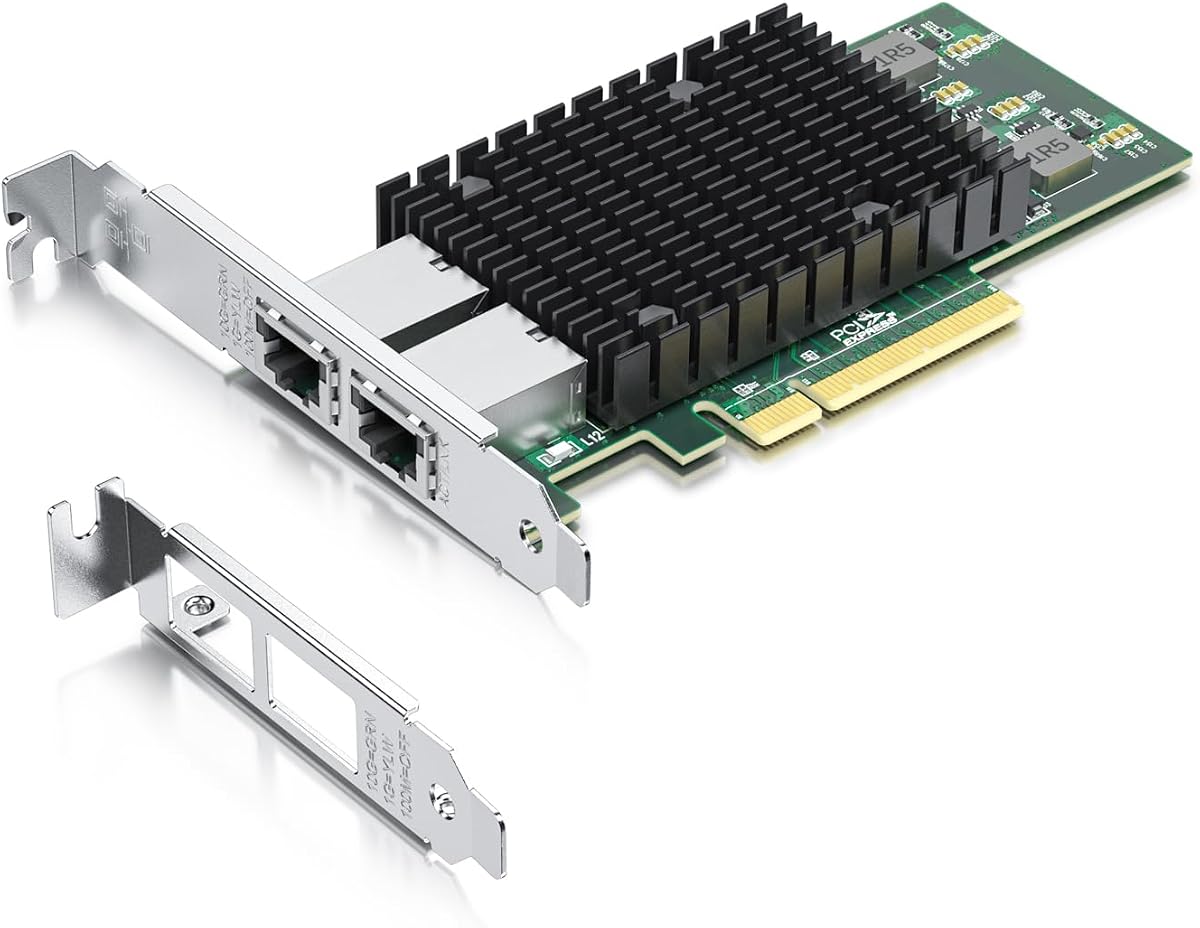

The 10Gtek 10Gb Dual RJ45 Port Network Card combines an original Intel X540 controller with two copper 10GbE connections, making it a strong choice for servers, high-end workstations, and storage systems that need more than a single fast Ethernet link. Its 4.1 rating reflects a capable design, although buyers should consider the card's bandwidth and platform demands carefully.
We may earn a commission when you buy through this link, at no additional cost to you.
Two 10GbE ports provide substantial headroom for large file transfers, virtualized environments, storage traffic, and converged networking. The X540 supports Intelligent Offloads along with iSCSI, FCoE, and NFS according to the supplied information. Its PCIe 2.1 x8 interface can operate in compatible x8 or x16 slots, while support for Category 6A and Category 6 cabling provides useful installation flexibility.
The card is not without compromises. It needs a motherboard and platform capable of handling 10GbE, and a PCIe slot with adequate lanes. The product does not support hot swapping, and Windows 11 users are advised to obtain installation guidance and manually configure the driver. These requirements make the card less convenient for casual upgrades.
Despite those limitations, the 10Gtek card is a compelling overall recommendation for buyers who want two high-speed copper ports in a flexible x8 or x16 slot. It particularly suits server operators, NAS builders, and workstation users with suitable networking infrastructure. Its included low-profile bracket also broadens the range of compatible compact systems.
Two 10GbE ports allow separate network paths or aggregation of demanding workloads. This makes the adapter useful for servers that cannot afford the cable complexity of optical networking but still need a substantial bandwidth upgrade.
Support for iSCSI, FCoE, NFS, and Intelligent Offloads makes the card more relevant to storage and server duties than a basic desktop Ethernet adapter. A compatible operating system and driver are still required to use these functions properly.
We may earn a commission when you buy through this link, at no additional cost to you.
The I226-V 2.5GbE Dual Port card offers a balanced way to add two faster wired connections without requiring the lane count or cabling demands of a 10GbE adapter. Its 4.6 rating and stated support for Windows 10/11, Linux, major server platforms, hypervisors, and embedded systems make it broad in scope.
We may earn a commission when you buy through this link, at no additional cost to you.
Each copper port supports 2500BASE-T, 1000BASE-T, 100BASE-TX, and 10BASE-T, allowing the card to negotiate with a wide range of network equipment. The Intel I226-V controller is presented as an updated replacement for the discontinued I225-V, with improved error behavior, transmission stability over longer cables, and lower active power consumption.
Its PCIe 3.1 x1 interface is especially useful because it can fit systems with limited expansion resources, while the card remains compatible with x1, x4, x8, and x16 slots. The main caveat is platform support. Buyers should consult their motherboard documentation, confirm the I226-V is supported, and ensure the relevant BIOS setting is enabled before installation.
This is an excellent choice for modern workstations, compact servers, and home labs that want 2.5GbE without a 10GbE upgrade. It is less appropriate for users expecting storage-speed 10GbE links. For the stated 2.5GbE use case, however, it offers modern silicon, two ports, and unusually flexible slot compatibility.
The 2.5GbE rate sits between conventional gigabit and 10GbE networking. It can reduce bottlenecks in fast storage, large backups, and local transfers while using familiar RJ45 cabling and a modest PCIe footprint.
The listed support for current Windows releases, several Linux distributions, VMware ESXi, Proxmox, Unraid, OpenWrt, and DPDK broadens the card's appeal. Hardware support still depends on the exact motherboard, BIOS, and operating-system build.
We may earn a commission when you buy through this link, at no additional cost to you.
The VIMIN 10G PCI-E Network Card pairs two 10GbE RJ45 ports with an Intel X540-T2 controller, positioning it for servers and performance-oriented systems that need high-bandwidth copper networking. Its 4.5 rating indicates a generally favorable result, particularly for users who need dual 10GbE connectivity.
We may earn a commission when you buy through this link, at no additional cost to you.
The card can negotiate 10GbE and lower network speeds while supporting Windows, Windows Server, Linux, and VMware. It fits compatible x8 and x16 PCIe slots, and its standard and slim bracket options accommodate different server and workstation chassis. A heat sink and gold-finger connector are intended to support stable operation and reliable contact.
A particularly important limitation is the absence of 2.5GbE and 5GbE support. According to the product information, the card will operate at 1Gbps when connected to 2.5G or 5G equipment. That makes it less flexible than the I226-V option for mixed-speed modern networks, even though its top-end 10GbE mode is well suited to compatible infrastructure.
The VIMIN card is a strong recommendation for a server with existing 10GbE switches, cabling, and peers. Users building a mixed-speed network should verify equipment compatibility first. Those with a clear 10GbE requirement will appreciate the dual-port design, flexible slot fit, and server-oriented thermal design.
The X540-T2 platform is aimed at bandwidth-heavy workloads, making the card useful for large transfers, storage services, and virtualized environments. Both ports use accessible RJ45 connections, avoiding the more specialized cabling and transceiver requirements of optical NICs.
The included heat sink helps manage heat during sustained use, while two bracket options make the card more adaptable to different chassis. Buyers should still confirm clearance, airflow, and the physical dimensions of their system.
We may earn a commission when you buy through this link, at no additional cost to you.
The Intel 82575/82576 Dual-Port card combines two gigabit RJ45 connections with a range of management and remote-boot features. Its 4.4 rating makes it a practical option for legacy servers, labs, and systems where dual Ethernet matters more than the newest transfer rate.
We may earn a commission when you buy through this link, at no additional cost to you.
Its stated compatibility extends across numerous Windows and Windows Server editions, Linux, FreeBSD, DOS, and several legacy Unix-like environments. Network-oriented functions include PXE remote boot, iSCSI boot, Wake-on-LAN, VLAN filtering, SNMP, RMON, and IPMI pass-through. An alloy heat sink is included to help control operating temperature.
The primary drawback is speed. Both ports are limited to 1GbE, so this adapter is unsuitable for a user trying to remove a multi-gigabit or 10GbE bottleneck. It also does not support VMware ESXi 7.0 or later, which matters for modern hypervisor deployments despite the card's otherwise extensive operating-system coverage.
Choose this card when maintaining an older server, adding two managed copper links, or enabling PXE-based provisioning is more important than maximum throughput. It fits x1, x2, x4, x8, and x16 slots and includes a low-profile bracket, making it a flexible option for established systems with appropriate drivers.
PXE boot, Wake-on-LAN, iSCSI boot, SNMP, and RMON give this card a more useful feature set than a basic dual-port gigabit adapter. These functions are valuable for administrators managing many systems or imaging workstations remotely.
The long operating-system list is one of the card's standout benefits. It can be especially useful when maintaining a heterogeneous fleet that includes older Windows releases, FreeBSD, or Unix-compatible servers.
We may earn a commission when you buy through this link, at no additional cost to you.
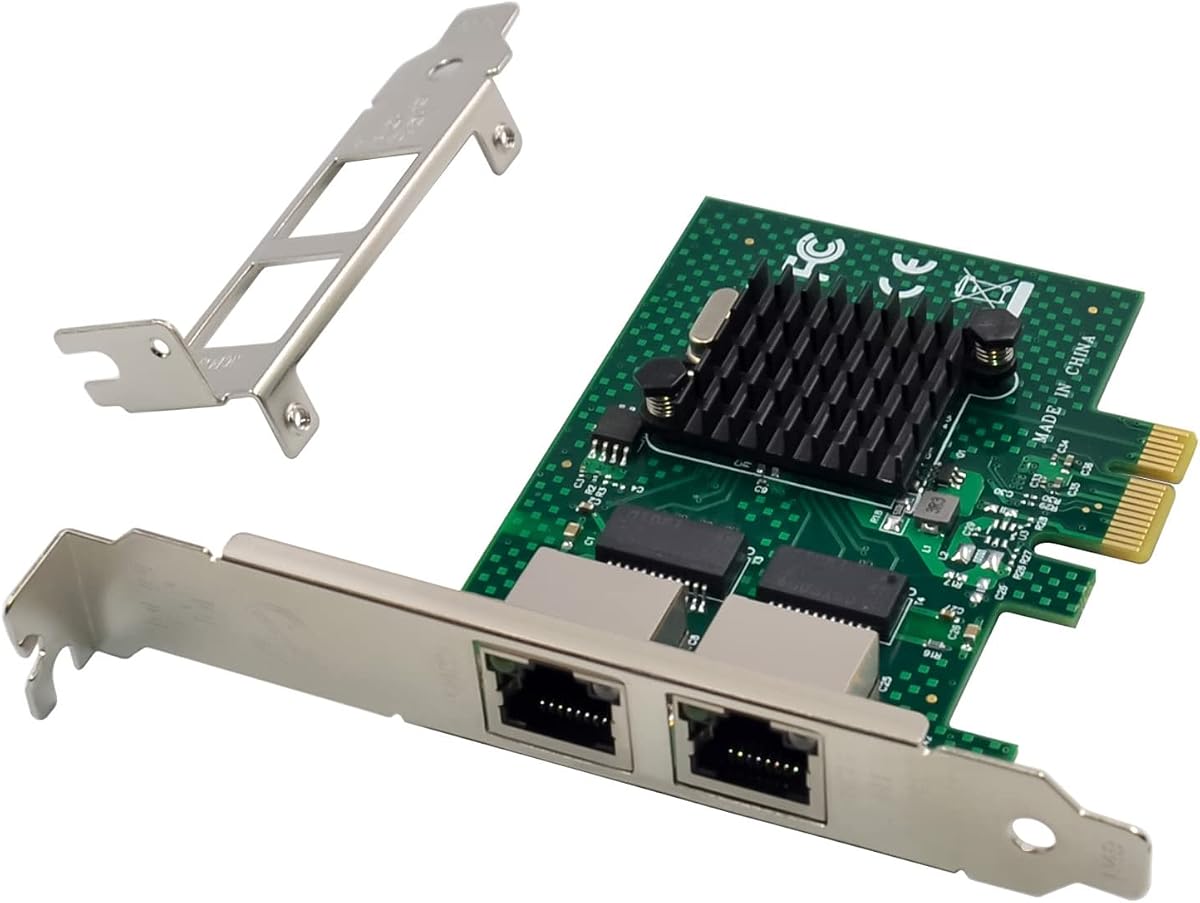
The 10Gtek Intel 82576 Gigabit card is a straightforward way to add two RJ45 Ethernet ports to a compatible system. With a 4.4 rating, it offers a practical balance of established controller hardware, broad driver support, and a comparatively modest PCIe requirement for value-focused buyers.
We may earn a commission when you buy through this link, at no additional cost to you.
The original Intel 82576 controller supports Intelligent Offloads, while the two copper ports accept Category 5 or better cabling over distances up to 100 meters. Its PCIe 2.0 x1 interface fits x1 and larger compatible slots, and both a profile bracket and a low-profile bracket are included. Drivers can be obtained from Intel's website.
The card cannot deliver speeds above 1GbE and does not support VMware ESXi 7.0 or later. It also lacks hot-swap support, which matters if the intended use involves live server maintenance. For ordinary file transfer, network storage, management, and internet access, though, those limitations are rarely decisive.
This is a compelling budget pick for adding an extra wired connection to a desktop or maintaining a server with established Intel 82576 drivers. Buyers should verify ESXi version requirements and confirm that their motherboard provides an available PCIe slot. Within the gigabit category, its included bracket and support package make it a well-rounded option.
A single-lane PCIe interface and established gigabit controller make this card easy to integrate with many general-purpose systems. It adds connectivity without demanding a high-speed network redesign.
Including both standard and low-profile hardware allows the same card to fit conventional towers, small-form-factor systems, and servers. Buyers should still inspect their chassis for an available expansion slot and adequate clearance.
We may earn a commission when you buy through this link, at no additional cost to you.
The Intel 82576 Gigabit Dual NIC is a well-rounded dual-port adapter for users who want two stable gigabit connections and broad platform choice. Its 4.5 rating reflects a generally strong proposition, particularly for offices, home servers, and older business systems that lack enough built-in Ethernet ports.
We may earn a commission when you buy through this link, at no additional cost to you.
Both RJ45 ports support 10, 100, and 1000Mbps operation over Category 5e cabling up to 100 meters. Quality-of-Service support is a useful addition for networks that manage latency-sensitive traffic, while the PCIe 2.0 x1 interface remains compatible with larger x1, x4, x8, and x16 slots. Both full-height and low-profile brackets are included.
Compatibility extends through many modern and legacy Windows, Windows Server, CentOS, RHEL, Ubuntu, Debian, FreeBSD, VMware ESXi 5 and 6, and SLSE releases. However, ESXi 7.0, macOS, and bypass mode are not supported. The card also cannot offer the throughput advantage of 2.5GbE or 10GbE models.
For users seeking a dependable dual-gigabit card with flexible mounting and a broad driver ecosystem, this is an excellent selection. It works particularly well with supported Windows and mainstream Linux systems. Those planning a modern high-speed network should choose a newer controller instead of maximizing this card's legacy value.
Separate gigabit links can connect a workstation to two networks, provide a management connection, or support failover and aggregation arrangements. The card's simplicity makes these arrangements approachable.
Drivers can be obtained from Intel or through the card's QR code, and both mounting brackets are packed in. These details simplify installation compared with adapters that require a separate bracket purchase.
We may earn a commission when you buy through this link, at no additional cost to you.
The GIGAPLUS X540-T2 Dual RJ45 card combines an Intel X540 controller, two 10GbE connections, and extensive platform support. Its 4.6 rating places it among the strongest cards in this guide, and it stands out as a premium option for servers and workstations that can fully use 10-gigabit networking.
We may earn a commission when you buy through this link, at no additional cost to you.
The two ports operate at 100Mbps, 1Gbps, or 10Gbps, and the PCIe 2.0 x8 interface is compatible with x8 and x16 slots. Stated operating-system coverage includes older and current Windows releases, Windows Server, Linux, VMware, ESX, and ESXi. Standard and low-profile brackets support physical installation in different desktops, workstations, servers, and mini-towers.
The card is exclusive to PCIe systems and cannot be used in a conventional PCI slot. As with other 10GbE options, it demands a compatible server or workstation, suitable PCIe resources, and networking equipment capable of handling the available bandwidth. Users should not expect it to offer intermediate 2.5GbE or 5GbE modes.
This is a premium recommendation for administrators who want a recognizable Intel X540 platform with two high-speed copper ports and flexible driver support. The card's combination of broad compatibility, a 4.6 rating, and lifetime technical support makes it especially attractive for long-lived infrastructure where support access is valuable.
The X540 controller is a proven platform for demanding server workloads, and two 10GbE ports offer room for high-volume transfers, storage access, and virtualized services. Proper cooling and a compatible host remain important.
Support for numerous Windows, Linux, and VMware environments makes this card useful across mixed infrastructure. Drivers can be installed through the included QR code or downloaded from Intel's website.
We may earn a commission when you buy through this link, at no additional cost to you.
The H!Fiber X540-BT2 is a dual-port 10GbE card built around an original Intel X540-BT2 controller. Its 4.5 rating, broad operating-system list, and included hardware make it an attractive high-speed option for compatible servers and professional workstations.
We may earn a commission when you buy through this link, at no additional cost to you.
Each RJ45 port supports 10Gbps, 1Gbps, and 100Mbps and is designed for Category 6A cabling. The PCIe 2.1 x8 connection fits compatible x8 and x16 slots. Quality-of-Service support can help prioritize selected traffic, while a full-height and low-profile bracket are both included for easier chassis matching.
The product does not support 2.5GbE or 5GbE, and Windows 11 requires correct driver configuration according to the supplied details. Mac OS and bypass mode are also excluded. These limitations mean the card is best reserved for a mature 10GbE environment rather than a mixed-speed consumer network.
The H!Fiber card is a strong recommendation for a server that already has 10GbE switches and cabling. It is especially attractive where administrators value a well-documented OS matrix, Intel controller support, and flexible mounting. Users seeking a more modern intermediate speed should instead consider the I226-V model.
Dual RJ45 ports offer a simpler path to 10GbE than deploying optical transceivers and fiber patch panels. Category 6A support provides a clear cabling standard for new installations.
Quality-of-Service support can improve the handling of prioritized traffic in managed environments. It is a useful reason to select this card over a basic gigabit adapter when network responsiveness matters.
We may earn a commission when you buy through this link, at no additional cost to you.
The Intel 82576 SR-IOV Dual Port card differentiates itself through virtualization and remote-management features. With a 4.5 rating, it is a solid choice for administrators of established data-center systems that value SR-IOV, PXE, and IPMI-related functions more than multi-gigabit throughput.
We may earn a commission when you buy through this link, at no additional cost to you.
Its PCIe 2.0 x4 interface is compatible with x4, x8, and x16 slots and includes a low-profile bracket. Stated features include SR-IOV, PXE remote boot, iSCSI boot, Wake-on-LAN, VLAN filtering, IPMI pass-through through SMBus or NC-SI, SNMP, and RMON. An alloy heat sink is included for thermal management.
Both ports remain limited to 1GbE, and the product does not support VMware ESXi 7.0 or later. Its operating-system list is extensive but weighted toward established Windows, Linux, FreeBSD, DOS, and older Unix-compatible systems. Compatibility with modern server platforms therefore needs verification before procurement.
Buyers running virtualization platforms or provisioning many servers can benefit from SR-IOV and PXE functionality. For ordinary home or office use, these advanced features may be unnecessary, and a simpler gigabit card could be more appropriate. Its niche strength is management and virtualized deployment support.
SR-IOV support can help administrators share physical network functions more directly with virtualized workloads. Actual performance and compatibility depend on the host platform, hypervisor, and operating system.
PXE and iSCSI boot make the adapter useful for centralized deployment and diskless or network-boot environments. VLAN filtering and IPMI pass-through further improve administrative flexibility.
We may earn a commission when you buy through this link, at no additional cost to you.
The Broadcom BCM5720-2P offers a well-known server-oriented controller in a dual-port gigabit format. Its 4.6 rating and extensive list of enterprise, cloud, storage, and virtualization use cases make it a sensible choice for adding basic but broadly compatible wired connectivity.
We may earn a commission when you buy through this link, at no additional cost to you.
The card uses a PCIe 1.x or 2.x interface and is listed as compatible with x1, x2, x4, x8, and x16 slots. A low-profile bracket is included. Stated operating-system support covers CentOS, Debian, Microsoft Windows, Oracle Linux, Oracle Solaris, Red Hat Enterprise Linux, SUSE Linux Enterprise Server, Ubuntu, VMware, ESX, ESXi 5 through 8, vSphere, Hyper-V, and Windows Server.
Its maximum 1GbE rate means it cannot satisfy multi-gigabit storage, large file-transfer, or server consolidation requirements. The older bus generation is still broadly usable, but buyers may find newer cards better aligned with current expansion layouts. Driver support should also be confirmed for the precise operating system and server generation being deployed.
The BCM5720-2P is a good general-purpose choice for a compatible server that needs two stable gigabit links without a high-speed network requirement. Its broad platform list and high rating add confidence for conventional enterprise tasks, although it should not be confused with a 10GbE adapter.
The Broadcom NetXtreme BCM5720-2P is associated with established server connectivity, and the listed operating-system coverage is extensive. It is a sensible option for maintaining familiar infrastructure rather than introducing a less common controller.
The manufacturer lists cloud platforms, private clouds, container systems, HPC clusters, database servers, and NVMe-over-Fabrics environments as potential applications. The adapter itself remains a gigabit solution, so actual network capacity depends on connected equipment.
We may earn a commission when you buy through this link, at no additional cost to you.
The right card depends on more than having two RJ45 sockets. Link speed, controller, operating system, PCIe layout, chassis clearance, cabling, and management features must all align with the host and network infrastructure.
Start with the speed of the switches, hosts, and storage devices the card must connect to. A 1GbE card is sufficient for office traffic and basic network services, while 2.5GbE can accelerate modern local storage, backups, and file transfers. A 10GbE card is appropriate for servers, virtualization hosts, high-volume storage, and aggregation, but every endpoint and cable must support the intended rate.
Choose the speed the entire network path can sustain. A faster NIC cannot create a faster link when the switch port or peer device is slower.
The controller determines driver maturity, supported operating systems, management capabilities, and available offload functions. Intel X540 and 82576 designs, the Intel I226-V, and the Broadcom BCM5720-2P each have different compatibility profiles. Check whether the host supports the exact chip and whether current drivers are available for the installed OS version.
Prioritize a controller with explicit support for your platform. Generic descriptions alone are not enough for server or hypervisor use.
PCIe compatibility involves generation, lane count, physical connector, and available space in the system. A single-lane card can fit a broad range of compatible slots, while x8 cards offer greater bandwidth for 10GbE or dual-port workloads. Some x8 cards also work in x16 slots, but physical bracket alignment and motherboard lane allocation still need verification.
Check the motherboard manual for slot width, lane sharing, and supported card sizes. A card that fits electrically may still conflict with other expansion hardware.
Review the exact operating-system list rather than assuming a server NIC works everywhere. Windows, Linux, and VMware environments may require different drivers, while legacy releases such as ESXi 5 or 6 are not equivalent to current ESXi builds. A card intended for Windows 11 may also require manual driver setup, as noted by some products in this guide.
Match the card to the operating system you will actually deploy. Keep the installation media and intended driver version available before removing an existing network connection.
RJ45 networking is convenient, but the cable category and installation quality influence supported speeds and reliability. Gigabit connections can generally use Category 5e or better over 100 meters. For 10GbE, the listed products emphasize Category 6 or Category 6A, with Category 6A offering a clearer path to full 10Gbps performance. Untwisted or damaged cables can prevent reliable negotiation.
Match cable quality to the selected link rate and route cables away from sources of electrical interference. Replace questionable patch cords rather than assuming the adapter is defective.
Features such as PXE boot, iSCSI boot, Wake-on-LAN, VLAN filtering, QoS, SR-IOV, SNMP, RMON, and IPMI pass-through can be decisive in managed environments. They support provisioning, monitoring, virtualized networking, and remote maintenance. Consumers and ordinary office users may not need them, but server administrators should verify support in the host platform as well as the card.
Prioritize features that solve an operational requirement. Paying for a specialized capability that cannot be used by the operating system or hypervisor provides little practical value.
A dual-port card may require more physical space than a single-port adapter, and some products include standard, low-profile, or slim brackets. Check whether the needed bracket is supplied, whether screws align with the chassis, and whether the card's height or heatsink conflicts with a nearby expansion card. Servers and compact workstations are especially prone to clearance problems.
Measure the available space when specifications are unclear. The included bracket list should match the intended chassis before purchase.
Faster controllers can generate meaningful heat during sustained transfers, making airflow and a properly mounted heatsink important. The VIMIN card explicitly highlights its heat sink, and the Intel 82576 options also use cooling hardware. A card fitted tightly below a high-output expansion card may not receive adequate airflow, especially in a compact server.
Consider both the chassis cooling path and the card's stated thermal design. Stable operation under load matters more than a specification that works only in ideal conditions.
Before installation, power the computer down completely, disconnect the power cable, and open the case according to the manufacturer's instructions. Confirm the available PCIe slot, remove the appropriate rear-panel cover, and attach the bracket that matches the chassis. Connect the card without forcing it, secure it with the retention screw or latch, and reinstall the cover before restoring power.
After the system starts, enter its BIOS or UEFI setup and confirm that the relevant PCIe slot and onboard network controller are enabled. Some systems may need an option changed from a dedicated or disabled state to a shared setting. Install the correct operating-system driver for the card's exact controller and verify that both Ethernet interfaces appear in the operating system's network settings.
Label the two ports and connect certified cabling to the appropriate switch, router, or peer devices. Test each link independently, confirm negotiated speed, and inspect the operating system's event log for driver errors. For long-running server use, ensure airflow reaches the card, monitor interface statistics and temperature-related stability, and keep the driver and operating system updated after checking vendor compatibility.
Yes, provided the computer has a compatible available PCIe slot, a supported operating system, and suitable drivers. The two card ports connect through their own internal interfaces and can be used for separate networks, failover, aggregation, or management traffic. A powered-down installation and correct bracket are also generally required.
Only when the connected devices and applications can benefit from that throughput. A 10GbE card can accelerate large local transfers, fast NAS access, backups, and virtualized workloads, but a gigabit switch or slow storage device will limit results. It also requires compatible Category 6 or Category 6A cabling and appropriate host hardware.
The X540-based cards in this guide support 1GbE and 100Mbps as well as 10GbE, so they can generally negotiate a lower link with compatible equipment. The VIMIN and H!Fiber models specifically do not support intermediate 2.5GbE or 5GbE rates. A link will still perform only as fast as the slowest connected device allows.
The x and digit notation describes available PCIe lanes, not the Ethernet speed itself. A gigabit card may use x1, while a dual 10GbE card often uses x8 to provide sufficient host bandwidth. A wider card can usually fit a compatible x16 slot, but physical size, power, and chassis clearance must also be considered.
You need one if the computer uses a low-profile or small-form-factor chassis. Many cards include a standard and low-profile bracket, but some only include low-profile hardware. Check the included accessories and the bracket shape required by your case before ordering, and make sure the rear openings align with the connectors.
Many products explicitly support Linux and VMware, but compatibility differs by controller and release. Some Intel 82576 cards exclude ESXi 7.0 or later, while the BCM5720-2P lists ESXi 5 through 8. Confirm the exact controller, operating-system version, and available driver rather than relying on a general Linux claim.
Some server-oriented Intel controller drivers were not automatically selected for every Windows 11 configuration. The product details for the 10Gtek and H!Fiber cards recommend setting up the driver manually. Download the appropriate driver, follow the installation instructions, and confirm that the required PCI device is enabled in the system firmware.
Yes, the featured products are dual-port adapters, and the GIGAPLUS card is explicitly described as having two independent Ethernet ports. The operating system can treat the interfaces separately, bond them, or use them in other supported configurations. The exact bonding modes and reliability depend on the controller, driver, operating system, and switch configuration.
The 10Gtek 10Gb Dual RJ45 X540 stands out as the best overall choice for users who need two 10GbE connections, an established Intel controller, broad server support, and flexible x8 or x16 installation. The I226-V model is the more versatile modern pick when 2.5GbE, a single-lane interface, and a broad mix of current platforms are priorities.
For budget-oriented gigabit networking, the 10Gtek Intel 82576 card provides two ports, established drivers, and a low-profile bracket. Buyers seeking premium 10GbE capability may favor the GIGAPLUS X540-T2, while the VIMIN, H!Fiber, and Broadcom options serve particular infrastructure and management requirements. Always prioritize controller support, compatible cabling, and a clear network-speed plan.
Product availability, driver revisions, operating-system compatibility, and prices can change, so verify the latest manufacturer information and current listing details before purchasing. Checking the host's manual, switch capabilities, and bracket requirements at the same time can prevent most installation disappointments.