
HUANUO Printer Stand with Storage Drawer
4.5Editor score
Compact under-desk footprint
Divided storage drawer
Tool-free stackable assembly
Lockable swiveling caster wheels
This rolling printer stand guide compares ten mobile printer carts for capacity, stability, storage, charging options, mobility, and placement in home offices.
A rolling printer stand can reclaim valuable desk space while keeping printers, scanners, paper, and accessories organized and accessible. The best models combine a stable frame, useful storage, smooth locking casters, and a footprint that suits your office, studio, or home workspace.
We compared all ten stands across their dimensions, tier configurations, storage features, load limits, charging options, wheel systems, and installation requirements. The list covers compact under-desk models, drawer-equipped cabinets, and larger three-tier carts designed for heavier equipment.
Each pick highlights a different balance of capacity, mobility, and convenience, from practical budget options to feature-rich stands with integrated power connections. Product availability and pricing can change, so check the current listing and measure your intended space before ordering.
4.5Editor score

4.5Editor score

4.7Editor score
The table below compares the ten recommended stands by their physical footprint, storage design, mobility system, and support capacity, helping you identify the most practical option for your printer and workspace.




The YAOHUOO 3 Tier Large Printer Stand with Power Outlet/Adjustable Shelf is a versatile rolling printer stand for anyone who needs more than a simple printer perch. It holds up to two or three printers, a 3D printer, fax machine, heat press, or laser printer, according to the supplied product information. Its three-tier layout turns a crowded desk into a dedicated mobile equipment station, while the integrated power outlets and charging ports reduce cable clutter around the work area.
We may earn a commission when you buy through this link, at no additional cost to you.
The standout feature is its four-position shelf adjustment. Each adjustment level provides two inches of vertical separation, allowing the middle shelf to accommodate different printer bodies and equipment arrangements. The stand measures 22 inches wide by 15 inches deep and 25.5 inches tall, giving it enough surface area for substantial office hardware. A heavy-duty metal frame and waterproof boards provide a stable base, with each shelf listed as supporting up to 120 pounds.
Mobility is handled by four 360-degree casters, and each wheel can be locked once the cart reaches its final position. Four adjustable feet are also included for users who prefer a stationary setup. The built-in station includes two power outlets plus one USB and one Type-C charging port. These additions are useful in a home office, studio, or shared workspace, although they make this model more feature-oriented than a basic two-tier cart.
This is the strongest all-around choice for users who want meaningful storage, flexible shelf positioning, and charging access in one piece of furniture. It is especially appropriate for heavy printers, multiple devices, or a home business that frequently rearranges its equipment. The main tradeoff is its height, which may prevent it from sliding fully beneath a low desk. Measure the desk clearance before choosing it, and verify that your printer and accessories fit comfortably on the top and middle surfaces.
Three shelves and an adjustable middle tier let you balance bulky printers with paper, toner, or other office supplies. The listed per-shelf capacity also makes this stand better suited to substantial equipment than lighter-duty carts.
Integrated outlets and USB charging ports simplify cable management, while lockable caster wheels make it possible to move the cart without lifting a loaded printer. Adjustable feet provide a stationary alternative when mobility is not needed.
We may earn a commission when you buy through this link, at no additional cost to you.
The HUANUO Printer Stand with Storage Drawer, Locking Wheels, Under Desk Cart is a practical choice for home offices that need to place a printer and supplies under a desk. It has a 4.5 rating and combines a two-tier structure with a divided storage drawer. The top platform measures 17.2 by 13.2 inches, large enough for many inkjet printers and smaller 3D printers, while the lower shelf accommodates paper, files, and reference materials.
We may earn a commission when you buy through this link, at no additional cost to you.
Its most useful feature is the pull-out drawer with internal dividers. This creates a dedicated place for pens, cables, replacement cartridges, and small accessories that otherwise scatter across a desk. The lower open shelf expands the storage capacity without increasing the footprint. Because the design is stackable, users can also omit extension pieces to configure a shorter height for a desktop, shelf, or tighter cabinet area.
Assembly is designed to be quick and tool-free, making this stand appealing to users who do not want a complicated setup. The locking caster wheels swivel through 360 degrees for repositioning, and two can be locked to hold the stand steady. The wheels are optional, so the same unit can function on a desktop or shelf without rolling hardware. A stated total support capacity of 38.5 pounds is suitable for many home office printers but offers less margin than the heavy-duty metal models in this list.
The HUANUO stand is best for compact spaces, student bedrooms, and home offices where a single printer and a moderate amount of paper need to be organized. The included drawer makes it more versatile than a plain open shelf. Two cautions are worth noting: do not move the stand with the drawer and other items loaded, and check the printer's size and weight before purchase. For a small footprint with concealed storage, it is one of the most sensible choices.
The divided drawer keeps small accessories organized, while the lower shelf handles bulkier paper and files. This makes the cart practical where a deep shelving unit would not fit.
Stackable sections allow users to choose a lower or taller configuration. Optional casters let the same stand work on a desktop, shelf, or floor without changing its core storage design.
We may earn a commission when you buy through this link, at no additional cost to you.
The Lerliuo Under Desk Rolling Printer Stand combines a wide two-tier structure, a fabric drawer, and a steel frame in a design aimed at organized workspaces. It measures 20.08 inches long by 15.75 inches wide and 18.31 inches tall. The extra-large desktop is intended to accommodate different printer sizes, while the bottom shelf stores paper and documents. A divided fabric drawer provides a concealed location for office accessories.
We may earn a commission when you buy through this link, at no additional cost to you.
Support is a key strength. The product information lists a total capacity of 140 pounds, the highest stated figure in this comparison, supported by a steel-tube frame and thick wood panels. That makes the cart more appropriate for substantial office equipment than lightweight stands. Despite its industrial appearance, the drawer and lower shelf also allow it to serve as a kitchen shelf, sofa-side table, or bedside organizer when it is not needed for printing.
All four casters swivel through 360 degrees, and two include locking mechanisms to stabilize the cart in its chosen location. This wheel arrangement supports frequent movement between rooms or around a shared workspace. Installation instructions, labeled components, and a hex wrench are included. The packaging uses thick foam and double wrapping to protect the panels during transport, a useful detail for buyers concerned about damage before assembly.
This model is a good fit for users who value capacity over a compact footprint. Its 20-inch-plus length and wood construction may be less convenient under a shallow desk than the more compact HUANUO or HOOBRO models. Nevertheless, the wide top, divided drawer, and high load rating give it considerable flexibility. Choose it when your printer is heavy, your storage needs extend beyond paper, and you expect to use the cart as a general-purpose mobile organizer.
The long desktop offers more placement room than compact carts, helping accommodate different printer shapes and nearby accessories. A substantial lower shelf keeps frequently used paper accessible.
The listed 140-pound capacity and steel-tube supports make this model a practical option for heavier equipment. Locking casters help preserve stability after the loaded cart is positioned.
We may earn a commission when you buy through this link, at no additional cost to you.
The Mount-It Under Desk Printer Stand is a straightforward two-tier cart for printers, fax machines, and scanners that need a mobile home beneath a desk. Its open design keeps the structure visually uncluttered and makes it easy to access a printer, paper, toner, and other supplies. A steel wire frame, solid metal poles, and a durable laminate top provide a practical support structure for office and home environments.
We may earn a commission when you buy through this link, at no additional cost to you.
The stand has a stated weight capacity of 100 pounds, with 50 pounds assigned to each shelf. That balanced rating makes it suitable for a printer on top and a reasonable quantity of paper or supplies below. Four omnidirectional wheels move independently and swivel for easy navigation around furniture. Once the cart is in position, the wheels can be locked to keep the printer and supplies secure during use.
Assembly is one of this model's most approachable features. Two-part plastic clips connect the shelves and frame, reducing the need for extensive tools or complicated instructions. The powder-coated finish is designed to resist chipping and scratching, which helps maintain a professional appearance in a frequently used office area. The black finish also coordinates easily with desks, shelving, and other metal-framed equipment.
The Mount-It stand is best for users who need dependable basic storage and mobility without drawers, charging ports, or complicated height adjustment. It is particularly suitable for shared offices, reception areas, and home offices with a straightforward printer setup. Its limitation is storage refinement: small accessories must be placed in containers on the lower shelf, and there is no enclosed drawer for cables or stationery. Even so, the simple design, balanced support rating, and tool-light installation make it a dependable choice.
Independent omnidirectional casters make it easier to guide the cart around desk legs and corners. Locking the wheels creates a stable platform once the printer is in its operating position.
The top tier holds the printer, while the lower shelf keeps paper and replacement supplies off the floor. Its open layout makes stored items easy to see and retrieve.
We may earn a commission when you buy through this link, at no additional cost to you.
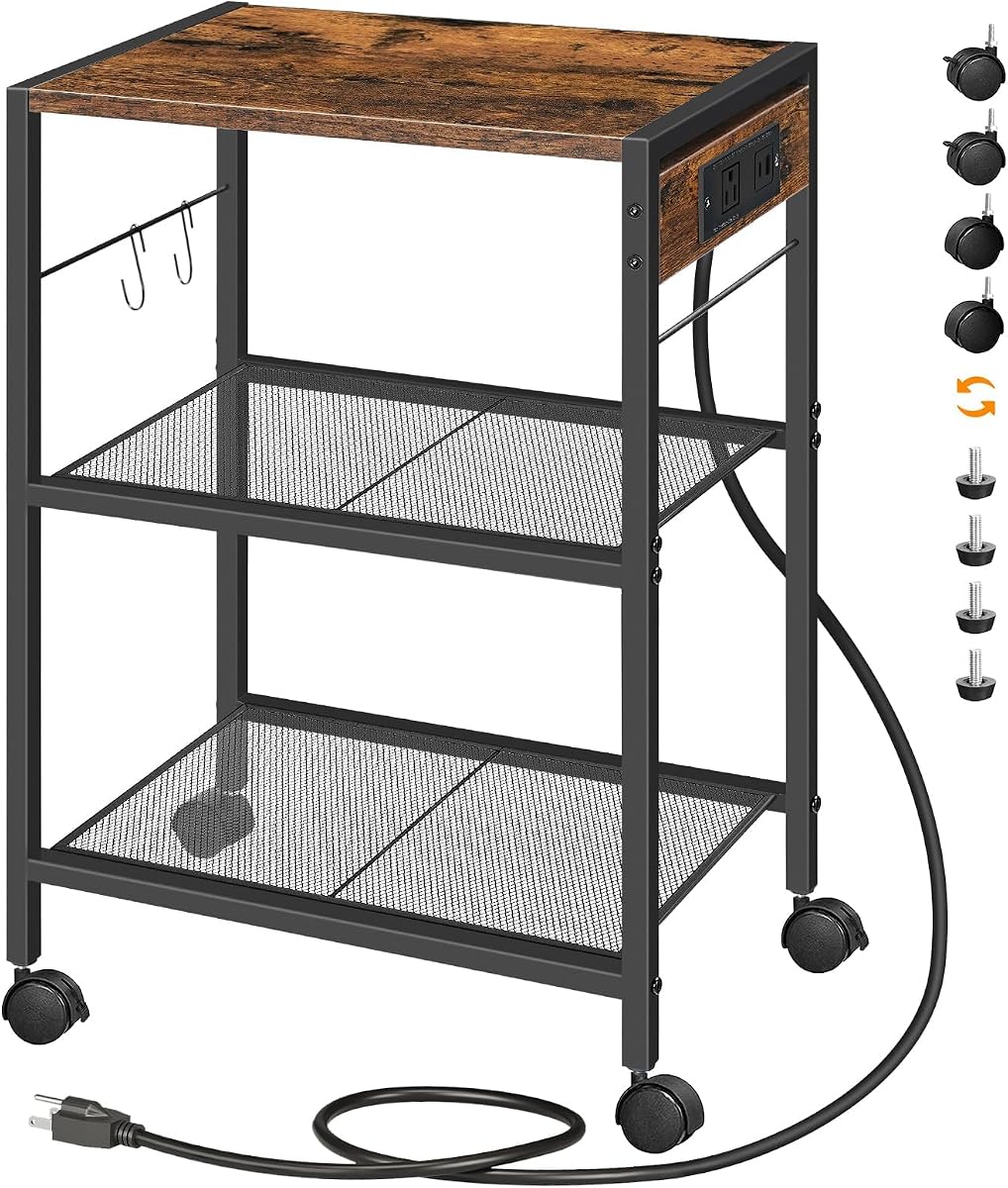
The HOOBRO Industrial Printer Stand is a three-tier rolling cart that combines a wood top, metal mesh shelves, a charging station, and two side hooks. It is designed to hold scanners, copiers, laser printers, books, and plants, making it more versatile than a conventional under-desk printer stand. The rustic brown finish gives it furniture-like styling for home offices and living areas.
We may earn a commission when you buy through this link, at no additional cost to you.
Its charging station includes four USB ports and a standard outlet, allowing several small electronics to charge from one central point. The upper wood platform is rated for up to 44 pounds, while each mesh shelf supports up to 17 pounds. Those figures are adequate for many printers and accessories, but the lower mesh tiers are intended for lighter items than the solid-top models with larger stated capacities.
Users can choose between four casters and four adjustable feet. Two casters have brakes, allowing the cart to roll when needed and remain fixed while a printer operates. The feet are useful on uneven floors where a rolling configuration might sit awkwardly. Detailed instructions, tools, and numbered accessories are included to simplify installation. Two hooks add convenient hanging space for lightweight accessories.
This HOOBRO model fits users who want a mobile organizer that can transition between office equipment and household storage. It is less suitable when a heavy laser printer needs to rest on a lower mesh tier, so place heavier equipment on the wood top and reserve the mesh shelves for paper and smaller accessories. The generous three-level layout and charging options compensate for the lower individual mesh-shelf limits.
Four USB ports and a standard outlet create a convenient charging point for phones, accessories, and compatible electronics. This reduces the need for multiple wall adapters around the printer station.
Four locking casters make repositioning easy, while four adjustable feet provide stability on uneven surfaces. This dual configuration suits offices, living rooms, and spaces where furniture moves frequently.
We may earn a commission when you buy through this link, at no additional cost to you.
The VASAGLE 2-Tier Printer Stand is the highest-rated product in this guide, carrying a 4.7 rating. It is designed for users who want a compact, attractive mobile printer table that can slide beneath a desk. The upper surface measures 18.9 inches long by 15.7 inches wide, providing room for most inkjet printers or fax machines, while a lower open shelf stores paper reams, ink cartridges, and folders.
We may earn a commission when you buy through this link, at no additional cost to you.
Construction combines quality particleboard with a sturdy steel frame. The upper platform is rated to support up to 99 pounds, and the lower shelf supports up to 33 pounds, for 132 pounds of listed capacity across the two levels. That makes the stand suitable for more than a lightweight printer and several reams of paper. Its restrained styling is also more neutral than overtly industrial or rustic models, allowing it to blend into a home office.
Four sturdy wheels provide mobility, with two that can be locked to keep the stand in position. The wheels make it convenient to bring a printer to a shared work area, tuck it away when it is not needed, or move it for cleaning. Assembly is supported by clear instructions and an Allen key, which helps simplify setup for users who want a polished piece of office furniture without a complicated tool requirement.
The VASAGLE stand is the premium choice for buyers who place a premium on finish quality, useful capacity, and straightforward design. It lacks a drawer and power ports, so it is less versatile than some of the feature-rich models, but it remains highly focused on the core functions of a printer stand. It is an especially attractive option for compact offices, study rooms, and home workspaces that want storage without an industrial appearance.
A 99-pound upper shelf rating comfortably accommodates many full-size printers, while the lower shelf handles paper and cartridges. The open construction keeps stored supplies visible and accessible.
The combination of particleboard, steel, and a neutral appearance is intended to blend with conventional office furniture. Locking wheels keep the cart stable while preserving easy mobility.
We may earn a commission when you buy through this link, at no additional cost to you.
The Faesun Printer Stand with Storage is built around a spacious 22-inch tabletop and two fabric drawers, making it a practical organizer for printers, files, and small-office essentials. Its reinforced construction is listed as supporting up to 50 pounds. The design is particularly well suited to apartments, study rooms, and home offices where a compact cabinet can combine a printer table, filing unit, and general organizer.
We may earn a commission when you buy through this link, at no additional cost to you.
Both drawers include U-shaped dividers designed to hold A4 and letter-size folders flat. This is more useful than an undivided drawer for users who move between tax documents, school materials, and household records. An open shelf provides quick-access storage, and a side pocket creates an additional place for stationery or a tablet. The drawer-focused layout reduces visible clutter without requiring a separate filing cabinet nearby.
The unit uses smooth casters for movement and includes leveling feet for a stable stationary configuration. A reinforced metal frame supports FSC-certified wood components, while labeled parts, included tools, and detailed instructions support a straightforward assembly. It is designed to move beside a desk or lock into place for a stable workstation. The overall form is closer to a compact file cabinet than a bare metal cart.
This stand is ideal for users whose printer is small to medium and whose main need is organized paper storage. It offers less support than the 99-, 120-, and 140-pound models, so a heavy laser printer may exceed the stated total limit. It also has no built-in power or USB connection. Even with those limitations, the dual drawers and file-oriented dividers make it one of the most useful choices for paperwork-heavy home offices.
Dividers in both drawers allow folders to remain flat and separated. This design helps keep active documents organized beside the printer rather than spread across the desktop.
The 22-inch top, open shelf, and side pocket combine several storage functions in one mobile unit. It works well in apartment and home-office layouts where floor area is limited.
We may earn a commission when you buy through this link, at no additional cost to you.
The MAHANCRIS Industrial Printer Cart provides three open shelves, integrated charging, and a relatively compact frame. It measures 16.5 inches long by 11 inches wide and 23.6 inches tall. The vertical format saves floor area compared with wider stands, while three shelves provide room for a printer, paper, books, and other household or office supplies.
We may earn a commission when you buy through this link, at no additional cost to you.
A 150-centimeter power cord feeds a charging station with two USB ports and two three-prong outlets. These connections can support printers, phones, cameras, and other compatible electronics, depending on their power requirements. The engineered wood and thickened metal frame create a stable structure, and every layer is listed as supporting up to 44 pounds. Two hooks provide extra hanging space for lightweight accessories.
Four universal casters make the cart mobile, and two can be locked to keep it stable while in use. Four foot pads are also included for stationary positioning. This dual setup allows buyers to change between a rolling printer stand and a fixed side table as their space or workflow changes. Detailed instructions are provided for assembly, and the rustic retro color is intended to coordinate with a range of home and office interiors.
The MAHANCRIS cart is best for standard printers and compact work areas where a narrow footprint is more important than a very deep top. It is less suitable for oversized office equipment because the platform is only 11 inches wide. The three tiers and charging options offer strong versatility for the size, though users should distribute heavier devices onto the upper shelf and confirm that paper and accessories fit within the narrower width.
Three open tiers use height efficiently, making the cart suitable for rooms where a broad printer table would be inconvenient. The vertical format also keeps the top surface clear for the printer.
Two outlets and two USB ports reduce the need for separate extension leads. The long power cord provides flexibility in where the cart is positioned within the room.
We may earn a commission when you buy through this link, at no additional cost to you.
The GYIIYUO 2 Drawer File Cabinet is designed around an unusually wide 24-inch desktop, providing more room for a large office printer or even dual monitor arms. Its industrial-style cabinet combines a printer platform, document storage, and an open shelf. The top is listed as supporting up to 120 pounds, giving it substantial capacity for professional equipment.
We may earn a commission when you buy through this link, at no additional cost to you.
Storage is divided between a deep lower drawer for A4 and letter-sized folders, an open shelf for quick access, and a side bag for stationery or a tablet. This arrangement makes the unit relevant to accountants, teachers, tax professionals, and remote workers who handle physical documents as part of their daily work. The wood-grain finish and steel frame allow it to transition into living-room or entryway use when needed.
One distinctive feature is its dual-support system. Buyers can use the casters for mobile positioning or switch to leveling feet for a stationary setup on carpet, tile, or hardwood. The product information describes this as a quick mode change intended to provide stability without wobble. This flexibility is particularly useful in rooms where a rolling unit is convenient during the workday but a fixed cabinet is preferable at night.
This cabinet is a good choice when a narrow printer table feels too restrictive and file organization matters as much as mobility. Its 24-inch width, however, demands more clearance than the slimmer options, and the total height may prevent it from fitting beneath a low desk. Confirm the room and desk measurements, verify the printer's footprint, and keep the stated 120-pound limit in mind before using it for equipment.
The 24-inch top offers more placement room than most stands in the comparison. It is suitable for large printers and other desktop equipment that needs a broad, stable base.
Casters support convenient repositioning, while leveling feet create a stable base on hard floors and carpet. The dual-support setup adapts to different room layouts and work routines.
We may earn a commission when you buy through this link, at no additional cost to you.
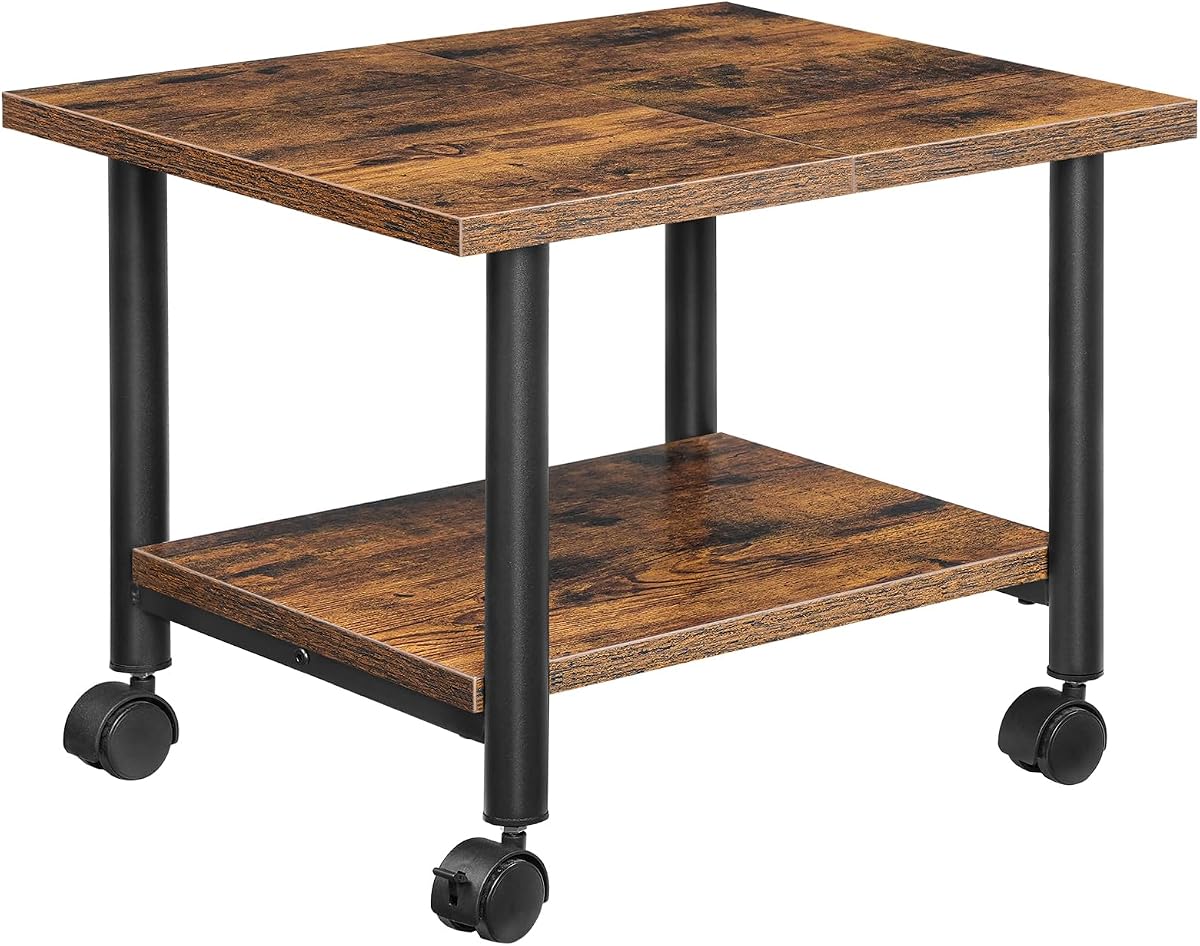
The HOOBRO Printer Stand is a mobile two-tier cart designed to place a copier or laser printer beside a user and free up desk space. Its upper shelf supports up to 88 pounds, while the lower panel supports 33 pounds. The overall dimensions are 19.1 by 15.7 by 14.4 inches, a relatively low configuration intended to fit under a desk or desktop.
We may earn a commission when you buy through this link, at no additional cost to you.
The lower shelf is useful for several reams of paper, printer cartridges, stamps, clips, and other supplies. An iron frame, P2 chipboard panels, thick black metal legs, and under-shelf support rods create a stable base. Although both levels are open, the two-tier arrangement keeps supplies off the floor and makes them easy to reach without opening a compartment or pulling out a drawer.
Two lockable wheels allow the stand to be moved without lifting a printer, then secured once it reaches the desired location. This is especially useful in shared offices or home workspaces where equipment must be moved aside for other activities. The rustic brown and black color scheme gives the cart a practical industrial appearance, and the compact height makes it easier to tuck away than a tall three-tier stand.
The HOOBRO model is best for routine users who want direct access to a printer and basic paper storage without a larger cabinet. It does not offer charging ports, a drawer, or the height adjustment found in some competing designs. Nevertheless, its 88-pound upper shelf rating, stable frame, and low profile make it a capable choice for typical office printers. It is particularly well suited to spaces where a compact, frequently moved cart is preferable to a larger organizer.
The 14.4-inch height is designed to fit beneath conventional desks. This allows the printer to remain within easy reach without occupying the main work surface.
An iron frame, support rods, and an 88-pound upper shelf rating provide a stable base for many printers. Locking wheels keep the loaded cart stationary during operation.
We may earn a commission when you buy through this link, at no additional cost to you.
The right rolling printer stand depends on printer size, available clearance, storage habits, and mobility. Comparing dimensions, weight ratings, shelf construction, wheel design, and power features prevents an attractive cart from becoming an impractical one.
Measure the full printer footprint and include any open paper tray. Compare those dimensions with the usable area of the stand, not merely the advertised length and width. Leave a little extra room so the equipment can be moved onto and off the cart without catching its edges.
Choose a capacity comfortably above the printer's weight rather than matching the limit exactly. Add the expected paper, toner, and accessories when comparing total loads. Solid tops and steel frames generally suit heavier equipment better than compact panels or mesh shelves.
If the cart must slide under a desk, compare its height with the lowest available clearance rather than the nominal desk height. For a side table or room-center printer station, greater height can provide more vertical storage without reducing access.
Match storage to your routine. Choose open shelves for frequently replenished paper and enclosed drawers for smaller items that tend to scatter. If you manage records, file-sized dividers are more useful than generic compartments.
Look for lockable wheels on every caster or at least enough support to prevent rotation during use. If the cart will sit on carpet, uneven flooring, or a hard surface, wheels alone may not provide the most stable base. Several models include leveling feet as a stationary alternative.
Check whether you actually need built-in charging before paying extra attention to those features. Confirm the cord length, available wall outlets, and the power requirements of every device you intend to connect. Keep connections accessible and avoid overloading the supplied station.
Review the included hardware and instructions before ordering if you dislike assembly. Look for labeled parts, clear diagrams, and all required tools. Also consider whether the finish suits your decor, since a printer cart often becomes a visible piece of office furniture rather than hidden equipment.
Consider the secondary uses only if they match your real routine. A printer cart with excellent shelves is useful for papers and books, but it may be less suitable for food, liquids, or delicate items. Choose versatility when it serves a genuine need rather than simply adding more functions to the design.
Unpack the stand near the intended location and confirm that all shelves, poles, fasteners, wheels, feet, and tools are present before assembly. Follow the included instructions, connect the frame while the components are accessible, and tighten hardware evenly. Place the stand on a level surface and ensure the lockable wheels are engaged before positioning a printer on the top tier.
Move the printer onto the stand only after the cart is fully assembled and stable. Keep the weight within the stated limits, place heavier equipment on the solid upper shelf, and avoid loading a lower mesh tier beyond its rating. If the stand has an adjustable middle shelf, select the position that leaves adequate clearance for the printer, paper path, and output tray. Route cables neatly and avoid placing them where casters could roll over them.
For routine care, unplug connected devices before cleaning the stand. Wipe the top and shelves with a soft, slightly damp cloth, and remove dust from mesh surfaces with a dry cloth or soft brush. Check wheel locks and frame connections periodically, particularly after moving a loaded cart. Use the included feet when a stationary base is needed on carpet or uneven flooring, and avoid exceeding the published load capacity.
Choose a stand whose top surface is slightly larger than the printer's full footprint, including any open paper tray or output area. Then check the stand's height against the clearance beneath your desk if it needs to slide underneath. Wide models such as the 22-inch YAOHUOO and 24-inch GYIIYUO offer generous equipment space, while narrower carts may work better in compact rooms.
They can, but only when the stand's construction and stated load rating are suitable. Models with solid tops and steel frames, such as the Lerliuo, YAOHUOO, and GYIIYUO, list higher support figures than several compact or mesh-based alternatives. Always check both the total capacity and any individual shelf limit, and place the heaviest printer on the strongest upper surface.
Locking wheels are highly useful because a loaded printer can create enough movement for the cart to drift during printing or scanning. They are especially helpful on hard floors and in shared workspaces where the stand is moved frequently. The HUANUO, Lerliuo, Mount-It, and several other models include locking or brake-equipped casters, and most provide additional leveling feet.
Built-in outlets and USB ports are useful when you want a central charging point for a printer, phone, camera, or other electronics. The YAOHUOO, MAHANCRIS, and HOOBRO industrial model include charging features. If your printer already has a nearby outlet and you rarely charge other devices, a simpler cart may better match your needs.
It will fit only if the stand's listed height is lower than the available clearance beneath the desktop. The HOOBRO two-tier model is 14.4 inches high, while several three-tier units are considerably taller. Measure the lowest point of the desk opening and account for outlets, cables, baseboards, and any unevenness in the floor before ordering.
Open shelves are best for paper reams, toner cartridges, books, and items that should remain visible and easy to reach. Drawers are better for small accessories, cables, stationery, and folders that would otherwise create clutter. The HUANUO, Faesun, and GYIIYUO stands use drawers, while most of the other models rely on open shelves.
Yes, several models are designed for multipurpose use. The Lerliuo is described for use as a kitchen shelf, sofa-side table, or bedside organizer, while the YAOHUOO, MAHANCRIS, HOOBRO, and GYIIYUO models also have general storage applications. For kitchen use, keep liquids and food separate from the printer area and follow the stand's care guidance.
Assembling it near the final location is usually easiest because the assembled cart may be awkward to move through doorways or around furniture. Even with casters, a fully loaded stand is difficult to maneuver safely. Clear the area, lay out and identify the parts, and follow the manufacturer's instructions in the order provided.
The YAOHUOO 3 Tier Large Printer Stand is the most complete all-around option, combining generous storage, adjustable shelf positioning, integrated charging, strong per-shelf support, and lockable mobility. The HUANUO model is a compelling budget-focused choice for compact spaces, and the VASAGLE stand stands out with the highest rating, a polished design, and strong load capacities.
Prioritize fit before features. Measure your printer, available floor area, and under-desk clearance, then compare those dimensions with the stand's platform and height. Heavy equipment calls for a steel frame and high stated capacity, while small accessories benefit from drawers. Integrated outlets, alternate caster and foot configurations, and multipurpose styling should support your routine rather than complicate it.
Ratings, product availability, and pricing can change, so review the current listing before purchasing and confirm the latest specifications with the manufacturer or retailer. The ten stands in this guide cover compact two-tier carts, filing-oriented cabinets, mobile organizers, and larger three-tier workstations, giving you a strong starting point for a cleaner and more efficient printing area.